3.5 Recommend Movies Using Association Rules
A popular movie rental website is being updated. The company wants to offer personalized movie recommendations to customers based on their rental and purchase history. They have asked you, a data scientist, to help create these recommendations. To solve this, you use the Apriori algorithm to analyze the movie data and identify groups of movies that are frequently rented or purchased together.
Table 3-3 Related Content
| Topic | Link |
|---|---|
| OML4Py GitHub Example | Association Rules |
| About Machine Learning Classes and Algorithms | About Machine Learning Classes and Algorithms |
| Association Rules | Association Rules |
| About Apriori | About Apriori |
Before you start your OML4Py use case journey, ensure that you have the following:
-
Data Set
The data set used for this use case is from the SH schema. The SH schema can be readily accessed in Oracle Autonomous AI Database. For on-premises databases, the schema is installed during the installation or can be manually installed by downloading the scripts. See Installing the Sample Schemas.
You will use the
SALEStable from theSHschema. You can access the table by running theSELECTstatements in OML Notebooks. -
Database
Select or create a database using one of the following options:
- Get your FREE cloud account. Go to https://cloud.oracle.com/database and select Oracle Database Cloud Service (DBCS), or Oracle Autonomous AI Database. Create an account and create an instance. See Autonomous Database Quick Start Workshop.
- Download the latest version of Oracle Database (on premises).
-
Machine Learning Tools
Use OML Notebooks for Oracle Autonomous AI Database.
Topics:
- Load Data
Examine the data set and its attributes. Load the data in your database. - Explore Data
After loading the data into the table, begin by exploring it to understand its structure and assess its quality. At this stage, examine the data to identify data types and detect any noise. Pay special attention to missing values and potential outliers in numeric fields. - Build Model
Build your model using the modifiedmovies_viewdataset. - Evaluate
After building your association rules model, the next step is to evaluate the quality of the generated rules.
Related Topics
Parent topic: Use Cases
3.5.1 Load Data
Examine the data set and its attributes. Load the data in your database.
In this use case, you will load the data set to your database. If you are using Oracle Autonomous Database, you will use an existing data file from the Oracle Cloud Infrastructure (OCI) Object Storage. You will create a sample table, load data into the sample table from files on the OCI Object Storage, and explore the data. If you are using the on-premises database, you will use Oracle SQL developer to import the data set and explore the data.
- Access the data.
- Examine the various attributes or columns of the data set.
- Assess data quality (by exploring the data).
Examine Data
The following table displays information about the attributes from MOVIES_SALES_FACT:
| Attribute Name | Information |
|---|---|
ORDER_NUM |
Specifies the order number |
ACTUAL_PRICE |
Specifies the actual price of the movie |
AGE |
Specifies the age of the customer |
AGE_BAND |
Specifies the age band of the customer. The possible values are 20-29, 30-39, 40-49, 50-59, 60-69, 70-79, 80-89 and so on. |
APP |
Specifies the application used for the movie |
CITY |
Specifies the name of the city |
CITY_ID |
Specifies the city ID |
COMMUTE_DISTANCE |
Specifies the commute distance |
COMMUTE_DISTANCE_BAND |
Specifies the commute distance band |
CONTINENT |
Specifies the continent name |
COUNTRY |
Specifies the country name |
COUNTRY_CODE |
Specifies the country code |
COUNTRY_ID |
Specifies the country ID |
CREDIT_BALANCE |
Specifies the credit balance of the customer |
CUSTOMER_ID |
Specifies the customer ID |
CUSTOMER_NAME |
Specifies the customer name |
DAY |
Specifies the day of the week in YYYY-mm-dd hh:mm:ss format
|
DAY_NAME |
Specifies the day of the week |
DAY_NUM_OF_WEEK |
Specifies the day number of the week |
DEVICE |
Specifies the device information used by the customer |
DISCOUNT_PERCENT |
Specifies the discount percent |
DISCOUNT_TYPE |
Specifies the discount type availed by the customer. Possible values are referral, coupon, promotion, volume, none |
EDUCATION |
Specifies customer's education |
EMAIL |
Specifies email ID of the customer |
FULL_TIME |
Specifies customer's employment status such as full time, not employed, part time |
GENDER |
Specifies the gender of the customer |
GENRE |
Specifies the genre of the movie |
HOUSEHOLD_SIZE |
Specifies the household size of the customer |
HOUSEHOLD_SIZE_BAND |
Specifies the household size band |
INCOME |
Specifies the income of the customer |
INCOME_BAND |
Specifies the income band of the customer |
INSUFF_FUNDS_INCIDENTS |
Specifies the number of insufficient funds incidents that the customer had |
JOB_TYPE |
Specifies the cusotmer's job |
LATE_MORT_RENT_PMTS |
Specifies is the customer had any late mortgage or rent payment |
LIST_PRICE |
Specifies the list price of the movie |
MARITAL_STATUS |
Specifies the marital status of the customer |
MONTH |
Specifies the month in MON-YYYY format
|
MONTH_NAME |
Specifies the month. For example, January. |
MONTH_NUM_OF_YEAR |
Specifies the month number of the year |
MORTGAGE_AMT |
Specifies the mortgage amount |
MOVIE_ID |
Specifies the movie ID |
NUM_CARS |
Specifies the number of the cars that the customer owns |
NUM_MORTGAGES |
Specifies the number of mortgages |
OS |
Specifies the OS information |
PAYMENT_METHOD |
Specifies the payment method |
PET |
Specifies if the customer owns a pet |
POSTAL_CODE |
Specifies the postal code of the address |
PROMOTION_RESPONSE |
Specifies the response of the customer to a promotional offer |
QUANTITY_SOLD |
Specifies the quantity sold |
QUARTER_NAME |
Specifies the quarter name in Qn-YYYY format. For example, Q1-2001.
|
QUARTER_NUM_OF_YEAR |
Specifies the quarter number of the year |
RENT_OWN |
Specifies if the customer is living at a rented place or own place |
SEARCH_GENRE |
Specifies the genre of the movies searched |
SEGMENT_DESCRIPTION |
Describes the population segment |
SEGMENT_NAME |
Specifies the population segment name |
SKU |
Specifies the SKU ID |
STATE_PROVINCE |
Specifies the province |
STATE_PROVINCE_ID |
Specifies the province ID |
STREET_ADDRESS |
Specifies the customer's address |
TITLE |
Specifies the movie title |
USERNAME |
Specifies the username provided by the customer |
WORK_EXPERIENCE |
Specifies the work experience of the customer |
WORK_EXPERIENCE_BAND |
Specifies the work experience band of the customer |
YEAR |
Specifies the year |
YEARS_CURRENT_EMPLOYER |
Specifies the current employer of the customer |
YEARS_CURRENT_EMPLOYER_BAND |
Specifies the customer's employment band in years with the current employer |
YEARS_RESIDENCE |
Specifies the number of years the customer has been residing at a place |
YEARS_RESIDENCE_BAND |
Specifies the residence band |
- Create a Table
Create a table calledMOVIE_SALES_FACT. This table is used inDBMS_CLOUD.COPY_DATAprocedure to access the data set. - Load Data in the Table
Load the data set stored in object storage to theMOVIE_SALES_FACTtable.
Parent topic: Recommend Movies Using Association Rules
3.5.1.1 Create a Table
Create a table called MOVIE_SALES_FACT. This table is used in DBMS_CLOUD.COPY_DATA procedure to access the data set.
Enter the following code in the OML Notebooks and run the notebook.
%sql
CREATE TABLE MOVIE_SALES_FACT
( ORDER_NUM NUMBER(38,0),
 DAY DATE,
 DAY_NUM_OF_WEEK NUMBER(38,0),
 DAY_NAME VARCHAR2(26 BYTE) COLLATE USING_NLS_COMP,
 MONTH VARCHAR2(12 BYTE) COLLATE USING_NLS_COMP,
 MONTH_NUM_OF_YEAR NUMBER(38,0),
 MONTH_NAME VARCHAR2(26 BYTE) COLLATE USING_NLS_COMP,
 QUARTER_NAME VARCHAR2(26 BYTE) COLLATE USING_NLS_COMP,
 QUARTER_NUM_OF_YEAR NUMBER(38,0),
 YEAR NUMBER(38,0),
 CUSTOMER_ID NUMBER(38,0),
 USERNAME VARCHAR2(26 BYTE) COLLATE USING_NLS_COMP,
 CUSTOMER_NAME VARCHAR2(250 BYTE) COLLATE USING_NLS_COMP,
 STREET_ADDRESS VARCHAR2(250 BYTE) COLLATE USING_NLS_COMP,
 POSTAL_CODE VARCHAR2(26 BYTE) COLLATE USING_NLS_COMP,
 CITY_ID NUMBER(38,0),
 CITY VARCHAR2(128 BYTE) COLLATE USING_NLS_COMP,
 STATE_PROVINCE_ID NUMBER(38,0),
 STATE_PROVINCE VARCHAR2(128 BYTE) COLLATE USING_NLS_COMP,
 COUNTRY_ID NUMBER(38,0),
 COUNTRY VARCHAR2(126 BYTE) COLLATE USING_NLS_COMP,
 COUNTRY_CODE VARCHAR2(26 BYTE) COLLATE USING_NLS_COMP,
 CONTINENT VARCHAR2(128 BYTE) COLLATE USING_NLS_COMP,
 SEGMENT_NAME VARCHAR2(26 BYTE) COLLATE USING_NLS_COMP,
 SEGMENT_DESCRIPTION VARCHAR2(128 BYTE) COLLATE USING_NLS_COMP,
 CREDIT_BALANCE NUMBER(38,0),
 EDUCATION VARCHAR2(128 BYTE) COLLATE USING_NLS_COMP,
 EMAIL VARCHAR2(128 BYTE) COLLATE USING_NLS_COMP,
 FULL_TIME VARCHAR2(26 BYTE) COLLATE USING_NLS_COMP,
 GENDER VARCHAR2(26 BYTE) COLLATE USING_NLS_COMP,
 HOUSEHOLD_SIZE NUMBER(38,0),
 HOUSEHOLD_SIZE_BAND VARCHAR2(26 BYTE) COLLATE USING_NLS_COMP,
 WORK_EXPERIENCE NUMBER(38,0),
 WORK_EXPERIENCE_BAND VARCHAR2(26 BYTE) COLLATE USING_NLS_COMP,
 INSUFF_FUNDS_INCIDENTS NUMBER(38,0),
 JOB_TYPE VARCHAR2(26 BYTE) COLLATE USING_NLS_COMP,
 LATE_MORT_RENT_PMTS NUMBER(38,0),
 MARITAL_STATUS VARCHAR2(26 BYTE) COLLATE USING_NLS_COMP,
 MORTGAGE_AMT NUMBER(38,0),
 NUM_CARS NUMBER(38,0),
 NUM_MORTGAGES NUMBER(38,0),
 PET VARCHAR2(26 BYTE) COLLATE USING_NLS_COMP,
 PROMOTION_RESPONSE NUMBER(38,0),
 RENT_OWN VARCHAR2(26 BYTE) COLLATE USING_NLS_COMP,
 YEARS_CURRENT_EMPLOYER NUMBER(38,0),
 YEARS_CURRENT_EMPLOYER_BAND VARCHAR2(26 BYTE) COLLATE USING_NLS_COMP,
 YEARS_CUSTOMER NUMBER(38,0),
 YEARS_CUSTOMER_BAND VARCHAR2(26 BYTE) COLLATE USING_NLS_COMP,
 YEARS_RESIDENCE NUMBER(38,0),
 YEARS_RESIDENCE_BAND VARCHAR2(26 BYTE) COLLATE USING_NLS_COMP,
 AGE NUMBER(38,0),
 AGE_BAND VARCHAR2(26 BYTE) COLLATE USING_NLS_COMP,
 COMMUTE_DISTANCE NUMBER(38,0),
 COMMUTE_DISTANCE_BAND VARCHAR2(26 BYTE) COLLATE USING_NLS_COMP,
 INCOME NUMBER(38,0),
 INCOME_BAND VARCHAR2(26 BYTE) COLLATE USING_NLS_COMP,
 MOVIE_ID NUMBER(38,0),
 SEARCH_GENRE VARCHAR2(26 BYTE) COLLATE USING_NLS_COMP,
 TITLE VARCHAR2(4000 BYTE) COLLATE USING_NLS_COMP,
 GENRE VARCHAR2(26 BYTE) COLLATE USING_NLS_COMP,
 SKU NUMBER(38,0),
 LIST_PRICE NUMBER(38,2),
 APP VARCHAR2(26 BYTE) COLLATE USING_NLS_COMP,
 DEVICE VARCHAR2(26 BYTE) COLLATE USING_NLS_COMP,
 OS VARCHAR2(26 BYTE) COLLATE USING_NLS_COMP,
 PAYMENT_METHOD VARCHAR2(26 BYTE) COLLATE USING_NLS_COMP,
 DISCOUNT_TYPE VARCHAR2(26 BYTE) COLLATE USING_NLS_COMP,
 DISCOUNT_PERCENT NUMBER(38,1),
 ACTUAL_PRICE NUMBER(38,2),
 QUANTITY_SOLD NUMBER(38,0)
 )
;
Parent topic: Load Data
3.5.1.2 Load Data in the Table
Load the data set stored in object storage to the MOVIE_SALES_FACT table.
Before you load this data ensure that you set Compute Resources to Medium or High. If you select High, then, set Memory field to 16 for High Resource Service. You must have Administrator privilege to configure the memory settings. See Compute Resource.
%script
BEGIN
 DBMS_CLOUD.COPY_DATA (table_name => 'MOVIE_SALES_FACT',file_uri_list => 'https://objectstorage.uk-london-1.oraclecloud.com/n/adwc4pm/b/moviestream_kl/o/d801_movie_sales_fact_m-*.csv', format => '{"delimiter":",", "recorddelimiter":"newline", "skipheaders":"1", "quote":"\\\"", "rejectlimit":"1000", "trimspaces":"rtrim", "ignoreblanklines":"false", "ignoremissingcolumns":"true", "dateformat":"DD-MON-YYYY HH24:MI:SS"}');
END;
/
PL/SQL procedure successfully completed.


---------------------------table_name: is the target table’s name.credential_name: is the name of the credential created earlier.file_uri_list: is a comma delimited list of the source files you want to load. The special character*in the filed801_movie_sales_fact_m-*.csvmeans you are bulk loading the MovieStream data set containing sales data for 2018-2020.format: defines the options you can specify to describe the format of the source file, including whether the file is of type text, ORC, Parquet, or Avro.delimiter: Specifies the field delimiter (special character). Here, it is specified as "," (comma)recorddelimiter: Specifies the record delimiter. The default value isnewline. By default,DBMS_CLOUDtries to automatically find the correct newline character as the delimiter.skipheaders: Specifies how many rows should be skipped from the start of the file. In this use case, it is1.quote: Specifies the quote character for the fields.rejectlimit: The operation will error out after specified number of rows are rejected. Here, the value is1000.trimspaces: Specifies how the leading and trailing spaces of the fields are trimmed. Here it isrtrim. Thertrimvalue indicates that you want trailing spaces trimmed.ignoreblanklines: Blank lines are ignored when set to true. The default value isfalse.ignoremissingcolumns: If there are more columns in thefield_listthan there are in the source files, the extra columns are stored as null. The default value isfalse. In this use case, it is set totrue.dateformat: Specifies the date format in the source file.
In this example, adwc4pm is the Oracle Cloud Infrastructure object storage namespace and moviestream_kl is the bucket name.
Related Topics
Parent topic: Load Data
3.5.2 Explore Data
After loading the data into the table, begin by exploring it to understand its structure and assess its quality. At this stage, examine the data to identify data types and detect any noise. Pay special attention to missing values and potential outliers in numeric fields.
Note:
Each record in the database is referred to as a case, and each case is uniquely
identified by a case_id. In this use case, the
CUSTOMER_ID serves as the case_id.
The following steps help you with exploratory analysis of the data.
-
Import libraries
Run the following script in a
%pythoninterpreter paragraph to import theomlmodules, the Panda's module, and set the display options:import oml import pandas as pd import numpy as np import matplotlib.pyplot as plt import warnings warnings.simplefilter(action='ignore', category=FutureWarning) -
Create a DataFrame proxy object on the MOVIE_SALES_FACT table
Use the
oml.syncfunction to create the Python object oml_movies_sales_fact as a proxy for a database table MOVIE_SALES_FACT. Theoml.syncfunction returns anoml.DataFrameobject.oml_movies_sales_fact = oml.sync(query = "SELECT * FROM MOVIE_SALES_FACT") z.show(oml_movies_sales_fact.head(10))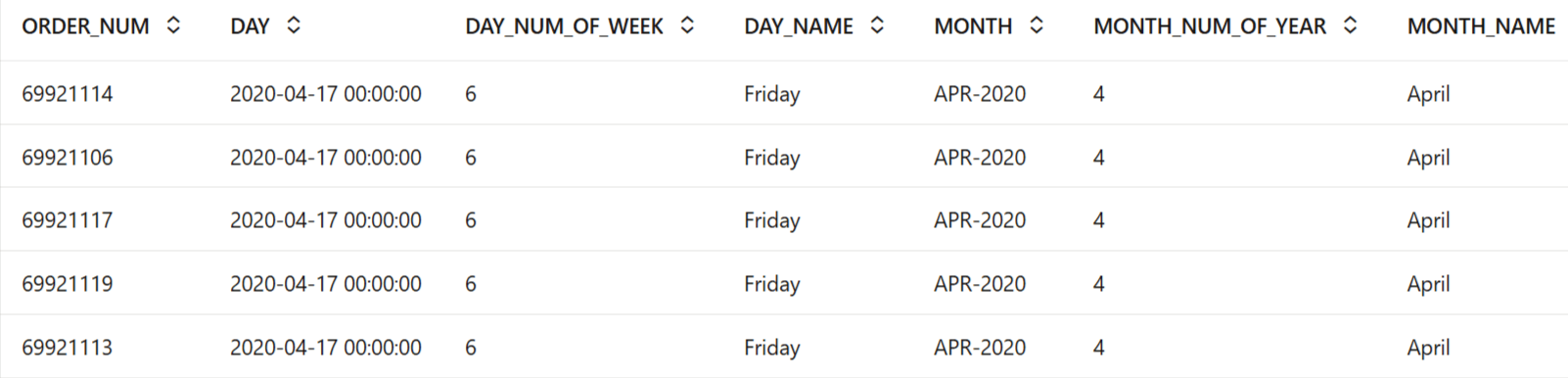
-
Movie sales fact dataset row and column Count
To determine the number of rows and columns in the
oml.DataFrameobject oml_movies_sales_fact, useDataFrame.shape.print(f"Rows: {oml_movies_sales_fact.shape[0]}, Columns: {oml_movies_sales_fact.shape[1]}")Rows: 97890562, Columns: 70 -
Movie sales fact Dataset Column Types
Run the following script to view the data type of each column.
print(f"Data types of each column in the Sales dataset:\n{oml_movies_sales_fact.dtypes}")Data types of each column in the Sales dataset: ORDER_NUM <class 'oml.core.integer.Integer'> DAY <class 'oml.core.datetime.Datetime'> DAY_NUM_OF_WEEK <class 'oml.core.integer.Integer'> DAY_NAME <class 'oml.core.string.String'> MONTH <class 'oml.core.string.String'> MONTH_NUM_OF_YEAR <class 'oml.core.integer.Integer'> MONTH_NAME <class 'oml.core.string.String'> QUARTER_NAME <class 'oml.core.string.String'> QUARTER_NUM_OF_YEAR <class 'oml.core.integer.Integer'> YEAR <class 'oml.core.integer.Integer'> CUSTOMER_ID <class 'oml.core.integer.Integer'> USERNAME <class 'oml.core.string.String'> CUSTOMER_NAME <class 'oml.core.string.String'> STREET_ADDRESS <class 'oml.core.string.String'> POSTAL_CODE <class 'oml.core.string.String'> CITY_ID <class 'oml.core.integer.Integer'> CITY <class 'oml.core.string.String'> STATE_PROVINCE_ID <class 'oml.core.integer.Integer'> STATE_PROVINCE <class 'oml.core.string.String'> COUNTRY_ID <class 'oml.core.integer.Integer'> COUNTRY <class 'oml.core.string.String'> COUNTRY_CODE <class 'oml.core.string.String'> CONTINENT <class 'oml.core.string.String'> SEGMENT_NAME <class 'oml.core.string.String'> SEGMENT_DESCRIPTION <class 'oml.core.string.String'> CREDIT_BALANCE <class 'oml.core.integer.Integer'> EDUCATION <class 'oml.core.string.String'> EMAIL <class 'oml.core.string.String'> FULL_TIME <class 'oml.core.string.String'> GENDER <class 'oml.core.string.String'> HOUSEHOLD_SIZE <class 'oml.core.integer.Integer'> HOUSEHOLD_SIZE_BAND <class 'oml.core.string.String'> WORK_EXPERIENCE <class 'oml.core.integer.Integer'> WORK_EXPERIENCE_BAND <class 'oml.core.string.String'> INSUFF_FUNDS_INCIDENTS <class 'oml.core.integer.Integer'> JOB_TYPE <class 'oml.core.string.String'> LATE_MORT_RENT_PMTS <class 'oml.core.integer.Integer'> MARITAL_STATUS <class 'oml.core.string.String'> MORTGAGE_AMT <class 'oml.core.integer.Integer'> NUM_CARS <class 'oml.core.integer.Integer'> NUM_MORTGAGES <class 'oml.core.integer.Integer'> PET <class 'oml.core.string.String'> PROMOTION_RESPONSE <class 'oml.core.integer.Integer'> RENT_OWN <class 'oml.core.string.String'> YEARS_CURRENT_EMPLOYER <class 'oml.core.integer.Integer'> YEARS_CURRENT_EMPLOYER_BAND <class 'oml.core.string.String'> YEARS_CUSTOMER <class 'oml.core.integer.Integer'> YEARS_CUSTOMER_BAND <class 'oml.core.string.String'> YEARS_RESIDENCE <class 'oml.core.integer.Integer'> YEARS_RESIDENCE_BAND <class 'oml.core.string.String'> AGE <class 'oml.core.integer.Integer'> AGE_BAND <class 'oml.core.string.String'> COMMUTE_DISTANCE <class 'oml.core.integer.Integer'> COMMUTE_DISTANCE_BAND <class 'oml.core.string.String'> INCOME <class 'oml.core.integer.Integer'> INCOME_BAND <class 'oml.core.string.String'> MOVIE_ID <class 'oml.core.integer.Integer'> SEARCH_GENRE <class 'oml.core.string.String'> TITLE <class 'oml.core.string.String'> GENRE <class 'oml.core.string.String'> SKU <class 'oml.core.integer.Integer'> LIST_PRICE <class 'oml.core.float.Float'> APP <class 'oml.core.string.String'> DEVICE <class 'oml.core.string.String'> OS <class 'oml.core.string.String'> PAYMENT_METHOD <class 'oml.core.string.String'> DISCOUNT_TYPE <class 'oml.core.string.String'> DISCOUNT_PERCENT <class 'oml.core.float.Float'> ACTUAL_PRICE <class 'oml.core.float.Float'> QUANTITY_SOLD <class 'oml.core.integer.Integer'> dtype: object -
Popular Movies Purchased by 'Titanic' Customers
Run the following script to identify popular movies among customers who have watched "Titanic." The query selects all customers who have rented or purchased "Titanic" and then aggregates the data to find other movie titles these customers have watched. Finally, it displays movies with more than 800,000 rentals or purchases by this group.
POPULAR_MOVIES = oml.sync(query=
    """
        select a.title, count(1) as cnt
        from movie_sales_fact a
        join (
            select distinct customer_id
            from movie_sales_fact
            where title = 'Titanic'
        ) b
        on a.customer_id = b.customer_id
        group by a.title
        having count(1) > 800000
    """
)

z.show(POPULAR_MOVIES)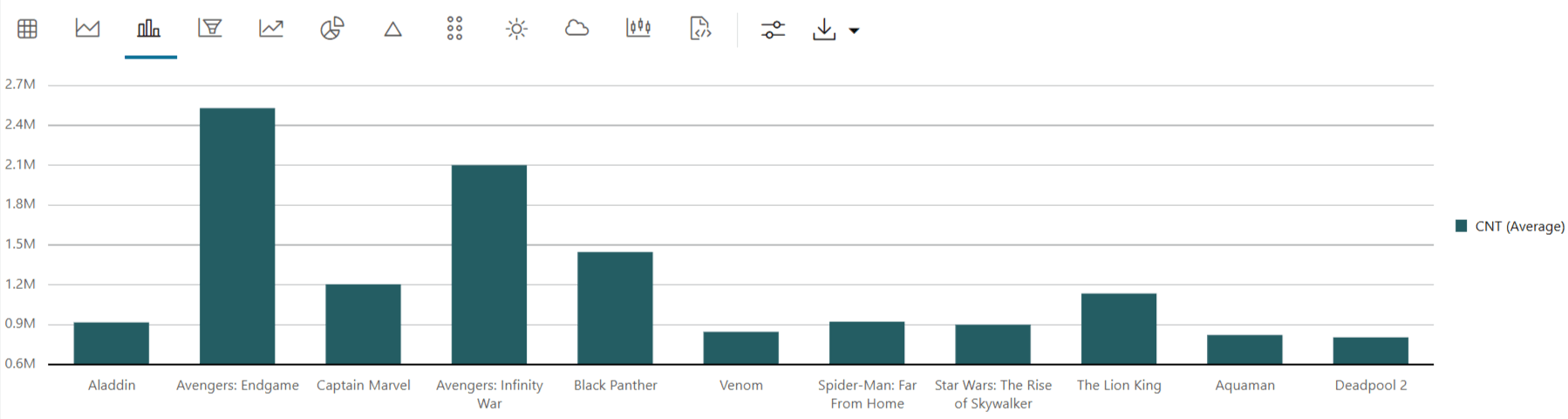
-
Get Movies view proxy data and display a few rows
The data set is huge with millions of records. Create an oml proxy object called
movies_viewto select a smaller data set by providing a customer ID and movie ID range.movies_view = oml.sync(query = 'SELECT DISTINCT CUSTOMER_ID, MOVIE_ID, TITLE FROM MOVIE_SALES_FACT WHERE CUSTOMER_ID BETWEEN 1000000 AND 1000120 AND MOVIE_ID BETWEEN 150 AND 300') z.show(movies_view.head(10))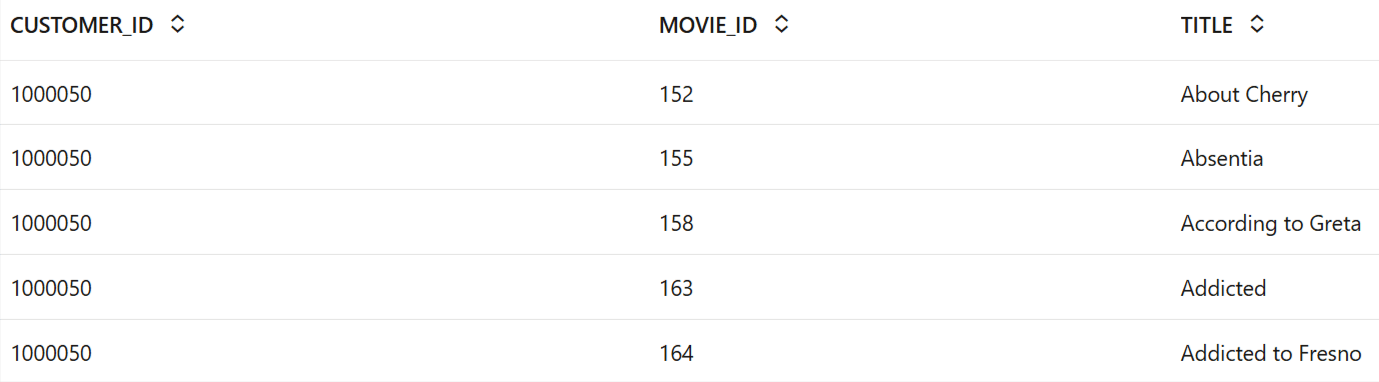
-
Check the distribution of TITLE
Use the crosstab method to perform a cross-column analysis of an oml.DataFrame object in the database. The crosstab method computes a cross-tabulation of two or more columns. By default, it computes a frequency table for the columns unless a column and an aggregation function have been passed to it. In this example, the crosstab function displays the distribution of TITLE movies.
z.show(movies_view.crosstab("TITLE"))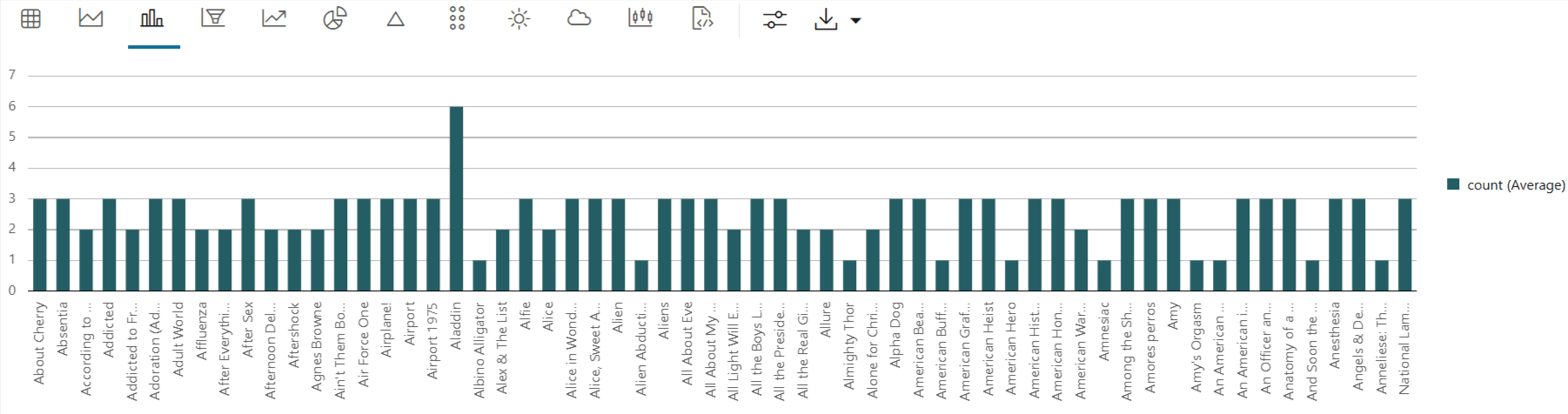
-
Count the number of missing values in each column
To check if there are any missing values run the following script. The count function returns the number of elements that are not NULL for each column and the len function returns the number of rows in the dataset.
print("Number of missing values in each column is : \n")
print(len(movies_view)-movies_view.count())
Number of missing values in each column is : CUSTOMER_ID 0 MOVIE_ID 0 TITLE 0 dtype: int64
Parent topic: Recommend Movies Using Association Rules
3.5.3 Build Model
Build your model using the modified movies_view
dataset.
Use the oml.ar function to apply association rule mining to your
movie-stream dataset and build your association rules model.
Association rule mining is an unsupervised learning technique, which means you do not have labels or predictors in your data. Instead, you look for patterns within the dataset. As a result, you do not need to split your data into training and test sets, and you do not evaluate accuracy in the way you would with supervised learning models.
Algorithm Selection
Oracle supports the Apriori algorithm for building Association Rules models.
In your dataset, each row represents the set of movies a customer watched within a session or time window. The Apriori algorithm identifies frequent itemsets—groups of one or more items that commonly appear together in a transaction. For example, an itemset could be a group of movies that are rented together by the same customer. The algorithm determines frequent itemsets based on support, which measures how often an itemset appears in your dataset (the proportion of transactions containing the itemset).
The Apriori algorithm then generates association rules from these itemsets. An association rule shows that if a transaction contains a particular item or group of items, it is likely to also contain another item or group of items. The strength of an association rule is measured by confidence, which indicates the probability that a transaction including one itemset will also include another.
Follow the steps below to build your Association Rules model using the Apriori algorithm.
-
Specify model settings
Specify the model settings by running the following script. The settings are given as key-value or dictionary pairs where it refers to parameters name and value setting respectively.
try:
    oml.drop(model = 'ar_mod')
except:
    pass

# Specify settings.
setting = { 'PREP_AUTO': 'ON',
            'asso_min_support':'0.02',
            'asso_min_confidence':'0.1',
            'ASSO_MAX_RULE_LENGTH': '2',
            'ODMS_ITEM_ID_COLUMN_NAME': 'TITLE'}

# Create an AR model object
ar_mod = oml.ar(**setting)
Model setting parameters:
PREP_AUTO: Used to specify fully automated or user-directed general data preparation. By default, it is enabled with a constant value as'PREP_AUTO': PREP_AUTO_ON.asso_min_support: Minimum support for association rules. The default value is0.1.asso_min_confidence: Minimum confidence for association rules. The default value is0.1.ASSO_MAX_RULE_LENGTH: Maximum rule length for association rules. The default value is4.ODMS_ITEM_ID_COLUMN_NAME: Specifies the name of the column that contains the items in each transaction. When you use this setting, the algorithm requires your data to be in native transactional format, consisting of two columns:- Case ID: A categorical or numeric column that uniquely identifies each transaction or case.
- Item ID: A categorical or numeric column that specifies the items included in each transaction.
-
Create Association Rules model
To build the association rules model, fit the algorithm to your data using the
fitmethod. It trains the association rules model using themovies_viewdatasetar_mod_fit = ar_mod.fit(movies_view, case_id = 'CUSTOMER_ID') -
Display model details
Run the following script to view details about the association rule model object, including model settings, global settings, itemsets, rules, and other information.
ar_mod_fit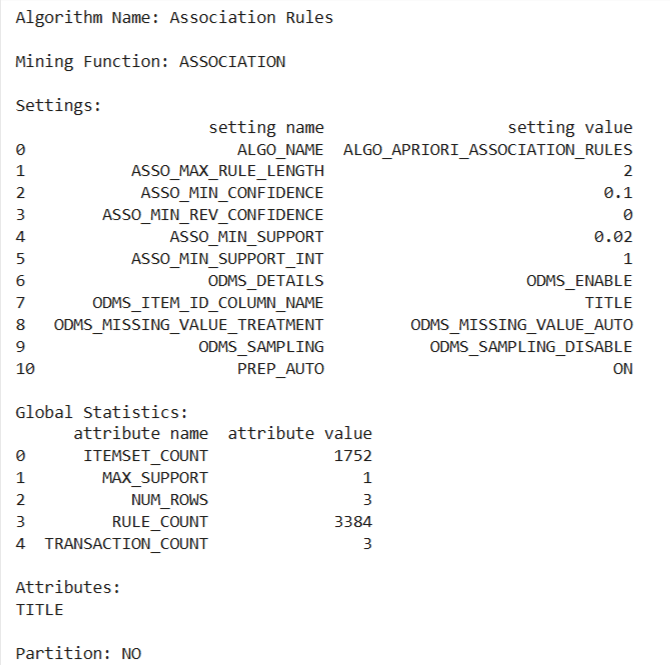
-
Display the generated rules
Run the following command to display all association rules found by the model, with key values rounded to three decimal places for easier interpretation:
z.show(ar_mod_fit.rules.round(3))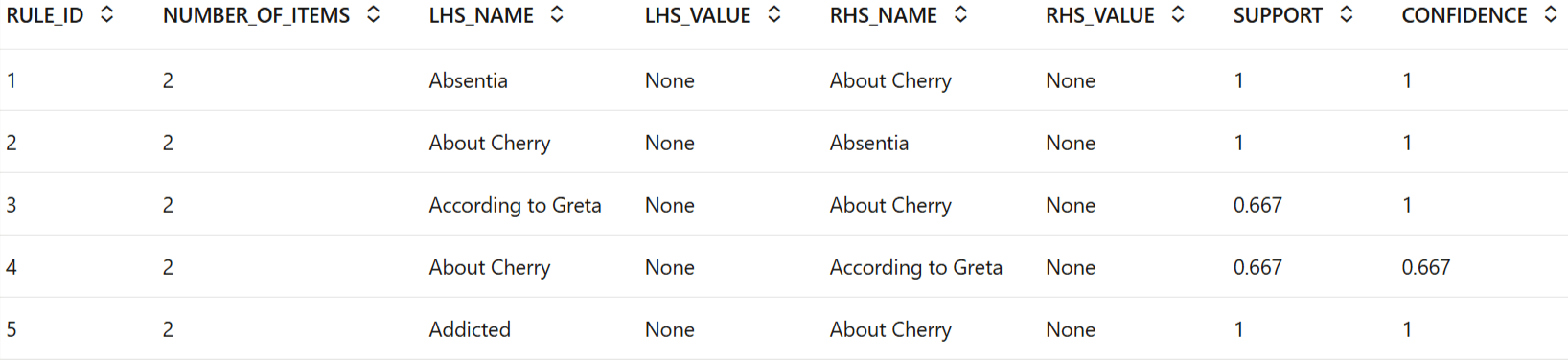
Explanation of the Result:
This table shows all the association rules generated from the dataset. Each row corresponds to a rule uncovered by the model. The coulmns are:
- RULE_ID: The unique identifier for each rule.
- NUMBER_OF_ITEMS: Total number of items (movies) included in both the antecedent and consequent for the rule.
- LHS_NAME: The antecedent (left-hand side) of the rule—if a user has this movie in their basket, the rule applies.
- RHS_NAME: The consequent (right-hand side) of the rule—the movie that is likely to be recommnded with the antecedent.
- SUPPORT: The proportion of all transactions where both the antecedent and consequent appear together.
- CONFIDENCE: The conditional probability that the consequent will be present when the antecedent is present.
- REVCONFIDENCE: The probability that the antecedent will be present when the consequent is present (the reverse rule's confidence).
- LIFT: Indicates the strength of the rule; a value above 1 suggests a meaningful association beyond chance.
Notice that there are rules where the same pair of movies appear with their positions swapped between LHS_NAME and RHS_NAME (for example, "Absentia" ⇒ "About Cherry" and "About Cherry" ⇒ "Absentia"). This occurs because association rule mining finds patterns in both directions. If two movies are almost always rented together, it's statistically relevant to say:- If a user has "Absentia," they are very likely to have "About Cherry" as well, and
- If a user has "About Cherry," they are very likely to have "Absentia" as well.
These rules are distinct, as they allow you to recommend either movie to a user when you know they have selected the other. In other words, if a user has chosen one movie, you can confidently suggest the other, regardless of which was selected first.
Parent topic: Recommend Movies Using Association Rules
3.5.4 Evaluate
After building your association rules model, the next step is to evaluate the quality of the generated rules.
Evaluation helps determine how well the model identifies meaningful relationships between items in the dataset. For unsupervised techniques such as association rules, traditional metrics like Root Mean Square Error (RMSE), Mean Average Error (MAE), and accuracy are not applicable. Instead, you focus on interpreting the generated rules and evaluating their strength and relevance using statistical measures specific to association rules.
The results of an association rules model are the rules that reveal patterns of association within your data. OML4Py does not provide a scoring operation for association models. Instead, you evaluate the quality of the generated rules using metrics such as support and confidence, which help you rank the rules.
Association rules are interpreted using the following statistical measures:
- Support: Indicates how often the items in a rule appear together in the dataset.
- Confidence: Measures how frequently the consequent occurs in transactions that contain the antecedent.
- Business Value: Reflects the practical or commercial importance of the item associations.
OML4Py also supports the metric lift for association rules. Lift quantifies the strength of a rule compared to the random co-occurrence of the antecedent and the consequent. It shows the increase in the likelihood of the consequent, given the antecedent, and is calculated as the confidence of the rule divided by the support of the consequent. A rule with a lift less than 1 does not indicate a meaningful cross-selling opportunity—regardless of its support and confidence—because it is less predictive than random chance.
-
Display top 10 most frequent purchased items
Run the following command to display the top 10 most frequent itemsets identified by the association rules model. The itemsets are sorted first by the number of items they contain and then by their support, so you can easily review which combinations of movies most commonly appear together in customer transactions.
z.show(ar_mod_fit.itemsets.sort_values(['NUMBER_OF_ITEMS','SUPPORT'], ascending = False).head(10))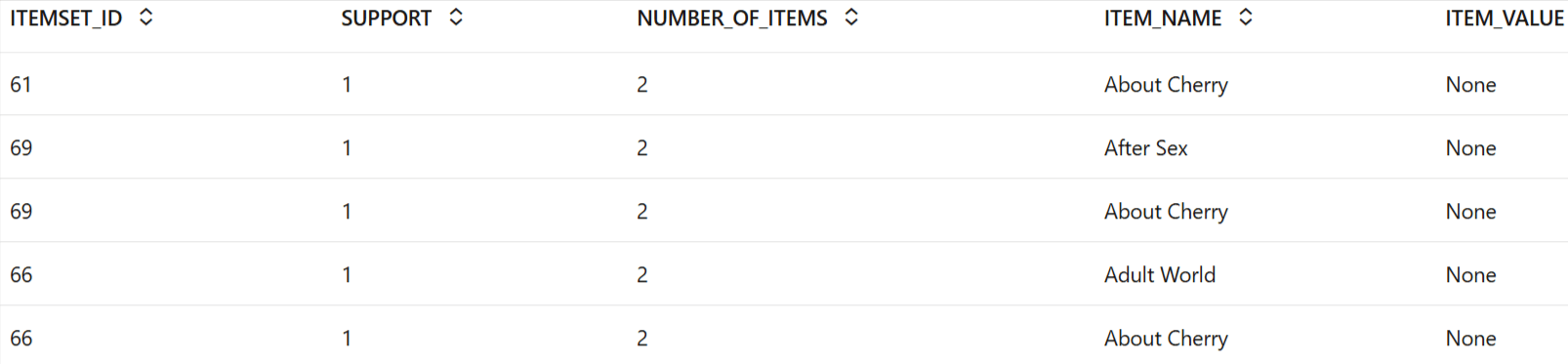
-
Display bar chart of top 10 most frequent purchased items
z.show(ar_mod_fit.itemsets.sort_values(['NUMBER_OF_ITEMS','SUPPORT'], ascending = False).head(10))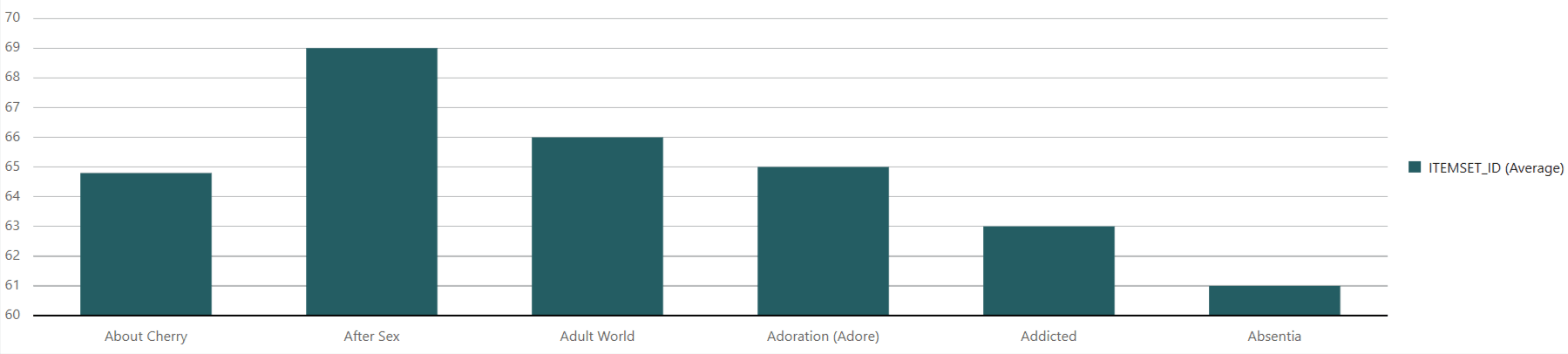
-
Display top 10 Association Rules sorted by confidence and support
Run the following command to display the top 10 association rules discovered by the model. The rules are sorted by confidence and support, allowing you to quickly identify the strongest and most frequent relationships between items in your dataset. Each rule’s metrics are rounded to three decimal places for clarity.
z.show(ar_mod_fit.rules.sort_values(['CONFIDENCE', 'SUPPORT'], ascending = False).round(3).head(10))
-
Plot 12 Association Rules by confidence
Run the following command to display the top 12 association rules generated by the model, sorted by confidence. This allows you to review the rules with the highest confidence, highlighting the most reliable associations found in your dataset.
z.show(ar_mod_fit.rules.sort_values(['CONFIDENCE'], ascending = False).head(12))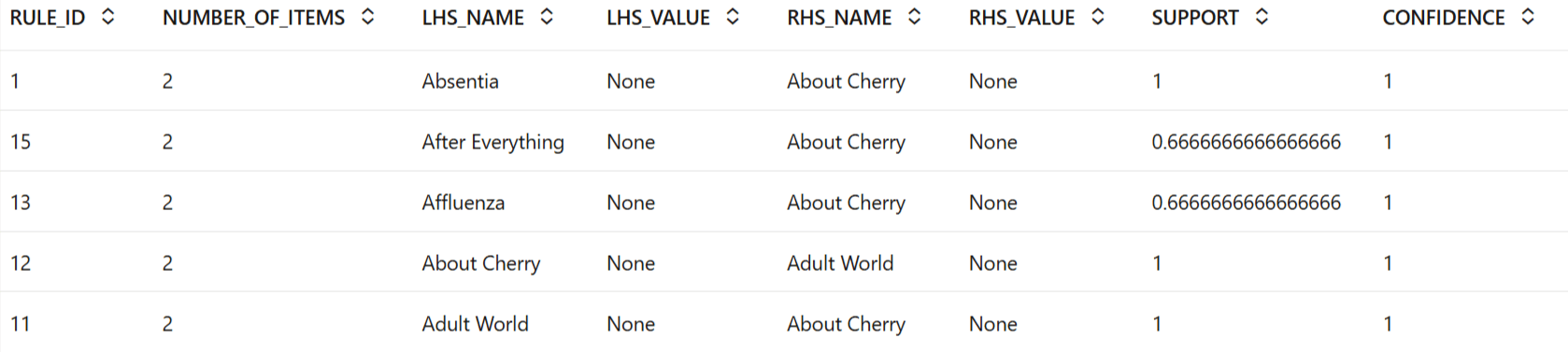
-
What items should we recommend when customer has 'About Cherry' in basket?
Run the following command to display the top 10 association rules where "About Cherry" appears on the left-hand side of the rule (the antecedent). The results are sorted by confidence and rounded to three decimal places, enabling you to see which items are most strongly associated with "About Cherry" in customer transactions.
z.show(
    ar_mod_fit.rules[ar_mod_fit.rules['LHS_NAME'] == 'About Cherry']
    .sort_values(['CONFIDENCE'], ascending=False)
    .round(3)
    .head(10)
)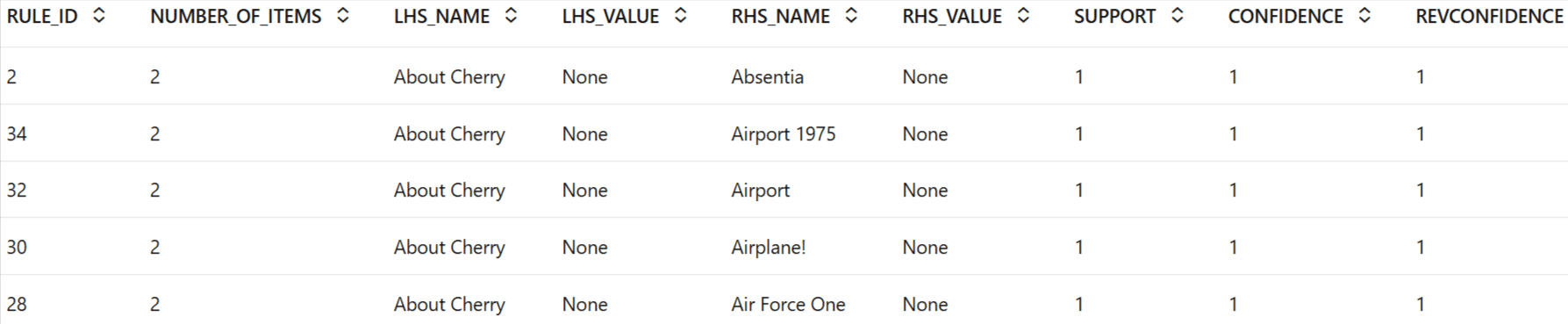
So, if a user has "About Cherry" in their basket, you can recommend any of the movies listed in the
RHS_NAMEcolumn (such as "Absentia," "Airport 1975," or "Airport"). These recommendations are based on association rules where "About Cherry" is the antecedent, and the suggested movies are the consequent. The rules are sorted by confidence, so the movies at the top are the most likely to be watched together with "About Cherry." If multiple movies have the same confidence value, you may recommend any of them.
To conclude, you have successfully examined association rules and provided top movie recommendations to customers based on their frequently purchased and/or rented movies.
Parent topic: Recommend Movies Using Association Rules