2.3 Application Registrations, Users, and Roles
Learn about the application registrations, user accounts, and role assignments required across both the IAM system and database to support Oracle Deep Data Security (Deep Sec). These configurations are fundamental to establishing identity, enforcing access policies, and securing the flow of data across your environment. This section begins with an overview of common data access patterns that guide these configuration choices.
2.3.1 Data Access Patterns
Explore the primary patterns in which IAM-managed end users and applications access the database using token-based authentication. Understanding these patterns helps you determine the application registrations, user accounts, and role mappings required to implement Deep Sec in your environment.
- Connect Directly to the Database: End users, applications,
or AI agents access data by connecting directly to the database. This pattern
has two variants:
- End Users Connect Directly to the Database: IAM-managed end users log on directly to the database with a SQL client, such as SQL*Plus, and no application is involved. Data access is based entirely on the end user's authorization.
- Applications Connect Directly to the Database: Applications or AI agents connect directly using their own database-access token obtained from IAM and a database application identity. Data access is based on the application identity's authorization.
- Connect Through an Application: End users access data
through an application, which propagates their identity to the database. This
pattern has two variants:
- Applications or AI Agents Access the Database on Behalf of End Users: Data access is based entirely on end-user authorization. An application, such as an analytics tool or MCP (Model Context Protocol) server, accesses the database using an end user's IAM role.
- End Users Operate in the Context of an Application or AI Agent: Data access is based on both end-user and application authorization.
2.3.1.1 End Users Connect Directly to the Database
In this pattern, end users log on directly to the database using a SQL client, such as SQL*Plus. No application is involved.
Use case
This pattern supports simple development or testing environments, where users query the database directly.
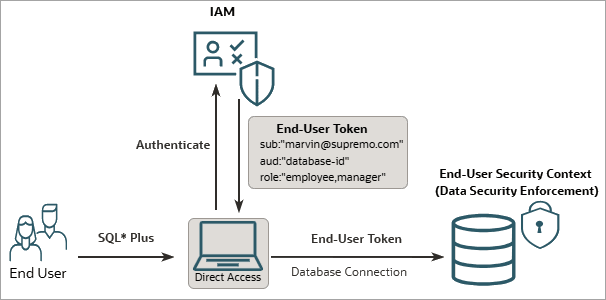
Database authentication flow
Prerequisite setup:
- IAM setup: Register the database as an OAuth resource
with required roles (for example,
employeeandmanager). Additionally, create an end user (Marvin) and assign them these roles. - Database setup: Configure IAM as an external identity
provider, create corresponding Deep Sec data
roles, and map them to IAM roles (for example, create data roles named
employee_roleandmanager_rolethat map to the IAM roles).
The runtime flow is as follows:
- User login: The end user (Marvin) logs in through a SQL client configured for token-based authentication (for example, SQL*Plus).
- Token retrieval: The client obtains an end-user token
from IAM and passes it to the database. This token includes the following
information:
- End user (Marvin) as the subject
- The database as the audience
- Marvin’s assigned IAM roles (
employee,
                                    manager
)
- Security context establishment: The database validates
the token, establishes an end-user security context, and activates the data
roles corresponding to the end user’s IAM roles (that is,
employee_roleandmanager_roledata roles are activated).Marvin receives the privileges associated with these data roles. Unlike traditional database users, Marvin does not have a dedicated database user or schema. Marvin's identity and privileges are provided dynamically at runtime in the end-user security context.
Note:
For OCI IAM, the end user's client can supply an OCI IAM auth token instead of an OAuth 2.0 token as the end-user token. An OCI IAM auth token is a scoped proof-of-possession token issued by OCI IAM for database authentication. See Key Terminology. In this pattern, you do not register the database as an OAuth resource. Instead, the database acts as a resource principal in OCI IAM, and you govern access using OCI IAM policies and groups mapped to data roles.
In a variation of this pattern, an application or MCP server can connect to the database using an OCI IAM auth token scoped to the end user, and the database establishes the end-user security context directly from that token. For an example of this scenario, see Integrate with the Database Tools MCP Server.
Configuration path
For the complete configuration path, see IAM-Managed Users Connecting Directly.
2.3.1.2 Applications Connect Directly to the Database
In this pattern, an application or AI agent logs on directly to the database as an application identity, using a database-access token that it obtains from IAM. The database establishes an end-user security context for the application identity itself and enforces data authorization.
Use case
This pattern supports service applications, autonomous AI agents, and scheduled jobs that access protected data using their own application identity. Use this pattern when data access must be authorized for the application or AI agent itself, rather than for an end user acting through the application.
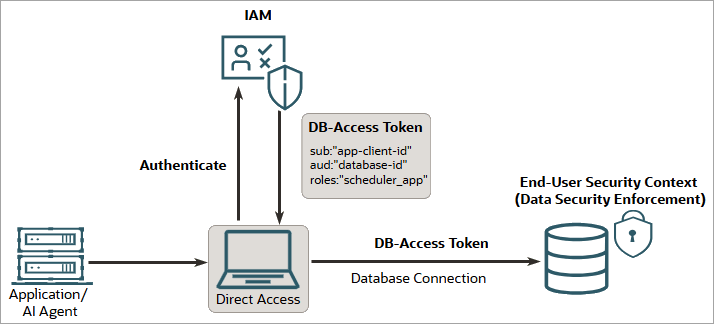
Database authentication flow
Prerequisite setup:
- IAM setup: Register the database as an OAuth resource. Register the application as an OAuth client (which receives a client ID), assign it the IAM roles that define its access, and authorize it to obtain a database-access token with its client credentials.
- Database setup: Configure IAM as an external identity
provider. Create an application identity (for example,
hcm_app) that maps to the application's OAuth client identifier. Then create the required Deep Sec data roles that define the application's data access, and either grant them directly to the application identity or map them to the application's IAM roles.
The runtime flow is as follows:
- Application authentication: The application authenticates
to IAM with its client credentials and obtains a database-access token. This
token includes the following information:
- The application's client ID as the subject (sub claim)
- The database as the audience (aud claim)
- The application's assigned IAM roles
- Direct logon: The application uses the database-access
token to log on directly to the database. The database validates the token
and looks for a global schema mapped to the token's subject (the
application's client ID). If no mapped schema exists, the database resolves
the subject to the mapped application identity (for example,
hcm_app) and creates a lightweight session for it. Unlike a traditional database user, the application identity has no dedicated schema. - Security context establishment: The database establishes an end-user security context for the session whose identity is the application identity. It activates the data roles granted directly to the application identity in the database, together with the data roles mapped to the application's IAM roles. SQL executed on the connection is enforced according to those data roles, so the application retrieves only the data its application identity is authorized to access.
Note:
In this pattern, the application or AI agent accesses the database as itself. If an end user later operates through the application and the application propagates that user’s identity to the database, see End Users Operate in the Context of an Application or AI Agent.Configuration path
For the complete configuration path, see IAM-Managed Applications Connecting Directly.
2.3.1.3 Applications or AI Agents Access the Database on Behalf of End Users
In this pattern, an application (such as an analytics tool or MCP server) executes SQL against the database using the end user's authorization. The application acts on behalf of the end user, exchanging the end user's token for a database-scoped on-behalf-of (OBO) token from IAM (for example, Microsoft Entra ID).
Use case
This pattern is ideal for reporting tools and MCP servers. In these scenarios, the application does not possess its own data privileges; instead, it acts on behalf of the user to retrieve only the data that specific user is authorized to access.
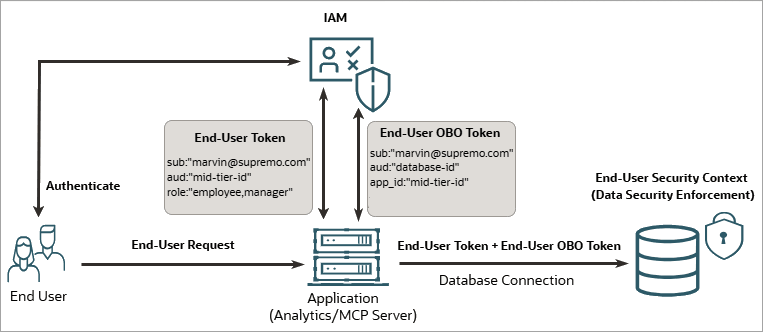
Database authentication flow
Prerequisite setup:
- IAM setup: Register the database as an OAuth resource
with required roles (for example,
employeeandmanager). Next, create an end user (Marvin) and assign them these roles. Additionally, configure the application to act on behalf of the end user. - Database setup: Configure IAM as an external identity
provider, create corresponding Deep Sec data
roles, and map them to IAM roles (for example, create data roles named
employee_roleandmanager_rolethat map to the IAM roles).
The runtime flow is as follows:
- User login: The end user (Marvin) logs in to the application through IAM and receives a token scoped specifically to that application.
- Token exchange: The application presents the end-user
token as an assertion, along with its own credentials, and receives an
on-behalf-of (OBO) token for Marvin. This OBO token is the database-access
token, and it has Marvin as the subject (
subclaim). - Security context payload propagation: The application uses this database-access token to connect to the database. Additionally, it passes the end-user token for role resolution.
- Security context establishment: The database validates
the tokens, establishes an end-user security context, and activates the data
roles corresponding to the end user’s IAM roles (that is, the
employee_roleandmanager_roledata roles).Because Marvin is the subject in the database-access token, the application is essentially accessing the database as Marvin. The database activates the data roles according to the claims in the end-user token. The application itself does not define or control the roles; the user's own IAM role assignments drive database access.
Note:
The application establishes the database connection (on which it attaches end-user security context payloads) in either of the two ways: by using a connection pool user account authenticated by a password, or by logging on directly as an application identity using a database-access token. The attachment of the end-user security context payload and its enforcement are identical in both cases.Configuration path
For the full configuration path for IAM-managed users with application connections, see IAM-Managed Users Connecting Through an Application.
2.3.1.4 End Users Operate in the Context of an Application or AI Agent
In this pattern, data access is controlled by both end-user and application authorization. The application is registered as an OAuth application in IAM with its own roles, and end users are assigned those roles. As a result, an end user acquires the combined privileges of their own account and the application (or AI agent).
Use case
This is the most common pattern for enterprise and agentic AI applications. This approach is ideal when an AI agent or enterprise application must connect to the database securely, but restrict the data it retrieves based on the end user interacting with the application.
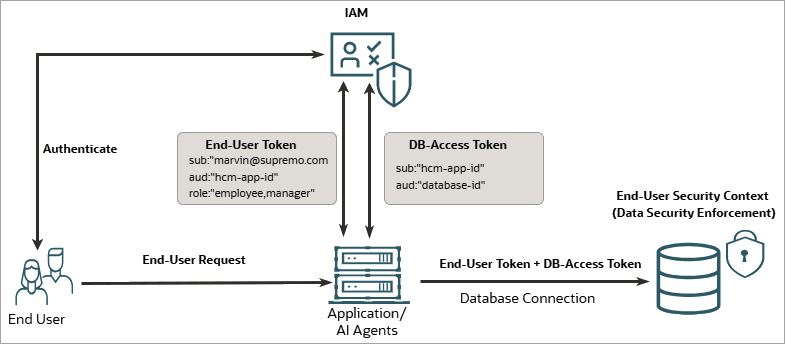
Database authentication flow
Prerequisite setup:
- IAM setup: Register the database as an OAuth resource.
Next, register the application (for example, HCM application) with required
roles, such as
employeeandmanager. Create an end user (Marvin) and assign them these roles. Additionally, grant the application access to the database resource. - Database setup: Configure IAM as an external identity
provider, create corresponding Deep Sec data
roles, and map them to IAM roles (for example, create data roles named
employee_roleandmanager_rolethat map to the IAM roles).
The runtime flow is as follows:
- User login: The end user (Marvin) logs in to the application (HCM) through IAM and receives a token scoped specifically to that application. The token includes the roles assigned to the end user.
- Application authentication: The HCM application obtains
its own database-access token, with the application as the subject
(
subclaim) and the database as the audience. - Security context payload propagation: The application uses its own database-access token to authorize the connection. Additionally, the application forwards the end-user token as an attribute assertion for Marvin’s identity and roles.
- Security context establishment: The database validates
the tokens, establishes an end-user security context, and activates the data
roles corresponding to the end user’s IAM roles (that is, the
employee_roleandmanager_roledata roles).In this case, the application accesses the database as itself, and the database activates the data roles corresponding to the end user's assigned application roles, which are present as claims in the end-user token.
Note:
The application establishes the database connection (on which it attaches end-user security context payloads) in either of the two ways: by using a connection pool user account authenticated by a password, or by logging on directly as an application identity using a database-access token. The attachment of the end-user security context payload and its enforcement are identical in both cases.Configuration path
For the full configuration path for IAM-managed users with application connections, see IAM-Managed Users Connecting Through an Application.
2.3.2 Application Registrations in IAM
When an end user interacts with a modern application, their request traverses two distinct trust boundaries: the application server that orchestrates business logic and the database that enforces data-level security.
Each of these components has a unique security posture and must be represented as a separate application registration in your IAM (for example, Microsoft Entra ID or OCI IAM).
The chain of trust
Because these components are registered independently, the authentication architecture of Oracle Deep Data Security (Deep Sec) relies on a transitive chain of trust, where each component delegates identity assertion to the next.
- User to application (API call): The user authenticates directly with IAM through a browser-based redirect. IAM issues an authorization code, which the application exchanges for an end-user token. This token asserts the end user’s identity and is scoped to the application API. The application validates this token to confirm the user’s identity and authorized scopes.
- Application to database:
Subsequently, the application must obtain a separate
database-scoped token (the database-access token)
through one of the following flows:
- On-behalf-of (OBO) flow: The
application presents the end-user token along with
its own credentials to the IAM token endpoint and
requests a database-scoped token. The resulting
database-access token carries the original user's
identity (
subclaim) but is addressed to the database audience. - Client credentials flow: The
application obtains a database-access token using
its own credentials, without exchanging the
end-user token. The resulting database-access
token carries the application's identity
(
subclaim), not the user's.
- On-behalf-of (OBO) flow: The
application presents the end-user token along with
its own credentials to the IAM token endpoint and
requests a database-scoped token. The resulting
database-access token carries the original user's
identity (
- Database validation: The Oracle AI Database validates both tokens against the IAM's public signing keys and confirms that the audience claim in the database-access token matches its own application ID, thereby authorizing the connection. It then uses the end-user token to extract the user's identity and role claims and establish the end-user security context. Once established, all subsequent SQL statements on that connection are subject to the data-security policies that apply to that specific end user.
About scopes and delegation
A scope is a named permission that a resource server (such as the application or the database) exposes. When a client requests a token, it specifies which scopes it needs, and IAM evaluates whether the client is authorized to request those scopes.
In Deep Sec's security
architecture, scopes define what a component is authorized to do.
For example, the database exposes a scope (such as
sessions:scope:connect) that the
application requests when acquiring a database-access token. In an
OBO flow, the scope authorizes the application to connect to the
database on behalf of the user. In a client credentials flow, the
scope authorizes the application to connect to the database using
its own identity. In both flows, the database uses the end-user
token to establish the end-user security context, ensuring that data
access is governed by the actual end user's identity and roles,
regardless of how the application obtained its database-access
token.
For steps to configure application registrations in your IAM, see IAM, Database, and Application Configuration.
2.3.3 User and Role Management in IAM
You create and manage application users and roles in your IAM (for example, Microsoft Entra ID or OCI IAM). Subsequently, you create corresponding Deep Sec data roles in the database, and map the data roles to IAM roles for authorization.
This section explains how users and roles are structured in IAM and how they connect to database-level access control.
User registrations in IAM
Typically, you'll manage user identities for your application centrally in an IAM system. Each application user requires a user account in your IAM. IAM assigns every user a unique principal identifier, such as a user principal name (UPN) in Microsoft Entra ID or a user name in OCI IAM. This identifier is the canonical representation of the user's identity and is embedded in every token IAM issues for that user.
When the database receives a token, it extracts this principal identifier to establish the end-user security context for the session. The database does not store a separate local identity for externally managed users; instead, it relies entirely on the identity asserted in the token. This means that IAM remains the single source of truth for user lifecycle operations, such as provisioning, deprovisioning, and credential management.
Role definitions in IAM
Roles define what an authenticated user is authorized to do within the application and, by extension, within the database. The specific mechanism for defining roles differs between IAM providers, but the principle remains the same: roles appear as claims in the tokens issued to users, and the database maps those claims to its internal data roles.
Microsoft Entra ID: App roles
In Entra ID, you define app roles within each application registration. App roles are
scoped to a specific application, meaning a role named employee on the HCM
application registration is distinct from a role named employee on a
different application registration. You assign app roles to users (or to other service
principals) through the Entra ID portal or API. When Entra ID issues a token for that
application, it includes the user's assigned app roles in the token's roles
claim. This gives the database a reliable, application-specific set of role assertions for
each user.
OCI IAM: Groups
In OCI IAM, groups serve as the role
mechanism. You create groups that represent logical roles within your application, such as
employee or manager, and assign users to them. When OCI
IAM issues a token, it includes the user's group memberships in the token's claims
(typically through a custom claim configuration or a default groups claim). The database
reads these group claims and treats them as the equivalent of role assertions for
authorization.
Despite the difference in terminology (app roles in Entra ID versus groups in OCI IAM), both serve the same function in this architecture; they provide the role claims that the database needs to determine which data roles to enable for an end-user security context.
Role mappings
The Deep Sec feature in Oracle AI Database supports data roles that can be mapped to external identity claims. When the database receives a token containing role or group claims, it matches those claims to pre-configured data roles. For each match, the database automatically enables the corresponding data role for that session, granting the user the associated fine-grained data authorizations.
Each data role has a one-to-one relationship with an external role claim. This means that any changes to a user's role assignments in IAM (such as adding the user to a new app role in Entra ID, or changing the user's group membership in OCI IAM) take effect automatically the next time that user's token is presented to the database, without requiring any changes to the database configuration itself. For details on data roles, see User and Role Management in the Database.
For steps to configure application users and roles in your IAM, see IAM, Database, and Application Configuration.
2.3.4 User and Role Management in the Database
Deep Sec provides a specialized framework for administering application users and roles within the database, designed to meet the security requirements of modern applications.
Traditional database user accounts pose two significant problems for application-level access control: they own database schemas and objects, and they typically carry excessive privileges, especially when multiple application users share a single account.
The Deep Sec framework addresses these problems by introducing end users and data roles as distinct entities from traditional database users and roles. This separation enables you to enforce fine-grained data authorization without granting application users direct ownership of database objects.
- Externally: Through an IAM system, where data roles in the database map to application roles in IAM.
- Locally: Directly within the database, for simple applications, demonstrations, or development and test environments.
Topics:
2.3.4.1 Entity Types
Learn about the principal entities in Deep Sec and how they interact within the database environment.
End user
A user that an application defines. Unlike a traditional database user, an end user does not own database schemas or database objects. Instead, the Deep Sec framework grants end users access to specific rows and columns of tables (and views) through data grants, which are assigned to data roles that correspond to their application roles.
End users can create lightweight database sessions (end-user security contexts) through the application, rather than establishing full traditional database sessions.
Deep Sec recognizes the following two categories of end users:
- End user managed in IAM
A user whose identity is created and managed in IAM. Typically, they connect to the database through the application. They can also log in directly using token-based authentication. These end users do not require local identity mappings in the database because the database derives their data authorization from the application roles that IAM assigns to them.
- End user managed locally
A user created and managed in the database using the
CREATE END USERstatement. End users managed in the database can log in directly using password authentication. Optionally, you can also configure a second authentication factor. In addition, you can map these end users by user name to the users managed in the application's own user store, so that those users can connect through the application's trust, without requiring direct password authentication on the database server. Locally managed end users do not map to any entities in IAM, making them suitable for simple applications, or for demo, development, and test environments. You can grant fine-grained data grants to local end users directly or indirectly through data roles that are managed locally.The following SQL statement creates a local end user named
emmawho can log in directly with a password stored in the database:CREATE END USER emma IDENTIFIED BY <password>;
Data role
A data role is defined in the database specifically for fine-grained
data grants. The keyword DATA in SQL statements distinguishes these
roles from standard database roles.
Deep Sec supports the following two categories of data roles.
- Data role that is externally mapped
A data role that is a database-side representation of an application role managed in IAM and assigned to application users. You create this data role with the
MAPPED TOclause followed by the identifier string of the application role. This mapping establishes a one-to-one relationship between the data role in the database and the application role in IAM.When an end user in IAM attaches to a session, the database automatically finds and enables the data roles that map to the user’s application roles. This mechanism allows the end user to use the fine-grained data grants associated with the data roles.
The following example creates a data role that maps to a Microsoft Entra ID role namedemployee:CREATE DATA ROLE employee_role MAPPED TO 'AZURE_ROLE=employee';The following example creates a data role that maps to an OCI IAM group namedemployee:CREATE DATA ROLE employee_role MAPPED TO 'IAM_OAUTH_GROUP=employee'; - Data role that is locally managed
A data role that is created and managed entirely within the database, without any mapping to an external application role. You can grant this data role to local end users, application identities, or to other data roles that are managed locally. Also, you can grant database roles or data grants to this data role.
The following SQL statements create a data role namedemployee_roleand grant it to a local end user,emma:CREATE DATA ROLE employee_role; GRANT DATA ROLE employee_role TO emma;
Application identity
- It authorizes data access for users who connect through the application, and for the application itself. You can grant data roles that are locally managed to the application identity to confer common privileges on all end users who connect through that application, or to allow trusted application code to temporarily elevate a connected user's privileges. See Privilege Elevation.
- It acts as a connection or logon principal. An
application can log on directly as its application identity to establish the
database connection on which it attaches end-user security context payloads,
instead of using a connection pool user account. Additionally, an
application or AI agent can log on directly as its application identity to
access data under its own authorization; in this case, the database
establishes an end-user security context whose identity is the application
identity, which you can retrieve at runtime with
ORA_END_USER_CONTEXT.name.
You create an application identity with the CREATE APPLICATION
IDENTITY statement, mapping it to the application's OAuth client
identifier.
CREATE APPLICATION IDENTITY hcm_app MAPPED TO 'AZURE_CLIENT_ID=f1fab37e-7aa2-4ff8-849c-7e731fea3b48';hcm_role to
the application identity hcm_app. The database then enables
hcm_role in the security context of every end user who connects
through the HCM
application:GRANT DATA ROLE hcm_role TO hcm_app;You can only grant data roles that are managed locally to an application identity. The database automatically enables data roles that are externally mapped based on the end-user token's role claims (or application's database-access token role claims, in case of application direct logon); you cannot grant these data roles to an application identity.
For full configuration details, including the privileges an application identity requires to establish a connection or log on directly, see Configure Application Identities.
Summary of entity types
The following table summarizes the principal entity types in Deep Sec's user and role administration framework.
Table 2-1 Entity types in Deep Sec
| Entity | Description |
|---|---|
|
End user |
A user of an application who does not own database schemas or
database objects. An end user can be:
|
|
Data role |
It can be one of the following types:
|
|
Application identity |
A registered identity for an application. Enables data roles and common privileges for all users connecting through that application. In addition, an application identity can serve as a logon principal: an application or AI agent can log on as its application identity to establish the database connection on which it attaches end-user security context payloads, or to access data directly under its own authorization. |
For more details on how to configure Deep Sec entity types, see User and Role Administration.
2.3.4.2 SQL Quick Reference
Use this quick reference to find basic SQL statements for managing users, roles, and application identities in Deep Sec.
| Task | SQL Statement |
|---|---|
|
Create an end user in the database with password authentication |
|
|
Create a data role that is externally mapped (Microsoft Entra ID) |
CREATE DATA ROLE <name> MAPPED TO
'AZURE_ROLE=<role>'; |
|
Create a data role that is locally managed in the database |
CREATE DATA ROLE <name>; |
|
Grant a data role (that is locally managed) to a local end user |
GRANT DATA ROLE <role> TO
<user>; |
|
Create an application identity |
CREATE APPLICATION IDENTITY <name> MAPPED
TO '<mapping>'; |
|
Grant a data role (that is locally managed) to an application identity |
GRANT DATA ROLE <role> TO
<app_identity>; |
For detailed syntax and additional options, see User and Role Administration.