2.2 Fine-Grained Data Authorization
Learn how Oracle Deep Data Security (Deep Sec) enforces row and column security, validates privileges through access check functions, and applies mandatory access control for comprehensive data protection.
2.2.1 Architectural Overview
To provide context for Deep Sec's fine-grained authorization model, let’s review the authentication and authorization flow in a typical three-tier architecture and examine the components involved.
Authorization flow
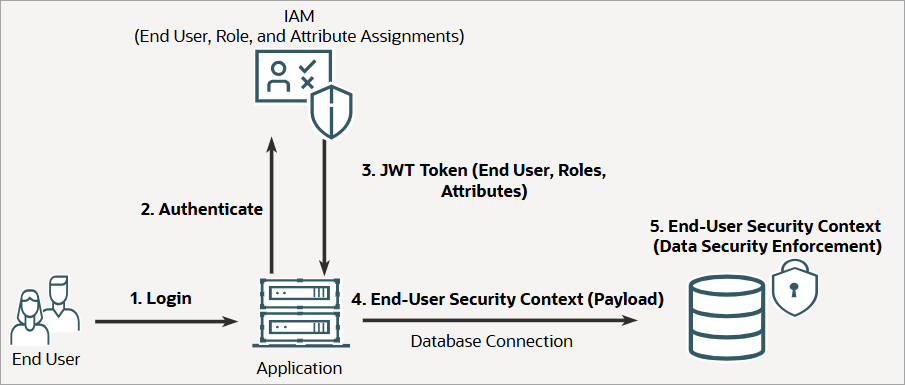
The following figure illustrates the authentication and authorization flow in a typical three-tier application architecture with Deep Sec enabled:
Key components
- End-user management
- End users of applications and analytics tools are typically managed in an external IAM system, and they are authenticated when they access the application. Unlike traditional database users, Deep Sec end users do not own database schemas or objects; however, they require access to specific rows and columns within tables and views.
- To grant this access, you assign roles to users in IAM, then create corresponding data roles in the database and map them to the IAM roles. Note that the fine-grained authorization model described in this guide applies only to application users. Database users (such as schema owners or administrators) continue to use database-native access control solutions, such as Oracle Virtual Private Database (VPD).
- Application layer
- The application represents a mid-tier processing unit, running either inside or outside the database server. It authenticates the user and acts on their behalf to perform tasks, which may include calling other servers or services. The application may also use automated agents, including agentic AI or generative AI, to process requests and generate SQL statements.
- End-user security context
- The database establishes the end-user security context (comprising the user's identity, roles, and attributes) based on claims from identity providers and application-specific logic (such as business unit, job function, or profile options). In the typical flow depicted above, this security context payload is propagated through JSON Web Tokens (JWT) over the OAuth 2.0 protocol, though other authentication methods may be used. At runtime, the application attaches this security context payload to the database connection. The database then uses this payload to enforce fine-grained security, granting the end user access to specific rows and columns based on the established policy.
2.2.2 About Data Grants and Security Context
Deep Sec introduces data grants to precisely control access at the row, column, and cell levels. Learn about data grants and how to use the runtime security context to create dynamic, identity-based predicates within data grants.
Data grant
Central to the Deep Sec authorization model is the data grant, a policy statement that authorizes access to specific rows and columns within a table or view. Through multiple data grants, a user can hold different privileges on different row sets and column values (cells) within the same table or view; for example, SELECT privilege on some rows, UPDATE on certain columns for a subset of those rows, and full modification privileges on another set of rows. The grants are additive, meaning a user's data access is determined based on the union of all data grants assigned to them.
You define data grants using the CREATE DATA GRANT
statement. Each grant specifies the privileges (SELECT, UPDATE, INSERT,
DELETE), the target object, an optional WHERE clause
(predicate) to identify rows, and the grantee.
CREATE [OR REPLACE] DATA GRANT [schema.]grant_name AS
    <SELECT | UPDATE | INSERT | DELETE> [(column [, column] ...)]
    ON <object>
    [WHERE <predicate>]
    TO {<end_user> | <data_role>};
objectis the target table or view for the data grant.predicateis a SQL expression that defines which rows the user can access. It supports dynamic logic, including subqueries and references to the end-user security context. The default isTRUE, representing all rows.end_user or data_roleis the local end user or data role for the privilege grant. See User and Role Management in the Database.
See Configure Data Grants for complete details on the syntax and data privilege semantics for DML operations.
Security context reference
To define data grants, it is essential to understand how to reference the end-user security context in SQL. Data grants in Deep Sec typically rely on the end-user security context payload (the user's identity, roles, and attributes) that the application propagates to the database at runtime.
You can access this context in the database using the
ORA_END_USER_CONTEXT SQL function. It returns the context
parameters as JSON accessible through standard dot-notation. For example,
ORA_END_USER_CONTEXT.username returns the current end user’s
name.
You'll typically use this function in data grant predicates to identify rows based on the current user's identity or attributes. For more details, see End-User Contexts and Attributes.
2.2.3 Row and Column Controls
Understand how data grants enforce fine-grained security at the row, column, and cell levels.
You can create data grants for data roles or directly for local end users. In an IAM-managed environment, data grants are created for data roles that are mapped to external application roles. End users are provisioned in an IAM system and assigned application roles. In the database, data roles are mapped to the external roles, and these data roles hold the data grants. In a locally managed environment, you can create data grants for data roles that are managed within the database or directly for local end users. This flexibility supports both centralized identity governance and simpler standalone configurations. For details on data roles and role mapping, see User and Role Management in the Database.
When an end user queries a table protected by data grants, the database performs the following actions:
- Policy evaluation: Identifies the data grants that apply
to the user or their active data roles, and verifies that the required data
privilege (such as
SELECT) is granted for the target table. - Row filtering: Dynamically appends a
WHEREclause to the query based on the grant's predicate, filtering rows transparently at the database level without requiring changes to the application's SQL. - Column restriction: Masks or restricts columns according
to column‑level rules (for example, returning
NULLfor unauthorized columns or disallowingUPDATEon specific fields).
Note:
Data grant examples throughout this section are based on the
following hr.employees table.
EMPLOYEE_ID  FIRST_NAME  LAST_NAME  EMAIL       MANAGER     SSN          SALARY  PHONE
-----------  ----------  ---------  ----------  ----------  -----------  ------  --------
100          Victoria    Williams   vwilliams               219-09-9999  13000   555-0100
200          Marvin      Anderson   manderson   vwilliams   457-55-5462  12030   555-0200
300          Chris       Evans      cevans      vwilliams   321-12-4567   6900   555-0300
400          Emma        Baker      ebaker      manderson   733-02-9821   8200   555-0400
500          Taylor      Mills      tmills      manderson   558-76-1243   9000   555-0500
Row-level security
Row-level security is enforced through data grants that restrict
operations (such as SELECT,
UPDATE, INSERT, or DELETE) to a
specific set of rows, defined by a SQL predicate (WHERE clause).
The predicate can reference the end-user security context or include subqueries for
more complex logic. The database evaluates the predicate for each row: if it
evaluates to TRUE, the row is accessible; if
FALSE, the row is filtered out.
Example: Basic row security
The data grant in this example permits employees to view only their own record.
The following SQL statement creates a data grant named
employees_own_record in the hr schema. This
grant allows users with the employee_role data role to access their
own record in the hr.employees table. In an IAM-managed
environment, any end user whose application role maps to
employee_role can view only the row that corresponds to their
own identity.
-- Grant 1: Allow employees to see their own record
CREATE OR REPLACE DATA GRANT hr.employees_own_record
  AS SELECT
  ON hr.employees
  WHERE email = ORA_END_USER_CONTEXT.username
  TO employee_role;
When Emma, who is an application user and an employee, queries the table, she sees only her own record.
EMMA> SELECT * FROM hr.employees;

EMPLOYEE_ID FIRST_NAME LAST_NAME EMAIL   MANAGER    SSN         SALARY PHONE
----------- ---------- --------- ------- ---------- ----------- ------ --------
400         Emma       Baker     ebaker  manderson  733-02-9821  8200  555-0400

1 row selected.
Column- and cell-level security
While row security determines which records are visible, column security
determines which attributes within those records are exposed. By specifying row
predicates with column restrictions, you achieve cell-level security—rules that
govern which column values a user may SELECT,
INSERT, or UPDATE for a specific set of
rows.
This enables scenarios where a user has access to a row but is restricted from viewing sensitive columns (such as social security number) or modifying critical columns (such as salary).
Example: Cell-level write restrictions
You can define data grants to limit UPDATE privileges
to specific columns. If a user attempts to update an unauthorized column in an
authorized row, the operation is silently ignored.
The data grant in this example allows employees to view their own record and update only the phone number.
-- Grant 2: Allow employees to see their own record and update phone number
CREATE OR REPLACE DATA GRANT hr.employees_own_record
  AS SELECT, UPDATE (phone)
  ON hr.employees
  WHERE email = ORA_END_USER_CONTEXT.username
  TO employee_role;
Example: Hierarchical access with column masking
You can grant access to rows while excluding sensitive columns (for
example, social security number). The rows are returned, but the unauthorized
columns appear as NULL.
The data grant (manager_direct_reports) in this example
allows managers to view the records of their direct reports, with the social
security number (SSN) column excluded. It also allows managers to update only the
salary column for their direct reports. The grant is defined for the data role named
manager_role.
-- Grant 3: Allow managers to see their direct reports (with SSN masked) and update their salaries
CREATE OR REPLACE DATA GRANT hr.manager_direct_reports
  AS SELECT (ALL COLUMNS EXCEPT ssn), UPDATE (salary)
  ON hr.employees
  WHERE manager = ORA_END_USER_CONTEXT.username
  TO manager_role;
Marvin, who is both a manager and an employee, holds both the
employee_role and manager_role data roles. As
an employee, he sees his own record, including his SSN. As a manager, he also sees
the records of his direct reports (Emma and Taylor) but with their SSN values masked
as NULL. The manager role additionally grants him the ability to
edit the salaries of his direct reports.
MARVIN> SELECT * FROM hr.employees;

EMPLOYEE_ID FIRST_NAME LAST_NAME EMAIL      MANAGER    SSN         SALARY PHONE
----------- ---------- --------- ---------- ---------- ----------- ------ --------
200         Marvin     Anderson  manderson  vwilliams  457-55-5462 12030  555-0200
400         Emma       Baker     ebaker     manderson              8200   555-0400
500         Taylor     Mills     tmills     manderson              9000   555-0500

3 rows selected.
For advanced examples of data grants that propagate across table hierarchies, see Configure Data Grants.
2.2.4 Access Check Functions
Deep Sec provides SQL functions to detect unauthorized values for conditional masking and to evaluate user privileges at the row and column level.
Verify column access
(ORA_IS_COLUMN_AUTHORIZED)
This function differentiates between a genuine
NULL stored in the database and a
NULL returned due to authorization
restrictions. This allows developers to handle restricted data
gracefully in the presentation layer.
- Behavior: Returns
TRUEif the current user is authorized to access the column value for the given row, or if the column is not protected by a data grant. ReturnsFALSEif the user lacks authorization to view the value. - Use case: Displaying a mask instead of a blank field for unauthorized values.
Example:
SELECT
list to display:
- The actual SSN value for rows where he is authorized to view it.
- A mask (
000-00-0000) for rows where he is not authorized, instead of a blank field.
MARVIN> SELECT first_name, last_name,
               DECODE(ORA_IS_COLUMN_AUTHORIZED(ssn),
                       FALSE, '000-00-0000',
                       TRUE, ssn) AS ssn,
               email,
               manager
        FROM   hr.employees;

FIRST_NAME LAST_NAME  SSN          EMAIL       MANAGER
---------- ---------- ------------ ----------- ----------
Marvin     Anderson   457-55-5462  manderson   vwilliams
Emma       Baker      000-00-0000  ebaker      manderson
Taylor     Mills      000-00-0000  tmills      manderson

3 rows selected.
Validate operational
privileges (ORA_CHECK_DATA_PRIVILEGE)
This function allows applications to check a user's privileges at the row or column level. This is essential for enforcing security in APIs and controlling dynamic UI elements (such as enabling or disabling an Edit button) based on the user's access rights.
- Behavior: Returns
TRUEif the user holds the specified<privilege>for the given row or column. ReturnsFALSEotherwise. - Use case: Pre-validating whether a user is authorized to perform an operation before executing it.
Example:
SELECT privileges on each row and
UPDATE privileges specifically on the phone
column.MARVIN> SELECT first_name, last_name,
manager,
ORA_CHECK_DATA_PRIVILEGE(emp, 'SELECT') AS can_view,
ORA_CHECK_DATA_PRIVILEGE(emp, 'UPDATE', phone) AS can_update_phone
FROM hr.employees emp;
FIRST_NAME LAST_NAME MANAGER CAN_VIEW CAN_UPDATE_PHONE
---------- ---------- ---------- --------- ----------------
Marvin Anderson vwilliams TRUE TRUE
Emma Baker manderson TRUE FALSE
Taylor Mills manderson TRUE FALSE
3 rows selected.
The output confirms that Marvin can view his own record and those of his direct reports, but can only update his own phone number.
2.2.5 Mandatory Access Control
Understand how adopting Mandatory Access Control (MAC) helps you enforce consistent security policies across all access paths to your data objects.
When your application handles sensitive data, like Personally Identifiable Information (PII) or Protected Health Information (PHI), authorization must remain consistent regardless of the access path. Whether a user queries a base table directly or accesses it indirectly through a view, the resulting data exposure must be identical.
The risk of inconsistent access
A security gap can arise when a user has access to both a base table and a view defined on that table. In standard configurations, views typically execute with the privileges of the view owner rather than the querying user. Consequently, a user restricted from certain rows in the base table may see all rows when querying the view.
The following example illustrates this scenario, using the same
hr.employees table referenced earlier.
- An administrator may create a view on the
hr.employeestable that exposes all employee data.-- Create a view in hr schema CREATE VIEW hr.employees_view AS SELECT * FROM hr.employees; - The administrator then grants the
employee_rolefull access to the view, but own-record-only access to the base table.-- Grant broad access to the VIEW CREATE OR REPLACE DATA GRANT hr.employees_view_grant AS SELECT ON hr.employees_view TO employee_role; -- Grant restricted access to the BASE TABLE CREATE OR REPLACE DATA GRANT hr.employees_own_record AS SELECT ON hr.employees WHERE email = ORA_END_USER_CONTEXT.username TO employee_role; - Table access: When Emma queries the
hr.employeestable directly, the database restricts her to her own record, in accordance with thehr.employees_own_recorddata grant.EMMA> SELECT first_name FROM hr.employees; FIRST_NAME ---------- Emma 1 row selected. - View access: However, when Emma queries
hr.employees_view, she can view all rows. This occurs because the view accesses the base table using the permissions of the view owner (hr), bypassing the user-specific restriction.EMMA> SELECT first_name FROM hr.employees_view; FIRST_NAME ---------- Victoria Marvin Chris Emma Taylor 5 rows selected.
MAC enforcement
To resolve the inconsistent access behavior and enforce a Mandatory
Access Control (MAC) model, Deep Sec provides the
USE DATA GRANTS ONLY configuration setting.
When USE DATA GRANTS ONLY is enabled on a table:
- End users cannot access the table unless they hold the required
data grant. Access is denied even if the user possesses database object or
system privileges (like
SELECTorSELECT ANY TABLE). - Access control policies are enforced uniformly, regardless of whether the user accesses the table directly or through a view.
Example: Enforce MAC on the hr.employees
table
To ensure that access restrictions defined on the base table are not circumvented through views or alternative access paths, enable MAC on the table using the following command:
SET USE DATA GRANTS ONLY ON hr.employees ENABLED;With MAC enabled, employees see only their row, whether they query the table or the view.
EMMA> SELECT first_name FROM hr.employees;

FIRST_NAME
----------
Emma
1 row selected.
EMMA> SELECT first_name FROM hr.employees_view;
FIRST_NAME
----------
Emma
1 row selected.