3 Installation and Configuration
At its core, the Global Service Manager (GSM) and the GDS Catalog provide intelligent routing, dynamic load balancing, service failover, and configuration metadata storage. These core components can be configured with redundancy to ensure high availability. On the client side, Oracle GDS integrates with Oracle-enabled clients and connection pools to support features such as Fast Connection Failover (FCF) and intelligent routing of connections and work requests.
On the database side, the Oracle Notification Service (ONS) delivers real-time event
notifications to the GSM, while the gsmuser schema enables local
service orchestration. Together, these components provide a scalable, resilient, and
optimized framework for global service management.
Some components of the framework are installed when you install Oracle AI Database. Other components require that you perform certain tasks using the Global Data Services control utility (GDSCTL).
- Oracle GDS Capacities and Requirements
Perform capacity planning and sizing before deployment, and review capacity periodically to ensure that you have sufficient system resources for application performance requirements. - Planning GDS Deployment
To enable seamless, reliable and highly available communication between clients and distributed databases managed by GDS, follow these guidelines. - GDS Software Installation
Learn about the steps involved to set up the required GDS components so you can manage, balance, and optimize client connections and high availability. - Installing a Global Service Manager
Follow these steps to prepare for and install a Global Service Manager. - GDS Catalog Database and GDS Catalog Setup
Learn how to set up and protect a Global Data Services (GDS) catalog database to support your GDS configuration with high availability and reliability. - Global Data Services Configuration
Oracle Global Data Services (GDS) implements the Oracle AI Database service model across a set of replicated databases
Oracle GDS Capacities and Requirements
Perform capacity planning and sizing before deployment, and review capacity periodically to ensure that you have sufficient system resources for application performance requirements.
Plan to accommodate database growth or consolidation, increased application workloads, new processes, or other factors that strain system resources. The following lists summarize GDS sizing capacities and requirements:
GDS Capacities and Requirements for Single GDS Manages
- 5,000 GDS Pools
- 10 GDS Regions
- 5 Global Service Managers per Region
- 10,000 database instances
- 10,000 global services
- 1,000 mid-tier connection pools
GDS Capacities and Requirements for GDS Databases
- Can be a Single Instance or an Oracle RAC database
- Can be a container (CDB) or non-container (Non-CDB) database
- Can run on commodity servers or Oracle Engineered Systems (such as Oracle Exadata or Oracle Database Appliance)
- Are managed with the GDSCTL command-line interface or the Enterprise Manager database plug-in
Parent topic: Installation and Configuration
Planning GDS Deployment
To enable seamless, reliable and highly available communication between clients and distributed databases managed by GDS, follow these guidelines.
Configure network connectivity for your GDS setup as follows:
- Global Service Manager (GSM) Listener and ONS Port Accessibility: All GDS pool databases must be able to communicate with every Global Service Manager’s Listener (default port: 1522) and ONS ports (default: 6123 for local ONS and 6234 for remote ONS) in both directions. These ports must also be accessible from the Application/Client tier, all GDS pool databases, the GDS catalog database, other Global Service Managers in the deployment.
- TNS Listener Port Configuration for Pool Databases: The TNS Listener port (default: 1521) for each GDS pool database must be open in both directions to enable communication with all Global Service Managers, and the GDS catalog database.
- GDSCTL Connectivity: If the GDSCTL utility is run from a separate machine, ensure that this machine has direct, bidirectional port access to the TNS Listener port (default: 1521) of GDS catalog database.
- Default ONS Port Usage: On most platforms, the default ports for Oracle Notification Service (ONS) are: 6123 for local ONS, and 6234 for remote ONS.
For detailed information about memory, physical storage, kernel versions and packages required by Global Data Services see Oracle AI Database Installation Guide for Linux:
GDS Software Installation
Learn about the steps involved to set up the required GDS components so you can manage, balance, and optimize client connections and high availability.
The global service manager (GSM) is the central component of the Global Data Services framework, and you must install the global service manager using separate media. No other Oracle software is required to install and run the global service manager.
You can install the global service manager on a system where you have other Oracle products installed, but you must install the global service manager in a separate Oracle home directory. You can install more than one global service manager on a single system, but each global service manager must have a separate Oracle home directory. For optimal performance, deploy the global service manager on a dedicated host, especially if your Global Data Services configuration includes many databases.
You must install at least one global service manager for each Global Data Services region. Global service managers can be hosted on physical or virtual environments. For high availability, Oracle recommends installing multiple (typically three) global service managers in each region, and run each on a separate host.
Oracle Universal Installer does not currently support installing software on multiple hosts. You must install each global service manager on its own host.
The Global Data Services administrator installs the global service manager. The Global Data Services administrator is responsible for the following tasks:
-
Administering global service managers
-
Administering the Global Data Services catalog
-
Administering regions and database pools
The Global Data Services administrator must have an operating system user
account on all hosts where global service managers are deployed, and you must run the
installation under that user account. The installation must not be run by a
root user.
Parent topic: Installation and Configuration
Installing a Global Service Manager
Follow these steps to prepare for and install a Global Service Manager.
Before you begin:
The global service manager is the central component of the Global Data Services framework. You must install the global service manager using separate media. No other Oracle software is required to install and run the global service manager.
You can install the global service manager on a system where you have other Oracle products installed, but you must install the global service manager in a separate Oracle home directory. You can install more than one global service manager on a single system, but each global service manager must have a separate Oracle home directory. For optimal performance, deploy the global service manager on a dedicated host, especially if your Global Data Services configuration includes many databases.
You must install at least one global service manager for each Global Data Services region. Global service managers can be hosted on physical or virtual environments. For high availability, Oracle recommends that you install multiple (typically three) global service managers in each region, and run each on a separate host.
The Global Data Services administrator installs the global service manager. The Global Data Services administrator's responsibilities include:
- Administering global service managers
- Administering the Global Data Services catalog
- Administering regions and database pools
Note:
The Global Data Services administrator must have an operating system user account on all hosts where global service managers are deployed, and you must run the installation under that user account. The installation must not be run by aroot
user.
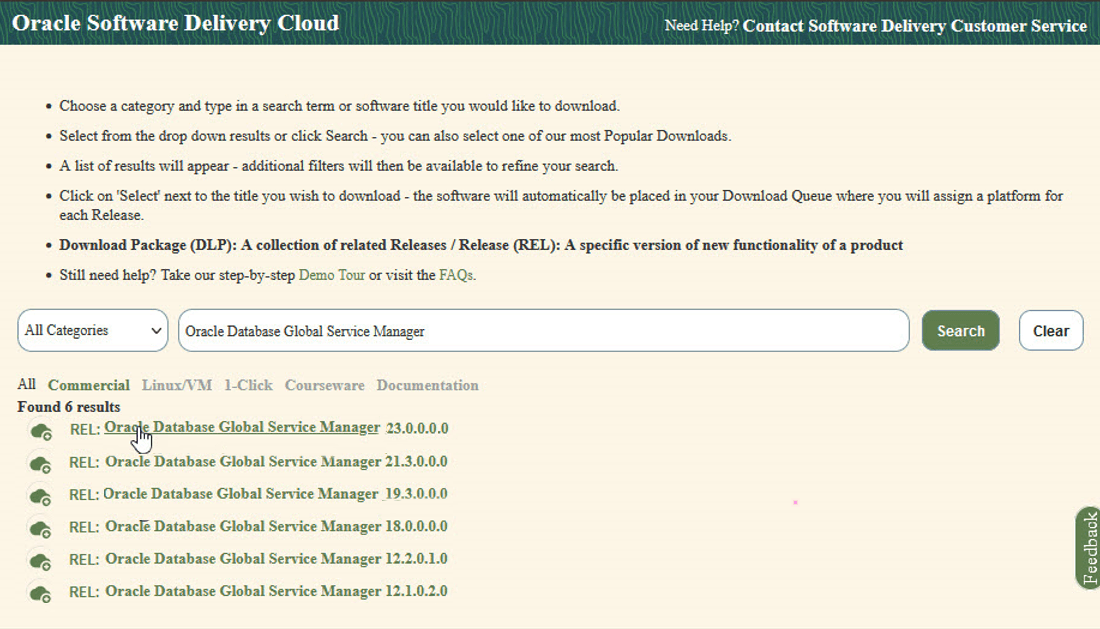
- Download the global service manager software from edelivery.oracle.com and unzip.
Note:
After installing the Global Data Services software, Oracle recommends that you update the installation to the latest Oracle Database release.Parent topic: Installation and Configuration
GDS Catalog Database and GDS Catalog Setup
Learn how to set up and protect a Global Data Services (GDS) catalog database to support your GDS configuration with high availability and reliability.
What You Need to Know About Creating the GDS Catalog
Every Global Data Services configuration must have a Global Data Services catalog. The Global Data Services catalog can reside on the same host as a GDS configuration database, but Oracle does not recommend this scenario for large configurations. Oracle recommends that you use Oracle high availability features such as Oracle Real Application Clusters (Oracle RAC) and Oracle Data Guard to protect the Global Data Services catalog against outages.
Global Data Services Catalog Requirements
Before starting the deployment, verify the following:
- The GDS catalog database uses a server parameter file (SPFILE).
- For Oracle RAC databases, single client access name (SCAN) is configured.
- Network connectivity is established and bidirectional for the following:
- GSM Listener port (Default: 1522)
- Database Listener port (Default: 1521)
- ONS ports (Default: 6123 local, 6234 remote)
- The host running GDSCTL has bidirectional connectivity to the GDS catalog database listener.
- Environment variables are set correctly. Specificially:
ORACLE_HOMEPATHincludes$ORACLE_HOME/binTNS_ADMINis set to$ORACLE_HOME/network/admin
The Global Data Services catalog must be protected for high availability and disaster recovery.
Note:
Oracle recommends that the Global Data Services administrator does not directly connect to the catalog database, despite having a user account on the catalog database. Global Data Services administrators can use the GDSCTL utility to manage Global Data Services. GDSCTL connects to the Global Data Services catalog with the credentials that the Global Data Services administrator provides when running GDSCTL commands.
For example:
GDSCTL> create gdscatalog -database serv1:1521:catdb.example.com
    -user gsm_admin
In the preceding example, serv1:1521:catdb.example.com
is an Easy Connect string that contains the host name and port number of the
listener that is used to connect to the database, and
catdb.example.com is the service name for the Global Data
Services catalog database.
You designate one database as the primary repository for the Global Data Services catalog. You can use existing high availability technologies, such as Oracle RAC, Oracle Data Guard, and Oracle Clusterware, to protect the Global Data Services catalog.
Related Topics
Parent topic: Installation and Configuration
Global Data Services Configuration
Oracle Global Data Services (GDS) implements the Oracle AI Database service model across a set of replicated databases
The implementation of the database service model across the replcated databases set is called a Global Data Services configuration.
- Oracle GDS Deployment Steps
The basic steps to deploy Global Data Services are to install GSMs, create the GDS catalog, configure components, set privileges, and enable client connectivity. - GDS Configuration Example
Follow this example to see how to implement Oracle Global Data Services using the GDSCTL utility, administrator users, and service configuration. - GDS Configuration Best Practices
In accordance with Oracle Maximum Availability Architecture (MAA), Oracle recommends that you follow these best practices.
Parent topic: Installation and Configuration
Oracle GDS Deployment Steps
The basic steps to deploy Global Data Services are to install GSMs, create the GDS catalog, configure components, set privileges, and enable client connectivity.
Deployment steps:
- Install Oracle GDS global service manager software on global service
manager servers.
- Minimum: One global service manager for each region.
- Recommended: Three global service managers for each region.
- Pre-create the Oracle GDS catalog database.
- Set up Oracle GDS Administrator accounts and privileges.
- Configure Oracle GDS.
- Create the GDS catalog and standby databases.
- Add global service managers, regions, pools, databases, and global services.
- Set up client connectivity.
Parent topic: Global Data Services Configuration
GDS Configuration Example
Follow this example to see how to implement Oracle Global Data Services using the GDSCTL utility, administrator users, and service configuration.
Deployment options:
Administrator-managed deployment means that you configure database services to run on specific instances belonging to a particular database using a preferred and available designation.
Policy-managed deployment means that the deployment is based on server pools, where database services run within a server pool as singletons, or run uniformly across all of the servers in the server pool. Databases are deployed in one or more server pools. The size of the server pools determines the number of database instances in the deployment.
Steps:
- Create and prepare a GDS catalog database.
GDS uses a catalog database to store metadata about the layout and status of the GDS configuration. For maximum availability, Oracle recommends that the GDS catalog database be deployed independently and that Oracle's high-availability features, such as Oracle Real Application Clusters (Oracle RAC) and Oracle Data Guard, be used to protect the catalog database against outages.
- Create the
GSM_ADMINuser and assign that user theGSMADMIN_ROLE.Note:
By default, the passwords for GSM_ADMIN, GSMUSER, and GSMCATUSER expires after 180 days.SQL> create user gsm_admin identified by password; User created. SQL> grant gsmadmin_role to gsm_admin; Grant succeeded. SQL> exit - Using the environment configured for the global service manager
home, run GDSCTL to create the GDS catalog database with Auto VNCR disabled
(Auto VNCR can cause problems with Oracle RAC deployments).
GDSCTL> create gdscatalog -database "(DESCRIPTION=(CONNECT_TIMEOUT=90)(RETRY_COUNT=50) (RETRY_DELAY=3)(TRANSPORT_CONNECT_TIMEOUT=3)(ADDRESS_LIST=(LOAD_BALANCE=ON) (ADDRESS=(PROTOCOL=TCP)(HOST=catalog.example.com)(PORT=1521))) (CONNECT_DATA=(SERVICE_NAME=CAT1PDB)))" -user gsmcatuser/<mypasswordhere> -region region1 -configname gds01 -autovncr off - Connect to the catalog database, unlock the
GSMCATUSERuser, and set the password.SQL> alter user gsmcatuser account unlock; User altered. SQL> alter user gsmcatuser identified by password; User altered. - With the environment configured for the global service manager
home, use GDSCTL to connect to, create, and start the global service manager
listeners.
As a best practice, place global service manager listeners on hardware separate from the servers hosting the Oracle databases in the GDS configuration. Because resource requirements for global service manager listeners are low, you can use virtual machines to host them.
GDSCTL> add gsm -gsm gsm1 -catalog "(DESCRIPTION=(CONNECT_TIMEOUT=90)(RETRY_COUNT=50) (RETRY_DELAY=3)(TRANSPORT_CONNECT_TIMEOUT=3)(ADDRESS_LIST=(LOAD_BALANCE=ON) (ADDRESS=(PROTOCOL=TCP)(HOST=catalog.example.com)(PORT=1521))) (CONNECT_DATA=(SERVICE_NAME=CAT1PDB)))" -region region1 -pwd <mypasswordhere> GDSCTL>start gsm -gsm gsm1 GSM is started successfully -
After starting a GSM, verify that it is running and connected to the catalog:
GDSCTL> statusReview the output to verify that it is started and connected, that services are listed and ready, and that the correct database, region and role are displayed. For example, for GDS catalog Y::
Alias GSM1 Version 23.0.0.0.0 Start Date 13-APR-2025 09:40:59 Trace Level off Listener Log File /u01/app/oracle/diag/gsm/hostname/gsm1/alert/log.xml Listener Trace File /u01/app/oracle/diag/gsm/hostname/gsm1/trace/ora_64863_139739749930432.trc Endpoint summary (ADDRESS=(HOST=hostname.example.com)(PORT=1522)(PROTOCOL=tcp)) GSMOCI Version 4.0.191114 Mastership Y Connected to GDS catalog Y Process Id 64883 Number of reconnections 0 Pending tasks. Total 0 Tasks in process. Total 0 Regional Mastership TRUE Total messages published 0 Time Zone -04:00 Orphaned Buddy Regions: None GDS region region01 -
With the environment configured for the global service manager home, use GDSCTL to create a default GDS pool and default region.
GDSCTL> add gdspool -gdspool dbpoolora GDSCTL> add region -region region1 GDSCTL> add region -region sca - With Auto VNCR disabled during GDS catalog creation to avoid
issues, use GDSCTL to add hosts using the
add invitednodecommand, using the host name or IP address appropriately.GDSCTL> add invitednode 10.0.20.103 GDSCTL> add invitednode 10.0.20.104 - Unlock the
GSMUSERaccount.Before adding a database to a pool, the database administrator should unlock theGSMUSERaccount and give the password to the GDS pool administrator, as shown in the following example.SQL> alter user gsmuser account unlock; User altered. SQL> alter user gsmuser identified by password; User altered. - Add databases to the GDS pool.
To be part of a GDS pool, a database must use a server parameter file (SPFILE). An Oracle RAC database should also have SCAN set up.
To add a database, connect to the GDS catalog using the GDS pool or GDS administrator credentials. For example, without Data Guard, the following add database command can be used.
Note:
When using Oracle Active Data Guard with GDS on Oracle AI Database 26ai and later releases, useadd databaseinstead ofadd brokerconfigto add the primary and standby databases. For more information, see add brokerconfig). The syntax for these commands is similar to the following:GDSCTL> add database -connect 10.0.20.103:1521/PORCLCDB -region region1 -gdspool dbpoolora -pwd Oracle_26ai -savename GDSCTL> add database -connect 10.0.20.104:1521/SORCLCDB -region region1 -gdspool dbpoolora -pwd Oracle_26ai -savenameDatabase instance registration with a global service manager succeeds only when the request originates from a valid node. If a host on which a database resides contains multiple network interfaces, then auto-configuration can register incorrect IP addresses, causing database registration requests to be rejected.
- Correct any rejected registration and properly discover all database
instances.
If a firewall exists between the global service managers and databases and the ports are not opened, then the registration fails. If this happens, then the global service
manageralertlog records entries similar to the following:Listener(VNCR option 1) rejected Registration request from destination 10.0.20.103 Listener(VNCR option 1) rejected Registration request from destination 10.0.20.104To correct the rejected registration and properly discover all database instances, run
add invitednodeusing the rejected IP address listed in the global service manager alert log. - If there is a firewall between the global service managers and the
database, then once the ports have been opened and verified using
tnsping, issue theadd invitenodecommand as shown here. - Create and start Global Services.
The GDSCTL
add servicecommand creates a Read-Write service for the Primary Database.GDSCTL> add service -gdspool dbpoolora -service gds01_rw_srvc_1 -preferred_all -role primary -pdbname ORCLPDB1Start the Read-Write Service:
GDSCTL> start service -service gds01_rw_srvc_1Create and start a Read-Only Service for the Standby Database:
GDSCTL> add service -gdspool dbpoolora -service gds01_ro_srvc_1 -preferred_all -role physical_standby -pdbname ORCLPDB1 GDSCTL> start service -service gds01_ro_srvc_1 - Verify that the Global Services are running.
GDSCTL> services

Service "gds01_ro_srvc_1.dbpoolora.gds01" has 1 instance(s). Affinity ANYWHERE ,
  Instance "gdspoolora%11", Name: "SORCLCDB", db: "SORCLCDB", region: "region1", status: ready.

Service "gds01_rw_srvc_1.dbpoolora.gds01" has 1 instance(s). Affinity ANYWHERE ,
  Instance "gdspoolora%1", Name: "PORCLCDB", db: "PORCLCDB", region: "region1", status: ready.
Parent topic: Global Data Services Configuration
GDS Configuration Best Practices
In accordance with Oracle Maximum Availability Architecture (MAA), Oracle recommends that you follow these best practices.
-
Each client communicates using an Oracle-integrated connection pool, such as UCP, OCI, or ODP.NET. Connection pools will receive notifications about any service failovers and load balancing advisory events through -Fast Application Notification events.
-
Run three global service managers in each region. Oracle recommends that you create three global service managers in each region so that if one global service manager goes down, then you have two remaining global service managers to provide redundancy. Each global service manager should reside on separate hardware. Global service managers enable connection routing among replicated databases. A global service manager is a stateless, lightweight, and intelligent listener that can repopulate its metadata from the GDS catalog.
-
Protect the GDS catalog database with Oracle Data Guard. The GDS catalog is a small (less than 100 GB) repository that hosts the metadata of the GDS configuration, regions, global service managers, global services, databases, and so on. MAA recommends that you set up a local Oracle Data Guard standby database configured with Maximum Availability database protection mode, Data Guard Fast-Start failover, and a remote physical standby database. All GDS catalog standby databases should use Oracle Active Data Guard for the best data protection, and they should reside on separate hardware and storage.
Parent topic: Global Data Services Configuration