ADMINISTER KEY MANAGEMENT
Purpose
The ADMINISTER KEY MANAGEMENT statement provides a unified key management interface for Transparent Data Encryption. Use this statement to:
-
Manage software and hardware keystores
-
Manage encryption keys
-
Manage secrets
For an application PDB, the key management operation can only be performed outside an application action (install, uninstall, upgrade, or patch).
Starting with Oracle AI Database 23.26.0, the Transparent Data Encryption (TDE) decryption libraries for the GOST and SEED algorithms are deprecated, and encryption to GOST and SEED are desupported.
Prerequisites
You must have the ADMINISTER KEY MANAGEMENT or SYSKM system privilege.
To specify the CONTAINER clause, you must be connected to a multitenant container database (CDB). To specify CONTAINER = ALL, the current container must be the root and you must have the commonly granted ADMINISTER KEY MANAGEMENT or SYSKM privilege.
Syntax
administer_key_management::=
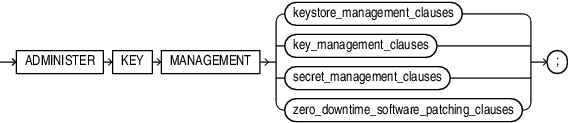
Description of the illustration administer_key_management.gif
(keystore_management_clauses::=, key_management_clauses::=, secret_management_clauses::=)
keystore_management_clauses::=
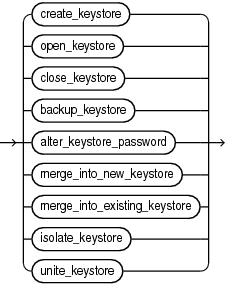
Description of the illustration keystore_management_clauses.gif
(create_keystore::=, open_keystore::=, close_keystore::=, backup_keystore::=, alter_keystore_password::=, merge_into_new_keystore::=, merge_into_existing_keystore::=)
create_keystore::=

Description of the illustration create_keystore.gif
open_keystore::=
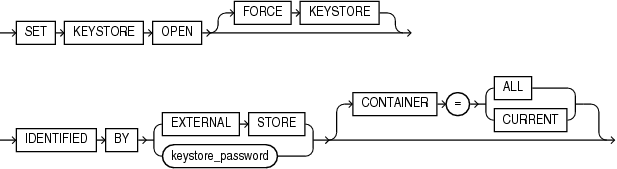
Description of the illustration open_keystore.gif
close_keystore::=

Description of the illustration close_keystore.gif
backup_keystore::=
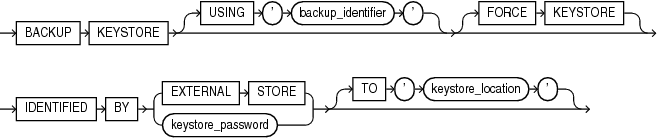
Description of the illustration backup_keystore.gif
alter_keystore_password::=

Description of the illustration alter_keystore_password.gif
merge_into_new_keystore::=
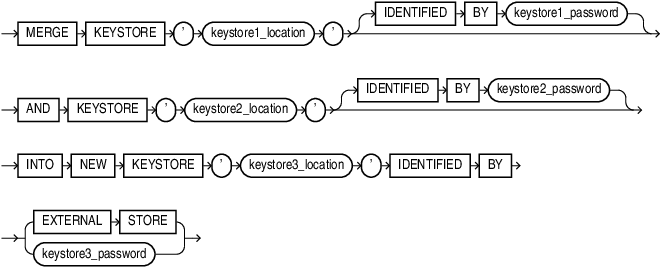
Description of the illustration merge_into_new_keystore.gif
merge_into_existing_keystore::=
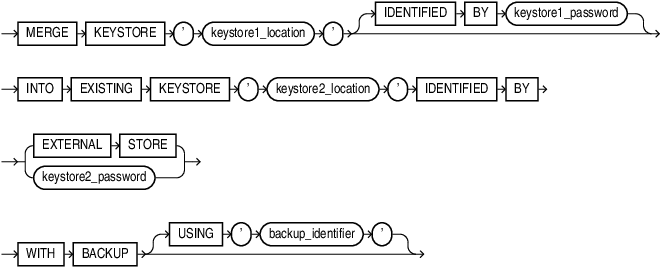
Description of the illustration merge_into_existing_keystore.gif
isolate_keystore::=
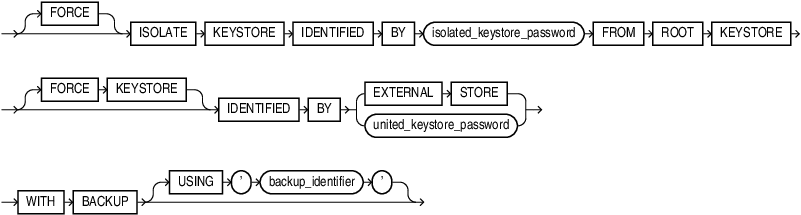
Description of the illustration isolate_keystore.gif
unite_keystore::=

Description of the illustration unite_keystore.gif
key_management_clauses::=
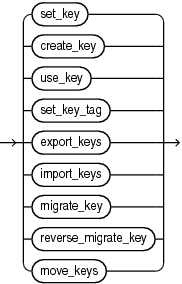
Description of the illustration key_management_clauses.gif
(set_key::=, create_key::=, use_key::=, set_key_tag::=, export_keys::=, import_keys::=, migrate_key::=, reverse_migrate_key::=)
set_key::=
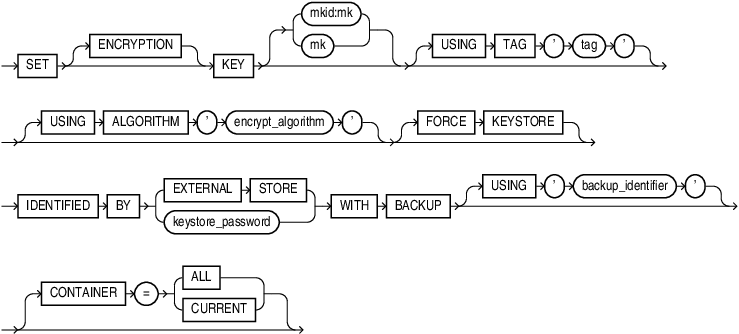
Description of the illustration set_key.gif
create_key::=
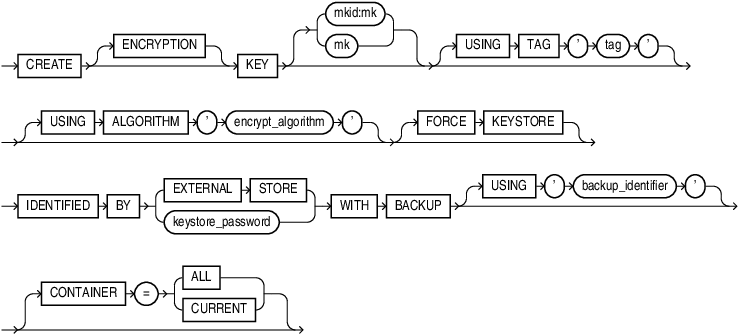
Description of the illustration create_key.gif
use_key::=

Description of the illustration use_key.gif
set_key_tag::=
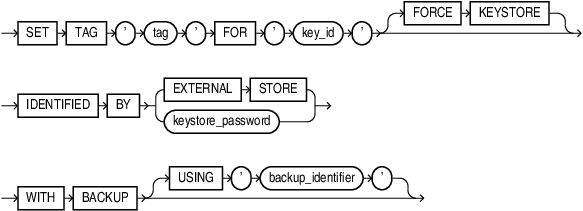
Description of the illustration set_key_tag.gif
export_keys::=
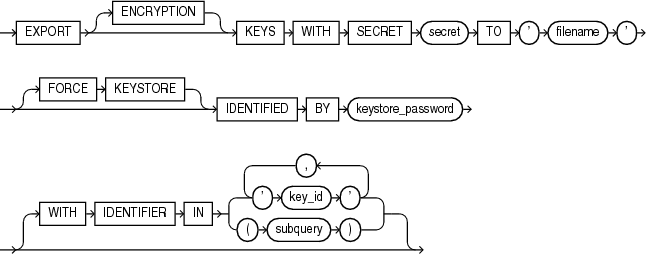
Description of the illustration export_keys.gif
import_keys::=
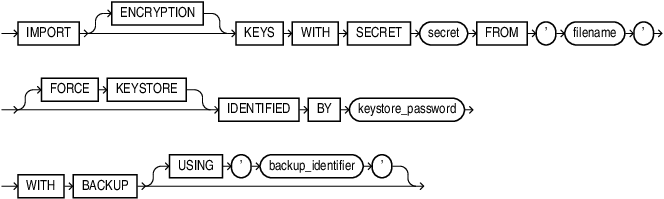
Description of the illustration import_keys.gif
migrate_key::=
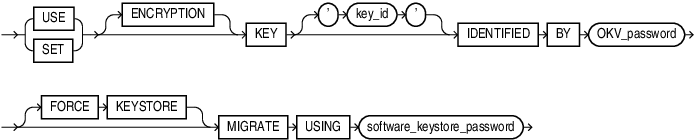
Description of the illustration migrate_key.gif
reverse_migrate_key::=
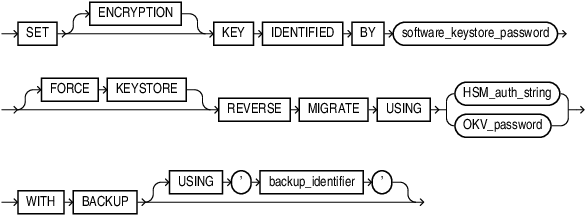
Description of the illustration reverse_migrate_key.gif
move_keys::=
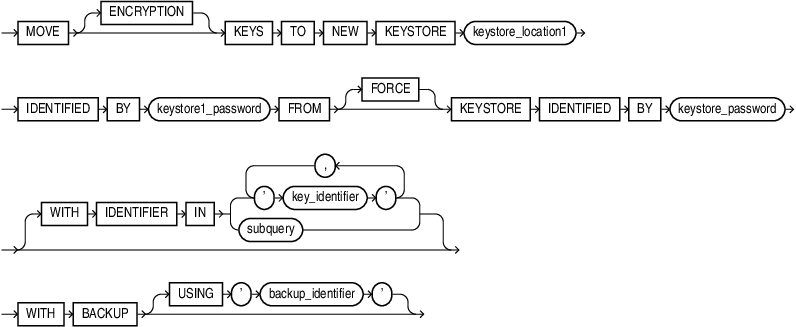
Description of the illustration move_keys.gif
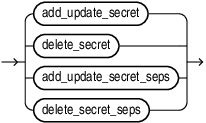
secret_management_clauses::=
Description of the illustration secret_management_clauses.gif
(add_update_secret::=, delete_secret::=)
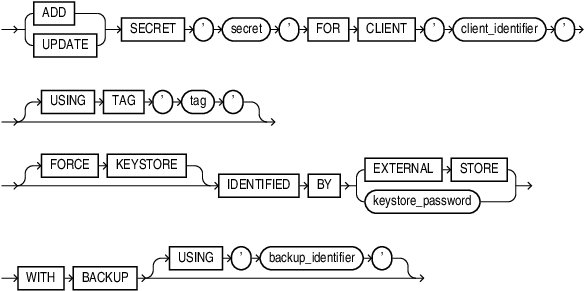
add_update_secret::=
Description of the illustration add_update_secret.gif
delete_secret::=

Description of the illustration delete_secret.gif
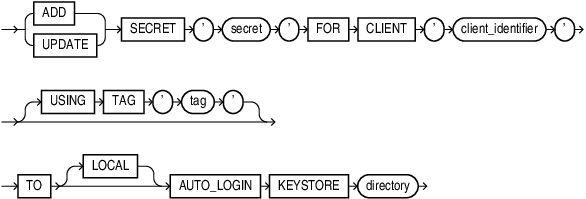
add_update_secret_seps::=
Description of the illustration add_update_secret_seps.gif
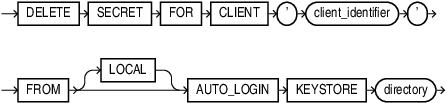
delete_secret_seps::=
Description of the illustration delete_secret_seps.gif
zero_downtime_software_patching_clauses::=

Description of the illustration zero_downtime_software_patching_clauses.gif
Semantics
keystore_management_clauses
Use these clauses to perform the following keystore management operations:
-
Create a software keystore
-
Open and close a software keystore or a hardware keystore
-
Back up a password-protected software keystore
-
Change the password of a password-protected software keystore
-
Merge two existing software keystores into a new password-protected software keystore
-
Merge one existing software keystore into an existing password-protected software keystore
-
Isolate the keystore of a Pluggable Database (PDB) from the Container Database (CDB) so that the PDB can manage its own keystore.
-
Unite the keystore of a PDB with the CDB.
create_keystore
This clause lets you create the following types of software keystores: password-protected software keystores and auto-login software keystores. To issue this clause in a multitenant environment, you must be connected to the root.
CREATE KEYSTORE
Specify this clause to create a password-protected software keystore.
-
For keystore_location, specify the full path name of the software keystore directory. The keystore will be created in this directory in a file named
ewallet.p12. This clause is optional if theWALLET_ROOTparameter has been set. Refer to Transparent Data Encryption to learn how to determine the software keystore directory for your system. -
Use the
IDENTIFIEDBYclause to set the password for the keystore. Refer to “Notes on Specifying Keystore Passwords” for more information.
CREATE [ LOCAL ] AUTO_LOGIN KEYSTORE
Specify this clause to create an auto-login software keystore. An auto-login software keystore is created from an existing password-protected software keystore. The auto-login keystore has a system-generated password. It is stored in a PKCS#12-based file named cwallet.sso in the same directory as the password-protected software keystore.
-
By default, Oracle creates an auto-login keystore, which can be opened from computers other than the computer on which the keystore resides. If you specify the
LOCALkeyword, then the database creates a local auto-login keystore, which can be opened only from the computer on which the keystore resides. -
For keystore_location, specify the full path name of the directory in which the existing password-protected software keystore resides. The password-protected software keystore can be open or closed.
-
Use the
IDENTIFIEDBYclause to specify the password for the existing password-protected software keystore. Refer to “Notes on Specifying Keystore Passwords” for more information.
Restriction on Creating Keystores
You can create at most one password-protected software keystore and one auto-login software keystore, either local or not, in any single directory.
See Also: Transparent Data Encryption for more information on creating software keystores
open_keystore
This clause lets you open a password-protected software keystore or Oracle Key Vault.
Note: You do not need to use this clause to open auto-login and local auto-login software keystores because they are opened automatically when they are required-that is, when the master encryption key is accessed.
-
The
FORCEKEYSTOREclause is useful when opening a keystore in a PDB. It ensures that the CDB root keystore is open before opening the PDB keystore. Refer to “Notes on the FORCE KEYSTORE Clause” for more information. -
Use the
IDENTIFIEDBYclause to specify the password for the keystore. Refer to “Notes on Specifying Keystore Passwords” for more information. -
The
CONTAINERclause applies when you are connected to a CDB.If the current container is a pluggable database (PDB), then specify
CONTAINER=CURRENTto open the keystore in the PDB. The keystore must be open in the root before you open it in the PDB.If the current container is the root, then specify
CONTAINER=CURRENTto open the keystore in the root, or specifyCONTAINER=ALLto open the keystore in the root and in all PDBs.If you omit this clause, then
CONTAINER=CURRENTis the default.
See Also:
-
Transparent Data Encryption Managing Keystores and TDE Master Encryption Keys in United Mode
-
Transparent Data Encryption Managing Keystores and TDE Master Encryption Keys in Isolated Mode
-
Transparent Data Encryption for more information on opening password-based software keystores and hardware keystores
close_keystore
This clause lets you close a password-protected software keystore, an auto-login software keystore, or a hardware keystore. Closing a keystore disables all encryption and decryption operations. Any attempt to encrypt or decrypt data or access encrypted data results in an error.
-
To close a password-protected software keystore or a hardware keystore, specify the
IDENTIFIEDBYclause. Refer to “Notes on Specifying Keystore Passwords” for more information. -
To close an auto-login keystore, do not specify the
IDENTIFIEDBYclause. Before you close an auto-login keystore, check theWALLET_TYPEcolumn of theV$ENCRYPTION_WALLETview. If it returnsAUTOLOGIN, then you can close the keystore. Otherwise, if you attempt to close the keystore, then an error occurs. -
The
CONTAINERclause applies when you are connected to a CDB.If the current container is a PDB, then specify
CONTAINER=CURRENTto close the keystore in the PDB.If the current container is the root, then the
CONTAINER=CURRENTandCONTAINER=ALLclauses have the same effect; both clauses close the keystore in the root and in all PDBs.If you omit this clause, then
CONTAINER=CURRENTis the default.
See Also: Transparent Data Encryption for more information on closing keystores
backup_keystore
This clause lets you back up a password-protected software keystore. The keystore must be open.
-
By default, the database creates a backup file with a name of the form
ewallet_timestamp.p12, where timestamp is the file creation timestamp in UTC format. The optionalUSING'backup_identifier'clause lets you specify a backup identifier which is added to the backup file name. For example, if you specify a backup identifier of'Backup1', then the database creates a backup file with a name of the formewallet_timestamp_Backup1.p12. -
The
FORCEKEYSTOREclause enables this operation even if the keystore is closed. Refer to “Notes on the FORCE KEYSTORE Clause” for more information. -
Use the
IDENTIFIEDBYclause to specify the password for the keystore. Refer to “Notes on Specifying Keystore Passwords” for more information. -
The optional
TO‘keystore_location’ clause lets you specify the directory in which the backup file is created. If you omit this clause, then the backup is created in the same directory as the keystore that you are backing up.
See Also: Transparent Data Encryption for more information on backing up password-based software keystores
alter_keystore_password
This clause lets you change the password for a password-protected software keystore. The keystore must be open.
-
The
FORCEKEYSTOREclause enables this operation even if the keystore is closed. Refer to “Notes on the FORCE KEYSTORE Clause” for more information. -
For old_keystore_password, specify the old password for the keystore. For new_keystore_password, specify the new password for the keystore. Refer to “Notes on Specifying Keystore Passwords” for more information.
-
The optional
WITHBACKUPclause instructs the database to create a backup of the keystore before changing the password. Refer to “Notes on the WITH BACKUP Clause” for more information.
See Also: Transparent Data Encryption for more information on changing a password-based software keystore password
merge_into_new_keystore
This clause lets you merge two software keystores into a new keystore. The keys and attributes in the two constituent keystores are added to the new keystore. The constituent keystores can be password-based or auto-login (including local auto-login) software keystores; they can be open or closed. The new keystore is a password-protected software keystore. It is in a closed state when the merge completes. Any or none of the keystores specified in this clause can be the keystore configured for use by the database.
-
For keystore1_location, specify the full path name of the directory in which the first keystore resides.
-
Specify
IDENTIFIEDBYkeystore1_password only if the first keystore is a password-based software keystore. Refer to “Notes on Specifying Keystore Passwords” for more information. -
For keystore2_location, specify the full path name of the directory in which the second keystore resides.
-
Specify
IDENTIFIEDBYkeystore2_password only if the second keystore is a password-based software keystore. -
For keystore3_location, specify the full path name of the directory in which the new keystore is created.
-
For keystore3_password, specify the password for the new keystore.
See Also: Transparent Data Encryption for more information on merging software keystores
merge_into_existing_keystore
This clause lets you merge a software keystore into another existing software keystore. The keys and attributes in the keystore from which you merge are added to the keystore into which you merge. The keystore from which you merge can be a password-protected or auto-login (including local auto-login) software keystore; it can be open or closed. The keystore into which you merge must be a password-based software keystore. It can be open or closed when the merge begins. However, it will be in a closed state when the merge completes. Either or neither of the keystores specified in this clause can be the keystore configured for use by the database.
-
For keystore1_location, specify the full path name of the directory in which the keystore from which you merge resides.
-
Specify
IDENTIFIEDBYkeystore1_password only if the keystore from which you merge is a password-based software keystore. -
For keystore2_location, specify the full path name of the directory in which the keystore into which you merge resides.
-
For keystore2_password, specify the password for the keystore into which you merge.
-
The optional
WITHBACKUPclause instructs the database to create a backup of the keystore into which you merge before performing the merge. Refer to “Notes on the WITH BACKUP Clause” for more information.
See Also: Transparent Data Encryption for more information on merging software keystores
isolate_keystore
Pluggable Databases (PDB) within a Container Database (CDB) can create and manage their own keystore. The isolate_keystore clause allows a tenant to:
-
Manage its Transparent Data Encryption keys independently from those of the CDB.
-
Create a password for its independent keystore.
Within the CDB environment you can choose how the keys of a given PDB are protected. PDBs can either protect their keys with an independent password, or use the united password of the CDB.
-
Use the
IDENTIFIEDBYclause to specify the password for the keystore. -
The isolated_keystore_password refers to the independent password of the PDB keystore.
-
The
FORCEKEYSTOREclause enables this operation even if the keystore is closed. Refer to “Notes on the FORCE KEYSTORE Clause” for more information. -
The united_keystore_password refers to the password of the CDB keystore.
-
The optional
WITHBACKUPclause instructs the database to create a backup of the keystore before changing the password. Refer to “Notes on the WITH BACKUP Clause” for more information.
FORCE Clause with isolate_keystore
The FORCE clause of the ADMINISTER KEY MANAGEMENT FORCE ISOLATE KEYSTORE command is used when a clone of the PDB is using the master key being isolated. This command copies the keys from the CDB keystore into the isolated PDB keystore. For example:
ADMINISTER KEY MANAGEMENT
FORCE ISOLATE KEYSTORE
IDENTIFIED BY <isolated_keystore_password>
FROM ROOT KEYSTORE
[FORCE KEYSTORE]
IDENTIFIED BY [EXTERNAL STORE | <united_keystore_password>]
[WITH BACKUP [USING <backup_identifier>]
unite_keystore
The unite_keystore clause allows a PDB that was independently managing its keystore to change its keystore management mode to united. In united mode CDB$ROOT keystore password is used to manage PDBs within the CDB.
-
Use the
IDENTIFIEDBYclause to specify the password for the keystore. -
The isolated_keystore_password refers to the independent password of the PDB keystore.
-
The
FORCEKEYSTOREclause enables this operation even if the keystore is closed. Refer to “Notes on the FORCE KEYSTORE Clause” for more information. -
The united_keystore_password refers to the password of the CDB keystore.
-
The optional
WITHBACKUPclause instructs the database to create a backup of the keystore before changing the password. Refer to “Notes on the WITH BACKUP Clause” for more information.
For example:
ADMINISTER KEY MANAGEMENT
UNITE KEYSTORE
IDENTIFIED BY <isolated_keystore_password>
WITH ROOT KEYSTORE
[FORCE KEYSTORE]
IDENTIFIED BY [EXTERNAL STORE | <united_keystore_password>]
[WITH BACKUP [USING <backup_identifier>]
key_management_clauses
Use these clauses to perform the following key management operations:
-
Create and activate a master encryption key
-
Set the tag for an encryption key
-
Export encryption keys from a keystore into a file
-
Import encryption keys from a file into a keystore
-
Migrate from a password-protected software keystore to a hardware keystore
-
Migrate from a hardware keystore to a password-protected software keystore
set_key
This clause creates a new master encryption key and activates it. You can use this clause to create the first master encryption key in a keystore or to rotate (change) the master encryption key. If a master encryption key is active when you use this clause, then it is deactivated before the new master encryption key is activated. The keystore that contains the key can be a password-protected software keystore or a hardware keystore. The keystore must be open.
If you specify CONTAINER = ALL, you must ensure that all the PDBs are open. Otherwise the command fails.
Specify the desired value for your TDE Master Key ID (MKID) and desired value of the TDE Master Encryption Key (MK ) to create your own TDE Master Encryption Key.
If you do not specify MKID or MK, the default keys used are the system generated MKID and MK.
-
In TDE encrypted databases, the TDE Master Key ID(
MKID) is used to keep track of which TDE Master Encryption Key is in use. TheMKID:MKoption allows both theMKIDand theMKto be specified. -
If only the
MKis specified, the database generates aMKIDfor you, so that you can keep track of the TDE Master Encryption Key having theMKvalue that you specified. -
If the
MKIDis invalid, for example if it is the wrong length, or if it is a string of zeroes, you will see the following error:ORA-46685: invalid master key identifier or master key value. -
If the
MKIDyou specified is the same as theMKIDof an existing TDE Master Encryption Key in the keystore, you will see the following error:ORA-46684: master key identifier exists in the keystore. -
If either the
MKIDor theMKis invalid, you will see the following error:ORA-46685: invalid master key identifier or master key value. -
You must specify both
MKID:MKfor theset_keyclause andcreate_keyclause.
For the use_key clause, you need to only specify MKID.
-
The
ENCRYPTIONkeyword is optional and is provided for semantic clarity. -
Specify the optional
USINGTAGclause to associate a tag to the new master encryption key. Refer to “Notes on the USING TAG Clause” for more information. -
If you specify the
USINGALGORITHMclause, then the database creates a master encryption key that conforms to the specified encryption algorithm. For encrypt_algorithm, you can specifyAES256,ARIA256,GOST256, orSEED128. To specify this clause, theCOMPATIBLEinitialization parameter must be set to12.2or higher. If you omit this clause, then the default isAES256.The ARIA, SEED, and GOST algorithms are country-specific national and government standards for encryption and hashing. See Oracle AI Database Security Guide for more information.
-
The
FORCEKEYSTOREclause enables this operation even if the keystore is closed. Refer to “Notes on the FORCE KEYSTORE Clause” for more information. -
Use the
IDENTIFIEDBYclause to specify the password for the keystore. Refer to “Notes on Specifying Keystore Passwords” for more information. -
Specify the
WITHBACKUPclause, and optionally theUSING'backup_identifier'clause, to create a backup of the keystore before the new master encryption key is created. Refer to “Notes on the WITH BACKUP Clause” for more information. -
The
CONTAINERclause applies when you are connected to a CDB.If the current container is a PDB, then specify
CONTAINER=CURRENTto create and activate a new master encryption key in the PDB. A master encryption key must exist in the root before you create a master encryption key in the PDB.If the current container is the root, then specify
CONTAINER=CURRENTto create and activate a new master encryption key in the root, or specifyCONTAINER=ALLto create and activate new master encryption keys in the root and in all PDBs.If you omit this clause, then
CONTAINER=CURRENTis the default.
See Also:
-
Transparent Data Encryption Managing Keystores and TDE Master Encryption Keys in United Mode
-
Transparent Data Encryption Managing Keystores and TDE Master Encryption Keys in Isolated Mode
-
Transparent Data Encryption for more information on creating and activating a master encryption key
create_key
For details on specifying the MKID:MK option, see the semantics for the set_key clause.
This clause lets you create a master encryption key for later use. You can subsequently activate the key by using the use_key clause. The keystore that contains the key can be a password-protected software keystore or a hardware keystore. The keystore must be open.
-
The
ENCRYPTIONkeyword is optional and is provided for semantic clarity. -
Specify the optional
USINGTAGclause to associate a tag to the encryption key. Refer to “Notes on the USING TAG Clause” for more information. -
If you specify the
USINGALGORITHMclause, then the database creates a master encryption key that conforms to the specified encryption algorithm. For encrypt_algorithm, you can specifyAES256,ARIA256,GOST256, orSEED128. To specify this clause, theCOMPATIBLEinitialization parameter must be set to12.2or higher. If you omit this clause, then the default isAES256.The ARIA, SEED, and GOST algorithms are country-specific national and government standards for encryption and hashing. See Oracle AI Database Security Guide for more information.
-
The
FORCEKEYSTOREclause enables this operation even if the keystore is closed. Refer to “Notes on the FORCE KEYSTORE Clause” for more information. -
Use the
IDENTIFIEDBYclause to specify the password for the keystore in which the key will be created. Refer to “Notes on Specifying Keystore Passwords” for more information. -
Specify the
WITHBACKUPclause, and optionally theUSING'backup_identifier'clause, to create a backup of the keystore before the key is created. Refer to “Notes on the WITH BACKUP Clause” for more information. -
The
CONTAINERclause applies when you are connected to a CDB.If the current container is a PDB, then specify
CONTAINER=CURRENTto create a master encryption key in the PDB. A master encryption key must exist in the root before you create a master encryption key in the PDBIf the current container is the root, then specify
CONTAINER=CURRENTto create a master encryption key in the root, or specifyCONTAINER=ALLto create master encryption keys in the root and in all PDBs.If you omit this clause, then
CONTAINER=CURRENTis the default.
See Also: Transparent Data Encryption for more information on creating a master encryption key for later use
use_key
This clause lets you activate a master encryption key that has already been created. If a master encryption key is active when you use this clause, then it is deactivated before the new master encryption key is activated. The keystore that contains the key can be a password-based software keystore or a hardware keystore. The keystore must be open.
-
The
ENCRYPTIONkeyword is optional and is provided for semantic clarity. -
For key_id, specify the identifier of the key that you want to activate. You can find the key identifier by querying the
KEY_IDcolumn of theV$ENCRYPTION_KEYSview. -
Specify the optional
USINGTAGclause to associate a tag to the encryption key. Refer to “Notes on the USING TAG Clause” for more information. -
The
FORCEKEYSTOREclause enables this operation even if the keystore is closed. Refer to “Notes on the FORCE KEYSTORE Clause” for more information. -
Use the
IDENTIFIEDBYclause to specify the password for the keystore that contains the key. Refer to “Notes on Specifying Keystore Passwords” for more information. -
Specify the
WITHBACKUPclause, and optionally theUSING'backup_identifier'clause, to create a backup of the keystore before the key is activated. Refer to “Notes on the WITH BACKUP Clause” for more information.
See Also: Transparent Data Encryption for more information on activating a master encryption key
set_key_tag
This clause lets you set the tag for the specified encryption key. The tag is an optional, user-defined descriptor for the key. If the key has no tag, then use this clause to create a tag. If the key already has a tag, then use this clause to replace the tag. You can view encryption key tags by querying the TAG column of the V$ENCRYPTION_KEYS view. The keystore must be open.
-
For tag, specify an alphanumeric string. Enclose tag in single quotation marks.
-
For key_id, specify the identifier of the encryption key. You can find the key identifier by querying the
KEY_IDcolumn of theV$ENCRYPTION_KEYSview. -
The
FORCEKEYSTOREclause enables this operation even if the keystore is closed. Refer to “Notes on the FORCE KEYSTORE Clause” for more information. -
Use the
IDENTIFIEDBYclause to specify the password for the keystore that contains the key. Refer to “Notes on Specifying Keystore Passwords” for more information. -
Specify the
WITHBACKUPclause, and optionally theUSING'backup_identifier'clause, to create a backup of the keystore before you set the key tag. Refer to “Notes on the WITH BACKUP Clause” for more information.
See Also: Transparent Data Encryption for more information on setting a key tag
export_keys
Use this clause to export one or more encryption keys from a password-protected software keystore into a file. The keystore must be open. Each encryption key is exported together with its key identifier and key attributes. The exported keys are protected in the file with a password (secret). You can subsequently import one or more of the keys into a password-protected software keystore by using the import_keys clause.
-
The
ENCRYPTIONkeyword is optional and is provided for semantic clarity. -
Specify secret to set the password (secret) that protects the keys in the file. The secret is an alphanumeric string. You can optionally enclose the secret in double quotation marks. Quoted and nonquoted secrets are case sensitive.
-
For filename, specify the full path name of the file to which the keys are to be exported. Enclose filename in single quotation marks.
-
The
FORCEKEYSTOREclause enables this operation even if the keystore is closed. Refer to “Notes on the FORCE KEYSTORE Clause” for more information. -
Use the
IDENTIFIEDBYclause to specify the password for the keystore that contains the keys you want to export. Refer to “Notes on the WITH BACKUP Clause” for more information. -
Use the
WITHIDENTIFIERINclause to specify one or more encryption keys that you would like to export using one of the following methods:-
Use key_id to specify the identifier of the encryption key you would like to export. You can specify more than one key_id in a comma-separated list. You can find key identifiers by querying the
KEY_IDcolumn of theV$ENCRYPTION_KEYSview. -
Use subquery to specify a query that returns a list of key identifiers for the encryption keys you would like to export. For example, the following subquery returns the key identifiers for all encryption keys in the database whose tags begin with the string
mytag:
-
SELECT KEY_ID FROM V$ENCRYPTION_KEYS WHERE TAG LIKE 'mytag%'Be aware that the database executes *subquery* within the current user's rights and not with definer's rights.
- If you omit the
WITHIDENTIFIERINclause, then all encryption keys in the database are exported.
Restriction on the WITH IDENTIFIER IN Clause
In a multitenant environment, you cannot specify WITH IDENTIFIER IN when exporting keys from a PDB. This ensures that all of the keys in the PDB are exported, along with metadata about the active encryption key. If you subsequently clone the PDB, or unplug and plug in the PDB, then you can use the export file to import the keys into the cloned or newly plugged-in PDB and preserve information about the active encryption key.
Note, that the keystores on Automatic Storage Management (ASM) disk groups or regular file systems can be merged with MERGE statements. The export files used in the EXPORT and the IMPORT statements can only be a regular operating system file and cannot be located on an ASM disk group.
ADMINISTER KEY MANAGEMENT export_keys and import_keys do not support wallet files in ASM.
See Also: Transparent Data Encryption for more information on exporting encryption keys
import_keys
Use this clause to import one or more encryption keys from a file into a password-based software keystore. The keystore must be open. Each encryption key is imported together with its key identifier and key attributes. The keys must have been previously exported to the file by using the export_keys clause. You cannot re-import keys that have already been imported into the keystore.
-
The
ENCRYPTIONkeyword is optional and is provided for semantic clarity. -
For secret, specify the password (secret) that protects the keys in the file. The secret is an alphanumeric string. You can optionally enclose the secret in double quotation marks. Quoted and nonquoted secrets are case sensitive.
-
For filename, specify the full path name of the file from which the keys are to be imported. Enclose filename in single quotation marks.
-
The
FORCEKEYSTOREclause enables this operation even if the keystore is closed. Refer to “Notes on the FORCE KEYSTORE Clause” for more information. -
Use the
IDENTIFIEDBYclause to specify the password for the keystore into which you want to import the keys. Refer to “Notes on the WITH BACKUP Clause” for more information. -
Specify the
WITHBACKUPclause, and optionally theUSING'backup_identifier'clause, to create a backup of the keystore before the keys are imported. Refer to “Notes on the WITH BACKUP Clause” for more information.
Note, that the keystores on Automatic Storage Management (ASM) disk groups or regular file systems can be merged with MERGE statements. The export files used in the EXPORT and the IMPORT statements can only be a regular operating system file and cannot be located on an ASM disk group.
ADMINISTER KEY MANAGEMENT export_keys and import_keys do not support wallet files in ASM.
See Also: Transparent Data Encryption for more information on importing encryption keys
migrate_key
Use this clause to migrate from a password-protected software keystore to a hardware keystore. This clause decrypts existing table encryption keys and tablespace encryption keys with the master encryption key in the software keystore and then re-encrypts them with the newly created master encryption key in the hardware keystore.
You can use use_key with migrate_key to migrate an exisiting key to a hardware keystore.
You must specify the key_id with use_key as follows:
ADMINISTER KEY MANAGEMENT
  USE ENCRYPTION KEY '0673C1262AA1D04F14BF26D720480C55B2'
  IDENTIFIED BY "external_keystore_password"
  MIGRATE USING software_keystore_password;
Note: The use of this clause is only one step in a series of steps for migrating from a password-protected software keystore to a hardware keystore. Refer to Transparent Data Encryption for the complete set of steps before you use this clause.
-
The
ENCRYPTIONkeyword is optional and is provided for semantic clarity. -
For HSM_auth_string, specify the hardware keystore password. Refer to “Notes on Specifying Keystore Passwords” for more information.
-
The
FORCEKEYSTOREclause enables this operation even if the keystores are closed. Refer to “Notes on the FORCE KEYSTORE Clause” for more information. -
For software_keystore_password., specify the password-based software keystore password. Refer to “Notes on Specifying Keystore Passwords” for more information.
-
Specify the
WITHBACKUPclause, and optionally theUSING'backup_identifier'clause, to create a backup of the keystore before the migration occurs. Refer to “Notes on the WITH BACKUP Clause” for more information.
reverse_migrate_key
Use this clause to migrate from a hardware keystore to a password-protected software keystore. This clause decrypts existing table encryption keys and tablespace encryption keys with the master encryption key in the hardware keystore and then re-encrypts them with the newly created master encryption key in the password-protected software keystore.
Note: The use of this clause is only one step in a series of steps for migrating from a hardware keystore to a password-protected software keystore. Refer to Transparent Data Encryption for the complete set of steps before you use this clause.
-
The
ENCRYPTIONkeyword is optional and is provided for semantic clarity. -
For software_keystore_password., specify the password-based software keystore password. Refer to “Notes on Specifying Keystore Passwords” for more information.
-
The
FORCEKEYSTOREclause enables this operation even if the keystores are closed. Refer to “Notes on the FORCE KEYSTORE Clause” for more information. -
For HSM_auth_string, specify the hardware keystore password. Refer to “Notes on Specifying Keystore Passwords” for more information.
move_keys
Use the move_keys clause to move an encryption key into a new keystore. You must be a user with the ADMINISTER KEY MANAGEMENT or SYSKM privileges to log into the database. You must query the KEY_IDcolumn of the V$ENCRYPTION_KEYS view to find the key identifier of the keystore that you want to move the keys to.
keystore_location1 is the path to the wallet directory that will store the new keystore .p12 file. By default, this directory is in $ORACLE_BASE/admin/db_unique_name/wallet.
keystore1_password is the password for the new keystore.
keystore_password is the password for the keystore from which the key is moving.
key_identifier is the key identifier that you find from querying the KEY_ID column of the V$ENCRYPTION_KEYS view. Enclose this setting in single quotation marks (‘ ‘).
subquery can be used to find the exact key identifier that you want.
backup_identifier is an optional description of the backup. Enclose backup_identifier in single quotation marks (‘ ‘).
For example:
ADMINISTER KEY MANAGEMENT MOVE KEYS
TO NEW KEYSTORE $ORACLE_BASE/admin/orcl/wallet
IDENTIFIED BY keystore_password
FROM FORCE KEYSTORE
IDENTIFIED BY keystore_password
WITH IDENTIFIER IN
(SELECT KEY_ID FROM V$ENCRYPTION_KEYS WHERE ROWNUM < 2);
secret_management_clauses
Use these clauses to add, update, and delete secrets in password-protected software keystores or hardware keystores.
See Also: Transparent Data Encryption for more information on adding, updating, and deleting secrets
add_update_secret
This clause lets you add a secret to a keystore or update an existing secret in a keystore. The keystore must be open.
-
Specify
ADDto add a secret to a keystore. -
Specify
UPDATEto update an existing secret in a keystore. -
For secret, specify the secret to be added or updated. The secret is an alphanumeric string. Enclose the secret in single quotation marks.
-
For client_identifier, specify an alphanumeric string used to identify the secret. Enclose client_identifier in single quotation marks. This value is case-sensitive. You can enter any of the following fixed values:
-
TDE_WALLETif the keystore was configured as FILE -
OKV_PASSWORDif the keystore was configured as Oracle Key Vault. -
HSM_PASSWORDif the keystore was configured for a third-party HSM
-
-
Specify the optional
USINGTAGclause to associate a tag to secret. The tag is an optional, user-defined descriptor for the secret. Enclose the tag in single quotation marks. You can view secret tags by querying theSECRET_TAGcolumn of theV$CLIENT_SECRETSview. -
The
FORCEKEYSTOREclause enables this operation even if the keystore is closed. Refer to “Notes on the FORCE KEYSTORE Clause” for more information. -
Use the
IDENTIFIEDBYclause to specify the password for the keystore. Refer to “Notes on Specifying Keystore Passwords” for more information. -
Specify the
WITHBACKUPclause, and optionally theUSING'backup_identifier'clause, to create a backup of the keystore before adding or updating the secret in a password-based software keystore. Refer to “Notes on the WITH BACKUP Clause” for more information.
delete_secret
This clause lets you delete a secret from a keystore. The keystore must be open.
-
For client_identifier, specify an alphanumeric string used to identify the secret. Enclose client_identifier in single quotation marks. You can view client identifiers by querying the
CLIENTcolumn of theV$CLIENT_SECRETSview. -
The
FORCEKEYSTOREclause enables this operation even if the keystore is closed. Refer to “Notes on the FORCE KEYSTORE Clause” for more information. -
Use the
IDENTIFIEDBYclause to specify the password for the keystore. Refer to “Notes on Specifying Keystore Passwords” for more information. -
Specify the
WITHBACKUPclause, and optionally theUSING'backup_identifier'clause, to create a backup of the keystore before deleting the secret from a password-based software keystore. Refer to “Notes on the WITH BACKUP Clause” for more information.
Notes on the USING TAG Clause
Many ADMINISTER KEY MANAGEMENT operations include the USING TAG clause, which lets you associate a tag to an encryption key. The tag is an optional, user-defined descriptor for the key. It is a character string enclosed in single quotation marks.
You can view encryption key tags by querying the TAG column of the V$ENCRYPTION_KEYS view.
Notes on the FORCE KEYSTORE Clause
When a auto-login wallet exists, the FORCE KEYSTORE clause enables a keystore operation even if the keystore is closed.. The behavior of this clause depends on whether you are connected to a non-CDB, a CDB root, or a PDB.
Note: A multitenant container database is the only supported architecture in Oracle Database 21c and later releases. While the documentation is being revised, legacy terminology may persist. In most cases, “database” and “non-CDB” refer to a CDB or PDB, depending on context. In some contexts, such as upgrades, “non-CDB” refers to a non-CDB from a previous release.
-
When you are connected to a non-CDB:
-
If the password-protected software or hardware keystore is closed, then the database opens the password-protected software or hardware keystore while the operation is performed and leaves it open, and then updates the auto-login keystore, if one exists, with the new information.
-
If the auto-login keystore is open, then the database opens the password-protected software or hardware keystore temporarily while the operation is performed and updates the auto-login keystore with the new information, without switching out the auto-login keystore.
-
If the password-protected software or hardware keystore is open, then the
FORCEKEYSTOREclause is not necessary and has no effect.
-
-
When you are connected to the CDB root:
-
To perform an operation on the CDB root keystore (
CONTAINER=CURRENT), the CDB root keystore must be open. Therefore, the behavior described for a non-CDB applies to the CDB root. -
To perform an operation on the CDB root keystore and all PDB keystores (
CONTAINER=ALL), the CDB root keystore and all PDB keystores must be open. Therefore, the behavior described for a non-CDB applies to the CDB root and each PDB.
-
-
When you are connected to a PDB:
- To perform an operation on a PDB keystore, the CDB root keystore and the keystore for that PDB must be open. Therefore, the behavior described for a non-CDB applies to the CDB root and that PDB.
Notes on Specifying Keystore Passwords
Specify keystore passwords as follows:
-
For a password-protected software keystore, specify the password as a character string. You can optionally enclose the password in double quotation marks. Quoted and nonquoted passwords are case sensitive. Keystore passwords adhere to the same rules as database user passwords. Refer to the BY password clause of
CREATEUSERfor the complete details. -
For a hardware keystore, specify the password as a string of the form
"user_id:password"where:-
user_id is the user ID created for the database using the HSM management interface
-
password is the password created for the user ID using the HSM management interface
Enclose the user_id
:password string in double quotation marks ("") and separate user_id and password with a colon (:). -
If you specify EXTERNAL STORE, then the database uses the keystore password stored in the external store to perform the operation. This feature enables you to store the password in a separate location where it can be centrally managed and accessed. To use this functionality, you must create a directory WALLET_ROOT/tde_seps for the database to auto-discover this wallet.Refer to Database Transparent Data Encryption for more information on configuring an external store for a keystore password.
Notes on the WITH BACKUP Clause
Many ADMINISTER KEY MANAGEMENT operations include the WITH BACKUP clause. This clause applies only to password-protected software keystores. It indicates that the keystore must be backed up before the operation is performed.
You must either specify WITH BACKUP when performing the operation, or issue ADMINISTER KEY MANAGEMENT with WITH BACKUP immediately before performing the operation.
You can also back up the auto-login wallet using WITH BACKUP.
When you specify the WITH BACKUP clause, the database creates a backup file with a name of the form ewallet_timestamp.p12, where timestamp is the file creation timestamp in UTC format. The backup file is created in the same directory as the keystore you are backing up.
The optional USING 'backup_identifier' clause lets you specify a backup identifier, which is added to the backup file name. For example, if you specify a backup identifier of 'Backup1', then the database creates a backup file with a name of the form ewallet_timestamp_Backup1.p12.
The WITH BACKUP clause is mandatory for password-protected software keystores, but optional for hardware keystores.
add_update_secret_seps
Specify this clause to manage keys in a secure external password store (SEPS) also known as a SEPS wallet. The semantics of this clause is the same as the add_update_secret clause.
delete_secret_seps
Specify this clause to delete keys in a secure external password store (SEPS) also known as a SEPS wallet. The semantics of this clause is the same as the delete_secret clause.
zero_downtime_software_patching_clauses
Specify this clause to switch over to a new PKCS#11 endpoint library. Afterward, you can switch over to the updated PKCS#11 endpoint shared library by executing the following statement:
ADMINISTER KEY MANAGEMENT SWITCHOVER TO LIBRARY 'updated_fully_qualified_file_name_of_library' FOR ALL CONTAINERSSee Also: Managing Updates to the PKCS#11 Library
Examples
Creating a Keystore: Examples
The following statement creates a password-protected software keystore in directory /etc/ORACLE/WALLETS/orcl:
ADMINISTER KEY MANAGEMENT
  CREATE KEYSTORE '/etc/ORACLE/WALLETS/orcl'
  IDENTIFIED BY password;
The following statement creates an auto-login software keystore from the keystore created in the previous statement:
ADMINISTER KEY MANAGEMENT
  CREATE AUTO_LOGIN KEYSTORE FROM KEYSTORE '/etc/ORACLE/WALLETS/orcl'
  IDENTIFIED BY password;
Opening a Keystore: Examples
The following statement opens a password-protected software keystore:
ADMINISTER KEY MANAGEMENT
  SET KEYSTORE OPEN
  IDENTIFIED BY password;
If you are connected to a CDB, then the following statement opens a password-protected software keystore in the current container:
ADMINISTER KEY MANAGEMENT
  SET KEYSTORE OPEN
  IDENTIFIED BY password
  CONTAINER = CURRENT;
The following statement opens a hardware keystore:
ADMINISTER KEY MANAGEMENT
  SET KEYSTORE OPEN
  IDENTIFIED BY "user_id:password";
The following statement opens a keystore whose password is stored in the external store:
ADMINISTER KEY MANAGEMENT
  SET KEYSTORE OPEN
  IDENTIFIED BY EXTERNAL STORE;
Closing a Keystore: Examples
The following statement closes a password-protected software keystore:
ADMINISTER KEY MANAGEMENT
  SET KEYSTORE CLOSE
  IDENTIFIED BY password;
The following statement closes an auto-login software keystore:
ADMINISTER KEY MANAGEMENT
  SET KEYSTORE CLOSE;
The following statement closes a hardware keystore:
ADMINISTER KEY MANAGEMENT
  SET KEYSTORE CLOSE
  IDENTIFIED BY "user_id:password";
The following statement closes a keystore whose password is stored in the external store:
ADMINISTER KEY MANAGEMENT
  SET KEYSTORE CLOSE
  IDENTIFIED BY EXTERNAL STORE;
Backing Up a Keystore: Example
The following statement creates a backup of a password-protected software keystore. The backup is stored in directory /etc/ORACLE/KEYSTORE/DB1 and the backup file name contains the tag hr.emp_keystore.
ADMINISTER KEY MANAGEMENT
  BACKUP KEYSTORE USING 'hr.emp_keystore'
  IDENTIFIED BY password
  TO '/etc/ORACLE/KEYSTORE/DB1/';
Changing a Keystore Password: Example
The following statement changes the password for a password-protected software keystore. It also creates a backup of the keystore, with the tag pwd_change, before changing the password.
ADMINISTER KEY MANAGEMENT
  ALTER KEYSTORE PASSWORD IDENTIFIED BY old_password
  SET new_password WITH BACKUP USING 'pwd_change';
Merging Two Keystores Into a New Keystore: Example
The following statement merges an auto-login software keystore with a password-protected software keystore to create a new password-protected software keystore at a new location:
ADMINISTER KEY MANAGEMENT
  MERGE KEYSTORE '/etc/ORACLE/KEYSTORE/DB1'
  AND KEYSTORE '/etc/ORACLE/KEYSTORE/DB2'
    IDENTIFIED BY existing_keystore_password
  INTO NEW KEYSTORE '/etc/ORACLE/KEYSTORE/DB3'
    IDENTIFIED BY new_keystore_password;
Merging a Keystore Into an Existing Keystore: Example
The following statement merges an auto-login software keystore into a password-protected software keystore. It also creates a backup of the password-protected software keystore before performing the merge.
ADMINISTER KEY MANAGEMENT
  MERGE KEYSTORE '/etc/ORACLE/KEYSTORE/DB1'
  INTO EXISTING KEYSTORE '/etc/ORACLE/KEYSTORE/DB2'
    IDENTIFIED BY existing_keystore_password
  WITH BACKUP;
Creating and Activating a Master Encryption Key: Examples
The following statement creates and activates a master encryption key in a password-protected software keystore. It encrypts the key using the SEED128 algorithm. It also creates a backup of the keystore before creating the new master encryption key.
ADMINISTER KEY MANAGEMENT
  SET KEY USING ALGORITHM 'SEED128'
  IDENTIFIED BY password
  WITH BACKUP;
The following statement creates a master encryption key in a password-protected software keystore, but does not activate the key. It also creates a backup of the keystore before creating the new master encryption key.
ADMINISTER KEY MANAGEMENT
  CREATE KEY USING TAG 'mykey1'
  IDENTIFIED BY password
  WITH BACKUP;
The following query displays the key identifier for the master encryption key that was created in the previous statement:
SELECT TAG, KEY_ID
  FROM V$ENCRYPTION_KEYS
  WHERE TAG = 'mykey1';

TAG     KEY_ID
---     ----------------------------------------------------
mykey1  ARgEtzPxpE/Nv8WdPu8LJJUAAAAAAAAAAAAAAAAAAAAAAAAAAAAA
The following statement activates the master encryption key that was queried in the previous statement. It also creates a backup of the keystore before activating the new master encryption key.
ADMINISTER KEY MANAGEMENT
  USE KEY 'ARgEtzPxpE/Nv8WdPu8LJJUAAAAAAAAAAAAAAAAAAAAAAAAAAAAA'
  IDENTIFIED BY password
  WITH BACKUP;
Setting a Key Tag: Example
This example assumes that the keystore is closed. The following statement temporarily opens the keystore and changes the tag to mykey2 for the master encryption key that was activated in the previous example. It also creates a backup of the keystore before changing the tag.
ADMINISTER KEY MANAGEMENT
  SET TAG 'mykey2' FOR 'ARgEtzPxpE/Nv8WdPu8LJJUAAAAAAAAAAAAAAAAAAAAAAAAAAAAA'
  FORCE KEYSTORE
  IDENTIFIED BY password
  WITH BACKUP;
Exporting Keys: Examples
The following statement exports two master encryption keys from a password-protected software keystore to file /etc/TDE/export.exp. The statement encrypts the master encryption keys in the file using the secret my_secret. The identifiers of the master encryption keys to be exported are provided as a comma-separated list.
ADMINISTER KEY MANAGEMENT
  EXPORT KEYS WITH SECRET "my_secret"
  TO '/etc/TDE/export.exp'
  IDENTIFIED BY password
  WITH IDENTIFIER IN 'AdoxnJ0uH08cv7xkz83ovwsAAAAAAAAAAAAAAAAAAAAAAAAAAAAA',
                     'AW5z3CoyKE/yv3cNT5CWCXUAAAAAAAAAAAAAAAAAAAAAAAAAAAAA';
The following statement exports master encryption keys from a password-protected software keystore to file /etc/TDE/export.exp. Only the keys whose tags are mytag1 or mytag2 are exported. The master encryption keys in the file are encrypted using the secret my_secret. The key identifiers are found by querying the V$ENCRYPTION_KEYS view.
ADMINISTER KEY MANAGEMENT
  EXPORT KEYS WITH SECRET "my_secret"
  TO '/etc/TDE/export.exp'
  IDENTIFIED BY password
  WITH IDENTIFIER IN
    (SELECT KEY_ID FROM V$ENCRYPTION_KEYS WHERE TAG IN ('mytag1', 'mytag2'));
The following statement exports all master encryption keys of the database to file /etc/TDE/export.exp. The master encryption keys in the file are encrypted using the secret my_secret.
ADMINISTER KEY MANAGEMENT
  EXPORT KEYS WITH SECRET "my_secret"
  TO '/etc/TDE/export.exp'
  IDENTIFIED BY password;
In a multitenant environment, the following statements exports all master encryption keys of the PDB salespdb, along with metadata, to file /etc/TDE/salespdb.exp. The master encryption keys in the file are encrypted using the secret my_secret. If the PDB is subsequently cloned, or unplugged and plugged back in, then the export file created by this statement can be used to import the keys into the cloned or newly plugged-in PDB.
ALTER SESSION SET CONTAINER = salespdb;
ADMINISTER KEY MANAGEMENT
  EXPORT KEYS WITH SECRET "my_secret"
  TO '/etc/TDE/salespdb.exp'
  IDENTIFIED BY password;
Importing Keys: Example
The following statement imports the master encryption keys, encrypted with secret my_secret, from file /etc/TDE/export.exp to a password-protected software keystore. It also creates a backup of the password-protected software keystore before importing the keys.
ADMINISTER KEY MANAGEMENT
  IMPORT KEYS WITH SECRET "my_secret"
  FROM '/etc/TDE/export.exp'
  IDENTIFIED BY password
  WITH BACKUP;
Migrating a Keystore: Example
The following statement migrates from a password-protected software keystore to a hardware keystore. It also creates a backup of the password-protected software keystore before performing the migration.
ADMINISTER KEY MANAGEMENT
  SET ENCRYPTION KEY IDENTIFIED BY "user_id:password"
  MIGRATE USING software_keystore_password
  WITH BACKUP;
Reverse Migrating a Keystore: Example
The following statement reverse migrates from a hardware keystore to a password-protected software keystore:
ADMINISTER KEY MANAGEMENT
  SET ENCRYPTION KEY IDENTIFIED BY software_keystore_password
  REVERSE MIGRATE USING "user_id:password";
Adding a Secret to a Keystore: Examples
The following statement adds secret secret1, with the tag My first secret, for client client1 to a password-protected software keystore. It also creates a backup of the password-protected software keystore before adding the secret.
ADMINISTER KEY MANAGEMENT
  ADD SECRET 'secret1' FOR CLIENT 'client1'
  USING TAG 'My first secret'
  IDENTIFIED BY password
  WITH BACKUP;
The following statement adds a similar secret to a hardware keystore:
ADMINISTER KEY MANAGEMENT
  ADD SECRET 'secret2' FOR CLIENT 'client2'
  USING TAG 'My second secret'
  IDENTIFIED BY "user_id:password";
Updating a Secret in a Keystore: Examples
The following statement updates the secret that was created in the previous example in a password-based software keystore. It also creates a backup of the password-protected software keystore before updating the secret.
ADMINISTER KEY MANAGEMENT
  UPDATE SECRET 'secret1' FOR CLIENT 'client1'
  USING TAG 'New Tag 1'
  IDENTIFIED BY password
  WITH BACKUP;
The following statement updates the secret that was created in the previous example in a hardware keystore:
ADMINISTER KEY MANAGEMENT
  UPDATE SECRET 'secret2' FOR CLIENT 'client2'
  USING TAG 'New Tag 2'
  IDENTIFIED BY "user_id:password";
Deleting a Secret from a Keystore: Examples
The following statement deletes the secret that was updated in the previous example from a password-protected software keystore. It also creates a backup of the password-protected software keystore before deleting the secret.
ADMINISTER KEY MANAGEMENT
  DELETE SECRET FOR CLIENT 'client1'
  IDENTIFIED BY password
  WITH BACKUP;
The following statement deletes the secret that was updated in the previous example from a hardware keystore:
ADMINISTER KEY MANAGEMENT
  DELETE SECRET FOR CLIENT 'client2'
  IDENTIFIED BY "user_id:password";