CREATE JSON RELATIONAL DUALITY VIEW
Purpose
JSON-relational duality views expose data in relational tables as JSON documents. The documents are materialized on demand, not stored. Duality views give your data a conceptual and an operational duality as it is organized both relationally and hierarchically. You can base different duality views on data stored in one or more of the same tables, providing different JSON hierarchies over the same, shared data. This means that applications can access (create, query, modify) the same data as a collection of JSON documents or as a set of related tables and columns, and both approaches can be employed at the same time.
A flex column in a table underlying a JSON-relational duality view lets you add and redefine fields of the document object produced by that table. This provides a schema flexibility to a duality view, and to the documents it supports. For more information on flex columns in a table underlying a JSON-relational duality view see JSON Data Stored in JSON-Relational Duality Views of the JSON-Relational Duality Developer’s Guide.
You define a duality view against a set of tables related by primary key (PK), foreign key (FK) or unique key constraints (UK). The following rules apply:
-
The primary or unique key constraints must be declared in the database but need not be enforced (can be
RELYconstraints). Foreign key constraints are not required to be declared in the database. -
The relationships type can be 1-to-1, 1-to-N and N-to-M (using a mapping table with two FKs). The N-to-M relationship can be thought of as the combination of 1-to-N and 1-to-1 relationship.
-
Columns of two or more tables with 1-to-1 or N-to-1 relationships can be merged into the same JSON object via
UNNEST. Otherwise a nested JSON object is created. -
Tables with a 1-to-N relationship create a nested JSON array.
-
A duality view has only one column of type
JSON. -
Each row in the duality view is one JSON object, which is typically a hierarchy of nested objects and arrays.
-
Each application object is built from values originating from one or multiple rows from the underlying tables of that view. Typically, each table contributes to one (nested) JSON object.
Note: The SQL data types allowed for a column in a table underlying a duality view are BINARY_DOUBLE, BINARY_FLOAT, BLOB, BOOLEAN, CHAR, CLOB, DATE, JSON, INTERVAL DAY TO SECOND, INTERVAL YEAR TO MONTH, NCHAR, NCLOB, NUMBER, NVARCHAR2, VARCHAR2, RAW, TIMESTAMP, TIMESTAMP WITH TIME ZONE, and VECTOR. An error is raised if you specify any other column data type.
See Also: JSON-Relational Duality Developer’s Guide
Syntax
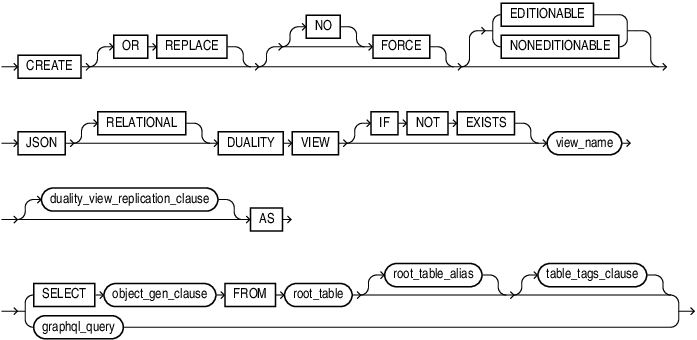
create_json_relational_duality_view::=
Description of the illustration create_json_relational_duality_view.gif
( graphql_query::= )
duality_view_replication_clause

Description of the illustration duality_view_replication_clause.gif
object_gen_clause::=

Description of the illustration object_gen_clause.gif
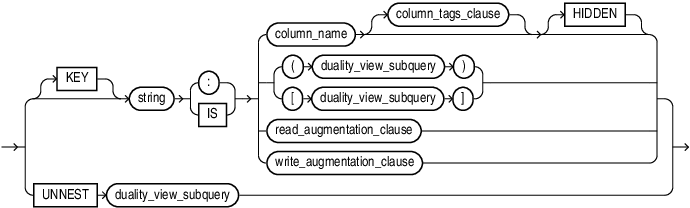
key_value_clause::=
Description of the illustration key_value_clause.gif
flex_clause::=

Description of the illustration flex_clause.gif
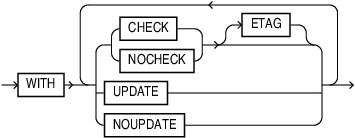
column_tags_clause::=
Description of the illustration column_tags_clause.gif
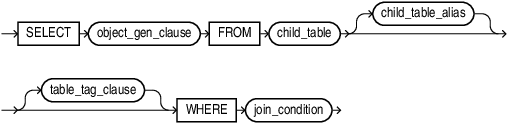
duality_view_subquery::=
Description of the illustration duality_view_subquery.gif
read_augmentation_clause::=
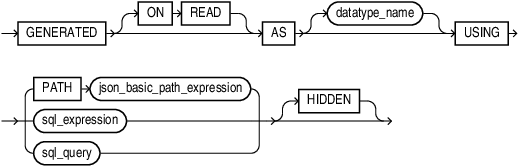
Description of the illustration read_augmentation_clause.gif
write_augmentation_clause::=
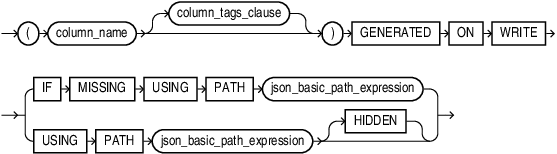
Description of the illustration write_augmentation_clause.gif
table_tags_clause::=
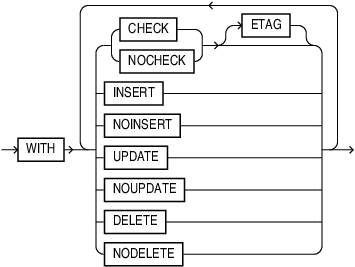
Description of the illustration table_tags_clause.gif
graphql_query::=
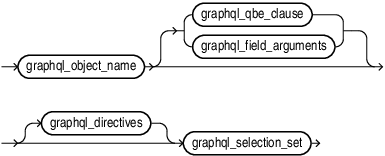
Description of the illustration graphql_query.gif
For complete syntax and semantics of graphql_query see GRAPHQL Table Function
Semantics
The JSON realtional duality view has only one column of data type JSON. The column contains the JSON object which is a representation of a application object. The column name is always DATA.
The duality view is read-only by default. This means that the following annotations are in effect: NOINSERT, NODELETE, NOUPDATE.
OR REPLACE
Specify OR REPLACE to re-create the view if it already exists. You can use this clause to change the definition of an existing view without dropping, re-creating, and regranting object privileges previously granted on it.
IF NOT EXISTS
Specifying IF NOT EXISTS has the following effects:
-
If the view does not exist, a new view is created at the end of the statement.
-
If the view exists, this is the view you have at the end of the statement. A new one is not created because the older one is detected.
You can have only one of OR REPLACE or IF NOT EXISTS in a statement at a time. Using both in the same statement results in the following error:
ORA-11541: REPLACE and IF NOT EXISTS cannot coexist in the same DDL statement.
Using IF EXISTS with CREATE results in ORA-11543: Incorrect IF NOT EXISTS clause for CREATE statement
duality_view_replication_clause
To enable logical replication on a duality view use CREATE JSON RELATIONAL DUALITY VIEW ENABLE LOGICAL REPLICATION.
To disable logical replication on a duality view use CREATE JSON RELATIONAL DUALITY VIEW DISABLE LOGICAL REPLICATION
Note:
On a multi instance RAC database, you must run the ALTER SYSTEM ENABLE RAC TWO_STAGE ROLLING UPDATES ALL DDL, before you can enable or disable logical replication.
You must run ALTER SYSTEM ENABLE RAC TWO_STAGE ROLLING UPDATES ALL after patching all the RAC instances.
After you run ALTER SYSTEM ENABLE RAC TWO_STAGE ROLLING UPDATES ALL you cannot perform an online downgrade (unpatch) of your RAC database to DBRU23.5 or lower. You must take a downtime.
On a single instance database, you do not need to run ALTER SYSTEM ENABLE RAC TWO_STAGE ROLLING UPDATES ALL.
root_table
root_table refers to the top level table which the duality view is defined on. It is the only table specified in the FROM clause of the top level SELECT statement.
key_value_clause
You must have one key named _id that points to the column(s) that identify the JSON document, usually a primary-key column.
See Document-Identifier Field for Duality Views of the JSON-Relational Duality Developer’s Guide.
table_tags_clause
You can mark the view as updatable using the following keyword inside a WITH clause:
-
WITH INSERT -
WITH UPDATE -
WITH DELETE
You can combine keywords together without commas, for example: WITH INSERT UPDATE
column_tags_clause
You can mark individual columns with WITH UPDATE or WITH NOUPDATE. This supercedes table-level annotation.
Column Properties for Updatability
If the FROM clause is marked with such keywords, then this sets the default for all columns of the table in the FROM clause. You can change the default setting on an individual column. If the FROM clause is specified as WITH INSERT UPDATE DELETE and a column overrides this default with NOUPDATE, then updates are not allowed.
Column Properties for ETAGs
Individual columns as well as a FROM clause can be specified to take part in the CHECK ETAG calculation or not. An ETAG is a hash value for all the columns’ values in one JSON object and is used to detect changes. A column without ETAG can be changed without this change impacting other operations. By default all columns participate in ETAG calculation. Using NOCHECK ETAG a column can be excluded from ETAG calculation.
graphql_query
You can create or replace a JSON relational duality view with object_name defined as a graphql_query The selection set defines the view’s logical JSON shape and field mappings. Optional QBE and field arguments constrain the underlying documents and rows included in the view.
Restrictions
-
You can have SQL style comments in the GraphQL query for duality views but not in the GraphQL table function.
-
Multi-line comments enclosed by three double quote are allowed in the GraphQL query for duality views but not in the GraphQL table function.
-
GraphQL variables are only supported in GraphQL table function.
-
GraphQL queries used in the table function or to define a duality view can include non-ascii characters in identifiers.
For complete syntax and semantics of graphql_query see GRAPHQL Table Function
Examples
See Also: Introduction To Car-Racing Duality Views Example of the JSON-Relational Duality Developer’s Guide.
Example 1: Create a Duality View of Orders
The following example is a view of an orders view object ORDERS_OV with the following information:
-
Order information such as order status from the
Orderstable -
A
CustomerInfosingleton descendant consisting of customer details from theCustomertable -
An
OrderItemsarray descendant consisting of a list of order items from theOrderItemstable. -
Each order item, in turn, consists of
ItemInfoandShipmentInfosingletons from theProductsandShipmenttables respectively.
CREATE OR REPLACE JSON RELATIONAL DUALITY VIEW ORDERS_OV AS
SELECT JSON { '_id'   : ord.order_id,
              'OrderTime' : ord.order_datetime,
	        'OrderStatus' : ord.order_status,
              'CustomerInfo' :
			  (SELECT JSON{'CustomerId'    : cust.customer_id,
	    	                      'CustomerName'  : cust.full_name,
                                  'CustomerEmail' : cust.email_address }
			   FROM CUSTOMERS cust
                     WHERE cust.customer_id = ord.customer_id),
              'OrderItems' : (SELECT JSON_ARRAYAGG(
					JSON { 'OrderItemId' : oi.line_item_id,
                                       'Quantity'    : oi.quantity,
                                       'ProductInfo' : <subquery from product>
                                	 'ShipmentInfo' : <subquery from shipments>)
                            })
                            FROM ORDER_ITEMS oi
                            WHERE ord.order_id = oi.order_id)
}
FROM ORDERS ord;
Example 2: Create an Updatable View
To make the view updatable, one has to add INSERT or UPDATE or DELETE or any combination of these to either the FROM clause or individual column. The following allows to update the order, only read the customer and insert and update (not delete) order items.
CREATE OR REPLACE JSON RELATIONAL DUALITY VIEW ORDERS_OV AS
SELECT JSON { '_id'     : ord.order_id,
              'OrderTime'.  : ord.order_datetime,
	         'OrderStatus' : ord.order_status,
              'CustomerInfo' :
		     (SELECT JSON{'CustomerId'    : cust.customer_id,
	    	                  'CustomerName'  : cust.full_name,
                             'CustomerEmail' : cust.email_address WITH NOCHECK}
			   FROM CUSTOMERS c WITH CHECK
                     WHERE cust.customer_id = ord.customer_id),
              'OrderItems' : (SELECT JSON_ARRAYAGG(
					JSON { 'OrderItemId' : oi.line_item_id,
                                       'Quantity'    : oi.quantity,
                                       'ProductInfo' : <subquery from product>
                                       'ShipmentInfo' : <subquery from shipments>)
                            })
                            FROM ORDER_ITEMS oi WITH INSERT UPDATE
                            WHERE ord.order_id = oi.order_id)
}
FROM ORDERS ord WITH INSERT UPDATE DELETE;