Creating a Property Graph Using PGQL
CREATE PROPERTY GRAPH is a PGQL DDL statement to create a PGQL property graph from the database tables.
The CREATE PROPERTY GRAPH statement starts with the name you give the graph, followed by a set of vertex tables and edge tables. The graph can have no vertex tables or edge tables (an empty graph), or vertex tables and no edge tables (a graph with only vertices and no edges), or both vertex tables and edge tables (a graph with vertices and edges). However, a graph cannot be specified with only edge tables and no vertex tables.
Optionally, you can also create a PGQL property graph from existing graphs. See Creating a PGQL Property Graph with the BASE_GRAPHS Clause for more information.
Note:
The following best practices are recommended when creating a PGQL property graph:
-
Ensure that a primary key constraint exist for a vertex or an edge key so that the graph does not contain duplicate vertex or edge keys.
-
Ensure that a foreign key constraint exists between the edge and the referenced vertex tables so that the graph does not contain edges with missing vertices.
-
Run the
pg.validate()function after creating the graph to verify that the vertex and edge table keys are unique and the source and destination of the edges exist.
pgqlStmt.execute("CALL pg.validate('<graph_name>')")For example, consider the bank_accounts and bank_transfers database tables created using the sample graph data in opt/oracle/graph/data directory. See Using Sample Graph Data for more information.
-
BANK_ACCOUNTS is a table with columns
id,name, andbalance. A row is added into this table for every new account. -
bank_transfers is a table with columns
txn_id,src_acct_id,dst_acct_id,description, andamount. A row is added into this table for every new transaction fromsrc_acct_idtodst_acct_id.
You can create a PGQL property graph using the database tables as shown:
CREATE PROPERTY GRAPH bank_graph
     VERTEX TABLES(
       bank_accounts AS accounts
         KEY(id)
         LABEL accounts
         PROPERTIES (id, name)
     )
     EDGE TABLES(
       bank_transfers AS transfers
         KEY (txn_id)
         SOURCE KEY (src_acct_id) REFERENCES accounts (id)
         DESTINATION KEY (dst_acct_id) REFERENCES accounts (id)
         PROPERTIES (description, amount)
     ) OPTIONS (PG_PGQL)
The following graph concepts are explained by mapping the database tables to the graph and using the preceding PGQL DDL statement:
-
Vertex tables: A table that contains data entities is a vertex table (for example,
bank_accounts).-
Each row in the vertex table is a vertex.
-
The columns in the vertex table are properties of the vertex.
-
The name of the vertex table is the default label for this set of vertices. Alternatively, you can specify a label name as part of the CREATE PROPERTY GRAPH statement.
-
-
Edge tables: An edge table can be any table that links two vertex tables, or a table that has data that indicates an action from a source entity to a target entity. For example, transfer of money from
FROM_ACCOUNT_IDtoTO_ACCOUNT_IDis a natural edge.-
Foreign key relationships can give guidance on what links are relevant in your data. CREATE PROPERTY GRAPH will default to using foreign key relationships to identify edges.
-
Some of the properties of an edge table can be the properties of the edge. For example, an edge from
src_acct_idtodst_acct_idcan have propertiesdescriptionandamount. -
The name of an edge table is the default label for the set of edges. Alternatively, you can specify a label name as part of the CREATE PROPERTY GRAPH statement.
-
-
Keys:
-
Keys in a vertex table: The key of a vertex table identifies a unique vertex in the graph. The key can be specified in the CREATE PROPERTY GRAPH statement; otherwise, it defaults to the primary key of the table. If there are duplicate rows in the table, the CREATE PROPERTY GRAPH statement will return an error.
-
Key in an edge table: The key of an edge table uniquely identifies an edge in the graph. The KEY clause specifying source and destination vertices uniquely identifies the source and destination vertex keys.
-
-
REFERENCES Clause: This connects the source and destination vertices of an edge to the corresponding vertex tables. Also, note the following:
-
The source and destination keys can reference the key of the vertex table. For example:
VERTEX TABLES ( bank_accounts KEY(id)) EDGE TABLES ( bank_transfers KEY (txn_id) SOURCE KEY (src_acct_id) REFERENCES accounts (id) DESTINATION KEY (dst_acct_id) REFERENCES accounts (id) ) -
The source and destination keys can reference any set of columns of the vertex table. In case the referenced columns do not match a
PRIMARYorUNIQUEkey, then you must ensure to maintain data integrity in the referenced columns.VERTEX TABLES ( vt KEY ( vt_c1 ) ) EDGE TABLES ( et SOURCE KEY ( et_c1 ) REFERENCES (vt_any_unique_key_column ))
-
-
Table aliases: Vertex and edge tables must have unique names. If you need to identify multiple vertex tables from the same relational table, or multiple edge tables from the same relational table, you must use aliases. For example, you can create two vertex tables
bank_accountsandaccountsfrom one tablebank_accounts, as shown:CREATE PROPERTY GRAPH bank_transfers VERTEX TABLES (bank_accounts KEY(id) bank_accounts AS accounts KEY(id))In case any of your vertex and edge table share the same name, then you must again use a table alias. In the following example, table alias is used for the edge table, DEPARTMENTS, as there is a vertex table referenced with the same name:
CREATE PROPERTY GRAPH hr VERTEX TABLES ( employees KEY(employee_id) PROPERTIES ARE ALL COLUMNS, departments KEY(department_id) PROPERTIES ARE ALL COLUMNS ) EDGE TABLES ( departments AS managed_by SOURCE KEY ( department_id ) REFERENCES departments ( department_id ) DESTINATION employees PROPERTIES ARE ALL COLUMNS )OPTIONS (PG_PGQL) -
Properties: The vertex and edge properties of a graph are derived from the columns of the vertex and edge tables respectively and by default have the same name as the underlying table columns. However, you can choose a different property name for each column. This helps to avoid conflicts when two tables have the same column name but with different data types.
In the following example, the vertex properties
idandnameare renamed toacct_noandacct_namerespectively:CREATE PROPERTY GRAPH bank_graph VERTEX TABLES ( bank_accounts AS accounts LABEL accounts PROPERTIES (id AS acct_no, name AS acct_name) )
For more details on the CREATE PROPERTY GRAPH statement, see the PGQL Specification.
Refer to the following table for creating a property graph:
Table: CREATE PROPERTY GRAPH Statement Support
| Method | More Information |
|---|---|
Create a property graph in the graph server (PGX) using the oracle.pgx.api Java package. |
Java APIs for Executing CREATE PROPERTY GRAPH Statements |
Create a property graph in the graph server (PGX) using the pypgx.api Python package. |
Python APIs for Executing CREATE PROPERTY GRAPH Statements |
| Create a PGQL property graph in your database. | Creating a PGQL Property Graph |
-
Creating a PGQL Property Graph with the BASE_GRAPHS Clause
You can create a PGQL property graph by providing a list of existing PGQL property graphs. -
Creating a PGQL Property Graph with Arbitrary Property Expressions
You can create a PGQL property graph with vertex and edge properties mapped to arbitrary property expressions.
Creating a PGQL Property Graph with the BASE_GRAPHS Clause
You can create a PGQL property graph by providing a list of existing PGQL property graphs.
You can specify the BASE GRAPHS clause in the CREATE PROPERTY GRAPH DDL statement for specifying one or more existing PGQL property graphs from which you wish to create the new PGQL property graph. It is allowed to specify the BASE GRAPHS clause without specifying the VERTEX TABLES and EDGE TABLES clauses.
The syntax of the BASE GRAPHS clause in the CREATE PROPERTY GRAPH statement is as shown:
CreatePropertyGraph   ::= 'CREATE' 'PROPERTY' 'GRAPH' GraphName
                           BaseGraphs?
                           VertexTables?
                           EdgeTables?

BaseGraphs            ::= 'BASE' 'GRAPHS' '(' BaseGraph ( ',' BaseGraph )* ')'

BaseGraph             ::= SchemaQualifiedName

ElementTablesClause   ::=   AllElementTables
                          | ElementTablesList

AllElementTables      ::= 'ALL' 'ELEMENT' 'TABLES' ExceptElementTables?

ExceptElementTables   ::= 'EXCEPT' '(' ElementTableReference ( ',' ElementTableReference )* ')'

ElementTablesList     ::= '(' ElementTable ( ',' ElementTable )* ')'

ElementTable          ::= ElementTableReference TableAlias?

ElementTableReference ::= Identifier
The BASE GRAPHS clause option allows you to duplicate a graph using a different name.
CREATE PROPERTY GRAPH <new_graph>
  BASE GRAPHS (<old_graph>)
  OPTIONS ( PG_PGQL )
Also, note that once the new_graph is created, it does not have any dependency on old_graph. This implies that updating or deleting the old_graph has no impact on the new_graph.
Consider the following example schema:
Figure: Example Schema
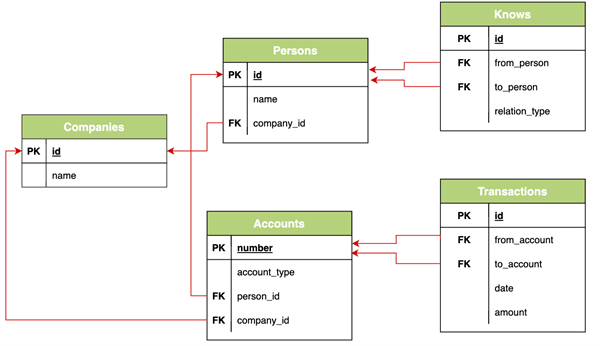
Description of the illustration base_graphs_example_schema.png
Assume that the following two graphs, social_network and bank_transactions, are created from the preceding schema:
Figure: Graphs Created from the Example Schema
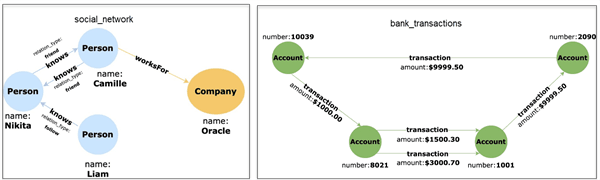
Description of the illustration bank_txn_and_social_nw_graph.png
Using the BASE GRAPHS clause, you can then create a new PGQL property graph by establishing a relationship between both the preceding graphs as shown:
Figure: Financial_Transactions Graph
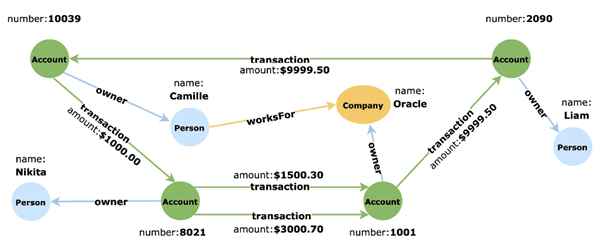
Description of the illustration base_graph_diagram.png
To obtain this new graph based on the social_network and bank_transactions graphs:
-
Specify the names of the two graphs,
social_networkandbank_transactions, in theBASE GRAPHSclause. If a base graph does not exist in the current schema, then the user must specify the schema name. -
Eliminate the
Knowsedge in thesocial_networkgraph. This can be achieved by using theALL ELEMENT TABLES EXCEPTclause and specifying thetable_nameof that edge. Alternatively, you can use theELEMENT TABLESclause and specify only the two tables,PersonsandCompanies. -
Create a new edge between the
Accountsvertex in thebank_transactionsgraph and thePersonsvertex in thesocial_networkgraph. -
Create a new edge between the
Accountsvertex in thebank_transactionsgraph and theCompaniesvertex in thesocial_networkgraph.
The optimized CREATE PROPERTY GRAPH statement with the BASE GRAPHS clause to create the new PGQL property graph is as shown:
CREATE PROPERTY GRAPH financial_transactions
  BASE GRAPHS(
    bank_transactions,
    social_network ALL ELEMENT TABLES EXCEPT ( knows )
  )
  EDGE TABLES(
    Accounts AS PersonOwner
      SOURCE KEY ( "number" ) REFERENCES Accounts ( "number" )
      DESTINATION Persons
      LABEL owner NO PROPERTIES,
    Accounts AS CompanyOwner
      SOURCE KEY ( "number" ) REFERENCES Accounts ( "number" )
      DESTINATION Companies
      LABEL owner NO PROPERTIES
  ) OPTIONS ( PG_PGQL )
Creating a PGQL Property Graph with Arbitrary Property Expressions
You can create a PGQL property graph with vertex and edge properties mapped to arbitrary property expressions.
For instance, consider the following example data. The table contains emp_dtls as a JSON column.
CREATE TABLE emp_data (
  emp_id NUMBER GENERATED ALWAYS AS IDENTITY (START WITH 1 INCREMENT BY 1),
  emp_dtls JSON,
  CONSTRAINT emp_pk PRIMARY KEY (emp_id));

INSERT INTO emp_data (emp_dtls)
       VALUES ('{"name":"John","department":"IT","role":"Software Developer"}');

INSERT INTO emp_data (emp_dtls)
       VALUES ('{"name":"Mary","department":"HR","role":"HR Manager"}');

INSERT INTO emp_data (emp_dtls)
       VALUES ('{"name":"Bob","department":"IT","role":"Technical Consultant"}');

INSERT INTO emp_data (emp_dtls)
       VALUES ('{"name":"Alice","department":"HR","role":"HR Assistant"}');
You can then create a PGQL property graph with vertex and edge properties mapped to JSON data using the JSON_VALUE function.
CREATE PROPERTY GRAPH g
VERTEX TABLES (
  emp_data PROPERTIES (
           JSON_VALUE(emp_dtls, '$.name') AS name,
           JSON_VALUE(emp_dtls, '$.department') AS department,
           JSON_VALUE(emp_dtls, '$.role') AS role)
) OPTIONS(PG_PGQL)
Finally, you can query the vertex and edge properties of the graph as shown:
SELECT *
FROM GRAPH_TABLE ( g
  MATCH (n IS emp_data)
  COLUMNS (n.name, n.department, n.role) )
The query produces the following output:
+-------------------------------------------+
| NAME  | DEPARTMENT | ROLE                 |
+-------------------------------------------+
| John  | IT         | Software Developer   |
| Mary  | HR         | HR Manager           |
| Bob   | IT         | Technical Consultant |
| Alice | HR         | HR Assistant         |
+-------------------------------------------+