Creating a SQL Property Graph
Using the CREATE PROPERTY GRAPH DDL statement, you can create a property graph object directly in an Oracle AI Database.
Example: Creating a SQL Property Graph Using the CREATE PROPERTY GRAPH DDL Statement
This example creates a SQL property graph, students_graph, using persons, university, friends, and student_of as the underlying database tables for the graph.
In order to run this example, ensure the following:
-
Set up the sample tables in the database as explained in Setting Up Sample Data in the Database.
-
See Granting System and Object Privileges for SQL Property Graphs to ensure you have the required privileges to create a SQL property graph.
The following diagram illustrates the students_graph:
Figure: STUDENTS_GRAPH
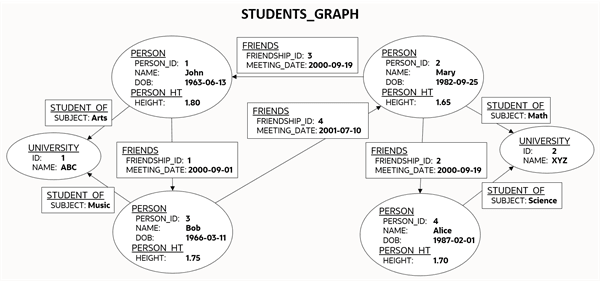
Description of the illustration students_graph.png
The corresponding SQL property graph DDL statement is as shown:
CREATE PROPERTY GRAPH students_graph
  VERTEX TABLES (
    persons KEY (person_id)
      LABEL person
        PROPERTIES (person_id, name, birthdate AS dob)
      LABEL person_ht
        PROPERTIES (height),
    university KEY (id)
  )
  EDGE TABLES (
    friends
      KEY (friendship_id)
      SOURCE KEY (person_a) REFERENCES persons(person_id)
      DESTINATION KEY (person_b) REFERENCES persons(person_id)
      PROPERTIES (friendship_id, meeting_date),
    student_of
      KEY (s_id)
      SOURCE KEY (s_person_id) REFERENCES persons(person_id)
      DESTINATION KEY (s_univ_id) REFERENCES university(id)
      PROPERTIES (subject)
  );
On execution, the preceding example creates a SQL property graph object that uses the tables in your schema to define its graph element tables. Note that the creation of the new SQL property graph object, results only in the storage of the property graph metadata, and there is no copying of data from the underlying database objects into the graph element tables. This implies that when querying a SQL property graph, all the graph queries are performed on the current graph data in the database. You may also specify another schema to contain the SQL property graph provided that you have sufficient privileges.
The graph definition in the example creates a graph that comprises:
-
Two vertex graph element tables:
-
persons: The table has an explicitly defined unique key,
person_id, and it is associated with two labels:-
person: This label exposesperson_id,nameandbirthdateas properties. -
person_ht: This label exposes only theheightproperty.
-
-
university: The label for the table is implicitly inferred and by default all visible columns of the underlying database table are exposed as properties.
-
-
Two edge graph element tables:
-
friends: The edge table references
personsas the underlying database table for both the source and destination vertex tables. The source and destination keys (person_aandperson_b) for the edge table correspond to the unique key of the source and destination vertex tables respectively. The label for the edge table is automatically inferred from the name of the graph element table (friends, in this case) and exposesfriendship_idandmeeting_dateas properties. -
student_of: The edge table references
personsanduniversityas the underlying database tables for the source and destination vertex tables respectively. The source and destination keys (s_person_idands_univ_id) for the edge table correspond to the unique key of the source and destination vertex tables respectively. The label for the edge table is automatically inferred from the name of the graph element table (student_of, in this case) and exposessubjectas the property.
-
It is important to note that once a SQL property graph is created, you cannot alter the graph definition. However, you can redefine a SQL property graph using the OR REPLACE clause in the CREATE PROPERTY GRAPH DDL statement. You can use this clause to change the definition of an existing SQL property graph without dropping, re-creating, and regranting object privileges that were earlier granted on it.
See Also:
- Creating a SQL Property Graph Using Database Views
- CREATE PROPERTY GRAPH in Oracle AI Database SQL Language Reference
The following sections explain more on the concepts of the graph element tables, keys, labels and properties:
-
About Vertex and Edge Graph Element Tables
The vertices and edges of a SQL property graph defined from the underlying database objects are stored in the graph element tables. -
About Vertex and Edge Table Keys
Each vertex and edge table used in a SQL property graph definition must have a key in order to identify a unique vertex or an edge in a SQL property graph. -
About Labels and Properties
Labels can be associated to one or more graph element tables and they enrich the graph definition. A label can be defined with or without properties. -
Using Graph Options to Create SQL Property Graphs
You can use graph options to control the behavior of a SQL property graph at the time of its creation. -
Granting System and Object Privileges for SQL Property Graphs
Learn about the new system and object privileges for performing operations on SQL property graphs. -
Retrieving Metadata for SQL Property Graphs
The metadata of SQL property graphs can be accessed through a series of data dictionary views. -
Creating a SQL Property Graph Using Database Views
You can create SQL property graphs using database views or synonyms that reference views. -
Special Instructions for Creating SQL Property Graphs with Advanced Table Features
Review the special instructions when using certain table types and features to create a SQL property graph. -
Limitations of Creating a SQL Property Graph
This section lists a few restrictions that apply when creating a SQL property graph.
About Vertex and Edge Graph Element Tables
The vertices and edges of a SQL property graph defined from the underlying database objects are stored in the graph element tables.
A graph element table can either be a vertex table or an edge table.
Refer to the graph definition in Example: Creating a SQL Property Graph Using the CREATE PROPERTY GRAPH DDL Statement to easily understand the following sections:
Vertex graph element table
-
A vertex table is defined using the
VERTEX TABLESclause. -
Each row in a vertex table corresponds to a vertex of the graph.
-
A vertex graph element table has a name that is independent from the name of the underlying database object.
-
By default, the name of the vertex graph element table is the same as the name of the underlying database object.
-
A vertex table name must be unique for a graph. In case you want to define a SQL property graph with multiple graph element tables from the same database object, then you must specify an alternate graph element table name using the
ASclause.
Edge graph element table
-
An edge table is defined using the
EDGE TABLESclause. -
It specifies a direct relationship between the source vertex table and the destination vertex table using the
SOURCEandDESTINATIONkeywords thatREFERENCESthe respective vertex tables. -
Each row in an edge table corresponds to an edge of the graph.
-
An edge graph element table has a name that is independent from the name of the underlying database object.
-
By default, the name of the edge graph element table is the same as the name of the underlying database object.
-
The edge table name must be unique for a graph. An edge table name cannot be shared with a vertex table or another edge table.
About Vertex and Edge Table Keys
Each vertex and edge table used in a SQL property graph definition must have a key in order to identify a unique vertex or an edge in a SQL property graph.
The key is defined from one or more columns of the underlying table. The key may be implicitly inferred based on an existing primary key or a unique constraint defined on the underlying table, or explicitly defined. The key should be unique.
However, note that the uniqueness constraint for the key column is required if you create the graph in ENFORCED MODE. Otherwise, you can create the graph in TRUSTED MODE using key columns that do not have a uniqueness constraint. See Using Graph Options to Create SQL Property Graphs for more information on the different modes that can be applied during graph creation.
Vertex or edge table keys can be defined for any of the following built-in data type columns:
-
VARCHAR2 -
NVARCHAR2 -
NUMBER -
BINARY_FLOAT -
BINARY_DOUBLE -
CHAR -
NCHAR -
DATE -
INTERVAL(bothYEAR TO MONTHandDAY TO SECOND) -
TIMESTAMP
Note that the TIMESTAMP WITH TIME ZONE data type is not supported.
Refer to the SQL property graph definition in Example: Creating a SQL Property Graph Using the CREATE PROPERTY GRAPH DDL Statement to easily understand the following sections:
Vertex Table Key
-
By default, the key for a vertex table is automatically identified from a single
PRIMARY KEYorUNIQUEkey constraint on the underlying database object. If both exist, then thePRIMARY KEYconstraint takes precedence over theUNIQUEkey constraint. -
If the vertex table key is automatically inferred based on a single
UNIQUEkey, then the set of columns in thatUNIQUEkey must also beNOT NULL. -
If the underlying database object does not contain a unique constraint to enforce uniqueness, then you must explicitly define the
KEYsubclause in theVERTEX TABLESclause, to identify the columns that define a unique key for the vertex table. Note that the column names must match the column names of the underlying database object. -
Composite vertex table keys are also supported.
Edge Table Key
-
By default, the key for an edge table is automatically identified from a single
PRIMARY KEYorUNIQUEkey constraint on the underlying database object. If both exist, then thePRIMARY KEYconstraint takes precedence over theUNIQUEkey constraint. -
If the edge table key is automatically inferred based on a single
UNIQUEkey, then the set of columns in thatUNIQUEkey must also beNOT NULL. -
If the underlying database object does not contain a unique constraint to enforce uniqueness, then you must explicitly define the
KEYsubclause in theEDGE TABLESclause, to identify the columns that define a unique key for the edge table. Note that the column names must match the column names of the underlying database object. -
By default, the
SOURCEandDESTINATIONtable keys are automatically obtained from a singleFOREIGN KEYconstraint between the edge table and the underlying source and destination tables respectively. -
However, you must explicitly specify the
KEYsubclause for theSOURCEandDESTINATIONvertex tables, if any of the following applies:-
There is no
FOREIGN KEYconstraint between the edge and the referenced vertex tables. -
There are multiple
FOREIGN KEYconstraints between the edge and the referenced vertex tables. -
The underlying database objects for the edge table and its source and destination vertex tables are materialized views or external tables.
-
Note: All restrictions that apply for primary key constraints on a database object also apply on vertex and edge table keys.
About Labels and Properties
Labels can be associated to one or more graph element tables and they enrich the graph definition. A label can be defined with or without properties.
You can optionally define LABELS and PROPERTIES for the vertex and edge tables in your graph. When not specified, the graph element tables are automatically assigned a label with the name of the graph element table, and all visible columns are exposed as properties, using the column name as property name.
Refer to the SQL property graph definition in Example: Creating a SQL Property Graph Using the CREATE PROPERTY GRAPH DDL Statement to easily understand the following sections:
Labels
-
By default, the vertex and edge tables are automatically assigned a label with the name of the respective graph element tables.
-
The
DEFAULT LABELsubclause can also be used to explicitly apply the preceding rule. -
You can explicitly assign a new label name to a vertex or an edge graph element table using the
LABELsubclause. -
Multiple labels can be associated with the same graph element table.
-
The same label can be shared with multiple graph element tables.
A label can be associated with more than one graph element table (shared label) provided the following conditions apply:
-
All graph element tables that share this label declare the same set of property names. Note that the property order does not matter in the label definition.
-
Different columns or value expression exposed by the same property name have union compatible types.
-
-
Also, refer to Type Compatibility Rules for Determining Property Types for more information.
Properties
-
By default, all the visible columns of a vertex or an edge table are automatically exposed as properties if there is no label declaration or if the
DEFAULT LABELsubclause is used in the property graph definition. The property names are the same as the column names of the underlying database object. -
Columns of any Oracle built-in data types can be exposed as properties of labels in a SQL property graph. This includes virtual columns, JSON data type columns,
CLOBandBLOBdata types.However, the following are not supported:
-
XMLTypeandSDO_GEOMETRYtype columns are not supported. -
SQL/XML value expressions over
XMLTypecolumn stored as binary XML, andSDO_GEOMETRYbuilt-in functions overSDO_GEOMETRYobject datatype column are allowed as long as they return a value of a type supported for properties. Any general object data type and user defined data type and their corresponding SQL operator value expression over them are not supported. -
Columns of type
ANYTYPEcannot be exposed as property.
-
-
At the time of the SQL property graph creation, the data type of a vertex or edge property is determined as follows:
-
Distinct properties associated with distinct labels have the same data type as the underlying database columns.
-
Properties with the same name coming from different labels have the same data type as the underlying database columns. However, you must use the
ALLOW MIXED PROPERTY TYPESoption when creating the SQL property graph.See Using Graph Options to Create SQL Property Graphs for an example using a shared property name.
-
Properties with the same name coming from the same label will have the UNION ALL compatible type of the underlying database columns. In addition, you must use the
ALLOW MIXED PROPERTY TYPESoption when creating the SQL property graph:-
See Using Graph Options to Create SQL Property Graphs for an example using a shared property name in a shared label.
-
See Type Compatibility Rules for Determining Property Types for more information on the type rules that determine the property type.
-
-
-
If you want to explicitly define the vertex or edge properties for a label, then the following property declarations are supported:
-
PROPERTIES [ARE] ALL COLUMNS: To expose all the visible columns of the graph element table as label properties. However, if any columns are added or deleted in the source database object, after the creation of the SQL property graph, then these will not be reflected on the graph.
-
PROPERTIES [ARE] ALL COLUMNS EXCEPT(<column_names_list>): To expose all the visible columns of the graph element table as label properties except those that are explicitly listed.
-
PROPERTIES(<list_of_column_names>): To expose only those columns of the graph element table that are explicitly listed as label properties. The property name defaults to the column name.
-
PROPERTIES(<column_name AS property_name,...>): Same as the preceding option. However, if
AS property_nameis appended to thecolumn_name, thenproperty_nameis used as the property name. -
PROPERTIES(<column_expressions AS property_name,...>): To declare a property which is an expression over columns. The
ASclause is mandatory in this case. A value expression can either be a SQL operator expression defined over scalar data type columns or JSON expression. See JSON Support in SQL Property Graphs for an example using JSON expressions. -
NO PROPERTIES: No columns are exposed for a label.
-
-
Peudo-columns cannot be exposed as a label property.
Using Graph Options to Create SQL Property Graphs
You can use graph options to control the behavior of a SQL property graph at the time of its creation.
Graph options can be specified at the end of the CREATE PROPERTY GRAPH DDL statement using the OPTIONS clause. You can use either the MODE or MIXED PROPERTY TYPES option, or both as required.
Using an Option to Specify the Mode of the Graph
You can specify the MODE of the graph by using one of the following option values at the time of creating the SQL property graph:
-
ENFORCED MODE: This ensures that there is a dependency to the unique key constraint on the underlying database tables. If used when creating a SQL property graph, the
CREATE PROPERTY GRAPHstatement will throw an error if any of the following conditions apply:-
The specified vertex or edge table
KEYfor the graph element table is neither aPRIMARY KEYnor aUNIQUEkey defined onNOT NULLcolumns. -
There is no explicit vertex or edge table
KEYdefined for the graph element table and also the system is unable to automatically identify the default vertex or edge key, as there is no singlePRIMARY KEYor a singleUNIQUEkey constraint onNOT NULLcolumns on the underlying database table. -
For a specified edge source key and corresponding source vertex key or for a specified edge destination key and corresponding destination vertex key, there does not exist a corresponding
FOREIGN KEYbetween the underlying tables. -
An edge table has no explicit keys for the source or for the destination and the system is unable to implicitly infer the keys, as there is no single
FOREIGN KEYconstraint between the edge table and the referenced source (or destination) vertex table.
For example, consider the following
t1table in the database that does not have any primary key, unique key or aNOT NULLconstraint.SQL> CREATE TABLE t1 (id NUMBER, name VARCHAR2(10)); INSERT INTO t1 (id, name) VALUES (1,'John'); INSERT INTO t1 (id, name) VALUES (2, 'Mary');Create a SQL property graph using
OPTIONS(ENFORCED MODE)as shown:CREATE PROPERTY GRAPH g VERTEX TABLES ( t1 KEY (id) LABEL t PROPERTIES ARE ALL COLUMNS ) OPTIONS(ENFORCED MODE);The graph creation fails with the following error as there are no key constraints to enforce uniqueness:
ORA-42434: Columns used to define a graph element table key must be NOT NULL in ENFORCED MODEIf you omit the
KEYclause in the preceding graph definition, then the following error is thrown:ORA-42402: cannot infer key for graph element table T1 -
-
TRUSTED MODE (default): There is no dependency to the unique key constraint on the underlying database tables when using the
TRUSTEDmode. Therefore, the preceding example when run inTRUSTEDmode will not throw any error. This implies that if you choose to use this option, then you must guarantee the uniqueness of primary keys on each of the graph element tables, as well as valid foreign key references between an edge table and its source and destination tables. Otherwise, your graph query results may be incorrect as the expected guarantees are not met.
Using an Option to Allow or Disallow Different Property Types for Shared Property Names
You can specify the MIXED PROPERTY TYPES options using one of the following values:
-
ALLOW MIXED PROPERTY TYPES: This ensures that:
-
If two properties with the same name belong to different labels, then they can have completely different types.
For example, in addition to the sample tables
personsandstudents(see Setting Up Sample Data in the Database), create the following additional table:CREATE TABLE t2 (id NUMBER, height VARCHAR2(4), CONSTRAINT t2_pk PRIMARY KEY (id)); INSERT INTO t2 (id, height) VALUES (1, '1.80'); INSERT INTO t2 (id, height) VALUES (2, '1.65'); CREATE TABLE t3 (id NUMBER, height BINARY_DOUBLE, CONSTRAINT t3_pk PRIMARY KEY (id)); INSERT INTO t3 (id, height) VALUES (1, 1.80); INSERT INTO t3 (id, height) VALUES (2, 1.65);Run the following
CREATE PROPERTY GRAPHDDL statement which uses three distinct labels for the same property name,height.CREATE PROPERTY GRAPH g1 VERTEX TABLES ( persons LABEL person PROPERTIES (name, height), t2 LABEL t2 PROPERTIES (height), t3 LABEL t3 PROPERTIES (height) )OPTIONS(ALLOW MIXED PROPERTY TYPES);When the graph is created, the property type for
heightin the vertex tables associated with:-
LABEL personisFLOAT -
LABEL t2isVARCHAR -
LABEL t3isBINARY_DOUBLE
However, when querying this graph, the property type for
heightis dependent on the label constraint used in the SQL graph query. See Accessing Label Properties for more information. -
-
If you are sharing property names inside shared labels, then they should be all union compatible types.
For example, run the following
CREATE PROPERTY GRAPHDDL statement where the property nameheightis used inside the shared labelt:CREATE PROPERTY GRAPH g2 VERTEX TABLES ( persons LABEL t PROPERTIES (height), t2 LABEL t PROPERTIES (height) )OPTIONS(ALLOW MIXED PROPERTY TYPES);
The graph creation fails as the column
heightin the tablespersonsandt2has the data typeFLOATandVARCHARrespectively which are union incompatible. Therefore, the following error is thrown:ORA-42414: cannot use mixed type for property HEIGHT of label THowever, the following graph will get created successfully as
FLOATandBINARY_DOUBLEbelong to the numeric group and are union compatible. -
CREATE PROPERTY GRAPH g3
   VERTEX TABLES (
      persons
        LABEL t PROPERTIES (height),
      t3
        LABEL t PROPERTIES (height)
   )OPTIONS(ALLOW MIXED PROPERTY TYPES);
See Type Compatibility Rules for Determining Property Types for more information.
-
DISALLOW MIXED PROPERTY TYPES (default): This ensures that a property with the same name should strictly be the same data type. This applies to all labels irrespective of whether they are associated with a single or multiple graph element tables.
For example, run the following DDL statement using
personsandt2as the underlying database tables:CREATE PROPERTY GRAPH g4 VERTEX TABLES ( persons LABEL person PROPERTIES (name, height), t2 LABEL t2 PROPERTIES (height) );The preceding code uses the default
DISALLOW MIXED PROPERTY TYPESgraph option and therefore throws an error as mixed property types are used in the graph definition:ORA-42414: cannot use mixed type for property HEIGHT of label T2
The following table summarizes compatibility rules with respect to the MIXED PROPERTY TYPES options
| Description | ALLOW | DISALLOW |
|---|---|---|
| Properties with the same name exposed by shared labels | Union-compatible | Types must match |
| Shared properties | Any | Types must match |
In the preceding table:
-
Properties with the same name exposed by shared labels: A label with the same name can be associated with more than one graph element table.
-
Shared properties: A property with the same name can be exposed by different labels.
Granting System and Object Privileges for SQL Property Graphs
Learn about the new system and object privileges for performing operations on SQL property graphs.
Table: System Privileges for SQL Property Graph Objects
| System Privileges | Description |
|---|---|
CREATE PROPERTY GRAPH |
To create a SQL property graph in the grantee’s schema. |
CREATE ANY PROPERTY GRAPH |
To create a SQL property graph in any schema except SYS and AUDSYS. |
ALTER PROPERTY GRAPH |
To alter a SQL property graph in the grantee’s schema. |
ALTER ANY PROPERTY GRAPH |
To alter a SQL property graph in any schema except SYS and AUDSYS. |
READ PROPERTY GRAPH |
To query a SQL property graph in the grantee’s schema. |
READ ANY PROPERTY GRAPH |
To query a SQL property graph in any schema except SYS and AUDSY. |
SELECT PROPERTY GRAPH |
To query a SQL property graph in the grantee’s schema. |
SELECT ANY PROPERTY GRAPH |
To query a SQL property graph in any schema except SYS and AUDSY. |
DROP PROPERTY GRAPH |
To drop a SQL property graph in the grantee’s schema. |
DROP ANY PROPERTY GRAPH |
To drop a SQL property graph in any schema except SYS and AUDSYS. |
COMMENT PROPERTY GRAPH |
To add a comment to a SQL property graph in the grantee’s schema. |
COMMENT ANY PROPERTY GRAPH |
To add a comment to a SQL property graph in any schema except SYS and AUDSYS. |
Table: Object Privileges for SQL Property Graphs
| Object Privileges | Description |
|---|---|
ALTER |
To alter a SQL property graph. |
READ |
To query a SQL property graph with a SQL graph query. |
SELECT |
To query a SQL property graph with a SQL graph query. |
Note that the SELECT privilege behaves exactly as the READ privilege for the SQL property graph object. It is mainly present for compatibility with the SQL standards for a property graph object.
The following shows the examples for granting and revoking the SQL property graph related privileges. Ensure you have SYSDBA access to grant and revoke these privileges:
GRANT CREATE PROPERTY GRAPH, CREATE ANY PROPERTY GRAPH,
      ALTER ANY PROPERTY GRAPH, DROP ANY PROPERTY GRAPH,
      READ ANY PROPERTY GRAPH TO <graphuser>;
REVOKE CREATE PROPERTY GRAPH, CREATE ANY PROPERTY GRAPH,
ALTER ANY PROPERTY GRAPH, DROP ANY PROPERTY GRAPH,
READ ANY PROPERTY GRAPH FROM <graphuser>;You can share your SQL property graph in the database with another user as shown.
GRANT SELECT ON PROPERTY GRAPH <graph_name> TO <schema_user>;Retrieving Metadata for SQL Property Graphs
The metadata of SQL property graphs can be accessed through a series of data dictionary views.
The following table provides a complete list of the data dictionary views that you can access to retrieve the metadata for SQL property graphs. Note that the metadata for each category in the table exists across ALL_ , USER_, and DBA_ view set. Depending upon your level of privilege, you can access the corresponding view.
Table: List of Data Dictionary Views to Retrieve Metadata for SQL Property Graphs
| View Name | Description |
|---|---|
| To describe all the property graphs in the database. | |
| To describe all the graph element tables of the property graphs in the database. | |
| To describe all the columns used to define the edge relationships. | |
| To describe all the columns used as the key for the graph element tables. | |
| To describe labels of property graphs in the database. | |
| To describe the properties of all the labels of the property graphs in the database. | |
| To describe all the column expressions used to define the properties of labels. | |
| To describe all the labels of all the graph element tables of the property graphs in the database. | |
| To display comments on the property graphs that are accessible to the current user. |
The following example retrieves the graph element tables that were defined for the SQL property graph (students_graph) created in Creating a SQL Property Graph.
SQL> SELECT * FROM USER_PG_ELEMENTS;

GRAPH_NAME           ELEMENT_NAME    ELEMENT_KIND    OBJECT_OWNER    OBJECT_NAME
-------------------- --------------- --------------- --------------- ---------------
STUDENTS_GRAPH       PERSONS         VERTEX          GRAPHUSER       PERSONS
STUDENTS_GRAPH       UNIVERSITY      VERTEX          GRAPHUSER       UNIVERSITY
STUDENTS_GRAPH       FRIENDS         EDGE            GRAPHUSER       FRIENDS
STUDENTS_GRAPH       STUDENT_OF      EDGE            GRAPHUSER       STUDENT_OF
Retrieving SQL Creation DDL Using the DBMS_METADATA Package
You can retrieve the creation DDL for a SQL property graph using the DBMS_METADATA package.
The following example displays the DDL for the graph created in Creating a SQL Property Graph using the DBMS_METADATA package.
SQL> SELECT DBMS_METADATA.GET_DDL('PROPERTY_GRAPH', 'STUDENTS_GRAPH') FROM DUAL;

  CREATE PROPERTY GRAPH "GRAPHUSER"."STUDENTS_GRAPH"
  VERTEX TABLES (
   "GRAPHUSER"."PERSONS" AS "PERSONS" KEY ("PERSON_ID")
      LABEL PERSON PROPERTIES ("PERSON_ID", "NAME", "BIRTHDATE" AS "DOB")
      LABEL PERSON_HT PROPERTIES ("HEIGHT"),
   "GRAPHUSER"."UNIVERSITY" AS "UNIVERSITY" KEY ("ID")
      PROPERTIES ("ID", "NAME") )
  EDGE TABLES (
   "GRAPHUSER"."FRIENDS" AS "FRIENDS" KEY ("FRIENDSHIP_ID")
      SOURCE KEY("PERSON_A") REFERENCES PERSONS ("PERSON_ID")
      DESTINATION KEY("PERSON_B") REFERENCES PERSONS ("PERSON_ID")
     PROPERTIES ("FRIENDSHIP_ID", "MEETING_DATE"),
   "GRAPHUSER"."STUDENT_OF" AS "STUDENT_OF" KEY ("S_ID")
      SOURCE KEY("S_PERSON_ID") REFERENCES PERSONS ("PERSON_ID")
      DESTINATION KEY("S_UNIV_ID") REFERENCES PERSONS ("ID")
     PROPERTIES ("SUBJECT") )
  OPTIONS (TRUSTED MODE, DISALLOW MIXED PROPERTY TYPES)
Creating a SQL Property Graph Using Database Views
You can create SQL property graphs using database views or synonyms that reference views.
Views defined on database tables (single or multiple tables), hybrid partitioned tables, database links, and object views can be used for creating SQL property graphs. Also, the following views are supported for creating SQL property graphs:
-
Views using or projecting aggregates and window functions
-
Views involving polymorphic table functions
-
View containing PL/SQL functions
-
Views on table functions (such as
JSON_TABLE,XMLTABLE, and pipelined table functions) -
Also, see Special Instructions for Creating SQL Property Graphs with Advanced Table Features for information about additional supported views.
When using views to define vertex or edge graph element tables in the CREATE PROPERTY GRAPH DDL statement, note the following:
-
The
KEYcolumns must be defined for the graph element tables and those columns must be included in the views output. -
The
PROPERTIESclause can reference only the respective view. Therefore use only the view column names for defining properties. -
You must have the
SELECTprivilege on views that you do not own.
The following examples describe a few scenarios on creating SQL property graphs using views. Ensure you have the required privileges to create a SQL property graph as described in Granting System and Object Privileges for SQL Property Graphs.
Example: Creating a SQL Property Graph Using Views on Database Tables
This example creates tech_students and student_profiles views from student_of and persons database tables respectively. See Setting Up Sample Data in the Database for the initial set up of these database tables.
CREATE or REPLACE VIEW tech_students AS
  SELECT * FROM student_of a  WHERE a.subject = 'Math' or a.SUBJECT= 'Science';

CREATE or REPLACE VIEW student_profiles AS
  SELECT PERSON_ID, NAME, BIRTHDATE FROM PERSONS;
Using the preceding views, the example creates a SQL property graph using the following CREATE PROPERTY GRAPH DDL statement.
CREATE OR REPLACE PROPERTY GRAPH students
  VERTEX TABLES (
    student_profiles KEY (person_id)
      PROPERTIES ARE ALL COLUMNS,
    university KEY (id)
      PROPERTIES ARE ALL COLUMNS
  )
  EDGE TABLES (
    tech_students
      KEY (s_id)
      SOURCE KEY (s_person_id) REFERENCES student_profiles(person_id)
      DESTINATION KEY (s_univ_id) REFERENCES university(id)
      PROPERTIES (subject)
  );
Optionally, you can query the data dictionary views to verify the graph creation using views and table objects as shown:
SELECT e.element_name, e.object_owner, e.object_name, o.object_type
FROM USER_PG_ELEMENTS e, ALL_OBJECTS o
WHERE graph_name='STUDENTS'
  AND e.object_name = o.object_name
  AND e.object_owner = o.owner;
The query shows the following output:
ELEMENT_NAME         OBJECT_OWNER    OBJECT_NAME          OBJECT_TYPE
-------------------- --------------- -------------------- ---------------
STUDENT_PROFILES     GRAPHUSER       STUDENT_PROFILES     VIEW
UNIVERSITY           GRAPHUSER       UNIVERSITY           TABLE
TECH_STUDENTS        GRAPHUSER       TECH_STUDENTS        VIEW
You can then query the newly created SQL property graph. For example:
SELECT * FROM GRAPH_TABLE (students
  MATCH
  (a IS student_profiles) -[e IS tech_students]-> (b IS university)
    COLUMNS (a.name AS student, e.subject as subject, b.name AS university)
);
The preceding query retrieves the student names, subject, and the university to which they belong as shown:
STUDENT   SUBJECT    UNIVERSITY
--------  -------    ----------
Mary	  Math       XYZ
Alice	  Science    XYZ
If you are not the graph creator, then see Privileges to Query a SQL Property Graph to learn about the privileges to query a SQL property graph.
Example: Creating a SQL Property Graph With Views Using JSON_TABLE function
This example creates hr_data_view on persons database table which is set up as described in Setting Up Sample Data in the Database. The view is created using JSON_TABLE function on hr_data column.
CREATE OR REPLACE VIEW hr_data_view AS
  SELECT person_id, name, v.department, v.role
    FROM persons, JSON_TABLE ( hr_data, '$' COLUMNS (department VARCHAR2(20) PATH '$.department',  role VARCHAR2 (20) PATH '$.role')) v;
Using the preceding view, the example creates the emp SQL property graph as shown
CREATE OR REPLACE PROPERTY GRAPH emp
  VERTEX TABLES(
    hr_data_view KEY(person_id)
      LABEL person
        PROPERTIES(name, department, role)
);
Optionally, you can then query the SQL property graph. For example:
SELECT * FROM GRAPH_TABLE (emp
  MATCH
  (a IS person)
    COLUMNS (a.name AS empName, a.department as worksIn, a.role AS role)
);
The preceding query produces the following output:
EMPNAME    WORKSIN              ROLE
---------- -------------------- --------------------
John       IT                   Software Developer
Mary       HR                   HR Manager
Bob        IT                   Technical Consultant
Alice      HR                   HR Assistant
Special Instructions for Creating SQL Property Graphs with Advanced Table Features
Review the special instructions when using certain table types and features to create a SQL property graph.
Hybrid Partitioned Tables & Database Links:
Hybrid partitioned tables and database links cannot be used directly as graph element tables.
However, you can define views on these tables and use these views to create the graph.
Pseudocolumns:
Pseudocolumns cannot be exposed as properties or as keys for graph element tables.
However, you can define a view that projects the pseudocolumns, and then expose the resulting view columns as properties or keys.
Column Expressions with PL/SQL Functions:
Column expressions that comprise invocations to PL/SQL functions cannot be exposed as properties.
However, you can define a view that projects these column expressions, and then expose these view columns as properties.
Virtual Columns Based on PL/SQL Functions:
Virtual columns defined over column expressions that comprise invocations to PL/SQL functions cannot be exposed as properties.
However, you can define a view that projects these virtual columns, and then expose these view columns as properties.
XMLType Columns:
XMLType columns cannot be directly exposed as properties.
However, note the following:
-
You can define a view that projects these
XMLTypecolumns, and then expose these view columns as properties. -
You can use SQL/XML operations in the property definition to convert
XMLTypevalues to supported data types for use in the graph (this approach does not require views).
Limitations of Creating a SQL Property Graph
This section lists a few restrictions that apply when creating a SQL property graph.
-
Object tables (that is, table created with
CREATE TABLE x OF myObjectType) cannot be used as graph element tables in a SQL property graph. -
XMLType table (that is, table created with
CREATE TABLE x OF XMLTYPE ...) , as well as views derived from these tables, cannot be used as graph element tables in a SQL property graph. -
Columns of type
ANYTYPE. as well as views on these columns, cannot be exposed as properties or as keys for graph element tables. -
Creating a SQL property graph on top of standard dynamic performance views (
V$fixed views) or global dynamic performance views (GV$fixed views) is not supported. -
Creating a SQL property graph on top of analytic views is not supported.
-
Creating a SQL property graph in
ENFORCED MODEis not supported when using views as graph element tables. -
SQL property graphs are not editionable.
-
A SQL property graph definition cannot be modified once the graph is created. However, you can redefine a SQL property graph using the
OR REPLACEclause in theCREATE PROPERTY GRAPHDDL statement. -
SQL property graph creation is not supported in a shard catalog. However, you can create a property graph over sharded tables in the local shards.