Property Graph Schema Visualization
You can visualize the underlying database schema for your property graph.
-
Visualizing the Schema of a SQL Property Graph
You can visualize the underlying schema of a SQL property graph. -
Visualizing the Schema of a PGQL Property Graph
You can visualize the underlying schema of a PGQL property graph.
Visualizing the Schema of a SQL Property Graph
You can visualize the underlying schema of a SQL property graph.
Perform the following steps to visualize the schema of a SQL property graph.
-
Click Get Graphs List in the SQL property graph tab.
-
Click the options menu against the desired graph and select Show Graph Schema.
Figure: Show Graph Schema Option
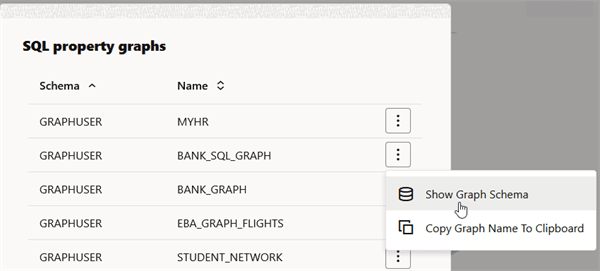
Description of the illustration show_graph_schema.png
The schema of the graph is displayed as shown:
Figure: Graph Schema Visualization for a SQL Property Graph
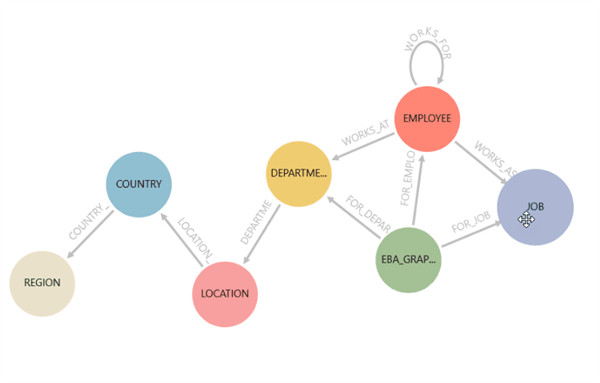
Description of the illustration schema_viz.png
If you proceed to run a SQL graph query, then the schema visualization will be replaced with graph visualization.
Visualizing the Schema of a PGQL Property Graph
You can visualize the underlying schema of a PGQL property graph.
Perform the following steps to visualize the schema of a PGQL property graph.
-
Click Get Graphs List in the Database (PGQL Property Graphs) tab.
-
Click the options menu against the desired graph and select Show Graph Schema.
The schema of the graph gets displayed. The following example shows the schema visualization of a PGQL property graph named MOVIES_PGQL.
Figure: Graph Schema Visualization for a PGQL Property Graph
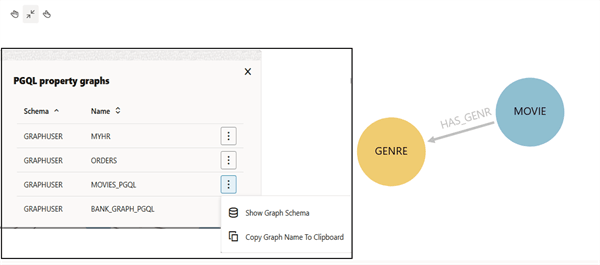
Description of the illustration schema_viz_pgql_pg.png
If you proceed to run a PGQL graph query, then the schema visualization will be replaced with graph visualization.