Quick Start for Working with SQL Property Graphs
This tutorial helps you get started on creating, querying, and running graph algorithms on a SQL property graph.
Before you begin, ensure that you have the required privileges to create and drop a SQL property graph. See Granting System and Object Privileges for SQL Property Graphs for more information.
The following tutorial uses the SQLcl tool and is based on the sample bank graph data (see Using Sample Graph Data) provided with the graph server installation in the database tables. However, you can run these examples using any SQL based interface.
-
Create a SQL property graph using the
CREATE PROPERTY GRAPHDDL statement.SQL> CREATE PROPERTY GRAPH bank_sql_graph 2 VERTEX TABLES ( 3 BANK_ACCOUNTS 4 KEY ( id ) 5 LABEL accounts 6 PROPERTIES ( id, name ) 7 ) 8 EDGE TABLES ( 9 BANK_TRANSFERS 10 SOURCE KEY ( src_acct_id ) REFERENCES BANK_ACCOUNTS(id) 11 DESTINATION KEY ( dst_acct_id ) REFERENCES BANK_ACCOUNTS(id) 12 LABEL transfers 13 PROPERTIES ( amount, description, src_acct_id, dst_acct_id, txn_id ) 14* ); Property GRAPH created.On execution, the
bank_sql_graphgraph is created in the database. The graph is made up of one vertex graph element table (bank_accounts) and one edge graph element table (bank_transfers).See Creating a SQL Property Graph to learn the concepts of graph element tables, keys, labels and properties.
-
Run a SQL graph query, on the newly created graph, to list all the transactions from the account with
idvalue816.SQL> SELECT * FROM GRAPH_TABLE (bank_sql_graph 2 MATCH 3 (a IS accounts WHERE a.id = 816) -[e IS transfers]-> (b IS accounts) 4 COLUMNS (a.id AS acc_a, e.amount AS amount, b.id AS acc_b) 5* ); ACC_A AMOUNT ACC_B ________ _________ ________ 816 8781 287 816 6381 590 816 9011 934 816 6890 289 816 4443 812See SQL Graph Queries for more information.
-
Optionally, if you have installed the graph server (PGX), then you can also visualize the preceding SQL graph query, using the graph visualization tool.
The only difference is that you must return the vertex and edge IDs in order to visualize the vertices and edges of the SQL graph query together with their IDs and all their labels and properties. Note that the
COLUMNSclause in the following example uses theVERTEX_IDandEDGE_IDfunctions:
Figure: Visualizing a SQL Graph Query
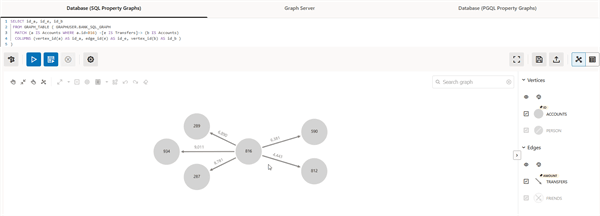
Description of the illustration qs_sql_graphviz.png
-
See Vertex and Edge Identifiers to learn more about the
VERTEX_IDandEDGE_IDfunctions. -
See Visualizing Graph Queries on SQL Property Graphs for more details.
-
Load the graph into the graph server (PGX) if you want to run graph algorithms.
opg4j> var graph = session.readGraphByName("BANK_SQL_GRAPH", GraphSource.PG_SQL)
graph ==> PgxGraph[name=BANK_SQL_GRAPH,N=1000,E=5001,created=1752053171422]
PgxGraph graph = session.readGraphByName("BANK_SQL_GRAPH", GraphSource.PG_SQL);>>> graph = session.read_graph_by_name("BANK_SQL_GRAPH", "pg_sql") >>> graph PgxGraph(name: BANK_SQL_GRAPH, v: 1000, e: 5001, directed: True, memory(Mb): 0)See Loading a SQL Property Graph into the Graph Server (PGX) for more information.
-
Execute the PageRank algorithm as shown:
opg4j> var analyst = session.createAnalyst()
analyst ==> NamedArgumentAnalyst[session=0fb6bea7-d467-458d-90c3-803d2932df12]
opg4j> analyst.pagerank(graph)
$3 ==> VertexProperty[name=pagerank,type=double,graph=bank_sql_graph]
Analyst analyst = session.createAnalyst(); analyst.pagerank(graph);>>> analyst = session.create_analyst() >>> analyst.pagerank(graph) VertexProperty(name: pagerank, type: double, graph: bank_sql_graph) -
Query the graph to list the top 10 accounts by pagerank:
opg4j> session.queryPgql("SELECT a.id, a.pagerank FROM MATCH (a) ON bank_sql_graph ORDER BY a.pagerank DESC LIMIT 5").print()

+-----------------------------+
| id  | pagerank              |

+-----------------------------+
| 387 | 0.007302836252205924  |
| 406 | 0.006734430614559079  |
| 135 | 0.006725965475577353  |
| 934 | 0.006641340764834484  |
| 397 | 0.0057016075312134595 |

+-----------------------------+
$5 ==> PgqlResultSetImpl[graph=bank_sql_graph,numResults=5]
session.queryPgql("SELECT a.id, a.pagerank FROM MATCH (a) ON bank_sql_graph ORDER BY a.pagerank DESC LIMIT 5").print();>>> session.query_pgql("SELECT a.id, a.pagerank FROM MATCH (a) ON bank_sql_graph ORDER BY a.pagerank DESC LIMIT 5").print() +-----------------------------+ | id | pagerank | +-----------------------------+ | 387 | 0.007302836252205924 | | 406 | 0.006734430614559079 | | 135 | 0.006725965475577353 | | 934 | 0.006641340764834484 | | 397 | 0.0057016075312134595 | +-----------------------------+ -
Drop the SQL property graph after running the graph queries.
SQL> DROP PROPERTY GRAPH bank_sql_graph;

Property dropped.