3.2.3 Agentic Planner Task
The Agentic Planner is an operator task that uses an LLM to dynamically orchestrate workflow tasks and tools at runtime. Unlike an Agentic Task, which runs a specific agent, the Agentic Planner acts as a dynamic orchestrator or master planning node. It evaluates the goal, runtime context, available tasks, internal tools, and MCP server tools, and then decides which task or tool to run next.
Use the Agentic Planner when the workflow path cannot be fully determined at design time, or when the workflow must make adaptive decisions based on intermediate task results. A workflow can include one or more Agentic Planner operators, depending on how much of the workflow needs dynamic orchestration.
The Agentic Planner can:
- Plan and schedule workflow tasks dynamically.
- Invoke internal tools and MCP server tools.
- Evaluate results from previously executed planned tasks.
- Continue planning in iterations until the goal is completed or failed.
- Coordinate agentic tasks, HTTP tasks, simple tasks, human tasks, and other supported workflow tasks.
- Record planner iterations, tool calls, task decisions, and outputs in workflow execution details.
Agentic Planner execution is durable. MicroTx Workflows records the planner history, raw planner responses, tool execution details, task scheduling decisions, and output as part of workflow execution. The planner also uses fenced idempotency handling so that repeated execution does not duplicate completed planner work.
Execution Flow
At runtime, the Agentic Planner performs the following steps:
- Receives a goal from a prompt or prompt template.
- Builds a planning context using the available workflow tasks, internal tools, MCP tools, optional data, and previous execution results.
- Calls the configured LLM to generate a plan.
- Executes planned tools immediately or schedules planned workflow tasks.
- Waits for scheduled tasks to complete, and then evaluates their output.
- Repeats planning iterations until the planner returns a completed or failed status.
- Stores planner output, history, and execution details in the workflow execution.
You can view the planner's iterations, task decisions, tool execution details, logs, input, and output from the workflow execution details page under the Agentic Planner task.
Prerequisites
Before you add an Agentic Planner, create or identify the following resources:
- An LLM definition. See Create an LLM Definition.
- A prompt or prompt template that describes the planner goal. See Create a Prompt Template Definition.
- Internal tool configuration for every tool, if any, that the agentic planner task uses. See Create an Internal Tool Configuration.
- MCP server definitions, if the planner uses MCP tools. See Provide MCP Server Details.
- Identify and define all the tasks that you want to run as part of the agentic planner task execution.
- Workflow tasks that the planner can schedule, such as Agentic Task, HTTP, Simple task, Human task, or other supported tasks. The Agentic Planner must have at least one available execution target, such as a workflow task, internal tool, or MCP server tool.
To add an Agentic Planner Task
-
Navigate to the Task tab in a workflow and view all the tasks that you can add using the Workflow Builder. See Access the Task Tab in Workflow Builder.
- In the More Tasks dialog box, click Planner Task to add it to the workflow.
-
Click the task that you have added in the left pane. The Task tab in the right pane displays details about the task, such as its name and parameters. Next, let's provide details for the task.
-
In the Task Details group, enter the following information.
- Task Name: Mandatory. Enter a unique name for the task. The name must be between 1 to 128 alphanumeric characters in length and cannot contain spaces or any special characters. Optionally, you can use underscore (_) and hyphen (-).
- Task Reference: Mandatory. Enter a value to refer to the task within a workflow definition. This value must be unique within a workflow. The task reference value must be between 1 to 128 alphanumeric characters in length and cannot contain spaces or any special characters. Optionally, you can use underscore (_) and hyphen (-).
- In the Agentic Planner Task Parameters group, provide the following information.
- LLM Profile: Mandatory. Select the LLM definition that the planner uses for reasoning.
- Model Name: Mandatory. Select the model to use from the LLM definition.
- Prompt or Prompt Template: Mandatory. Enter a prompt or select a prompt template that describes the planner goal. At least one of these values is required.
- Prompt Variables: Optional. Provide values for variables, if any, used in the prompt template.
- Idempotency Timeout (ms): Optional. Specifies how long MicroTx Workflows holds the task-level idempotency lock for this task. The lock prevents duplicate concurrent execution during retries or replays. The default is 180000 milliseconds or 3 minutes.
- Tools: Optional. Select internal tool configurations that the planner can call directly.
- MCP Servers: Optional. Select MCP server definitions. The planner can discover and call tools exposed by these MCP servers.
- Guardrails: Optional. Provide task-specific guardrails such as stop words.
- Temperature: Optional. Controls randomness of the generated response. Lower values generate more deterministic responses. Higher values generate more varied responses. The default value is 0.2.
- Max Tokens: Optional. Sets the maximum number of tokens that the model can generate. The default value is 1024.
- Top K: Optional. Number of highest-probability tokens considered during generation. The default value is 40.
- Top P: Optional. Controls nucleus sampling value. The default value is 0.9.
-
Add Data Source: Optional. Select this check box when you want to provide any additional data that is required to execute the task, and then select one of the following options in the Data Source drop-down list.
- WEB: Select this option when you want to access data from the web, and then enter the complete URL to the data in the URL field.
- OCI: Select this option when you want to access data that is available in Oracle Cloud Infrastructure (OCI), and then enter the complete URL to the data in the URL field.
- LOCAL: Select this option when you want to use a file that you have uploaded to the local storage, and then select or provide a file name in the File Path drop-down list.
- TEXT: Select this option when you want to provide the text as supporting data in the TEXT field.
For the Agentic Planner, provide data as a JSON object and include it in the planning context. For example:
{
          "data":
          {    "loanApplicationText": "${workflow.input.loan_application_text}",
               "document": "${workflow.input.document}"
          }
}
- Optional. Add all the tasks that you want to run as part of the agentic planner task execution. You must provide at least one task, tool, or MCP server.
- Click
 to expand the Agentic Planner task.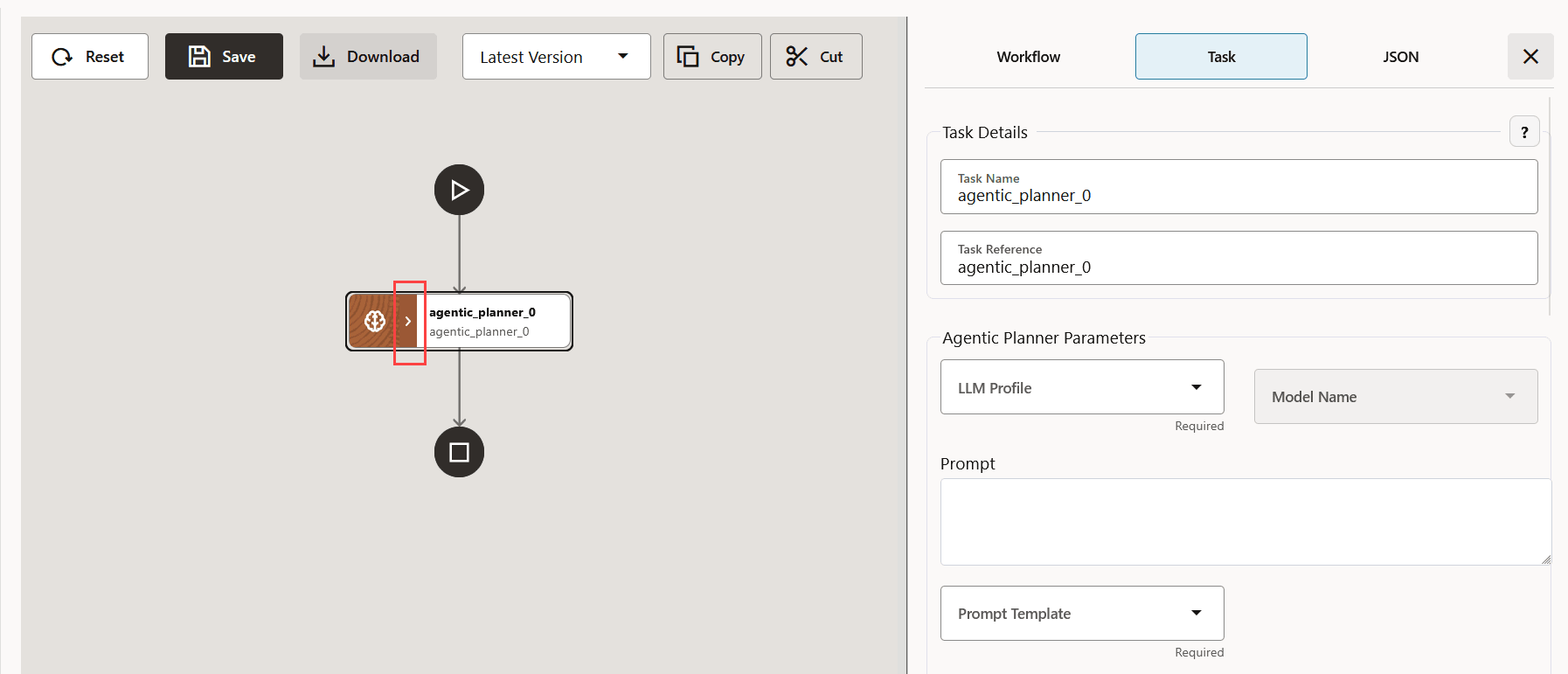
- Click
 .
.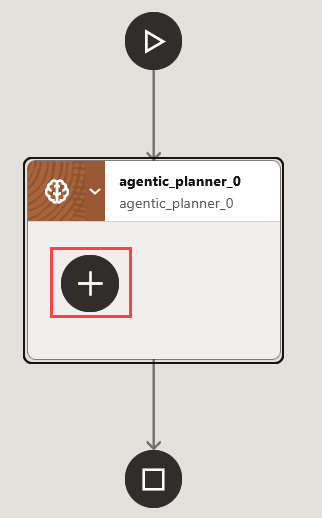 Many eligible workflow tasks are displayed.
Note:
Only System Tasks and Worker Tasks are available for selection inside an Agentic Planner. Operator Tasks are not supported and therefore are not displayed, or cannot be added.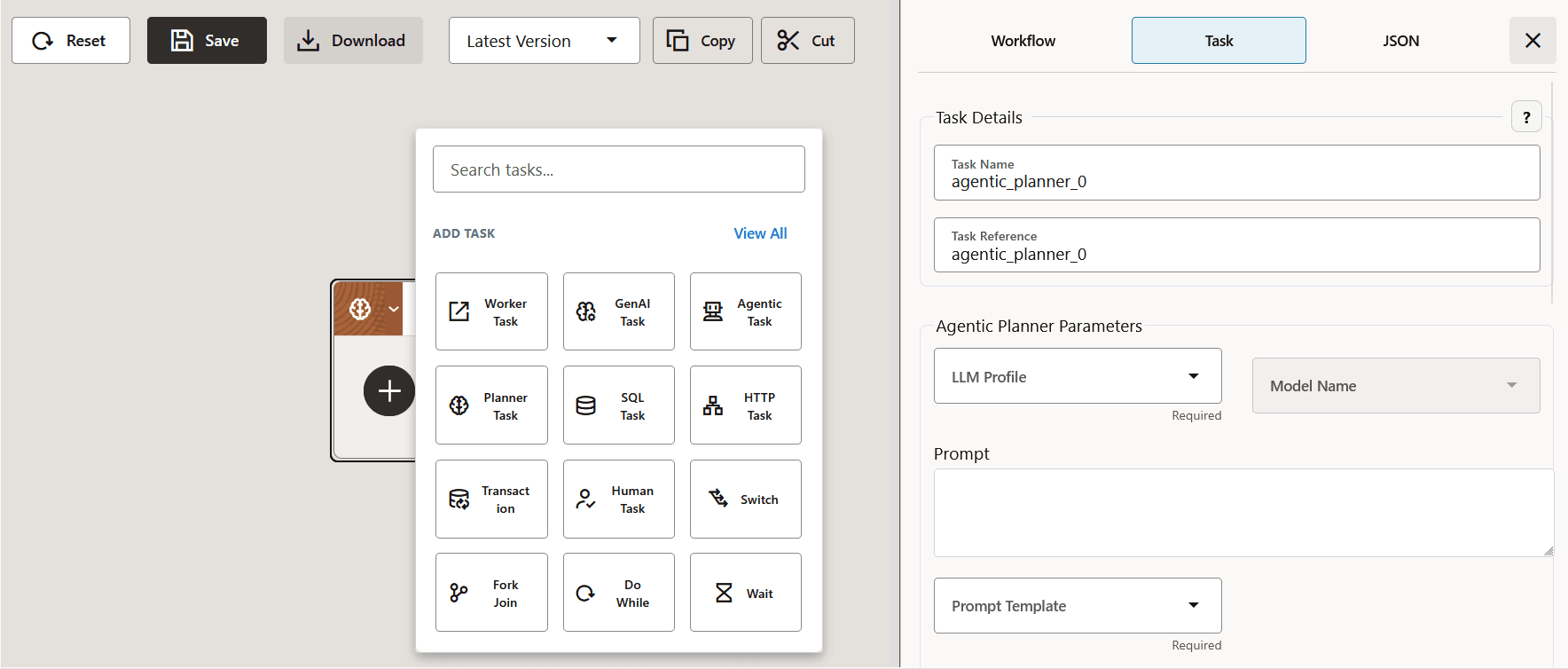
- Select the workflow tasks that the planner is allowed to schedule. These tasks act as available actions for the planner.
- Click
-
Click Save to save the changes to the workflow.
MicroTx Workflows displays the changes in JSON code.
-
Review all the changes, and then click Confirm Save to save the changes.
If you do not want to save the changes, click Cancel, and then click Reset to undo all the changes that you have made since the workflow was last saved.
Example
The following example shows an Agentic Planner that orchestrates a loan-processing flow. The planner can schedule document verification, compliance check, loan processing, notification, and human verification tasks. It can also use tools exposed by the doc_mcp MCP server.
{
    "name": "Agentic Planner",
    "taskReferenceName": "agentic_planner",
    "inputParameters": {
        "llmProfile": {
            "name": "openai-dev-llm-profile",
            "model": "gpt-4o"
        },
        "promptTemplate": "loan_process_planner",
        "promptVariables":{
              "document": "${workflow.input.document}"
        },
        "data": {
          "loanApplicationText": "${workflow.input.loan_application_text}",
          "document": "${workflow.input.document}"
        },
        "mcpServers": [
            "doc_mcp"
        ],
        "tasks": [
            {
                "name": "Loan Document Verification Task",
                "taskReferenceName": "document_verification",
                "inputParameters": {
                    "agentProfile": "loan_document_verification_agent",
                    "promptVariables": {
                        "document": "${workflow.input.document}"
                    }
                },
                "type": "AGENTIC_TASK"
            },
            {
                "name": "Compliance Agent",
                "taskReferenceName": "compliance_agent",
                "type": "HTTP",
                "inputParameters": {
                    "http_request": {
                        "method": "POST",
                        "uri": "http://localhost:8001/api/compliance/check",
                        "headers": {
                            "Content-Type": "application/json"
                        },
                        "body": {
                            "socialSecurityNumber": "${extract_loan_details.output.ssn}"
                        }
                    }
                }
            },
            {
                "name": "loan_processing_agent_task",
                "taskReferenceName": "loan_processing_agent_task",
                "inputParameters": {
                    "applicantId": "${workflow.input.applicantId}"
                },
                "type": "SIMPLE"
            },
            {
                "name": "Notify AML verification failure",
                "taskReferenceName": "notify_aml_check_failure_to_admin",
                "type": "HTTP",
                "inputParameters": {
                    "http_request": {
                        "method": "POST",
                        "uri": "http://localhost:8085/email/notify",
                        "headers": {
                            "Content-Type": "application/json"
                        },
                        "body": {
                            "text": "Loan application requires AML
      reverification. Request: ${workflow.input.loan_application_text}"
                        }
                    }
                }
            },
            {
                "name": "human_aml_verification_task",
                "taskReferenceName": "human_aml_verification",
                "type": "HUMAN",
                "inputParameters": {
                    "applicant": "${extract_loan_details.output}"
                }
            }
        ]
    },
    "type": "AGENTIC_PLANNER"
}
Practical Example
In a loan-processing workflow, you can use the Agentic Planner after a GenAI task extracts applicant details from natural language input. The planner can then decide how to proceed: verify documents with an Agentic Task, call a credit or compliance HTTP service, invoke MCP tools for AML or income verification, request human approval when needed, and continue planning based on the results.
Use the Agentic Planner for use cases such as:
- Loan processing and approval orchestration.
- Customer support ticket triage.
- DevOps incident response.
- Research workflows that coordinate multiple data-gathering and validation steps.
- Multi-agent workflows that combine Agentic Tasks, external services, tools, and human approval.
Parent topic: Create System Tasks and Operator Tasks