2.2.2 About Workflow Status
A workflow status indicates the current state of a workflow execution. Understanding workflow statuses helps you determine which actions are available, whether the workflow is still active, and how to troubleshoot failures.
A workflow execution starts in the RUNNING status. It can then complete successfully, fail, time out, be paused, be resumed, or be terminated. Some statuses are terminal, which means the workflow execution has ended and will not continue unless you retry or restart it.
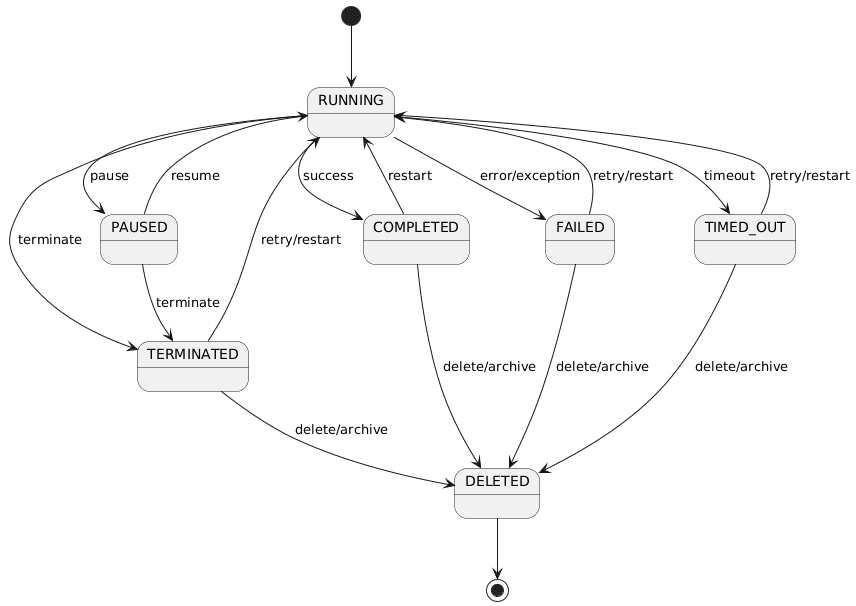
The following image shows how the workflow moves from one status to another.
To check the current status of a workflow, see View Details of a Workflow Execution.
The following table describes the different workflow statuses and lists the permitted actions that you can perform in each status. Actions attempted outside their allowed status do not result in a valid status change.
| Workflow Status | Description | Permitted Actions |
|---|---|---|
RUNNING |
The workflow is currently active and tasks are being scheduled or executed | Pause, terminate |
PAUSED |
The workflow execution is paused. It does not continue until it is resumed. A user or program can resume or terminate the workflow. | Resume, terminate |
COMPLETED |
The workflow execution finished successfully and all required tasks were completed. This is a terminal status. | Delete, archive, restart |
FAILED |
The workflow execution failed because one or more tasks failed or an error occurred during execution. This is a terminal status. | Delete, archive, retry, restart |
TERMINATED |
The workflow execution was stopped before it completed, usually by a user, API call, event, or another workflow. This is a terminal status. | Delete, archive, retry, restart |
TIMED_OUT |
The workflow execution exceeded a configured workflow or task timeout. This is a terminal status. | Delete, archive, retry, restart |
DELETED |
Workflow has been deleted and is no longer available. | None |
At any time during the RUNNING or PAUSED
status, you can terminate a workflow, which moves it to the TERMINATED
status.
During normal execution, if the workflow finishes successfully, it
transitions from RUNNING to COMPLETED. If it
encounters an error or exception, it moves from RUNNING to
FAILED. If it exceeds a designated time limit, it transitions from
RUNNING to TIMED_OUT. These three
statuses—COMPLETED, FAILED, and
TIMED_OUT—are considered end or terminal states under normal
circumstances.
From the COMPLETED, FAILED,
TERMINATED, or TIMED_OUT statuses, you can either
delete or archive a workflow—both actions result in the workflow moving to a
DELETED (or archived) status.
Additionally, you can reprocess a workflow after it has finished or failed.
If a workflow is in the TERMINATED, FAILED or
TIMED_OUT statuses, you can retry or restart the workflow, which
sends it back to the RUNNING status and begins execution anew. If the
workflow is in the COMPLETED status, you restart the workflow, but you
cannot retry it. Restarting a workflow also brings the workflow back to the
RUNNING status. Restart starts the workflow execution again from
the beginning. Restart is available only for terminal workflows and depends on whether
the workflow definition is restartable.
A workflow begins in RUNNING status. While it is
running, you can pause it, which changes the status to PAUSED. A
paused workflow can be resumed, which returns it to RUNNING and
continues execution, or it can be terminated.
If the workflow finishes all required tasks successfully, it changes to
COMPLETED. If execution fails, it changes to
FAILED. If the workflow or a task exceeds its configured
timeout, it changes to TIMED_OUT. If a user, API call, event, or
another workflow stops the execution, it changes to TERMINATED.
COMPLETED, FAILED,
TERMINATED, and TIMED_OUT are terminal
statuses. Workflows in a terminal status do not continue automatically. Depending on
the status and workflow definition, you can retry or restart the workflow. Retry
resumes execution from FAILED, TIMED_OUT, or
CANCELED tasks where retry is possible. Retry is not available
for COMPLETED workflows. You can also remove terminal workflows,
and optionally archive them during removal.
When you delete a workflow execution, MicroTx Workflows removes it from the data store. When archive is enabled, terminal workflow executions can be archived before removal.
Parent topic: Manage Workflow Executions