Exam Related Issues
1. How do I reschedule or cancel my exam?
- Sign into your MyLearn account and you will see the options to reschedule or cancel.
- You must reschedule or cancel your exam at least 24 hours prior to your exam appointment or you may lose an exam attempt.
If your issue remains unresolved (Requires Oracle Login):
2. I had a technical issue during my exam (exam would not launch, was not able to check in, exam stopped in the middle, lost connectivity, Zoom crashed, etc). What should I do?
Please log a ticket.
If your issue remains unresolved (Requires Oracle Login):
3. I am unable to view any available time slots for the exam.
Please log a ticket.
If your issue remains unresolved (Requires Oracle Login):
4. I missed my exam, or was unable to make it. What do I do now?
If you miss your appointment time, your exam is recorded as a “No Show.” A “No Show” counts as an exam attempt. You will need to register again after purchasing the exam.
If your issue remains unresolved (Requires Oracle Login):
5. To whom should I contact for Pearson VUE exam related queries?
For Pearson VUE related queries, please contact Pearson VUE customer support at PearsonVUE.
If your issue remains unresolved (Requires Oracle Login):
6. My Pre-Exam System check attempts are all used up. What should I do now?
Please log a ticket.
If your issue remains unresolved (Requires Oracle Login):
7. I am eligible for the delta exam, but system is asking me to take base exam?
Please log a ticket.
If your issue remains unresolved (Requires Oracle Login):
8. What is the process to take Japanese and Chinese language exams for Oracle Database, Java, and MySQL at Pearson VUE?
Chinese and Japanese language exams for Oracle Database, Java, and MySQL will continue to be delivered through Pearson VUE. Vouchers can be purchased through Oracle and Pearson VUE.
If your issue remains unresolved (Requires Oracle Login):
9. Who can I connect with, if I run into issues during System Diagnostics Test?
You can connect with the Support team during the Check-in process:
-
Click on the Extension icon in the upper right corner of the browser
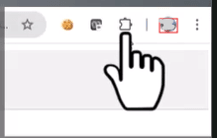
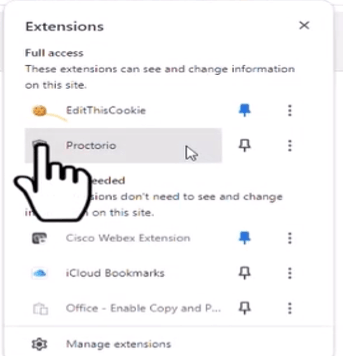
- Click on the Shield icon
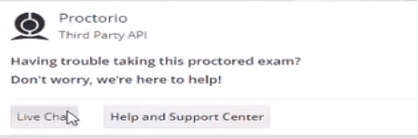
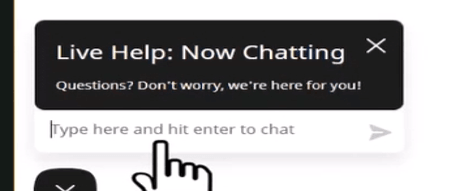
- Click on Live Chat
If your issue remains unresolved (Requires Oracle Login):
10. How do I ensure my system is ready for the exam?
Perform the readiness check to set up your system prior to the exam.
You can go through the guided video here.
If your issue remains unresolved (Requires Oracle Login):
11. How do I provide feedback for any question?
Use the Have Feedback? option along the top corner of your screen to provide feedback. You should also log a ticket here.
If your issue remains unresolved (Requires Oracle Login):
12. Can I use pen and paper or a calculator during the exam?
Pen and paper are not allowed. Instead, you can use the digital Calculator and Whiteboard from the exam control panel.
If your issue remains unresolved (Requires Oracle Login):
13. What are the system requirements and supported browsers to take the exam?
Check the Exam Preparation page.
Supported browsers are only Google Chrome or Microsoft Edge.
Note: Ensure to clear your browser cache before taking the exam.
If your issue remains unresolved (Requires Oracle Login):
14. Can I chat with the examiner during the exam?
Click on Exam Support on the exam control panel to chat with the examiner/proctor during the exam.
If your issue remains unresolved (Requires Oracle Login):
15. Why am I not seeing the SR (service request) ticket that I raised?
Please note: Newly created Service Requests may take up to 25 minutes to appear on My Support Requests. We appreciate your patience while your request is being processed. Do not raise a duplicate SR as this will only cause delays in the processing.