Connection Issues
1. I am unable to connect to the lab environment via VNC/RDP
Our primary connection method is OUCM using the Launch Lab button from MyLearn (Lab tab). Please try accessing your lab using Launch Lab button or using the alternate connection method MotionPro + RDP or Tiger VPN. Refer question 2.
If your issue remains unresolved (Requires Oracle Login):
2. How do I use the alternate connection method by downloading MotionPro Client?
- Go to: MotionPro - Download.
-
Download the appropriate MotionPro client for your operating system, if your installed version refuses to connect, please download and install v9.4.0.495.
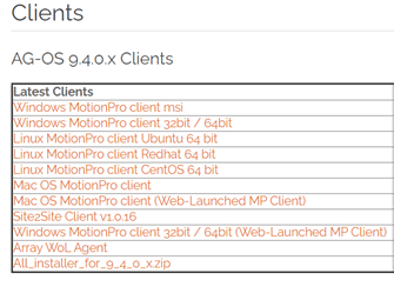
- Install it, then search for the MotionPro app on your computer:
- Windows: Open the Start Menu (Windows key) and type MotionPro, then launch the app.
-
Mac: Open Spotlight (Command + Space) and type MotionPro, then launch the app.
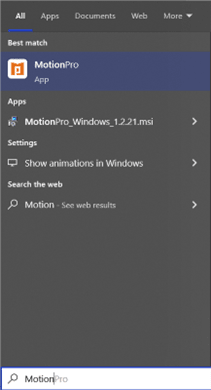
-
Click Add Profile and fill in the fields as shown in the screenshot below. Use the credentials you received for your lab.
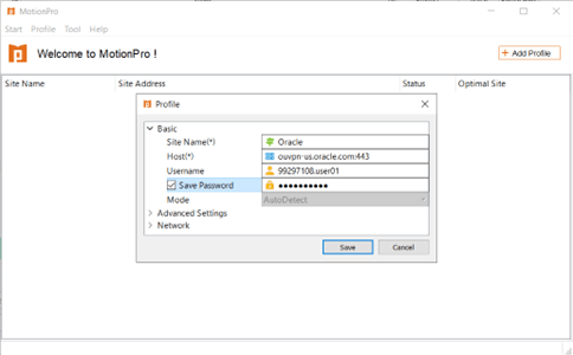
- Click Save.
-
Right-click the profile you just created and press Connect from the drop-down menu.
Note: For the MotionPro VPN to work, you should disconnect form any other VPN.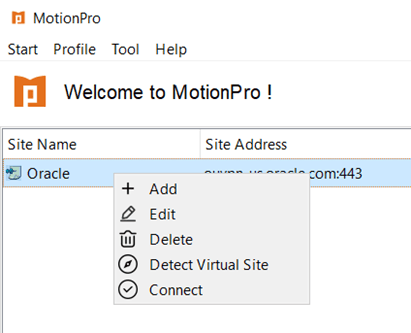
If your lab machine runs on the Windows platform:
- Launch Remote Desktop Protocol (RDC), input the IP address of your machine and launch the connections.
- When asked for credentials please use:
- Username for Windows machines:
administrator - Password:
Your OU connect password
- Username for Windows machines:
If your lab machine runs on the Linux platform:
- Install TigerVNC Viewer:
- Go to TigerVNC Viewer - Releases and click the binaries URL for the latest version.
- Windows: Download the appropriate
.exefor your system. - Mac: Download the
.dmg.
- Install TigerVNC Viewer and, during installation, uncheck Register as a Service and Start Service options if presented.
- Run TigerVNC Viewer. Enter the IP address of the remote machine assigned for your lab (it will be available along with the rest of your credentials) and click Connect.
- When asked for credentials please us:
- Username for Linux machines:
oracle - Password:
Your OU connect password
- Username for Linux machines:
- Follow the instructions in the Activity Guide to complete the practices.
If your issue remains unresolved (Requires Oracle Login):
3. My Lab connection is very slow. What other options do I have?
If you have admin rights on your machine please try the steps under question number 2, which will guide you trough the steps of using an alternate connection method:
- TigerVNC for Linux machines
- RDP for Windows machines
If you don’t have admin rights, open a browser, go to Speedtest.net or Fast.com, pause any downloads or streaming, click Go or Start Test, and wait for the results showing your download speed, upload speed, and ping.
- If speed test results are good and you still experience high latency, please contact support (Requires Oracle Login):