Use Case: Understanding Date Comparisons
The goal of this confluence is explaining how Date User Field conditions are currently working, and how will it work for form field date validation.
Introduction:
- In this doc we are referring to the user date field condition and comparing it to the conditions date.
- User date field conditions have the (almost) same UI as the new date validation conditions (’form field- date’)- except the 'Exists' operator will be replaced by 'Empty', but for validation date conditions isn’t ready.
What are OGL fields?
- OGL fields are stored in server for each user. for example by the
iridize("api.fields.set")
call:
iridize("api.fields.set", { user_id: userId, num_guides_created: 297 || undefined, joined_at: 1692078770.0 || undefined, managed_by: "oracle" || undefined, app_type: "demo" || undefined, expiration_at: "0" || undefined, customer_type: "Customer" || undefined });
What is UserFieldDate?
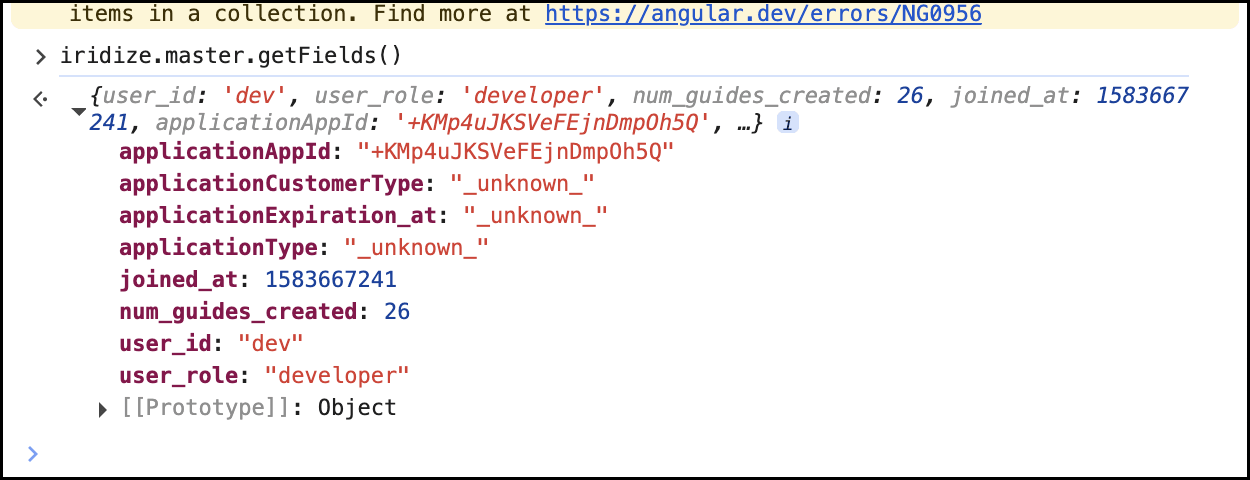
- A field is considered date field if it ends with “_at”, f.e, joined_at in the picture above. Saved as a timestamp. (for form field date, please see How will it be for Validation conditions (= form field date)? below)
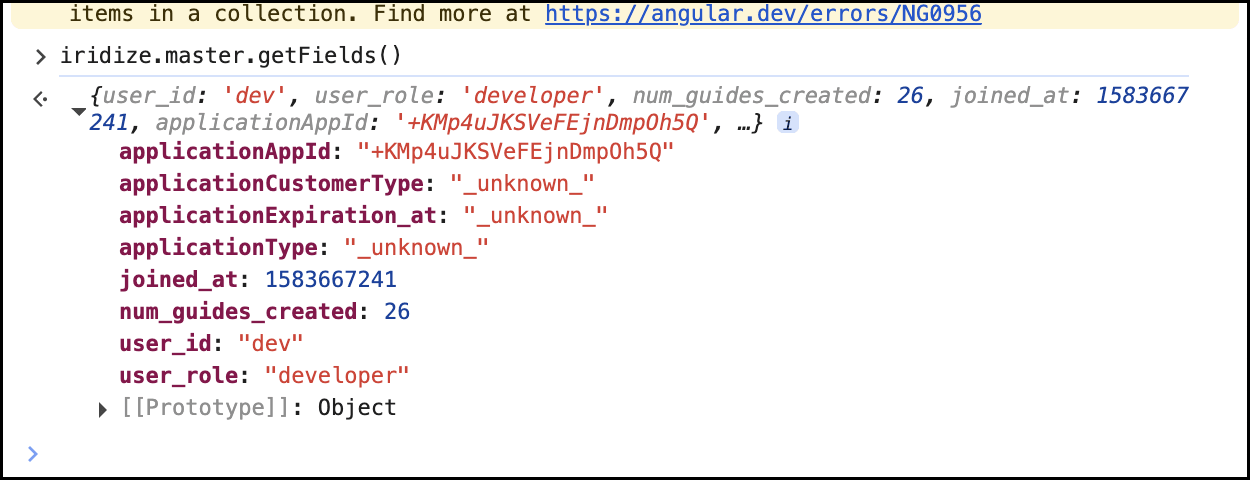
- UserFieldDate = the value of a date field OGL saved on OGL’s server. Can be seen via ’ iridize.master.getFields()’, for the example below, joined_at is a user field date and its value is 1602078770.0
- For simplicity, although the server field is saved as a number, we will
use its date form in the examples
How will it be for Validation conditions (= form field date)?
- Except for the 'Exist' operator, which will be replaced by 'Empty' for the form field date conditions, every thing is the same.
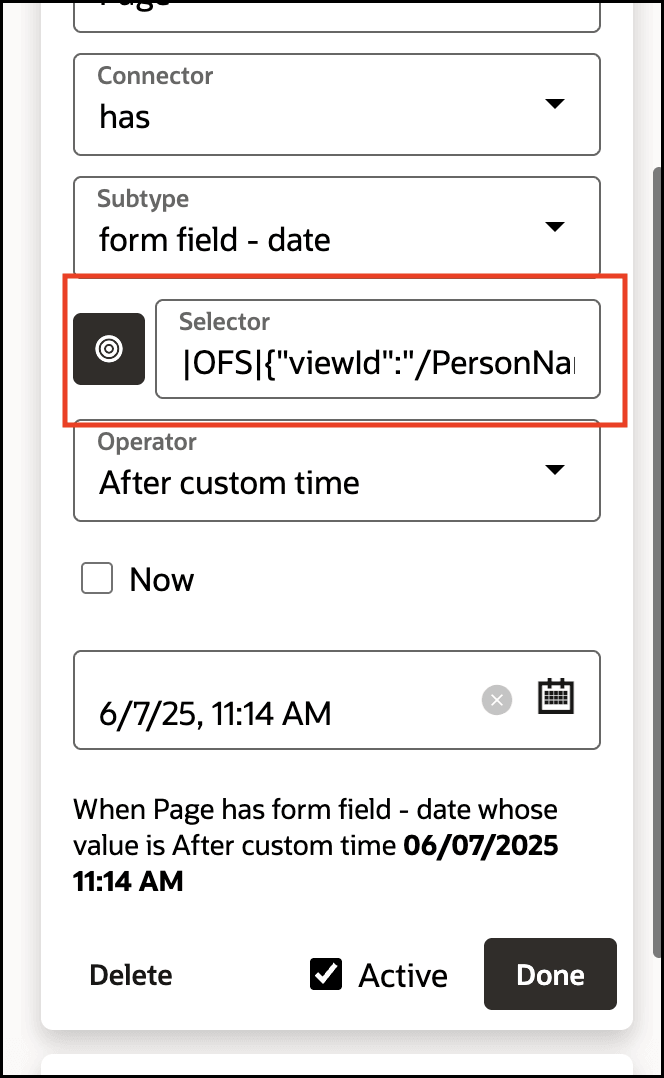
- It's the same way of comparing, but instead of looking at UserFieldDate
(saved at the server) we are looking at the value of the element selected by the
form field date condition selector. Every things else stays the same
What is ConditionDate?
- ConditionDate = the value of the date operand as seen on the condition
UI
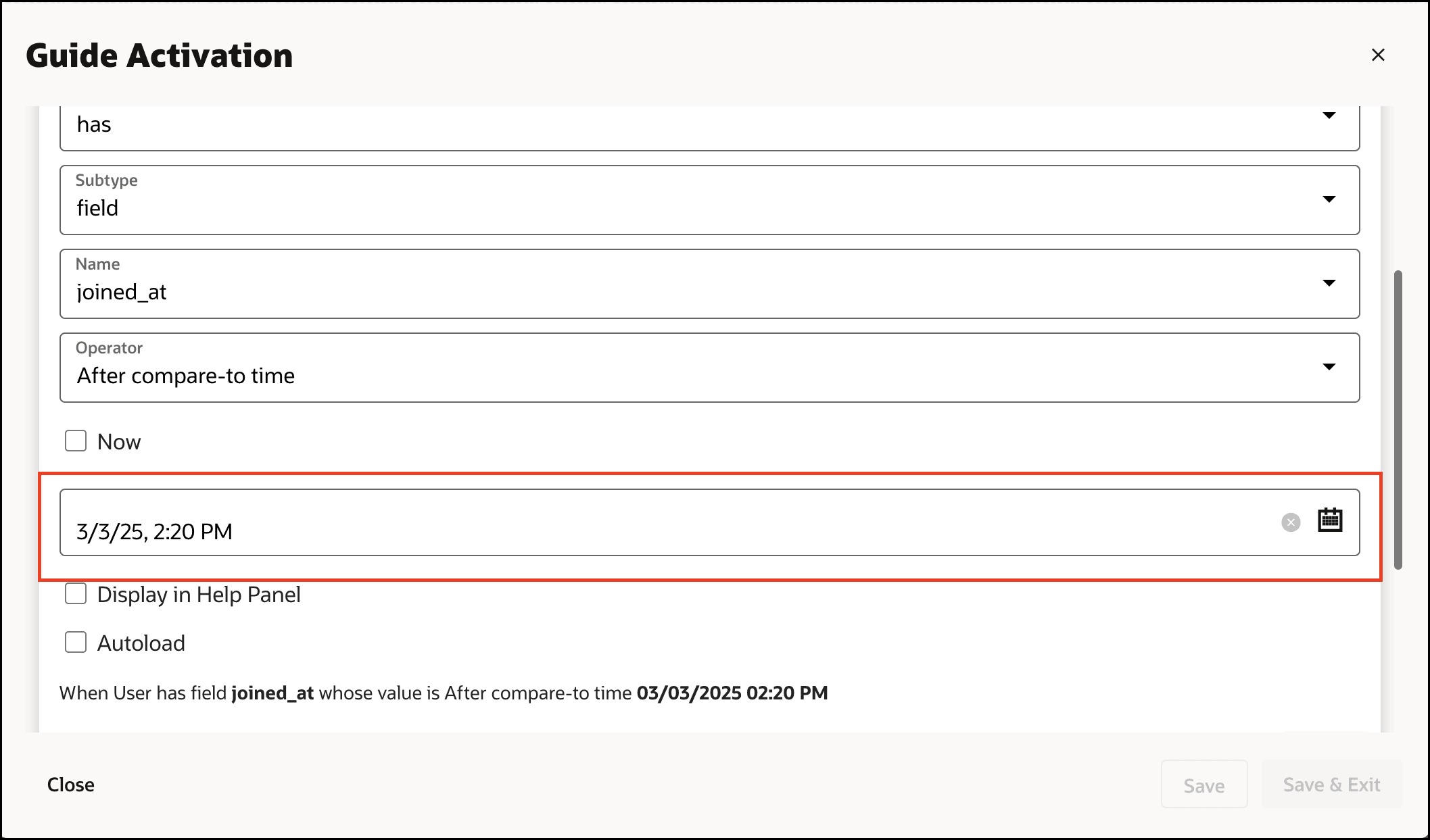
If Now is enabled => ConditionDate = time when condition is checked on host app for the end user
Operators by examples:
- After custom time (was: "After compare-to
time")
- Means: UserFieldDate happens after ConditionDate
- Use case: End user should see the guide
in autoload if they joined after March 1 2025.
- Example 1:
- - UserFieldDate (user joined at) = March 5, 2025
- - ConditionDate = March 1, 2025
- March 5 comes 2025 after March 1 2025, so the condition is ✅ True
- Example 1:
- Use case: End user should see the guide in
autoload if they joined after March 5 2025.
- Example 2:
- - UserFieldDate (user joined at) = March 1, 2025
- - ConditionDate = March 5, 2025
- March 1 comes before March 5, so the condition is ❌ False
- Example 2:
- At custom time (was: "At compare-to time")
- Means: Both dates are exactly the same.
- Use case: End user should see the guide
in autoload if they joined at March 1 2025
- Example 1:
- - UserFieldDate (user joined at) = March 1, 2025
- - ConditionDate = March 1, 2025
- Both are the same, so the condition is ✅ True
- Example 1:
- Use case: End user should see the guide in
autoload if they joined at March 5 2025
- Example 2:
- - UserFieldDate (user joined at) = March 1, 2025
- - ConditionDate = March 5, 2025
- Dates are different, so the condition is ❌ False
- Example 2:
- At or after custom time (was: "At or after compare-to
time")
- Means: UserFieldDate happens after or is the same as ConditionDate.
- Use case: End user should see the guide
in autoload if they joined at March 1 2025 or later
- Example 1:
- - UserFieldDate (user joined at) = March 1, 2025
- - ConditionDate = March 1, 2025
- Both are the same, so the condition is ✅ True
- Example 2:
- - UserFieldDate (user joined at) = March 3, 2025
- - ConditionDate = March 1, 2025
- March 3 2025 is after March 1 2025 then it's still ✅ True
- Example 3:
- - UserFieldDate (user joined at) = February 28, 2025
- - ConditionDate = March 1, 2025
- February 28 2025 is before March 5 2025 so the condition is ❌ False
- Example 1:
- At or before custom time (was: "At or before compare-to
time")
- Means: UserFieldDate happens before or is the same as ConditionDate.
- Use case: End user should see the
guide in autoload if they joined at March 1 2025 or before
- Example 1:
- - UserFieldDate (user joined at) = March 1, 2025
- - ConditionDate = March 1, 2025
- Both are the same, so the condition is ✅ True
- Example 2:
- - UserFieldDate (user joined at) = February 28, 2025
- - ConditionDate = March 1, 2025
- February 28 2025 1 is before March 1 2025 then it's still ✅ True
- Example 1:
- Use case: End user should see the
guide in autoload if they joined at February 28, 2025 or
before.
- Example 3:
- - UserFieldDate (user joined at) = March 1, 2025
- - ConditionDate = February 28, 2025
- March 1 2025 1 is after February 28 2025 so the condition is ❌ False
- Example 3:
- Before custom time (was: "Before compare-to time")
- Means: UserFieldDate happens before ConditionDate.
- Use case: End user should see the guide in
autoload if they joined before March 1 2025
- Example 1:
- - UserFieldDate (user joined at) = March 1, 2025
- - ConditionDate = March 3, 2025
- March 1 2025 comes before March 3 2025, so the condition is ✅ True
- Example 2:
- - UserFieldDate (user joined at) = March 1, 2025
- - ConditionDate = March 1, 2025
- Dates are the same, so the condition so the condition is ❌ False
- Example 1:
- Use case: End user should see the guide
in autoload if they joined before March 3 2025
- Example 3:
- - UserFieldDate (user joined at) = March 4, 2025
- - ConditionDate = March 3, 2025
- March 4 2025 1 is after March 3 2025 so the condition is ❌ False
- Example 3:
- Exist(for user field date)
- Means: The user has UserFieldDate saved in the server
- Use case: End user should see the guide in
autoload if they have joined_at field saved in OGL's server.
- Example 1:
- Field is ‘joined_at’
- Field is ‘joined_at’
- This user has the joined at field field, so the condition is ✅ True
- Example 2:
- Field is ‘joined_at’

- Field is ‘joined_at’
- The user doesn’t have field, so the condition so the condition is ❌ False
- Note: As discussed on daily, this doesn’t make sense for validation conditions, and will be replaced by EMPTY, see below)
- Example 1:
- Empty
(new operator- for form field date conditions)
- Means: The user has filled the condition selector with some value.
- Use case: End user shouldn't be able to
submit the form if they have not filled the birthday form field
date.
- Example 1:
- User has filled nothing
- This user hasn't filled anything, so the field is empty, so the condition is ✅ True = the submit button will be disabled
- Example 2:
- User has filled '1/2/2000' in the date (or any other value, currently we will not validate its a valid date value)
- The condition date field isn't empty, so the condition is ❌ False = the submit button will not be disabled
- Example 1:
- 1.1. The trickier ones :
- More than (after), Less than (after), More than (before), Less than (before)
- Rules of thumb to follow:
- Before/After is the relation between
UserFieldDate and ConditionDate.
- –Before = UserFieldDate was prior to ConditionDate
- –After = UserFieldDate was later than the ConditionDate.
- –Except some edge cases, which will be discussed and marked by ?
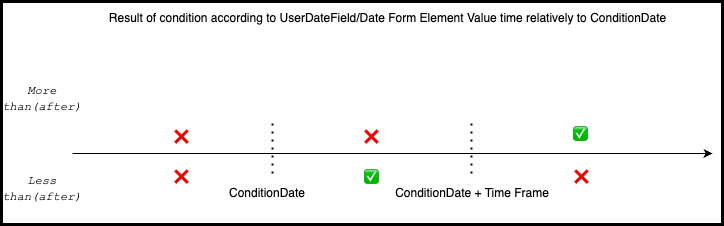
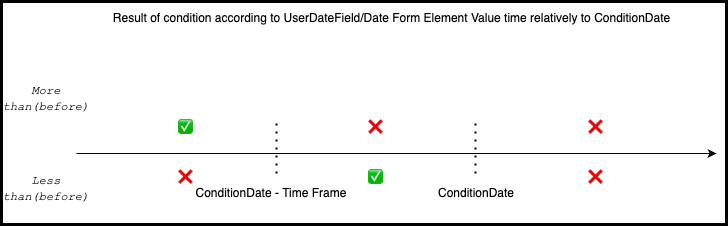
- More than/less than refers the difference of time between the two dates, compared to a given time frame.
- Diagram of more/less than (After):
- Diagram of more/less than (Before)
- Before/After is the relation between
UserFieldDate and ConditionDate.
-
- More than (after)
- Means: UserFieldDate happens later than ConditionDate by more than the given timeframe.
- Use case: End user should
see the guide in autoload if they joined at least
one day after March 1 2025
- Example 1:
- - UserFieldDate (user joined at) = March 4, 2025
- - ConditionDate = March 1, 2025
- - time frame = 1 day
- - The difference is 3 days, which is more than 1 day → ✅ True
- Example 2:
- - UserFieldDate (user joined at) = March 2, 2025
- - ConditionDate = March 1, 2025
- - time frame = 1 day
- - The difference is exactly 1 day, not more than 1 day → ❌ False
- Example 3:
- - UserFieldDate (user joined at) = February 28, 2025
- - ConditionDate = March 1, 2025
- - time frame = 1 day
- - February 28 2025 is 1 day before March 01 2025, (so the difference is -1 day), not more than 1 day → ❌ False
- Less than (after)
- Means: UserFieldDate
happens after ConditionDate, within the given
timeframe.
–or UserFieldDate happens before ConditionDate ? (this is not expected, will be changed to be false)
- Use case: End user should
see the guide in autoload if they joined less than
one day after March 1 2025
- Example 1:
- - UserFieldDate (user joined at) = March 1, 2025 10:00 AM
- - ConditionDate = March 1, 2025 9:00 AM
- - time frame = 1 day
- - The difference is only 1 hour, which is less than 1 day → ✅ True
- Example 2:
- - UserFieldDate (user joined at)= March 3, 2025
- - ConditionDate = March 1, 2025
- - time frame = 1 day
- - The difference is 2 days, which is not less than 1 day → ❌ False
- Example 3:
-
(this is not expected, will be changed to be false)
- - UserFieldDate (user joined at) = March 1, 2025 09:00 AM
- - ConditionDate = March 1, 2025 10:00 AM
- - time frame = 1 day
- - UserFieldDate was before ConditionDate, so the difference is -1 hour, which is less than 1 day → ✅ True ?
- Example 1:
- Means: UserFieldDate
happens after ConditionDate, within the given
timeframe.
- More than (after)
-
- More than (before)?
- Means: UserFieldDate happens before than ConditionDate by more than the given timeframe.
- Use case: End user should
see the guide in autoload if they joined more than a
day ago (in this use case, "now" checkbox will be
enabled, but can be used with a specific date in
other use cases)
- Example 1:ul
- - UserFieldDate (user joined at) = March 1, 2025
- - ConditionDate (time when condition is checked) = March 4, 2025
- - time frame = 1 day
- - The difference is 3 days, which is more than 1 day → ✅ True
- Example 2:
- - UserFieldDate (user joined at) = March 1, 2025
- - ConditionDate (time when condition is checked) = March 2, 2025
- - time frame = 1 day
- - The difference is exactly 1 day, not more than 1 day → ❌ False
- Example 3:
- - UserFieldDate (user joined at) = March 2, 2025
- - ConditionDate = March 1, 2025
- - time frame = 1 day
- - UserFieldDate was after ConditionDate → ❌ False
- Example 1:ul
- More than (before)?
-
- Less than (before)
- Means: UserFieldDate happens
before ConditionDate, within the given timeframe
–or UserFieldDate happens after ConditionDate ?
(this is not expected, will be changed to be false) - Use case: End user should see the
guide in autoload if they joined less than a day ago
(in this use case, "now" checkbox will be
enabled, but can be used with a specific date in
other use cases)
- Example 1:
- - UserFieldDate = March 1, 2025 09:00 AM
- - ConditionDate = March 1, 2025 10:00 AM
- - time frame = 1 day
- - The difference is just one hour, which is less than 1 day → ✅ True
- Example 2:
- - UserFieldDate = March 1, 2025
- - ConditionDate = March 3, 2025
- - time frame = 1 day
- - The difference is 2 days, which is not less than 1 day → ❌ False
- Example 3: ? (this is not expected, will be changed to be false)
- - UserFieldDate = March 1, 2025 11:00 AM
- - ConditionDate = March 1, 2025 10:00 AM
- - time frame = 1 day
- - UserFieldDate was after ConditionDate, so the difference is -1 hour, which is less than 1 day → ✅ True ?
- Means: UserFieldDate happens
before ConditionDate, within the given timeframe
- Less than (before)
- After custom time (was: "After compare-to
time")