Validation Conditions - Understanding Date Comparisons
Introduction
- Validation conditions are step conditions. Note that often 'has not' will need to be used as the connector.
- Equals operator is same as form field - text was. All other operators are new.
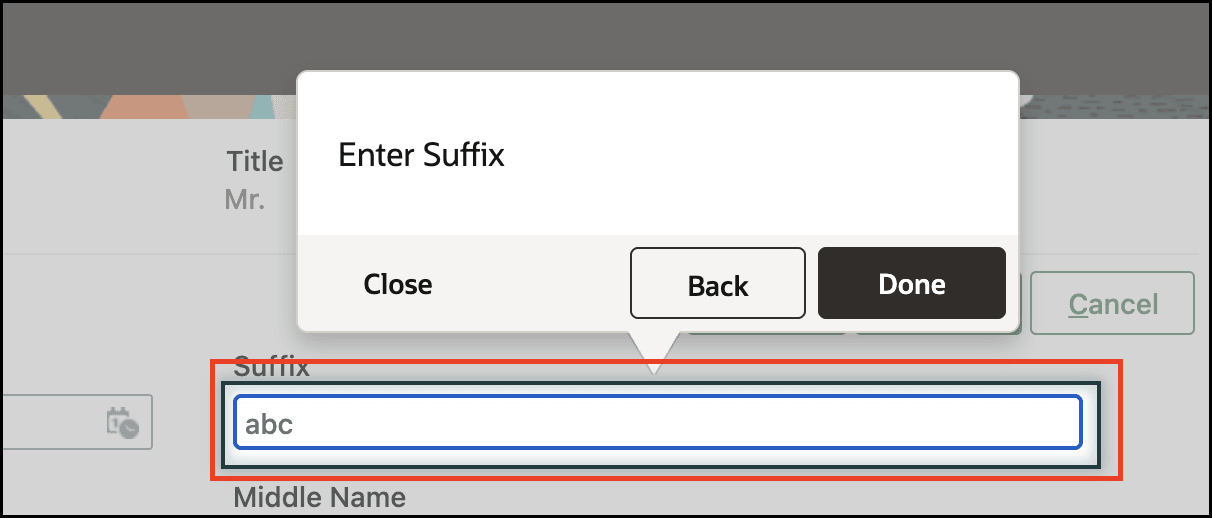
- What is Form field value in app?
- The value of the element selected by the form field condition selector
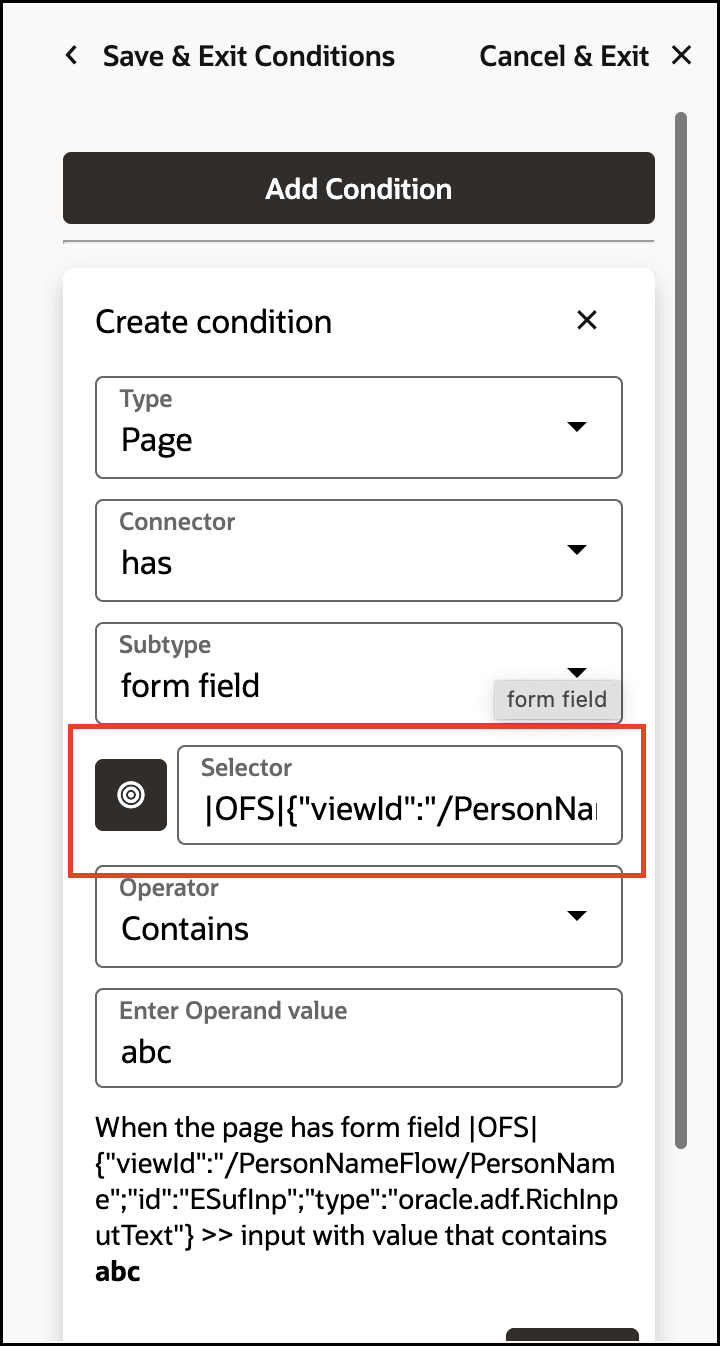
What is Condition form field?
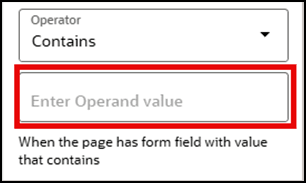
- the value of the operand as seen on the condition UI
- Most of the examples here are using 'has' as the connector, but there are some examples with 'has not' as the connector.
Operators by example:
- Contains:
- Means: Checks if the input string contains the specified operand.
- Use case: End user should see the step if they filled the form field with a value that includes "World".
- Example 1:
- Form field value in app = Hello World
- Condition form field = World
- Hello World contains World, so the condition is ✅ True
- Example 2:
- Form field value in app = Hello
- Condition form field = World
- Hello does not contain World, so the condition is ❌ False
- Empty:
- Means: Checks if the input string is empty after trimming whitespace.
- Use case: End user should see the step if they didnt fill the form field.
- Example 1:
- Form field value in app = (*note: with or without spaces*)
- The input string is empty, so the condition is ✅ True
- Example 2:
- Form field value in app = Hello
- The input string is not empty, so the condition is ❌ False
- Ends with:
- Means: Checks if the input string ends with the specified operand.
- Use case: End user should see the step if they filled the form field with a value with the suffix "World".
- Example 1:
- Form field value in app = Hello World
- Condition form field = World
- Hello World ends with World, so the condition is ✅ True
- Example 2:
- Form field value in app = World Hello
- Condition form field = World
- World Hello does not end with Hello, so the condition is ❌ False
- Equals (note: this is the same as form field - text was):
- Means: Checks if the input string matches the specified operand exactly, or checks if the input string contains the specified operand as a substring if the exact match option is not selected. If the operand is enclosed in square brackets, it is treated as a regular expression.
- Use case: End user should see the step if they filled the form field with the value "Hello World" exactly.
- Example 1:
- Form field value in app = Hello World
- Condition form field = Hello World
- Exact Match = enabled (true)
- Hello World equals Hello World exactly, and exact match is enabled, so the condition is ✅ True
- Example 2:
- Form field value in app = Hello
- Condition form field =Hello World
- Exact Match = enabled (true)
- Hello World does not equal Hello, so the condition is ❌ False
- Use case 1: End user should see the step if they filled the form field with the value "World".
- Example 1:
- Form field value in app = Hello World
- Condition form field = World
- Exact Match = disabled (false)
- Hello World contains World as a substring, and exact match is false, so the condition is ✅ True
- Use case 2: End user should see the step if they filled the form field with the value that starts with H.
- Example 1:
- Form field value in app = Hello World
- Condition form field = [H.*]
- Exact Match = disabled (false)
- Hello World matches the regular expression H.*, so the condition is ✅ True
- Exact length:
- Means: Checks if the length of the input string is equal to the specified operand.
- Use case: End user should see the step if they filled the form field with a value with a length 5 of characters.
- Example 1:
- Form field value in app = Hello
- Condition form field = 5
- The length of Hello is 5, which is equal to 5, so the condition is ✅ True
- Example 2:
- Form field value in app = Hello World
- Condition form field = 5
- The length of Hello World is 11, which is not equal to 5, so the condition is ❌ False
- Greater than:
- Means: Checks if the numeric value of the input string is greater than the specified operand.
- Use case: End user should see the step if they filled the form field with a value larger than 5.
- Example 1:
- Form field value in app = 10
- Condition form field = 5
- 10 is greater than 5, so the condition is ✅ True
- Example 2:
- Form field value in app = 4
- Condition form field = 5
- 4 is not greater than 5, so the condition is ❌ False
- Input Format:
- Means: Checks various constraints on the input string.
- At least one letter:
- Means: Checks if the input string contains at least one letter.
- Use case: End user should see the step if they filled the form field with a value that includes at least one letter.
- Example 1:
- Form field value in app = 123abc
- 123abc includes at least one letter, so the condition is ✅ True
- Example 2:
- Form field value in app = 123456
- 123456 does not include any letters, so the condition is ❌ False
- Use case 1: End user should see the step if they filled the form field with a value that doesn't include at least one letter. (note: in that case we will use "has not" for the condition)
- Example 1:
- Form field value in app = 123abc
- 123abc includes at least one letter, and we used 'has not', so the condition is ❌ False
- Example 2:
- Form field value in app = 123456
- 123456 does not include any letters, and we used 'has not', so the condition is ✅ True
- At least one number:
- Means: Checks if the input string contains at least one digit.
- Use case: End user should see the step if they filled the form field with a value that includes at least one number.
- Example 1:
- Form field value in app = abc123
- abc123 includes at least one number, so the condition is ✅ True
- Example 2:
- Form field value in app = abcdef
- abcdef does not include any numbers, so the condition is ❌ False
- At least one special character:
- Means: Checks if the input string contains at least one special character. Special characters include !, @, #, $, %, ^, &, *, (, ), _, -, +, =, {, }, [, ], :, ;, ', <, >, ?, /, ., ~, `, |, , and other non-alphanumeric characters.
- Use case: End user should see the step if they filled the form field with a value that includes at least one special character.
- Example 1:
- Form field value in app = abc!23
- abc!23 includes at least one special character (!), so the condition is ✅ True
- Example 2:
- Form field value in app = abcdef
- abcdef does not include any special characters, so the condition is ❌ False
- Email format:
- Means: Checks if the input string matches a standard email format.
- Use case: End user should see the step if they filled the form field with a value thats a valid email.
- Example 1:
- Form field value in app = test@example.com
- test@example.com matches a standard email format, so the condition is ✅ True
- Example 2:
- Form field value in app = invalid_email
- invalid_email does not match a standard email format, so the condition is ❌ False
- Use case 1: End user should see the step if they filled the form field with a value thats invalid email. (note: in that case we will use "has not" for the condition)
- Example 1.1:
- Form field value in app = test@example.com
- test@example.com matches a standard email format, and we used "has not", so the condition is ❌ False
- Example 2.1:
- Form field value in app = invalid_email
- invalid_email does not match a standard email format, and we used "has not", so the condition is ✅ True
- Letters and numbers only:
- Means: Checks if the input string contains only letters and numbers.
- Use case: End user should see the step if they filled the form field with a value that includes at least one special character.
- Example 1:
- Form field value in app = abc123
- abc123 includes only letters and numbers, so the condition is ✅ True
- Example 2:
- Form field value in app = abc!23
- abc!23 includes not only letters and numbers, but also a special character, so the condition is ❌ False
- Letters and numbers only:
- Means: Checks if the input string contains only letters and numbers.
- Use case: End user should see the step if they filled the form field with a value that includes only number and letters.
- Example 1:
- Form field value in app = abc123
- abc123 includes only letters and numbers, so the condition is ✅ True
- Example 2:
- Form field value in app = abc!23
- abc!23 includes not only letters and numbers, but also a special character, so the condition is ❌ False
- No numbers:
- Means: Checks if the input string does not contain any digits.
- Use case: End user should see the step if they filled the form field with a value that doesn't include numbers.
- Example 1:
- Form field value in app = hello
- hello does not contain any numbers, so the condition is ✅ True
- Example 2:
- Form field value in app = hello123
- hello123 contains numbers, so the condition is ❌ False
- No special characters:
- Means: Checks if the input string does not contain any special characters (except for whitespace). It means it allows only letters, numbers and whitespaces.
- Use case: End user should see the step if they filled the form field with a value that doesn't include special characters.
- Example 1:
- Form field value in app = hello world
- hello world does not contain any special characters, so the condition is ✅ True
- Example 2:
- Form field value in app = hello!world
- hello!world contains a special character (the '!'), so the condition is ❌ False
- No spaces:
- Means: Checks if the input string does not contain any whitespace characters.
- Use case: End user should see the step if they filled the form field with a value that doesn't include spaces.
- Example 1:
- Form field value in app = hello
- hello does not contain any spaces, so the condition is ✅ True
- Example 2:
- Form field value in app = hello world
- hello world contains a space, so the condition is ❌ False
- Only letters allowed:
- Means: Checks if the input string contains only letters.
- Use case: End user should see the step if they filled the form field with a value that includes only letters.
- Example 1:
- Form field value in app = abcdef
- abcdef includes only letters, so the condition is ✅ True
- Example 2:
- Form field value in app = abc123
- abc123 includes not only letters, but also numbers, so the condition is ❌ False
- Only numbers allowed:
- Means: Checks if the input string contains only digits (0-9).
- Use case: End user should see the step if they filled the form field with a value that includes only digits.
- Example 1:
- Form field value in app = 12345
- 12345 includes only numbers, so the condition is ✅ True
- Example 2:
- Form field value in app = 123abc
- 123abc includes not only numbers, but also letters, so the condition is ❌ False
- Password strength:
- Means: Checks if the input string meets strong password criteria (at least one lowercase, uppercase, number, special character, and minimum length 8).
- Use case: End user should see the step if they filled the form field with a value that matches a strong password.
- Example 1:
- Form field value in app = P@ssw0rd
- P@ssw0rd meets strong password criteria, so the condition is ✅ True
- Example 2:
- Form field value in app = weakpass
- weakpass does not meet strong password criteria, so the condition is ❌ False
- URL format:
- Means: Checks if the input string matches a basic URL format.
- Use case: End user should see the step if they filled the form field with a value that matches a URL format.
- Example 1:
- Form field value in app = http://example.com
- http://example.com matches a basic URL format, so the condition is ✅ True
- Example 2:
- Form field value in app = invalid_url
- invalid_url does not match a basic URL format, so the condition is ❌ False
- Less than:
- Means: Checks if the numeric value of the input string is less than the specified operand.
- Use case: End user should see the step if they filled the form field with a value that is less than 10.
- Example 1:
- Form field value in app = 5
- Condition form field = 10
- 5 is less than 10, so the condition is ✅ True
- Example 2:
- Form field value in app = 10
- Condition form field = 10
- 10 is not less than 10, so the condition is ❌ False
- Maximum length:
- Means: Checks if the length of the input string is less than or equal to the specified operand.
- Use case: End user should see the step if they filled the form field with a value with length up to 5 characters.
- Example 1:
- Form field value in app = Hello
- Condition form field = 5
- The length of Hello is 5, which is less than or equal to 5, so the condition is ✅ True
- Example 2:
- Form field value in app = Hello World
- Condition form field = 5
- The length of Hello World is 11, which is greater than 5, so the condition is ❌ False
- Minimum length:
- Means: Checks if the length of the input string is greater than or equal to the specified operand.
- Use case: End user should see the step if they filled the form field with a value with length of atleast 5 characters.
- Example 1:
- Form field value in app = Hello World
- Condition form field = 5
- The length of Hello World is 11, which is greater than or equal to 5, so the condition is ✅ True
- Example 2:
- Form field value in app = Hi
- Condition form field = 5
- The length of Hi is 2, which is less than 5, so the condition is ❌ False
- Range:
- Means: Checks if the numeric value of the input string is between two specified operands (exclusive).
- Use case: End user should see the step if they filled the form field with a value between 5 and 10.
- Example 1:
- Form field value in app = 7
- Condition form fields = 5;10
- 7 is between 5 and 10, so the condition is ✅ True
- Example 2:
- Form field value in app = 15
- Condition form fields = 5;10
- 15 is not between 5 and 10, so the condition is ❌ False
- Starts with:
- Means: Checks if the input string starts with the specified operand.
- Use case: End user should see the step if they filled the form field with a value that its prefix is "Hello"
- Example 1:
- Form field value in app = Hello World
- Condition form field = Hello
- Hello World starts with Hello, so the condition is ✅ True
- Example 2:
- Form field value in app = World Hello
- Condition form field = Hello
- World Hello does not start with Hello, so the condition is ❌ False