10 Configuring ECE Services
Learn how to configure Oracle Communications Elastic Charging Engine (ECE) services by configuring and deploying the ECE Helm chart.
Topics in this document:
For information about performing administrative tasks on your ECE cloud native services, see "Administering ECE Cloud Native Services" in BRM Cloud Native System Administrator's Guide.
Before installing the ECE Helm chart, you must first publish the metadata, config, and pricing data from the PDC pod.
Note:
Kubernetes looks for the CPU limit setting for pods. If it's not set, Kubernetes allocates a default value of 1 CPU per pod, which causes CPU overhead and Coherence scalability issues. To prevent this from happening, override each ECE pod's CPU limit to be the maximum CPU available on the node.
Adding Elastic Charging Engine Keys
Table 10-1 lists the keys that directly impact ECE deployment. Add these keys to your override-values.yaml file for oc-cn-ece-helm-chart. In the table, component-name should be replaced with the name of the ECE component, such as emgateway, radiusgateway, diametergateway, httpgateway, and ratedeventformatter.
Table 10-1 Elastic Charging Engine Keys
| Key | Path in values.yaml File | Description |
|---|---|---|
|
imageRepository |
N/A |
The repository server from where images must be pulled. |
|
imagePullSecrets |
N/A |
The secrets required to pull images from the repository. |
|
container.* |
N/A |
The details for the ECE container:
|
|
TZ |
N/A |
The TZ setting specifies the configured value. The default is UTC. |
|
chargingSettingPath |
volume |
The location of the configuration folder for ECE. The default is /home/charging/opt/ECE/oceceserver/config. |
|
createWalletsAsSecrets |
N/A |
Whether to create keystore certificates and wallets as secrets during the ECE deployment process (true) or if they have been pre-created as Kubernetes secrets (false). See " Using External Kubernetes Secrets for Certificates and Wallets " in BRM Cloud Native System Administrator's Guide for more information. |
|
secretEnv.* |
N/A |
The secret environment settings are:
See " Using External Kubernetes Secrets for Certificates and Wallets " in BRM Cloud Native System Administrator's Guide for more information. |
|
jmx.* |
N/A |
The details for the JMX keystore:
|
|
sslconnectioncertificates.* |
N/A |
The details for the SSL certificates:
|
|
prometheus.* |
monitoring |
The details for Prometheus:
|
|
sdk.* |
job |
The details for SDK:
|
|
customerloader.* |
job |
The details for customerloader:
|
|
jmsconfig.* |
job |
The details for jmsconfig:
|
|
chargingConfigurationReloader.* |
job |
The details for chargingConfigurationReloader:
|
|
chargingSyCacheMigration.* |
job |
The details for chargingSyCacheMigration:
|
|
schemaLoader.* |
job |
The details for schemaLoader:
|
|
serviceFqdn |
emgateway |
The service FQDN setting specifies the configured value. The default is ece-emg. |
|
resources.* |
emgateway |
The resource configuration specifies the CPU and memory resources for the component. |
|
nodeSelector.* |
emgateway |
The node selector configuration specifies where the pod can be scheduled. |
|
affinity.* |
emgateway |
The details for affinity:
|
|
addOnPodSpec.* |
emgateway |
The additional pod specification defines extra pod-level settings. |
|
emGatewayList.* |
emgateway |
The details for emGatewayList:
|
|
wallet |
radiusgateway |
The primary root wallet filename. The chart resolves it under /home/charging/wallet/brmwallet/root. The default is cwallet.sso. |
|
queueSize |
radiusgateway |
The size of the processing queue. The default is 8. |
|
avpName |
radiusgateway |
The attribute-Value Pair name for RADIUS. The default is Service-Type. |
|
vendorId |
radiusgateway |
The vendor ID for RADIUS attributes. The default is 0. |
|
keyPass |
radiusgateway |
The password for key. The default is an empty value. |
|
keyStoreLocation |
radiusgateway |
The location of the keystore, if SSL is used. The default is an empty value. |
|
enableRetransmissionCheck |
radiusgateway |
Whether to enable checking for retransmissions. The default is true. |
|
timeToLive |
radiusgateway |
The time to live for messages in milliseconds. The default is 30000. |
|
notificationListenerConnectionPoolSize |
radiusgateway |
The connection pool size for notification listeners. The default is 10. |
|
maxSessionsPerUser |
radiusgateway |
The maximum number of sessions for a user. The default is 5. |
|
resources.* |
radiusgateway |
The resource configuration specifies the CPU and memory resources for the component. |
|
nodeSelector.* |
radiusgateway |
The node selector configuration specifies where the pod can be scheduled. |
|
affinity.* |
radiusgateway |
The affinity configuration specifies pod scheduling affinity rules. |
|
addOnPodSpec.* |
radiusgateway |
The additional pod specification defines extra pod-level settings. |
|
radiusgatewayList.* |
radiusgateway |
The details for radiusgatewayList:
|
|
resources.* |
diametergateway |
The resource configuration specifies the CPU and memory resources for the component. |
|
diametergatewayList.* |
diametergateway |
The details for diametergatewayList:
|
|
resources.* |
cdrgateway |
The resource configuration specifies the CPU and memory resources for the component. |
|
nodeSelector.* |
cdrgateway |
The node selector configuration specifies where the pod can be scheduled. |
|
affinity.* |
cdrgateway |
The details for affinity:
|
|
addOnPodSpec.* |
cdrgateway |
The additional pod specification defines extra pod-level settings. |
|
cdrgatewayList.* |
cdrgateway |
The details for cdrgatewayList:
|
|
serverSslKeyStore |
httpgateway |
The SSL keystore file for the server. The default is httpGatewayServer.jks. |
|
extServerSSLKeyStoreSecret |
httpgateway |
The names of the external Kubernetes secrets for the HTTP Gateway. See " Using External Kubernetes Secrets for Certificates and Wallets " in BRM Cloud Native System Administrator's Guide for more information. |
|
serverSslKeyStoreType |
httpgateway |
The type of the SSL keystore. The default is PKCS12. |
|
serverSslKeyStoreAlias |
httpgateway |
The alias for the key in the SSL keystore. The default is oracle. |
|
walletLocation |
httpgateway |
The wallet location for SSL configuration. The default is /home/charging/wallet/ecewallet/. |
|
snrHttp2Enable |
httpgateway |
Whether to enable HTTP2 Server Name Indication. The default is true. |
|
cdrGenerationEnabled |
httpgateway |
Whether CDR generation is enabled. Set to "true" to enable. The default is false. |
|
cdrGenerationStandaloneMode |
httpgateway |
Whether CDR generation uses standalone mode. The default is false. |
|
cdrGatewayList |
httpgateway |
The list of CDR Gateway services. The default is ece-cdrgatewayservice:8084. |
|
cdrGatewayRetry |
httpgateway |
The number of retries for CDR Gateway communication. The default is 3. |
|
retryIntervalInMillis |
httpgateway |
The interval between retries in milliseconds. The default is 5000. |
|
serverHttpExternalPort |
httpgateway |
The external HTTP port for the server. The default is 31500. |
|
rateOfflineCDRinRealtime |
httpgateway |
Whether to rate offline CDRs in real-time. The default is false. |
|
generateCDRsForOnlineRequests |
httpgateway |
Whether to generate CDRs for online requests. The default is true. |
|
callScreeningEnabled |
httpgateway |
Whether to enable call screening feature. The default is true. |
|
notificationListenerConnectionPoolSize |
httpgateway |
The connection pool size for notification listeners. The default is 10. |
|
ecsClusterHealthStatus |
httpgateway |
The ECS cluster health status value used for active-active site health detection. The default value is an empty string. This is a read-only value that is automatically updated by the HTTP Gateway. |
|
httpIdentityKeystore |
httpgateway |
The SSL identity keystore file for the server. The default is an empty value. |
|
extHttpIdentityKeystoreSecret |
httpgateway |
The names of the external Kubernetes secrets for the HTTP Gateway. See " Using External Kubernetes Secrets for Certificates and Wallets " in BRM Cloud Native System Administrator's Guide for more information. |
|
httpIdentityKeystoreType |
httpgateway |
The type of the SSL identity keystore. The default is an empty value. |
|
httpTruststore |
httpgateway |
The SSL truststore file. The default is an empty value. |
|
extHttpTruststoreSecret |
httpgateway |
The names of the external Kubernetes secrets for the HTTP Gateway. See " Using External Kubernetes Secrets for Certificates and Wallets " in BRM Cloud Native System Administrator's Guide for more information. |
|
httpTruststoreType |
httpgateway |
The type of the SSL truststore. The default is an empty value. |
|
nrfPublicKeyLocation |
httpgateway |
The public Key Path of NRF so that JWT can be validated. The default is an empty value. |
|
extNrfPublicKeyLocationSecret |
httpgateway |
The names of the external Kubernetes secrets for the HTTP Gateway. See " Using External Kubernetes Secrets for Certificates and Wallets " in BRM Cloud Native System Administrator's Guide for more information. |
|
nrfJwtAlgorithm |
httpgateway |
The algorithm used to create the NRF Public Key. Valid Values: RSA,EC. Default value is RSA. The default is RSA. |
|
resources.* |
httpgateway |
The resource configuration specifies the CPU and memory resources for the component. |
|
nodeSelector.* |
httpgateway |
The node selector configuration specifies where the pod can be scheduled. |
|
affinity.* |
httpgateway |
The details for affinity:
|
|
addOnPodSpec.* |
httpgateway |
The additional pod specification defines extra pod-level settings. |
|
includeTrailingForwardSlash |
httpgateway |
Whether a trailing forward slash is included. The default is true. |
|
httpgatewayList.* |
httpgateway |
The details for httpgatewayList:
|
|
resources.* |
customerUpdater |
The resource configuration specifies the CPU and memory resources for the component. |
|
nodeSelector.* |
customerUpdater |
The node selector configuration specifies where the pod can be scheduled. |
|
affinity.* |
customerUpdater |
The affinity configuration specifies pod scheduling affinity rules. |
|
addOnPodSpec.* |
customerUpdater |
The additional pod specification defines extra pod-level settings. |
|
customerUpdaterList.* |
customerUpdater |
The details for customerUpdaterList:
|
|
resources.* |
ratedEventFormatter |
The resource configuration specifies the CPU and memory resources for the component. |
|
ratedEventFormatterList.* |
ratedEventFormatter |
The details for ratedEventFormatterList:
|
|
resources.* |
cdrFormatter |
The resource configuration specifies the CPU and memory resources for the component. |
|
cdrFormatterList.* |
cdrFormatter |
The details for cdrFormatterList:
|
|
resources.* |
brmGateway |
The resource configuration specifies the CPU and memory resources for the component. |
|
nodeSelector.* |
brmGateway |
The node selector configuration specifies where the pod can be scheduled. |
|
affinity.* |
brmGateway |
The details for affinity:
|
|
addOnPodSpec.* |
brmGateway |
The additional pod specification defines extra pod-level settings. |
|
brmGatewayList.* |
brmGateway |
The details for brmGatewayList:
|
|
resources.* |
monitoringAgent |
The resource configuration specifies the CPU and memory resources for the component. |
|
monitoringAgentList.* |
monitoringAgent |
The details for monitoringAgentList:
|
|
labels |
charging |
The label for all pods in the deployment. The default value is ece. |
|
jmxport |
charging |
The JMX port exposed by ece, which can be used to log in to JConsole. The default is 31022. |
|
coherencePort |
charging |
The Coherence cluster communication port. |
|
terminationGracePeriodSeconds |
charging |
The time to wait before forcefully terminating the pod. The default is 10. |
|
persistenceEnabled |
charging |
Whether to persist the ECE cache data into the Oracle database. The default is true. See " Enabling Persistence in ECE " in BRM Cloud Native System Administrator's Guide for more information. |
|
ratedEventStreamingEnabled |
charging |
Whether to enable rated events to be published to a kafka topic. The default is false. |
|
rebuildCdrStoreTable |
charging |
Whether to enable rebuilding of the cdrStore table. The default is false. |
|
hpaEnabled |
charging |
Whether to enable autoscaling using Kubernetes Horizontal Pod Autoscaler. The default is false. See " Setting Up Autoscaling of ECE Pods " in BRM Cloud Native System Administrator's Guide for more information. |
|
remEnabled |
charging |
Whether to enable Rated Event Manager. The default is true. |
|
incrementalCustomerLoad |
charging |
Whether subscribers are loaded incrementally into the ECE cache after the initial customer load. Set this to true and configure migration.loader.initialCustomerLoadFilterQuery to load the initial set of subscribers during a fresh installation. Configure migration.loader.incrementalCustomerLoadFilterQuery to load additional subscribers by using the Customer Loader job during a Helm upgrade after ECE enters the usage processing state. Changing this value after ECE starts can cause the customerUpdater pods to restart. The default is false. |
|
parallelPodManagement |
charging |
Whether pods are started, updated, or terminated in parallel (true) instead of sequentially (false). |
|
timeoutSurvivorQuorum |
charging |
The minimum number of cluster members that must remain in the cluster when the cluster service is terminating suspect members, without data loss. The default is 3. To calculate the minimum number, use this formula: (chargingServerWorkerNodes – 1) * (sum of all ecs pods/chargingServerWorkerNodes) |
|
chargingServerWorkerNodes |
charging |
The number of charging server worker nodes. The default is 3. |
|
clusterDomain |
charging |
The DNS domain configured for the Kubernetes cluster. An empty value uses the cluster’s default DNS domain. |
|
autoGenerateAppConfig |
charging |
Whether selected application configurations are automatically replicated from the primary site to all sites in an active-active deployment. When set to true , ECE replicates diameterGatewayConfig , cdrFormatterConfiguration , cdrGatewayConfiguration , httpGatewayConfig , nfProfileConfig , nfServiceConfig , and brmGatewayConfiguration . It does not replicate ratedEventFormatterConfiguration , oraclePersistence , cachePersistence , ratedEventPublisher , Kafka configuration, JMSConfiguration , siteConfig , or customerGroupConfig . You must define these configurations for each site in the override file. When set to false , you must configure all pod and application configurations for every site and ensure that Coherence members are unique in each site. This parameter is intended primarily for large systems. The default is true. |
|
metrics.* |
charging |
The details for metrics:
|
|
ecs.* |
charging |
The details for ecs:
|
|
pricingupdater.* |
charging |
The configuration includes the corresponding component settings.
|
|
configLoader.* |
charging |
The details for configLoader:
|
|
customerLoader.* |
charging |
The details for customerLoader:
|
|
query.* |
charging |
The details for query:
|
|
clusterName |
charging |
The clusterName determines site where ref pod is running. The default is BRM. |
|
isFederation |
charging |
Whether federation is enabled. The default is false. |
|
activeCluster |
charging |
Whether the cluster is marked as primary in an active-active setup. The default is true. |
|
secondaryCluster |
charging |
Whether the cluster is configured as a secondary cluster. The default is false. |
|
clusterTopology |
charging |
The topology type of the cluster. The default is active-active. |
|
cluster.* |
charging |
The details for cluster:
|
|
journalingConfig.* |
charging |
The details for journalingConfig:
|
|
federatedCacheScheme.* |
charging |
The details for federatedCacheScheme:
|
|
eceWalletLocation |
charging |
The path to the ECE wallet directory. The default is /home/charging/wallet/ecewallet/. |
|
extBRMClientWalletSecret |
charging |
The existing Kubernetes secret containing all BRM client wallet files. Leave empty to use secrets/brmwallet/client/. |
|
extBRMServerWalletSecret |
charging |
The existing Kubernetes secret containing all BRM server wallet files. Leave empty to use secrets/brmwallet/server/. |
|
extBRMRootWalletSecret |
charging |
The existing Kubernetes secret containing all BRM root wallet files. Leave empty to use secrets/brmwallet/root/. |
|
brmWalletServerLocation |
charging |
The primary BRM server wallet filename. The chart resolves it under /home/charging/wallet/brmwallet/server. The default is cwallet.sso. |
|
brmWalletClientLocation |
charging |
The retained client wallet filename. Current rendered configuration does not consume it. The default is cwallet.sso. |
|
brmWalletLocation |
charging |
The path to the BRM wallet directory. The default is /home/charging/wallet/brmwallet. |
|
customSSLWallet |
charging |
Whether a custom SSL wallet is used. The default is false. |
|
secretCustomWallet.* |
charging |
The details for secretCustomWallet:
|
|
server.* |
charging |
The details for server:
|
|
customerGroupConfigurations.* |
charging |
The configurations for customer groups.
|
|
siteConfigurations.* |
charging |
The configuration for monitoring sites.
|
|
ratedEventPublishers.* |
charging |
The configuration for rated event publishers.
|
|
ratedEventKafkaPublishers.* |
charging |
The configuration for rated event kafka publishers.
|
|
itemAssignmentConfig.* |
charging |
The details for itemAssignmentConfig:
|
|
simpleFileBasedRatedEventPublisher.* |
charging |
The configuration for simple file-based rated event publisher.
|
|
errorHandler.* |
charging |
The details for errorHandler:
|
|
notification.* |
charging |
The details for notification:
|
|
diameterGatewayPeerConfigurations.* |
charging |
The details for diameterGatewayPeerConfigurations:
|
|
expirationConfiguration.* |
charging |
The expiration configuration for various types of records.
|
|
extensions.* |
charging |
The details for extensions:
|
|
brmCdrPlugins.* |
charging |
The details for brmCdrPlugins:
|
|
cdrFormatterPlugins.* |
charging |
The details for cdrFormatterPlugins:
|
|
nfProfileConfigurations.* |
charging |
The details for nfProfileConfigurations:
|
|
nfServiceConfigurations.* |
charging |
The details for nfServiceConfigurations:
|
|
cachePersistenceConfigurations.* |
charging |
The details for cachePersistenceConfigurations:
|
|
connectionConfigurations.* |
charging |
The details for connectionConfigurations:
|
|
brsConfigurations.* |
charging |
The details for brsConfigurations:
|
|
messagePriorityConfigurations.* |
charging |
The details for messagePriorityConfigurations:
|
|
overloadConfigurations.* |
charging |
The details for overloadConfigurations:
|
|
kafkaConfigurations.* |
charging |
The details for kafkaConfigurations:
|
|
loader.* |
migration |
The details for loader:
|
|
pricingUpdater.* |
migration |
The configurations for connecting to a server to update pricing information.
|
|
common.* |
testtools |
The details for common:
|
|
simulators.* |
testtools |
The details for simulators:
|
|
loader.* |
testtools |
The details for loader:
|
|
customerGenerator.* |
testtools |
The details for customerGenerator:
|
|
filePath |
subscriberTrace |
The file path where the subscriber trace configuration is stored. It indicates the XML file location that contains settings for subscriber tracing. The default is /home/charging/config/subscriber-trace.xml. |
|
logMaxSubscribers |
subscriberTrace |
The setting specifies the maximum number of individual subscribers that the system will track simultaneously in its logs. The default is 100. |
|
logMaxSubscriberSessions |
subscriberTrace |
The setting defines the maximum number of sessions per subscriber that can be logged concurrently. The default is 24. |
|
logExpiryWaitTime |
subscriberTrace |
The setting indicates the duration after which the logged data for a subscriber is considered old and can be purged from the system. The default is 1. |
|
logCleanupInterval |
subscriberTrace |
The setting specifies the frequency (in days) at which the system will perform a cleanup operation to remove expired logs based on the logExpiryWaitTime. The default is 2. |
|
logLevel |
subscriberTrace |
The setting sets the granularity of the logs captured for subscriber tracing. A level of “DEBUG” is the most detailed, capturing a comprehensive range of information about each subscriber session. The default is DEBUG. |
|
subscriberList |
subscriberTrace |
The setting specifies a list of subscribers to be explicitly traced. The default is an empty value. |
|
logger.* |
log4j2 |
The details for logger. |
|
rootDir |
eceproperties |
The root directory of ECE server installation. The default is /home/charging/opt/ECE/oceceserver. |
|
logsDir |
eceproperties |
The directory for ECE server logs. The default is /home/charging/opt/ECE/oceceserver/logs. |
|
NotificationQueue.* |
JMSConfiguration |
The details for NotificationQueue:
|
|
BRMGatewayNotificationQueue.* |
JMSConfiguration |
The configuration specifies the settings for this notification queue.
|
|
DiameterGatewayNotificationQueue.* |
JMSConfiguration |
The configuration specifies the settings for this notification queue.
|
|
jdbcConfigurations.* |
REFPluginConfiguration |
The schema-specific JDBC connection settings. Add one entry under jdbcConfigurations for each schema, all fields are compulsory.
|
|
wallet_location |
REFPluginConfiguration |
The location of the database wallet for secure connections. The default is /home/charging/wallet/ecewallet/. |
|
validateSchema |
REFPluginConfiguration |
Whether to validate database schema on connection. The default is true. |
|
initialPoolSize |
REFPluginConfiguration |
The initial size of the database connection pool. The default is 1. |
|
minPoolSize |
REFPluginConfiguration |
The minimum number of connections in the pool. The default is 1. |
|
maxPoolSize |
REFPluginConfiguration |
The maximum number of connections in the pool. The default is 50. |
|
connectionWaitTimeout |
REFPluginConfiguration |
The time in seconds to wait for a connection from the pool. The default is 5. |
|
validateConnectionOnBorrow |
REFPluginConfiguration |
Whether to validate connections on borrow. The default is false. |
|
sqlForValidateConnection |
REFPluginConfiguration |
The SQL query used to validate a connection. The default is SELECT SYSDATE FROM DUAL. |
|
fastConnectionFailoverEnabled |
REFPluginConfiguration |
Whether fast connection failover is enabled. The default is false. |
|
onsConfiguration |
REFPluginConfiguration |
The Oracle Notification Service (ONS) configuration specifies the ONS settings. |
|
maxStatements |
REFPluginConfiguration |
The maximum number of statements allowed in the pool. The default is 50. |
|
jmxEnabled |
REFPluginConfiguration |
Whether JMX monitoring is enabled. The default is true. |
|
metricUpdateInterval |
REFPluginConfiguration |
The interval in seconds for updating metrics. The default is 10. |
|
poolLogLevel |
REFPluginConfiguration |
The log level for connection pool messages. The default is INFO. |
|
control_file_dir |
REFPluginConfiguration |
The directory for control files. The default is /home/charging/rem_input/. |
|
load_thread_capacity |
REFPluginConfiguration |
The number of threads for loading operations. The default is 30. |
|
update_thread_capacity |
REFPluginConfiguration |
The number of threads for update operations. The default is 20. |
|
concurrent_updaters |
REFPluginConfiguration |
The number of concurrent updaters. The default is 4. |
|
updater_backlog_limit |
REFPluginConfiguration |
The backlog limit for updaters. The default is 50. |
|
zip_buffer_size |
REFPluginConfiguration |
The zip input buffer size (in bytes) used for BLOB insertions in the ZIP_DB operation mode. The default is 8192. |
|
refmode |
REFPluginConfiguration |
The reference mode. The default is DIRECT. |
|
creation_process |
REFPluginConfiguration |
The process used for creation. The default is RATING_PIPELINE. |
|
successmode |
REFPluginConfiguration |
The success mode for operations. The default is delete. |
|
dbSSLEnabled |
REFPluginConfiguration |
Whether SSL for database connection is enabled (set to "true" to enable). The default is false. |
|
dbSSLClientAuth |
REFPluginConfiguration |
Whether client authentication is required for SSL/TLS connection. The default is false. |
|
sslTrustStoreLocation |
REFPluginConfiguration |
The file path to the SSL/TLS truststore location for database connection. The default is /scratch/db_wallet/cwallet.sso. |
|
sslKeyStoreLocation |
REFPluginConfiguration |
The file path to the SSL/TLS keystore location for database connection. The default is /scratch/db_wallet/cwallet.sso. |
|
sslTrustStorePwd |
REFPluginConfiguration |
The password for accessing the SSL/TLS truststore. The default is infranet.rel.db.ssl.truststore.password. |
|
sslKeyStorePwd |
REFPluginConfiguration |
The password for accessing the SSL/TLS keystore. The default is infranet.rel.db.ssl.keystore.password. |
|
eventStream.* |
REFPluginConfiguration |
The eventStream property is effective when refMode is STREAM. In STREAM mode, producer.bootstrap_servers must be set to a valid Kafka broker URL.
|
| cmService.* | N/A |
The details for the CM service:
|
|
brmgatewayService.port |
N/A |
The port setting specifies the service port. The default is 15502. |
|
cdrgatewayService.port |
N/A |
The port setting specifies the service port. The default is 8084. |
|
diametergatewayService.* |
N/A |
The port details for the Diameter Gateway service:
|
|
radiusgatewayService.* |
N/A |
The port details for the RADIUS Gateway service:
|
|
httpgatewayService.* |
N/A |
The port details for the HTTP Gateway service:
|
|
jmxservice.* |
N/A |
The port details for the JMX service:
|
|
type |
monitoringagent |
The NodePort service type allows access to application from outside. The default is NodePort. |
|
logs.* |
pvc |
The details for logs:
|
|
brmconfig.* |
pvc |
The details for brmconfig:
|
|
cdrformatter.* |
pvc |
The details for cdrformatter:
|
|
storageClass.name |
N/A |
The name of the storage class for dynamic volume provisioning. |
|
coherenceClusterRackSafe.* |
N/A |
The settings for making the ECE Coherence cluster rack-safe.
|
Configuring Gateway Service Types and NodePorts
The ECE Helm chart creates Kubernetes services for Diameter Gateway, RADIUS Gateway, and HTTP Gateway. By default, these gateway services use the NodePort service type.
You can change the service type in the override-values.yaml file for oc-cn-ece-helm-chart when your Kubernetes environment exposes gateway traffic through another method, such as an ingress controller or a load balancer.
-
Open the override-values.yaml file for oc-cn-ece-helm-chart.
-
Set the type key under diametergatewayService, radiusgatewayService, and httpgatewayService.
For example:diametergatewayService: port: 3868 type: NodePort radiusgatewayService: port: 1812 type: NodePort httpgatewayService: port: 8080 type: NodePort
You can set type to ClusterIP, NodePort, or LoadBalancer, depending on how gateway traffic is exposed in your Kubernetes environment.
-
If the service type is NodePort, set the NodePort values for the gateway service instances.
For example:diametergateway: diametergatewayList: - coherenceMemberName: "diametergateway1" diameterServiceNodePort: 31851 - coherenceMemberName: "diametergateway2" diameterServiceNodePort: 32050 radiusgateway: radiusgatewayList: - coherenceMemberName: "radiusgateway1" radiusServiceNodePort: 30182 - coherenceMemberName: "radiusgateway2" radiusServiceNodePort: 31135 httpgateway: serverHttpExternalPort: 31500For multiple Diameter Gateway or RADIUS Gateway instances, specify the NodePort value under each instance in the corresponding gateway list.
Note:
The diameterServiceNodePort, radiusServiceNodePort, and serverHttpExternalPort keys are used only when the corresponding gateway service type is set to NodePort. If you do not specify these keys, Kubernetes assigns NodePort values automatically. -
Run the helm upgrade command.
-
Verify the gateway service type and port configuration:
kubectl get svc
When the gateway services are configured as NodePort, the output shows the configured NodePort values.
For example:NAME TYPE PORT(S) ece-dgw-1 NodePort 3868:31851/TCP ece-dgw-2 NodePort 3868:32050/TCP ece-http NodePort 8080:31500/TCP ece-rgw NodePort 1812:30182/UDP ece-rgw-2 NodePort 1812:31135/UDP
When the gateway services are configured as ClusterIP, the output does not show NodePort values.
For example:NAME TYPE PORT(S) ece-dgw-1 ClusterIP 3868/TCP ece-dgw-2 ClusterIP 3868/TCP ece-http ClusterIP 8080/TCP ece-rgw ClusterIP 1812/UDP ece-rgw-2 ClusterIP 1812/UDP
Enabling SSL in Elastic Charging Engine
Note:
For more information about securing communications between ECE and external applications, see "Securing ECE Communication" in BRM Cloud Native System Administrator's Guide.
To complete the configuration for SSL setup in ECE:
-
Configure the SSL KeyStores by doing one of the following:
-
Generate the Identity and Trust KeyStores and then move your files, such as identity.p12 and trust.p12, under the oc-cn-ece-helm-chart/ece/keystore directory.
-
Pre-create the Kubernetes Secret for the Identity and Trust KeyStore files and set the secretEnv.extECESecret key in your override-values.yaml file for both oc-cn-ece-helm-chart.
For more information, see "Managing KeyStore Certificates and Wallets" in BRM Cloud Native System Administrator's Guide.
-
-
Set these keys in the override-values.yaml file for oc-cn-ece-helm-chart:
-
sslconnectioncertificates.SSLENABLED: Set this to true.
-
sslEnabled: Set this to true in emGatewayConfigurations, httpGatewayConfigurations, and BRMConnectionConfiguration.
-
migration.pricingUpdater.keyStoreLocation: Set this to /home/charging/opt/ECE/oceceserver/config/client.jks.
-
charging.brmWalletServerLocation: Set this to the name of the BRM server wallet file, such as cwallet.sso.
-
charging.emGatewayConfigurations.emGatewayConfigurationList.emGateway1Config.wallet: Set this to the BRM wallet location.
-
charging.emGatewayConfigurations.emGatewayConfigurationList.emGateway2Config.wallet: Set this to the BRM wallet location.
-
charging.radiusGatewayConfigurations.wallet: Set this to the BRM wallet location.
-
charging.connectionConfigurations.BRMConnectionConfiguration.brmwallet: Set this to the BRM wallet location.
-
-
Deploy your ECE cloud native services by following the instructions in "Deploying BRM Cloud Native Services".
Enabling SSL for the HTTP Gateway Server
When you enable SSL for the HTTP Gateway server, the ECE Helm chart does not automatically generate the HTTP Gateway server certificate or server SSL keystore.
-
Create or obtain a private key and server certificate for the HTTP Gateway server.
-
Create a PKCS12 keystore containing the private key and server certificate.
-
Configure the HTTP Gateway server SSL keystore by doing one of the following:
- To store the keystore in the ECE Helm chart:
-
Move the PKCS12 keystore file to the oc-cn-ece-helm-chart/secrets/httpgateway directory.
-
In your override-values.yaml file for oc-cn-ece-helm-chart, set the following keys:
-
httpgateway.serverSslKeyStore: Set this to the name of the PKCS12 keystore file.
-
createWalletsAsSecrets: Set this to true.
-
-
-
To use an external Kubernetes secret:
- Create a Kubernetes secret containing the HTTP Gateway server PKCS12 keystore.
- In your override-values.yaml file oc-cn-ece-helm-chart, set httpgateway.extServerSSLKeyStoreSecret to the name of the Kubernetes secret.
- To store the keystore in the ECE Helm chart:
-
In your override-values.yaml file, set the following keys:
-
httpgateway.serverSslKeyStoreType: Set this to PKCS12.
-
httpgateway.serverSslKeyStoreAlias: Set this to the private key alias in the keystore. The default is oracle.
-
secretEnv.ECEHTTPGATEWAYSERVERSSLKEYSTOREPASSWORD: Set this to the password for the PKCS12 keystore.
-
-
For each applicable HTTP Gateway instance, set the httpgateway.httpgatewayList[].httpGatewayConfiguration.serverSslEnabled key to true.
-
Deploy the ECE Helm chart.
Connecting ECE Cloud Native to an SSL-Enabled Database
ECE uses Kubernetes secrets to provide SSL wallet and truststore files that secure connections to the ECE persistence database and the BRM database.
Note:
In earlier ECE releases, the ECE wallet was stored on the shared ece-wallet-pvc. This PVC is no longer used or created in current ECE releases. ECE wallet files are provisioned from Kubernetes secrets into pod-local storage.
You can provide the SSL files in either of the following ways:
-
Add the SSL files to the ECE Helm chart and allow the chart to create the required Kubernetes secrets during deployment.
-
Create Kubernetes secrets before you deploy ECE and configure ECE to use those secrets.
To connect ECE cloud native services to an SSL-enabled Oracle database:
-
Provide the SSL wallet files in one of the following ways:
-
Configure the ECE persistence database connection. Under charging.connectionConfigurations.OraclePersistenceConnectionConfigurations, configure the following keys:
-
dbSSLEnabled: Set this to true.
-
dbSSLType: Set this to the required SSL connection type: oneway, twoway, or none.
-
sslServerCertDN: Set this to the SSL server certificate DN. The default is DC=local,DC=oracle,CN=pindb.
-
trustStoreLocation: Specify the truststore file name when the ECE Helm chart creates the secret. If you use a pre-created Kubernetes secret, specify the key in the secret that contains the truststore.
-
trustStoreType: Set this to the truststore file type: SSO or PKCS12.
-
extPersistenceDBSSLWalletSecret: If you use a pre-created Kubernetes secret, set this to the name of the secret that contains the ECE database SSL truststore.
-
-
Configure Customer Updater for an SSL-enabled Oracle AQ database queue. Under customerUpdater.customerUpdaterList.oracleQueueConnectionConfiguration, configure the following keys:
-
dbSSLEnabled: Set this to true.
-
dbSSLType: Set this to the required SSL connection type: oneway, twoway, or none.
-
sslServerCertDN: Set this to the SSL server certificate DN. The default is DC=local,DC=oracle,CN=pindb.
-
trustStoreLocation: Specify the truststore file name when the ECE Helm chart creates the secret. If you use a pre-created Kubernetes secret, specify the key in the secret that contains the truststore.
-
trustStoreType: Set this to the truststore file type: SSO or PKCS12.
-
extBRMDBSSLWalletSecret: If you use a pre-created Kubernetes secret, set this to the name of the secret that contains the BRM database SSL truststore.
Note:
For database connectivity, ECE supports the database service name, but not the database service ID. Set the following keys to the database service name:
-
charging.connectionConfigurations.OraclePersistenceConnectionConfigurations.sid
-
customerUpdater.customerUpdaterList.oracleQueueConnectionConfiguration.sid
-
-
Configure the Oracle Net files for the ECE and BRM database connections.
-
Obtain the tnsnames.ora and sqlnet.ora files for the SSL-enabled ECE and BRM databases.
-
In the ECE database sqlnet.ora file, configure the wallet location as follows:
WALLET_LOCATION = (SOURCE = (METHOD = FILE) (METHOD_DATA = (DIRECTORY = /home/charging/opt/ECE/oceceserver/config/ece_ssl_db_wallet/schema1) ) ) -
In the BRM database sqlnet.ora file, configure the wallet location as follows:
WALLET_LOCATION = (SOURCE = (METHOD = FILE) (METHOD_DATA = (DIRECTORY = /home/charging/opt/ECE/oceceserver/config/brm_ssl_db_wallet/schema1) ) ) -
When you build your customized ECE image:
-
Add the ECE Oracle Net files to /home/charging/ext/ora_files/ece.
-
Add the BRM Oracle Net files to /home/charging/ext/ora_files/brm.
-
-
Build and publish the customized ECE image, and configure your ECE deployment to use that image.
-
-
Configure SSL files for other ECE integrations as required.
Use the corresponding Kubernetes secret settings when you configure SSL for other ECE components. For example:
charging:
  kafkaConfigurations:
    kafkaConfigurationList:
      - kafkaTrustStoreLocation: certificate_key
        extKafkaTrustStoreSecret: external_secret_name

migration:
  pricingUpdater:
    keyStoreLocation: certificate_key
    extPDCKeyStoreSecret: external_secret_name

JMSConfiguration:
  NotificationQueue:
    - KeyStoreLocation: certificate_key
      extJMSKeyStoreSecret: external_secret_name

  BRMGatewayNotificationQueue:
    - KeyStoreLocation: certificate_key
      extJMSKeyStoreSecret: external_secret_name

  DiameterGatewayNotificationQueue:
    - KeyStoreLocation: certificate_key
      extJMSKeyStoreSecret: external_secret_name
For information about the available configuration keys, see "Adding Elastic Charging Engine Keys".
Using the ECE Helm Chart to Create Kubernetes Secrets
To have the ECE Helm chart create the Kubernetes secrets:
-
In your override-values.yaml file for oc-cn-ece-helm-chart, set createWalletsAsSecrets to true.
-
Place the ECE database SSL wallet files in the oc-cn-ece-helm-chart/secrets/db_wallets/ece_ssl_db_wallet/scheman directory, where n is the schema number.
-
Place the BRM database SSL wallet files in the oc-cn-ece-helm-chart/secrets/db_wallets/brm_ssl_db_wallet/scheman directory, where n is the schema number.
-
For a multischema system, create a directory for each schema and add the appropriate wallet files to each directory.
-
From the oc-cn-ece-helm-chart directory, grant the required permissions to the secrets directory:
chmod -R 775 secrets
Using Pre-created Kubernetes Secrets
To use pre-created Kubernetes secrets:
-
Create a Kubernetes secret that contains the SSL truststore for the ECE persistence database.
-
Create a Kubernetes secret that contains the SSL truststore for the BRM database connection.
-
Open your override-values.yaml file for oc-cn-ece-helm-chart.
-
Under charging.connectionConfigurations.OraclePersistenceConnectionConfigurations, set extPersistenceDBSSLWalletSecret to the name of the ECE Kubernetes secret.
-
Set trustStoreLocation to the key in the secret that contains the truststore for the ECE persistence database.
-
Under customerUpdater.customerUpdaterList.oracleQueueConnectionConfiguration, set extBRMDBSSLWalletSecret to the name of that BRM Kubernetes secret.
-
Set trustStoreLocation to the key in the secret that contains the truststore for the BRM database connection.
ECE provides extPersistenceDBSSLWalletSecret and extBRMDBSSLWalletSecret for externally supplied Kubernetes Secrets.
About Elastic Charging Engine Volume Mounts
ECE uses persistent volumes for data that requires persistence or shared access across pods. Use RWX storage only for workloads that require shared writable storage.
Table 10-2 summarizes the ECE storage model.
Table 10-2 ECE Storage Model Details
| Storage | Storage Model | Description |
|---|---|---|
|
logs-pvc |
Optional RWX PVC or pod-local storage |
ECE uses logs-pvc when you configure pvc.logs.name. If you do not configure a logs PVC, ECE uses pod-local emptyDir storage and continues to write supported log output to the console. Files stored only in emptyDir do not persist when Kubernetes deletes or re-creates the pod. Utilities such as query.sh, subscriber tracing, GC logging, and scripts that write directly to the logs directory can continue to create log files, but those files are not persistent. |
|
brmconfig-pvc |
ReadWriteOncePod |
ECE uses brmconfig-pvc as a single-writer persistent volume for BRM configuration data generated by Pricing Updater. Keep Pricing Updater configured with a single replica when you use this storage model. |
|
cdrformatter-pvc |
RWX PVC |
ECE uses shared writable storage for CDR Formatter output because the generated files must be available in a common shared location. |
|
SDK storage |
Pod-local |
ECE provides the SDK content in the container at /home/charging/opt/ECE/ocecesdk. Files that SDK jobs generate remain pod-local unless you copy them to persistent storage. |
|
/home/charging/ext |
Image-backed |
Use image layering to provide supported non-SSL files under /home/charging/ext, including third-party JAR files, custom ECE data, Diameter configuration, Oracle Net configuration files, and subscriber trace configuration. Use Kubernetes secrets for SSL wallets, keystores, and other supported sensitive data. |
|
ECE wallet |
Pod-local emptyDir |
Each wallet-using pod creates its wallet in pod-local emptyDir storage under /home/charging/wallet from mounted Kubernetes secrets. For long-running wallet-using pods, the ECE wallet sidecar monitors mapped Kubernetes secret values and updates the corresponding wallet entries while the pod is running. When Kubernetes re-creates a pod, ECE re-creates the wallet from the current secret values. Do not configure an ECE wallet PVC. For information about rotating persistence database credentials at runtime, see "Rotating Persistence Database Passwords" in BRM Cloud Native System Administrator's Guide. |
For the list of third-party libraries to download, see BRM Compatibility Matrix.
Configure the supported persistent-volume settings in the override-values.yaml file for oc-cn-ece-helm-chart. For information about the available storage configuration keys, see "Adding Elastic Charging Engine Keys".
Loading Custom Diameter AVP
Use image layering to add custom Diameter AVP files to your ECE cloud native deployment. ECE reads custom Diameter AVP files from /home/charging/ext/diameter in the ECE image.
To load custom Diameter AVPs into your ECE cloud native environment:
-
In the files that you use to build your customized ECE image, create the diameter directory under /home/charging/ext.
-
Add the custom AVP file, such as dictionary_custom.xml, to /home/charging/ext/diameter.
-
Build and publish the customized ECE image.
-
Configure your ECE deployment to use the customized image.
-
Run the helm install or helm upgrade command for the ECE Helm release.
If you add or update a custom AVP after ECE is deployed, restart the affected Diameter Gateway pod:
-
In your override-values.yaml file for oc-cn-ece-helm-chart, increment the restartCount value for the applicable entry in diametergateway.diametergatewayList.
-
Run the helm upgrade command to update the release.
Generating CDRs for Unrated Events
By default, the httpgateway pod sends all 5G usage requests to the ecs pod for online and offline charging.
You can configure httpgateway to convert some 5G usage requests into call detail record (CDR) files based on the charging type. You can then send the CDR files to roaming partners, a data warehousing system, or legacy billing systems for rating. For more information, see "About Generating CDRs" in ECE Implementing Charging.
You use the following to generate CDRs:
-
httpgateway pod
-
cdrgateway pod
-
cdrFormatter pod
-
CDR database
The cdrgateway and cdrFormatter pods can be scaled together, with one each per schema, or independently of the schemas. For more information, see "Scaling the cdrgateway and cdrFormatter Pods".
For details about the CDR format, see "CHF-CDR Format" in ECE 5G CHF Protocol Implementation Conformance Statement.
To set up ECE cloud native to generate CDRs:
-
Configure your httpgateway pod to do the following:
-
Generate CDRs (set cdrGenerationEnabled to true).
-
Route offline charging requests to the ecs pod for rating (set rateOfflineCDRinRealtime to true) or to the cdrgateway pod for generating CDRs (set rateOfflineCDRinRealtime to false).
-
Route online charging requests to the ecs pod for rating (set generateCDRsForOnlineRequests to false) or to the cdrgateway pod for generating CDRs (set generateCDRsForOnlineRequests to true).
-
-
Configure the cdrgateway pod to connect to the CDR database and do the following:
-
Generate individual CDR records for each request (set individualCdr to true) or aggregate multiple requests into a CDR record based on trigger criteria (set individualCdr to false). For information about the trigger criteria, see "About Trigger Types" in ECE Implementing Charging.
-
Store CDR records in an Oracle NoSQL database (set isNoSQLConnection to true) or in an Oracle database (set isNoSQLConnection to false).
-
-
Configure the cdrFormatter pod to do the following:
-
Retrieve batches of CDR records from the CDR database and pass them to a specified cdrFormatter plug-in for processing.
-
Purge processed CDR records from the CDR database older than a specified number of days (configured in retainDuration).
-
Purge orphan CDR records from the CDR database.
Orphan CDR records are incomplete ones that are older than a specified number of seconds (configured in cdrOrphanRecordCleanupAgeInSec). Orphan CDR records can be created when your ECE system goes down due to maintenance or failure.
-
-
Configure the cdrFormatter plug-in to do the following:
-
Write a specified number of CDR records to each CDR file (set maxCdrCount to the maximum number).
-
Create JSON-formatted CDR files and then store them in your file system (set enableDiskPersistence to true) or send them to your Kafka messaging service (set enableKafkaIntegration to true).
-
To generate CDRs in ECE cloud native, you configure the following entries in your override-values.yaml file. This example configures:
-
httpgateway to route both online and offline charging requests to cdrgateway.
-
cdrgateway to aggregate multiple requests into a CDR record and then store it in an Oracle NoSQL database.
-
cdrFormatter to retrieve CDR records in batches of 2500 from the Oracle NoSQL database and then send them to the default plug-in module. Immediately after CDR records are retrieved, cdrFormatter purges them from the database. It would also purge orphan records older than 200 seconds from the database.
-
The cdrFormatter plug-in to create CDR files with a maximum of 20000 CDR records and an .out file name extension. It would store them in your file system in the path /home/charging/cdr_input.
cdrFormatter:
 cdrFormatterList:
   - schemaNumber: "1"
     replicas: 1
     coherenceMemberName: "cdrformatter1"
     jmxEnabled: true
     jvmGCOpts: "-XX:+UnlockExperimentalVMOptions  -XX:+AlwaysPreTouch -XX:G1RSetRegionEntries=2048 -XX:ParallelGCThreads=10 -XX:+ParallelRefProcEnabled    -XX:MetaspaceSize=100M -XX:+PrintGCDetails -XX:+PrintGCDateStamps -XX:+PrintGCTimeStamps -XX:+PrintTenuringDistribution -XX:+PrintAdaptiveSizePolicy -XX:-UseGCLogFileRotation -XX:+UseG1GC -XX:NumberOfGCLogFiles=99"
     jvmOpts: "-Xms16g -Xmx20g -Dece.metrics.http.service.enabled=true"
     cdrFormatterConfiguration:
       name: "cdrformatter1"
       clusterName: "BRM"
       primaryInstanceName: "cdrformatter1"
       partition: "1"
       isNoSQLConnection: "true"
       noSQLConnectionName: "noSQLConnection"
       connectionName: "oraclePersistence1brm"
       threadPoolSize: "6"
       retainDuration: "0"
       ripeDuration: "60"
       checkPointInterval: "6"
       maxPersistenceCatchupTime: "0"
       pluginPath: "ece-cdrformatter.jar"
       pluginType: "oracle.communication.brm.charging.cdr.formatterplugin.internal.SampleCdrFormatterCustomPlugin"
       pluginName: "cdrFormatterPlugin1"
       noSQLBatchSize: "2500"
       cdrStoreFetchSize: "2500"
       cdrOrphanRecordCleanupAgeInSec: "200"
       cdrOrphanRecordCleanupSleepIntervalInSec: "200"
       enableIncompleteCdrDetection: "false"

cdrgateway:
  cdrgatewayList:
    - coherenceMemberName: "cdrgateway1"
      replicas: 6
      jmxEnabled: true
      jvmGCOpts: "-XX:+UnlockExperimentalVMOptions  -XX:+AlwaysPreTouch -XX:G1RSetRegionEntries=2048 -XX:ParallelGCThreads=10 -XX:+ParallelRefProcEnabled    -XX:MetaspaceSize=100M -XX:+PrintGCDetails -XX:+PrintGCDateStamps -XX:+PrintGCTimeStamps -XX:+PrintTenuringDistribution -XX:+PrintAdaptiveSizePolicy -XX:-UseGCLogFileRotation -XX:+UseG1GC -XX:NumberOfGCLogFiles=99"
      jvmJMXOpts: "-Dcom.sun.management.jmxremote -Dcom.sun.management.jmxremote.authenticate=true -Dcom.sun.management.jmxremote.ssl=true -Dcom.sun.management.jmxremote.local.only=true"
      jvmCoherenceOpts: "-Dpof.config=charging-pof-config.xml -Dcoherence.override=charging-coherence-override-dev.xml  -Dcoherence.security=false -Dsecure.access.name=admin"
      jvmOpts: "-Xms6g -Xmx8g -Dece.metrics.http.service.enabled=true -DcdrServerCorePoolSize=64 -Dserver.sockets.metrics.bind-address=0.0.0.0 -Dece.metrics.http.port=19612"
      restartCount: "0"
      cdrGatewayConfiguration:
        name: "cdrgateway1"
        clusterName: "BRM"
        primaryInstanceName: "cdrgateway1"
        schemaNumber: "1"
        isNoSQLConnection: "true"
        noSQLConnectionName: "noSQLConnection"
        connectionName: "oraclePersistence1"
        cdrPort: "8084"
        cdrHost: "ece-cdrgatewayservice"
        individualCdr: "false"
        cdrServerCorePoolSize: "32"
        cdrServerMaxPoolSize: "256"
        enableIncompleteCdrDetection: "false"
        retransmissionDuplicateDetectionEnabled: "false"

httpgateway:
   cdrGenerationEnabled: "true"
   cdrGenerationStandaloneMode: "true"
   rateOfflineCDRinRealtime: "false"
   generateCDRsForOnlineRequests: "true"
   httpgatewayList:
      - coherenceMemberName: "httpgateway1"
        replicas: 8
        maxreplicas: 8
        jvmGCOpts: "-XX:+AlwaysPreTouch -XX:G1RSetRegionEntries=2048 -XX:ParallelGCThreads=10 -XX:+ParallelRefProcEnabled    -XX:MetaspaceSize=100M -XX:+PrintGCDetails -XX:+PrintGCDateStamps -XX:+PrintGCTimeStamps -XX:+PrintTenuringDistribution -XX:+PrintAdaptiveSizePolicy -XX:-UseGCLogFileRotation -XX:+UseG1GC -XX:NumberOfGCLogFiles=99"
        jvmOpts: "-Xms10g -Xmx14g -Djava.net.preferIPv4Addresses=true -Dece.metrics.http.service.enabled=true -Dserver.sockets.metrics.bind-address=0.0.0.0 -Dece.metrics.http.port=19612"
        httpGatewayConfiguration:
           name: "httpgateway1"
           processingThreadPoolSize: "200"
           processingQueueSize: "32768"
           kafkaBatchSize: "10"

charging:
  connectionConfigurations:
    OraclePersistenceConnectionConfigurations:
      - retryCount: "1"
        retryInterval: "1"
        maxStmtCacheSize: "100"
        connectionWaitTimeout: "3000"
        timeoutConnectionCheckInterval: "3000"
        inactiveConnectionTimeout: "3000"
        databaseConnectionTimeout: "6000"
        persistenceInitialPoolSize: "4"
        persistenceMinPoolSize: "4"
        persistenceMaxPoolSize: "20"
        reloadInitialPoolSize: "0"
        reloadMinPoolSize: "0"
        reloadMaxPoolSize: "20"
        ratedEventFormatterInitialPoolSize: "6"
        ratedEventFormatterMinPoolSize: "6"
        ratedEventFormatterMaxPoolSize: "24"

  cdrFormatterPlugins:
    cdrFormatterPluginConfigurationList:
      cdrFormatterPluginConfiguration:
        name: "cdrFormatterPlugin1"
        tempDirectoryPath: "/tmp/tmp"
        doneDirectoryPath: "/home/charging/cdr_input"
        doneFileExtension: ".out"
        enableKafkaIntegration: "false"
        enableDiskPersistence: "true"
        maxCdrCount: "20000"
        staleSessionCauseForRecordClosingString: "PARTIAL_RECORD"
        enableStaleSessionCleanupCustomField: "false"
Scaling the cdrgateway and cdrFormatter Pods
To increase performance and throughput, you can scale the cdrgateway and cdrFormatter pods together, with one each per schema, or scale them independently of the schemas.
Figure 10-1 shows an example of scaled cdrgateway and cdrFormatter pods that have CDR storage in an Oracle Database. This example contains:
-
One cdrgateway multi-replica deployment for all ECE schemas. All cdrgateway replicas have a single CDR Gateway service acting as a front end to httpgateway.
-
One cdrFormatter single-replica deployment for each ECE schema. Each cdrFormatter reads persisted CDRs from its associated ECE schema.
httpgateway forwards CDR requests to cdrgateway replicas in round-robin fashion. In this example, cdrgateway replicas 1-0, 1-1, and 1-2 persist CDRs in schema 1 tables, and replicas 1-3, 1-4, and 1-5 persist CDRs in schema 2 tables.
Figure 10-1 Scaled Architecture with an Oracle Database
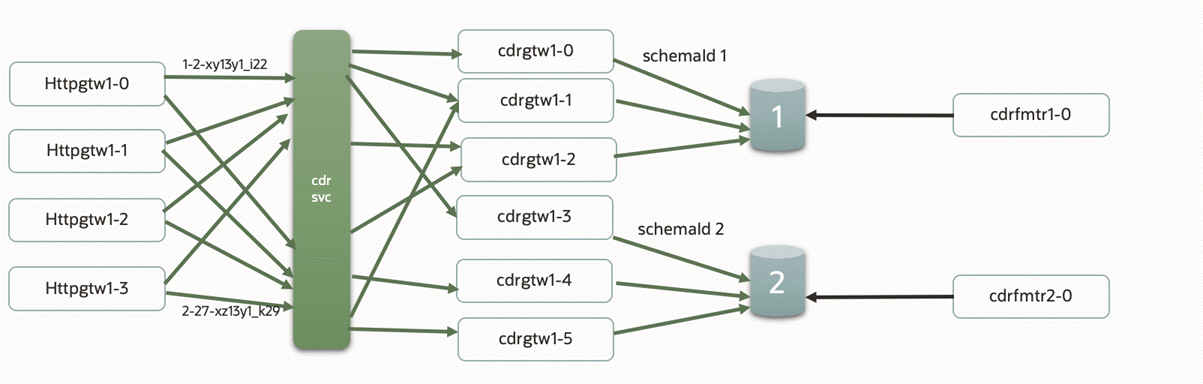
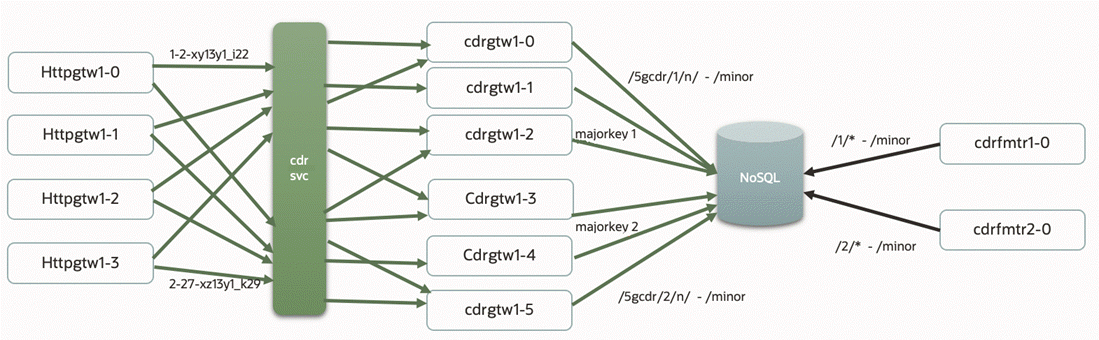
Figure 10-2 shows an example of scaled cdrgateway and cdrFormatter pods that have CDR storage in an Oracle NoSQL Database. This example contains:
-
One cdrgateway multi-replica deployment for all ECE schemas. All cdrgateway replicas have a single CDR Gateway service acting as a front end to the httpgateway.
-
One cdrFormatter single-replica deployment for each major key partition in the ECE schema. Each cdrFormatter reads persisted CDRs from its associated partition.
Figure 10-2 Scaled Architecture with a NoSQL Database
Configuring ECE to Support Prepaid Usage Overage
You can configure ECE cloud native to capture any overage amounts by prepaid customers during an active session, which can help you prevent revenue leakage. If the network reports that the number of used units during a session is greater than a customer's available allowance, ECE cloud native charges the customer up to the available allowance. It can then create an overage record with information about the overage amount and sends it to the ECE Overage topic. You can create a custom solution for reprocessing the overage amount later on.
For example, assume a customer has a prepaid balance of 100 minutes, but uses 130 minutes during a session. ECE cloud native would charge the customer for 100 minutes, create an overage record for the remaining 30 minutes of usage, and then write the overage topic to the ECE Overage Kafka topic.
When the prepaid usage overage is disabled, ECE cloud native charges the customer for the full amount regardless of the amount of funds in the customer's balance.
To configure ECE cloud native to support prepaid usage overage, do the following:
-
Ensure that ECE cloud native is connected to your Kafka Server
-
Enable ECE cloud native to support prepaid usage overage
-
Create an ECE Overage topic in your Kafka Server
To do so, set the following keys in your override-values.yaml file for oc-cn-ece-helm-chart and then run the helm upgrade command:
-
charging.kafkaConfigurations.kafkaConfigurationList.*: Specify how to connect ECE to your Kafka Server.
-
charging.server.checkReservationOverImpact: Set this to true.
-
charging.kafkaConfigurations.kafkaConfigurationList.overageTopicName: Set this to the name of the Kafka topic where ECE will publish overage records.
Note:
If your system does not contain Kafka topics, you can configure ECE to push overage details to a separate log file instead. To do so, in your override-values.yaml file for oc-cn-ece-helm-chart, set the charging.ecs.jvmOpts key to -Deceoveragelogdir=/home/charging/opt/ECE/oceceserver/logs.
Recording Failed ECE Usage Requests
ECE cloud native may occasionally fail to process usage requests. For example, a data usage request could fail because a customer has insufficient funds. You can configure ECE cloud native to publish details about failed usage requests, such as the user ID and request payload, to the ECE failure topic in your Kafka server. Later on, you can reprocess the usage requests or view the failure details for analysis and reporting.
To configure ECE cloud native to record failed ECE usage requests:
-
Ensure that ECE cloud native is connected your Kafka Server
-
Enable the recording of failed ECE usage requests
-
Create an ECE failure topic in your Kafka Server
-
charging.kafkaConfigurations.kafkaConfigurationList.*: Specify how to connect ECE to your Kafka Server.
-
charging.kafkaConfigurations.kafkaConfigurationList.persistFailedRequestsToKafkaTopic: Set this to true.
-
charging.kafkaConfigurations.kafkaConfigurationList.failureTopicName: Set this to the name of the topic that stores information about failed ECE usage requests.
Loading BRM Configuration XML Files
BRM is configured by using the pin_notify and payloadconfig_ece_sync.xml files. To ensure that the BRM pod can access these files for configuring the EAI Java Server (eai_js), they are exposed through the brm_config PVC within the pricingupdater pod. When new metadata is synchronized with ECE, if there are updates to the payload configuration file, it will create a new file in the location which can be accessed and configured in BRM.
For more information, see "Enabling Real-Time Synchronization of BRM and ECE Customer Data Updates" in ECE Implementing Charging.
Setting Up Notification Handling in ECE
You can configure ECE cloud native to send notifications to a client application or an external application during an online charging session. For example, ECE can send a notification when a customer breaches a credit threshold or needs to request reauthorization.
You can configure ECE to send notifications by using either Apache Kafka topics or Oracle WebLogic queues:
Creating an Apache Kafka Notification Topic
To create notification topics in Apache Kafka:
-
Create the following Kafka topics either in the Kafka entrypoint.sh script or after the Kafka pod is ready:
-
kafka.topicName: Set this to ECENotifications.
-
kafka.suspenseTopicName: Set this to ECESuspenseQueue.
-
-
In the ZooKeeper runtime ConfigMap, set the ece-zookeeper-0.ece-zookeeper.ECENameSpace.svc.cluster.local key to the name of the Kafka cluster.
-
Set the following Kafka and ZooKeeper environment variables:
-
KAFKA_PORT: Set this to the port on which Apache Kafka listens.
-
KAFKA_HOST_NAME: Set this to the host name of the machine on which Apache Kafka runs. If you use multiple Kafka brokers, specify a comma-separated list of host names.
-
REPLICATION_FACTOR: Set this to the number of topic replicas to create.
-
PARTITIONS: Set this to the number of Kafka partitions to create for your topics. Oracle recommends calculating the number as follows:
[(Max Diameter Gateways * Max Peers Per Gateway) + (1 for BRM Gateway) + Internal Notifications]
-
TOPIC_NAME: Set this to ECENotifications. ECE publishes notifications to this topic.
-
SUSPENSE_TOPIC_NAME: Set this to ECESuspenseQueue. BRM publishes failed notifications to this topic for later retry.
-
ZK_CLUSTER: Set this to the name of your ZooKeeper cluster. This should match the value you set in step 2.
-
ZK_CLIENT_PORT: Set this to the port on which ZooKeeper listens for client connections.
-
ZK_SERVER_PORT: Set this to the ZooKeeper server port.
-
-
Ensure that the Kafka and ZooKeeper pods are in the READY state.
-
In the override-values.yaml file for oc-cn-ece-helm-chart, set the following keys:
-
charging.server.kafkaEnabledForNotifications: Set this to true.
-
charging.kafkaConfigurations.kafkaConfigurationList[].name: Set this to the name of your ECE cluster.
-
charging.kafkaConfigurations.kafkaConfigurationList[].hostname: Set this to the host name of the system on which Kafka runs.
-
charging.kafkaConfigurations.kafkaConfigurationList[].topicName: Set this to ECENotifications.
-
charging.kafkaConfigurations.kafkaConfigurationList[].suspenseTopicName: Set this to ECESuspenseQueue.
-
-
From the helmcharts directory, install the ECE cloud native service:
helm install EceReleaseName oc-cn-ece-helm-chart --namespace BrmNameSpace --values OverrideValuesFile
The notification topics are created in Apache Kafka.
Creating an Oracle WebLogic Notification Queue
To create notification queues and topics in Oracle WebLogic:
-
Ensure that Oracle WebLogic Server is running in your Kubernetes cluster.
-
Create a separate WebLogic domain for the ECE notification queues.
Note:
Do not create the ECE notification queues in an existing WebLogic domain. For example, do not use the Billing Care, Business Operations Center, PDC, or Billing Care REST API domains.
-
Add the following third-party libraries to a customized ECE image:
-
com.oracle.weblogic.beangen.general.api.jar
-
wlthint3client.jar
To add the libraries to the image:
-
Create a 3rdparty_jars directory in the build context for your customized ECE image.
-
Copy the required JAR files into the 3rdparty_jars directory.
-
In the Dockerfile for the customized ECE image, copy the 3rdparty_jars directory to /home/charging/ext/3rdparty_jars.
ECE copies JAR files from /home/charging/ext/3rdparty_jars into the ECE library directory when the container starts.
-
-
Build the customized ECE image and push it to a container image repository that your Kubernetes cluster can access.
-
Create an override-values.yaml file for oc-cn-ece-helm-chart.
-
Configure ECE to use the customized image in the override-values.yaml file:
-
imageRepository: Set this to the repository server that contains your customized ECE image.
-
container.image: Set this to the name and tag of your customized ECE image.
-
imagePullSecrets: If the repository requires authentication, set this to the Kubernetes secret that ECE uses to pull the image.
-
-
If you enable SSL for WebLogic, create a Kubernetes secret that contains the JKS keystore.
For a disaster recovery environment, provide the common JKS keystore required by the participating site.
-
Set the following keys in your override-values.yaml file:
-
secretEnv.JMSQUEUEPASSWORD: Set this to the WebLogic user password.
-
secretEnv.NOTIFYEVENTKEYPASS: If you enable WebLogic SSL, set this to the KeyStore password.
-
job.jmsconfig.runjob: Set this to true.
-
job.jmsconfig.preCreateJmsServerAndModule: Set this to true if the JMS configuration job must create the ECE JMS module and subdeployment.
-
charging.server.weblogic.jmsmodule: Set this to ECE.
-
charging.server.weblogic.subdeployment: Set this to ECEQueue.
-
charging.server.kafkaEnabledForNotifications: Set this to false.
-
In the applicable JMSConfiguration entries, set HostName, Port, Protocol, and ConnectionURL to the values for your WebLogic environment.
-
If you enable WebLogic SSL:
-
Set KeyStoreLocation to the key in the Kubernetes secret that contains the keystore, and
-
Set extJMSKeyStoreSecret to the name of the Kubernetes secret.
-
For more information about these keys, see Table 10-1.
-
-
From the helmcharts directory, install the ECE cloud native service:
helm install EceReleaseName oc-cn-ece-helm-chart --namespace BrmNameSpace --values OverrideValuesFile
The ECE JMS configuration creates the following resources in the ECE domain of your WebLogic Server:
-
A WebLogic notification topic named NotificationTopic.
-
A WebLogic notification queue named SuspenseQueue
-
A WebLogic connection factory named NotificationFactory
Next, configure the connection factory so that clients can connect to the ECE notification queues and topics in Oracle WebLogic.
To configure the connection factory:
-
On the WebLogic Server in which the JMS ECE notification queue resides, sign in to WebLogic Remote Console.
-
Click Edit Tree, then Services, and then JMS Modules.
The Summary of JMS Modules page appears.
-
In the JMS Modules table, click ECE.
-
Click Connection Factories in the tree in the left pane.
-
In the JMS Connection factories table, click NotificationFactory.
-
On the Client tab, do the following:
-
In Client ID Policy, select Unrestricted.
-
In Subscription Sharing Policy, select Sharable.
-
Click Save.
-
-
On the Transactions tab, do the following.
-
In Transaction Timeout, enter 2147483647, which is the maximum timeout value.
-
Click Save.
-
-
Click the shopping cart at the top right, and then click Commit Changes to commit your changes.
For more information, see Oracle WebLogic Remote Console Online Help.
Configuring ECE for a Multischema BRM Environment
If your BRM database contains multiple schemas, you must configure ECE to connect to each schema.
To configure ECE for a BRM multischema database:
-
Open your override-values.yaml file for the oc-cn-ece-helm-chart chart.
-
Specify the password for accessing each schema in the BRM database. To do so, configure these keys for each schema:
-
secretEnv.BRMDATABASEPASSWORD.schema: Set this to the schema number. Enter 1 for the primary schema, 2 for the secondary schema, and so on.
-
secretEnv.BRMDATABASEPASSWORD.PASSWORD: Set this to the schema password.
This shows example settings for two schemas:
secretEnv: BRMDATABASEPASSWORD: - schema: 1 PASSWORD: EncryptedPassword - schema: 2 PASSWORD: EncryptedPassword -
-
Configure a customerUpdater pod for each schema. To do so, add a -schemaNumber list for each schema. In the list:
-
Set the SchemaNumber key to 1 for the primary schema, 2 for the secondary schema, and so on.
- Set the amtAckQueueName key to the fully qualified name of the acknowledgment queue to which the pin_amt utility listens to Account Migration Manager (AMM)-related acknowledgment events. The value is in the format primarySchema.ECE_AMT_ACK_QUEUE, where primarySchema is the name of the primary schema.
-
Set the hostName and jdbcUrl keys to their corresponding values for each schema.
This shows example settings for two schemas:
customerUpdater: customerUpdaterList: - schemaNumber: "1" coherenceMemberName: "customerupdater1" replicas: 1 jmxEnabled: true coherencePort: "" jvmGCOpts: "" jvmJMXOpts: "" jvmCoherenceOpts: "" jvmOpts: "" jmxport: "" restartCount: "0" oracleQueueConnectionConfiguration: name: "customerupdater1" gatewayName: "customerupdater1" hostName: "" port: "1521" sid: "pindb" userName: "pin" jdbcUrl: "" queueName: "IFW_SYNC_QUEUE" suspenseQueueName: "ECE_SUSPENSE_QUEUE" ackQueueName: "ECE_ACK_QUEUE" amtAckQueueName: "pin0101.ECE_AMT_ACK_QUEUE" batchSize: "1" dbTimeout: "900" retryCount: "10" retryInterval: "60" walletLocation: "/home/charging/wallet/ecewallet/" - schemaNumber: "2" coherenceMemberName: "customerupdater2" replicas: 1 jmxEnabled: true coherencePort: "" jvmGCOpts: "" jvmJMXOpts: "" jvmCoherenceOpts: "" jvmOpts: "" jmxport: "" oracleQueueConnectionConfiguration: name: "customerupdater2" gatewayName: "customerupdater2" hostName: "" port: "1521" sid: "pindb" userName: "pin" jdbcUrl: "" queueName: "IFW_SYNC_QUEUE" suspenseQueueName: "ECE_SUSPENSE_QUEUE" ackQueueName: "ECE_ACK_QUEUE" amtAckQueueName: "pin0101.ECE_AMT_ACK_QUEUE" batchSize: "1" dbTimeout: "900" retryCount: "10" retryInterval: "60" walletLocation: "/home/charging/wallet/ecewallet/" -
-
Configure a ratedEventFormatter pod for processing rated events belonging to each BRM schema. To do so, add a -schemaNumber list for each schema. In the list, set the schemaNumber and partition keys to 1 for the primary schema, 2 for the secondary schema, and so on.
This shows example settings for two schemas:
ratedEventFormatter: ratedEventFormatterList: - schemaNumber: "1" replicas: 1 coherenceMemberName: "ratedeventformatter1" jmxEnabled: true coherencePort: jvmGCOpts: "" jvmJMXOpts: "" jvmCoherenceOpts: "" jvmOpts: "" jmxport: "" restartCount: "0" ratedEventFormatterConfiguration: name: "ratedeventformatter1" primaryInstanceName: "ratedeventformatter1" partition: "1" noSQLConnectionName: "noSQLConnection" connectionName: "oraclePersistence1" threadPoolSize: "6" retainDuration: "0" ripeDuration: "600" checkPointInterval: "6" maxPersistenceCatchupTime: "60" siteName: "" pluginPath: "ece-ratedeventformatter.jar" pluginType: "oracle.communication.brm.charging.ratedevent.formatterplugin.internal.BrmCdrPluginDirect" pluginName: "brmCdrPlugin1" noSQLBatchSize: "25" - schemaNumber: "2" replicas: 1 coherenceMemberName: "ratedeventformatter2" jmxEnabled: true coherencePort: jvmGCOpts: "" jvmJMXOpts: "" jvmCoherenceOpts: "" jvmOpts: "" jmxport: "" ratedEventFormatterConfiguration: name: "ratedeventformatter2" primaryInstanceName: "ratedeventformatter2" partition: "2" noSQLConnectionName: "noSQLConnection" connectionName: "oraclePersistence1" threadPoolSize: "6" retainDuration: "0" ripeDuration: "600" checkPointInterval: "6" maxPersistenceCatchupTime: "60" siteName: "" pluginPath: "ece-ratedeventformatter.jar" pluginType: "oracle.communication.brm.charging.ratedevent.formatterplugin.internal.BrmCdrPluginDirect" pluginName: "brmCdrPlugin1" noSQLBatchSize: "25" -
Save and close your override-values.yaml file for oc-cn-ece-helm-chart.
-
In your override-values.yaml file, configure charging.itemAssignmentConfig.poidIdConfigurations[] by specifying schemaName and poidQuantity for each schema.
This shows example settings for three schemas:
<itemAssignmentConfigconfig-class="oracle.communication.brm.charging.appconfiguration.beans.item.ItemAssignmentConfig" itemAssignmentEnabled="true" delayToleranceIntervalInDays="0" poidPersistenceSafeCount="12000">
   <schemaConfigurationGroup config-class="java.util.ArrayList">
      <poidIdConfigurationconfig-class="oracle.communication.brm.charging.appconfiguration.beans.item.PoidIdConfiguration" schemaName="1" poidQuantity="2000000">
      </poidIdConfiguration>
      <poidIdConfigurationconfig-class="oracle.communication.brm.charging.appconfiguration.beans.item.PoidIdConfiguration" schemaName="2" poidQuantity="2000000">
      </poidIdConfiguration>
      <poidIdConfigurationconfig-class="oracle.communication.brm.charging.appconfiguration.beans.item.PoidIdConfiguration" schemaName="3" poidQuantity="2000000">
      </poidIdConfiguration>
   </schemaConfigurationGroup>
</itemAssignmentConfig>
After you deploy oc-cn-ece-helm-chart in "Deploying BRM Cloud Native Services", the ECE pods will be connected to your BRM database schemas.
Configuring ECE for Overload Protection
When the amount of incoming requests for ECE cloud native exceeds its capacity, it experiences an overload. This can lead to charging nodes becoming stuck or unresponsive. To avoid this, you can enable an overload protection mechanism.
When an overload happens, ECE starts rejecting the new incoming requests and informs the client about any submitted request that could not be processed. These requests can then be routed to some other alternative gateway or can be accepted by the same gateway once the overload condition is resolved.
You can configure ECE cloud native either to reject all incoming requests or to reject requests based on priority. The priority level is determined by the overload condition which is calculated based on queue depth and average latency. A Threshold Overload Monitor independently monitors both factors using an exponentially weighted moving average (EWMA) combined with hysteresis. For more information, see "About System Overload Protection" in BRM System Administrator’s Guide.
Note:
Priority-based overload protection is applicable only to HTTP Gateway and Diameter Gateway.
You can configure ECE cloud native to monitor thresholds at different levels based on your expected throughput and latency:
-
Open your Helm Chart’s values.yaml file.
-
Define the attributes in overloadConfigurations.
For more information about the attributes, see "About the overloadConfigurations Attribute Entries" in BRM System Administrator’s Guide.
If you want ECE to reject all the incoming requests, enable the overload protection and do not add any other parameters.
Configuring Direct Loading Using the ECE RE Manager Plug-in
By default, the ECE Helm chart configures RE Formatter to use the ECE RE Manager plug-in in DIRECT mode. In this mode, the plug-in loads rated events directly into the BRM database.
Before you deploy ECE, configure the BRM database connection used for direct loading.
To configure the BRM database connection for direct loading:
-
Open the override-values.yaml file for oc-cn-ece-helm-chart.
-
Configure REFPluginConfiguration.jdbcConfigurations with the JDBC URL or URLs for the BRM database schemas.
For a single-schema BRM deployment, configure one JDBC connection:
REFPluginConfiguration:
  jdbcConfigurations:
    - connectionURL: "jdbc:oracle:thin:@//<host>:<port>/<service>"
      user: "pin"
      wallet_entry_name: "brm.db.pwd"
where:
-
<host> is the host name of the BRM database.
-
<port> is the database listener port.
-
<service> is the BRM database service name.
For a multi-schema BRM deployment, configure one JDBC connection for each BRM schema. Each RE Formatter uses the JDBC connection that points to its corresponding BRM schema:
REFPluginConfiguration:
  jdbcConfigurations:
    - connectionURL: "jdbc:oracle:thin:@//<host>:<port>/<service>"
      user: "pin"
      wallet_entry_name: "brm.db.pwd"
    - connectionURL: "jdbc:oracle:thin:@//<host>:<port>/<service>"
      user: "pin"
      wallet_entry_name: "brm.db.pwd"
where:
-
<host> is the host name of the BRM database.
-
<port> is the database listener port.
-
<service> is the BRM database service name.
-
-
Deploy your ECE cloud native services by following the instructions in "Deploying BRM Cloud Native Services".
Table 10-3 lists the override-values.yaml properties that configure direct loading from ECE when you use that file. If your deployment does not use override-values.yaml, configure the same properties in values.yaml. The ECE Helm chart supplies the default values.
Table 10-3 ECE Direct Loading Configuration Properties
| Attribute Name | Default Value | Description |
|---|---|---|
|
charging.remEnabled |
true |
Enables the ECE RE Manager plug-in. |
|
REFPluginConfiguration.refmode |
DIRECT |
Sets the initial rated-event transfer mode to direct database loading. |