4 NSSF Supported Features
This section explains about the NSSF supported features.
Note:
The performance and capacity of the NSSF system may vary based on the call model, Feature or Interface configuration, and underlying CNE and hardware environment.4.1 NRF Client Retry and Health Check
The NRF Client Health Check provides robust monitoring and management capabilities for Network Repository Function (NRF) services within the application architecture. This feature enables automated health assessments of NRF instances, ensuring high service availability, particularly in georedundant deployments.
Key Highlights:
- Continuous Monitoring: The NRF client automatically sends
NFProfileRetrievalrequests to all configured NRF instances at configurable intervals to assess their health status. - Failure Detection & Traffic Redirection: If the primary NRF at a local site becomes unavailable, the NRF client detects the failure and seamlessly redirects service traffic to a secondary NRF at a remote site.
- Intelligent Health Status Updates: All NRF instances are initially marked as HEALTHY. Upon receiving specific error responses (5xx, 4xx, or configurable 3xx errors) to profile retrieval requests, instance health status is updated to UNHEALTHY, reducing failed traffic attempts.
- Customized Configuration: Both the health check interval and failure response codes can be customized to suit deployment requirements.
- Operational Efficiency: Only NRF instances confirmed as healthy are used to process session requests.
If the connection to the NRF is lost or experiences errors, the NSSF client will automatically retry the connection and perform regular health checks. This minimizes service disruption and improves fault tolerance within the 5G core network.
Health Check: Details and Call Flow
NRF Client performs health checks on all configured NRFs and maintains a list of healthy NRFs to be used during service requests. The NRFs can be configured either statically or by performing a DNS query using a virtual FQDN.
As part of the health check procedure, the NRF Client sends one
NFProfileRetrieval request to all configured NRFs at each
healthCheckInterval.
An NRF is considered unhealthy:
- If it sends a failure response for successive
HealthCheckConfig.healthCheckCountnumber of times. A response is considered a failure if its HTTP status code is configured inHealthCheckConfig.errorReasonsForFailure. - If it sends a failure response with a
Retry-Aftervalue in the response header; in this case, the NRF is marked as unhealthy immediately for theRetry-Afterperiod.
An NRF is considered healthy:
- If it sends a success response for successive
HealthCheckConfig.healthCheckCountnumber of times. A response is considered a success if its HTTP status code is not configured inHealthCheckConfig.errorReasonsForFailure.
Note:
- If the HealthCheck feature is disabled, all NRFs are considered HEALTHY by default.
- If the highest priority NRF is down, requests are sent to the next highest priority healthy NRF. When the highest priority NRF is marked as healthy again, requests are redirected back to it.
Retry Mechanism (nrfRetryConfig)
The Retry Mechanism is a fault-tolerance pattern that enables an application to automatically retry a failed operation. In this NRF Client implementation, it systematically handles temporary network communication failures by attempting to perform the same operation multiple times before considering it a complete failure. The feature allows NFs to attempt their service requests to alternate NRFs in case of failures.
General Call Flow
- NRF Client triggers a service request to the highest priority and healthy NRF.
- If a failure response or request timeout is received, the NRF Client retries the
request to the same NRF for
NrfRetryConfig.primaryNrfRetryCounttimes. On receiving a success response within these attempts, the response is consumed, and no further requests are sent. - If no success response is received, the NRF Client sends the service request to
the next higher priority healthy alternate NRF.
- If HealthCheck is disabled, the previous NRF is flagged as unhealthy for
a period of
retryAfterTime. - If HealthCheck is enabled, it flags the NRF as unhealthy based on its algorithm.
- If HealthCheck is disabled, the previous NRF is flagged as unhealthy for
a period of
- If a failure response or request timeout occurs again, the NRF Client retries
the request to the same alternate NRF for
NrfRetryConfig.nonPrimaryNrfRetryCounttimes. On receiving a success response, the response is consumed. - If a
Retry-Aftertime value is received in the response header from the NRF, the NRF Client halts further attempts to that NRF and flags it as unhealthy for theRetry-Afterperiod. - Steps 3–5 are repeated until one of the following occurs:
- NRF Client receives a success response,
NrfRetryConfig.alternateNRFRetryCountis exhausted,- All attempts to available healthy NRFs are exhausted.
- If any of the above conditions are met, the NRF Client consumes the response and proceeds.
- Lower numbers indicate higher priority NRFs.
- A response is considered a failure if the response code or exception matches
NrfRetryConfig.errorReasonsForFailure/NrfRetryConfig.gatewayErrorCodes. - The primary and non-primary NRFs are georedundant.
Autonomous Procedures
For procedures such as NFRegistration, NfHeartbeat,
NfStatusSubscribe, and NFDiscovery, the NRF
Client performs the General Call Flow steps periodically until a success response is
received:
- NfRegistration: Retried every
registrationRetryInterval. - NfStatusSubscribe: Retried every
subscriptionRetryInterval. - NFDiscovery: Retried every
discoveryRetryInterval. - NfHeartbeat: Retried every
heartbeatTimerinterval as received in theNfRegistrationresponse.
Note:
If a response code or exception is not configured inNrfRetryConfig.errorReasonsForFailure/NrfRetryConfig.gatewayErrorCodes,
no retry will occur.
Limitations
- The state of the NRFs is maintained in memory and not in a database. Hence, if the NRF Client pod goes down, the state information is lost.
- The state of the NRFs is not shared across pods. Each NRF Client pod maintains its own NRF state. As a result, some subsequent requests may be sent to an unavailable NRF before being sent to an available one.
Managing NRF Client Retry and Health Check
This section provides information about Helm, REST API, and Cloud Native Configuration Console (CNC Console) configurations required to configure this feature.
Enable:
You can enable this feature using Helm configuration.
To enable it:
- Open the
ocnssf_custom_values_25.2.200.yamlfile. - In the
Nrf-Client Micro service attributessection, update the following parameters as shown below:{ "healthCheckConfig": { "healthCheckCount": 2, "healthCheckInterval": 5, "requestTimeout": 10, "errorReasonsForFailure": [ "500", "502", "503", "504", "400", "403", "404", "405", "408", "411", "SocketTimeoutException", "JsonProcessingException", "UnknownHostException", "NoRouteToHostException", "IOException" ], "gatewayErrorCodes": [ "503", "429" ] } }Note:
Here,healthCheckCount>0enables proactive health checks, with a scheduled check every 5 seconds and NRF health status updated after 2 consecutive identical responses. - For detailed descriptions of these parameters, see the Oracle Communications Cloud Native Core, Network Slice Selection Function Installation, Upgrade, and Fault Recovery Guide.
- Save the file.
In the example above, within the
healthCheckConfig section:
- The
healthCheckCountvalue is set to2, which enables the health check feature. - The
healthCheckIntervalvalue is5, meaning that every 5 seconds a scheduler evaluates whether the routes defined in thenrfRouteList(in this case,primaryNrfApiRootandsecondaryNrfRoot) have changed their status.
To justify a change in route status, the healthCheckCount must
also be considered. This parameter defines the number of consecutive times the same
status must be received before replacing the previous status with a new one.
A route evaluation is considered unhealthy under the following conditions:
- If the
NFProfileRetrievalrequest breaches therequestTimeoutcondition - If the
NFProfileRetrievalrequest throws an exception or returns an error code defined inerrorReasonForFailureorgatewayErrorCode. - If the
NFProfileRetrievalresponse contains aRetry-Afterheader, the route is marked as unhealthy for the duration specified by that header, regardless of whether this is the first occurrence or whether the required number of consecutive evaluations has been completed.
Disable
You can disable this feature using Helm configuration.
To disable it:
- Open the
ocnssf_custom_values_25.2.200.yamlfile. - In the
Nrf-Client Micro service attributessection, update the following parameters as shown below:{ "healthCheckConfig": { "healthCheckCount": -1, "healthCheckInterval": 5, "requestTimeout": 10, "errorReasonsForFailure": [ "500", "502", "503", "504", "400", "403", "404", "405", "408", "411", "SocketTimeoutException", "JsonProcessingException", "UnknownHostException", "NoRouteToHostException", "IOException" ], "gatewayErrorCodes": [ "503", "429" ] } }Note:
- With
healthCheckCount: -1, health checks are disabled, and all NRFs are considered healthy by default. - The only difference between this example and the previous one is
that when Health Check (HC) is disabled, the behavior depends
entirely on the NRF Client Feature: Retry Mechanism
(
nrfRetryConfig). In this case, NRF requests are retried based solely on the result of the first request sent. - If a response code or exception is received that is not configured
in the
healthCheckConfig, the peer will be marked as healthy.
- With
- For detailed descriptions of these parameters, see the Oracle Communications Cloud Native Core, Network Slice Selection Function Installation, Upgrade, and Fault Recovery Guide.
- Save the file.
Configuration
Helm
{
  "nrfRetryConfig": [
    {
      "serviceRequestType": "ALL_REQUESTS",
      "primaryNRFRetryCount": 0,
      "nonPrimaryNRFRetryCount": 0,
      "alternateNRFRetryCount": -1,
      "errorReasonsForFailure": [
        "500",
        "502",
        "503",
        "504",
        "400",
        "403",
        "404",
        "405",
        "408",
        "411"
      ],
      "gatewayErrorCodes": [
        "503"
      ],
      "requestTimeout": 3
    },
    {
      "serviceRequestType": "AUTONOMOUS_NFREGISTER",
      "primaryNRFRetryCount": 1,
      "nonPrimaryNRFRetryCount": 1,
      "alternateNRFRetryCount": -1,
      "errorReasonsForFailure": [
        "500",
        "502",
        "503",
        "504",
        "400",
        "403",
        "404",
        "405",
        "408",
        "411"
      ],
      "gatewayErrorCodes": [
        "503"
      ],
      "requestTimeout": 3
    },
    {
      "serviceRequestType": "AUTONOMOUS_NFHEARTBEAT",
      "primaryNRFRetryCount": 0,
      "nonPrimaryNRFRetryCount": 0,
      "alternateNRFRetryCount": -1,
      "errorReasonsForFailure": [
        "500",
        "502",
        "503",
        "504",
        "400",
        "403",
        "404",
        "405",
        "408",
        "411"
      ],
      "gatewayErrorCodes": [
        "503"
      ],
      "requestTimeout": 3
    },
    {
      "serviceRequestType": "AUTONOMOUS_NFPATCH",
      "primaryNRFRetryCount": 0,
      "nonPrimaryNRFRetryCount": 0,
      "alternateNRFRetryCount": -1,
      "errorReasonsForFailure": [
        "500",
        "502",
        "503",
        "504",
        "400",
        "403",
        "404",
        "405",
        "408",
        "411"
      ],
      "gatewayErrorCodes": [
        "503"
      ],
      "requestTimeout": 3
    },
    {
      "serviceRequestType": "NFDEREGISTER",
      "primaryNRFRetryCount": 0,
      "nonPrimaryNRFRetryCount": 0,
      "alternateNRFRetryCount": -1,
      "errorReasonsForFailure": [
        "500",
        "502",
        "503",
        "504",
        "400",
        "403",
        "404",
        "405",
        "408",
        "411"
      ],
      "gatewayErrorCodes": [
        "503"
      ],
      "requestTimeout": 3
    }
  ]
}
For detailed descriptions of these parameters, see the Oracle Communications Cloud Native Core, Network Slice Selection Function Installation, Upgrade, and Fault Recovery Guide
REST API
There are no REST API configurations required for this feature.
CNC ConsoleThere is no option to enable or disable this feature using CNC Console.
Observe
Metrics
nrfclient_nrf_operative_status
KPIs
There are no new KPIs for this feature.
Alerts
- OcnssfAllNrfInstancesInDownStateCritical
- OcnssfNrfInstancesInDownStateMajor
For more information about these alerts, see NSSF Alerts section.
Maintain
- Collect the logs: For more information on how to collect logs, see Oracle Communications Cloud Native Core, Network Slice Selection Function Troubleshooting Guide.
- Raise a service request: See My Oracle Support for more information on how to raise a service request.
4.2 Support for TLSv1.3 on Internal API Communication
In a Kubernetes-based 5G Core deployment, the Network Slice Selection Function (NSSF) interacts with the Kubernetes API server (Kube-API-Server) to retrieve Secrets and ConfigMaps.
With this enhancement, NSSF now supports TLSv1.3 in addition to TLSv1.2 for secure communication with the Kubernetes API server. The Support for TLS for Consumer NFs and Producer NFs is already there in NSSF.
Note:
- Exclusive TLS version support: NSSF does not support TLSv1.2 and TLSv1.3 concurrently. All pods must use the same version (either TLSv1.2 or TLSv1.3) when communicating with the Kubernetes API server.
- CNE version requirement: An application TLS server configured with TLSv1.3 requires a corresponding CNE version that also supports TLSv1.3.
- Secret volume mount latency: When Secrets are mounted as volumes, changes may not be detected immediately within the configured reload period. Kubelet may take several seconds to a few minutes (typically 1–3 minutes) to propagate updates to the volumes. Once the updates are reflected, they are detected in the next scheduler run, triggering the necessary actions.
- Behavior when
tlsVersionSupportForKubeApiServer.enabledis enabled:- Helm installation or upgrade fails if:
- An invalid TLS version is configured.
- Configured cipher suites are incompatible with the selected TLS version, or no cipher suites are configured.
- Validation of Helm configuration fails because secrets
required by enabled features are missing in
featureSecrets.
- Mounting Secrets across namespaces is not supported. All Secrets must reside in the same namespace as the Ingress Gateway, Egress Gateway, and Alternate-Route microservices.
- For the CCA Header feature, any Secret added using REST API that was not defined in the Helm chart at deployment is considered unavailable.
- Perform a Helm upgrade whenever adding or updating Secrets in
featureSecrets.
- Helm installation or upgrade fails if:
Managing Support for TLSv1.3 on Internal API Communication
This section provides information about Helm, REST API, and Cloud Native Configuration Console (CNC Console) configurations required to configure this feature.
Enable:
This feature is disabled by default when NSSF is deployed.
To enable it using Helm:
- Open the
ocnssf_custom_values_25.2.200.yamlfile. - In the
Global parameterssection, set:global.tlsVersionSupportForKubeApiServer.enabledtotrue
- Configure the following parameters as required:
- TLS version
global.tlsVersionSupportForKubeApiServer.kubeApiServerTlsVersion– specifies the TLS version to be used.
- Cipher suites
global.tlsVersionSupportForKubeApiServer.cipherSuites– defines the cipher suites for the selected TLS version.
- Ingress Gateway Secrets
ingressgateway.tlsVersionSupportForKubeApiServer.featureSecrets– lists all Secrets required for Ingress Gateway volume mounting (for example, TLS, Message Copy (SASL/SSL), CCA header).
- Egress Gateway Secrets
egressgateway.tlsVersionSupportForKubeApiServer.featureSecrets– lists all Secrets required for Egress Gateway volume mounting (for example, HTTPS for Egress Gateway, Message Copy (SASL/SSL)).
- TLS version
- For detailed descriptions of these parameters, see the Oracle Communications Cloud Native Core, Network Slice Selection Function Installation, Upgrade, and Fault Recovery Guide.
- Save the file.
- Install NSSF. For the installation procedure, see the Oracle Communications Cloud Native Core, Network Slice Selection Function Installation, Upgrade, and Fault Recovery Guide.
- If enabling the feature after deployment, run a Helm upgrade. For upgrade steps, see the Oracle Communications Cloud Native Core, Network Slice Selection Function Installation, Upgrade, and Fault Recovery Guide.
REST API
There are no REST API configurations required for this feature.
CNC ConsoleThere is no option to enable or disable this feature using CNC Console.
Observe
Metrics
The following metrics are added in the Ingress Gateway Metrics section:
oc_ingressgateway_ip_addresses_fetch_failure
The following metrics are added in the Egress Gateway Metrics section:
oc_egressgateway_ip_addresses_fetch_failure
oc_certificatemanagement_tls_certificate_infooc_certificatemanagement_tls_secret_statusoc_certificatemanagement_tls_certs_reload_failurecgiu_jetty_ip_address_fetch_failure
For more information about metrics, see NSSF Metrics section.
KPIs
There are no new KPIs for this feature.
Alerts
There are no new alerts for this feature.
Maintain
- Collect the logs: For more information on how to collect logs, see Oracle Communications Cloud Native Core, Network Slice Selection Function Troubleshooting Guide.
- Raise a service request: See My Oracle Support for more information on how to raise a service request.
4.3 Support for Dual Stack
Using the dual stack mechanism, applications or NFs can establish connections with pods and services in a Kubernetes cluster using IPv4 or IPv6 or both simultaneously. Dual stack provides:
- coexistence strategy that allows hosts to reach IPv4 and IPv6 simultaneously.
- IPv4 and IPv6 allocation to the Kubernetes clusters during cluster creation. This allocation is applicable for all the Kubernetes resources unless explicitly specified during the cluster creation.
With this feature, NSSF can be deployed on a dual stack Kubernetes infrastructure. Using the dual stack mechanism, NSSF establishes and accepts connections within pods and services in a Kubernetes cluster using either IPv4 or IPv6. NSSF communicates with entities that support both IPv4 and IPv6.
NSSF supports:
- Dual stack communication with external entities, such as other NFs.
- Only IPv6 communication within the NSSF microservices.
- Only IPv6 communication with cnDBTier, CNC Console, and Kubernetes APIs.
The dual stack architecture for NSSF within a Kubernetes cluster can be visualized as follows:
Edge Microservices (Ingress Gateway):
- Handles incoming traffic from external Network Functions (NFs) and supports dual stack communication.
- Can accept IPv4 and IPv6 addresses based on the incoming request.
- Establishes connections to NSSF backend microservices using single stack IPv6 in IPv6-preferred configurations.
Backend Microservices:
- Operate as single stack, either IPv4 or IPv6, based on the deployment mode.
- Communicate with other backend services through the configured IP family policy.
- IP families and policies are aligned with deployment mode settings to ensure compatibility.
Egress Gateway Microservices:
- Routes outgoing requests using either IPv4 or IPv6.
- Configurable using the
global.egressRoutingModeHelm parameter to support preferred routing modes.
Note:
The Ingress Gateway microservice establishes connections with NSSF backend microservices using a single stack, with IPv6 preferred.
- Backend Microservices: All other microservices, except the Ingress Gateway microservice, are considered backend microservices. NSSF supports single stack IPv4 or IPv6 for backend microservices. All backend microservices interact with each other using a single stack.
- Egress Gateway Microservice: Provides options for
sending outgoing requests using either IPv4 or IPv6. The preferred routing
mode can be configured using the
global.egressRoutingModeHelm parameter.
Pods and Services
The services are broadly categorized into two types: external pods and services and internal pods and services. Each category has specific networking requirements for handling Ingress Gateway and Egress Gateway traffic.
External Pods and Services
- Ingress Gateway Traffic: External pods and services handling Ingress Gateway traffic must be configured as dual stack. This means both pods and services must be exposed on both IPv6 and IPv4 interfaces, with IPv6 being the preferred IP.
- Egress Gateway Traffic: For Egress Gateway traffic, external pods must also be dual stack, exposed on both IPv6 and IPv4 interfaces, with IPv6 again set as the preferred IP.
Internal Pods and Services
- Ingress Gateway Traffic: Internal pods and services for Ingress Gateway traffic are expected to be single stack, meaning they should be exposed only on IPv6 interfaces.
- Egress Gateway Traffic: Similarly, for Egress Gateway traffic, internal pods must be single stack and exposed only on IPv6 interfaces, with IPv6 as the preferred IP.
Deployment Modes
The feature introduces five deployment modes to accommodate different network scenarios:
Table 4-1 Deployment Modes
| Deployment Mode | Internal Microservices | External Services | Behavior |
|---|---|---|---|
| IPv4 Only | Single stack (IPv4) | Single stack (IPv4) | Only single stack and IPv4 preferred for all services. If the deployment mode is set to IPv4, then all communication between microservices is through IPv4. In this case, both internal microservices and external services' IP family policy is single stack, and IP families will be IPv4. |
| IPv6 Only | Single stack (IPv6) | Single stack (IPv6) | Only single stack and IPv6 preferred for all services. If the deployment mode is set to IPv6, then all communication between microservices is through IPv6. In this case, both internal microservices and external services' IP family policy is single stack, and IP families will be IPv6. |
| IPv4 over IPv6 | Single stack (IPv4) | Dual stack (IPv4 and IPv6) | Dual stack and IPv4 preferred for all services. If the deployment mode is set to IPv4_IPv6, then all communication between microservices is through IPv4, since IPv4 is preferred. In this case, internal microservices' IP family policy is single stack, and IP families will be IPv4. The IP family policies of the external-facing services require dual stack, and IP families will be IPv4 and IPv6. |
| IPv6 over IPv4 | Single stack (IPv6) | Dual stack (IPv4 and IPv6) | Dual stack and IPv6 preferred for all services. If the deployment mode is set to IPv6_IPv4, then all communication between microservices is through IPv6, since IPv6 is preferred. In this case, internal microservices' IP family policy is single stack, and IP families will be IPv6. The IP family policies of the external-facing services require dual stack, and IP families will be IPv4 and IPv6. |
| Cluster Preferred | Single stack (cluster IP-based) | Single stack (cluster IP-based) | There will be no changes in the service file. IPs are assigned depending on the cluster. In this case, both internal microservices' and external-facing services' IP family policies are single stack, and IP families will be the cluster IP address. |
IP Address Allocation to Pods
IP address allocation to pods depends on the IP address preference set in the Kubernetes cluster. Pods do not have the capability to select their IP address. For example:
IPv4 Preferred Configuration: If the Kubernetes cluster is configured with IPv4 as the preferred address family, both IPv4 and IPv6 addresses are allocated to the pod, but the primary address will be IPv4.
Status: Running
IP: 10.xxx.xxx.xxx
IPs:
 IP: 10.xxx.xxx.xxx
 IP: fd00::1:1xxx:9xxx:bxxx:fxxx
IPv6 Preferred Configuration: If the Kubernetes cluster is configured with IPv6 as the preferred address family, both IPv4 and IPv6 addresses are allocated to the pod, but the primary address will be IPv6.
Status: Running
IP: fd00::1:1xxx:9xxx:bxxx:fxxx
IPs:
 IP: fd00::1:1xxx:9xxx:bxxx:fxxx
 IP: 10.xxx.xxx.xxx
IP Address Allocation to Services
IP address allocation for all NSSF services depends on the deployment mode specified in the Helm configuration, as defined in the table below. When the Helm parameters are configured appropriately, NSSF automatically sets the IP Family Policy and IP Families attributes for its services.
Table 4-2 IP Allocation As Per Supported Deployment Modes
| Supported Mode | Deployment Mode (global.deploymentMode) | NSSF Microservices | Egress Routing Mode (global.egressRoutingMode) | Description |
|---|---|---|---|---|
| IPv4 Only | IPv4 | IPv4 | IPv4 | The Ingress Gateway service will be single stack with IPv4 only. It uses IPv4 pod IPs to establish connections. |
| IPv6 Only | IPv6 | IPv6 | IPv6 | The Ingress Gateway service will be single stack with IPv6 only. It uses IPv6 pod IPs to establish connections. |
| IPv4 over IPv6 | IPv4_IPv6 | IPv4 | Any | The Ingress Gateway service will be dual stack with both IPv4 and IPv6 addresses. It uses IPv4 pod IPs to establish connections. |
| IPv6 over IPv4 | IPv6_IPv4 | IPv6 | Any | The Ingress Gateway service will be dual stack with both IPv4 and IPv6 addresses. It uses IPv6 pod IPs to establish connections. |
| Cluster Preferred | ClusterPreferred | ClusterPreferred | None | This is the default value configured for
global.deploymentMode. All NSSF services will
be single stack with IPv4 or IPv6 based on the infrastructure
preference.
|
Customizing IP Address Allocation
You can customize IP address allocation for services using the Helm parameters outlined above. Services route traffic to destination endpoints based on these configurations. For example:
- If
global.deploymentModeis set to IPv4, only IPv4 addresses are allocated to services, and services use IPv4 pod IPs to send traffic to their endpoints. - If
global.deploymentModeis set to ClusterPreferred, IPs are assigned based on the cluster's IP family configuration.
Upgrade Impact
In a dual stack environment, all NSSF backend services are configured as
single stack. Due to Kubernetes limitations, an NSSF upgrade is not supported when
there is a mismatch between the ipFamilies configured for NSSF
backend microservices and the deployment mode's ipFamilies
configuration. In such cases, NSSF recommends performing a fresh installation to
change the preferred ipFamilies. However, this does not apply to
the edge microservice (Ingress Gateway microservice), as it can expand the
ipFamilies list by setting it to dual stack based on cluster
preferences.
Managing Support for Dual Stack
This section provides information about Helm, REST API, and Cloud Native Configuration Console (CNC Console) configurations required to configure this feature.
Enable:
The support for dual stack is a core functionality of NSSF. You do not need to enable or disable this feature. However, configuration for the Edge and Egress Gateway microservices is required for this feature to work.
Configuration for Edge and Egress Gateway Microservices
- Edge Microservices: IP address allocation for edge microservices (such as the
Ingress Gateway) is determined by the
global.deploymentModeHelm parameter. - Egress Gateway Microservices: IP selection and connection preferences for
outgoing traffic are managed by the
global.egressRoutingModeHelm parameter. The preferred routing mode can be configured to prioritize either IPv4 or IPv6, depending on network requirements.
Configure
This section lists the configuration details for this feature.
Helm
Use the following Helm parameters to configure dual stack behavior:
- Open the
ocnssf_custom_values_25.2.200.yamlfile in a text editor. - Update the following
parameters:
global: deploymentMode: clusterPreferred # Indicates the edge deployment mode. egressRoutingMode: None # Controls IP address selection and connections for the Egress Gateway microservice. - Save the changes to the file.
- Install NSSF. Follow the installation procedure provided in the Oracle Communications Cloud Native Core, Network Slice Selection Function Installation, Upgrade, and Fault Recovery Guide to install NSSF using the updated configuration file.
REST API
There are no REST API configurations required for this feature.
CNC ConsoleThere is no option to enable or disable this feature using CNC Console.
Observe
Metrics
The following metrics are added in the Ingress Gateway Metrics section:
oc_ingressgateway_incoming_ip_typeoc_ingressgateway_outgoing_ip_type
The following metrics are added in the Egress Gateway Metrics section:
oc_egressgateway_incoming_ip_typeoc_egressgateway_outgoing_ip_typeoc_egressgateway_dualstack_ip_rejected_total
For more information about metrics, see NSSF Metrics section.
KPIs
There are no new KPIs for this feature.
Alerts
There are no new alerts for this feature.
Maintain
- Collect the logs: For more information on how to collect logs, see Oracle Communications Cloud Native Core, Network Slice Selection Function Troubleshooting Guide.
- Raise a service request: See My Oracle Support for more information on how to raise a service request.
4.4 Support for Automated Certificate Lifecycle Management
NSSF uses secure protocols, such as HTTPS and Secure Socket Layer (SSL) or Transport Layer Security (TLS), to establish and manage secure connections. This is achieved using Public and Private Keys and the presence of trusted authorities such as Certificate Authorities (CA), which create and issue certificates. These certificates have validity. You must renew these certificates before they expire. These certificates can be revoked when the CA or its keys are compromised
Starting with NSSF 25.1.2xx, you can integrate NSSF with Oracle Communications Cloud Native Core, Certificate Management (OCCM) to support automation of certificate lifecycle management. OCCM manages TLS certificates stored in Kubernetes secrets by integrating with Certificate Authority (CA) using the Certificate Management Protocol Version 2 (CMPv2) protocol in the Kubernetes secret. OCCM obtains and signs TLS certificates within the NSSF namespace. For more information about OCCM, see Oracle Communications Cloud Native Core, Certificate Management User Guide.

The above diagram indicates that OCCM writes the keys to the certificates and NSSF reads these keys to establish a TLS connection with other NFs.
OCCM can automatically manage the following TLS certificates:
- 5G Service Based Architecture (SBA) client TLS certificates
- 5G SBA server TLS certificates
- Message Feed TLS certificates
Install Guide Considerations
- Upgrade: When NSSF is deployed with OCCM, follow the specific upgrade procedure. For information about the upgrade strategy, see "Upgrading NSSF" in Oracle Communications Cloud Native Core, Network Slice Selection Function Installation, Upgrade, and Fault Recovery Guide.
- Rollback: For more information on migrating the secrets from NSSF to OCCM and removal of Kubernetes secrets from the yaml file, see "Postupgrade Task" in Oracle Communications Cloud Native Core, Network Slice Selection Function Installation, Upgrade, and Fault Recovery Guide.
Managing DNS SRV Based Selection of NRF in NSSF
This section provides information about Helm, REST API, and Cloud Native Configuration Console (CNC Console) configurations required to configure this feature.
Configure
There are no additional configuration changes required at NSSF.
Observe
Metrics
The following metric is available for this feature:
oc_egressgateway_connection_failure_totaloc_ingressgateway_connection_failure_total
For more information about metrics, see NSSF Metrics section.
KPIs
There are no new KPIs for this feature.
Alerts
There are no new alerts for this feature.
Maintain
- Collect the logs: For more information on how to collect logs, see Oracle Communications Cloud Native Core, Network Slice Selection Function Troubleshooting Guide.
- Raise a service request: See My Oracle Support for more information on how to raise a service request.
4.5 DNS SRV Based Selection of NRF in NSSF
Currently, the NSSF selects the NRF for communication based on static configurations set by the operator. However, there are scenarios where the NRF may go down for various reasons. In such cases, the NSSF, which relies on the NRF for specific communications, may experience service disruptions.
The DNS SRV based selection of NRF in NSSF feature enhances network resilience by utilizing the NRF's georedundancy capabilities to handle potential site failures. This setup enables Network Functions (including NSSF) to continue operating smoothly by redirecting traffic from a primary NRF to a secondary NRF when a failure occurs at the primary site.
This feature allows the NSSF to dynamically select NRF instances based on real-time availability and site redundancy through DNS SRV configurations. In addition to the static configurations by operators, the NSSF can now resolve NRFs using DNS SRV-based Fully Qualified Domain Names (FQDNs). The NSSF is configured with a primary NRF and multiple fallback NRFs, which take over if the primary NRF becomes unreachable.
The nrf-client uses the Alternate Route Service, which helps the Network Slice Selection Function (NSSF) find and select different Network Repository Functions (NRFs) by using DNS SRV-based lookups. This service allows the NSSF to translate Fully Qualified Domain Names (FQDNs) or virtual FQDNs into alternate NRF addresses. This setup enables the NSSF to prioritize and adjust connections to different NRFs based on specific service needs.
How Alternate Routing Works
Figure 4-1 Call Flow of DNS SRV Based Selection of NRF in NSSF
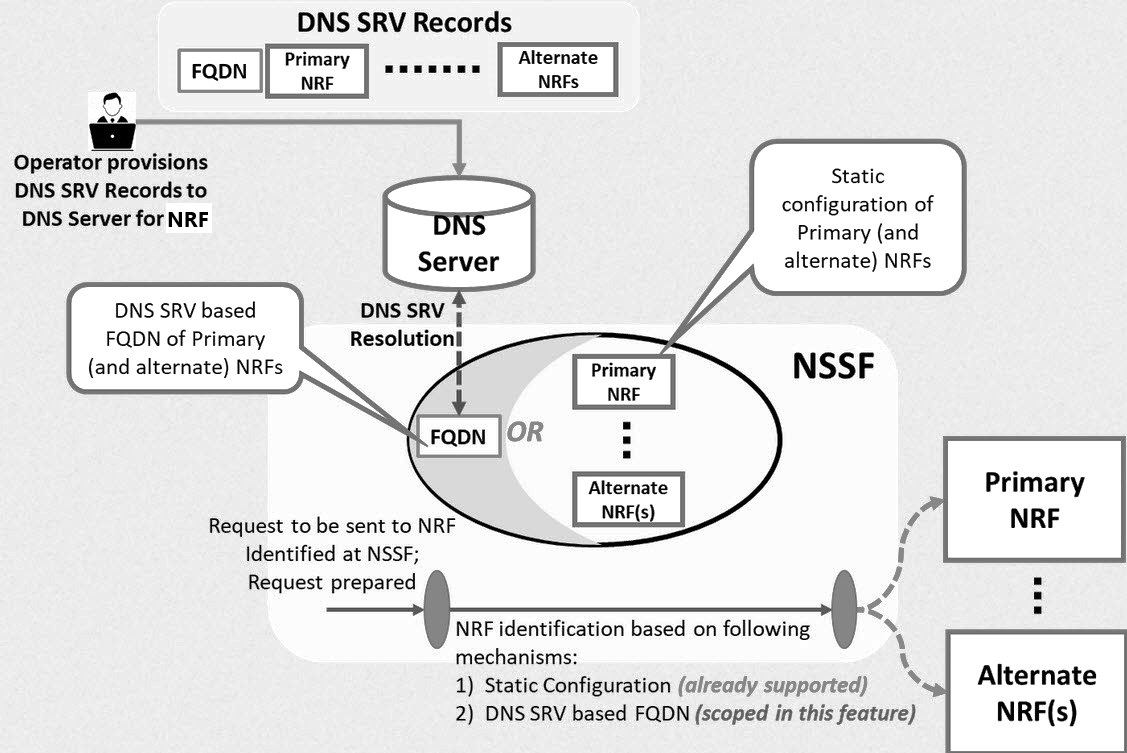
- DNS SRV Record Lookup: The NSSF starts by using DNS SRV records to fetch information about the FQDN of the primary NRF and alternate NRFs.
- DNS Query: The DNS server receives a query from the NSSF to resolve the FQDN of the primary NRF or alternate NRFs.
- DNS Resolution: The DNS server resolves the FQDN and returns the resolved address for the primary NRF or one of the alternate NRFs.
- NRF Identification by NSSF: Based on the FQDN provided by DNS, the NSSF identifies the primary NRF to communicate with. If the primary NRF is unavailable, the NSSF uses one of the alternate NRFs.
- Static Configuration Option: Alternatively, the NSSF can rely on a static configuration of the primary and alternate NRFs instead of querying DNS.
- Request Preparation: Once an NRF (primary or alternate) is identified, the NSSF prepares the request to be sent to the selected NRF.
- Communication with NRF: The NSSF sends the request to the identified NRF, enabling further processing or service access.
The Alternate Route Service utilizes DNS SRV records to look up virtual FQDNs. The Egress Gateway queries this service to retrieve a list of alternate NRFs along with their priorities. Based on these priorities, the Egress Gateway reroutes requests to other NRF instances as required.
Key Operations of nrf-client for High Availability
The NSSF uses a component called nrf-client to facilitate communication with NRFs. The nrf-client performs critical functions to ensure NRFs remain available and responsive:
- Traffic Routing: The nrf-client directs all requests (for example, registration, updates, heartbeats, and discovery) to the primary NRF.
- Failure Detection: If the primary NRF cannot be reached, the nrf-client detects the failure either through routing errors or by receiving a "503 Service Unavailable" response, which may include a "Retry-After" interval.
- Failover and Retry: If the primary NRF fails, the nrf-client temporarily
marks it as unavailable and reroutes traffic to a secondary NRF based on DNS SRV
priority. The retry interval, specified in the "Retry-After" header or a preset
interval, determines when the nrf-client reattempts contact with the primary
NRF.
- During this interval, all requests are routed to the secondary NRF.
- Once the retry interval expires, the nrf-client resumes attempts to communicate with the primary NRF.
Note:
The nrf-client only tries to connect with each NRF once. If it cannot send a request to an NRF, it returns a "503 Service Unavailable" response to the NSSF. This one-time attempt helps avoid repeated failures and ensures alternate routing to secondary NRFs when needed.Managing DNS SRV Based Selection of NRF in NSSF
This section provides information about Helm, REST API, and Cloud Native Configuration Console (CNC Console) configurations required to configure this feature.
Enable:
enableVirtualNrfResolution=true
virtualNrfFqdn=nrfstub.changeme-ocats.svc
virtualNrfScheme=http
Note:
IfenableVirtualNrfResolution is set to false,
the nrf-client uses primaryNrfApiRoot and
secondaryNrfApiRoot configurations to register with the NRF.
However, if enableVirtualNrfResolution is set to
true and an incorrect virtualNrfFqdn is
configured, the nrf-client does not fallback to primaryNrfApiRoot
and secondaryNrfApiRoot for registration, resulting in a
registration failure.
Apart from this, for more information on other Helm parameters supported for this feature, see Helm section below.
Configure
Helm
nrf-client Helm parameters in
ocnssf_custom_values_25.2.200.yaml file.
nrf-client:
  # This config map is for providing inputs to NRF-Client
  configmapApplicationConfig:
    &configRef
    profile: |-
      [appcfg]
      primaryNrfApiRoot=nrf-stubserver.changeme-ocats:8080
      secondaryNrfApiRoot=nrf-stubserver.changeme-ocats:8080
      nrfScheme=http
      retryAfterTime=PT120S
      nrfClientType=NSSF
      nrfClientSubscribeTypes=
      appProfiles=[{
  "nfInstanceId": "9faf1bbc-6e4a-4454-a507-aef01a101a01",
  "nfType": "NSSF",
  "nfStatus": "REGISTERED",
  "heartBeatTimer": 30,
  "fqdn": "ocnssf-nsgateway.ocnssf.svc",
  "priority": 1,
  "capacity": 1,
  "load": 2,
  "plmnList": [
    {
      "mcc": "311",
      "mnc": "480"
    }
  ],
  "nfSetIdList": [
    "setEast.nssfset.5gc.mnc480.mcc311"
  ],
  "locality": "rcnltxekloc1",
  "nfServices": [
    {
      "serviceInstanceId": "92d59bfc-e5d6-47f5-a26b-3a03facdebcc",
      "serviceName": "nnssf-nsselection",
      "versions": [
        {
          "expiry": null,
          "apiFullVersion": "1.0.0",
          "apiVersionInUri": "v1"
        }
      ],
      "scheme": "http",
      "nfServiceStatus": "REGISTERED",
      "fqdn": "ocnssf1-ingress-gateway.ocnssf.svc",
      "interPlmnFqdn": null,
      "ipEndPoints": [
        {
          "ipv4Address": "10.224.45.178",
          "transport": "TCP",
          "port": 80
        }
      ],
      "allowedNfTypes": [
        "AMF",
        "NSSF"
      ],
      "priority": 1,
      "capacity": 1,
      "load": 2
    },
    {
      "serviceInstanceId": "d33728cd-6e21-434b-bc5a-ed69bc612377",
      "serviceName": "nnssf-nssaiavailability",
      "versions": [
        {
          "expiry": null,
          "apiFullVersion": "1.0.0",
          "apiVersionInUri": "v1"
        }
      ],
      "scheme": "http",
      "nfServiceStatus": "REGISTERED",
      "fqdn": "ocnssf2-ingress-gateway.ocnssf.svc",
      "interPlmnFqdn": null,
      "ipEndPoints": [
        {
          "ipv4Address": "10.224.45.179",
          "transport": "TCP",
          "port": 80
        }
      ],
      "allowedNfTypes": [
        "AMF",
        "NSSF"
      ],
      "priority": 1,
      "capacity": 1,
      "load": 2
    }
  ]
}]
      enableF3=true
      enableF5=true
      renewalTimeBeforeExpiry=3600
      validityTime=30
      enableSubscriptionAutoRenewal=true
      nfHeartbeatRate=80
      acceptAdditionalAttributes=false
      retryForCongestion=5
      enableVirtualNrfResolution=true
      virtualNrfFqdn=nrfstub.changeme-ocats.svc
      virtualNrfScheme=http
Note:
This is a sample configuration. Modify the parameters as per your setup. For detailed information about the Helm parameters, see the "Customizing NSSF " section in the Oracle Communications Cloud Native Core, Network Slice Selection Function Installation, Upgrade, and Fault Recovery Guide.REST API
There are no REST API configurations required for this feature.
CNC ConsoleThere is no option to enable or disable this feature using CNC Console.
Observe
Metrics
The following metric is available for this feature:
nrfclient_nrf_operative_statusnrfclient_dns_lookup_request_total
For more information about metrics, see NSSF Metrics section.
KPIs
There are no new KPIs for this feature.
Alerts
The following alerts are available for this feature:
Maintain
- Collect the logs: For more information on how to collect logs, see Oracle Communications Cloud Native Core, Network Slice Selection Function Troubleshooting Guide.
- Raise a service request: See My Oracle Support for more information on how to raise a service request.
4.6 Deleting All Slices in a TAI Using PATCH Remove Operation
In the context of 5G networks, network slicing is a crucial feature. It allows the network to be divided into multiple virtual slices, each optimized for a specific type of service or use case. These slices are defined by S-NSSAIs (Single Network Slice Selection Assistance Information) and are associated with specific geographical areas, referred to as Tracking Areas (TAIs).
The Access and Mobility Function (AMF) is responsible for managing these slices and ensuring that these devices connect to the appropriate slices. The Network Slice Selection Function (NSSF) assists the AMF in managing and selecting these slices.
Currently, when the AMF needs to update or delete slices for specific areas, there are limitations in how the NSSF responds to such requests. This new feature addresses those limitations, improving flexibility and compliance with certain operational requirements.
This feature enhances the NSSF to support specific behaviors for managing network slices through the PATCH operation. This includes the ability to:
- delete all slices for specific areas (TAI) using PATCH.
- improve responses for better clarity and compliance, including the
use of
204 No Contentwhen all slices in an area are removed. - allow slices to be added back later through PATCH operations.
Old Behavior
- Slice Management with PATCH Operations:
- The NSSF responded with
200 OKto all PATCH requests, even if slices were only partially deleted. 204 No Contentresponses were not supported for PATCH operations.- If no authorized slices were found in a PATCH request, the
NSSF returned a
403 Forbiddenresponse.
- The NSSF responded with
- Deletion Constraints:
- The AMF could only delete all slices across all areas using a DELETE request, which was not always practical.
- The NSSF required at least one slice to remain in a TAI, in accordance with existing specifications.
Enhanced Behavior (When the feature is enabled):
- Enhanced Deletion Using PATCH:
- The AMF can now issue a PATCH request to delete all slices
for a specific TAI.
- If all slices are successfully deleted for the
specified area(s), the NSSF responds with
204 No Content. - If some slices remain after the deletion, the NSSF
responds with
200 OK, including the list of remaining slices.
- If all slices are successfully deleted for the
specified area(s), the NSSF responds with
- The AMF can now issue a PATCH request to delete all slices
for a specific TAI.
- Support for Full Deletion Scenarios:
- If a
NssaiAvailabilityPATCH request results in deletion of all slices within a specific TAI:- The response can be
200 OK(if other TAIs still have SNSSAIs that are supported by the AMF and authorized by NSSF), or 204 No Content(if none of the SNSSAIs supported by the AMF are authorized by NSSF).
- The response can be
- If all slices are deleted across all TAIs, the NSSF
responds with
204 No Content.
- If a
- Adding Back Slices: After a full deletion, the AMF can re-add slices for the same area using a PATCH operation.
- Oracle NSSF Specific Handling:
- When processing a PATCH request that removes all slices, the NSSF verifies compliance with the 3GPP specification, which requires at least one slice in an area.
- To support the new feature, the NSSF uses a flag:
- If the flag is enabled, the NSSF can handle and store areas with no slices (for example, storing a null value or a placeholder).
- This ensures the system behaves as expected while complying with 3GPP standards and supporting this feature.
Enhanced Behavior (When the feature is disabled):
- Enhanced Deletion Using PATCH:
- The system first checks the size of the
supportedSnssaislist. If it is greater than 1, NSSF responds with200 OK, including the list of remaining slices. - Otherwise, deletion is not allowed, and NSSF returns a
400 Bad
                                Request
response.
- The system first checks the size of the
This feature provides flexibility for the AMF to manage slices with
greater granularity, targeting specific areas without affecting others, thereby
improving efficiency and control. It aligns with 3GPP standard operations for PATCH
while introducing flexibility for specific use cases (e.g., FOA). Additionally,
returning 204 No Content for full deletions offers a clearer
indication that all slices were successfully removed, enhancing system
transparency.
Managing Deletion of All Slices in a TAI Using PATCH Remove Operation
This section provides information about Helm, REST API, and Cloud Native Configuration Console (CNC Console) configurations required to configure this feature.
Enable:
You can enable this feature using REST API or CNC Console.
Configure
Helm
There are no Helm configurations required for this feature.
REST API
A new boolean parameter, enhancedPatchBehaviourEnable,
is added to enable or disable this feature using SystemOptions API. Update
this parameter value as true or false to enable or
disable this feature, respectively. By default, it is set to false.
For more information about the REST API configuration, see "SystemOptions" section in "NSSF REST Specifications" chapter of Oracle Communications Cloud Native Core, Network Slice Selection Function REST Specification Guide.
CNC Console
The value of EnhancedPatchBehaviourEnable parameter can
also be updated using CNC Console interface for NSSF System Option.
Observe
Metrics
There are no new Metrics for this feature. However, this feature uses the following metric to count the success response messages sent by NSSF for requests for the Nnssf_NSSAIAvailability service.
ocnssf_nssaiavailability_success_tx_total
For more information about metrics, see NSSF Metrics section.
KPIs
There are no new KPIs for this feature.
Alerts
There are no new alerts for this feature.
Maintain
- Collect the logs: For more information on how to collect logs, see Oracle Communications Cloud Native Core, Network Slice Selection Function Troubleshooting Guide.
- Raise a service request: See My Oracle Support for more information on how to raise a service request.
4.7 Support for TLS
NSSF uses Hypertext Transfer Protocol Secure (HTTPS) to establish secure connections with Consumer NFs and Producer NFs, respectively. These communication protocols are encrypted using Transport Layer Security (TLS). TLS comprises the following components:
- Handshake Protocol: Exchanges the security parameters of a connection. Handshake messages are supplied to the TLS record layer.
- Record Protocol: Receives the messages to be transmitted, fragments the data into multiple blocks, secures the records, and then transmits the result. Received data is delivered to higher-level peers.
TLS Handshake
This section describes the differences between TLSv1.2 and TLSv1.3 and the advantages of TLSv1.3 over TLSv1.2 and earlier versions.
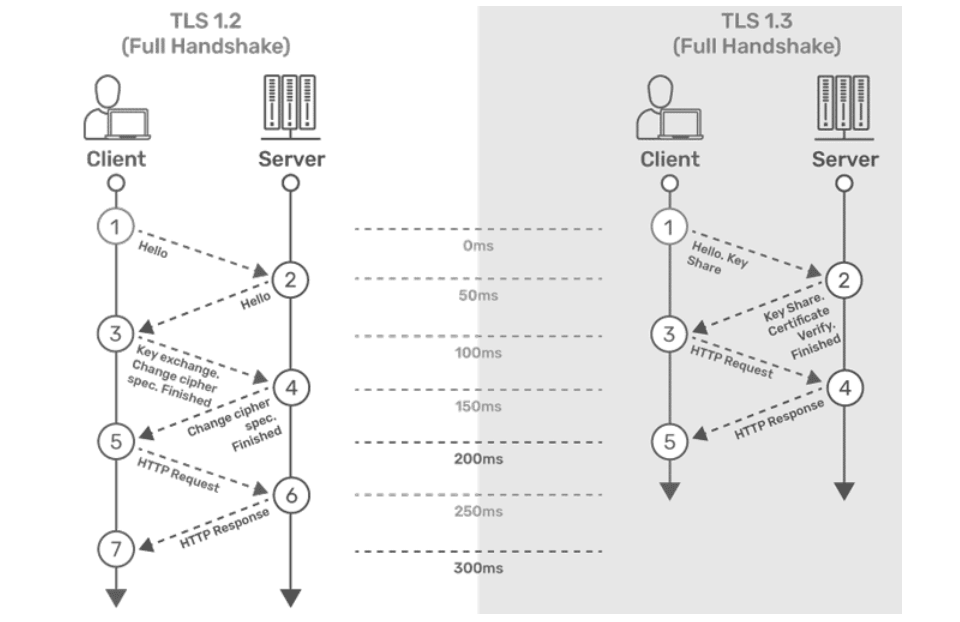
TLSv1.2
- The connection or handshake starts when the client sends a “client hello” message to the server. This message consists of cryptographic information such as supported protocols and supported cipher suites. It also contains a random value or random byte string.
- To respond to the “client hello” message, the server sends the “server hello” message. This message contains the CipherSuite that the server has selected from the options provided by the client. The server also sends its certificate along with the session ID and another random value.
- The client verifies the certificate sent by the server. When the verification is complete, it sends a byte string and encrypts it using the public key of the server certificate.
- When the server receives the secret, both the client and server generate a master key along with session keys (ephemeral keys). These session keys are used to symmetrically encrypt the data.
- The client sends an “HTTP Request” message to the server to enable the server to switch to symmetric encryption using the session keys.
- To respond to the client’s “HTTP Request” message, the server does the same and switches its security state to symmetric encryption. The server concludes the handshake by sending an HTTP response.
- The client-server handshake is completed in two round-trips.
TLSv1.3
- The connection or handshake starts when the client sends a “client hello” message to the server. The client sends the list of supported cipher suites. The client also sends its key share for that particular key agreement protocol.
- To respond to the “client hello” message, the server sends the key agreement protocol that it has chosen. The “Server Hello” message comprises the server key share, server certificate, and the “Server Finished” message.
- The client verifies the server certificate, generates keys as it has the key share of the server, and sends the “Client Finished” message along with an HTTP request.
- The server completes the handshake by sending an HTTP response.
The following digital signature algorithms are supported in TLS handshake:
Table 4-3 Digital Signature Algorithms
| Algorithm | Key Size (Bits) | Elliptic Curve (EC) |
|---|---|---|
| RS256 (RSA) | 2048 | NA |
| 4096
This is the recommended value. |
NA | |
| ES256 (ECDSA) | NA | SECP384r1
This is the recommended value. |
Comparison Between TLSv1.2 and TLSv1.3
The following table provides a comparison of TLSv1.2 and TLSv1.3:
Table 4-4 Comparison of TLSv1.2 and TLSv1.3
| Feature | TLS v1.2 | TLS v1.3 |
|---|---|---|
| TLS Handshake |
|
|
| Cipher Suites |
|
|
| Round-Trip Time (RTT) | This has a high RTT during the TLS handshake. | This has low RTT during the TLS handshake. |
| Perfect Forward Secrecy (PFS) | This doesn't support PFS. | TLSv1.3 supports PFS. PFS ensures that each session key is completely independent of long-term private keys, which are keys that are used for an extended period to decrypt encrypted data. |
| Privacy | This is less secure, as the ciphers used are weak. | This is more secure, as the ciphers used are strong. |
| Performance | This has high latency and a less responsive connection. | This has low latency and a more responsive connection. |
Advantages of TLSv1.3
The TLSv1.3 handshake offers the following improvements over earlier versions:
- All handshake messages after the ServerHello are encrypted.
- It improves efficiency in the handshake process by requiring fewer round trips than TLSv1.2. It also uses cryptographic algorithms that are faster.
- It provides better security than TLSv1.2, addressing known vulnerabilities in the handshake process.
- It eliminates data compression.
The following table describes the TLS versions supported on the client and server sides. The last column indicates which version will be used.
TLS Version Used
When NSSF is acting as a client or a server, it can support different TLS versions.
The following table provides information about which TLS version will be used when various combinations of TLS versions are present between the server and the client.
Table 4-5 TLS Version Used
| Client Support | Server Support | TLS Version Used |
|---|---|---|
| TLSv1.2, TLSv1.3 | TLSv1.2, TLSv1.3 | TLSv1.3 |
| TLSv1.3 | TLSv1.3 | TLSv1.3 |
| TLSv1.3 | TLSv1.2, TLSv1.3 | TLSv1.3 |
| TLSv1.2, TLSv1.3 | TLS v1.3 | TLSv1.3 |
| TLSv1.2 | TLSv1.2, TLSv1.3 | TLSv1.2 |
| TLSv1.2, TLSv1.3 | TLSv1.2 | TLSv1.2 |
| TLS v1.3 | TLSv1.2 | Sends an error message.
For more information about the error message, see "Troubleshooting TLS Version Compatibilities" section in Oracle Communications Cloud Native Core, Network Slice Selection Function Troubleshooting Guide. |
| TLSv1.2 | TLSv1.3 | Sends an error message.
For more information about the error message, see "Troubleshooting TLS Version Compatibilities" section in Oracle Communications Cloud Native Core, Network Slice Selection Function Troubleshooting Guide. |
Note:
- If Egress Gateway is deployed with both the versions of TLS that is TLSv1.2 and TLSv1.3, then Egress Gateway as client will send both versions of TLS in the client hello message during the handshake and the server needs to decide which version to be used.
- If Ingress Gateway is deployed with both the version of TLS that is with TLSv1.2 and TLSv1.3, then Ingress Gateway as the server will use the TLS version received from the client in the server hello message during the handshake.
- This feature does not work in ASM deployment.
Managing Support for TLSv1.2 and TLSv1.3
Enable:
This feature can be enabled or disabled at the time of NSSF deployment using the following Helm parameters:
- enableIncomingHttps: This flag is used for enabling/disabling HTTPS/2.0
(secured TLS) in the Ingress Gateway. If the value is set to false, NSSF will
not accept any HTTPS/2.0 (secured) traffic. If the value is set to true, NSSF
will accept HTTPS/2.0 (secured) traffic.
Note: Do not change the
&enableIncomingHttpsRefreference variable. For more information on enabling this flag, see the "Enabling HTTPS at Ingress Gateway" section in the Oracle Communications Cloud Native Core, Network Slice Selection Function Installation, Upgrade, and Fault Recovery Guide. - enableOutgoingHttps: This flag is used for enabling/disabling HTTPS/2.0
(secured TLS) in the Egress Gateway. If the value is set to false, NSSF will not
accept any HTTPS/2.0 (secured) traffic. If the value is set to true, NSSF will
accept HTTPS/2.0 (secured) traffic.
For more information on enabling this flag, see the "Enabling HTTPS at Egress Gateway" section in the Oracle Communications Cloud Native Core, Network Slice Selection Function Installation, Upgrade, and Fault Recovery Guide.
Configure
You can configure this feature using Helm parameters.
The following parameters in the Ingress Gateway and Egress Gateway microservices must be customized to support TLSv1.2 or TLSv1.3:
- Generate HTTPS certificates for both the ingress and egress gateways. Ensure that the certificates are correctly configured for secure communication. After generating the certificates, create a Kubernetes secret for each gateway (egress and ingress). Then, configure these secrets to be used by the respective gateways. For more information about HTTPS configuration, generating certificates, and creating secrets, see the "Configuring Secrets for Enabling HTTPS" section in the Oracle Communications Cloud Native Core, Network Slice Selection Function Installation, Upgrade, and Fault Recovery Guide.
- After configuring the secret and applying it to the namespace where NSSF is
deployed, perform the following Helm changes for Ingress and Egress gateways in
the
ocnssf_custom_values_25.2.200.yamlfile:- Parameters required to support TLSv1.2:
service.ssl.tlsVersionindicates the TLS version.cipherSuitesindicates supported cipher suites.allowedCipherSuitesindicates allowed cipher suites.
- Parameters required to support TLSv1.3:
service.ssl.tlsVersionindicates the TLS version.cipherSuitesindicates the supported cipher suites.allowedCipherSuitesindicates the allowed cipher suites.clientDisabledExtensionis used to disable the extension sent by messages originating from clients during the TLS handshake with the server.serverDisabledExtensionis used to disable the extension sent by messages originating from servers during the TLS handshake with the client.tlsNamedGroupsis used to provide a list of values sent in thesupported_groupsextension. These are comma-separated values.clientSignatureSchemesis used to provide a list of values sent in thesignature_algorithmsextension.
For more information about configuring the values of the above-mentioned parameters, see the "Ingress Gateway Microservice" and "Egress Gateway Microservice" sections in the Oracle Communications Cloud Native Core, Network Slice Selection Function Installation, Upgrade, and Fault Recovery Guide.
- Parameters required to support TLSv1.2:
- Save the
ocnssf_custom_values_25.2.200.yamlfile. - Install NSSF. For more information about the installation procedure, see the Oracle Communications Cloud Native Core, Network Slice Selection Function Installation, Upgrade, and Fault Recovery Guide.
- Run Helm upgrade if you are enabling this feature after NSSF deployment. For more information about the upgrade procedure, see the Oracle Communications Cloud Native Core, Network Slice Selection Function Installation, Upgrade, and Fault Recovery Guide.
Note:
- NSSF does not prioritize cipher suites based on priority. To select a cipher based on priority, you must list the cipher suites in decreasing order of priority.
- NSSF does not prioritize supported groups based on priority. To select a supported group based on priority, you must list the supported group values in decreasing order of priority.
- If you want to provide values for the
signature_algorithmsextension using theclientSignatureSchemesparameter, the following comma-separated values must be provided to deploy the services:- rsa_pkcs1_sha512
- rsa_pkcs1_sha384
- rsa_pkcs1_sha256
Note:
By default, it isnull. - The mandatory extensions as listed in RFC 8446 cannot be disabled using the
clientDisabledExtensionattribute on the client or using theserverDisabledExtensionattribute on the server side. The following is the list of the extensions that cannot be disabled:- supported_versions
- key_share
- supported_groups
- signature_algorithms
- pre_shared_key
Observe
Metrics
The following metrics are available for this feature:
oc_ingressgateway_incoming_tls_connectionsoc_egressgateway_outgoing_tls_connectionssecurity_cert_x509_expiration_seconds
For more information about metrics, see NSSF Metrics section.
KPIs
There are no new KPIs for this feature.
Alerts
The following alerts are available for this feature:
Note:
Alert gets raised for every certificate that will expire in the above time frame. For example, NSSF supports both RSA and ECDSA. So, we have configured two certificates. Accordingly, let us suppose RSA certificate is about to expire in 6 months in this situation only one alert will be raised and if both are about to expire then two alerts will be raised.Maintain
- Collect the logs: For more information on how to collect logs, see Oracle Communications Cloud Native Core, Network Slice Selection Function Troubleshooting Guide.
- Raise a service request: See My Oracle Support for more information on how to raise a service request.
4.8 Traffic Segregation
This feature provides end-to-end traffic segregation to NSSF based on traffic types. Within a Kubernetes cluster, traffic segregation can divide applications or workloads into distinct sections such as OAM, SBI, Kubernetes control traffic, etc. The Multus CNI container network interface (CNI) plugin for Kubernetes enables attaching multiple network interfaces to pods to help segregate traffic from each NSSF microservice.
This feature addresses the challenge of logically separating IP traffic of different profiles, which are typically handled through a single network (Kubernetes overlay). The new functionality ensures that critical networks are not cross-connected or sharing the same routes, thereby preventing network congestion.
With traffic segregation, operators can segregate traffic to external feeds and applications more effectively. Previously, all external traffic was routed through the same external network, but now, egress traffic from the NSSF pods can be directed through non-default networks to third-party applications. This separation is achieved by leveraging cloud-native infrastructure and the load balancing algorithms in OCCNE.
Note:
The Traffic Segregation feature is only available in NSSF if OCCNE is installed with CNLB.Cloud Native Load Balancer (CNLB)
CNE provides Cloud Native Load Balancer (CNLB) for managing the ingress and egress
network as an alternate to the existing LBVM, lb-controller, and egress-controller
solutions. You can enable or disable this feature only during a fresh CNE
installation. When this feature is enabled, CNE automatically uses CNLB to control
ingress traffic. To manage the egress traffic, you must preconfigure the egress
network details in the cnlb.ini file before installing CNE.
For more information about enabling and configuring CNLB, see Oracle Communications Cloud Native Core, Cloud Native Environment User Guide, and Oracle Communications Cloud Native Core, Cloud Native Environment Installation, Upgrade, and Fault Recovery Guide.
Network Attachment Definitions for CNLB
A Network Attachment Definition (NAD) is a resource used to set up a network attachment, in this case, a secondary network interface to a pod. NSSF supports two types of CNLB NADs:
- Ingress Network Attachment Definitions
Ingress NADs are used to handle inbound traffic only. This traffic enters the CNLB application through an external interface service IP address and is routed internally using interfaces within CNLB networks.
- Naming
Convention:
nf-<service_network_name>-int
- Naming
Convention:
- Egress Only Network Attachment Definitions
Egress Only NADs enable outbound traffic only. An NF pod can initiate traffic and route it through a CNLB application, translating the source IP address to an external egress IP address. An egress NAD contains network information to create interfaces for NF pods and routes to external subnets.
- Requirements:
- Ingress NADs are already created for the desired internal networks.
- Destination (egress) subnet addresses are known
beforehand and defined under the
cnlb.inifile'segress_destvariable to generate NADs. - The use of an Egress NAD on a deployment can be combined with Ingress NADs to route traffic through specific CNLB apps.
- Naming
Convention:
nf-<service_network_name>-egr
- Requirements:
Managing Ingress and Egress Traffic Segregation
Enable:
This feature is disabled by default. To enable this feature, you must
configure the network attachment annotations in the ocnssf_custom_values_25.2.200.yaml file.
Configuration
For more information about Traffic Segregation configuration, see " Configuring Traffic Segregation" section in Oracle Communications Cloud Native Core, Network Slice Selection Function Installation, Upgrade, and Fault Recovery Guide..
Observe
There are no Metrics, KPIs, or Alerts available for this feature.
Maintain
- Collect the logs: For more information on how to collect logs, see Oracle Communications Cloud Native Core, Network Slice Selection Function Troubleshooting Guide.
- Raise a service request: See My Oracle Support for more information on how to raise a service request.
4.9 Support for cnDBTier APIs in CNC Console
NSSF earlier fetched the status of cnDBTier using the CLI-based mechanism.
Table 4-6 cnDBTier APIs
| Console Parameter | cnDBTier API name | Description |
|---|---|---|
| Backup List | http://<base-uri>/ocdbtier/list/backups |
This is a read-only API. This API displays the details of completed backups along with backup ID, backup creation timestamp, and backup size. |
| Backup Manager Health Status | http://<base-uri>/{unique_prefix}/ocdbtier/health-info/backup-mgr-svc/status |
This is a read-only API. This API displays the health status of the backup manager service. It checks the following:
|
| cnDBTier Backup Status | http://<base-uri>/ocdbtier/backup/status |
This is a read-only API. This API displays the current backup status of the cnDBTier. It displays the following:
|
| cnDBTier Health | http://<base-uri>/{unique_prefix}/ocdbtier/health-info |
This API lists the health info of cnDBTier pods. |
| cnDBTier Version | http://<base-uri>/ocdbtier/version |
This is a read-only API. This API displays the cnDBTier version. |
| Database Statistics Report | http://<base-uri>/ocdbtier/statistics/report/dbinfo |
This is a read-only API. This API displays the number of available database. |
| Georeplication Recovery Status | http://<base-uri>/ocdbtier/faultrecovery/status |
This is a read-only API. This API is used to monitor the recovery status of georeplication for both FAILED and ACTIVE cnDBTier sites. |
| Georeplication Status | http://<base-uri>/ocdbtier/status/replication/realtime |
This API displays the georeplication status. |
| Georeplication Status Across All Sites | http://<base-uri>/ocdbtier/replication/status/realtime |
This is a read-only API. This API is used to retrieve the georeplication status across all the configured sites, offering a consolidated view of the overall replication status. |
| Local Cluster Status | http://<base-uri>/ocdbtier/status/cluster/local/realtime |
This is a read-only API. This API displays the status of the local cluster. |
| Monitor Health Status | http://<base-uri>/{unique_prefix}/ocdbtier/health-info/monitor-svc/status |
This is a read-only API. This API displays the health status of the monitor service. It checks the following:
|
| NDB Health Status | http://<base-uri>/{unique_prefix}/ocdbtier/health-info/ndb-svc/status |
This is a read-only API. This API displays the health status of the NDB service pods such as (data pods, sql pods, app-my-sql pods, mgmt pods). It checks if the pods status is up or not. |
| On Demand Backup | http://<base-uri>/ocdbtier/on-demand/backup/initiate |
This API is used to initiate a new backup. This API displays the status of initiated on-demand backups and helps to create a new backup. |
| Real Time Overall Replication Status | http://<base-uri>/ocdbtier/status/replication/realtime |
This is a read-only API. This API displays the overall replication status in multisite deployments. For example, in a four-site deployment, it provides the replication status between the following sites: site1-site2, site1-site3, site1-site4. This is applicable for all other sites, such as, site 2, site 3, and site 4. |
| Replication Health Status | http://<base-uri>/{unique_prefix}/ocdbtier/health-info/replication-svc/status |
This is a read-only API. This API displays the health status of the
replication service. It checks the following:
|
| Replication HeartBeat Status | http://<base-uri>/ocdbtier/heartbeat/status |
This is a read-only API. This API displays the connectivity status between the local site and the remote site name to which NSSF is connected. |
| Site Specific Real Time Replication Status | http://<base-uri>/ocdbtier/status/replication/realtime/{remoteSiteName} |
This is a read-only API. This API displays the site-specific replication status. |
| Start Georeplication Recovery | http://<base-uri>/ocdbtier/faultrecovery/start |
This API is used to start the georeplication recovery process. |
| Update Cluster As Failed | http://<base-uri>/ocdbtier/markcluster/failed |
This API is used to mark a disrupted cnDBTier cluster as failed. |
Enable
The CNC console section for accessing the cnDBTier APIs is available in NSSF if the cnDBTier is configured as an instance during the CNC Console deployment. For more information about integrating cnDBTier APIs in CNC Console, see the "NF Single Cluster Configuration With cnDBTier Menu Enabled" section in Oracle Communications Cloud Native Configuration Console Installation, Upgrade, and Fault Recovery Guide.
There is no option to disable this feature.
Configure
cnDBTier APIs can be accessed or configured using the CNC Console. For more information, see cnDBTier APIs in the CNC Console.
Maintain
- Collect the logs: For more information on how to collect logs, see Oracle Communications Cloud Native Core, Network Slice Selection Function Troubleshooting Guide.
- Raise a service request: See My Oracle Support for more information on how to raise a service request.
4.10 Support for Common Service APIs in CNC Console
The configuration for common service APIs was supported only using REST. With the implementation of this feature, NSSF now supports the configuration of Ingress Gateway and Egress Gateway parameters using the CNC Console. You can perform HTTP methods such as GET and PUT using the Console.
For more information about the common service APIs, see "Common Services REST APIs" section in the Oracle Communication Cloud Native Core, Network Slice Selection Function REST Specification Guide.
Managing common service APIs in the CNC Console
Enable
This feature is enabled automatically along with the NRF instance deployment.
Configure
You can configure the common services APIs in the CNC Console. For more information, see Common Services Configuration section.
Maintain
- Collect the logs: For more information on how to collect logs, see Oracle Communications Cloud Native Core, Network Slice Selection Function Troubleshooting Guide.
- Raise a service request: See My Oracle Support for more information on how to raise a service request.
4.11 Enhanced Computation of AllowedNSSAI in NSSF
As per 3GPP specification, NSSF utilizes AMF (Access and Mobility Management Function) to manage the slice selection criteria. Here, if a newly configured NSSAI is not supported by the Radio Access Network (RAN), the AMF designates it as the Rejected-NSSAI. To allow the newly configured NSSAI, UE needs to request for a re-registration. It allows the AMF to disregard a UE's Requested NSSAI and formulate the AllowedNSSAI based on subscription details and support from the RAN
The objective of this feature is to maintain a consistent approach to handling slice subscription changes between AMF and NSSF. Recognizing the need for adaptive and subscriber centric configurations of NSSAI, this feature allows NSSF to generate AllowedNSSAI based on individual user equipment (UE) subscriptions and Tracking Area characteristics.
When this feature is enabled, NSSF generates AllowedNSSAI based on User Equipment (UE) subscription details and the supported configuration within the Tracking Area. Conversely, when the feature is disabled, the NSSF adheres to the 3GPP specification 29.531, constructing AllowedNSSAI based on the intersection of Requested and Subscribed NSSAI and also operator policy.
NSSAI Configuration (When the feature is enabled):
- Subscriber-Driven Configuration: The NSSF will dynamically build AllowedNSSAI based on the UE subscription information. This ensures that network slices are aligned with the specific requirements and preferences of individual subscribers.
- Tracking Area Considerations: The NSSF takes into account the supported configuration within the Tracking Area, optimizing the network slice selection based on the geographical location and network capabilities in real time.
Static NSSAI Configuration (When the feature is disabled):
- Compliance with 3GPP Specification 29.531: When the feature is disabled, the NSSF follows the guidelines outlined in the 3GPP specification 29.531. This involves creating AllowedNSSAI based on the intersection of Requested and Subscribed NSSAI, providing a standardized approach to network slice configuration.
- Maintaining Compatibility: Disabling the dynamic NSSAI configuration ensures compatibility with industry standards and facilitates interoperability across different network elements and vendors.
Managing Enhanced Computation of AllowedNSSAI in NSSF
Enable:
You can enable this feature using REST API or CNC Console.
Enable using REST API
- Use the following API path:
{apiRoot}/nnsf-configuration/v1/systemoptions/
- To enable the feature for a specific PLMN, set the
enhancedAllowedNssaiEnableparameter totrue. The default value for this parameter isfalse. - Run GET service method to get the
enhancedAllowedNssaiEnablevalue for the PLMN. - Run PUT service method to update the
enhancedAllowedNssaiEnablevalue for the PLMN.
For more information about API path, see "SystemOptions" section in Oracle Communications Cloud Native Core, Network Slice Selection Function REST Specification Guide.
Enable using CNC Console
For more information, see NSSF System Option section.
Observe
Metrics
There are no new metrics for this feature.
KPIs
There are no new KPIs for this feature.
Alerts
There are no alerts generated for this feature.
Maintain
- Collect the logs: For more information on how to collect logs, see Oracle Communications Cloud Native Core, Network Slice Selection Function Troubleshooting Guide.
- Raise a service request: See My Oracle Support for more information on how to raise a service request.
4.12 LCI and OCI Headers
Within the complex 5G architecture, network overload scenarios are common. The exchanges of data between producer and consumer Network Functions (NFs) often involve significant message and notification volumes, necessitating a precise approach to load balancing. This is imperative to prevent network failures triggered by overload conditions.
In such scenarios, it becomes crucial for consumer NFs to be promptly notified when the producer NF approaches an overloaded state. This enables consumer NFs to implement corrective actions proactively.
To address these challenges, the introduction of LCI and OCI Headers plays a pivotal role in optimizing communication between NSSF and its consumer NFs. They provide consumer NFs with real-time insights into the operational status of the NSSF resources, facilitating efficient traffic management.
These headers provide essential load and overload information for consumer NFs to optimize traffic distribution and take proactive measures during network overload scenarios.
The headers are integrated into outgoing responses, based on load levels at the Ingress Gateway. They server as communication tools and allow Network Functions (NFs) to share crucial load information, ensuring an architecture where 5G Core Network remains stable and high performing even during heavy load conditions.
LCI Header
The LCI header comprises overall load related information such as the timestamp of load data generation, the current load of the NF, and the scope of the load information. For example, there are two LCI headers:
- NF scope LCI header
- NF-service scope LCI header
Examples of LCI Headers
NF Scope LCI Header:
3gpp-sbi-lci: Timestamp: "Tue, 19 Sep 2023 13:47:41 UTC";
                Load-Metric: 1%; NF-Instance: 9faf1bbc-6e4a-4454-a507-aef01a101a01
Service Scope LCI Header:
3gpp-sbi-lci: Timestamp:
                "Mon, 25 Sep 2023 11:30:17 UTC"; Load-Metric: 0%; NF-Service-Instance:
                ae870316-384d-458a-bd45-025c9e748976
OCI Header
The OCI header communicates information about overload conditions. This information encompasses the timestamp when the overload condition was detected, Overload-Reduction-Metric, and Overload Validity period.
Examples of OCI Headers
NF Scope OCI Header:
3gpp-Sbi-Oci:Timestamp: "Mon, 02 May 2022 07:43:48 UTC";
                    Period-of-Validity: 30s; Overload-Reduction-Metric: 5.0%; NF-Instance:
                    5a7bd676-ceeb-44bb-95e0-f6a55a328b03
Service Scope OCI Header:
3gpp-Sbi-Oci:Timestamp: "Mon, 02 May 2022 07:43:48 UTC";
                    Period-of-Validity: 30s; Overload-Reduction-Metric: 5.0%; NF-Service-Instance:
                    5a7bd676-ceeb-44bb-95e0-f6a55a328b03
Both the LCI and OCI headers are incorporated in HTTP response messages without triggering additional signaling, ensuring a more efficient communication process. Here is how they help:
- The LCI header conveys the overall load of an NF, assisting in decisions regarding the acceptance or rejection of new requests to prevent further overload.
- In contrast, the OCI header communicates specific overload conditions, helping NFs take informed actions to mitigate these conditions.
- The LCI and OCI headers complement each other, allowing an NF to reduce the number of requests it sends to other NFs in response to an OCI header, even if it's not yet overloaded.
- This proactive measure prevents overload conditions from replicating.
Use Cases
- As of now, LCI and OCI Headers are supported at the Ingress Gateway only; not at the Egress Gateway.
- NSSF can utilize the LCI header to share its load information with the AMF (Access and Mobility Management Function). This information allows the AMF to make informed decisions about directing new User Equipment (UE) connections to the NSSF.
- Conversely, the NSSF can employ the OCI header to notify the Radio Access Network (RAN) of overload conditions, enabling the AMF to reduce the number of UEs it routes to NSSF.
Note:
Currently, this feature supports LCI-OCI headers at Ingress Gateway. The support for LCI and OCI headers in outgoing messages from Egress Gateway will be enabled in the future.This following diagram depicts the LCI and OCI workflow:
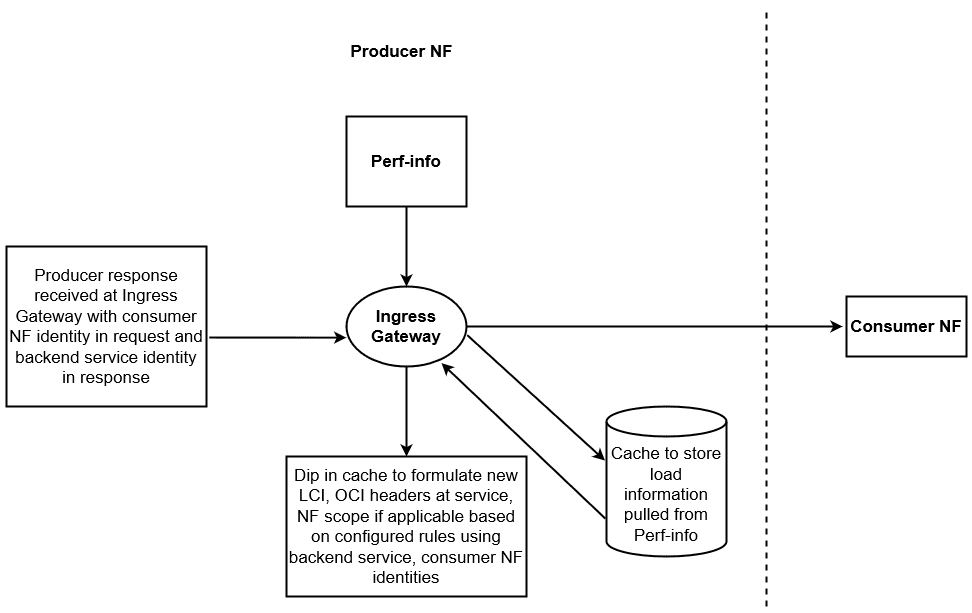
LCI Headers and Their Workflow
LCI Headers are dedicated to providing real-time load information, using the identifier "3gpp-Sbi-Lci." This information provides consumer NFs with the essential knowledge needed to make informed decisions about distribution of network traffic efficiently. When specific conditions are met, LCI headers are included in the messages and notifications (notifications will be supported in future releases; not supported yet), extending the scope to network function, backend service, or both. The condition states that user-agent/via/oauth header should be present in the request so that LCI is included in the response header.
- Ingress Gateway fetches the previous LCI Header from the
cache.
Note:
If no data is fetched regarding LCI Header from the cache, it indicates that LCI Header was not sent more than N seconds ago. In this case, a fresh LCI Header with the current information is included. - If the current load metric is within the load metric threshold, LCI Header is not included in the message.
- If it is beyond the threshold, LCI Header is included in the message. The LCI Header information is updated in the coherence cache for the current destination and further processing is done.
Table 4-7 LCI header fields
| Fields | Description |
|---|---|
| Load Control Timestamp | Human readable timestamp (date and time) indicating time when LCI header is sent. |
| Load Metric | Current load level for the scope of LCI, in terms of percentage, ranging from 0 to 100. 0 indicated 0% or no load, and 100 indicates 100% or maximum load. |
| Scope of LCI | The scope of LCI are NF Instance ID, NF Set ID, NF Service Instance ID or NF Service Set ID. This scope depends on the scope of load info received from perf-info. The same scope is conveyed to the consumer NF. |
OCI Headers and Their Workflow
OCI Headers operate under the identifier "3gpp-Sbi-Oci" and are designed to convey current overload information. This information is critical for consumer NFs, enabling them to take preemptive actions to reduce the traffic directed toward overloaded NFs. Like LCI headers, OCI headers are included in messages and notifications when specific conditions are met, spanning the NF scope, the backend service, or both.
When NSSF receives a request from an NF (for example, AMF), Ingress Gateway at NSSF checks if OCI is enabled. If it is not enabled, OCI header is not added as part of response. If it is enabled, OCI header is computed as follows:
- Ingress Gateway checks if the NF is overloaded as per the
configured range. Then, it fetches the previous OCI Header sent from the
cache.
Note:
If no data is fetched regarding OCI Header, however, the NF is overloaded, even then OCI Header is prepared. - If the overload is different from the previously computed value, the Ingress Gateway changes the overload reduction metric value and prepares a new OCI Header.
- If the overload is the same as the previous reported value, but the period of validity has expired, the OCI Header is included in the message.
- If the period of validity has not expired, the Ingress Gateway continues with further processing. The OCI Header information is updated in the coherence cache for the current destination and further processing is done.
Overload information need to be sent from producer NF to consumer NF in "3gpp-Sbi-Oci" header. The fields included in this header are described below:
Table 4-8 OCI header fields
| Fields | Description |
|---|---|
| Overload Control Timestamp | Human readable timestamp (date and time) indicating time when OCI header is sent. |
| Overload Reduction Metric | Indicates the percentage of traffic reduction that this NF expects from the receiver of OCI Header. The value ranges from 0-100, 0 indicating no traffic reduction towards sender of OCI. |
| Overload Control Period of Validity | Indicates a timer within which the information conveyed in OCI Header shall be considered valid (unless overridden by a newer OCI Header) |
| Scope of OCI |
The scope of OCI can be one of below:
The scope depends on the scope of load info received from perf-info. The same scope is conveyed to the destination NF. |
Load Computation
The Ingress Gateway features a configurable polling interval used to retrieve service-level load information from perf-info. The Ingress Gateway conducts load aggregation for supported NSSF services at the NF (Network Function) level, using a straightforward averaging logic. The supported services are decided based on the NF service to instance ID mapping, which is done through Helm. For example, in NSSF, the mapping is done for NsSelection and NsAvailability services. Hence, only these two services are supported in NSSF.
For instance, when the Ingress Gateway receives two pieces of load information for a particular service, it adds these values together and then divides the sum by two to calculate the average load at the NF level.
Peer Identity
If multiple fields are available to extract peer identity, the priority to extract this identity will be in below order:
- OAuth token
- User Agent header
- VIA header
Validity Period
If the same peer sends multiple requests within the validity period and there no breach of configured thresholds, then NSSF will not add LCI or OCI headers.
Managing LCI and OCI Headers
Enable:
You can enable LCI and OCI Headers by performing the following Helm configurations globally and at the Ingress Gateway:
- Global Helm Configuration
- Enable: You can enable LCI and OCI Headers globally at the
Network Function (NF) level by setting the values of
nssfLciEnabledandnssfOciEnabledparameters astrue, respectively.global: #=======================LCI/OCI header Global Values============================================ #Enabling LCI nssfLciEnabled: &lcienable true #Enabling OCI nssfOciEnabled: &ocienable true #====================================================================
- Enable: You can enable LCI and OCI Headers globally at the
Network Function (NF) level by setting the values of
- Ingress Gateway Helm Configuration
- Enable: You can enable LCI and OCI Headers globally
at Ingress Gateway level by setting the
lciHeaderConfig.enabledandociHeaderConfig.enabledparameters astrue, respectively. - Configure: You can configure LCI and OCI Headers at
Ingress Gateway using the Helm based
configuration:
## This is mandatory for LCI and OCI feature as this is required by perf-info service to get the load information of the services from prometheus
perf-info:
  configmapPerformance:
      prometheus: http://occne-prometheus-server.occne-infra:80


ingress-gateway:
 #To remove the Producer header from Ingress Response when LCI is enabled
  globalRemoveResponseHeader:
  - name: *producer
  # ********  Sub-Section Start: LCI/OCI Ingress Gateway Parameters ************
  #**************************************************************************

  # Engineering Parameter Start
  global:
    lciHeaderConfig:
      enabled: *lcienable
      # difference between previous threshold and current threshold for lci header will be added when the difference crosse the mentioned value
      loadThreshold: 30
      # Validity period after which lci header will be added to reponse header if delta of threshold is not breached
      localLciHeaderValidity: 60000 #(value in milliseconds)
      ## This header needs to be same which is being sent along with  request in microservice
      producerSvcIdHeader: *producer

    ociHeaderConfig:
      enabled: *ocienable
      ## This header needs to be same which is being sent along with reuest  microservice
      producerSvcIdHeader: *producer
      validityPeriod: 10000 #(value in milliseconds)
      ## The range of the cpu load for which the ingress gateway will get notified regarding the criticality of the load.
      overloadConfigRange: #Note - minor, major and critical conditions should cover complete range of 0 to 100 both inclusive for it to be a valid config
        minor: "[75-80]"
        major: "[81-90]"
        critical: "[91-100]"
      ## The range of the cpu load which needs to be decreased from the consumer when a particular criticality has reached.
      reductionMetrics:
        minor: 5  #(Possible values 1 to 9 both inclusive)
        major: 15  #(Possible values 5 to 15 both inclusive)
        critical: 25 #(Possible values 10 to 50 both inclusive)

    nfInstanceId:  "9faf1bbc-6e4a-4454-a507-aef01a101a01"
      ## This is a mapping for service name to service instance id for which service the LCI and OCI headers needs to be enabled. Default values are given with 'ocnssf' as release name. It must be  configured by operator in case release name is changed.
      ## only nsselection and nsavailability services should be configured. As these are the two services for which  LCI/OCI headers is supported.
      ## Format is <releaseName>-<serviceName> . Eg: if release name is given 'ocnssf-test' then svc name should be 'ocnssf-test-nsselection' and 'ocnssf-test-nsavailability'
    svcToSvcInstanceIdMapping:
      - svcName: ocnssf-nsselection
        serviceInstanceId: "ae870316-384d-458a-bd45-025c9e748976"
      - svcName: ocnssf-nsavailability
        serviceInstanceId: "ae870316-384d-458a-bd45-025c9e748996"

    perfInfoConfig:
      ## the interval when perf-info will fetch the cpu load from prometheus
      pollingInterval: 5000 #(value in milliseconds)
      serviceName: "ocnssf-perf-info"
      port: 5905
      perfInfoRequestMap: "/load"
  # Engineering Parameter End

  # ********  Sub-Section End: LCI/OCI Ingress Gateway Parameters ************

  # ********  Sub-Section Start: DB credentials Ingress Gateway Parameters ************
  #**************************************************************************
  dbConfig:
    dbHost: *dbHost
    dbPort: *dbPort
    secretName: *privDbSecret
    dbName: *provDB
    # Name of the Key configured for "DB Username" in Secret with following name: "<dbConfig.secretName>"
    dbUNameLiteral: mysql-username
    # Name of the Key configured for "DB Password" in Secret with following name: "<dbConfig.secretName>"
    dbPwdLiteral: mysql-password
    # Default is NDBCLUSTER
    dbEngine: *dbEngine

  # ********  Sub-Section End: DB credentials Ingress Gateway Parameters ************
  #**************************************************************************
- Enable: You can enable LCI and OCI Headers globally
at Ingress Gateway level by setting the
For more information about the Helm parameters, see "Customizing NSSF" section in Oracle Communications Cloud Native Core, Network Slice Selection Function Installation, Upgrade, and Fault Recovery Guide.
Observe
Metrics
There are no new metrics for this feature.
KPIs
There are no new KPIs for this feature.
Alerts
There are no alerts generated for this feature.
Maintain
- Collect the logs: For more information on how to collect logs, see Oracle Communications Cloud Native Core, Network Slice Selection Function Troubleshooting Guide.
- Raise a service request: See My Oracle Support for more information on how to raise a service request.
4.13 Server Header in NSSF
One of the core functionalities of the Network Slice Selection Function (NSSF) is to manage the security aspects of the 5G network. As part of this role, NSSF handles various requests from other network functions (NFs) and network entities over the HTTP protocol. On receiving these requests, NSSF validates and processes them before issuing responses to the requesting NFs or network entities.
In such scenarios, NFs and other network entities may encounter issues resulting in error responses. It becomes imperative for consumer NFs to pinpoint the source of the error, so they can undertake troubleshooting and corrective measures. The integration of this feature at NSSF helps to determine the originator of the error response.
This feature offers the support for Server Header in NSSF responses, which contain crucial information about the origin of an error response and the type of the error encountered. Thus, the Server Header enhances the behavior of NSSF while responding to requests, particularly the error responses.
Note:
This feature is applicable in scenarios where NSSF generates error responses. It does not affect normal response behavior.A Server Header starts with the value of NF Type, followed by a “-” and any other specific information, if needed, afterward. It is expected to be present in all NSSF responses in the following format:
<NF Type>-<Instance-Id>Where,
<NF Type>is the type of the NF.<NF Instance-Id>is the unique identifier of the NF instance generating the response.
For example, the following combinations are applicable to NSSF:
NSSF-<NSSF's Instance-Id>
Where,
NSSFis the <NF Type>.<NSSF's Instance-Id>is the unique identifier of the NSSF instance generating the response.
Managing Server Header in NSSF
Enable:
You can enable this feature using REST API or CNC Console.
Enable using REST API
By default, this feature is disabled. To enable it, REST API needs to be
invoked and the enabled flag needs to be updated to
true in the following URI:
/{nfType}/nf-common-component/v1/{serviceName}/serverheaderdetails
Example
Example of Request or Response Body to Enable Server Header:
{
  "enabled": true,
  "errorCodeSeriesId": "E1",
  "configuration": {
    "nfType": "NSSF",
    "nfInstanceId": "9faf1bbc-6e4a-4454-a507-aef01a101a01"
  }
}
Example of Request or Response Body to Disable Server Header:
{
  "enabled": false,
  "errorCodeSeriesId": "E1",
  "configuration": {
    "nfType": "NSSF",
    "nfInstanceId": "9faf1bbc-6e4a-4454-a507-aef01a101a01"
  }
}
Note:
-
enabledis used to enable or disable the feature. -
nfTypeandnfInstanceIdare used to form Server Header. - In the mentioned configuration, when sending a response to AMF,
the Server Header will be appended by the NSSF with the value
"
NSSF-9faf1bbc-6e4a-4454-a507-aef01a101a01" - The values in the above example are samples. Ensure that you
update the values of the following parameters according to your deployment:
nfTypemust be NSSF.errorCodeSeriesId: A valid configured value.nfInstanceId: NSSF's valid instance value. It must be same as NSSF's instance ID.
Enable using CNC Console
For more information, see Server Header Details.
Configure
Perform the REST API or CNC Console configurations in the following sequence to configure this feature:
- Configure errorcodeserieslist to update the errorcodeserieslist that are used to list the configurable exception or error for an error scenario in Ingress Gateway.
- Configure serverheaderdetails to enable the feature.
- <Optional>Configure routesconfiguration to map route
ID and its corresponding route-level configuration.
Note:
If this configuration is done for Server Header, then for this particular route, it will take precedence over the serverheaderdetails configuration.
Note:
- If routesconfiguration is done without errorCodeSeriesId then errorCodeSeriesId configured at serverheaderdetails is picked up, if Server Header is enabled there.
- If Server Header is enabled without configuring errorCodeSeriesId then it will be applied for all error codes. This is not a recommended configuration.
For more details about REST APIs, see "REST API Configurations for Server Header Feature" in Oracle Communications Cloud Native Core, Network Slice Selection Function REST Specification Guide.
Observe
Metrics
There are no new metrics for this feature.
KPIs
There are no new KPIs for this feature.
Alerts
There are no alerts generated for this feature.
Maintain
- Collect the logs: For more information on how to collect logs, see Oracle Communications Cloud Native Core, Network Slice Selection Function Troubleshooting Guide.
- Raise a service request: See My Oracle Support for more information on how to raise a service request.
4.14 Support for User-Agent Header
In 5G networks, producer Network Functions (NFs) cannot identify or validate a consumer on their own. To overcome this, 3GPP has introduced User-Agent headers, which are added to consumer service requests. This field is included in the HTTP (Hypertext Transfer Protocol) request that a consumer sends to the producer to identify itself and provide information about the NF making the request.
This feature enables the usage of the User-Agent Header in NSSF.
NSSF support the following inter-NF communication and service request functionalities:
- NSSF sends notifications to AMF.
- NSSF sends registration and heartbeat request to NRF.
- AMF in identifying the NSSF that sent the notification.
- NRF in identifying the NSSF that sent the subscription, registration, or heartbeat request to NRF.
Structure of an User-Agent Header
An User-Agent Header starts with the value of NF type, followed by a "-" and any other specific information, if needed afterwards. It is expected to be present in all the service requests and notification in the following formats:
- <NF Type>
- <NF Type>-<Instance-Id>
- <NF Type>-<Instance-Id> <FQDN>
Where,
- <NF Type> is the type of the NF.
- <Instance-Id> is the instance ID of the NF.
- <FQDN> is the FQDN of the NF.
For example: The following combinations are applicable to NSSF:
NSSF
NSSF-<NSSF's Instance-Id>
NSSF-<NSSF's Instance-Id> <NSSF's FQDN>
Note:
The onus is on operator to configure the values correctly as defined in the syntax explained above.Managing the Support for User-Agent Header
Enable:
You can enable this feature using REST API or CNC Console.
Enable using REST API
- Use the following API
path:
/{nfType}/nf-common-component/v1/{serviceName}/useragentheader
- Set enabled as
true. - Run the API using PUT method with the proposed values given in the
Rest API. For more information about API path, see "Configurations to Enable or
Disable User-Agent Header" section of "Egress Gateway REST APIs" in Oracle Communications Cloud Native Core, Network Slice Selection
Function REST
Specification Guide.
Given below is a sample REST API configuration to enable this feature:
{
   "enabled": true,
   "nfType": "NSSF",
   "nfInstanceId": "9faf1bbc-6e4a-4454-a507-aef01a101a01",
"nfFqdn": "nssf.oracle.com",
"addFqdnToHeader": true,
 "overwriteHeader": true
}
Note:
- In the mentioned configuration, when sending notifications to
AMF, the User-Agent Header will be appended by the NSSF with the value
NSSF-9faf1bbc-6e4a-4454-a507-aef01a101a01
                            nssf.oracle.com
. - The
nfInstanceIdandnfFqdnvalues in the above example are samples. Ensure that you update the values of thenfInstanceIdandnfFqdnparameters accordingly.
Enable using CNC Console
For more information, see User Agent Header Generation.
Observe
Metrics
The following metric is used to provide information about this feature:
oc_egressgateway_user_agent_consumer_total: This metric is applicable whenever the feature is enabled and User-Agent Header is getting generated.
For information about the metrics, see Egress Gateway Metrics.
Alerts
There are no alerts generated for this feature.
Maintain
- Collect the logs: For more information on how to collect logs, see Oracle Communications Cloud Native Core, Network Slice Selection Function Troubleshooting Guide.
- Raise a service request: See My Oracle Support for more information on how to raise a service request.
4.15 Monitoring the Availability of SCPs using SCP Health APIs
With the introduction of this feature, NSSF determines the availability and reachability status of all the SCPs configured either statically by the operator or through DNS SRV based selection of the SCP sets. With this feature, NSSF determines the availability and reachability status of all SCPs irrespective of the configuration types. This feature is an enhancement to the existing SBI routing functionality. Egress Gateway microservice interacts with SCP on their health API endpoints using HTTP2 OPTIONS method. It monitors the health of configured SCP peers to ensure that the traffic is routed directly to the healthy peers. This enhancement avoids routing or rerouting towards unhealthy peers, thus minimizing the latency time.
Egress Gateway microservice maintains the health status of all available and unavailable SCPs. It maintains the latest health of SCPs by periodically monitoring and uses this data to route egress traffic to the healthy SCP.
Note:
- This is not a standalone feature but an add-on to the existing SBI Routing feature, which means this feature is activated only if the SBI Routing feature is enabled.
- Health monitoring can only be enabled for the peers which belong to a peerset associated with a SBI Routing filter.
Managing Monitoring the Availability of SCPs using SCP Health APIs
Prerequisites
During the installation, peermonitoringconfiguration is set to
false by default. Since this feature is an add-on to the
existing SBI Routing feature, it will be activated if the
sbirouteconfig is enabled. To enable this feature, perform the
following:
Configure Using REST API
You can also enable this feature using the REST API configurations at Egress Gateway in the following sequence:
- Configure
peerconfigurationto define the list of peers to which Egress Gateway can send request.Note:
peerconfigurationmust consist ofhealthApiPatheven thoughpeermonitoringconfigurationis set tofalseby default. ConfigurevirtualHostunderpeerconfigurationwhere the AMF query is sent.Here is a sample configuration:
PUT Request
curl -v -X PUT "http://{{host}}:{{port}}/nssf/nf-common-component/v1/egw/peerconfiguration" -H "Content-Type: application/json" --data-raw '[{"id": "peer1","host": "scp1","port": "8080","apiPrefix": "/","healthApiPath":"/health/v1"},{"id": "peer2","host": "scp2","port": "8080","apiPrefix":"/","healthApiPath":"/health/v2"},{"id": "peer3","host": "scp3","port": "8080","apiPrefix": "/","healthApiPath":"/health/v3"},{"id": "peer4","host": "scp4","port": "8080","apiPrefix": "/","healthApiPath":"/health/v4"},{"id": "peer5","virtualHost": "xyz.test.com","apiPrefix": "/","healthApiPath":"/health/v5"},{"id": "peer6","virtualHost": "abc.test.com","apiPrefix": "/","healthApiPath":"/health/v6"}]' - Configure
peersetconfigurationto logically group the peers into sets.Note:
peerIdentifiermust be the value of SCP peer configured inpeerConfiguration.- You cannot configure multiple virtual hosts as peers in the same peer set.
- Configure the
priorityfor each SCP peer in the set. Depending on the priority, it selects the primary, secondary, or tertiary SCP peers to route requests.
Here is a sample configuration:
PUT Request
curl -v --http2-prior-knowledge -X PUT "http://{{host}}:{{port}}/nssf/nf-common-component/v1/egw/peersetconfiguration" -H "Content-Type: application/json" -d '[{"id":"set0","httpConfiguration":[{"priority": 1,"peerIdentifier": "peer1"},{"priority": 2,"peerIdentifier": "peer2"},{"priority": 3,"peerIdentifier": "peer3"},{"priority": 4,"peerIdentifier": "peer4"}],"httpsConfiguration":[{"priority": 1,"peerIdentifier": "peer1"},{"priority": 2,"peerIdentifier": "peer2"},{"priority": 3,"peerIdentifier": "peer3"},{"priority": 4,"peerIdentifier": "peer4"}]},{"id":"set1","httpConfiguration":[{"priority": 1,"peerIdentifier": "peer5"}],"httpsConfiguration":[{"priority": 1,"peerIdentifier": "peer6"}]}]' - Configure or update
errorcriteriasets.Here is a sample configuration:
PUT Request
curl -v --http2-prior-knowledge -X PUT "http://{{host}}:{{port}}/nssf/nf-common-component/v1/egw/sbiroutingerrorcriteriasets" -H "Content-Type: application/json" -d '[{"id":"criteria_0","method":["GET","POST","PUT","DELETE","PATCH"],"exceptions":["java.util.concurrent.TimeoutException","java.net.UnknownHostException"]},{"id":"criteria_1","method":["GET","POST","PUT","DELETE","PATCH"],"response":{"statuses":[{"statusSeries":"4xx","status":[400,404]},{"statusSeries":"5xx","status":[500,503]}]}}]' - Configure or update
erroractionsets.Here is a sample configuration:
PUT Request
curl -v --http2-prior-knowledge -X PUT "http://{{host}}:{{port}}/nssf/nf-common-component/v1/egw/sbiroutingerroractionsets" -H "Content-Type: application/json" -d '[{"id":"action_0","action":"reroute","attempts":3,"blacklist":{"enabled":false,"duration":60000}},{"id":"action_1","action":"reroute","attempts":3,"blacklist":{"enabled":false,"duration":60000}}]' - Configure
routesconfigurationto define the route and reroute parameters.Note:
- The configuration under
sbiRoutingConfigurationcorresponds to the SBI-Routing specific configuration. - If SBIRouting functionality is required, then configure
SBIRoutingFilter. If reroute mechanism is required for that route, then configureSBIReroutefilter with retries, methods, and statuses. peerSetIdentifiermust be the value configured duringpeersetconfiguration.
Here is a sample configuration:
PUT Request
curl -v --http2-prior-knowledge -X PUT "http://{{host}}:{{port}}/nssf/nf-common-component/v1/egw/routesconfiguration" -H "Content-Type: application/json" -d '[{"id":"egress_scp_proxy1","uri":"http://localhost:32068/","order":0,"metadata":{"httpsTargetOnly":false,"httpRuriOnly":false,"sbiRoutingEnabled":true},"predicates":[{"args":{"pattern":"/notification/amf2/"},"name":"Path"}],"filters":[{"name":"SbiRouting","args":{"peerSetIdentifier":"set0","customPeerSelectorEnabled":true,"errorHandling":[{"errorCriteriaSet":"criteria_1","actionSet":"action_1","priority":1},{"errorCriteriaSet":"criteria_0","actionSet":"action_0","priority":2}]}}]},{"id": "default_route","uri": "egress://request.uri","order": 100,"filters": [{"name": "DefaultRouteRetry"}],"predicates": [{"args": {"pattern": "/**"},"name": "Path"}]}]' - The configuration under
- Set the value of
enabledundersbiRoutingConfigurationtotrueto route the AMF queries through SCP configured in theidattribute.Note:
peerconfigurationandpeersetconfigurationcan be either set to empty list or populated with values. These attributes are used for routing only ifsbiRoutingConfigurationis enabled for a particular route. - After above configurations, configure
enableinpeermonitoringconfigurationastrueto enable peer monitoring. By default,enableis set tofalse.Note:
- Peer Monitoring can be enabled to use this feature, where Egress Gateway dynamically monitors the health of the peers configured.
- It is mandatory to configure
peerconfigurationwithhealthApiPathifpeermonitoringconfigurationis enabled.
Here is a sample configuration:
PUT Request
curl -v --http2-prior-knowledge -X PUT "http://{{host}}:{{port}}/nssf/nf-common-component/v1/egw/peermonitoringconfiguration" -H "Content-Type: application/json" --data-raw ' {"enabled": true,"timeout": 1000,"frequency": 2000,"failureThreshold": 3,"successThreshold" : 3}'
Note:
The IPs and parameter values in the examples are just placeholders. Replace them with your own settings for the cURLs to function correctly.For detailed information about the REST APIs and parameters, see "Egress Gateway REST APIs" in Oracle Communications Cloud Native Core, Network Slice Selection Function REST Specification Guide.
Configure Using CNC Console
Taking into account the prerequisites criteria and recommended sequence explained in sections above, you can refer to the Egress Gateway Configurations section in Configuring NSSF using CNC Console for configuring this feature using CNC Console.
Observe
Metrics
The following metrics are used to provide information about this feature:
oc_egressgateway_peer_health_statusoc_egressgateway_peer_health_ping_request_totaloc_egressgateway_peer_health_ping_response_totaloc_egressgateway_peer_health_status_transitions_totaloc_egressgateway_peer_countoc_egressgateway_peer_available_count
For information about the metrics, see NSSF Metrics.
Alerts
The following alerts are applicable for this feature:
- OcnssfScpMarkedAsUnavailable
- OcnssfAllScpMarkedAsUnavailable
For more information about the alerts, see NSSF Alerts.
Maintain
- Collect the logs: For more information on how to collect logs, see Oracle Communications Cloud Native Core, Network Slice Selection Function Troubleshooting Guide.
- Raise a service request: See My Oracle Support for more information on how to raise a service request.
4.16 Support for Kubernetes Resource
4.16.1 Network Policies
Network Policies are an application-centric construct that allows you to specify how a pod is allowed to communicate with various network entities. To control communication between the cluster's pods and services and to determine which pods and services can access one another inside the cluster, it creates pod-level rules.
Previously, NSSF had the privilege to communicate with other namespaces, and pods of one namespace could communicate with others without any restriction. Now, namespace-level isolation is provided for the NSSF pods, and some scope of communications is allowed between the NSSF and pods outside the cluster. The network policies enforces access restrictions for all the applicable data flows except communication from Kubernetes node to pod for invoking container probe.
Managing Support for Network Policies
Enable
To use this feature, network policies need to be applied to the namespace in which NSSF is deployed.
Configure
You can configure this feature using Helm. For information about configuring Network Policy, see Oracle Communications Cloud Native Core, Network Slice Selection Function Installation, Upgrade, and Fault Recovery Guide.
Observe
here is no specific metrics and alerts required for the Network Policy feature.
4.17 Validation of WWW-Authenticate Response Header 4xx with NSSF
When access token validation is enabled, NSSF performs access-token validation of the access token that comes with service requests to it. With this enhancement, NSSF has added supports 3GPP specified 4XX application error codes for these access token checks.
- Validating if access token is present in the service request: If the access token is not present, NSSF returns 401 unauthorized error code together with the "WWW-Authenticate" header as specified in 3GPP 16.5 29.531.
- Validating if access token does not have the required scopes to
invoke the service operation: NSSF validates the scope IE in
AccessTokenClaims(which is the name of the NSSF services for which the access token is authorized) against the NSSF Service that are accessed in this service request. If the validation fails, NSSF returns a 403 Forbidden error code together with the "WWW-Authenticate" header as specified in 3GPP 16.5 29.531.
Managing Validation of WWW-Authenticate Response Header 4xx with NSSF
Enable
This feature does not require any configuration. It is enabled by default when the NSSF is installed.
Maintain
- Collect the logs: For more information on how to collect logs, see Oracle Communications Cloud Native Core, Network Slice Selection Function Troubleshooting Guide.
- Raise a service request: See My Oracle Support for more information on how to raise a service request.
4.18 Deleting Subscription on 404 SUBSCRIPITON_NOT_FOUND Response from AMF
This feature implements a mechanism for the Network Slice Selection Function (NSSF) to manage Access and Mobility Management Function (AMF) subscriptions related to Tracking Area (TA) status changes. When enabled, the NSSF attempts to notify the AMF of any status alterations within a specific TA. If the AMF returns a "404 Subscription Not Found" error, indicating the absence of an active subscription, the NSSF proceeds to delete the associated subscription. This ensures the NSSF maintains an accurate record of active subscriptions.
Advantages:
- Optimized Notification Flow: By removing inactive subscriptions, the system prevents the transmission of unnecessary notifications to AMFs that are not subscribed to specific TAs.
- Resource Efficiency: Eliminating superfluous notifications reduces network traffic and processing overhead.
- Reduced Signaling Load: Prevents unnecessary signaling between the NSSF and AMF.
Use Case Flow:
- TA Status Change: A status change occurs within a designated Tracking Area.
- Notification Attempt: The NSSF attempts to notify the AMF of the status change.
- AMF Response: The AMF responds to the notification attempt.
- "404 Subscription Not Found" Response: If the AMF returns a "404 Subscription Not Found" error, it indicates there is no active subscription for the specific TA.
- Subscription Deletion: Upon receiving the "404" response, the NSSF deletes the subscription associated with the TA.
- Notification Cessation: The AMF no longer receives notifications regarding status changes for the deleted subscription's TA.
Note:
This behavior is applicable only when AMF responds with the '404 Subscription Not Found' error. It is not applicable to other failure scenarios.Managing Deleting Subscription on 404 SUBSCRIPITON_NOT_FOUND Response from AMF
Enable
To enable this feature, set the value of
deleteOnSubscriptionNotFound parameter to true
under the NSSubscription section in the ocnssf_custom_values_25.2.200.yaml file.
Observe
Metrics
The following metrics are used to provide information about this feature:
ocnssf_nssaiavailability_notification_delete_on_subscription_not_found_totalocnssf_nssaiavailability_notification_db_error
For information about the Metrics, see NSSF Metrics.
Error Scenarios
The following error logs are generated for this feature:
Table 4-9 Error Scenarios
| Scenario | Microservice | Details |
|---|---|---|
| Parameter deleteOnSubscriptionNotFound is true but unable to delete NssaiSubscription | NsSubscription |
Request URL: /nnssf-nssubscription/v1/nssai-availability/autoconfignotifications /nnssf-nssubscription/v1/nssai-availability/notifications Response Code/ Error Title: 404 SUBSCRIPTION_NOT_FOUND Log Snippet: |
| NsSubcription recieves 404 SUBSCRIPTION_NOT_FOUND from client, Param deleteOnSubscriptionNotFound is true hence NssaiSubscription is deleted | NsSubscription |
Request URL: /nnssf-nssubscription/v1/nssai-availability/autoconfignotifications /nnssf-nssubscription/v1/nssai-availability/notifications Response Code/ Error Title: 404 SUBSCRIPTION_NOT_FOUND Log Snippet: |
| NsSubcription recieves 404 SUBSCRIPTION_NOT_FOUND from client, Param deleteOnSubscriptionNotFound is false hence NssaiSubscription is not deleted | NsSubscription |
Request URL: /nnssf-nssubscription/v1/nssai-availability/autoconfignotifications /nnssf-nssubscription/v1/nssai-availability/notifications Response Code/ Error Title: 404 SUBSCRIPTION_NOT_FOUND Log Snippet: |
Maintain
- Collect the logs: For more information on how to collect logs, see Oracle Communications Cloud Native Core, Network Slice Selection Function Troubleshooting Guide.
- Raise a service request: See My Oracle Support for more information on how to raise a service request.
4.19 DNS SRV Based Selection of SCP in NSSF
NSSF selects Service Communication Proxy (SCP) for indirect communication of notifications using the static configurations done by the operator. This enhancement enables NSSF to learn SCP configuration from DNS SRV based FQDN, in addition to the already existing static manual configuration by the operator.
Egress Gateway (Egress Gateway) supports AlternateRoute Service, which NSSF is using to support DNS SRV based selection of SCP. It enables NSSF to resolve FQDN or Virtual FQDN to alternate FQDNs of SCP. Egress Gateway uses the virtual FQDN of SCP instances to query the AlternateRoute Service and get the list of alternate FQDNs with priorities assigned to each of them. Based on the priorities, Egress Gateway picks up the SCP instances for rerouting attempts.
The AlternateRoute Service allows the configuration of multiple sets of SCP instances in NSSF in contrast to only one static configuration in the previous scenario.
Managing DNS SRV Based Selection of SCP in NSSF
Configure
Configure Using Helm Parameters:
dnsSrvEnabled parameter is set to true by
default in the ocnssf_custom_values_25.2.200.yaml file:
dnsSrvEnabled: trueNote:
The default value of this parameter is set totrueby default. It is recommended to keep this value astrueonly. Disabling it may cause issues with the functioning of this feature and other features that are depended on it.dnsSrvFqdnSetting.enabled: trueNote:
Flag to enable or disable the usage of custom patterns for the FQDN while triggering DNS-SRV query. It is set totrueby default.dnsSrvFqdnSetting.pattern: "_{scheme}._tcp.{fqdn}."
For more information about Helm parameters to configure DNS SRV and Alternate Routing Service, see "Alternate Route Microservice Parameters section" in Oracle Communications Cloud Native Core, Network Slice Selection Function Installation, Upgrade, and Fault Recovery Guide.
Configure Using REST API:
The feature related REST API configurations are performed at NSSF and Egress Gateway.
- Perform REST API configurations at Egress Gateway in the following
sequence:
- Configure
peerconfigurationto define the list of peers to which Egress Gateway can send request.Note:
It is mandatory to configurepeerconfigurationwithhealthApiPathif you want to enablepeermonitoringconfiguration. - Configure
virtualHostunderpeerconfigurationwhere the AMF query is sent. - Configure
peersetconfigurationto logically group the peers into sets.Note:
peerIdentifiermust be the value of SCP peer configured inpeerConfiguration.- You cannot configure multiple virtual hosts as peers in the same peer set.
- Configure the
priorityfor each SCP peer in the set. Depending on the priority, it selects the primary, secondary, or tertiary SCP peers to route requests.
- Configure or update
errorcriteriasets. - Configure or update
erroractionsets. - Configure
routesconfigurationto define the route and reroute parameters. If SBIRouting functionality is required, then configureSBIRoutingFilter. If reroute mechanism is required for that route, then configureSBIReroutefilter with retries, methods, and statuses.Note:
peerSetIdentifiermust be the value configured duringpeersetconfiguration. - Set the value of
enabledundersbiRoutingConfigurationtotrueto route the AMF queries through SCP configured in theidattribute.Note:
peerconfigurationandpeersetconfigurationcan be either set to empty list or populated with values. These attributes are used for routing only ifsbiRoutingConfigurationis enabled for a particular route. - <Optional> You can also configure
peermonitoringconfigurationusing REST API or CNC Console. For more information about enabling or configuringpeermonitoringconfiguration, see Monitoring the Availability of SCPs using SCP Health APIs.Note:
It is mandatory to configurepeerconfigurationwithhealthApiPathifpeermonitoringconfigurationis enabled.
- Configure
- Perform the following REST API configurations at NSSF:
- Configure the
nssaiauthManaged Object to enable the configuration of network slice authentication rules by configuring Grant status (Allowed_PLMN, Rejected_PLMN, or Rejected_TAC) for S-NSSAI on a per TAI basis.
- Configure the
For more information about REST API parameters and configuration, see Oracle Communications Cloud Native Core, Network Slice Selection Function REST Specification Guide.
Configure using CNC Console
Taking into account the prerequisites criteria and recommended sequence explained in sections above, you can see Configuring NSSF using CNC Console section for configuring this feature using CNC Console.
Observe
Metrics
No new Metrics or KPIs were added to NSSF. However, the following Egress Gateway metrics for Alternate Route Service are used to provide the information about this feature:
oc_fqdn_alternate_route_totaloc_dns_srv_lookup_totaloc_alternate_route_resultsetoc_configclient_request_totaloc_configclient_response_total
For information about the Metrics, see Egress Gateway Metrics in NSSF Metrics.
Error Scenarios
No new logs are generated for this feature. However, it uses the following Egress Gateway error scenarios:
Table 4-10 Error Scenarios
| Scenario | Microservice | Details |
|---|---|---|
| Sending Subscription notification failed due to UnknownHost exception | ocnssf-egress-gateway |
Request URL: /nnssf-configuration/v1/nssaiauth Response Code/ Error Title:
Log Snippet: |
Maintain
- Collect the logs: For more information on how to collect logs, see Oracle Communications Cloud Native Core, Network Slice Selection Function Troubleshooting Guide.
- Raise a service request: See My Oracle Support for more information on how to raise a service request.
4.20 OAuth Access Token Based Authorization
NSSF supports Oauth 2.0, which is a security feature that NSSF uses to validate and authorize requests from allowed or valid consumers NFs. The consumer NF requests for access token from the issuer NRF, and uses this access token to send the request to NSSF. NSSF validates the requests and approves or discards it based on access token authorization received in the request. The access token is validated with the configured public key certificate in NSSF.
Before this enhancement, NSSF used NRF Instance ID to validate the access token, where Ingress Gateway stored public keys against NRF instance Id. This enhancement allows NSSF to use multiple public certificates for validating access tokens by adding support for Key-ID (K-ID) based access token validation, in addition to the existing NRF Instance ID based access token validation.
This enhancement now allows Ingress Gateway to operate in the following three different modes:
- K-ID based ONLY
- Ingress Gateway validates access token based on public keys indexed with key-id only.
- Instance ID based ONLY (DEFAULT)
- Ingress Gateway validates access token based on public keys indexed with NRF Instance ID in the issuer field.
- K-ID based with Instance ID based as fallback (KID_PREFERRED)
- Ingress Gateway validates access token based on public keys indexed with Key-ID. If Key-ID is not FOUND in Access token, Ingress Gateway attempts token validation using public keys indexed with NRF instance ID in the issuer field.
- Fallback happens only if the received access token is structured as
follows:
- Does not contain Key-ID
- Contains Key-ID but does not have public keys configured against the Key-ID
Managing OAuth Access Token Based Authorization Using Key-ID and NRF Instance ID
Prerequisites
This section describes the configurations required to enable access tokens before deploying NSSF.
Generating KeyPairs for NRF Instances
Note:
It is at the discretion of the user to create private keys and certificates, and it is not in the scope of NSSF. This section lists only samples to create KeyPairs.Using the OpenSSL tool, the user can generate private key and public certificates. The commands to generate the KeyPairs are as follows:
openssl ecparam -genkey -name prime256v1 -noout -out ec_private_key1.pem

openssl pkcs8 -topk8 -in ec_private_key1.pem -inform pem -out ec_private_key_pkcs8.pem -outform pem -nocrypt

openssl req -new -key ec_private_key_pkcs8.pem -x509 -nodes -days 365 -out 4bc0c762-0212-416a-bd94-b7f1fb348bd4.crt -subj "/C=IN/ST=KA/L=BLR/O=ORACLE/OU=CGBU/CN=ocnrf-endpoint.ocnrf.svc.cluster.local"
Note:
For ATS configuration details, see Configuring Secrets to Enable Access Token in Preinstallation Tasks of Cloud Native Core Network Slice Selection Function Installation and Upgrade Guide.Enabling and Configuring Access Token
Note:
While Helm based configuration is mandatory, you can also perform CNC Console-based configuration instead of REST-based configurations.Configuration using Helm:
For Helm-based configuration, perform the following steps:
- Create a secret that stores NRF public key certificates using
the following
commands:
kubectl create secret generic <secret name> --from-file=<filename.crt> -n <Namespace>For Example:
kubectl create secret generic oauthsecret --from-file=4bc0c762-0212-416a-bd94-b7f1fb348bd4.crt -n ocnssfNote:
In the above command:
oauthsecretis the secret nameocnssfis the namespace4bc0c762-0212-416a-bd94-b7f1fb348bd4.crtis the public key certificate
- Enable the
oauthValidatorEnabledparameter on Ingress Gateway by setting its value totrue. Further, configure the secret and namespace on Ingress Gateway in the OAUTH CONFIGURATION section of theocnssf_custom_values_25.2.200.yamlfile using the following fields:oauthValidatorEnablednfTypenfInstanceIdproducerScopeallowedClockSkewSecondsenableInstanceIdConfigHooknrfPublicKeyKubeSecretnrfPublicKeyKubeNamespacevalidationTypeproducerPlmnMNCproducerPlmnMCCoauthErrorConfigForValidationFailureoauthErrorConfigForValidationFailure.errorCodeoauthErrorConfigForValidationFailure.errorTitleoauthErrorConfigForValidationFailure.errorDescriptionoauthErrorConfigForValidationFailure.errorCauseoauthErrorConfigForValidationFailure.redirectUrloauthErrorConfigForValidationFailure.retryAfteroauthErrorConfigForValidationFailure.errorTriggeroauthErrorConfigForValidationFailure.errorTrigger.exceptionType
Note:
4bc0c762-0212-416a-bd94-b7f1fb348bd4.crtis the public key certificate and we can have any number of certificates in the secret.The following snippet represents the location of the mentioned parameter in the Helm file:Note:
- The following snippet represents only the sample values.
- For more information on parameters and their supported values, see Ingress Gateway Parameters from Customizing NSSF chapter in Oracle Communications Cloud Native Core, Network Slice Selection Function Installation, Upgrade, and Fault Recovery Guide
- For information about OAuth access token attributes like kid, typ, iss, aud, scope etc., see https://www.rfc-editor.org/rfc/rfc7515.html page.
#OAUTH CONFIGURATION

  oauthValidatorEnabled: true

  nfType: NSSF

  nfInstanceId: 9faf1bbc-6e4a-4454-a507-aef01a101a01

  producerScope: nnssf-nsselection,nnssf-nssaiavailability

  allowedClockSkewSeconds: 0

  enableInstanceIdConfigHook: true

  nrfPublicKeyKubeSecret: oauthsecret

  nrfPublicKeyKubeNamespace: ocnssf

  validationType: strict

  producerPlmnMNC: 14

  producerPlmnMCC: 310

  oauthErrorConfigForValidationFailure:

    errorCode: 401

    errorTitle: "Validation failure"

    errorDescription: "UNAUTHORIZED"

    errorCause: "oAuth access Token validation failed"

    redirectUrl:

    retryAfter:

    errorTrigger:

    - exceptionType: OAUTH_CERT_EXPIRED

      errorCode: 408

      errorCause: certificate has expired

      errorTitle:

      errorDescription:

      retryAfter:

      redirectUrl:- exceptionType: OAUTH_MISMATCH_IN_KID

      errorCode: 407

      errorCause: kid configured does not match with the one present in the token

      errorTitle:

      errorDescription:

      retryAfter:

      redirectUrl:

    - exceptionType: OAUTH_PRODUCER_SCOPE_NOT_PRESENT

      errorCode: 406

      errorCause: producer scope is not present in token

      errorTitle:

      errorDescription:

      retryAfter:

      redirectUrl:

    - exceptionType: OAUTH_PRODUCER_SCOPE_MISMATCH

      errorCode: 405

      errorCause: produce scope in token does not match with the configuration

      errorTitle:

      errorDescription:

      retryAfter:

      redirectUrl:

    - exceptionType: OAUTH_MISMATCH_IN_NRF_INSTANCEID

      errorCode: 404

      errorCause: nrf id configured does not match with the one present in the token

      errorTitle:

      errorDescription:

      retryAfter:

      redirectUrl: - exceptionType: OAUTH_PRODUCER_PLMNID_MISMATCH

      errorCode: 403

      errorCause: producer plmn id in token does not match with the configuration

      errorTitle:

      errorDescription:

      retryAfter:

      redirectUrl:

    - exceptionType: OAUTH_AUDIENCE_NOT_PRESENT_OR_INVALID

      errorCode: 402

      errorCause: audience in token does not match with the configuration

      errorTitle:

      errorDescription:

      retryAfter:

      redirectUrl:

    - exceptionType: OAUTH_TOKEN_INVALID

      errorCode: 401

      errorCause: oauth token is corrupted

      errorTitle:

      errorDescription:

      retryAfter:

 redirectUrl:oauthErrorConfigOnTokenAbsence:

    errorCode: 400

    errorTitle: "Token not present"

    errorDescription: "UNAUTHORIZED"

    errorCause: "oAuth access Token is not present"

    redirectUrl:

    retryAfter:
Configuration using REST API or CNC Console
REST API
After Helm configuration, send the REST requests to use configured public key certificates. Using REST-based configuration, you can distinguish between the certificates configured on different NRFs and can use these certificates to validate the token received from a specific NRF.
For more information about REST API configuration, see OAuth Validator Configuration section in Oracle Communications Cloud Native Core, Network Slice Selection Function REST Specification Guide.
CNC Console
For more information on CNC Console based configuration, see OAuth Validator Configurations.
Observe
- Added the following success measurements:
oc_oauth_nrf_request_totaloc_oauth_nrf_response_success_totaloc_oauth_token_cache_totaloc_oauth_validation_successful_totaloc_oauth_cert_expiryStatusoc_oauth_cert_loadStatusoc.oauth.keyid.count
- Added the following error measurements:
oc_oauth_nrf_response_failure_totaloc_oauth_request_failed_internal_totaloc_oauth_request_invalid_totaloc_oauth_validation_failure_totaloc.oauth.request.failed.cert.expiry
For information on Metrics and KPIs of NSSF, see NSSF Metrics and NSSF KPIs sections respectively.
Maintain
- Collect the logs: For more information on how to collect logs, see Oracle Communications Cloud Native Core, Network Slice Selection Function Troubleshooting Guide.
- Raise a service request: See My Oracle Support for more information on how to raise a service request.
4.21 Overload Control based on Percentage Discards
The Overload Control feature protects the system from overload and maintains the overall health of NSSF. The system needs to not only detect overload conditions but also protect against the same. Further, it needs to mitigate against and avoid the system from entering into an overload condition by taking necessary actions for recovering from overload.
NSSF provides the following means for overload management:
- Predefined threshold load levels
- Tracks number of pending messages
- Tracks CPU and memory usage
- Enforce load shedding during various overload levels
Perf-info performs overload calculations based on the indicators:
- CPU Utilization
- Memory Utilization
- Pending Message Count
- Failure Count
The overload level is configured for the following NSSF microservices:
- NSSelection
- NSAvailability
The Overload Manager module in Perf-info is configured or updated with the threshold
value for services. A configurable flag is available for sampling interval as
ocPolicyMapping.samplingPeriod based on which Ingress Gateway
calculates rate per service in the current sampling period and applies appropriate
discard policies and actions in the subsequent sampling period.
Overload Manager triggers Rate Calculator to start calculating the rate of incoming requests per service per sampling period. Ingress Gateway receives a notification event per service with the calculated rates to the Overload Manager filter at the end of every sampling period. It applies an appropriate configured discard policy for a particular service based on the rate of requests.
Ingress Gateway calculates the number of requests to be dropped in the current sampling period based on configured percentage discard.
Overload Thresholds for each service is evaluated based on four metrics namely
cpu, svc_failure_count, svc_pending_count, and
memory. Overload control is triggered if the thresholds for any one
metrics are reached.
Note:
When the percentage-based overload control discarding policy is enabled, the number of requests to be dropped in the current sampling period is computed based on the configured percentage discard and the "rate of requests outgoing of Ingress Gateway" in the previous sampling period for the service.
Once the number of requests to be dropped in the current sampling period is computed, the gateway does not drop all the new traffic to meet the discard count. Instead, Ingress Gateway executes a random function to decide if a request is to be discarded or not. If the random function returns true, the request is discarded in the current sampling period with the discard action "RejectWithErrorCode". This ensures there is a spread of discard requests in a sampling period.
Since we are calculating the number of requests to be dropped in the current sampling period based on the number of requests sent to the backend service in the previous sampling period and not on the total requests received at Ingress Gateway, the percentage dropped is not exactly the percentage configured.
Managing Overload Control based on Percentage Discards
Enable Overload Control Feature
- Open the
ocnssf_custom_values_25.2.200.yamlfile. - Set the
global.performanceServiceEnableparameter totruein theocnssf_custom_values_25.2.200.yamlfile.The following snippet represents the location of the mentioned parameter in the Helm file:#Flag to Enable or Disable Performance Service. The flag is set to true to enable the overload control feature by default. performanceServiceEnable: true - Set the
perf-info.overloadManager.enabledparameter totruein theocnssf_custom_values_25.2.200.yamlfile.The following snippet represents the location of the mentioned parameter in the Helm file:overloadManager: ingressGatewayPort: *httpSignalPort #Flag to Enable or Disable overloadManager enabled: true - Configure the Prometheus URI in
perf-info.configmapPerformance.prometheusThe following snippet represents the location of the mentioned parameter in the Helm file:perf-info configmapPerformance: prometheus: http://occne-prometheus-server.occne-infra:80Note:
Update the URL as per your setup. It should be a valid Prometheus server URL, which is same as data source URL used on the Grafana dashboard. - Save the
ocnssf_custom_values_25.2.200.yamlfile. - Run
helm upgrade, if you are enabling this feature after NSSF deployment. For more information on upgrade procedure, see Oracle Communications Cloud Native Core, Network Slice Selection Function Installation and Upgrade Guide.
Configure
You can configure this feature using Helm, REST API, and CNC Console.
Configure using REST API:
The Overload Control feature related configurations are performed at Ingress Gateway and Perf-info.
- {apiRoot}/nssf/nf-common-component/v1/igw/errorcodeprofiles
Note:
Dependency:errorcodeprofilesis used inocdiscardpoliciesto define how different overload levels trigger rejection with specific errors. - {apiRoot}/nssf/nf-common-component/v1/igw/ocdiscardpolicies
Note:
Dependency:ocdiscardpoliciesuseerrorcodeprofilesto decide the error message when rejecting requests.ocdiscardpoliciesare used byocpolicymappingto associate services with specific overload handling policies.
- {apiRoot}/nssf/nf-common-component/v1/igw/ocpolicymapping
Note:
Dependency:- Depends on
ocdiscardpoliciesto apply the right rejection policy to each service.
- Depends on
- {apiRoot}/nssf/nf-common-component/v1/igw/errorcodeserieslist
Note:
Not directly linked to other configurations but enhances error handling by classifying errors. - {apiRoot}/nssf/nf-common-component/v1/igw/routesconfiguration
Note:
routesconfigurationdefines routing behaviors and associates services with error code series. It referenceserrorCodeSeriesIdwhich is defined inidattribute inerrorcodeserieslist. - {apiRoot}/nssf/nf-common-component/v1/perfinfo/overloadLevelThreshold
Note:
Determines when a service is considered overloaded. It triggersocdiscardpolicieswhen thresholds are exceeded, causing requests to be rejected with predefined error responses.
For more information about APIs, see Oracle Communications Cloud Native Core, Network Slice Selection Function REST Specification Guide
Configure using CNC Console:
- Create or update the Error Code Profiles.
- Create or update the Create Overload Control Discard Policies.
- Create or update the Discard Policy Mapping.
- Create or update the Error Code Series.
- Update the Routes Configuration.
Disable Overload Control Feature
- In the following REST API change the value of
enableparameter tofalse:{apiRoot}/nssf/nf-common-component/v1/igw/ocpolicymapping
For more information about the
ocpolicymappingREST API, see Oracle Communications Cloud Native Core, Network Slice Selection Function REST Specification Guide. - Open the
ocnssf_custom_values_25.2.200.yamlfile. - Set the
perf-info.overloadManager.enabledparameter tofalsein theocnssf_custom_values_25.2.200.yamlfile.The following snippet represents the location of the mentioned parameter in the Helm file:overloadManager: ingressGatewayPort: *httpSignalPort #Flag to Enable or Disable overloadManager enabled: false - Save the
ocnssf_custom_values_25.2.200.yamlfile. - Run
helm upgrade, if you are enabling this feature after NSSF deployment. For more information on upgrade procedure, see Oracle Communications Cloud Native Core, Network Slice Selection Function Installation and Upgrade Guide.
Note:
If you want to enable the feature again after disabling it, follow the steps mentioned in the Enable Overload Control Feature and Configure sections.Observe
Metrics
No new metrics added to NSSF for the Overload Control feature. However, the following Perf-info metrics are used to provide the information about overload control feature:
cgroup_cpu_nanosecondscgroup_memory_bytesload_level
For information about Metrics, see Perf-info metrics for Overload Control in NSSF Metrics.
For information on KPIs of NSSF, see NSSF KPIs section.
Alerts
The following alerts are added for the Overload Control feature:
Maintain
- Collect the logs: For more information on how to collect logs, see Oracle Communications Cloud Native Core, Network Slice Selection Function Troubleshooting Guide.
- Raise a service request: See My Oracle Support for more information on how to raise a service request.
4.22 Auto-Population of Configuration Based on NSAvailability Update
This feature simplifies the configuration of authorized S-NSSAIs per
TAI in the NSSF by dynamically deriving them from the
NssaiAvailabilityData received from the AMF
When the Feature is Enabled
-
No need to configure
SupportedSNSSAIsperTAImanually. - Operators must configure:
ConfiguredSNSSAIs(allowedS-NSSAIs)BarredSNSSAIs(optional) at thePLMNportfolio level.
NSSF considers an S-NSSAI authorized in a TAI
if:
- It is present in the
NssaiAvailabilityDatafrom AMF (i.e., AMF supports it in thatTAI). - It is part of the
ConfiguredSNSSAIsat thePLMNlevel. - It is not barred in that
TAIorPLMN.
Additional Rule
- NSSF treats all configured
S-NSSAIsas applicable to allTAIsunless explicitly restricted.
Operational Benefit
- No per-
TAIsupport configuration is required, which simplifies setup and reduces operational errors.
When the Feature is Disabled
- Operators must manually configure:
ConfiguredSNSSAIsatPLMNlevelSupportedSNSSAIsperTAIusing theSupported in TAImanaged object- Optional
BarredSNSSAIsperTAI
NSSF considers an S-NSSAI authorized in a TAI
only if:
- It is present in the
NssaiAvailabilityDatafrom AMF for thatTAI. - It is explicitly listed as a
SupportedSNSSAIfor thatTAIin the configuration. - It is not barred.
Operational Overhead
- Manual per-
TAImapping is required, which increases complexity and maintenance effort.
Walkthrough – Step-by-Step Flow (Feature Enabled)
- Operator configures
ConfiguredSNSSAIsat thePLMNlevel. - AMF sends
NssaiAvailabilityDatafor eachTAI. - NSSF matches the configured
S-NSSAIswith the data received from AMF. - Any
S-NSSAIfound in both theConfiguredSNSSAIsand AMF data, and not barred, is authorized for theTAI. NoTAI-levelSupportedSNSSAIsconfiguration is needed.
Examples
Example 1 – Feature Enabled
ConfiguredSNSSAIsatPLMN:S1,S2-
NssaiAvailabilityDatafrom AMF:TAI-1:S1TAI-2:S2
Result:
TAI-1: AuthorizedS-NSSAIs=S1TAI-2: AuthorizedS-NSSAIs=S2- No per-
TAIsupport configuration is needed.
Walkthrough – Step-by-Step Flow (Feature Disabled)
-
The operator configures
ConfiguredSNSSAIsat the PLMN level. - The AMF sends
NssaiAvailabilityDatafor eachTAI. - The NSSF matches the configured
S-NSSAIswith the data received from the AMF. - Any
S-NSSAIfound in bothConfiguredSNSSAIsand AMF data, and explicitly listed as aSupportedSNSSAIfor thatTAI, is authorized for theTAI.TAI-levelSupportedSNSSAIsconfiguration is required.
Example 2 – Feature Disabled
ConfiguredSNSSAIsatPLMN:S1,S2- Operator explicitly configures:
- Supported in
TAI-1:S1 - Supported in
TAI-2:S2
- Supported in
- Even if AMF sends both
S1andS2forTAI-1andTAI-2, only what is manually listed for eachTAIwill be authorized.
Key Rules (Applicable in Both Modes)
- An
S-NSSAIis authorized only if it is both configured in NSSF and reported as supported by AMF. PLMN-level configuration is mandatory.TAI-level configuration depends on the feature state.- Any
S-NSSAIlisted inBarredSNSSAIs(PLMNorTAI) will not be authorized.
How It Works
AMF Sends Availability Update
- AMF sends
NssaiAvailabilityDataindicating theS-NSSAIsit supports in eachTAI.
NSSF Processing Logic
If Feature is Enabled:
- Checks whether the
S-NSSAIis configured at thePLMNlevel. - Verifies that the
S-NSSAIis not barred (PLMNorTAIlevel). - Stores availability data in the internal database.
- Creates or updates internal authorization records and notifies subscribed AMFs about new authorizations.
If Feature is Disabled:
- Verifies that the
S-NSSAIis explicitly allowed in the configuredSupportedSNSSAIsfor theTAI. - Checks barring rules.
- Authorizes only those
S-NSSAIsthat meet all criteria.
Sample Call Flow
Scenario Setup
- Configured at
PLMN:S1,S2,S3,S4 - Barred at
PLMN:S4 - Barred in
TAI-1:S3 - Supported in
TAI-1:S1(only if feature disabled) - AMF reports
S1,S2,S3,S4as supported inTAI-1
Call Flow (Feature Disabled)
- AMF sends
NSAvailability Updateto NSSF. - NSSF checks
ProvisionDBand sees that onlyS1is allowed inTAI-1. - NSSF stores the data in StateDB.
- NSSF authorizes
S1and responds to AMF:"S1 is authorized in TAI-1".
Call Flow (Feature Enabled)
- AMF sends
NSAvailability Updateto NSSF. - NSSF:
- Finds
S1–S4configured atPLMN. - Excludes
S4(barred inPLMN) andS3(barred inTAI-1). - NSSF stores the data in StateDB.
- Sends notification to other AMFs subscribed to
TAI-1.
- Finds
- NSSF responds to AMF:
"S1 and S2 are authorized in TAI-1".
Key Differences
Table 4-11 Key Differences
| Aspect | Feature Enabled | Feature Disabled |
|---|---|---|
| TAI-level support config | Not needed | Required |
| PLMN-level config required | Yes | Yes |
| Barring respected | Yes | Yes |
| Dynamic updates | Yes | No |
| Operational complexity | Low | High |
Benefits
- Reduces manual configuration effort
- Minimizes configuration errors
- Automatically keeps NSSF in sync with AMF capabilities
- Supports efficient, large-scale deployments with minimal overhead
Managing Auto-Population of Configuration Based on NSAvailability Update
Enable
Steps to Enable
You can enable this feature using REST API or CNC Console.
Configure
Helm
There are no Helm configurations required for this feature.
REST API
A boolean parameter, autoAuthorizeNssaiAvailabilityDataEnable, is
added to enable or disable this feature using the SystemOptions
API. Update this parameter value to true or false to enable or disable this feature,
respectively. By default, it is set to true.
Note:
- For more information, see SystemOptions in Oracle Communications Cloud Native Core, Network Slice Selection Function REST Specification Guide.
CNC Console
The value of the AutoAuthorizeNssaiAvailabilityDataEnable parameter
can also be updated using the CNC Console interface for the NSSF System Option.
Prerequisites
Operator must configure the following for this feature to work:
- Configure PLMN Level NSI Profile: Configure PLMN Level
NSI Profile for each supported PLMN, as
nssai_authautoconfiguration happens only when default profile is configured for the PLMN. For more information on REST based configuration, see PLMN Level NSI Profile in Oracle Communications Cloud Native Core, Network Slice Selection Function REST Specification Guide. For more information on CNC Console based configuration, see PLMN Level NSI Profile in 'Configuring NSSF using CNC Console'.
Caution:
- GR Deployment: In a GR deployment, the operator must configure the same set of AMFs on all sites.
- Security: Trusted AMFs can update NSSF configuration, so operators must carefully manage which AMFs are given this capability.
- Site-Level Configuration: Trusted AMFs and system options are site-level configurations. Operators must ensure consistent configuration across all sites.
Observe
No new metrics or KPIs are generated for this feature. For information on other Metrics and KPIs of OCNSSF, see OCNSSF Metrics and OCNSSF KPIs sections respectively.
Error Scenarios
For Auto-Population of Configuration Based on NSAvailability Update, logs are generated for NSAvailability, when error is due to configuration in the PLMN Level NSI Profile.
Table 4-12 Error Scenarios
| Scenario | Microservice | Details |
|---|---|---|
| PLMN Level NSI Profile is not configured | Nnssf_NSSAIAvailability |
Response Code/ Error Title: Configuration issue: PLMN Level Profile is not configured for <MCC> <MNC> Unable to process nsavailability request 500 Response with details missing configuration. Unable to find PLMN level profile for <MCC> <MNC> Log Snippet: {
"instant": {
"epochSecond": 1661325081,
"nanoOfSecond": 495990110
},
"thread": "XNIO-1 task-1",
"level": "ERROR",
"loggerName": "com.oracle.cgbu.cne.nssf.nsavailability.dataservicehelper.AmfTaiSnssaiMapDataPopulation",
"message": "CONFIGURATION_ERROR: Unable to find Plmn Level Profile",
"endOfBatch": false,
"loggerFqcn": "org.apache.logging.log4j.spi.AbstractLogger",
"contextMap": {
"ocLogId": "1661325081404_2998_ocnssf-ingress-gateway-fd65885d6-lppss"
},
"threadId": 234,
"threadPriority": 5,
"ts": "2022-08-24 07:11:21.495+0000",
"ocLogId": "1661325081404_2998_ocnssf-ingress-gateway-fd65885d6-lppss",
"pod": "ocnssf-nsavailability-65466b5f48-xtvgz",
"processId": "1",
"vendor": "Oracle",
"application": "ocnssf",
"engVersion": "22.2.0",
"mktgVersion": "22.2.0.0.0",
"microservice": "nsavailability",
"namespace": "ocnssf",
"node_name": "k8s-node-8.bulkhead.lab.us.oracle.com"
}
|
Maintain
- Collect the logs: For more information on how to collect logs, see Oracle Communications Cloud Native Core, Network Slice Selection Function Troubleshooting Guide.
- Raise a service request: See My Oracle Support for more information on how to raise a service request.
4.23 Feature Negotiation
This feature negotiates optional features applicable between NSSF and NF Service Consumer (AMF/V-NSSF) for the NSSF supported services. The NF Service Consumer indicates the optional features it supports for the Nnssf_NSSAIAvailability or Nnssf_NSSElection service by including the supported feature attributes.
The following optional supported features are defined for NSSF as per 3GPP:
- Nnssf_NSSAIAvailability service supportedFeatures attributes:
- Subscription Modification (SUBMOD): This feature allows the operator to modify subscriptions by supporting HTTP Patch on NSAvailability (/nssai-availability/subscriptions/). When Subscription Modification in Subscribe Service Operation (SUMOD) is supported, the operator can modify the subscription by implementing the HTTP Patch method.
- Empty Authorized NSSAI Availability Notification (EANAN): When this feature is supported, an NF Consumer that supports EANAN accepts an empty array of Authorized NSSAI Availability Data in a notification from NSSF and deletes locally stored Authorized NSSAI Availability Data that was received previously.
There is a negotiation between the NSSF and the requestor NSSF for supported features so that they can be enabled. This is done using the `SupportedFeature` IE.
Supported Feature Information Element (IE): Supported Feature is a hexadecimal string that contains a bitmask indicating supported features. Each character in the string can take a value of "0" to "9", "a" to "f" or "A" to "F". The character representing the highest-numbered features appears first in the string, and the character representing features 1 to 4 appears last in the string. The list of features and their numbering (starting with 1) are defined separately for each API. If the string contains a lower number of characters, then there are defined features for an API.
Note:
Features represented by the characters that are not present in the string are not supported.Behavior Based on SupportedFeatures in
NnssaiAvailability (Update and Subscription)
FeatureNegotiationEnable Flag: true
Validity Rules
SupportedFeatures> 1-byte integer not in (0 to F hexadecimal)NSSF responds with 400 Bad Request – Optional parameter invalid.
SupportedFeaturesin (0 to F hexadecimal) includes features not enabled (via Helm flags)NSSF responds with 400 Bad Request – Unsupported Feature.
Table 4-13 Accepted SupportedFeatures values
| SUMOD (Helm) | EANAN (Helm) | Accepted Values for SupportedFeatures |
|---|---|---|
| true | true | 0, 2, 4, 6 |
| true | false | 0, 2 |
| false | true | 0, 4 |
| false | false | 0 |
FeatureNegotiationEnable Flag: false
- Accepted
SupportedFeaturesvalue: 0 SupportedFeatures> 0NSSF responds with 400 Bad Request – Optional parameter invalid with the message "Feature Negotiation is not enabled from NSSF side".
Note:
Features represented by characters that are not present in the string are not supported. ONSSAI and ES3XX are not supported by the NSSF and thus cannot be enabled at the NSSF.Table 4-14 SupportedFeatures for NSAvailability
| Supported Feature based on supported feature set | ES3XX | EANAN | SUMOD | ONSSAI | Applicable to NSSF |
|---|---|---|---|---|---|
| "0" | no | no | no | no | Yes |
| "1" | no | no | no | yes | No |
| "2" | no | no | yes | no | Yes |
| "3" | no | no | yes | yes | No |
| "4" | no | yes | no | no | Yes |
| "5" | no | yes | no | yes | No |
| "6" | no | yes | yes | no | Yes |
| "7" | no | yes | yes | yes | No |
| "8" | yes | no | no | no | No |
| "9" | yes | no | no | yes | No |
| "A" | yes | no | yes | no | No |
| "B" | yes | no | yes | yes | No |
| "C" | yes | yes | no | no | No |
| "D" | yes | yes | no | yes | No |
| "E" | yes | yes | yes | no | No |
| "F" | yes | yes | yes | yes | No |
Managing Feature Negotiation
Enable
To enable this feature, set the
global.SupportedFeatureNegotiationEnable parameter to
true under the global section in the
ocnssf_custom_values_25.2.200.yaml file.
The following snippet represents the location of the mentioned parameter in the Helm file:
global:
 SupportedFeatureNegotiationEnable: true
 threegppFeatures:
    NsAvalability:
      SUMOD: true
      EANAN: true
Configure
There are no additional configurations required.
Observe
No new metrics or KPIs are generated for this feature. For information on other Metrics and KPIs of OCNSSF, see OCNSSF Metrics and OCNSSF KPIs sections respectively.
Error Scenarios
Table 4-15 Error Scenarios
| Scenario | Helm Configuration | Output |
|---|---|---|
|
NSAvailability request with supported feature. That is, '2' |
|
Response with
supported feature i.e. '2' |
|
NSAvailability request with supported feature. That is, '3' |
|
Bad request 400 Error: Unsupported Feature requested |
|
NSAvailability request with supported feature. That is, '4' |
|
Bad request 400 Error: Unsupported Feature requested |
|
NSAvailability request with supported feature. That is, '2' |
|
Bad request 400 Error: Unsupported Feature requested |
Maintain
- Collect the logs: For more information on how to collect logs, see Oracle Communications Cloud Native Core, Network Slice Selection Function Troubleshooting Guide.
- Raise a service request: See My Oracle Support for more information on how to raise a service request.
4.24 Subscription Modification Feature
This feature allows operator to modify subscription by supporting HTTP Patch on NsAvailability subscribe service operation (/nssai-availability/subscriptions/). Supported operations on HTTP Patch are ADD, REMOVE, and REPLACE. Whereas, COPY, MOVE, and TEST are not supported.
Managing Subscription Modification
Enable
To enable this feature, set the
global.SupportedFeatureNegotiationEnable and
global.threegppFeatures.NsAvailability.SUMOD parameters to
true under the global section in the
ocnssf_custom_values_25.2.200.yaml
file.
The following snippet represents the location of the mentioned parameters in the Helm file:
global:
 SupportedFeatureNegotiationEnable: true
 threegppFeatures:
    NsAvalability:
      SUMOD: true
Configure
There are no additional configurations required.
Observe
- Added the following error measurements:
- ocnssf_nssaiavailability_submod_error_response_tx_total
- ocnssf_nssaiavailability_submod_unimplemented_op_total
- ocnssf_nssaiavailability_submod_patch_apply_error_total
For information about other Metrics and KPIs of NSSF, see NSSF Metrics and NSSF KPIs sections respectively.
Error Scenarios
Table 4-16 Error Scenarios
| Scenario | Microservice | Description |
|---|---|---|
| Patch request processing failed due to invalid path | NsSubscription |
Request URL: nnssf-nssaiavailability/v1/nssai-availability/subscriptions/ Response Code/ Error Title: 400 400 Bad Request Error Jason Patch Req processing failed |
| Subscription with HTTP Patch (Option ADD). Subscription present and TAI addition not supported in PLMN. | NsSubscription |
Request URL: nnssf-nssaiavailability/v1/nssai-availability/subscriptions/ Response Code/ Error Title: HTTP 403 Unsupported PLMN Error Details must specify supported PLMN list |
| Subscription with HTTP Patch (Option ADD). Duplicate TAI addition. | NsSubscription |
Request URL: nnssf-nssaiavailability/v1/nssai-availability/subscriptions/ Response Code/ Error Title: HTTP 400 Bad Request MANDATORY_IE_INCORRECT |
| SUBMOD is set to false | NsSubscription |
Request URL: nnssf-nssaiavailability/v1/nssai-availability/subscriptions/ Response Code/ Error Title: HTTP 405 Method not allowed |
| Subscription ID is not found | NsSubscription |
Request URL: nnssf-nssaiavailability/v1/nssai-availability/subscriptions/ Response Code/ Error Title: HTTP 404 Not Found |
Maintain
- Collect the logs: For more information on how to collect logs, see Oracle Communications Cloud Native Core, Network Slice Selection Function Troubleshooting Guide.
- Raise a service request: See My Oracle Support for more information on how to raise a service request.
4.25 Empty Authorized NSSAI Availability Notification
Empty Authorized NSSAI Availability Notification (EANAN) feature provides support for sending an empty array of Authorized NSSAI Availability Data when a notification trigger leads to a situation of no Tracking Area (TA) with Authorized NSSAI by the NSSF. An Access and Mobility Management Function (AMF) that supports this feature accepts the empty array of Authorized NSSAI Availability Data in a notification from NSSF and deletes locally stored Authorized NSSAI Availability Data that was received previously.
Managing EANAN
Enable
To enable this feature, set the
global.SupportedFeatureNegotiationEnable and
global.threegppFeatures.NsAvailability.EANAN parameters to
true under the global section in the
ocnssf_custom_values_25.2.200.yaml file.
The following snippet represents the location of the mentioned parameters in the Helm file:
global:
 SupportedFeatureNegotiationEnable: true
 threegppFeatures:
  NsAvailability:
    EANAN: true
Configure
There are no additional configurations required.
Observe
No new metrics or KPIs are generated for this feature. For information on other Metrics and KPIs of OCNSSF, see OCNSSF Metrics and OCNSSF KPIs sections respectively.
Scenarios
Table 4-17 Scenarios
| Scenario | Helm Configuration | Details |
|---|---|---|
| Send empty notification when EANAN is supported by both NSSF and Consumer NF for delete as notification trigger |
global.SupportedFeatureNegotiationEnable: true global.threegppFeatures.NsAvailability.EANAN : true |
Subscription Test CaseSteps
|
| Do not send empty notification when EANAN is supported by NSSF and not by Consumer NF |
global.SupportedFeatureNegotiationEnable: true global.threegppFeatures.NsAvailability.EANAN : true |
Subscription Test CaseSteps
|
| Do not send empty notification when EANAN is not supported by NSSF and supported by Consumer NF |
global.SupportedFeatureNegotiationEnable: true global.threegppFeatures.NsAvailability.EANAN : false |
Subscription Test CaseSteps
|
| Do not send empty notification when EANAN is not supported by NSSF and supported by Consumer NF |
global.SupportedFeatureNegotiationEnable: true global.threegppFeatures.NsAvailability.EANAN : false |
Subscription Test CaseSteps
|
Maintain
- Collect the logs: For more information on how to collect logs, see Oracle Communications Cloud Native Core, Network Slice Selection Function Troubleshooting Guide.
- Raise a service request: See My Oracle Support for more information on how to raise a service request.
4.26 Georedundancy
NSSF supports up to three-site Georedundancy to ensure service continuity when one of the NSSF sites is down. When NSSF is deployed as georedundant NSSF instances, then:
- All the sites that register with NRF work independently and are in Active state.
- Based on the Rank, each NSSF site subscribes to NRF for any state change of other NSSF sites and gets notified when an NSSF site goes down.
- All NSSF sites retry subscription to the NRF for
nfTypeNSSF if the initial attempt fails. The NSSF will continue retrying at fixed intervals until the subscription to the NRF is successful. - The NFs in a given site need to configure one of the georedundant NSSF as the primary NSSF and others as secondary NSSF and tertiary NSSF, respectively.
- When the primary NSSF is available, the NFs send service requests to the primary NSSF. When the NSSF at the primary site is unavailable, the NFs redirect service requests to the secondary NSSF or tertiary NSSF, until the primary NSSF's Active status is restored.
- Priority based NSSF selection (at NF Consumer or SCP) can be implemented to ensure route traffic based on which NSSF site is up.
The NSSF's data gets replicated between the georedundant sites by using DB tier's replication service.
With NSSF georedundant feature, the NSSF Services (NSSelection and NSAvailability) will continue to work as independent service operations.
Following are the prerequisites for georedundancy:
- Each site must configure remote NSSF sites as georedundant mates.
- The configurations at each site must be same. The NSSF at all sites must handle the NFs in the same manner.
- Once the Georedundancy feature is enabled on a site, it cannot be disabled.
- If the Time Of the Day (TOD) feature is enabled, georedundant sites are time synchronized.
- NFs need to configure georedundant NSSF details as Primary, Secondary, and Tertiary NSSFs.
- Georedundant sites must have REST based configuration as explained in Oracle Communications Cloud Native Core, Network Slice Selection Function REST Specification Guide.
- At any given time, NFs must communicate with only one NSSF. That is, NFs must register services and maintain heartbeats with only one NSSF. The data must be replicated across the georedundant NSSFs, allowing seamless NF mobility across NSSFs as required.
Managing NSSF Georedundancy Feature
Prerequisites
Following are the prerequisites to enable georedundancy feature in NSSF:
- cnDBTier must be installed and configured for each site. For the installation procedure, see Oracle Communications Cloud Native Core, cnDBTier Installation, Upgrade, and Fault Recovery Guide.
- The Database Replication Channels between the sites must be up.
- Configure MySQL Database, Users and Secrets. For the configuration procedure, see Preinstallation Tasks in Oracle Communications Cloud Native Core, Network Slice Selection Function Installation an Upgrade Guide.
Enable Georedundancy Feature
Note:
Configuring these attributes during deployment is mandatory before enabling the georedundancy feature. Otherwise, georedundancy cannot be enabled, and NSSF at the site will act as a stand-alone NSSF.Helm Configuration for Database:
ocnssf_custom_values_25.2.200.yaml file for all three
sites:
global.leaderPodDbNameglobal.nrfClientDbNameglobal.stateDbNameglobal.provisionDbNameglobal.releaseDbNameglobal.nameSpaceglobal.mysql.primary.host
global:


 # Mysql NSSF Database Names
  stateDbName: 'nssfStateDB'
  provisionDbName: &provDB 'nssfProvSite1DB'


  # Mysql Release Database Name used to maintain release version
  releaseDbName: 'ocnssfReleaseDB'


  # NameSpace where secret is deployed
  nameSpace: &ns ocnssf1


  # Database configuration
  mysql:
    primary:
host: &dbHost "mysql-connectivity-service.site1"global:
# Mysql NSSF Database Names
stateDbName: 'nssfStateDB'
provisionDbName: &provDB 'nssfProvSite2DB'
# Mysql Release Database Name used to maintain release version
releaseDbName: 'ocnssfRelease2DB'
# NameSpace where secret is deployed
nameSpace: &ns ocnssf2
# Database configuration
mysql:
primary:
host: &dbHost "mysql-connectivity-service.site2"
global:

 # Mysql NSSF Database Names
  stateDbName: 'nssfStateDB'
  provisionDbName: &provDB 'nssfProvSite3DB'

  # Mysql Release Database Name used to maintain release version
  releaseDbName: 'ocnssfRelease3DB'

  # NameSpace where secret is deployed
  nameSpace: &ns ocnssf3


  # Database configuration
  mysql:
    primary:
      host: &dbHost "mysql-connectivity-service.site3"
Helm Configuration of Parameters:
Configure the following parameters in the ocnssf_custom_values_25.2.200.yaml file for all three
sites:
global.grEnabledglobal.nfInstanceIdglobal.siteId- If
global.grEnabledis set totrue, Configure the following parameters as well:global.grEnv.maxSecondsBehindRemoteglobal.grEnv.dbMonitorServiceUrlglobal.grEnv.peerGRSitesList.siteIdglobal.grEnv.peerGRSitesList.nfInstanceId
For more information about configuring the parameters, see Oracle Communications Cloud Native Core, Network Slice Selection Function Installation, Upgrade, and Fault Recovery Guide.
9faf1bbc-6e4a-4454-a507-aef01a101a01), which is
georedundant with Sites, "site2" (NssfInstanceId:
9faf1bbc-6e4a-4454-a507-aef01a101a02) and "site3"
(NssfInstanceId:
9faf1bbc-6e4a-4454-a507-aef01a101a03):global:
#Only applicable for NSSF microservices
#===================================================================
# GR params
#tag to enable GR
grEnabled: true
#InstanceId of NSSF used in case of GR
nfInstanceId: "9faf1bbc-6e4a-4454-a507-aef01a101a01"
#SiteID of NSSF used in case of GR
siteId: "site1"
#All parameters under this section are valid only if grEnabled is true
grEnv:
#Maximum allowed seconds behind remote site for replication
maxSecondsBehindRemote: 5
#URL to check db-replication status
dbMonitorServiceUrl: "http://mysql-cluster-db-monitor-svc.site1:8080/db-tier/status/replication/realtime"
#GR sites list
peerGRSitesList:
- siteId: "site2"
- nfInstanceId: "9faf1bbc-6e4a-4454-a507-aef01a101a02"
- siteId: "site3"
- nfInstanceId: "9faf1bbc-6e4a-4454-a507-aef01a101a03"9faf1bbc-6e4a-4454-a507-aef01a101a02), which
is georedundant with Sites, "site1" (NssfInstanceId:
9faf1bbc-6e4a-4454-a507-aef01a101a01) and "site3"
(NssfInstanceId:
9faf1bbc-6e4a-4454-a507-aef01a101a03):global:
#Only applicable for NSSF microservices
#===================================================================
# GR params
#tag to enable GR
grEnabled: true
#InstanceId of NSSF used in case of GR
nfInstanceId: "9faf1bbc-6e4a-4454-a507-aef01a101a02"
#SiteID of NSSF used in case of GR
siteId: "site2"
#All parameters under this section are valid only if grEnabled is true
grEnv:
#Maximum allowed seconds behind remote site for replication
maxSecondsBehindRemote: 5
#URL to check db-replication status
dbMonitorServiceUrl: "http://mysql-cluster-db-monitor-svc.site2:8080/db-tier/status/replication/realtime"
#GR sites list
peerGRSitesList:
- siteId: "site1"
- nfInstanceId: "9faf1bbc-6e4a-4454-a507-aef01a101a01"
- siteId: "site3"
- nfInstanceId: "9faf1bbc-6e4a-4454-a507-aef01a101a03"9faf1bbc-6e4a-4454-a507-aef01a101a03), which
is georedundant with Sites, "site1" (NssfInstanceId:
9faf1bbc-6e4a-4454-a507-aef01a101a01) and "site2"
(NssfInstanceId:
9faf1bbc-6e4a-4454-a507-aef01a101a02)global:
# GR params
#tag to enable GR
grEnabled: true
#InstanceId of NSSF used in case of GR
nfInstanceId: "9faf1bbc-6e4a-4454-a507-aef01a101a03"
#SiteID of NSSF used in case of GR
siteId: "site3"
grEnv:
#Maximum allowed seconds behind remote site for replication
maxSecondsBehindRemote: 5
#URL to check db-replication status
dbMonitorServiceUrl: "http://mysql-cluster-db-monitor-svc.site3:8080/db-tier/status/replication/realtime"
#GR sites list
peerGRSitesList:
- siteId: "site1"
- nfInstanceId: "9faf1bbc-6e4a-4454-a507-aef01a101a01"
- siteId: "site2"
- nfInstanceId: "9faf1bbc-6e4a-4454-a507-aef01a101a02"Observe
No new metrics or KPIs are generated for this feature. For information on other Metrics and KPIs of OCNSSF, see OCNSSF Metrics and OCNSSF KPIs sections respectively.
Maintain
- Collect the logs: For more information on how to collect logs, see Oracle Communications Cloud Native Core, Network Slice Selection Function Troubleshooting Guide.
- Raise a service request: See My Oracle Support for more information on how to raise a service request.
4.27 Multiple PLMN Support
NSSF allows the user to add the supported PLMN list which must be used for registering with NRF. Any change in supported PLMN list must trigger a Register request towards NRF with updated profile. Requests which have TAI containing other PLMN will be treated as roaming.
Managing Multiple PLMN Support
Enable
This feature is enabled by default. Once the operator configures
multiple PLMNs in the managed object
(SystemOptions), NSSF starts supporting multiple
PLMNs.
To enable support of multiple
PLMNs, the operator has to run the SystemOptions
PUT REST API.
- URL:
/nnssf-configuration/v1/systemoptions - Method:
PUT
{
  "autoAuthorizeNssaiAvailabilityDataEnable": true,
  "enhancedPatchBehaviourEnable": true,
  "plmnLevelSystemOptionsList": [
    {
      "plmnId": "311-480",
      "enhancedAllowedNssaiEnable": true
    },
    {
      "plmnId": "100-101",
      "enhancedAllowedNssaiEnable": true
    }
  ]
}
Disable
This feature support is inherent in
NSSF. In case the operator wants to use a single PLMN,
SystemOptions can be configured as shown below:
- URL:
/nnssf-configuration/v1/systemoptions - Method:
PUT
{
  "autoAuthorizeNssaiAvailabilityDataEnable": true,
  "enhancedPatchBehaviourEnable": true,
  "plmnLevelSystemOptionsList": [
    {
      "plmnId": "311-480",
      "enhancedAllowedNssaiEnable": true
    }
  ]
}
Note:
If there is noPLMN
configured in SystemOptions, it indicates that no
PLMNs are permitted. This is an undesirable configuration;
there must be at least one PLMN supported.
Observe
Following are the metrics related to Multiple PLMN Support:ocnssf_nsselection_unsupported_plmn_total
ocnssf_nsavailability_unsupported_plmn_total
For further information about the Metrics and KPIs, see NSSF Metrics and NSSF KPIs sections respectively.
Error Scenarios
Table 4-18 Error Scenarios
| Scenario | Microservice | Details |
|---|---|---|
| Request comes from unknown PLMN | NSSelection |
Request URL: /nnssf-nsselection/v1/network-slice-information/ Response Code / Error Title: 403 - PLMN_NOT_SUPPORTED Notes: No query sent to DB. Look into configured PLMNs and respond |
| Subscription request for unknown PLMN (Subscription request contains one or more TAIs which belong to unsupported PLMN) | NSAvailability |
Request URL: /nnssf-nssaiavailability/v1/nssai-availability/subscriptions Response Code / Error Title: 403 - PLMN_NOT_SUPPORTED Notes: No query sent to DB as none of the PLMNs are supported |
| NssaiAvailability request containing unknown PLMN/s (Availability request contains one or more TAIs which belong to unsupported PLMN) | NSAvailability |
Request URL: nnssf-nssaiavailability/v1/nssai-availability Response Code / Error Title: 403 - PLMN_NOT_SUPPORTED Notes: No query sent to DB as none of the PLMNs are supported |
| Operator tries to configure unsupported PLMN (request contains one or more unsupported PLMNs) | NSConfig |
Request URL: /nnssf-configuration/v1/plmnconfig Response Code / Error Title: 403 - PLMN_NOT_SUPPORTED Notes: Currently, as we are not supporting the roaming scenario, the operator must not be allowed to add policy configuration for unknown PLMNs. |
Maintain
- Collect the logs: For more information on how to collect logs, see Oracle Communications Cloud Native Core, Network Slice Selection Function Troubleshooting Guide.
- Raise a service request: See My Oracle Support for more information on how to raise a service request.
4.28 Support Indirect Communication
3GPP TS 29.531 Release 16 has introduced a new NF SCP which enables reliability and resiliency within network.
In indirect mode of communication consumers and producers interact through SCP. There are two communication models as described below:
Model C - Indirect communication without delegated discovery: Consumers do discovery by querying the NRF. Based on discovery result, the consumer does the selection of an NF Set or a specific NF instance of NF set. The consumer sends the request to the SCP containing the address of the selected service producer pointing to a NF service instance or a set of NF service instances. In the later case, the SCP selects an NF Service instance. If possible, the SCP interacts with NRF to get selection parameters such as Location, capacity, etc. The SCP routes the request to the selected NF service producer instance.
Model D - Indirect communication with delegated discovery: Consumers do not perform any discovery or selection. The consumer adds any necessary discovery and selection parameters required to find a suitable producer to the service request. The SCP uses the request address and the discovery and selection parameters in the request message to route the request to a suitable producer instance. The SCP can perform discovery with an NRF and obtain a discovery result
Once this feature is enabled on NSSF, it allows consumer NFs (AMF) to perform routing and rerouting to NSSF through SCP leveraging following 3GPP headers "3gpp-Sbi–Binding" and "3gpp-Sbi--Routing-Binding".
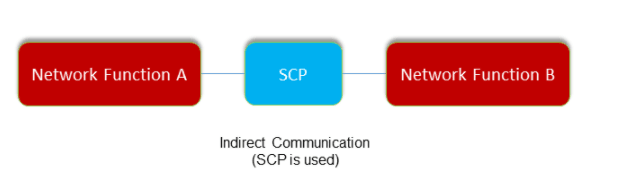
Note:
- This feature's scope involves the manipulation and updating of headers and values.
- It does not mandate that Notifications must go through SCP. The responsibility for configuring SCP to route the notifications is on the operator. For more information, see DNS SRV Based Selection of SCP in NSSF.
- NSSF only supports the following pattern of 3gpp-Sbi-Binding
Header:
bl=nf-set; nfset=set<setId>.region<regionId>.amfset.5gc.mnc<mnc>.mcc<mcc> - NSSF only accepts subscription with 3gpp-Sbi-Binding from AMF, provided AMF must be a part of the AMF-Set.
Managing Indirect Communication
Enable
To enable this feature, set the value of
indirectCommunicationSupportEnable to true in the
ocnssf_custom_values_25.2.200.yaml
file.
# Indirect communication support
indirectCommunicationSupportEnable: true
The scope of this feature is Subscription and Notification flow.
When this feature is enabled:
- When AMF sends a NsAvailability Subscribe with 3gpp-Sbi-Binding header, NSSF
validates if the header Supported Format is:
bl=nf-set; nfset=set<setId>.region<regionId>.amfset.5gc.mnc<mnc>.mcc<mcc>- Only the following format is supported:
bl=nf-set; nfset=set<setId>.region<regionId>.amfset.5gc.mnc<mnc>.mcc<mcc> - In case of a successful validation, the NSSF responds with a 201 status code. The response includes a "3gpp-Sbi-Binding" header containing NSSF's binding information.
- The NSSF computes its binding information by matching the NSSF set details for the corresponding PLMN.
- The NSSF stores the Binding header of the AMF set in the database.
- When sending a notification for the subscription, the same value from the AMF's binding header is included in the notification as the "3gpp-Sbi-Routing-Binding" header.
- Additionally, the NSSF adds a "3gpp-Sbi-Callback" header with the value
Nnssf_NSSAIAvailability_Notification.
- Only the following format is supported:
- If the AMF sends a NsAvailability Subscribe request without the
"3gpp-Sbi-Binding" header:
- The NSSF responds without including the "3gpp-Sbi-Binding" header in the response.
- The NSSF does not add the "3gpp-Sbi-Routing-Binding" header in the notification.
- The processing of the request remains unchanged, and there is no impact on the processing and response, except that the mentioned headers are not computed or included as specified above.
Disable
To disable this feature, set the value of
indirectCommunicationSupportEnable to false in the
ocnssf_custom_values_25.2.200.yaml
file.
- When
indirectCommunicationSupportEnableis set tofalse:- When AMF sends a NsAvailability Subscribe with 3gpp-Sbi-Binding header:
- NSSF ignores the header and process the request.
- NSSF does not add 3gpp-Sbi-Routing-Binding header in the notification.
- When AMF sends a NsAvailability Subscribe with 3gpp-Sbi-Binding header:
# Indirect communication support
indirectCommunicationSupportEnable: false
Observe
- Added the following success measurements:
- ocnssf_indirect_communication_request_rx_total
- ocnssf_indirect_communication_response_tx_success_total
- ocnssf_nssaiavailability_notification_indirect_communication_tx_total
- ocnssf_nssaiavailability_notification_indirect_communication_rx_total
- Added the following error measurements:
- ocnssf_nssaiavailability_indirect_communication_subscription_failure_total
- ocnssf_indirect_communication_response_tx_failure_total
- ocnssf_nssaiavailability_indirect_communication_notification_failure_total
For more information on above metrics and KPIs, see NSSF Metrics and NSSF KPIs.
Error Scenarios
Table 4-19 Error Scenarios
| Scenario | Input Details | Output |
|---|---|---|
| Subscription with binding, global.indirectCommunicationSupportEnable is set to true, NSSF is part of nfSet. |
Input message: Subscribe with header 3gpp-Sbi--Binding: bl=nf-set; nfset=set1.region48.amfset.5gc.mnc012.mcc345 Helm Parameters and Values:
|
Subscription Response Status: 201 Created Headers Location: http://10.178.246.56:30075/nnssf-nssaiavailability/v1/nssai-availability/subscriptions/1 3gpp-Sbi-Binding: bl=nf-set; nfset=set1.nssfset.5gc.mnc012.mcc345
Notification with headers 3gpp-Sbi-Routing-Binding: bl=nf-set; nfset=set1.region48.amfset.5gc.mnc012.mcc345 3gpp-Sbi-Callback: Nnssf_NSSAIAvailability_Notification |
| Subscription without binding, global.indirectCommunicationSupportEnable is set to true, NSSF is part of nfSet. |
Input message: Subscribe without Header (Direct)Helm Parameters and Values:
|
Subscription Response Status: 201 Created Location: http://10.178.246.56:30075/nnssf-nssaiavailability/v1/nssai-availability/subscriptions/1 |
| Subscription with binding, global.indirectCommunicationSupportEnable is set to false, NSSF is part of nfSet. |
Input message: Subscribe with header 3gpp-Sbi-Routing-Binding: bl=nf-set; nfset=set1.region48.amfset.5gc.mnc012.mcc345 Helm Parameters and Values:
|
Subscription Response Status: 201 Created |
| Subscription without binding, global.indirectCommunicationSupportEnable is set to false, NSSF is part of nfSet. |
Input message: Subscribe without Header (Direct) Helm Parameters and Values:
|
Subscription Response Status: 201 Created |
| Subscription with binding, global.indirectCommunicationSupportEnable is set to true, NSSF is not part of nfSet. |
Input message: Subscribe with Header 3gpp-Sbi-Binding: bl=nf-set; nfset=set1.region48.amfset.5gc.mnc012.mcc345 Helm Parameters and Values:
|
Subscription Response Status: 201 Created Headers Location: http://10.178.246.56:30075/nnssf-nssaiavailability/v1/nssai-availability/subscriptions/1 3gpp-Sbi-Routing-Binding: bl=nf-instance; nfinst=54804518-4191-46b3-955c-ac631f953ed7; backupnfinst=54804518-4191-46b3-955c-ac631f953ed8
Notification with headers 3gpp-Sbi-Routing-Binding: bl=nf-set; nfset=set1.region48.amfset.5gc.mnc012.mcc345 3gpp-Sbi-Callback: Nnssf_NSSAIAvailability_Notification ERROR Log |
| Subscription with binding, global.indirectCommunicationSupportEnable is set to true, NSSF is not part of nfSet. |
Input message: Subscribe with Header 3gpp-Sbi-Binding: bl=nf-set; nfset=set1.region48.amfset.5gc.mnc012.mcc345 Helm Parameters and Values:
|
Subscription Response Status 500 Internal Server Error Cause: CONFIGURATION_ERROR |
| Subscription with binding, global.indirectCommunicationSupportEnable is set to true, NSSF is part of nfSet. |
Input message: Subscribe with Header 3gpp-Sbi-Binding: bl=nf-set; nfset=set1.region48.amfset.5gc.mnc012.mcc345 Helm Parameters and Values:
|
Subscription Response Status: 500 Internal Server Error Cause: CONFIGURATION_ERROR |
| NSSF supports multiple PLMNSubscription with binding, global.indirectCommunicationSupportEnable is set to true, NSSF is part of nfSet. NSSF supports PLMN from which AMF is requesting |
Input message: Subscribe with Header3gpp-Sbi-Binding: bl=nf-set; nfset=set1.region48.amfset.5gc.mnc100.mcc101 Helm Parameters and Values:
|
Subscription Response Status: 201 Created Headers Location: http://10.178.246.56:30075/nnssf-nssaiavailability/v1/nssai-availability/subscriptions/1 3gpp-Sbi-Binding: bl=nf-set; nfset=set1.nssfset.5gc.mnc100.mcc101
Notification with headers 3gpp-Sbi-Routing-Binding: bl=nf-set; nfset=set1.region48.amfset.5gc.mnc100.mcc101 3gpp-Sbi-Callback: Nnssf_NSSAIAvailability_Notification |
| NSSF supports multiple PLMNSubscription with binding, global.indirectCommunicationSupportEnable is set to true, NSSF is part of nfSet. NSSF do not support PLMN from which AMF is requesting |
Input message: Subscribe with Header 3gpp-Sbi-Binding: bl=nf-set; nfset=set1.region48.amfset.5gc.mnc200.mcc201 Helm Parameters and Values:
|
Subscription Response Status: 403 Cause: PLMN_NOT_SUPPORTED |
| Subscription with invalid binding header, global.indirectCommunicationSupportEnable is set to true, NSSF is part of nfSet. |
Input message: Subscribe with Header 3gpp-Sbi-Binding: bl=nfserviceset; nfset=set1.region48.amfset.5gc.mnc012.mcc345 Helm Parameters and Values:
|
Subscription Response Status: 400 Bad Request Cause: INVALID_INPUT_DATA |
| Subscription with invalid binding header, global.indirectCommunicationSupportEnable is set to true, NSSF is part of nfSet. |
Input message: Subscribe with Header3gpp-Sbi-Binding: bl=nf-set nfset=set1.amfset.5gc.mnc012.mcc345 Helm Parameters and Values:
|
Subscription Response Status: 400 Bad Request Cause: INVALID_INPUT_DATA |
| Subscription with invalid binding header, global.indirectCommunicationSupportEnable is set to true, NSSF is part of nfSet. |
Input message: Subscribe with Header 3gpp-Sbi-Binding: bl=nf-set; nfset=set1.region48.amfset.5gc.mnc8120.mcc345 Helm Parameters and Values:
|
Subscription Response Status: 400 Bad Request Cause: INVALID_INPUT_DATA Description: Invalid mnc 8120 in 3gpp-Sbi-Binding Header |
| Subscription with invalid binding header, global.indirectCommunicationSupportEnable is set to true, NSSF is part of nfSet. |
Input message: Subscribe with Header 3gpp-Sbi-Binding: bl=nf-set; nfset=set1.region48.amfset.5gc.mnc8120.mcc345; scope=callback; scope=other-service Helm Parameters and Values:
|
Subscription Response Status: 400 Bad Request Cause: INVALID_INPUT_DATA Description: After 3 digits of MCC, there are other characters |
Maintain
- Collect the logs: For more information on how to collect logs, see Oracle Communications Cloud Native Core, Network Slice Selection Function Troubleshooting Guide.
- Raise a service request: See My Oracle Support for more information on how to raise a service request.
4.29 Supports Integration with ASM
NSSF leverages the Istio or Envoy service mesh (Aspen Service Mesh) for all internal and external communication. The service mesh integration provides inter-NF communication and allows API gateway co-working with service mesh. The service mesh integration supports the services by deploying a special sidecar proxy in the environment to intercept all network communication between microservices.
See Configuring NSSF to support ASM in Oracle Communication Cloud Native Core, Network Slice Selection Function Installation and Upgrade Guide for more details on configuring ASM.
4.30 Supports Compression Using Accept-Encoding or Content-Encoding gzip
HTTP data is compressed before it is sent from the server to improve transfer speed and bandwidth utilization.
HTTP headers let the client and the server pass additional information with an HTTP request or response.
The Content-Encoding header, when present in a response, indicates
which encoding is applied to the entity body. It lets the client know how to decode
the content in order to obtain the media type referenced by the
Content-Type header.
The Accept-Encoding header is used to find out the encoding
supported by the server. The server responds with the type of encoding used, as
indicated by the Accept-Encoding response header.
Syntax:
Accept-Encoding:gzip
content-encoding:gzip
Content-Type:application/json
Managing Supports Compression Using Accept-encoding/Content-encoding gzip
This sample configuration shows the minimum response size over which compression of the response is triggered.
The Helm
parameter maxPayloadSize is the acceptable payload size of the
request.
#Sample configuration gzip compression
  # Minimum response size required for compression to happen (size is in bytes)
  nsavailability.compressionMinimumResponseSize: 1024
  # Maximum limit for request payload size (size in KB)
nsavailability.maxPayloadSize: 500The following measurements are related to Supports compression using Accept-encoding/Content-encoding gzip feature:
ocnssf_nssaiavailability_options_rx_total
ocnssf_nssaiavailability_options_tx_status_ok_total
ocnssf_nssaiavailability_options_tx_status_unsupportedmediatetype_total
Table 4-20 Message Scenarios
| Scenario | Helm Parameter (nsavailability.contentEncodingEnabled) | Response Details |
|---|---|---|
| AMF sends an NSAvailability PUT with Request Message size is more than max acceptable size. | NA |
Response code: 413 (Request Entity Too Large error) Response in gzip: No Response Header: NA |
| Client sends HTTP OPTIONS with "Accept-encoding" of any value (blank or empty included) other than gzip. | Yes |
Response code: 415 (Unsupported Media Type) Response in gzip: NA Response Header: Accept-Encoding: gzip Allowed Methods : PUT, PATCH, DELETE Reason: Informs the client to optimize future interactions |
Maintain
- Collect the logs: For more information on how to collect logs, see Oracle Communications Cloud Native Core, Network Slice Selection Function Troubleshooting Guide.
- Raise a service request: See My Oracle Support for more information on how to raise a service request.
4.31 Dynamic Log Level Update
Dynamic Log Level Update allows operator to update NSSF log level dynamically without restart.
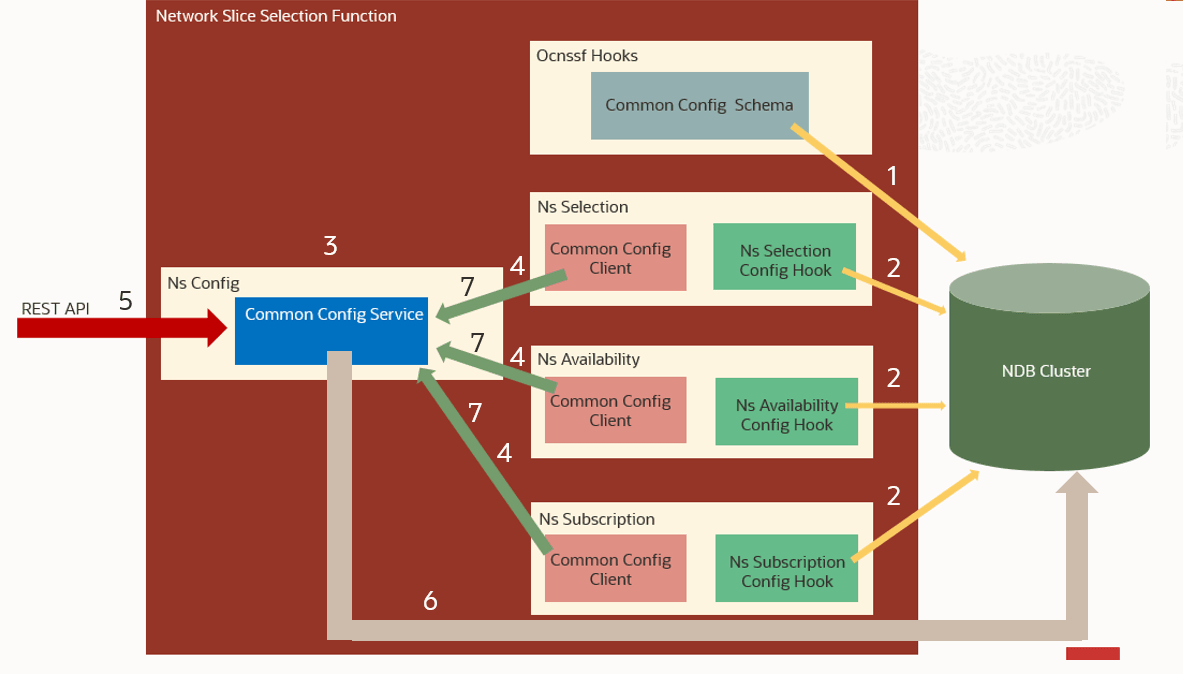
The log level can be changed by the user at run time. NSSF use common configuration service for dynamically updating Logging Information.
Managing Dynamic Log Level Update
Enable
- Customize the
ocnssf_custom_values_25.2.200.yamlhelm file. - Set
commonCfgClient.enabledtotruein the helm file.
Table 4-21 Parameters Configuration
| Name | Default | Description |
|---|---|---|
| commonCfgClient.enabled | true | Enable/Disable Client. |
| commonCfgClient.pollingInterval | 5000 | Set Polling Interval in Milliseconds |
Configure
REST API
For more information on REST API configuration, see Runtime Log Level Update section in the Oracle Communications Cloud Native Core, Network Slice Selection Function REST Specification Guide.
CNC Console
For more information on CNC Console configuration, see Logging Level Options section.
Observe
No new metrics or KPIs are generated for this feature. For information on other Metrics and KPIs of OCNSSF, see OCNSSF Metrics and OCNSSF KPIs sections respectively.
Maintain
- Collect the logs: For more information on how to collect logs, see Oracle Communications Cloud Native Core, Network Slice Selection Function Troubleshooting Guide.
- Raise a service request: See My Oracle Support for more information on how to raise a service request.
4.32 NF Authentication using TLS Certificate
HTTPS enables end to end encryption of messages to ensure security of data. HTTPS requires creation of TLS (Mutual TLS by 2 way exchange of ciphered keys).
Managing NF Authentication using TLS Certificate
Steps to Enable HTTPS in NSSF
Certificate CreationTo create certificate user must have the following files:
- ECDSA private key and CA signed certificate of NRF (if initial algorithm is ES256)
- RSA private key and CA signed certificate of NRF (if initial algorithm is RSA256)
- TrustStore password file
- KeyStore password file
- CA certificate
Secret Creation
$ kubectl create secret generic ocnssfaccesstoken-secret --from-file=ecdsa_private_key_pkcs8.pem --from-file=rsa_private_key_pkcs1.pem
      --from-file=trustStorePassword.txt --from-file=keyStorePassword.txt --from-file=ecdsa_ocnssf_certificate.crt--from-file=rsa_ocnssf_certificate.crt -n
    ocnssf
Certificate and Key Exchange
Once the connection is established, both parties can use the agreed algorithm and keys to securely send messages to each other. The handshake has 3 main phases:
- Hello
- Certificate Exchange
- Key Exchange
- Hello: The handshake begins with the client sending a ClientHello message. This contains all the information the server needs in order to connect to the client via SSL, including the various cipher suites and maximum SSL version that it supports. The server responds with a ServerHello, which contains similar information required by the client, including a decision based on the client’s preferences about which cipher suite and version of SSL will be used.
- Certificate Exchange: Now that contact has been established, the server has to prove its identity to the client. This is achieved using its SSL certificate, which is a very tiny bit like its passport. An SSL certificate contains various pieces of data, including the name of the owner, the property (For example: domain) it is attached to, the certificate’s public key, the digital signature and information about the certificate’s validity dates. The client checks that it either implicitly trusts the certificate, or that it is verified and trusted by one of several Certificate Authorities (CAs) that it also implicitly trusts. The server is also allowed to require a certificate to prove the client’s identity, but this only happens in very sensitive applications.
- Key Exchange: The encryption of the actual message data exchanged by the client and server is done using a symmetric algorithm, the exact nature of which was agreed during the Hello phase. A symmetric algorithm uses a single key for both encryption and decryption, in contrast to asymmetric algorithms that require a public or private key pair. Both parties need to agree on this single, symmetric key, a process that is accomplished securely using asymmetric encryption and the server’s public or private keys.
The client generates a random key to be used for the main, symmetric algorithm. It encrypts it using an algorithm also agreed upon during the Hello phase, and the server’s public key (found on its SSL certificate). It sends this encrypted key to the server, where it is decrypted using the server’s private key, and the interesting parts of the handshake are complete. The parties are identified that they are talking to the right person, and have secretly agreed on a key to symmetrically encrypt the data that they are about to send each other. HTTP requests and responses can be sent by forming a plain text message and then encrypting and sending it. The other party is the only one who knows how to decrypt this message, and so Man In The Middle Attackers are unable to read or modify any requests that they may intercept.
NSSF supports following cipher suites
- TLS_ECDHE_ECDSA_WITH_AES_256_GCM_SHA384
- TLS_ECDHE_RSA_WITH_AES_256_GCM_SHA384
- TLS_ECDHE_RSA_WITH_CHACHA20_POLY1305_SHA256
- TLS_DHE_RSA_WITH_AES_256_GCM_SHA384
- TLS_ECDHE_ECDSA_WITH_AES_128_GCM_SHA256
- TLS_ECDHE_RSA_WITH_AES_128_GCM_SHA256
HTTPS Encrypted Communication
Once the HTTPS handshake is complete all communications between the client and the server are encrypted. This includes the full URL, data (plain text or binary), cookies and other headers.
The only part of the communication not encrypted is what domain or host the client requested a connection. This is because when the connection is initiated an HTTP request is made to the target server to create the secure connection. Once HTTPS is established the full URL is used.
This initialization only needs to occur once for each unique connection. This is why HTTP/2 has a distinct advantage over HTTP/1.1 since it multi-plexes connections instead of opening multiple connections.
Helm Configuration to enable HTTPS on NSSF: #Enabling it generates key and trust store for https support
initssl: true (Note: secret has to be created if its set to true)
#If true opens https port on egress gateway
enableincominghttps: false
#Enabling it egress makes https request outside
enableoutgoinghttps: true
(Note: initssl should be set to true if either enableincominghttps or enableoutgoinghttps is enabled )
#KeyStore and TrustStore related private key and Certificate configuration (Note: The configuration names specified should be same as the file names specified when creating secret)
privateKey:
k8SecretName: accesstoken-secret
k8NameSpace: ocnssf
rsa:
fileName: rsa_private_key_pkcs1.pem
certificate:
k8SecretName: accesstoken-secret
k8NameSpace: ocnssf
rsa:
fileName: ocnssf.cer
caBundle:
k8SecretName: accesstoken-secret
k8NameSpace: ocnssf
fileName: caroot.cer
keyStorePassword:
k8SecretName: accesstoken-secret
k8NameSpace: ocnssf
fileName: key.txt
trustStorePassword:
k8SecretName: accesstoken-secret
k8NameSpace: ocnssf
fileName: trust.txt
initialAlgorithm: RSA256