4 Fault Recovery
4.1 Overview
This section describes fault recovery for a CNC solution deployment to support rapid service restoration and minimal data loss across sites. It provides procedures for two scenarios:
Note:
Relocation or migration of site due to infrastructure or geographical changes follow the procedure documented in the Rebuild fault recovery.4.1.1 Prerequisite for Site Recovery
Before starting site recovery, confirm and document the endpoint identity strategy used between mated sites, either FQDN-based or IP-based. This determines whether post-recovery updates are required for custom_values and replication configuration.
- Configuration based on FQDN: If the deployment uses FQDNs for all intersite references, no updates are required to:
custom_values- Replication configuration or data for the mated site
Note:
FQDNs remain consistent even if underlying IPs change, assuming DNS is correctly restored/updated.
- Configuration based on IP address (same IPs retained post-recovery):
If the recovered site can retain the original IP addresses used prior to the incident:
- After recovery, update
custom_valueswith the preserved IP information (to ensure restored configurations reflect the retained addressing). - After recovery, update replication details of the mated site with the preserved IP information (so replication endpoints remain aligned with the configuration before disaster).
- After recovery, update
Note:
Any IP-based peer or replication references must be repointed to the new addressing to restore intersite connectivity and replication.4.2 Scenario 1: Rebuild Existing Functional Site
This section explains the steps when one or more sites remain healthy, but a functional site must be rebuilt (for example, persistent faults, corruption concerns, repeated crashes), while the overall service continues on remaining sites.
4.2.1 Planning Fault Recovery
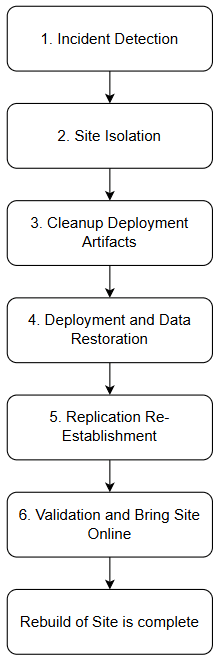
The following flow diagram gives a high-level overview of the sequence to be followed for fault recovery of CNC solution.
Figure 4-1 Planning Fault Recovery
4.2.2 Fault Recovery Workflow
The section provides details about the procedure to follow while rebuilding a site or cluster.
4.2.2.1 Incident Detection
Follow the below steps to monitor and detect the fault in the site:
-
- Continuously monitor the health of the infrastructure, applications, and databases for events such as hardware or network failures, service crashes, and data corruption.
- Monitor the alerts that indicates the breach of thresholds. For more information about the alerts, see NF specific User Guide. For more information on how to monitor the NF, see NF specific Installation, Upgrade, and Fault Recovery Guide.
- Ensure that there is backup is taken periodically. Take data backup of deployment artifacts including secrets, certificates, schemas, if the site is available and allowed to perform. The database backup can be taken from a healthy georedundant mated site or from a latest scheduled automatic backup. For more information on how to take data backup, see NF specific Installation, Upgrade, and Fault Recovery Guide.
- In case of any failure, isolate the site as mention in Site isolation step.
4.2.2.2 Site Isolation
Follow the procedure below to isolate the site and verify that replication and service communication are completely stopped:
- Check if the site isolation is feasible or not.
-
Site isolation is feasible if either of the following can be performed:
-
- Site is able to trigger a shutdown to stop signaling traffic.
- Site has the capability to run the procedure required to disable cnDBTier replication from its peer (mate) sites. For more information on how to stop replication, see Oracle Communications Cloud Native Core, cnDBTier User Guide.
-
If site isolation is feasible, perform if either or both isolation method:
- Shutdown the site, or stop or redirect the traffic from affected NF as mentioned in the NF specific User Guide.
- Disable the cnDBTier replication from its peer (mate) sites. For more information on how to stop replication, see Oracle Communications Cloud Native Core, cnDBTier User Guide.
- Once the site is isolated:
- Verify that no replication or service-level communication is occurring between the isolated site and healthy peer sites.
- Use monitoring tools and logs to confirm the site is fully disconnected and that data integrity is maintained on the remaining sites.
-
- Site isolation is not feasible if:
-
-
- Site cannot be shutdown and replication cannot be disabled.
- If the site isolation is not feasible, cleanup the deployment artifacts as mentioned in the below procedure.
-
4.2.2.3 Cleanup Deployment artifacts
Follow the procedure below to cleanup the resources:
- Delete Kubernetes resources (namespace, pods, PVCs, etc.) hosting the failed NFs and associated services on the affected site.
For more information about deleting the resources, see NF specific Installation, Upgrade, and Fault Recovery Guide.
- Ensure that all pods (workloads), persistent volume claims (PVCs), and related artifacts are purged to prepare for clean restoration.
4.2.2.4 Deployment and Data Restoration
Follow the procedure below to redeploy the site and restore cnDBTier data from the most recent validated backup:
- Check if site is FQDN or IP based, follow the instructions mentioned in the Prerequisite for Site Recovery section depending on the configuration.
- Follow NF specific fault recovery procedures. For the procedure, see NF specific Installation, Upgrade, and Fault Recovery Guide.
4.2.2.5 Replication Re-Establishment
Follow the procedure below to re-establish site-to-site replication, perform georeplication recovery to resynchronize data, and verify that replication stabilizes across all sites:
- Re-enable site-to-site replication once the recovered site is confirmed healthy, and reconfigure replication parameters as required. For more information about how to enable replication, see Oracle Communications Cloud Native Core, cnDBTier User Guide.
- Perform georeplication recovery using cnDBTier procedures to resynchronize datasets and restore a consistent, unified state across all operational sites. For detailed georeplication recovery steps and prerequisites, see Oracle Communications Cloud Native Core, cnDBTier User Guide.
- Monitor replication health continuously after replication is re-established. For detailed steps to check the replication, see Oracle Communications Cloud Native Core, cnDBTier User Guide.
- Confirm all sites successfully connected in the cluster and that replication reaches a stable and consistent state.
4.2.2.6 Validation and Bring Site Online
Follow the procedure below to validate the site:
- Ensure all Kubernetes pods for NFs and components (CNCC, OSO) have Running/Ready status, no CrashLoopBackOff conditions, and all services are reachable. For more information on how to verify the state, see NF specific Installation, Upgrade, and Fault Recovery Guide.
- Run basic call flow or policy lookup tests, and read or write to the database, if test traffic is available.
- If checks are successful, transition site back to NORMAL mode and resume traffic. For more information on how to change the state, see NF specific User Guide.
- Closely monitor alarms and logs as the site resumes full participation in the cluster.
4.3 Scenario 2: Recovery of Lost site or a cluster
This section explains the steps when a site or a cluster is failed and require complete restore, while the overall service continues on remaining sites.
4.3.1 Planning Fault Recovery
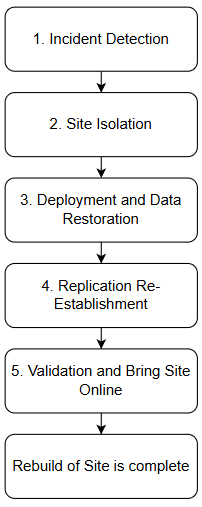
The following flow diagram gives a high-level overview of the sequence to be followed for fault recovery of CNC solution.
Figure 4-2 Planning Fault Recovery
4.3.2 Fault Recovery Workflow
The section provides details about the procedure to follow while a site or cluster is lost.
4.3.2.1 Incident Detection
Follow the below steps to monitor and detect the fault in the site:
-
- Continuously monitor the health of the infrastructure, applications, and databases for events such as hardware or network failures, service crashes, and data corruption.
- Monitor the alerts that indicates the breach of thresholds. For more information about the alerts, see NF specific User Guide. For more information on how to monitor the NF, see NF specific Installation, Upgrade, and Fault Recovery Guide.
- Ensure that there is backup is taken periodically. Take data backup of deployment artifacts including secrets, certificates, schemas, if the site is available and allowed to perform. The database backup can be taken from a healthy georedundant mated site or from a latest scheduled automatic backup. For more information on how to take data backup, see NF specific Installation, Upgrade, and Fault Recovery Guide.
- In case of any failure, isolate the site as mention in Site isolation step.
4.3.2.2 Site Isolation
Follow the procedure below to isolate the site and verify that replication and service communication are completely stopped:
- In the peer or mated sites, disable the replication details of lost site. For more information on how to stop replication, see Oracle Communications Cloud Native Core, cnDBTier User Guide.
- Confirm the replication is disabled. For more information on how to stop replication, see Oracle Communications Cloud Native Core, cnDBTier User Guide.
4.3.2.3 Deployment and Data Restoration
Follow the procedure below to redeploy the site and restore cnDBTier data from the most recent validated backup:
- Check if site is FQDN or IP based, follow the instructions mentioned in the Prerequisite for Site Recovery section depending on the configuration.
- Follow NF specific fault recovery procedures. For the procedure, see NF specific Installation, Upgrade, and Fault Recovery Guide.
4.3.2.4 Replication Re-Establishment
Follow the procedure below to re-establish site-to-site replication, perform georeplication recovery to resynchronize data, and verify that replication stabilizes across all sites:
-
Re-enable site-to-site replication once the recovered site is confirmed healthy, and reconfigure replication parameters as required. For more information about how to enable replication, see Oracle Communications Cloud Native Core, cnDBTier User Guide.
- Perform georeplication recovery using cnDBTier procedures to resynchronize datasets and restore a consistent, unified state across all operational sites. For detailed georeplication recovery steps and prerequisites, see Oracle Communications Cloud Native Core, cnDBTier User Guide.
-
Monitor replication health continuously after replication is re-established. For detailed steps to check the replication, see Oracle Communications Cloud Native Core, cnDBTier User Guide.
-
Confirm all sites successfully connected in the cluster and that replication reaches a stable and consistent state.
4.3.2.5 Validation and Bring Site Online
- Ensure all Kubernetes pods for NFs and components (CNCC, OSO) have Running/Ready status, no CrashLoopBackOff conditions, and all services are reachable. For more information on how to verify the state, see NF specific Installation, Upgrade, and Fault Recovery Guide.
- Run basic call flow or policy lookup tests, and exercise read/write to the database if test traffic is available.
- If checks are successful, transition site back to NORMAL mode and resume traffic. For more information on how to change the state, see NF User Guide.
- Closely monitor alarms and logs as the site resumes full participation in the cluster.