3 CNC Upgrade
3.1 Overview
Oracle's Cloud Native Core (CNC) Network Functions (NFs) support deployment on Oracle Communications Cloud Native Environment (CNE), non-Oracle cloud native environment, and Oracle Cloud Infrastructure (OCI) environment. This document provides information on Cloud Native Core (CNC) guidelines required to upgrade and rollback Oracle CNC Solution in the following environment:
- CNC Solution deployed on CNE: For information on upgrade or rollback procedures, see Upgrade of Oracle CNC Solution deployed on Oracle CNE.
- CNC Solution deployed on non-Oracle CNE: For information on upgrade or rollback procedures, see Upgrade of Oracle CNC Solution deployed on Non-Oracle CNE.
- CNC Solution deployed on OCI: For information on upgrade or rollback procedures, see Upgrade of Oracle CNC Solution deployed on with OCI.
3.1.1 Supported Upgrade Paths for CNC Components except CNE
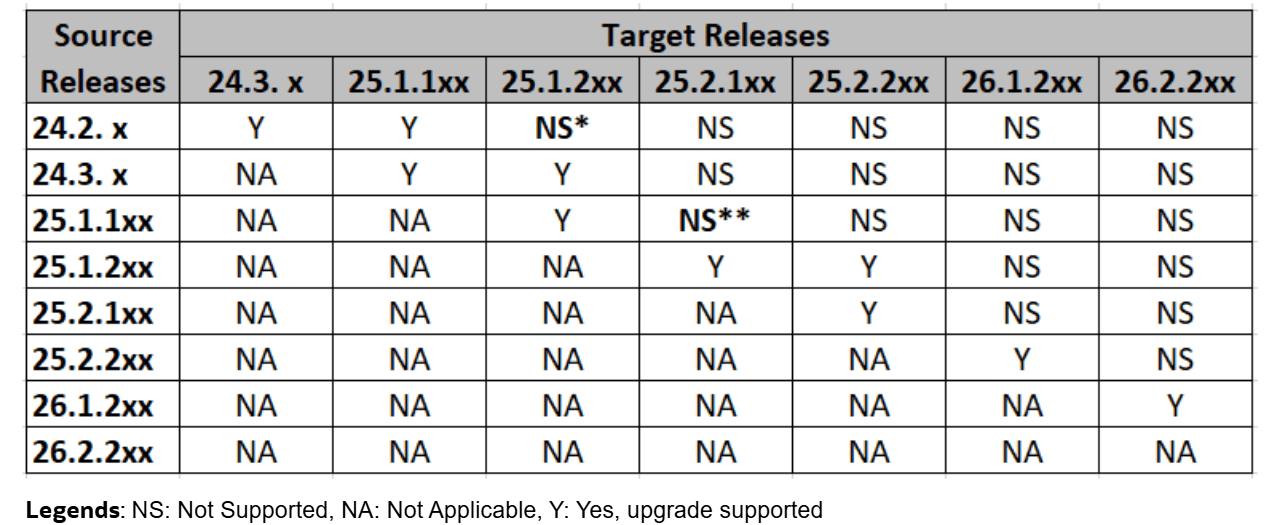
Figure 3-1 outlines the supported upgrade paths for different CNC components except CNE. It is not recommend to skip intermediate versions, unless explicitly mentioned.
Figure 3-1 CNC Upgrade Paths for CNC components except CNE
Note:
- * Policy, CNCC, UDR, SLF, and cnDBTier supports upgrade from 24.2.x to 25.1.2xx (this exception applies only to upgrade).
- ** SCP, SEPP, UDR, SLF, CNCC, and cnDBTier supports upgrade from 25.1.1xx to 25.2.1xx (this exception applies only to upgrade).
- This upgrade guideline is applicable to CNC components except CNE. For CNE upgrade guideline, see Figure 3-5.
- This upgrade path is an example, and it does not show future release plans.
- If the source release is A.B.1xx, upgrades must follow an incremental
sequence, for example,
- A.B.1xx
- A.B.2xx
- A.(B+1).1xx
- Upgrading from A.B.2xx to A.(B+1).2xx is allowed.
- Be sure to select intermediate versions to maintain compatibility throughout the upgrade.
3.2 Upgrade of Oracle CNC Solution deployed on Oracle CNE
This chapter provides information about Oracle Cloud Native Core (CNC) Solution upgrade when deployed on Oracle Communications Cloud Native Environment (CNE).
3.2.1 Overview
This section provides an overview of upgrade procedures of CNC components. You must complete the preupgrade procedures described in each subsection to ensure that the system is ready for an upgrade.
You can upgrade each Cloud Native Core (CNC) Network Functions (NFs) and Companion components from the specified source release to the target release. Once the required network function is up and running, upgrade infrastructure, followed by CNE upgrade.
Note:
The upgrade procedure for the infrastructure is not covered in this document. For more information about infrastructure upgrades, see the relevant infrastructure document.If you are using CNC Solution on Oracle CNE, perform the upgrade procedure in the following sequence:
Figure 3-2 CNC Solution Upgrade Order on Oracle CNE

3.2.2 Planning Upgrade
The following flow diagram gives a high-level overview of the sequence to be followed for upgrading CNC Solution deployed on CNE.
Figure 3-3 Planning Upgrade of CNC Solution
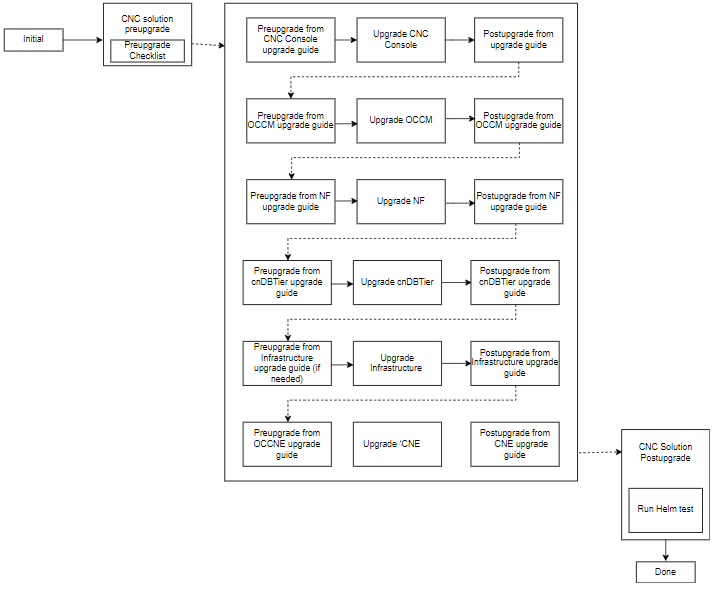
The following table lists the supported upgrade sequence:
Table 3-1 Upgrade Sequence
| Deployment Mode | Source Version | Target Version | Upgrade Sequence |
|---|---|---|---|
| Single Cluster or Multicluster | 25.2.1xx, 25.1.2xx | 25.2.2xx |
|
3.2.2.1 General Guidelines
Oracle recommends the following guidelines for upgrading CNC Solution deployed on CNE:
- Perform upgrade testing in sandbox or lab deployment before testing in production sites.
- Follow the upgrade sequence outlined in the Figure 3-1 and CNE Upgrade sections.
- Upgrade all components to their target release, as per the compatibility matrix provided in Oracle Communications Cloud Native Core Release Notes.
- In a multisite deployment model, perform the upgrade of one site at a
time. Follow the sequence mentioned in upgrade
sequence to upgrade all the components in the specific site and then
proceed to the next site.
Refer to cnDBTier and NF-specific installation, upgrade, and fault recovery guide for post upgrade steps to verify the health of cnDBTier services and NF components.
- It is recommended to perform an upgrade of CNC Console, OCCM, NF, and cnDBTier in a single maintenance window. If upgrade takes longer than a single maintenance window, individual components can be upgraded in multiple maintenance windows. Ensure that the upgrade order is followed as per the sequence mentioned in upgrade sequence.
- Ensure that Console and NF versions are compatible with OCCM before upgrade.
- Perform infrastucture upgrade, if needed.
- You can perform a CNE upgrade in multiple maintenance windows. For more information about upgrading CNE, see Oracle Communications Cloud Native Environment Installation, Upgrade, and Fault Recovery Guide.
- If CNE is a shared cluster, upgrade all the instances of CNC Console, OCCM, NF, and cnDBTier before upgrading CNE.
- If multiple NFs share a cnDBTier, upgrade all the instances of CNC Console, OCCM, and NFs sharing that cnDBTier of the specific site, before upgrading the cnDBTier of the site.
- Rollback is the reverse order of upgrade.
3.2.2.2 Preupgrade Checklist
Go through the following checklist before performing an upgrade.
3.2.2.2.1 Resource Requirement
This section details about the resources required to upgrade CNE, CNC NFs and Companion components.
3.2.2.2.1.1 CNC NFs and Companion Components
For CNC NFs and Companion components upgrade, reevaluate resource requirement before performing the upgrade. It is possible that CNC NFs and Companion components require additional resources due to changes in architecture or service model.
For more information on NF resource requirements, see NF-specific installation, upgrade, and fault recovery guides.
3.2.2.2.1.2 Cloud Native Environment
CNE automatically drains its worker nodes while performing the upgrade. When a worker node is drained, Kubernetes safely evicts all of the pods that were hosted on that worker node.
Note:
NF, cnDBTier, and CNC Console support Pod Distribution Budget (PDB) to gracefully handle worker node draining. Thus, based on available resources, a CNE worker node upgrade will happen. Operator needs to ensure that enough resources are available after draining the worker node. For more information on CNE resource requirements, see Oracle Communications Cloud Native Core, Cloud Native Environment Installation, Upgrade, and Fault Recovery Guide.
3.2.2.2.2 Prerequisites
Ensure that the following prerequisites are met before performing an upgrade:
- Verify that all required worker nodes are available for scheduling pods during upgrade. For example, taints applied on worker nodes (for any maintenance activity etc.). Make sure required number of worker nodes are available as per dimensioning before upgrade.
- Ensure that at least two worker nodes (that is, resource for largest worker node in cluster x 2) worth of total resources are free and available in CNE cluster.
- Monitor infrastructure related issue (for example, storage or hardware alarms from infrastructure) manually before CNE or Operating System upgrade.
- Take a backup of the following artifacts after installation of each of the CNC
components:
- custom values.yaml file
- servicemesh-config-custom-values.yaml file
- Updated helm charts
- Secrets
- Certificates
- Keys used
- See CNC Console, OCCM, NF, cnDBTier, and CNE installation and upgrade guides for preupgrade task details before upgrading respective components.
3.2.2.3 Upgrade Workflow
The section provides details about the upgrade sequence.
See CNC NFs, Companion components, and CNE installation, upgrade, and fault recovery guides for details on upgrading the respective components. The infrastructure upgrade is performed (if needed) after CNC components upgrade and before CNE upgrade.
3.2.2.3.1 CNC NFs and Companion Components Upgrade
This section describes the upgrade workflow for CNC Components deployed on CNE.
Figure 3-4 CNC Components Upgrade deployed on CNE
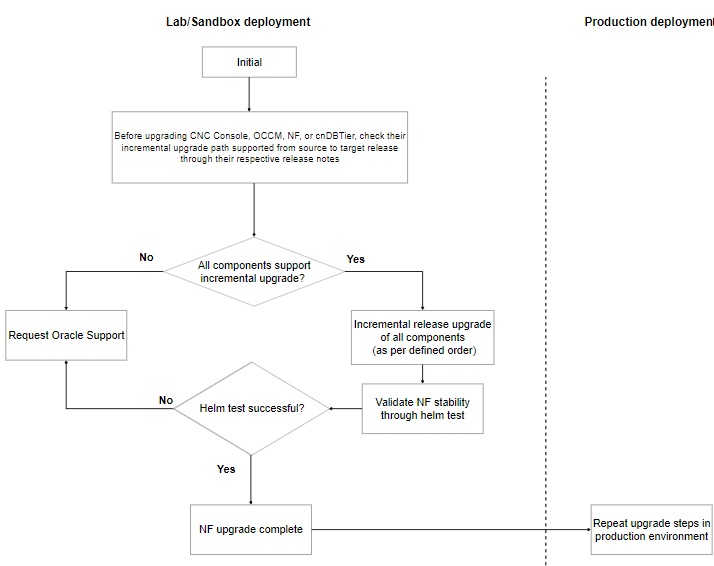
The following procedure explains the upgrade work flow for CNC Components:
- Check the supported upgrade path for each NF. To know the upgrade path,
see Oracle Communications Cloud Native Core Release Notes.
Check the upgrade sequence mentioned in the Supported Upgrade Paths for CNC Components except CNE section.
Note:
For multisite deployment model, follow the procedure on each site. - Check if all the CNC components support incremental upgrades. If it is
not supported, perform one of the following procedure:
- perform multiple hop upgrades.
- perform a fresh installation after site isolation.
- contact My Oracle Support.
- Upgrade the CNC components based on the upgrade sequence mentioned in the Planning Upgrade section.
- Run the Helm test command to check the upgrade status.
- Once the Helm test is successful, then the upgrade is complete.
- Perform the above upgrade steps in the production environment.
3.2.2.3.2 CNE Upgrade
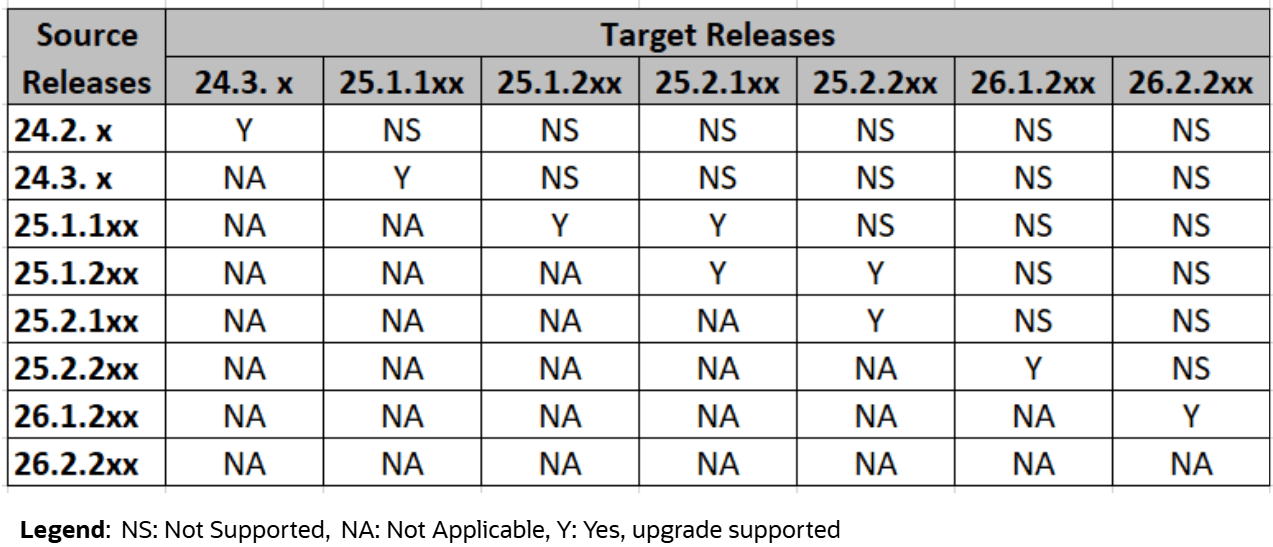
Supported CNE Upgrade Paths
Figure 3-5 Supported CNE Upgrade Paths
CNE Upgrade Workflow
The following flow diagram explains the process for upgrading CNE:
Figure 3-6 CNE Upgrade Procedure
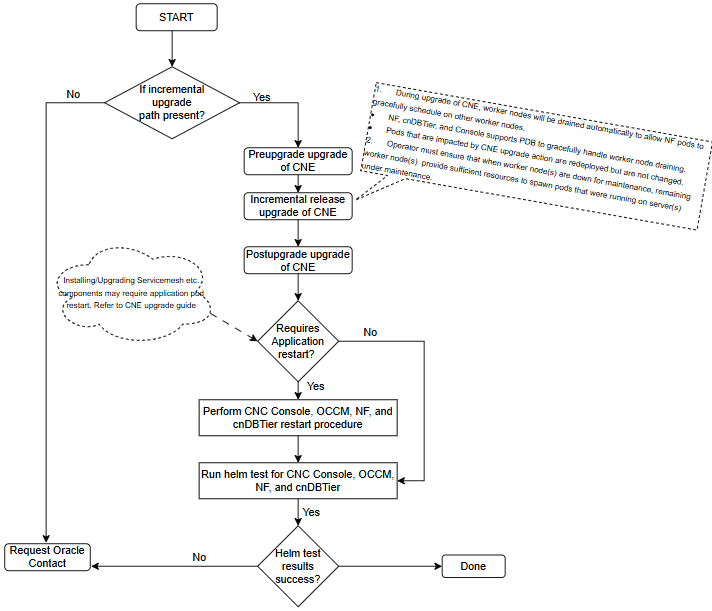
The following procedure explains the upgrade workflow for Oracle Communications Cloud Native Core, Cloud Native Environment (CNE):
- Check the supported upgrade path for CNE. To know the upgrade path, see Oracle Communications Cloud Native Core Release Notes.
- Check if CNE supports incremental upgrades. If it is not supported, contact My Oracle Support.
- Upgrade the components based on the upgrade sequence mentioned in the Planning Upgrade section.
- Check and perform an application pod restart, if required.
For example: After upgrading the service mesh, restart the application pods of CNC Console, OCCM, NF, and cnDBTier even if they are running on the latest versions.
- Run the Helm test command to check the upgrade status.
- Once the Helm test is successful, the upgrade is complete.
3.2.2.4 Performing the Upgrade
See the following documents for detailed procedures to upgrade the respective components:
Table 3-2 CNC Network Functions Document Reference
| CNC Network Functions | Document Reference |
|---|---|
| Oracle Communications Cloud Native Core, Binding Support Function (BSF) | Oracle Communications Cloud Native Core, Binding Support Function Installation, Upgrade, and Fault Recovery Guide |
| Oracle Communications Cloud Native Core, Network Exposure Function (NEF) | Oracle Communications Cloud Native Core, Network Exposure Function Installation, Upgrade, and Fault Recovery Guide |
| Oracle Communications Cloud Native Core, Network Repository Function (NRF) | Oracle Communications Cloud Native Core, Network Repository Function Installation, Upgrade, and Fault Recovery Guide |
| Oracle Communications Cloud Native Core, Network Slice Selection Function (NSSF) | Oracle Communications Cloud Native Core, Network Slice Selection Function Installation, Upgrade, and Fault Recovery Guide |
| Oracle Communications Cloud Native Core, Converged Policy (Policy) | Oracle Communications Cloud Native Core, Converged Policy Installation, Upgrade, and Fault Recovery Guide |
| Oracle Communications Cloud Native Core, Security Edge Protection Proxy (SEPP) | Oracle Communications Cloud Native Core, Security Edge Protection Proxy Installation, Upgrade, and Fault Recovery Guide |
| Oracle Communications Cloud Native Core, Service Communication Proxy (SCP) | Oracle Communications Cloud Native Core, Service Communication Proxy Installation, Upgrade, and Fault Recovery Guide |
| Oracle Communications Cloud Native Core, Unified Data Repository (UDR) | Oracle Communications Cloud Native Core, Unified Data Repository Installation, Upgrade, and Fault Recovery Guide |
Table 3-3 CNC Companion Components Document Reference
| CNC Companion Components | Document Reference |
|---|---|
| Oracle Communications Cloud Native Configuration Console (CNC Console) | Oracle Communications Cloud Native Configuration Console Installation, Upgrade, and Fault Recovery Guide |
| Oracle Communications Cloud Native Core, cnDBTier (cnDBTier) | Oracle Communications Cloud Native Core, cnDBTier Installation, Upgrade, and Fault Recovery Guide |
| Oracle Communications Cloud Native Core, Certification Management (OCCM) | Oracle Communications Cloud Native Core, Certification Management, Upgrade, and Fault Recovery Guide |
| Oracle Communications Cloud Native Core, Operations Services Overlay (OSO) | Oracle Communications Cloud Native Core, Operations Services Overlay Installation and Upgrade Guide |
3.2.3 Performing the Postupgrade Tasks
This section explains the postupgrade tasks.
3.2.3.1 NF Postupgrade
- Verify postupgrade of all the CNC NFs and Companion components by
running the "
helm test" to verify the deployment health and status. - See CNC NFs and Companion components installation, upgrade, and fault recovery guides for postupgrade task details after upgrading the respective components.
3.2.4 Performing the Rollback
Note:
Before rollback contact My Oracle Support to analyze the cause of failure and any possible workarounds.This section helps you to decide the order of the rollback of the components that were upgraded successfully. For example, a rollback is triggered if the cnDBTier upgrade fails (or validation after an upgrade fails) for any reason, and this guide provides the information to perform the rollback of CNC Components in a given order.
The following diagram details the rollback sequence:
Figure 3-7 Rollback Sequence

The following table lists the supported rollback sequence:
Table 3-4 Rollback Sequence
| Deployment Mode | Source Version | Target Version | Rollback Sequence |
|---|---|---|---|
| Single Cluster or Multicluster | 25.2.2xx | 25.2.1xx, 25.1.2xx |
|
See the following documents for detailed procedures to roll back the respective components:
Table 3-5 CNC Network Functions Document Reference
| CNC Network Functions | Document Reference |
|---|---|
| Oracle Communications Cloud Native Core, Binding Support Function (BSF) | Oracle Communications Cloud Native Core, Binding Support Function Installation, Upgrade, and Fault Recovery Guide |
| Oracle Communications Cloud Native Core, Network Exposure Function (NEF) | Oracle Communications Cloud Native Core, Network Exposure Function Installation, Upgrade, and Fault Recovery Guide |
| Oracle Communications Cloud Native Core, Network Repository Function (NRF) | Oracle Communications Cloud Native Core, Network Repository Function Installation, Upgrade, and Fault Recovery Guide |
| Oracle Communications Cloud Native Core, Network Slice Selection Function (NSSF) | Oracle Communications Cloud Native Core, Network Slice Selection Function Installation, Upgrade, and Fault Recovery Guide |
| Oracle Communications Cloud Native Core, Converged Policy (Policy) | Oracle Communications Cloud Native Core, Converged Policy Installation, Upgrade, and Fault Recovery Guide |
| Oracle Communications Cloud Native Core, Security Edge Protection Proxy (SEPP) | Oracle Communications Cloud Native Core, Security Edge Protection Proxy Installation, Upgrade, and Fault Recovery Guide |
| Oracle Communications Cloud Native Core, Service Communication Proxy (SCP) | Oracle Communications Cloud Native Core, Service Communication Proxy Installation, Upgrade, and Fault Recovery Guide |
| Oracle Communications Cloud Native Core, Unified Data Repository (UDR) | Oracle Communications Cloud Native Core, Unified Data Repository Installation, Upgrade, and Fault Recovery Guide |
Table 3-6 CNC Companion Components Document Reference
| CNC Companion Components | Document Reference |
|---|---|
| Oracle Communications Cloud Native Configuration Console (CNC Console) | Oracle Communications Cloud Native Configuration Console Installation, Upgrade, and Fault Recovery Guide |
| Oracle Communications Cloud Native Core, cnDBTier (cnDBTier) | Oracle Communications Cloud Native Core, cnDBTier Installation, Upgrade, and Fault Recovery Guide |
| Oracle Communications Cloud Native Core, Certification Management (OCCM) | Oracle Communications Cloud Native Core, Certification Management, Upgrade, and Fault Recovery Guide |
| Oracle Communications Cloud Native Core, Operations Services Overlay (OSO) | Oracle Communications Cloud Native Core, Operations Services Overlay Installation and Upgrade Guide |
3.2.5 Performing the Postrollback Tasks
Perform the following postrollback tasks:
-
Verify the rollback of all the CNC NFs and Companion components by running the "
helm test" to verify the deployment health and status. - See CNC NFs and Companion components installation, upgrade, and fault recovery guides for postrollback task details after rolling back respective components.
3.3 Upgrade of Oracle CNC Solution deployed on Non-Oracle CNE
This chapter provides information about Oracle Cloud Native Core (CNC) Solution upgrade when deployed on Non-Oracle cloud native environment.
3.3.1 Overview
This section provides an overview of upgrade procedures of CNC components. You must complete the preupgrade procedures described in each subsection to ensure that the system is ready for an upgrade.
You can upgrade each Cloud Native Core (CNC) Network Functions (NFs) and Companion components from the specified source release to the target release. Once the required network function is up and running, upgrade non-Oracle cloud native environment or infrastructure.
Note:
The upgrade procedure for the infrastructure is not covered in this document. For more information about infrastructure upgrades, see the relevant infrastructure document.If you are using Oracle CNC Solution on non-Oracle CNE, perform the upgrade procedure in the following sequence:
Figure 3-8 Oracle CNC Solution Upgrade Order on Non-Oracle CNE

See CNC NFs and Companion components installation, upgrade, and fault recovery guides for details on upgrading the respective components.
3.3.2 Planning Upgrade
This section explains the planning for upgrading CNC NFs and Companion components deployed on non-Oracle cloud native environment.
3.3.2.1 General Guidelines
Oracle recommends the following guidelines:
- Perform upgrade testing in sandbox or lab deployment before testing in production sites.
- Follow the upgrade sequence outlined in the Figure 3-1 section.
- Upgrade all components to their target release, as per the compatibility matrix provided in the CNC release notes.
- In a multisite deployment model, perform the upgrade of one site at a
time. Follow the sequence mentioned in Figure 3-8 to upgrade all the components in the specific site and then proceed to the next
site.
Refer to cnDBTier and NF-specific installation, upgrade, and fault recovery guide for post upgrade steps to verify the health of cnDBTier services and NF components.
- Perform an upgrade of CNC Console, OCCM, NF, and cnDBTier in a single maintenance window. If upgrade takes longer than a single maintenance window, individual components can be upgraded in multiple maintenance windows. Ensure that the upgrade order is followed as per the sequence mentioned in Figure 3-8.
- Ensure that CNC Console and NF versions are compatible with OCCM before upgrade.
- If multiple NFs share a cnDBTier, upgrade all the instances of CNC Console, OCCM, and NFs sharing that cnDBTier of the specific site, before upgrading the cnDBTier of the site.
- Rollback is the reverse order of upgrade.
3.3.2.2 Preupgrade Checklist
Go through the following checklist before performing an upgrade.
3.3.2.2.1 Resource Requirement
This section details about the resources required to upgrade a non-Oracle cloud native environment, CNC NFs, and Companion components.
3.3.2.2.1.1 CNC NFs and Companion components
For CNC NFs and Companion components upgrade, reevaluate resource requirement before performing the upgrade. It is possible that CNC NFs or Companion components requires additional resources due to changes in architecture or service model.
For more information on CNC NFs and Companion components resource requirements, see NF-specific installation, upgrade, and fault recovery guides.
3.3.2.2.1.2 Cloud Native Environment
Ensure that the number of planned resources required for NF, CNC Console, and cnDBTier are available during the non-Oracle cloud native environment upgrade.
For more information on non-Oracle cloud native environment resource requirements, see the installation and upgrade guide provided by the non-Oracle cloud native environment vendor.
3.3.2.2.2 Prerequisites
Ensure that you have the following prerequisites before performing an upgrade:
- Keep the backup of the following artifacts from your recent successful installation
handy:
- custom values.yaml file
- servicemesh-config-custom-values.yaml file, if any
- Updated helm charts
- Secrets
- Certificates
- Keys used
- See CNC Console, OCCM, NF, cnDBTier, and OSO guides for preupgrade task details before upgrading respective components.
- Refer to customer-specific non-Oracle cloud native environment Upgrade document for preupgrade tasks.
3.3.2.3 Upgrade Workflow
The following diagram details the upgrade sequence if you are using a non-Oracle CNE.
3.3.2.3.1 CNC NFs and Companion Components Upgrade
This section explains the upgrade workflow of CNC NFs and Companion Components deployed on Non-Oracle cloud native environment.
Figure 3-9 CNC NFs and Companion components Upgrade on Non-Oracle cloud native environment
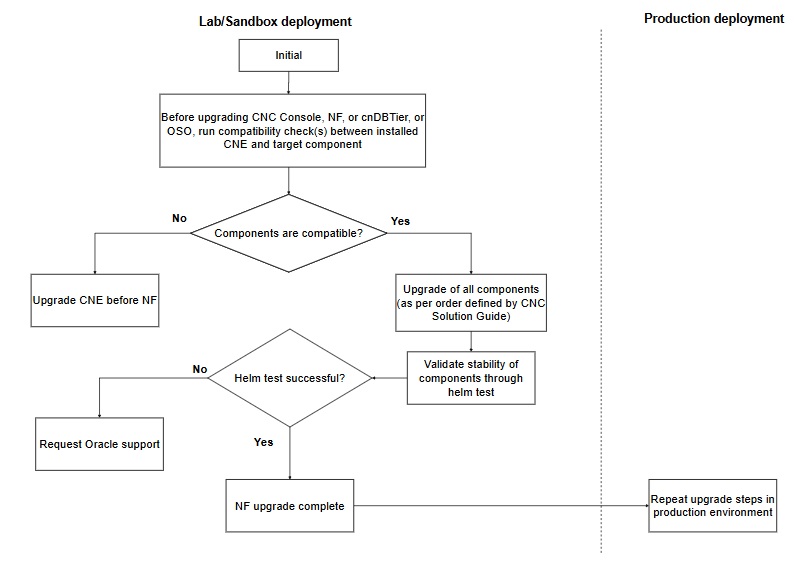
The following procedure explains the upgrade workflow for CNC NFs and Companion Components:
- Check the supported upgrade path for each CNC NFs and Companion
Components. To know the upgrade path, see Oracle Communications
Cloud Native Core Release Notes.
Note:
It is recommended to upgrade in the similar supported upgrade path of the Upgrade Workflow. - Check for the compatibility of the target CNC component. See Compatibility check of target NF component with installed CNE section for the procedure.
- If the CNC components are not compatible, upgrade non-Oracle cloud native environment.
- If all CNC components are compatible, upgrade the components based on the upgrade sequence mentioned in Upgrade Workflow section.
- Run the Helm test command to check the upgrade status. In case of any failure, contact My Oracle Support.
- Once the Helm test is successful, then the upgrade is complete.
- Perform the above upgrade steps in the production environment.
3.3.2.3.2 Compatibility Check of Target NF Component with Installed Non-Oracle cloud native environment
Follow the procedure to check the compatibility of target NF component with installed Non-Oracle cloud native environment:
- Run the following command to get the list of resource versions for the
installed non-Oracle cloud native environment
release:
kubectl api-resources --sort-by='name’ (or kubectl api-versions)Sample output:
serviceaccounts sa v1 true ServiceAccount serviceentries se networking.istio.io/v1beta1 true ServiceEntry servicemonitors monitoring.coreos.com/v1 true ServiceMonitor services svc v1 true Service sidecars networking.istio.io/v1beta1 true Sidecar ... ... ... ... - Run the following command to get the list of target CNC Console, OCCM,
NF, cnDBTier, and OSO resources and their
versions:
helm upgrade <helm release> <chart tarball> -f <ASM Custom File> -n <helm release> --dry-run | egrep -i "^apiVersion:|^kind:" |sed 's/\r$//' | awk '{ ORS = (NR%2 ? ", " : RS) } 1' | sort | uniqFor example:
helm upgrade ocpcf-lp occnp-23.2.0-od-20230210.tgz -f occnp-23.2.0-nb-20230127-custom-values-pcf-ASM.yaml -n ocpcf-lp --dry-run | egrep -i "^apiVersion:|^kind:" |sed 's/\r$//' | awk '{ ORS = (NR%2 ? ", " : RS) } 1' | sort | uniqSample output:apiVersion: apps/v1, kind: Deployment apiVersion: apps/v1, kind: StatefulSet apiVersion: autoscaling/v1, kind: HorizontalPodAutoscaler apiVersion: autoscaling/v2beta1, kind: HorizontalPodAutoscaler apiVersion: autoscaling/v2beta2, kind: HorizontalPodAutoscaler apiVersion: batch/v1, kind: Job apiVersion: policy/v1beta1, kind: PodDisruptionBudget apiVersion: rbac.authorization.k8s.io/v1beta1, kind: RoleBinding apiVersion: rbac.authorization.k8s.io/v1, kind: Role apiVersion: rbac.authorization.k8s.io/v1, kind: RoleBinding apiVersion: v1, kind: ConfigMap apiVersion: v1, kind: Service apiVersion: v1, kind: ServiceAccount - Verify that installed non-Oracle cloud native environment has all Kubernetes resources and their versions required by CNC Console, OCCM, NF, cnDBTier, and OSO.
3.3.3 Performing the NF Upgrade
See the following documents for detailed procedures to upgrade the respective components:
Table 3-7 CNC Network Functions Document Reference
| CNC Network Functions | Document Reference |
|---|---|
| Oracle Communications Cloud Native Core, Binding Support Function (BSF) | Oracle Communications Cloud Native Core, Binding Support Function Installation, Upgrade, and Fault Recovery Guide |
| Oracle Communications Cloud Native Core, Network Exposure Function (NEF) | Oracle Communications Cloud Native Core, Network Exposure Function Installation, Upgrade, and Fault Recovery Guide |
| Oracle Communications Cloud Native Core, Network Repository Function (NRF) | Oracle Communications Cloud Native Core, Network Repository Function Installation, Upgrade, and Fault Recovery Guide |
| Oracle Communications Cloud Native Core, Network Slice Selection Function (NSSF) | Oracle Communications Cloud Native Core, Network Slice Selection Function Installation, Upgrade, and Fault Recovery Guide |
| Oracle Communications Cloud Native Core, Converged Policy (Policy) | Oracle Communications Cloud Native Core, Converged Policy Installation, Upgrade, and Fault Recovery Guide |
| Oracle Communications Cloud Native Core, Security Edge Protection Proxy (SEPP) | Oracle Communications Cloud Native Core, Security Edge Protection Proxy Installation, Upgrade, and Fault Recovery Guide |
| Oracle Communications Cloud Native Core, Service Communication Proxy (SCP) | Oracle Communications Cloud Native Core, Service Communication Proxy Installation, Upgrade, and Fault Recovery Guide |
| Oracle Communications Cloud Native Core, Unified Data Repository (UDR) | Oracle Communications Cloud Native Core, Unified Data Repository Installation, Upgrade, and Fault Recovery Guide |
Table 3-8 CNC Companion Components Document Reference
| CNC Companion Components | Document Reference |
|---|---|
| Oracle Communications Cloud Native Configuration Console (CNC Console) | Oracle Communications Cloud Native Configuration Console Installation, Upgrade, and Fault Recovery Guide |
| Oracle Communications Cloud Native Core, cnDBTier (cnDBTier) | Oracle Communications Cloud Native Core, cnDBTier Installation, Upgrade, and Fault Recovery Guide |
| Oracle Communications Cloud Native Core, Certification Management (OCCM) | Oracle Communications Cloud Native Core, Certification Management, Upgrade, and Fault Recovery Guide |
| Oracle Communications Cloud Native Core, Operations Services Overlay (OSO) | Oracle Communications Cloud Native Core, Operations Services Overlay Installation and Upgrade Guide |
3.3.3.1 Non-Oracle Cloud Native Environment Upgrade
Figure 3-10 Non-Oracle CNE Upgrade

The following procedure explains the upgrade workflow for non-Oracle cloud native environment:
- Check for the compatibility of the target NF component. Refer to Compatibility check of target NF component with installed CNE section for compatibility check procedure.
- Check for resource requirements detail for worker nodes upgrade in vendor-specific cloud native core documentation.
- Upgrade cloud native core and restart the applications, if required.
- Run the Helm test command to check the upgrade status.
- Once the Helm test is successful, the upgrade is complete.
- Perform the above steps in the production environment.
3.3.3.2 Compatibility Check of NF Component with Target Cloud Native Environment
Perform the following compatibility checks:
- Run the following commands to get the list of deployed resources and
their versions from a given CNC Console, OCCM, NF, cnDBTier and OSO
release:
helm get manifest <helm release> -n <namespace> | egrep -i "^apiVersion:|^kind:" |sed 's/\r$//' | awk '{ ORS = (NR%2 ? ", " : RS) } 1' | sort | uniqSample Output:apiVersion: apps/v1, kind: Deployment apiVersion: apps/v1, kind: StatefulSet apiVersion: autoscaling/v1, kind: HorizontalPodAutoscaler apiVersion: autoscaling/v2beta1, kind: HorizontalPodAutoscaler apiVersion: autoscaling/v2beta2, kind: HorizontalPodAutoscaler apiVersion: policy/v1beta1, kind: PodDisruptionBudget apiVersion: rbac.authorization.k8s.io/v1beta1, kind: RoleBinding apiVersion: rbac.authorization.k8s.io/v1, kind: Role apiVersion: rbac.authorization.k8s.io/v1, kind: RoleBinding apiVersion: v1, kind: ConfigMap apiVersion: v1, kind: Service apiVersion: v1, kind: ServiceAccount - Run the following command to get the list of resource versions for the
target cloud native environment release:
Note:
- See Kubernetes release documentation for supported resources and versions.
- Alternate approach: From any installed target cloud native environment release, run the following command to get a list of all supported api-versions:
kubectl api-resources --sort-by='name’ (or kubectl api-versions)Sample output:serviceaccounts sa v1 true ServiceAccount serviceentries se networking.istio.io/v1beta1 true ServiceEntry servicemonitors monitoring.coreos.com/v1 true ServiceMonitor services svc v1 true Service sidecars networking.istio.io/v1beta1 true Sidecar ... ... ... ... - Manually ensure that all installed CNC Console, OCCM, NF, cnDBTier, and OSO resources and their versions are available in the target cloud native environment.
3.3.4 Performing the Postupgrade Tasks
This section explains the postupgrade tasks.
3.3.4.1 NF Postupgrade
- Verify postupgrade of all the CNC NFs and Companion components by
running the "
helm test" to verify the deployment health and status. - See CNC NFs and Companion components installation, upgrade, and fault recovery guides for postupgrade task details after upgrading respective components.
3.3.4.2 Cloud Native Environment Postupgrade
- Re-validate the stability of all the components by running
"
helm test" provided by CNC Console, OCCM, NF, and cnDBTier to verify the deployment health and status. - For procedures to perform any restart required by CNC Console, OCCM, NF, cnDBTier, or any other external component, see the component-specific guides or documents.
3.3.5 Performing the Rollback
Once a rollback is triggered for a component, this section of the guide helps you to decide the order of the rollback for other components that were upgraded successfully. For example, a rollback is triggered if the cnDBTier upgrade fails (or validation after an upgrade fails) for any reason, and this guide provides the information to perform the rollback of CNC NFs and CNC Console in a given order.
The following diagram details the rollback sequence:
Figure 3-11 Rollback Sequence with Non-Oracle CNE

Table 3-9 CNC Network Functions Document Reference
| CNC Network Functions | Document Reference |
|---|---|
| Oracle Communications Cloud Native Core, Binding Support Function (BSF) | Oracle Communications Cloud Native Core, Binding Support Function Installation, Upgrade, and Fault Recovery Guide |
| Oracle Communications Cloud Native Core, Network Exposure Function (NEF) | Oracle Communications Cloud Native Core, Network Exposure Function Installation, Upgrade, and Fault Recovery Guide |
| Oracle Communications Cloud Native Core, Network Repository Function (NRF) | Oracle Communications Cloud Native Core, Network Repository Function Installation, Upgrade, and Fault Recovery Guide |
| Oracle Communications Cloud Native Core, Network Slice Selection Function (NSSF) | Oracle Communications Cloud Native Core, Network Slice Selection Function Installation, Upgrade, and Fault Recovery Guide |
| Oracle Communications Cloud Native Core, Converged Policy (Policy) | Oracle Communications Cloud Native Core, Converged Policy Installation, Upgrade, and Fault Recovery Guide |
| Oracle Communications Cloud Native Core, Security Edge Protection Proxy (SEPP) | Oracle Communications Cloud Native Core, Security Edge Protection Proxy Installation, Upgrade, and Fault Recovery Guide |
| Oracle Communications Cloud Native Core, Service Communication Proxy (SCP) | Oracle Communications Cloud Native Core, Service Communication Proxy Installation, Upgrade, and Fault Recovery Guide |
| Oracle Communications Cloud Native Core, Unified Data Repository (UDR) | Oracle Communications Cloud Native Core, Unified Data Repository Installation, Upgrade, and Fault Recovery Guide |
Table 3-10 CNC Companion Components Document Reference
| CNC Companion Components | Document Reference |
|---|---|
| Oracle Communications Cloud Native Configuration Console (CNC Console) | Oracle Communications Cloud Native Configuration Console Installation, Upgrade, and Fault Recovery Guide |
| Oracle Communications Cloud Native Core, cnDBTier (cnDBTier) | Oracle Communications Cloud Native Core, cnDBTier Installation, Upgrade, and Fault Recovery Guide |
| Oracle Communications Cloud Native Core, Certification Management (OCCM) | Oracle Communications Cloud Native Core, Certification Management, Upgrade, and Fault Recovery Guide |
| Oracle Communications Cloud Native Core, Operations Services Overlay (OSO) | Oracle Communications Cloud Native Core, Operations Services Overlay Installation and Upgrade Guide |
3.3.6 Performing the Postrollback Tasks
Perform the following postrollback tasks:
- Verify the rollback of all the CNC NFs and Companion components by
running the "
helm test" to verify the deployment health and status. - See CNC NFs and Companion components installation and upgrade guides for postrollback task details after rolling back respective components.
3.4 Upgrade of Oracle CNC Solution deployed on with OCI
This section provides an overview of how to perform an upgrade of Oracle CNC NFs and Companion components in Oracle Cloud Infrastructure (OCI) environment.
3.4.1 Planning Upgrade
This section explains the planning for upgrading CNC with OCI Environment (OKE).
3.4.1.1 Guidelines
Oracle recommends the following guidelines:
- Perform upgrade testing in sandbox or lab deployment before testing in production sites.
- Upgrade all components to their target release, as per the compatibility matrix provided in the CNC release notes.
- In a multisite deployment model, perform the upgrade of one site at a
time. Follow the sequence mentioned in upgrade
sequence to upgrade all the components in the specific site and then
proceed to the next site.
Refer to cnDBTier and NF-specific installation, upgrade, and fault recovery guide for post upgrade steps to verify the health of cnDBTier services and NF components.
- Perform an upgrade of CNC Console, NF, and cnDBTier in a single maintenance window. If upgrade takes longer than a single maintenance window, individual components can be upgraded in multiple maintenance windows. Ensure that the upgrade order is followed as per the sequence mentioned in upgrade sequence.
- If multiple NFs share a cnDBTier, upgrade all the instances of CNC Console and NFs sharing that cnDBTier of the specific site, before upgrading the cnDBTier of the site.
- Rollback is the reverse order of upgrade.
3.4.1.2 Preupgrade Checklist
Go through the following checklist before performing an upgrade.
3.4.1.2.1 Resource Requirement
This section details about the resources required to upgrade CNC NFs and Companion components deployed on OCI environment.
3.4.1.2.1.1 OCI
Ensure that the number of planned resources required for NF, CNC Console, and cnDBTier are available during the upgrade.
3.4.1.2.1.2 Network Functions
For CNC NFs and Companion components upgrade, reevaluate resource requirement before performing the upgrade. It is possible that CNC NFs and Companion components require additional resources due to changes in architecture or service model.
For more information on NF resource requirements, see NF-specific installation, upgrade, and fault recovery guides.
3.4.1.2.2 Prerequisites
Ensure that you have the following prerequisites before performing an upgrade:
- Keep the backup of the following artifacts from your recent successful
installation handy:
- custom values.yaml file
- Updated helm charts
- Secrets
- Certificates
- Keys used
- See CNC Console, NF, and cnDBTier guides for preupgrade task details before upgrading respective components.
3.4.1.3 Upgrade Workflow
Note:
OCI Adaptor doesn't support upgrade. Since OCI Adaptor requires reinstall, metrics scraping is impacted during that period.Figure 3-12 CNC NFs and Companion components Upgrade Order on OCI Environment
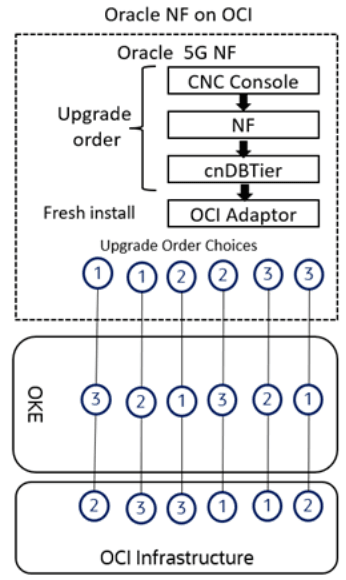
See CNC NFs and Companion components installation, upgrade, and fault recovery guides for details on upgrading the respective components.
3.4.1.3.1 CNC NFs and Companion components Upgrade
This section explains the upgrade workflow of CNC NFs and Companion Components deployed on OCI environment.
Figure 3-13 CNC NFs and Companion components Upgrade on OCI Environment
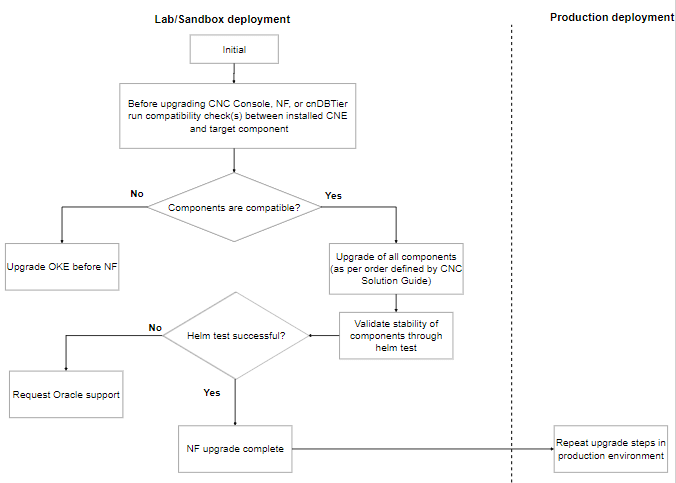
The following procedure explains the upgrade workflow for Oracle NFs:
- Check the supported upgrade path for each NF. To know the upgrade path,
see Oracle Communications Cloud Native Core Release
Notes.
Note:
It is recommended to upgrade in the similar supported upgrade path of the Upgrade Workflow. - Check for the compatibility of the target NF component. See Compatibility check of target NF component with installed CNE section for the procedure.
- If the NFs are not compatible, upgrade non-Oracle cloud native environment.
- If all NFs are compatible, upgrade the components based on the upgrade sequence mentioned in Upgrade Workflow section.
- Run the Helm test command to check the upgrade status. In case of any failure, contact My Oracle Support.
- Once the Helm test is successful, then the upgrade is complete.
- Perform the above upgrade steps in the production environment.
3.4.1.4 Compatibility Check of Target NF Component with Installed OCI
- Run the following command to get the list of resource versions for the
installed OCI:
kubectl api-versionsSample output:
admissionregistration.k8s.io/v1 apiextensions.k8s.io/v1 apiregistration.k8s.io/v1 apps/v1 authentication.k8s.io/v1 authorization.k8s.io/v1 autoscaling/v1 autoscaling/v2 autoscaling/v2beta2 batch/v1 certificates.k8s.io/v1 coordination.k8s.io/v1 discovery.k8s.io/v1 events.k8s.io/v1 flowcontrol.apiserver.k8s.io/v1beta1 flowcontrol.apiserver.k8s.io/v1beta2 metrics.k8s.io/v1beta1 networking.k8s.io/v1 node.k8s.io/v1 policy/v1 rbac.authorization.k8s.io/v1 scheduling.k8s.io/v1 storage.k8s.io/v1 storage.k8s.io/v1beta1 v1 - Run the following command to get the list of target CNC Console, NF, and
cnDBTier resources and their
versions:
helm upgrade <helm release> <chart tarball> -f <Custom File> -n <helm release> --dry-run | egrep -i "^apiVersion:|^kind:" |sed 's/\r$//' | awk '{ ORS = (NR%2 ? ", " : RS) } 1' | sort | uniqFor example:
helm upgrade ocudr ocudr-23.4.0.tgz -f ocudr_custom_values_23.4.0.yaml -n ocudr --dry-run | egrep -i "^apiVersion:|^kind:" |sed 's/\r$//' | awk '{ ORS = (NR%2 ? ", " : RS) } 1' | sort | uniqSample output:apiVersion: apps/v1 # for versions before 1.9.0 use apps/v1beta2 , kind: Deployment apiVersion: apps/v1 # for versions before 1.9.0 use apps/v1beta2, kind: Deployment apiVersion: apps/v1, kind: Deployment apiVersion: apps/v1, kind: StatefulSet apiVersion: autoscaling/v2, kind: HorizontalPodAutoscaler apiVersion: batch/v1, kind: Job apiVersion: policy/v1, kind: PodDisruptionBudget apiVersion: rbac.authorization.k8s.io/v1, kind: Role apiVersion: rbac.authorization.k8s.io/v1, kind: RoleBinding apiVersion: v1, kind: ConfigMap apiVersion: v1, kind: Pod apiVersion: v1, kind: Service apiVersion: v1, kind: ServiceAccount kind: Service, apiVersion: v1 - Verify that installed OCI has all resources and their versions required by CNC Console, NF, and cnDBTier.
3.4.2 Performing the NF Upgrade
Table 3-11 CNC Network Functions Document Reference
| CNC Network Functions | Document Reference |
|---|---|
| Oracle Communications Cloud Native Core, Binding Support Function (BSF) | Oracle Communications Cloud Native Core, Binding Support Function Installation, Upgrade, and Fault Recovery Guide |
| Oracle Communications Cloud Native Core, Network Exposure Function (NEF) | Oracle Communications Cloud Native Core, Network Exposure Function Installation, Upgrade, and Fault Recovery Guide |
| Oracle Communications Cloud Native Core, Network Repository Function (NRF) | Oracle Communications Cloud Native Core, Network Repository Function Installation, Upgrade, and Fault Recovery Guide |
| Oracle Communications Cloud Native Core, Network Slice Selection Function (NSSF) | Oracle Communications Cloud Native Core, Network Slice Selection Function Installation, Upgrade, and Fault Recovery Guide |
| Oracle Communications Cloud Native Core, Converged Policy (Policy) | Oracle Communications Cloud Native Core, Converged Policy Installation, Upgrade, and Fault Recovery Guide |
| Oracle Communications Cloud Native Core, Security Edge Protection Proxy (SEPP) | Oracle Communications Cloud Native Core, Security Edge Protection Proxy Installation, Upgrade, and Fault Recovery Guide |
| Oracle Communications Cloud Native Core, Service Communication Proxy (SCP) | Oracle Communications Cloud Native Core, Service Communication Proxy Installation, Upgrade, and Fault Recovery Guide |
| Oracle Communications Cloud Native Core, Unified Data Repository (UDR) | Oracle Communications Cloud Native Core, Unified Data Repository Installation, Upgrade, and Fault Recovery Guide |
Table 3-12 CNC Companion Components Document Reference
| CNC Companion Components | Document Reference |
|---|---|
| Oracle Communications Cloud Native Configuration Console (CNC Console) | Oracle Communications Cloud Native Configuration Console Installation, Upgrade, and Fault Recovery Guide |
| Oracle Communications Cloud Native Core, cnDBTier (cnDBTier) | Oracle Communications Cloud Native Core, cnDBTier Installation, Upgrade, and Fault Recovery Guide |
Table 3-13 OCI Components Document Reference
| OCI Components | Document Reference |
|---|---|
| OCI Adaptor |
|
Note:
OCI Adaptor doesn't support upgrade.3.4.2.1 Upgrade Workflow
Note:
OCI Adaptor doesn't support upgrade. Since OCI Adaptor requires reinstall, metrics scraping is impacted during that period.Figure 3-14 CNC NFs and Companion components Upgrade Order on OCI Environment
See CNC NFs and Companion components installation, upgrade, and fault recovery guides for details on upgrading the respective components.
3.4.2.2 Compatibility Check of CNC NF Component on Target OCI Environment
Perform the following compatibility checks:
- Run the following commands to get the list of deployed resources and
their versions from a given CNC NFs and Companion components
release:
helm get manifest ocudr -n ocudr | egrep -i "^apiVersion:|^kind:" |sed 's/\r$//' | awk '{ORS = (NR%2 ? ", " : RS) } 1' | so rt | uniqSample output:apiVersion: apps/v1 # for versions before 1.9.0 use apps/v1beta2 , kind: Deployment apiVersion: apps/v1 # for versions before 1.9.0 use apps/v1beta2, kind: Deployment apiVersion: apps/v1, kind: Deployment apiVersion: apps/v1, kind: StatefulSet apiVersion: autoscaling/v2, kind: HorizontalPodAutoscaler apiVersion: policy/v1, kind: PodDisruptionBudget apiVersion: rbac.authorization.k8s.io/v1, kind: Role apiVersion: rbac.authorization.k8s.io/v1, kind: RoleBinding apiVersion: v1, kind: ConfigMap apiVersion: v1, kind: Service apiVersion: v1, kind: ServiceAccount - Run the following command to get the list of resource versions for the
target cloud native environment release:
Note:
- See OKE release documentation for supported resources and versions.
- Alternate approach: From any installed target cloud native
environment release, run the following command to get a list of all
supported
api-versions:
kubectl api-versions
Sample output:admissionregistration.k8s.io/v1 apiextensions.k8s.io/v1 apiregistration.k8s.io/v1 apps/v1 authentication.k8s.io/v1 authorization.k8s.io/v1 autoscaling/v1 autoscaling/v2 autoscaling/v2beta2 batch/v1 certificates.k8s.io/v1 coordination.k8s.io/v1 discovery.k8s.io/v1 events.k8s.io/v1 flowcontrol.apiserver.k8s.io/v1beta1 flowcontrol.apiserver.k8s.io/v1beta2 metrics.k8s.io/v1beta1 networking.k8s.io/v1 node.k8s.io/v1 policy/v1 rbac.authorization.k8s.io/v1 scheduling.k8s.io/v1 storage.k8s.io/v1 storage.k8s.io/v1beta1 v1 - Manually ensure that all installed CNC NFs and Companion components resources and their versions are available in the target OCI environment.
3.4.3 Performing the Postupgrade Tasks
This section explains the postupgrade tasks.
3.4.3.1 NF Postupgrade
Perform the following NF postupgrade tasks:
- Verify postupgrade of all the components by running the "
helm
                    test
" provided by CNC Console, NFs, and cnDBTier to verify the deployment health and status. - See CNC Console, NFs, and cnDBTier installation, upgrade, and fault recovery guides for postupgrade task details after upgrading respective components.
3.4.3.2 OCI Environment Postupgrade
Perform the following postupgrade tasks:
- Re-validate the stability of all the components by running
"
helm test" provided by CNC Console, NF, and cnDBTier to verify the deployment health and status. - For procedures to perform any restart required by CNC Console, NF, or cnDBTier, see the NF-specific installation, upgrade, and fault recovery guides.
3.4.4 Performing the Rollback
Note:
OCI Adaptor doesn't support rollback.Figure 3-15 Performing the Rollback
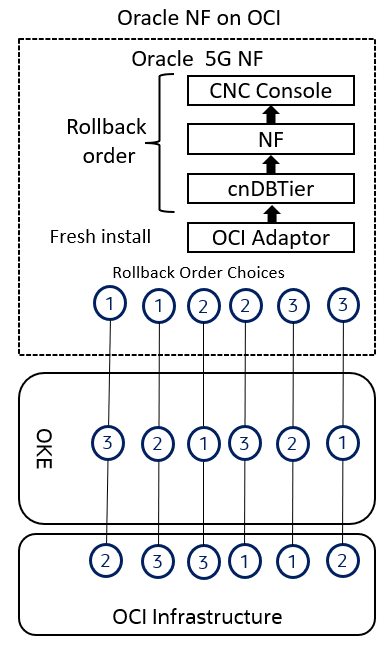
Note:
OCI Adaptor rollback is not supported. The user must use OCI Resource Manager to remove the OCI Adapters stack.
Table 3-14 CNC Network Functions Document Reference
| CNC Network Functions | Document Reference |
|---|---|
| Oracle Communications Cloud Native Core, Binding Support Function (BSF) | Oracle Communications Cloud Native Core, Binding Support Function Installation, Upgrade, and Fault Recovery Guide |
| Oracle Communications Cloud Native Core, Network Exposure Function (NEF) | Oracle Communications Cloud Native Core, Network Exposure Function Installation, Upgrade, and Fault Recovery Guide |
| Oracle Communications Cloud Native Core, Network Repository Function (NRF) | Oracle Communications Cloud Native Core, Network Repository Function Installation, Upgrade, and Fault Recovery Guide |
| Oracle Communications Cloud Native Core, Network Slice Selection Function (NSSF) | Oracle Communications Cloud Native Core, Network Slice Selection Function Installation, Upgrade, and Fault Recovery Guide |
| Oracle Communications Cloud Native Core, Converged Policy (Policy) | Oracle Communications Cloud Native Core, Converged Policy Installation, Upgrade, and Fault Recovery Guide |
| Oracle Communications Cloud Native Core, Security Edge Protection Proxy (SEPP) | Oracle Communications Cloud Native Core, Security Edge Protection Proxy Installation, Upgrade, and Fault Recovery Guide |
| Oracle Communications Cloud Native Core, Service Communication Proxy (SCP) | Oracle Communications Cloud Native Core, Service Communication Proxy Installation, Upgrade, and Fault Recovery Guide |
| Oracle Communications Cloud Native Core, Unified Data Repository (UDR) | Oracle Communications Cloud Native Core, Unified Data Repository Installation, Upgrade, and Fault Recovery Guide |
Table 3-15 CNC Companion Components Document Reference
| CNC Companion Components | Document Reference |
|---|---|
| Oracle Communications Cloud Native Configuration Console (CNC Console) | Oracle Communications Cloud Native Configuration Console Installation, Upgrade, and Fault Recovery Guide |
| Oracle Communications Cloud Native Core, cnDBTier (cnDBTier) | Oracle Communications Cloud Native Core, cnDBTier Installation, Upgrade, and Fault Recovery Guide |
Table 3-16 OCI Components Document Reference
| OCI Components | Document Reference |
|---|---|
| OCI Adaptor |
|
3.4.5 Performing the Postrollback Tasks
Perform the following postrollback tasks:
- Verify the rollback of all the CNC NFs and Companion components by
running the "
helm test" to verify the deployment health and status. - See CNC NFs and Companion components installation, upgrade, and fault recovery guides for postrollback task details after rolling back respective components.
3.5 Upgrade and Rollback Guidelines for Multisite Georeplication Setup
This chapter presents various scenarios related to the upgrade and rollback of Network Functions (NFs). It also outlines robust recovery strategies designed to address errors or failures encountered during the upgrade process, providing guidance on how to efficiently restore services and minimize downtime. In the following scenarios, three-site georeplication setup is considered as an example.
3.5.1 Scenario 1: Site-1 Upgrade
This scenario provides the upgrade guidelines for Site-1.
Figure 3-16 Scenario 1: Site-1 Upgrade
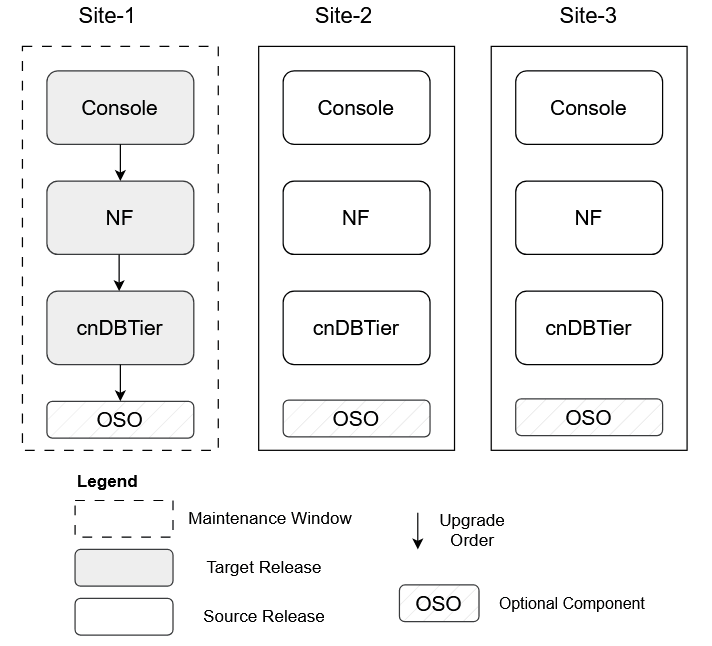
- The upgrade of Site-1 is a pivotal step in any multisite georeplication deployment. The recommended sequence for the upgrade process is to first upgrade the Console, followed by the Network Function (NF), and finally the cnDBTier, as outlined in preceding chapters. For detailed upgrade procedures, see the respective installation, upgrade, and fault recovery guides.
- This upgrade sequence is designed to ensure consistent data processing while minimizing service disruption. Since cnDBTier manages both configuration and subscriber data, which is replicated across all instances, it is essential to upgrade cnDBTier last to maintain data integrity throughout the process. The Site-1 upgrade is conducted as an in-service operation, allowing services to continue running with minimal impact.
- Once the upgrade is complete, system functionality is monitored and any potential service issues are addressed.
3.5.2 Scenario 2: Site-1 Rollback
This scenario provides the rollback guidelines for Site-1.
Figure 3-17 Scenario 2: Site-1 Rollback
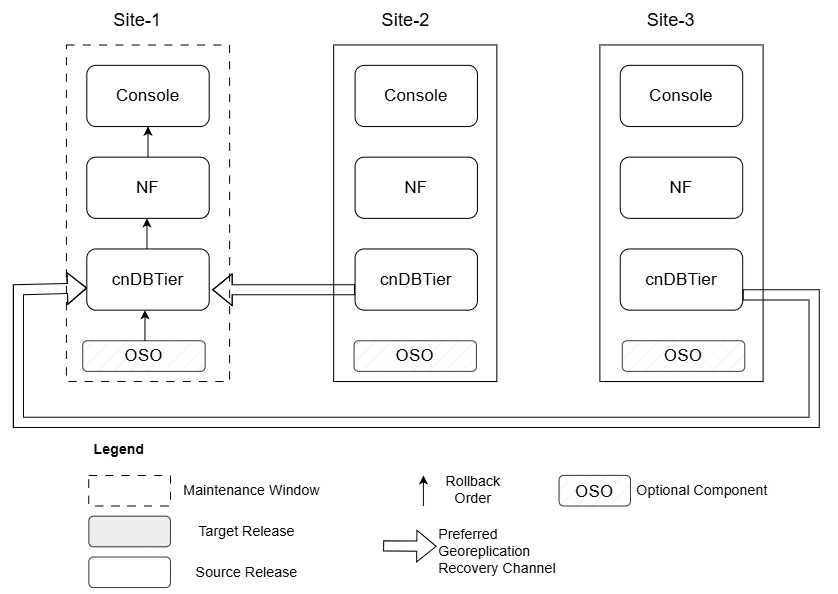
- A rollback at Site-1 serves as a critical recovery measure when the newly deployed release introduces issues that cannot be resolved within the allotted maintenance window. After a Site-1 upgrade, system operations are monitored closely for signs of functional irregularities, performance impact, or any adverse impact on services. In case of any significant issue, particularly one that cannot be addressed through minor configuration adjustments, a rollback procedure is initiated to restore stability.
- Prior to initiating a rollback, troubleshooting is performed with a focus on resolving manageable issues, such as configuration mismatches or custom values file errors, within the current maintenance window. If these efforts are unsuccessful, a rollback action is performed.
- The rollback process follows a defined sequence: first, revert cnDBTier, then the Network Function (NF), and finally the Console. This order is designed to safeguard data integrity and system consistency throughout the operation. Typically, a subsequent upgrade attempt is planned for the next available maintenance window once the underlying issues have been corrected or necessary patches have been made available. For detailed rollback procedures, see the respective installation, upgrade, and fault recovery guides.
- If required, Georeplication Recovery (GRR) for Site-1 can be performed either from Site-2 or Site-3 to facilitate a consistent state across all sites. For more information on the GRR procedure, see Oracle Communications Cloud Native Core, cnDBTier Installation, Upgrade, and Fault Recovery Guide.
3.5.3 Scenario 3: Site-2 Upgrade
This scenario provides the upgrade guidelines for Site-2.
Figure 3-18 Scenario 3: Site-2 Upgrade
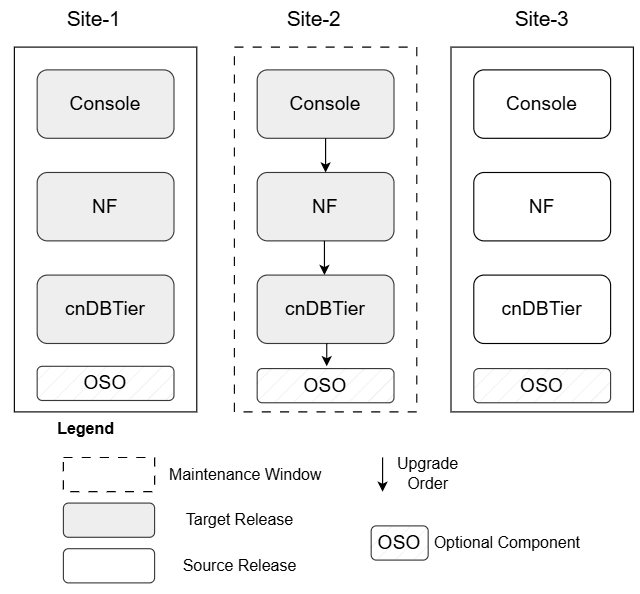
- Once the Site-1 upgrade is successful, the upgrade proceeds to Site-2.
- The recommended sequence for the upgrade process is to first upgrade the Console, followed by the Network Function (NF), and finally the cnDBTier, as outlined in preceding chapters. For detailed procedures, see the installation, upgrade, and fault recovery guides specific to cnDBTier and the NF. This upgrade sequence is designed to ensure consistent data processing while minimizing service disruption. Since cnDBTier manages both configuration and subscriber data, which is replicated across all instances, it is essential to upgrade cnDBTier last to maintain data integrity throughout the process.
- The Site-2 upgrade is conducted as an in-service operation, allowing services to continue running with minimal impact. Once the upgrade is complete, system functionality is monitored and any potential service issues are addressed.
3.5.4 Scenario 4: Site 2 Rollback
This scenario provides the rollback guidelines for Site-2.
Figure 3-19 Scenario 4: Site 2 Rollback
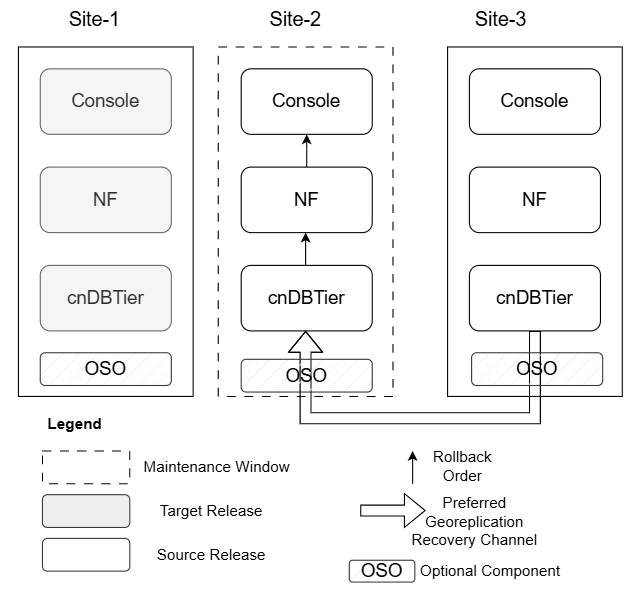
- n case Site-2 upgrade fails, rollback to the source release is recommended.
- Prior to initiating a rollback, troubleshooting is performed with a focus on resolving manageable issues, such as configuration mismatches or custom values file errors, within the current maintenance window. If these efforts are unsuccessful, a rollback action is performed.
- The rollback process follows a defined sequence: first, revert cnDBTier, then the Network Function (NF), and finally the Console. This order is designed to safeguard data integrity and system consistency throughout the operation. Typically, a subsequent upgrade attempt is planned for the next available maintenance window once the underlying issues have been corrected or necessary patches have been made available. For detailed rollback procedures, see the respective installation, upgrade, and fault recovery guides.
- If required, Georeplication Recovery (GRR) for Site-2 is preferred from Site-3 to facilitate a consistent state across all sites. For more information on the GRR procedure, see Oracle Communications Cloud Native Core, cnDBTier Installation, Upgrade, and Fault Recovery Guide.
3.5.5 Scenario 5: Site-3 Upgrade
This scenario provides the upgrade guidelines for Site-3.
Figure 3-20 Scenario 5: Site-3 Upgrade
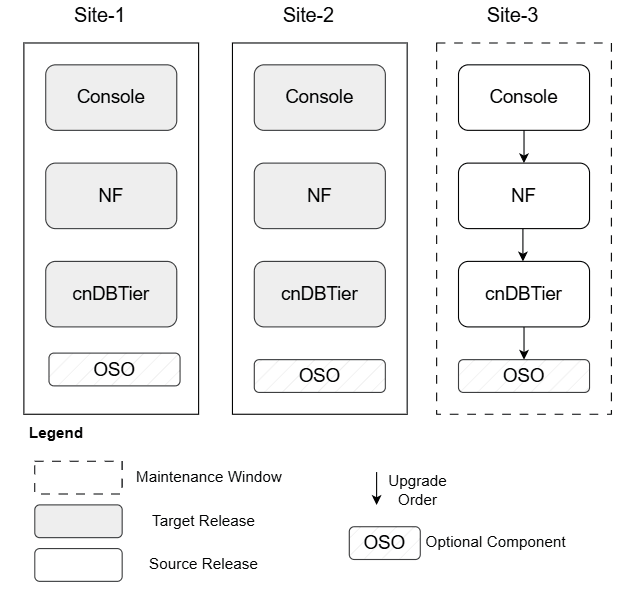
- Site-3 typically undergoes an upgrade only after Site-1 and Site-2 have been successfully upgraded. This staged approach reduces risk, ensuring stability before completing the upgrade cycle. For detailed upgrade procedures, see the respective installation, upgrade, and fault recovery guides.
- Once Site-3 is upgraded, maintenance for the entire set concludes. Although rollbacks are rare at this stage since most issues are caught earlier, if problems like configuration file errors appear, they are corrected and the upgrade is retried. Any persistent problems are addressed through follow-up patch releases.
3.5.6 Scenario 6: Site-3 Rollback
This scenario provides the rollback guidelines for Site-3.
Figure 3-21 Scenario 6: Site-3 Rollback
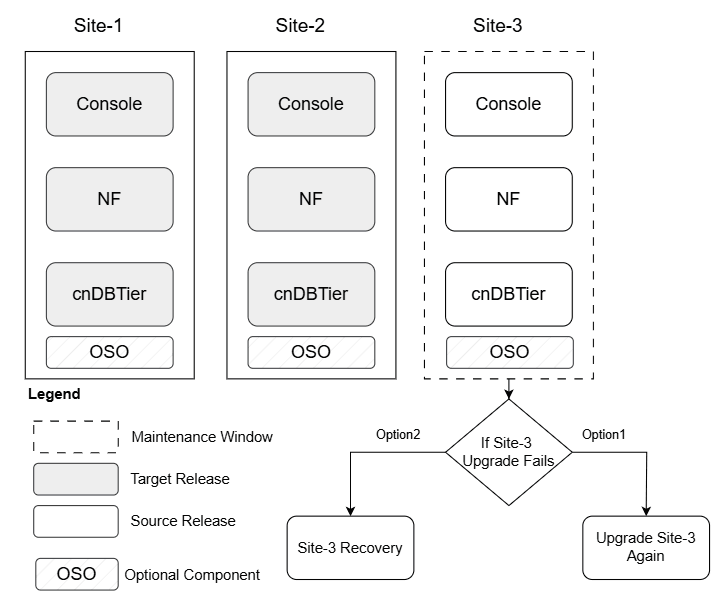
In case upgrade of Site-3 fails, following are the options:
- Troubleshooting is performed with a focus on resolving manageable issues, such as configuration mismatches or custom values file errors, within the current maintenance window.
- Option1: Attempt Site-3 upgrade again: In this case, the upgrade Site-3 as mentioned in the Scenario 5: Site-3 Upgrade.
- In case re-upgrade fails then rollback of Site-3 can be performed.
- Option2: Rollback all the sites to the source release: In this case, rollback all the sites as mentioned in the Scenario 8: All Sites Rollback.
3.5.7 Scenario 7: Site-3 Recovery when replication breaks
This scenario provides the recovery guidelines when replication channel of Site-3 breaks, after Site-3 upgrade or rollback failure.
Figure 3-22 Scenario 7: Site 3 Rollback when replication break
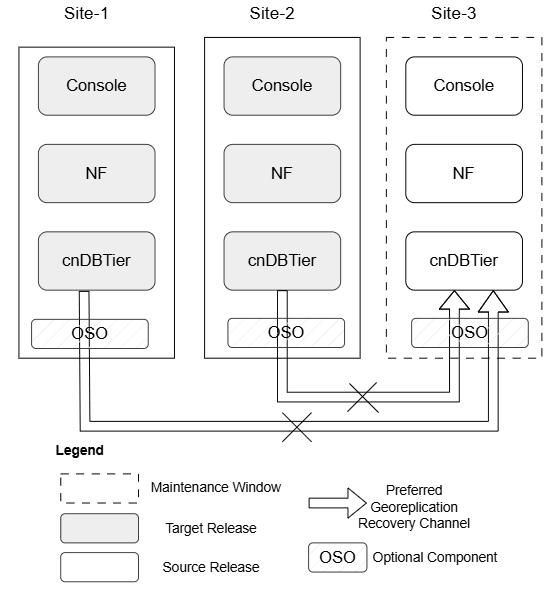
- In case of Site-3 could not be made operational after Site-3 upgrade or rollback then Site-3 recovery procedure should be followed to restore a healthy environment.
- GRR is only supported between sites running the same software version. Attempting to use GRR to connect a newer release with an older one is not supported and could lead to data inconsistency or system instability.
- Install the target release on Site-3 to match with the version of the other sites.
- Install sequence is as follows:
- First install the cnDBTier, and establish the replication channels with other sites of the set.
- Next install the Network Function (NF), and finally the Console.
- For detailed installation procedures, see the respective installation, upgrade, and fault recovery guides.
- Existing configuration method of configuring a new site is applied on the newly built set.
- After full site recovery, traffic is introduced on this site.
For detailed rollback procedures, see the respective installation, upgrade, and fault recovery guides.
For more information on the GRR procedure, see Oracle Communications Cloud Native Core, cnDBTier Installation, Upgrade, and Fault Recovery Guide.
3.5.8 Scenario 8: All Sites Rollback
This scenario addresses the rare situation in which a decision is made to revert (rollback) changes across all three sites.
Figure 3-23 Scenario 8: All Sites Rollback
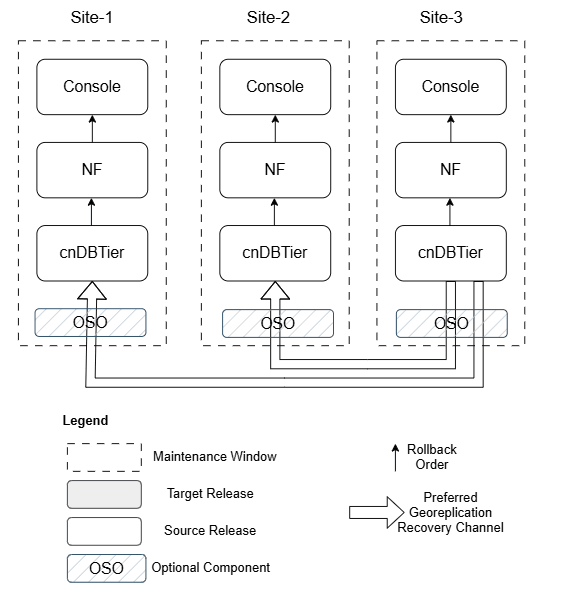
- Perform Site-3 rollback as mentioned in Scenario-6.
- Once Site-3 rollback is complete, perform Site-2 rollback.
- Georeplication Recovery (GRR) for Site-2 is performed from Site-3 to facilitate a consistent state across all sites.
- Once Site-2 rollback is complete, perform Site-1 rollback.
- Georeplication Recovery (GRR) for Site-1 is performed from Site-3 to facilitate a consistent state across all sites.
For detailed rollback procedures, see the respective installation, upgrade, and fault recovery guides.
For more information on the GRR procedure, see Oracle Communications Cloud Native Core, cnDBTier Installation, Upgrade, and Fault Recovery Guide.
3.5.9 Scenario 9: Patch Upgrade
This scenario provides the patch release upgrade guidelines for Site-3.
Figure 3-24 Scenario 9: Patch Upgrade
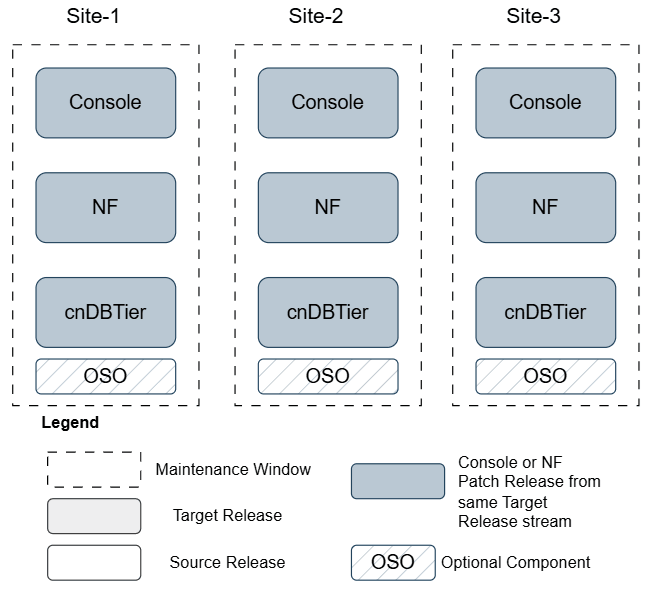
- A patch release upgrade updates software within the same release stream, delivering incremental improvements such as bug fixes, security vulnerability patches, and enhancements to system stability or performance. For example, upgrading a component from version 25.1.100 to 25.1.101 is considered a patch release upgrade.
- Patch upgrades are performed on individual components one by one using a similar methodology as full upgrade. This incremental approach helps to catch issues early, allowing for easy rollback or corrective action before broader deployment. Patch upgrades minimize operational disruption and, if needed, follow the same troubleshooting and rollback logic as main releases. For detailed upgrade procedures, see the respective installation, upgrade, and fault recovery guides.
Note:
All patch components (Console, NF, cnDBTier) must align to the same patch release stream (for example, all on 24.3.x, 24.2.x, 25.1.1xx, 25.1.2xx). Mixed patch versions across these components are not supported.
3.5.10 Georeplication Recovery (GRR) procedures to follow after Rollback
The following images describes the rollback guidance based on site that you are rolling back, as explained in the below flow chart:
Figure 3-25 Georeplication Recovery (GRR) procedures to follow after Rollback
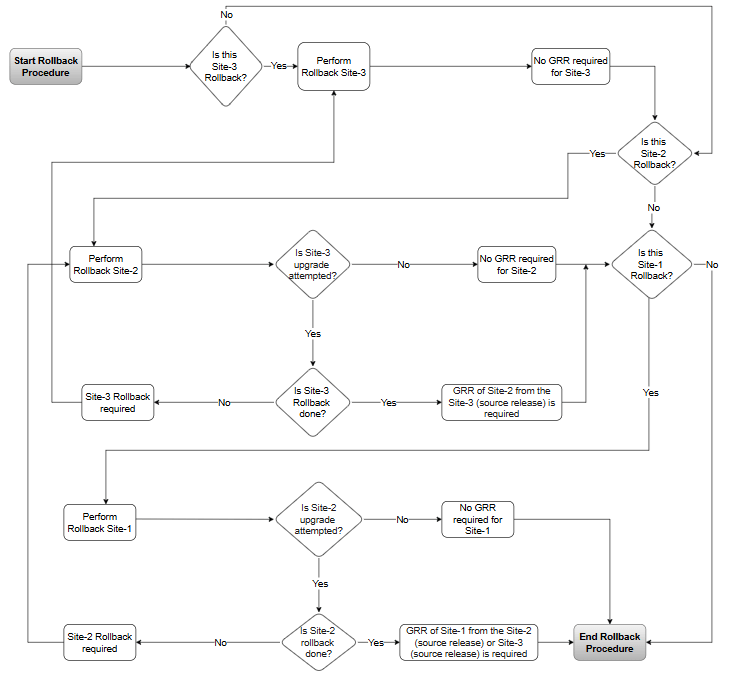
Terminologies:
- Source Release: Previously deployed software on the georedundant site set. (Upgrade Source Release -> Target Release and hence rollback Target Release -> Source Release)
- Target Release: New release upgrade done on the georedundant site set. (Upgrade Source Release -> Target Release and hence rollback Target Release -> Source Release)
-
Site-1: Represents the site on which upgrade is done first.
Note:
Runhelm ls <DbTier release name> -n <namespace>to determine cnDBTier upgrade order in the sites. For instance, site that is upgraded first is considered as site1, and so on. - Site-2: Represents the site on which upgrade is done after the Site-1.
- Site-3: Represents the site which got upgraded last.
- Hence the order of upgrade is Site-1 then Site-2 and finally Site-3.
Note:
If rollback of multiple sites are required in extreme conditions then it should follow the reverse order of upgrade, that is, Site-3 should be rolled back first, followed by Site-2 and then Site-1 rollback.