1 System Overview
This chapter provides a high-level overview of the application. It explains the basic functionality of the system and lists the main components.
It is not intended to advise on any specific Oracle Communications Convergent Charging Controller network or service implications of the product.
About Advanced Control Services
-
Calls to specific dialed numbers (service numbers)
-
Calls from specific calling numbers (CLI numbers)
-
All calls triggered to a specified INAP service key
Call Processing and Features
The call processing consists of an arbitrary call-processing diagram, which makes decisions and performs actions chosen from a rich set of feature nodes.
These nodes include basic features such as time routing (day, week, year), proportional routing, calling and called prefixes, special numbers, failover routing, and VIP customers. They include telephony actions such as announcement playing, IVR prompting, number redirection, account code, and PIN entry.
Other Features
In addition, many ancillary functions are provided, such as detailed logging and analysis information, event counting and branching, customer self-administration, multi-lingual support for announcements and user interfaces, and many more features as described in ACS User's Guide.
Call Routing Services
These features make ACS an ideal application to provide a wide range of common and popular call routing services, like:
- FreePhone
- Premium Rate
- TeleVote
- Follow Me/Personal Numbering
- Call Screening (Incoming)
It is also an ideal application for common residential or small business services, like:
- Account Code Validation
- Toll Barring (With PIN Override)
- Hot Line
- Call Screening (Outgoing)
- Basic Friends & Family
About Main Components of ACS
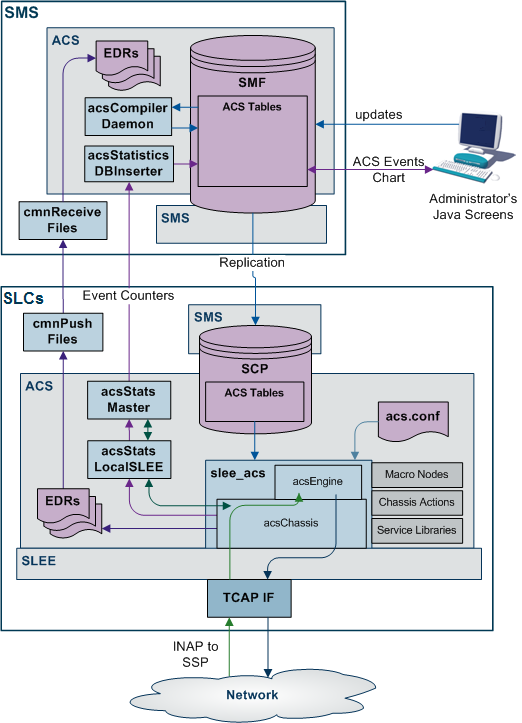
The schematic diagram below depicts the main components of ACS on the IN platform.
Standard Profile Block List
Table 1-1 lists the profile blocks available with a new installation of ACS.
Table 1-1 Standard Profile Blocks in ACS
| Name | Description |
|---|---|
| Any Valid Profile | Allows you to search for relevant tags in all profiles that have been loaded. |
|
App Specific Profile 1 App Specific Profile 2 App Specific Profile 3 App Specific Profile 4 App Specific Profile 5 App Specific Profile 6 App Specific Profile 7 App Specific Profile 8 |
Contains information specific to an application. For example, Messaging Manager. |
| CLI Subscriber Profile |
Contains most of the information you can specify in the CLI tab of the Numbers screen, like:
Note: Only relevant to the 0800 service. |
| Call Context | Allows access to information received from the network, including the list of buffers as described in ACS Buffers. |
| Control Plan Profile | This profile contains current switch node exits only. |
| Customer Profile |
Contains customer information like:
|
| Global Profile |
Contains global information like:
|
| Incoming Session Data |
Data which comes in over the network. Examples include:
|
| Outgoing Session Data | Data which goes out over the network. |
| Service Number Profile |
Contains most of the information you can specify in the Service Number tab of the Numbers screen, like:
Note: Only relevant to the 0800 service. |
| Temporary Storage |
Stores the data in memory and does not write it to the database. It exists for the duration of the control plan execution only. |
| VPN Network Profile |
Contains most of the information you can specify in the VPN edit network, like:
Note: Only relevant if you have the VPN service installed. |
| VPN Station Profile |
Contains most of the information you can specify in the VPN edit station, like:
Note: Only relevant if you have the VPN service installed. |
ACS Primary Tags
Table 1-2 provides a list of ACS primary tags.
Note:
-
These tags are preloaded on installation of ACS and are displayed on the ACS Configuration screen, in the Profile Tag Details tab.
-
Do not use reserved ACS primary tag to create the custom profile tag. Custom profile tag should be added with profile tag number starting from max profile tag number in the system + 1.
Table 1-2 ACS Primary Tags
| Description | Hex | Decimal |
|---|---|---|
| DO NOT USE | 0x0000 | 0 |
| PIN Prefix | 0x0001 | 1 |
| PIN Length | 0x0002 | 2 |
| Account Code Prefix | 0x0003 | 3 |
| Account Code Max Length | 0x0004 | 4 |
| A/S Prefix | 0x0005 | 5 |
| A/S Length | 0x0006 | 6 |
| Off Net Prefix | 0x0007 | 7 |
| S/D Prefix | 0x0008 | 8 |
| Outgoing Barred/Allowed List Type | 0x0009 | 9 |
| Outgoing Barred/Allowed List | 0x000a | 10 |
| Incoming Barred/Allowed List Type | 0x000b | 11 |
| Incoming Barred/Allowed List | 0x000c | 12 |
| Account Code Values | 0x000d | 13 |
| Account Code Policy | 0x000e | 14 |
| -RESERVED- | 0x000f | 15 |
| Divert RSF | 0x0010 | 16 |
| Divert Busy | 0x0011 | 17 |
| Divert No Answer | 0x0012 | 18 |
| Divert Follow Me | 0x0013 | 19 |
| Divert TOW Schedule | 0x0014 | 20 |
| PIN Digits | 0x0015 | 21 |
| PIN Rights | 0x0016 | 22 |
| Off Net Bar | 0x0017 | 23 |
| Follow on Break Out Sequence | 0x0018 | 24 |
| Station is Manager | 0x0019 | 25 |
| Speed List | 0x001a | 26 |
| Divert Barred/Allowed List Type | 0x001b | 27 |
| Divert Barred/Allowed List | 0x001c | 28 |
| Divert Locations | 0x001d | 29 |
| Break Limit | 0x001e | 30 |
| LCR Old National | 0x001f | 31 |
| LCR New National | 0x0020 | 32 |
| LCR Old International | 0x0021 | 33 |
| LCR New International | 0x0022 | 34 |
| Multi Lingual Announcements | 0x0023 | 35 |
| Number Lists | 0x0024 | 36 |
| Language | 0x0025 | 37 |
| Switch Configuration | 0x0026 | 38 |
| Virtual Message List | 0x0027 | 39 |
| Number Of Messages | 0x0028 | 40 |
| GUI Language | 0x0029 | 41 |
| Carrier Code | 0x002a | 42 |
| Barred Categories | 0x002b | 43 |
| Outgoing Barred/Allowed Ignore | 0x002c | 44 |
| Incoming Barred/Allowed Ignore | 0x002d | 45 |
| Divert Barred/Allowed Ignore | 0x002e | 46 |
| Account Code Minimum Length | 0x002f | 47 |
| Timezone Geographical Map | 0x0030 | 48 |
| PIN Encryption Method | 0x0031 | 49 |
| Silent Disconnect | 0x0032 | 50 |
| Postpaid Flag | 0x0033 | 51 |
| Hunt On Busy | 0x0034 | 52 |
| Hunt On No Answer | 0x0035 | 53 |
| Hunt Always | 0x0036 | 54 |
| Hunt RESERVED | 0x0037 | 55 |
| Help Line Address | 0x0038 | 56 |
| Legacy | 0x0039 | 57 |
| Disable | 0x003a | 58 |
| VARS | 0x003b | 59 |
| VARS Mapping | 0x003c | 60 |
| Toll Free Beep ID | 0x003d | 61 |
| Toll Free Beep Type | 0x003e | 62 |
| Termination Number Ranges | 0x003f | 63 |
| Termination Number Range Policy | 0x0040 | 64 |
| Control Plan Version Hiding | 0x0041 | 65 |
| Toll Free Beeps Required | 0x0042 | 66 |
| Bar Pay Phone Callers | 0x0043 | 67 |
| Bar Cell Phone Callers | 0x0044 | 68 |
Note:
Each service may have its own specific tags in a separate tag range.About ACS Functions
Calls using the ACS service will follow a control plan, and given varying circumstances will be directed to a terminating point. A control plan is effectively a flow chart defining the decisions and actions made to determine the routing of a call.
A control plan may consist of multiple different decision or action nodes called feature nodes. Each feature node has one input and a number of outputs determined by the type of feature node. The exceptions to this are the Start and End feature nodes that have only one output or one input respectively.
Each output from a feature node can lead to another feature node. The output used when exiting a feature node during call processing is determined by the functionality of that feature node. For example, a day of week feature node has multiple outputs, which are used depending on the current day of the week, and an internal customer defined mapping of the day of week to an output.