3 About Charging
This chapter provides an overview of Oracle Communications Convergent Charging Controller rating.
About Charging
To charge for services, you use Convergent Charging Controller to rate service usage and determine the charge. A rate is the amount to charge; for example, two cents per minute for voice calls, 20 cents per megabyte for data usage, or 5 cents to send an SMS.
You can use Convergent Charging Controller to rate:
-
Voice calls
-
Data sessions
-
Events, such as SMS messages
-
Periodic charges, such as subscription charges
You can configure rating based on:
-
Duration; for example, the length of the call
-
Volume; for example, the number of bytes downloaded
-
Geographic location of where the service originated; for example, where the calling number is located
-
Geographic location of the service destination; for example, where the number that was called is located
-
Time of day
-
Day of the week, and holidays
You can manage rating by specifying:
-
Minimum or maximum charge for a call or data transfer
-
Announcements to subscribers; for example, a low-credit announcement
-
Discounts and free minutes
How Convergent Charging Controller Rates are Defined
In Convergent Charging Controller, rating is performed by assigning a charge to a call, based on the origin and destination of the call; for example, ten cents per minute for a call from London to Paris.
Two elements are needed for rating: a charge period and a Calling Line Identifier (CLI) to Dialled Number (DN) tariff (CLI-DN tariff).
-
A charge period specifies how much to charge for all or a portion of a call; for example, 10 cents for the first minute of a call, 5 cents for the next five minutes, and so on. You can include up to ten sets of charge periods in a billing set.
-
CLI-DN tariffs use telephone prefixes to identify the call origin and destination. For example, a CLI-DN tariff might be assigned the following origin and destination:
-
Call origin: 3249
-
Call destination: 1440
-
You rate calls by assigning the charges in charge periods to the origins and destinations defined in CLI-DN tariffs. For example, CLI-DN tariffs might be used to configure the following rates:
| CLI (Call Origin) | DN (Call Destination) | Charge Period | Charge |
|---|---|---|---|
|
3249 |
1440 |
0 to 5 minutes |
2 cents per minute |
|
3249 |
1440 |
Over 5 minutes |
1 cent per minute |
Note:
You can also use charge periods to rate by quantity. In that case, the charge periods are sets of data quantity; for example, the first 200 megabytes downloaded, the second 200 megabytes downloaded, and so on.
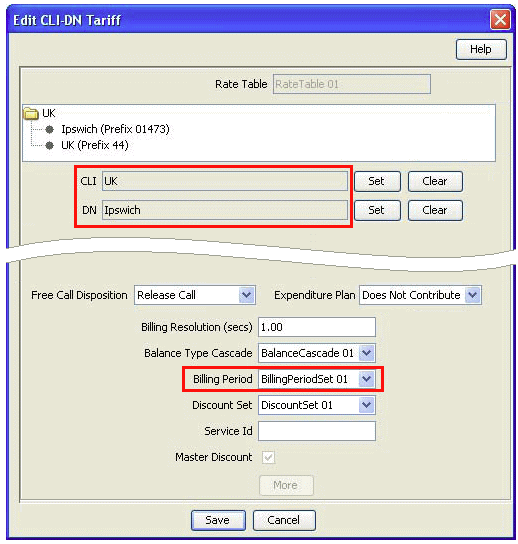
Figure 3-1 shows part of the dialog box used for defining a CLI-DN tariff. In this figure, the tariff defines a rate for calls originating in the United Kingdom, and terminating in Ipswich. The charge period is assigned to Billing Set 01. In this example, assume that Billing Set 01 includes the following charge periods:
-
0 to 5 minutes: 2 pence per minute
-
Over 5 minutes: 1 pence per minute
A six-minute call that used this CLI-DN tariff would have a charge of 11 pence; 10 pence for the first 5 minutes, and 1 pence for the last minute.
Note:
CLI-DN tariffs are the standard tariffs used by Convergent Charging Controller, but you can override them by creating weekly tariffs and holiday tariffs.
After you have defined CLI-DN rates, you need to configure more rating elements to enable Convergent Charging Controller to find the correct rate to use for a call. You create the following elements:
-
Product types
-
Tariff plans
-
Tariff plan selectors
-
Rate tables
-
Geography sets
You create those elements to organize rates used for different services, and used by different service providers. Convergent Charging Controller uses them to find the rate as follows:
-
When a subscriber purchases a service, such as a telephone service, the subscriber is assigned a product type.
-
When initiating a call, the service loader uses the customer's phone number to find the product type to use for rating and controlling the call.
-
The product type includes a tariff plan. Convergent Charging Controller uses the tariff plan selector to find the rate table associated with the tariff plan.
-
The rate table includes a set of CLI-DN tariffs that can be used. In Figure 3-1 the rate table is Rate Table 01. Convergent Charging Controller finds the rates to use by looking in the rate table.
-
Convergent Charging Controller uses a geography set to look up the call destination and origin. Figure 3-1 shows the geography set UK, which defines the locations Ipswich (prefix 01473) and UK (prefix 44).
-
Based on the call origin and destination, Convergent Charging Controller uses the appropriate CLI-DN tariff to rate the call.
Figure 3-2 shows a simplified workflow showing how Convergent Charging Controller finds the rate to use for a call.
Figure 3-2 Simplified Workflow for Finding a CLI-DN Tariff

About Configuring Charging
To configure rating, you create the following elements in Convergent Charging Controller:
-
Charge periods and charge period sets. A charge period specifies how much to charge for the duration of a call, or the volume of data; for example, ten cents per minute. You create charge period sets to apply multiple charge periods to a call; for example, 10 cents per minute for the first five minutes, and three cents per minute for the next 20 minutes. A charge period set can include 10 charge periods.
-
Calling Line Identifier (CLI) to Dialled Number (DN) tariffs (CLI-DN tariffs). You use CLI-DN tariffs to rate calls according to geographic location, as defined by telephone prefixes.
CLI-DN tariffs are the tariffs used by Convergent Charging Controller to rate calls, unless overridden by weekly tariffs or holiday tariffs.
The CLI-DN tariff for a call is always chosen according to the closest matching link across a geography set. You define geographic locations by creating geography sets in the Advanced Control Services (ACS) GUI.
-
Geography sets. You use geography sets to define the geographic locations used by CLI-DN tariffs. Geography sets are defined by groups of telephone prefixes. For example, you can create a Mobile Belgium geography set that includes the prefixes 3249, 3247, and 3248.
-
Holiday sets. You can provide discounts based on holidays; for example, a 50% discount on New Year's Day. Holiday sets define the days that you can use as holidays. You configure holiday sets in ACS.
-
Holiday tariffs. You use holiday tariffs to configure rating according to specific days of the year; for example, to provide a discount on all calls made on New Year's Day.
-
Weekly tariffs. You use weekly tariffs to define peak and off-peak times for rating. For example, you can specify that all calls from 5:00 p.m. Friday until 6:00 a.m. Monday have a maximum charge of $5.00.
-
Balance type cascades. A balance type cascade specifies the balance types that are used when rating, and the order in which they are used. For example, you might configure a balance type cascade that first consumes from the Promotional Cash balance type and then from the General Cash balance type.
-
Rate tables. You use rate tables to organize how you charge for services. Rate tables include:
-
One or more geography sets. Geography sets define the prefixes that can be used for determining rates.
-
One or more holiday sets. Holiday sets define the days of the year that you can assign holiday tariffs to.
-
Whether to rate by duration or volume.
-
A default reservation configuration, to manage reserved credit in the event of a network failure.
-
-
Tariff plans. Tariff plans provide a mapping between product types and rate tables. When initiating a call, the service loader finds the product type to use, which points to the tariff plan selector, where tariff plans are mapped to rate tables.
-
Discount periods. You use discount periods to assign discounts, such as 10% off of the calculated rate. The discounts are applied based on the configured charge periods. Discount periods are used by weekly and holiday tariffs.
About Friends and Destination Discounts and Friends and Family Discounts
This section provides an example of how to use Convergent Charging Controller to configure a customer offering.
Friends and Family discounts and Friends and Destination discounts apply a discounted rate to specified number prefixes (Friends and Destinations) or MSISDN numbers (Friends and Family).
When a subscriber uses a Friends and Destination discount, calls to a specified prefix or group of prefixes are discounted. For example, to set up a discount for all calls within the subscriber's county, you create a group of all the prefixes in that county.
When a subscriber uses a Friends and Family discount, the subscriber defines a list of MSISDN numbers that are discounted. The discount is applied based on how many numbers are on the list. For example, if there is one number on the list, and the discount is 10%, calls to that number are discounted 10%. If there are ten numbers on the list, calls to any of those numbers are discounted by 1%.
To enable Friends and Destination and Friends and Family discounts, you do the following:
-
Use the Charging Control Services (CCS) application to configure limitations for the discounts; for example, the percentage discount that can be applied, or a list of prefixes that are allowed for the discount. To do so, you configure properties in Product Types and in Service Providers.
-
Configure control plans that enable the discounts for subscribers. The control plans enable subscriber self-care. Subscribers can add numbers and prefixes to specify which destination calls are discounted.
-
Subscribers can use the self-care interface to set up their own discounts. You can also use CCS Customer Care Portal to assign the discounts to the subscriber's profile. You can use the Provisioning Interface (PI) commands to add, delete, and change discount numbers and prefixes belonging to a subscriber.
-
You can charge customers for changes made to their discount numbers and prefixes. Typically, you allow a specified number of changes for free by giving a discount such as Free Changes. Convergent Charging Controller tracks the number of changes made, and can start charging for each change after the amount in the Free Changes discount has been used up. You can also charge a monthly fee for the discount.
Note:
Convergent Charging Controller creates EDRs for successful and unsuccessful changes to friends and destination prefixes and friends and family numbers.
Convergent Charging Controller includes two service templates that you can use to implement Friends and Destination discounts and Friends and Family Discounts. These service templates include predefined control plans, product types, and notifications that you can modify.
About Configuring Friends and Destination Discounts
To configure Friends and Destination discounts, you configure the following:
-
Limitations for each service provider, such as prefixes that cannot be used
-
The discount amount for each product type
-
How the discount works in control plans
About Configuring Friends and Destination Discounts for Service Providers
In the Charging Control Services application, you can configure the following for each service provider:
-
Create blocked lists of Friends and Destinations prefixes. Those prefixes cannot be used for Friends and Destination discounts.
-
Create prefix groups by mapping prefix numbers to announcements. You can create a maximum of 100 mappings.
You define groups of prefixes by mapping prefixes to an announcement that is played to the caller who is using the Friends and Destination IVP configuration service. For example, you might map prefixes 3215 and 3216 to the announcement named FD Area 1. If the subscriber's Friends and Destination service is configured to use the FD Area 1 announcement, calls to those prefixes are discounted.
Note:
You must create announcements before you map prefixes to them.
About Configuring Friends and Destination Discounts in Product Types
In the Charging Control Services application, you can configure how the Friends and Destination discount works for each product type. You can specify:
-
The discount amount; for example, 10%.
-
The number of times a subscriber can make changes to the Friends and Destination configuration without getting charged for making the change.
About Configuring Friends and Destination Discounts in Control Plans
To implement Friends and Destination discounts in a control plan, you use the following feature nodes:
-
Friends and Destination Menu. The Friends and Destination Menu feature node provides access to either the Friends and Discounts configuration or the Friends and Family configuration. When activated, the feature node tells the user which discount is active (if any), and asks which discount the subscriber wants to configure.
When applying a discount to a group of prefixes, the announcement that is configured for Friends and Destination is the announcement that the prefixes are mapped to.
-
Friends and Destination Configuration. The Friends and Destination Configuration feature node enables callers to maintain their Friends and Destination discount prefixes. A caller can activate the discount, add prefixes, delete prefixes, and change existing prefixes.
In addition, you can configure the following:
-
The maximum number of retries allowed for entering digits
-
The length of time in seconds after the main announcement is played before the call is disconnected
-
Timeout intervals used for prompt announcements, list cycling, and list start
-
Whether to send an SMS text message information about the change and the cost
-
A list of event types that can be billed
-
A list of events for the event types selected
-
-
Friends and Destination Discount. The Friends and Destination Discount feature node enables the Friends and Family discount or Friends and Destination discount. You can specify if the discount applies to the caller's prefix, or to a group of prefixes.
-
Check Limitations. The Check Limitations feature node compares the contents of a number profile block against the limitations for a specified limited type.
-
Get Destination Prefix. The Get Destination Prefix feature node retrieves the longest matching favorite destination prefix for a provided number.
-
Produce Destination Prefix Tree. The Produce Destination Prefix Tree feature node produces a prefix tree from the provided destination prefix. The feature node uses the destination prefix to look up the destination announcement configured in friends and destination. All prefixes mapped to the same announcement as the destination prefix are found. A prefix tree of all the found prefixes is produced (including the destination prefix).
-
Play Destination. The Play Destination feature node plays to the caller the destination announcement associated with the provided destination prefix. The feature node uses the destination prefix to look up the destination announcement configured in friends and destination.
About Configuring Friends and Family Discounts
To configure Friends and Family discounts, you configure the following:
-
Limitations for each service provider
-
The discount amount for each product type
-
How the discount works in control plans
About Configuring Friends and Family Discounts for Service Providers
In the Charging Control Services application, you can configure blocked lists of Friends and Family numbers for each service provider. Those numbers cannot be used for Friends and Family discounts.
About Configuring Friends and Families Discounts in Product Types
In the Charging Control Services application, you can configure how the Friends and Family discount works for each product type. You can specify:
-
The discount amount; for example, 10%.
-
The number of times a subscriber can make changes to the Friends and Family configuration without getting charged for making the change.
-
The maximum number of Friends and Family numbers that the subscriber can add.
-
A list of numbers that can be either a list of allowed numbers or a list of numbers that are not allowed for the product type. This list is called the Friends and Family allowed list.
About Configuring Friends and Family Discounts in Control Plans
To implement Friends and Family discounts in a control plan, you use the following feature nodes:
-
Friends and Destination Menu. The Friends and Destination Menu feature node provides access to either the Friends and Discounts configuration or the Friends and Family configuration. When activated, the feature node tells the user which discount is active (if any), and asks which discount the subscriber wants to configure.
-
Friends and Family Configuration. The Friends and Family Configuration feature node enables callers to maintain their Friends and Family Service Number List. A caller can activate the discount, review the current list of numbers, add numbers, remove numbers, and edit existing numbers. You can configure announcements to guide the caller through the operations.
In addition, you can configure the following:
-
The maximum number of times a caller can enter a disallowed number.
-
The length of time in seconds after the main announcement is played before the call is disconnected
-
The length of time in seconds a list announcement is played before the call is disconnected
-
Timeout intervals used for prompt announcements, list cycling, and list start
-
Whether to send an SMS text message information about the change and the cost
-
A list of event types that can be billed
-
A list of events for the event types selected
-
-
Check Limitations. The Check Limitations feature node compares the contents of a number profile block against the limitations for a specified limited type.