2 About Call Routing and Call Management
This chapter provides an overview of Oracle Communications Convergent Charging Controller call routing and call management.
About Controlling Calls
To control phone calls in Convergent Charging Controller, you create control plans. Control plans define how a call is handled from when Convergent Charging Controller receives it until Convergent Charging Controller sends it to its destination. Typical call-control configuration tasks include:
-
Configuring number normalization.
-
Configuring how to handle responses from the destination number; for example, no answer, number busy, or number not found.
-
Configuring call routing; for example:
-
Routing based on geographic location or time of day
-
Least-cost routing
-
Routing based on hunting lists
-
Load balancing
-
Transferring a call from one service to another
-
-
Configuring interactive voice response (IVR); for example, present menu choices to subscribers
-
Configuring call completion
About Call Barring
Note:
This section describes call barring in the Prepaid Charging feature. You can also configure call barring by using the USSD Gateway, Messaging Manager, and Virtual Private Network (VPN) Service. See the documentation for those features for more information.
Call barring allows you to restrict incoming and outgoing calls based on a set of phone numbers or prefixes. For example, you can define a list of outgoing numbers (destination numbers) that are barred for each customer or a list of incoming calls that are barred for each subscriber.
To configure call barring, you do the following:
-
Create barred and allowed prefixes or numbers; for example, a list of numbers that are barred from calling a subscriber.
-
Configure control plans that check the incoming or outgoing calls against the barred and allowed numbers stored in the SMF database, to determine if the call is allowed.
About Creating Barred/Allowed Lists
To create barred/allowed lists, you use the Service Management System (SMS) application, which stores the barred/allowed lists in the SMF database. The numbers in the lists are available to feature nodes in control plans.
You cannot define a list of barred numbers and a list of allowed numbers for the same entity; for example, a subscriber cannot have an allowed list and a barred list.
You can define barred and allowed numbers for the following:
-
The system. You can define a system wide barred/allowed list in the Prepaid Charging Service Management configuration.
-
Customers. Each customer can have one list of barred or allowed outgoing numbers, and one list of barred or allowed incoming numbers.
-
Subscribers. You can define a list of barred or allowed numbers when you create a subscriber. You can also use Customer Care Portal and the Provisioning Interface to add or remove barred and allowed numbers to or from existing subscriber accounts.
-
Product types. You can define the outgoing numbers that are allowed or barred for subscribers that use the product type.
-
Service numbers. Each service number can have an incoming barred/allowed list. For example, you can restrict who can call the service number.
-
CLI numbers. Each CLI number can have an incoming barred/allowed list. For example, you can restrict who can call the CLI number.
About Configuring Call Barring in Control Plans
After you have stored barred and allowed numbers in the database, you can create control plans that use those numbers. The most commonly used feature node for implementing call barring is Prefix Tree Branching.
The Prefix Tree Branching feature node reads a prefix tree, compares some data (for example, the calling number) to the contents of the prefix tree, and exits with either no match, partial match (prefix only), or full number match.
For example, to implement call barring based on a customer's outgoing message barred list:
-
The Prefix Tree Branching feature node reads the customer's outgoing barred numbers list.
-
The Prefix Tree Branching feature node compares the outgoing number to the numbers in the prefix tree.
-
If no match is found, the next feature node continues the call. If a match is found, the control plan is branched into a resolution that might include an announcement feature node, a call termination feature node, or both.
You can also use the following feature nodes to implement call barring:
-
Calling Party Category. This feature node routes calls based on custom categories of incoming calls; for example, calls originating in hotels.
-
Check Limitations. This feature node performs call barring for Friends and Family, Messaging Manager, and other features.
About Call Forwarding
Convergent Charging Controller includes the following feature nodes that support call forwarding:
-
Branch On Call Forwarding Pending. This feature node branches depending on if call forwarding is pending. This feature uses the CAMEL Application Part (CAP) specification callForwardingSS-Pending operation as input. The exits are Pending and Not Pending, based on whether or not the operation occurred.
-
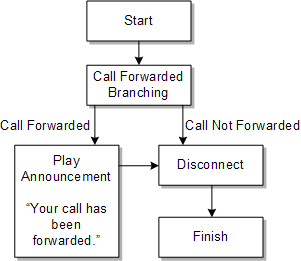
Call Forwarded Branching. This feature node branches depending on if a call has been forwarded. This feature node receives input from a Service Switching Point (SSP) using the CAP specification. The exits are Call Forwarded and Call Not Forwarded.
-
Branch on ERRB Cause Code. This feature node branches depending on if a call has been forwarded. This feature node receives input from a Request Report Basic Call State Model (BCSM) Event operation. One of the standard exits is Call Forwarded.
Figure 2-1 shows the service logic that plays an announcement if a call is forwarded.
Figure 2-1 Playing a Call Forwarding Announcement
About Configuring Interactive Voice Response
You can configure interactive voice response (IVR) in control plans to collect phone numbers from subscribers, or to create a response-driven series of choices, leading to different call terminations. IVR can be used for subscriber self-care, recharging, or any other functionality that requires input from the subscriber.
IVR requires two elements:
-
Announcements to prompt the caller to enter input. See "About Announcements" for information.
-
The caller's input, entered by using the keypad. This can be a phone number, or a single digit that transitions the caller to another choice in an IVR process.
The primary feature nodes for configuring IVR are:
-
Selection Dependent Routing. You use this feature node to route an IVR session based on single digits entered by the subscriber; for example, "Press 1 to talk to technical support."
-
Collect Digits to Pending TN. You use this feature node to get a phone number from a caller.
-
Collect Digits to Buffer. You use this feature node to get a phone number or any other numeric data from a caller.
-
Collect Digits to Sub-tag. You use this feature node to save the number to a subtag in a profile block. For example, this node adds speed-dial numbers to a subtag in the Speed Dial Block.
About Routing an IVR Session
Use the Selection Dependent Routing feature node to route an IVR session based on single digits entered by the caller. You can configure up to 20 branches. For example, you can configure:
-
Pressing star ( * ) routes to Branch 1.
-
Pressing pound ( # ) routes to Branch 2.
-
Pressing 0 routes to Branch 3.
You can configure three types of announcements:
-
An announcement that prompts the caller to press a key.
-
An announcement that prompts the caller if no input is received after a specific time. This is the timeout announcement.
-
An announcement that plays if the caller presses an invalid key.
You can specify the maximum number of times that an announcement is played, and the duration allowed before an announcement is repeated. When an announcement is repeated more than the maximum number of times allowed, the feature node exits as not collected. If the caller hangs up, or there is a network error, the feature node exits as abandoned.
About Collecting Numbers from Callers
To collect numbers from callers, you use the Collect Digits to Pending TN feature node and Collect Digits to Buffer feature node. These feature nodes perform almost the same function. The only difference is that Collect Digits to Pending TN only gets the pending termination number and Collect Digits to Buffer can get any numeric data, including the pending termination number.
Use Collect Digits to Buffer to collect data from a caller and store it for future use. For example, you might offer a prepaid service that prompts the caller to enter the destination phone number.
Note:
Collect Digits to Buffer can store the caller's input in any buffer. Be careful to not choose a buffer that already has data needed by another feature node.
For both feature nodes you configure the following elements:
-
Announcements. The main announcement asks the caller to enter a number; for example, "Please enter the international phone number that you wish to call, followed by the pound key." The retry announcement plays if the input is not correct. You can specify the number of retries and timeout value for both messages.
-
How to validate the data that the caller enters.
-
You can specify the minimum and maximum number of digits.
-
You can specify a prefix that the user must enter.
-
For telephone numbers, you can specify that the number is within the service provider's termination numbers range.
-
-
A key for the caller to press to cancel the entry, and a key to press after entering the number.
-
Where to store the data that is entered. For example, to collect a phone number, you store the data in the CC Pending Termination Field in outgoing session data.
If you specify CC Pending Termination Number, you need to specify the type of number to collect:
-
Off net
-
On net
-
Speed dial
-
Service number
-
CLI
The type of number value is copied to the Pending TN Type. This can be used by other feature nodes; for example, the Test Pending TN Type feature node. See "About Termination Number Types" for more information.
-
If the caller fails to submit a valid number within the allowed number of retries, the feature node exits as not updated. If the caller hangs up or there is a network error, the feature node exits as abandoned.
About Adding a Number to a Subtag
You use the Collect Digits to Sub-tag feature node to add a number to a subtag in a profile block; for example, to add a speed-dial number to the Speed Dial Block.
To use the feature node, you configure the following elements:
-
Announcements. The main announcement asks the caller to enter a number; for example, "Please enter the international phone number that you wish to call, followed by the hash or pound key." The retry announcement plays if the input is not correct. You can specify the number of retries and timeout value for both messages.
-
The minimum and maximum values that can be entered. For example, if you allow speed-dial numbers 1 through 10, 1 is the minimum and 10 is that maximum.
If the caller fails to submit a valid number within the number of retries, the feature node exits as not updated. If the caller hangs up or there is a network error, the feature node exits as abandoned.
About Terminating Calls
You control how calls are terminated by configuring termination numbers. A termination number is the final number that a call terminates to. You can use termination numbers as follows:
-
Specify the number that is being called.
-
Configure how to terminate unsuccessful calls.
-
Configure toll-free calls.
-
Send calls to voice mail.
To configure call termination, you do the following:
-
Configure termination number ranges for each customer.
-
Configure number termination in control plans.
About Configuring Termination Number Ranges
You configure termination number ranges for each customer. Termination number ranges validate the input of the number being called. For example, a customer might require a range of prefixes; such as 0800 to allow calls to 800 numbers, or 040 to allow calls to terminate to numbers with the 040 prefix.
You can also define a system-wide default termination number range. This range is used in control plans when specifying termination numbers. When assigning resources to a customer, you specify to use one of the following:
-
The default termination number range
-
The customer's termination number range
-
No termination number range; in this case, no validation is performed on termination numbers
You use the SMS application to configure termination number ranges. Customers cannot define or edit their own termination number ranges; only a system administrator can.
Note:
If you edit a termination number range that is used by a control plan, the control plan is recompiled.
In addition to termination number ranges, you can define a default termination number for each customer. This number is used when no other valid termination number is found in a control plan. The default termination number must be in the customer's termination number range.
About Configuring Number Termination in Control Plans
A call termination numbers is held in the Convergent Charging Controller PendingTN variable. This variable is used by the Terminate to Pending TN feature node to find the number to terminate the call to.
Note:
In the Control Plan Editor GUI, the Pending TN variable is referred to as the CC Pending Termination Number variable.
When a control plan starts, the PendingTN variable is set from a value you specify in the acs.conf file; specifically, the pendingTNSourceparameter in a ServiceEntry configuration line. (See "About Setting the PendingTN Variable" for more information.) The control plan feature nodes can modify the PendingTN value, or replace it. If the PendingTN value is not changed by a control plan, it is used to populate the destinationRoutingAddress (DRA) parameter in Connect operations sent to the service switching point (SSP).
When configuring call termination, you can configure to terminate calls conditionally or unconditionally.
-
When you configure conditional termination, the feature node includes exits to handle the following conditions:
-
The call is successful.
-
The line is busy.
-
There is no answer. You can set a timer to specify how long to wait before exiting.
-
The caller hangs up.
-
There was a network failure.
-
The network is congested.
-
-
When you configure unconditional termination, there is only one exit.
When you configure conditional termination, you have the following options:
-
Most number termination is handled by the Attempt Terminate to Pending TN feature node. This terminates the call to the number currently in the PendingTN variable.
You can optionally use this feature node to implement least-cost routing. To do so, you enter location data for the number prefix.
-
To terminate a call to a number without charging the caller, use the Attempt Terminate to Pending TN with Duration feature node. For example, you could use this feature node to connect to a subscription weather service. You can specify a maximum duration for the call.
-
To terminate to a specific number, use the Attempt Termination feature node.
When you configure unconditional termination, you have these options:
-
You can terminate the call to the number that was dialed. To do so, use the Terminate Unchanged feature node.
-
You can terminate the call to the number currently in the PendingTN variable. To do so, use the Terminate to Pending TN feature node.
-
You can terminate the number to a single number. To do so, use the Unconditional Termination feature node.
About Setting the PendingTN Variable
The PendingTN variable is filled in by default, as configured in the acs.conf file; specifically, in the pendingTNSource parameter in a ServiceEntry configuration line. You can change the number in the PendingTN variable. For example:
-
Use the Collect Digits to Pending TN feature node to get a termination number from a caller who is using the IVR.
-
Use the Number Lookup and Translation feature node to replace the PendingTN variable with a previously-stored number, or with a number provided by the caller.
-
Use the Set Pending TN from Profile feature node to set the PendingTN variable from another data source.
About Termination Number Types
In addition to the PendingTN variable, Convergent Charging Controller uses the PendingTNType to specify the termination number type. The types are:
-
Unknown.
-
Public Network Number. This is a number that accesses the PSTN directly (sometimes called an off-net number).
-
Private Network Number. This is a number that passes through a private network on its way to the PSTN (sometimes called an on-net number). For example, this number might be used in a "dial 1 to get out" scenario.
-
Speed Dial.
-
Service Number.
-
CLI.
You can use termination number types in feature nodes; for example:
-
You can use the Test Pending TN Type feature node to branch a control plan based on the termination number type.
-
You can specify the termination number type in the Collect Digits to Buffer feature node, used in IVR scenarios.
About Announcements
You use announcements to communicate with callers; for example, to play messages such as:
-
"Please enter the international destination number that you wish to call, then press the hash key."
-
"There is insufficient balance in your card for this call. Please purchase another card."
To use announcements, you do the following:
-
Create announcements and announcement sets in Advanced Calling Services (ACS).
-
Configure announcements in control plans.
You can create variable announcement rules (VARs) that choose from a set of announcements based on conditions. For example, a variable announcement rule might specify to play a different version of an announcement based on the amount of messages in a subscriber's balance.
About Creating Announcements and Announcement Sets
To create announcements, you record the announcements and store them on an intelligent peripheral.
You configure announcement sets in ACS as follows:
-
Assign a resource name and resource ID to each announcement. The resource name is the name of the intelligent peripheral that stores the recording. The ID is the number of the audio file that contains the announcement.
-
Configure variable announcements. See"About Configuring Variable Announcements" for information.
-
Assign each announcement to a language. It is typical to have multiple language versions of the same announcement. All of the versions would have a different resource ID.
-
Assign each announcement to an announcement set. You use announcement sets to organize announcements. You can flag an announcement set as public to allow it to be used by any customer.
About Configuring Variable Announcements
To configure variable announcements, you use variable announcement rule sets. Each rule includes a number of conditions that determine the content of the message. After you configure variable announcement rules, you map the rules to an announcement resource name and resource ID.
About Configuring Announcements for Product Types
When you configure product types in CCS, you can specify the following announcements for each product type:
-
The announcement that alerts the caller that they have a limited amount of credit remaining.
-
The announcement that is played when a subscriber swaps products.
About Setting Announcement Resource Limits
When you configure resource limits for customers, you can specify the maximum number of announcement sets and maximum number of announcements that a customer can use.
About Using Announcements in Control Plans
There are two feature nodes that have the sole purpose of playing announcements: the Play Announcement feature node and the Play Variable Part Announcement feature node. There are many feature nodes that play announcements as part of their functionality. For example, the PIN Authorization feature node plays an announcement that asks for the subscriber's PIN.