4 CCS Credit Card Feature Nodes
Available Feature Nodes
CCS Credit Card Feature Nodes List
This table lists the feature nodes available from the CCS Credit Card palette group in the ACS Control Plan Editor, and the fast key for each feature node in the list. You can use fast keys to search for feature nodes in the palette or the canvas.
Note:
The following feature nodes are deprecated and should no longer be used, but will still function in existing control plans.| Node Name | Node Description |
|---|---|
| Create and Register Credit Card |
The Create & Register Credit Card feature node links a specified subscriber (or if the token identifier is already in the database, then the current logical subscriber) to a credit card. Fast key: CRCC |
| Credit Card State Branching |
The Credit Card State Branching feature node enables control plan flow logic depending on the status of a specified credit card. Fast key: CCSB |
| Credit Cards Per Subscriber Branching |
The Credit Cards Per Subscriber Branching feature node enables control plan flow logic based on the number of credit cards associated with a specified subscriber. Fast key: CCSL |
| Delete Credit Card Details |
The Delete Credit Card Details feature node enables the credit card record and the associated subscriber registration to be removed from the database. Fast key: RMCC |
| Deregister Credit Card |
The Degregister Credit Card feature node removes the link between the credit card and the specified subscriber. Fast key: DRCC |
| Modify Credit Card Details |
The Modify Credit Card Details feature node enables a credit card to be modified. Fast key: MDCC |
| Retrieve Credit Cards for Subscriber |
The Retrieve Credit Cards for Subscriber feature node retrieves details for all the credit cards for the subscriber specified in the feature node configuration. Fast key: RTCC |
| Subscribers Per Credit Card Branching |
The Subscribers Per Credit Card Branching feature node enables control plan flow logic depending on the number of subscribers associated with a specified credit card. Fast key: SCCL |
Create and Register Credit Card
Warning: This feature node has now been deprecated and should no longer be used. This feature node will still function in existing control plans.
Node description
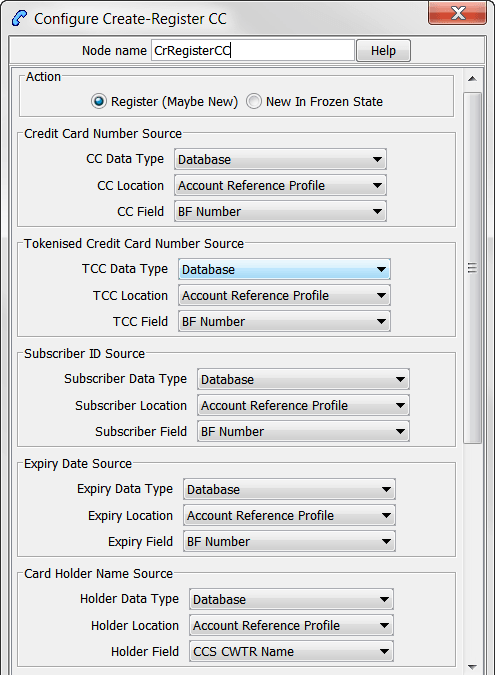
The Create & Register Credit Card feature node links a specified subscriber (or if the token identifier is already in the database, then the current logical subscriber) to a credit card.
When the option in the Action frame is set to:
- New In Frozen State, the feature node will not search for a subscriber record; it will only search for a credit card record.
- Register, the feature node searches the SCP database (through a cache) for an existing registration between the specified subscriber and the specified credit card record using the tokenized number as a search key.
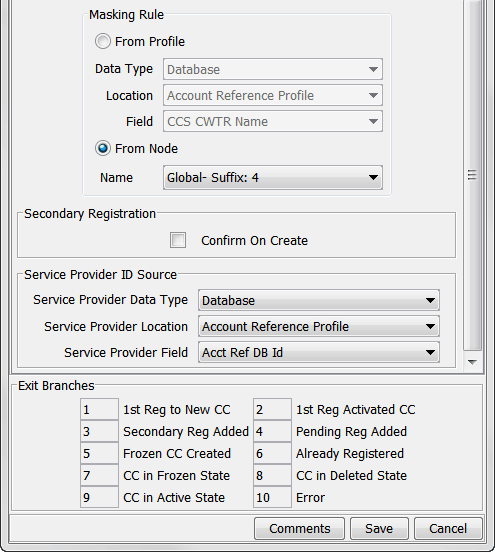
If no credit card record is found for the tokenized number, the feature node applies the masking rule specified to the full credit card number, resulting with a display number split into prefix and suffix that is sent to the SMS with the remaining parameters.
The display prefix and display suffix fields are encrypted by a local database function before being sent to the SMS in the replication request.

Node exits
This node has one entry and ten exits. The number of exits cannot be changed.
| Exit | Name | Cause |
|---|---|---|
| 1 | 1st Reg to New CC | No credit card record for the given tokenized number was found, and the action field is set to Register (Create if required). |
| 2 | 1st Reg Activated CC | No subscriber registration records were found (but the credit card record is present and the state is Frozen) and the action field is set to Register (Create if required). |
| 3 | Secondary Reg Added | A matching subscriber registration record is not found (but the credit card record is present and the state is Active) and the action field is set to Register (Create if required) and the Confirm Secondary Registration flag has been set. |
| 4 | Pending Reg Added | A matching subscriber registration record was not found (but the credit card record is present and the state is Active) and the action field is set to Register (Create if required) and the Confirm Secondary Registration flag has not been set. |
| 5 | Frozen CC Created | No credit card record for the given tokenized number was found, and the action field is set to Create in Frozen state. |
| 6 | Already Registered | A matching subscriber registration record for the credit card exists. |
| 7 | CC in Frozen State |
The action field has been set to Create in Frozen state and an existing credit card record is found which is either in the Active state or has the Frozen flag set. Note: For Active states, this will allow the operator to use the Modify CC feature node to set the state to Frozen on the existing credit card record. |
| 8 | CC in Deleted State | The credit card record is in the Deleted state. |
| 9 | CC in Active State | A matching subscriber registration record is found. |
| 10 | Error |
Any of the following:
|
Node fields
This table describes the function of each field.
| Field | Description |
|---|---|
| Action |
The initial state for the credit card. Register
New Frozen State No credit card found - new record is created as Frozen state. (Default is Register). |
| Credit Card Number Source | The profile field containing the full credit card number (optional, but mandatory for new credit cards). |
| Tokenised Credit Card Number Source | The profile field containing the tokenized credit card number (mandatory). |
| Subscriber ID Source | The profile field containing the subscriber number (optional). |
| Expiry Data Source | The profile field containing the credit card expiry date (optional, but mandatory for new credit cards). |
| Card Holder Source | The profile field containing the name on the credit card (optional, but mandatory for new credit cards). |
| Masking Rule | The profile field or list containing the credit card masking rule (optional, but mandatory for new credit cards). |
| Secondary Registration |
A flag to indicate the credit card is a pending or secondary registration (default is unset - pending). Select for a secondary registration and leave clear for a Pending registration |
| Service Provider ID Source | The profile field containing the ACS Customer identity. |
Configuring the node
Follow these steps to configure the Create & Register Credit Card feature node.
| Step | Action |
|---|---|
| 1 |
Select the required Action option. The options are:
|
| 2 |
Select from the Data Type, Location and Field drop down lists to set the following data locations:
|
| 3 |
Select the Masking Rule option:
|
| 4 |
Confirm the registration as one of the following:
|
| 5 | Click Save. |
Note: The available profile fields are managed using the SMS > ACS Service > Configuration > Profile Tag Details and Profile Tag Mapping tabs. For more information, see Advanced Control Services User's Guide.
Credit Card State Branching
Warning: This feature node has now been deprecated and should no longer be used. This feature node will still function in existing control plans.
Node description
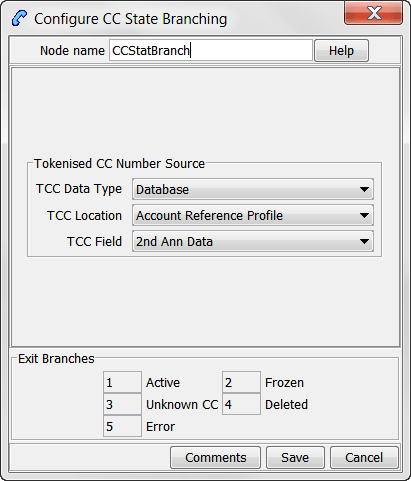
The Credit Card State Branching feature node enables control plan flow logic depending on the status of a specified credit card.
The feature node will read the SCP database (through a cache) and check the specified credit card record using the tokenized number as a search key.

Node exits
This node has one entry and five exits. The number of exits cannot be changed.
| Exit | Cause | Description |
|---|---|---|
| 1 | Active | The credit card record is in the Active state. |
| 2 | Frozen | The credit card record is in the Frozen state. |
| 3 | Unknown CC | No credit card record was found for the specified tokenized number. |
| 4 | Deleted | The credit card record is in the Deleted state. |
| 5 | Error | A general error has occurred. |
Configuring the node
Follow these steps to configure the node.
| Step | Action |
|---|---|
| 1 | Select from the Data Type, Location and Field profile field drop down lists to set the Tokenised Credit Card Number Source data location. |
| 2 | Click Save. |
Note: The available profile fields are managed using the SMS > ACS Service > Configuration > Profile Tag Details and Profile Tag Mapping tabs. For more information, see Advanced Control Services User's Guide.
Credit Cards Per Subscriber Branching
Warning: This feature node has now been deprecated and should no longer be used. This feature node will still function in existing control plans.
Node description
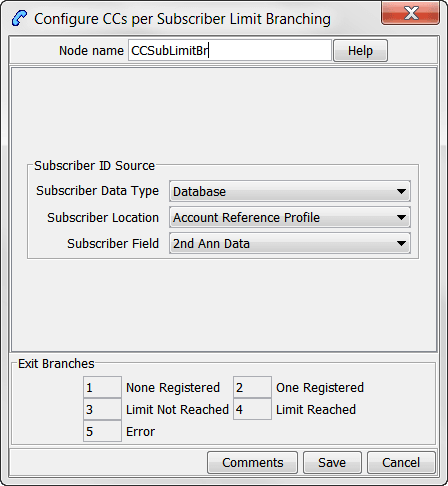
The Credit Cards Per Subscriber Branching feature node enables control plan flow logic based on the number of credit cards associated with a specified subscriber.
The feature node will search the SCP database (through a cache) to look for credit card registrations for the selected subscriber.
The search results will include credit card records in either the active or frozen state, but exclude those in the deleted state.
The subscriber registration state field will be ignored, therefore pending registrations will be included in the number of records found.
The feature node compares the number of returned records with the credit cards per subscriber limit, which is read from either the customer profile or the CCS global profile (in that order).

Node exits
This node has one entry and five exits. The number of exits cannot be changed.
| Exit | Name | Cause |
|---|---|---|
| 1 | None Registered | No credit card records were found. |
| 2 | One Registered | One credit card record is found and the credit cards per subscriber limit is greater than one. |
| 3 | Limit Not Reached | The number of credit card records found (including pending registrations) is less than the configured credit cards per subscriber limit. |
| 4 | Limit Reached | The number of credit card records found (including pending registrations) is greater than or equal to the credit cards per subscriber limit. |
| 5 | Error | A credit cards per subscriber limit could not be found. |
Configuring the node
Follow these steps to configure the node.
| Step | Action |
|---|---|
| 1 | Select from the Data Type, Location and Field profile field drop down lists to set the Subscriber ID Source data location. |
| 2 | Click Save. |
Note: The available profile fields are managed using the SMS > ACS Service > Configuration > Profile Tag Details and Profile Tag Mapping tabs. For more information, see Advanced Control Services User's Guide.
Delete Credit Card Details
Warning: This feature node has now been deprecated and should no longer be used. This feature node will still function in existing control plans.
Node description
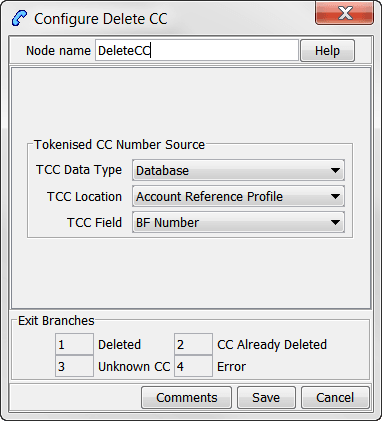
The Delete Credit Card Details feature node enables the credit card record and the associated subscriber registration to be removed from the database.
Note: If the state of the credit card is frozen, the state is changed to deleted and no records are removed.
The feature node searches the SCP database (through a cache) for the specified credit card record using the tokenized number as a search key.

Node exits
This node has one entry and four exits. The number of exits cannot be changed.
| Exit | Name | Cause |
|---|---|---|
| 1 | Deleted | The Credit Card record is in either the Active or Frozen state. |
| 2 | CC Already Deleted | The Credit Card record is already in the Deleted state. |
| 3 | Unknown CC | No Credit Card records have been found. |
| 4 | Error | A general error occurred. |
Configuring the node
Follow these steps to configure the node.
| Step | Action |
|---|---|
| 1 | Select from the Data Type, Location and Field profile field drop down lists to set the Tokenised Credit Card Number Source data location. |
| 2 | Click Save. |
Note: The available profile fields are managed using the SMS > ACS Service > Configuration > Profile Tag Details and Profile Tag Mapping tabs. For more information, see Advanced Control Services User's Guide.
Deregister Credit Card
Warning: This feature node has now been deprecated and should no longer be used. This feature node will still function in existing control plans.
Node description
The Degregister Credit Card feature node removes the link between the credit card and the specified subscriber.
The feature node searches the SCP database (through a cache) for a matching credit card record (using the tokenized number as a search key) and a registration to the specified subscriber.
Primary registration states cannot be removed by this feature node. The credit card can be removed by using the Delete Credit Card Details feature node. The primary registration may be changed using the CCS screens (SMS > Services > Prepaid Charging > Subscriber Management > Credit Cards) or a PI command (see PI Commands (CCS) Operations Guide).
Node exits
his node has one entry and six exits. The number of exits cannot be changed.
| Exit | Cause | Description |
|---|---|---|
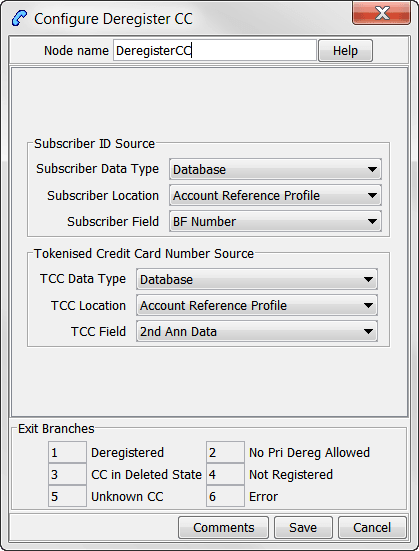
| 1 | Deregistered | A registration record is found and the registration state is Secondary or Pending. |
| 2 | No Pri Dereg Allowed | A registration record is found and the registration state is Primary. |
| 3 | CC in Deleted State | A credit card record is found with the Deleted state. |
| 4 | Not Registered | A credit card record is found but no registration can be found. |
| 5 | Unknown CC | No credit card record can be found. |
| 6 | Error | A general error has occurred. |
Configuring the node
Follow these steps to configure the node.
| Step | Action |
|---|---|
| 1 |
Select from the Data Type, Location and Field profile field drop down lists to set the following data locations:
|
| 2 | Click Save. |
Note: The available profile fields are managed using the SMS > ACS Service > Configuration > Profile Tag Details and Profile Tag Mapping tabs. For more information, see Advanced Control Services User's Guide.
Modify Credit Card Details
Warning: This feature node has now been deprecated and should no longer be used. This feature node will still function in existing control plans.
Node description
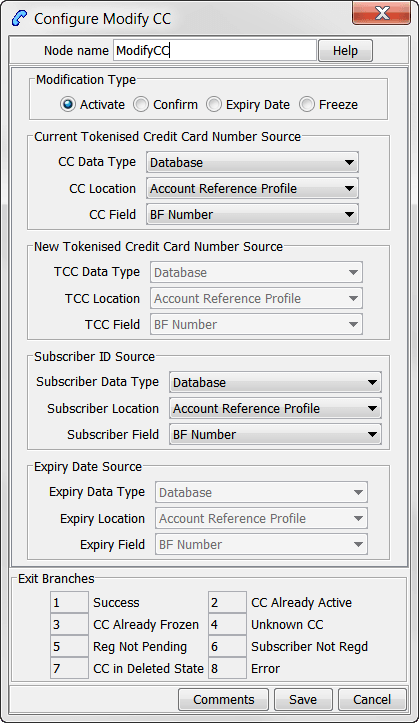
The Modify Credit Card Details feature node enables a credit card to be modified.
The feature node searches the SCP database (through a cache) for an existing credit card record with the specified current tokenized number.
The modification type selection drives what is changed:
- Activate - Changes the credit card state from frozen to active.
- Confirm - Changes the selected subscriber registration state from pending to secondary.
- Expiry Date - Changes the credit card expiry date (the expiry date and new tokenized number fields are only available with this option).
- Freeze - Changes the credit card state from active to frozen.
Node exits
This node has one entry and eight exits. The number of exits cannot be changed.
| Exit | Cause | Description |
|---|---|---|
| 1 | Success |
This branch taken for any of these conditions:
|
| 2 | CC Already Active | This branch taken when the modification type is Activate and the retrieved credit card state is Active. |
| 3 | CC Already Frozen | This branch taken when the modification type is Freeze and the retrieved credit card state is Frozen. |
| 4 | Unknown CC | This branch taken when an existing credit card record with the specified current tokenized number could not be found. |
| 5 | Reg Not Pending | This branch taken when the modification type is Confirm and a subscriber registration record is found with a registration state of Primary or Secondary. |
| 6 | Subscriber Not Regd | This branch taken when the modification type is Confirm and no subscriber registration record is found. |
| 7 | CC in Deleted State | This branch taken when the found credit card record is in the Deleted state. |
| 8 | Error |
This branch taken for any of these conditions:
|
Configuring the node
Follow these steps to configure the node.
| Step | Action |
|---|---|
| 1 |
Select the required Modification Type option, one of:
Note: The available profile field selections are made available according to this selection. |
| 2 |
Select from the available profile field Data Type, Location and Field drop down lists to set the following data locations:
|
| 3 | Click Save. |
Note: The available profile fields are managed using the SMS > ACS Service > Configuration > Profile Tag Details and Profile Tag Mapping tabs. For more information, see Advanced Control Services User's Guide.
Retrieve Credit Cards for Subscriber
Warning: This feature node has now been deprecated and should no longer be used. This feature node will still function in existing control plans.
Node description
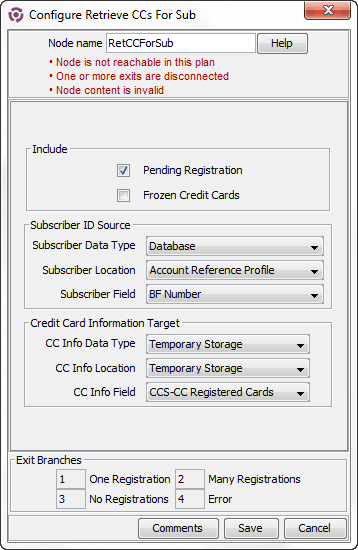
The Retrieve Credit Cards for Subscriber feature node retrieves details for all the credit cards for the subscriber specified in the feature node configuration.
The feature node searches for credit card records in the following states:
- Active
- Frozen (Optional. By default, frozen credit cards are not retrieved)
- Primary or secondary registration
- Pending registration (Optional. By default credit cards that are pending registration are not retrieved)
The feature node retrieves the following credit card details for each credit card registered to the subscriber, and orders the results in ascending registration date order:
- Tokenized credit card number
- Credit card number suffix
- Credit card expiry date
- Credit card holder
The feature node saves the results in temporary storage to the configured profile block. You must specify a profile block, such as the CCS-CC Registered Cards profile block, that contains four sub-tags in which to store the credit card details.
Use the Open Services Development (OSD) feature node after the Retrieve Credit Card Details feature node in your control plans to copy the details for each credit card from temporary storage to the OSD profile tags.
The following table lists the profile tag details for the CCS-CC Registered Cards profile block.
| Profile Tag Name | Profile Tag Type | Profile Tag ID | Parent Tag ID |
|---|---|---|---|
| CCS-CC Registered Cards | Array | 1311509 | |
| CS-CC Registered Tokens | Nstring | 1311510 | 1311509 |
| CCS-CC Registered Suffix | Nstring | 1311511 | 1311509 |
| CCS-CC Registered Expiry | Nstring | 1311512 | 1311509 |
| CCS-CC Registered Holder | Nstring | 1311513 | 1311509 |

Node exits
This node has one entry and four exits. The number of exits cannot be changed.
| Exit | Cause | Description |
|---|---|---|
| 1 | One Registration | A single registration has been found (including if selected, those in Pending or Frozen state). |
| 2 | Many Registrations | Multiple credit card records found (including if selected, those in Pending or Frozen state). |
| 2 | No Registrations | No registration records found (including if selected, those in Pending or Frozen state). |
| 4 | Error | If the destination profile block type is not array, or it does not have four nstring type sub-tags, then the error branch is taken. |
Configuring the node
Follow these steps to configure the Retrieve Credit Cards for Subscriber feature node.
| Step | Action |
|---|---|
| 1 |
Select the Include options as required:
|
| 2 |
Select from the profile field Data Type, Location and Field lists to set the following data locations:
|
| 3 | Click Save. |
Note: The available profile fields are managed using the SMS > ACS Service > Configuration > Profile Tag Details and Profile Tag Mapping tabs. For more information, see Advanced Control Services User's Guide.
Subscribers Per Credit Card Branching
Warning: This feature node has now been deprecated and should no longer be used. This feature node will still function in existing control plans.
Node description
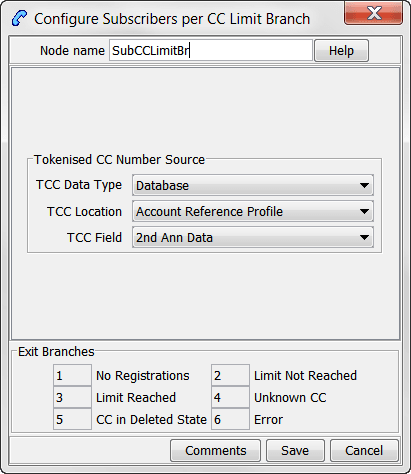
The Subscribers Per Credit Card Branching feature node enables control plan flow logic depending on the number of subscribers associated with a specified credit card.
The feature node searches the SCP database (through a cache) to look for subscriber registrations for the specified credit card record using the tokenized number as a search key.
The search results include all records in the pending, frozen or active states.
The subscribers per credit card limit is read from either the customer profile or the CCS global profile (in that order).

Node exits
This node has one entry and six exits. The number of exits cannot be changed.
| Exit | Name | Cause |
|---|---|---|
| 1 | No Registrations | No subscribers registered to the credit card. |
| 2 | Limit Not Reached | The configured limit of subscribers registered (including pending registration) to this credit card not yet reached. |
| 3 | Limit Reached | The number of subscribers registered (including pending registration) to this credit card is equal to or more than the configured limit. |
| 4 | Unknown CC | No records found for the credit card. |
| 5 | CC in Deleted State | The credit card is in the Delete state. |
| 6 | Error | No limit value found for the subscribers per credit card limit. |
Configuring the node
Follow these steps to configure the node.
| Step | Action |
|---|---|
| 1 | Select from the profile field Data Type, Location and Field drop down lists to set the Tokenised Credit Card Number Source data location. |
| 2 | Click Save. |
Note: The available profile fields are managed using the SMS > ACS Service > Configuration > Profile Tag Details and Profile Tag Mapping tabs. For more information, see Advanced Control Services User's Guide.