17 OSD Feature Nodes
Available Feature Nodes
OSD Feature Node List
This table lists the feature node available from the OSD palette group and the feature node fast key. You can use the fast key to search for the feature node in the feature palette or the canvas.
| Node name | Node description |
|---|---|
| Iterator |
The Iterator node allows iterating through prefix tree, ordered prefix trees, or array elements, extracting the content of each entry or element and copying it to temporary storage variables. Fast key: ITRT |
Disconnect Nodes Release Causes
This table lists the release causes you should use in Disconnect feature nodes that you include in your OSD control plans.
| Cause | OSD Meaning |
|---|---|
| 1 | No such subscriber |
| 3 | Missing parameter |
| 4 | Mis-typed parameter |
| 5 | System error |
Each cause is translated into a SOAP cause that is returned to the WSDL origin. This means that anyone trying to identify a fault with the control plan will be using accurate information.
Iterator
Node description
The Iterator node allows iterating through prefix tree, ordered prefix trees, or array elements, extracting the content of each entry or element and copying it to temporary storage variables.
Prefix trees and ordered prefix trees are defined in profile blocks. For more information on how to define these types of structures, see ACS User's Guide.
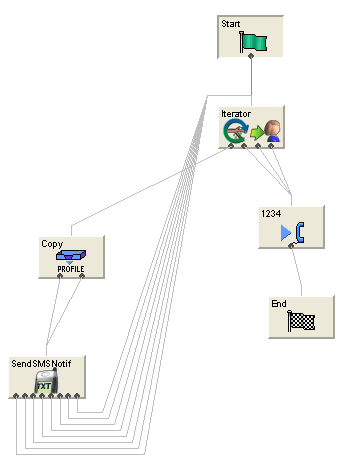
A telco or a third party (for example, an ASP) may require access to the Convergent Charging Controller platform from a WEB application (for example to transfer money from user A's account to user B's account, send a short message to user B and then tell user A what the balance and expiry date of all his balances are).
A control plan using the iterator node can perform part of this logic that deals with which parameters come in / go out through XML.
When the control plan is saved, a WSDL file is produced which can then be given to the third party or client ASP.
A SOAP request conforming to this WSDL and sent to the appropriate address and port will result in the control plan being run and a SOAP response containing the balances and expiry dates being sent back to the application.
Node icon
If the CPE has been configured to use the static panel CPE palette style, the CPE displays the icon shown below to represent the feature node.

Restrictions
A control plan may contain as many Iterator nodes as required.
Warning: An Iterator node must never be placed within the loop of another Iterator node. See Iterator examples below
Node exits
This node has one entry and four exits. The number of exits cannot be changed.
| Exit | Cause | Description |
|---|---|---|
| 1 | Next | A sub tag has been successfully processed, but there is at least another sub tag to process. |
| 2 | No more | A sub tag has been successfully processed and there are no more sub tags. |
| 3 | Data not found | Data could not be found at the profile filed (prefix tree) location. |
| 4 | Error | The node detected that two or more feature nodes are used simultaneously, which could result in each node attempting to copy into the same fields in Temporary Storage. |
Configuring the node
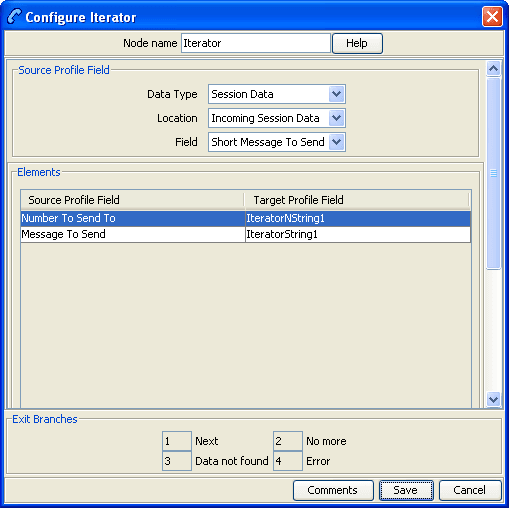
Follow these steps to configure the Iterator node.
| Step | Action |
|---|---|
| 1 |
In the Source Profile Field section of the Configure Iterator node screen, select the Data Type, Location, and Field from the drop down lists for the node to iterate over. Result: The Elements section is populated with the sub tags and their storage location after the Iterator node has finished processing the selected profile field. |
| 2 | Click Save. |