22 RIMS Feature Nodes
Overview
Introduction
This chapter describes the Oracle Communications Convergent Charging Controller RIMS feature nodes. You use RIMS feature nodes in Messaging Manager Navigator control plans. If any additional custom feature nodes have been created and installed to fit your specific customer requirements, they will not appear in this list.
Available Feature Nodes
RIMS Feature Nodes List
This table lists the feature nodes available from the RIMS palette group in the Control Plan Editor.
| Node name | Node description |
|---|---|
| IS41 RIMS Query | Supports IS-41 messages and queries the IMSI/MIN or IMSI/MIN & VMSC/SGSN address of any ACS number field. |
| MAP RIMS Query | Supports MAP messages and queries the IMSI/MIN or IMSI/MIN & VMSC/SGSN address of any ACS number field. |
RIMS Nodes Use Cases
Introduction
In order to retrieve the requested values from Messaging Manager Navigator and store them in the chassis and engine fields, each node has two states.
- The first state sets up an xmsRimsChassisAction and passes the data needed to generate the RIMS query message.
- The second state receives information determining which exit branch to take from the chassis action.
The only difference between the MAP and IS41 nodes are the data fields in the UI that will be used to populate the query message, thus the following section will apply to both MAP and IS41 nodes unless specified.
Query
The first state in each node will construct an xmsRimsChassisAction and send it the node data needed to construct the RIMS query message.
The node will then set the next state to be State 2, and will return ACS_ENGINE_MACRO_STAY_HERE, passing control to ACS until a response is received.
Response
The second state of the node will be entered once the xmsRimsChassisAction has determined the validity of the response message from RIMS, and stored the values in the chassis and engine contexts if they are successful. The chassis action will return an enum denoting which exit branch the node should take based on this.
Therefore, all the second state will need to do is follow the specified exit.
IS41 RIMS Query
Node description
The IS41 RIMS Query node supports IS-41 messages and queries the IMSI/MIN or IMSI/MIN & VMSC address of any MDN stored in an ACS number field.
The results can then be placed into ACS chassis and engine parameters.
This node allows you to override the SCCP Destination address digits used by the RIMS interface when sending IS41 SMSRequest messages to the HLR. The SCCP Calling Party address can also be overridden, allowing different addresses to be selected inside the control plan.
Node icon
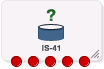
If the CPE has been configured to use the static panel CPE palette style, the CPE displays the icon shown below to represent the feature node.

Node exits
This node has one entry and five exits. The number of exits cannot be changed.
| Exit | Cause | Description |
|---|---|---|
| 1 | Success | Query was successful. |
| 2 | Transient Failure | A transient failure status was returned. |
| 3 | Permanent Failure | A permanent failure status was returned. |
| 4 | Node Failure | General case for an unhandled state in this node. |
| 5 | RIMS Timeout | Response time exceeded timeout. |
Restrictions
The HLR SCCP Address area in this node specifies a full SCCP destination address, not just the prefix. Therefore, this node is expected to be used in conjunction with, and after a Copy and/or a Modify node when a composite address is required by the control plan, for example, prefix + MDN.
This node may be used any number of times within a control plan.
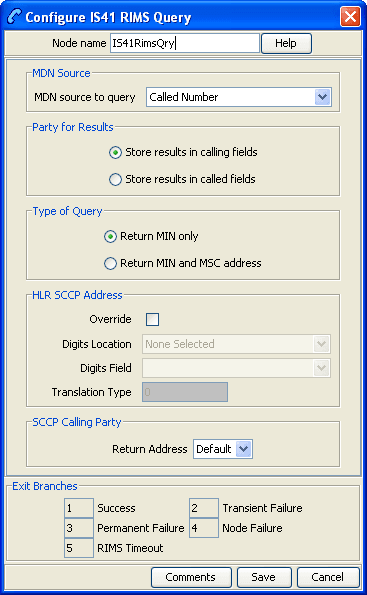
Configuring the node
Follow these steps to configure the IS41 RIMS Query node.
| Step | Action |
|---|---|
| 1 | Select the value in MDN source to query to send as the MDN key in the query message to RIMS. |
| 2 | In the Party for Results area, select the option to store the values in the response from RIMS in either calling or called engine and chassis fields. |
| 3 | In the Type of Query area, select the return option to control the contents of the requested results field in the query message. |
| 4 |
In the HLR SSCP Address area, select the Override check box to optionally edit the following fields:
Note: This area is used to specify the SCCP Destination address digits for the RIMS interface to use while sending IS41 SMSRequest messages to the HLR. This will be based on the data stored in the profile. |
| 5 |
In the SCCP Calling Party area, select from the drop down list the Return Address of the SCCP originating address. This field is populated from the
Note: It is recommended to select the
Return Address value as |
| 6 | Click Save. |
MAP RIMS Query
Node description
The MAP RIMS Query node supports MAP messages and queries the IMSI/MIN or IMSI/MIN & VMSC/SGSN address of any MDN stored in an ACS number.
The results can then be placed into ACS chassis and engine parameters.
This node allows you to override the SCCP Destination address digits used by the RIMS interface when sending MAP SendRoutingInfoForSM messages to the HLR. The SCCP Calling Party address can also be overridden, allowing different addresses to be selected inside the control plan.
Node icon
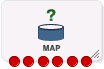
If the CPE has been configured to use the static panel CPE palette style, the CPE displays the icon shown below to represent the feature node.

Node exits
This node has one entry and six exits. The number of exits cannot be changed.
| Exit | Cause | Description |
|---|---|---|
| 1 | Success - VMSC | VMSC or only the IMSI, are successfully returned. |
| 2 | Success - SGSN | SGSN successfully returned. |
| 3 | Transient Failure | A transient failure status was returned. |
| 4 | Permanent Failure | A permanent failure status was returned. |
| 5 | Node Failure | General case for an unhandled state in this node. |
| 6 | RIMS Timeout | Response time exceeded timeout. |
Restrictions
The HLR SSCP Address area in this node specifies a full SCCP Destination address, not just the prefix. Therefore, this node is expected to be used in conjunction with, and after a Copy and/or a Modify node when a composite address is required by the control plan, for example, prefix + MSISDN.
This node may be used any number of times within a control plan.
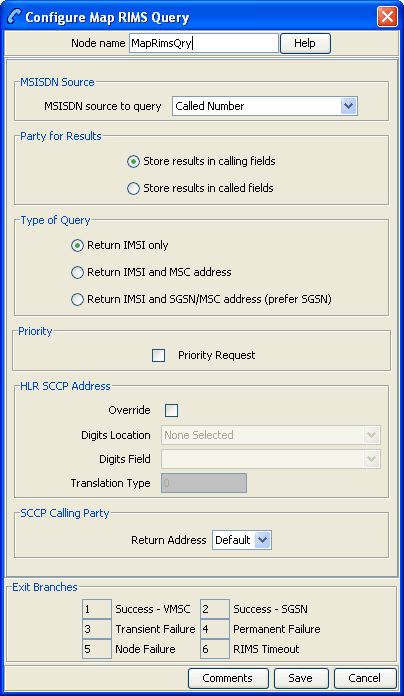
Configuring the node
Follow these steps to configure the Map RIMS Query node.
| Step | Action |
|---|---|
| 1 |
Select the value in MSISDN source to query to send as the MSISDN key in the query message to RIMS. Note: If you select an IMSI, RIMS will treat this value as an MSISDN and may return a non-intuitive number. |
| 2 | In the Party for Results area, select the option to store the values in the response from RIMS in either calling or called engine and chassis fields. |
| 3 |
In the Type of Query area, select the return option to control the contents of the requested results field in the query message. Note: If you select the Return IMSI and SGSN/MSC address option, but only the VMSC address is returned, the exit used will be "Success - VMSC". |
| 4 | Select the Priority Request check box if you wish to set RIMS query message to priority, rather than normal. |
| 5 |
In the HLR SSCP Address area, select the Override check box to optionally edit the following fields:
Note: This area is used to specify the SCCP Destination address digits which the RIMS interface will use while sending MAP SendRoutingInfoForSM messages to the HLR. This will be based on the data stored in the profile. |
| 6 |
From the SCCP Calling Party area, select from the drop down list the Return Address of the SCCP originating address. This field is populated from the
Note: It is recommended to select the
Return Address value as |
| 7 | Click Save. |