29 XMS Control Feature Nodes
Available Feature Nodes
XMS Control Feature Node List
This table lists all the available Messaging Manager feature nodes in the XMS Control feature group. If any custom feature nodes have been created and installed to fit your specific customer requirements, they will not appear in this list.
Note: For information about the available Messaging Manager profile fields, see Messaging Manager Profile Fields.
| Node name | Node description |
|---|---|
| Accept |
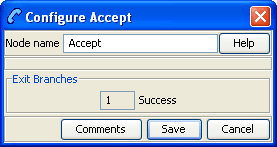
The Accept node is used to instruct Messaging Manager to perform an Accept action. This node should be used in preference to the Disconnect Call node specifying 127. |
| Attempt Delivery Pending | The Attempt Delivery Pending (ADP) feature node attempts to deliver the message. This feature node has no billing engine interaction, and will attempt the delivery of the short message with no account balance check. |
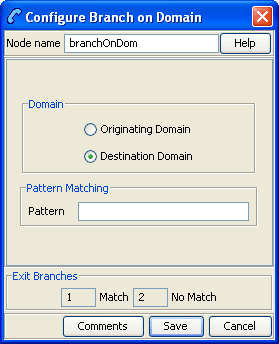
| Branch on Domain | The Branch on Domain node allows a service plan to act differently depending on the domains assigned to the message origination or destination domains. |
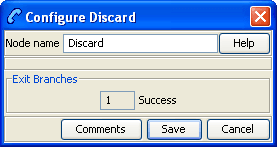
| Discard | The Discard node is used to tell Messaging Manager to perform a discard action. |
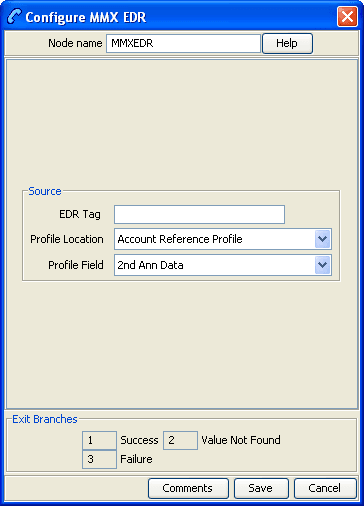
| MMX EDR | The MMX EDR node takes a literal string for the EDR tag, and a profile buffer for the EDR value. |
| Reject |
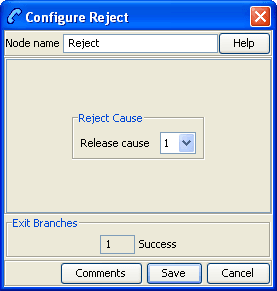
The Reject node is used to send a specified (in this node) ACS release cause to Messaging Manager. This node should be used in preference to the Disconnect Call node specifying the release cause. |
| Send Short Message Notification | Use the Send Short Message Notification (SSMN) feature node to construct and send an INTERNAL short message from Messaging Manager that you specify either in the feature node, or by using a notification template defined in ACS. |
| Send USSD Message | The Send USSD Message node is used to send a message to the USSD application. |
| Send USSD Notification | The Send USSD Notification node is used to send a USSD Notification message to the MSC/handset. |
| Set Message Routing | The Set Message Routing node allows a control plan to set routing parameters which determine the routing rule to use, and hence guides outbound path selection. |
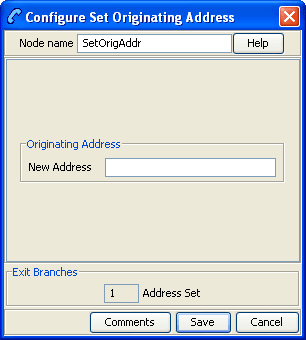
| Set Originating Address | The Set Originating Address node allows you to set the originating address for all messages that pass through the node to the address specified in the node. |
Accept
Node description
The Accept node is used to instruct Messaging Manager to perform an Accept action.
This node should be used in preference to the Disconnect Call node specifying 127.
Node icon

If the CPE has been configured to use the static panel CPE palette style, the CPE displays the icon shown below to represent the feature node.

Attempt Delivery Pending
Node description
The Attempt Delivery Pending (ADP) feature node attempts to deliver the message. This feature node has no billing engine interaction, and will attempt the delivery of the short message with no account balance check.
This feature node also monitors for message delivery and returns a message delivery status.
Node icon
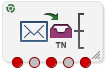
If the CPE has been configured to use the static panel CPE palette style, the CPE displays the icon shown below to represent the feature node.

Node exits
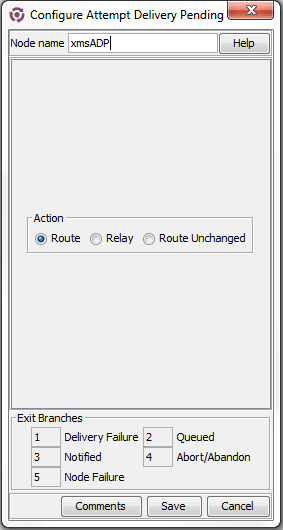
This feature node has one entry and five exits. The number of exits cannot be changed.
| Exit | Cause | Description |
|---|---|---|
| 1 | Delivery Failure | SMS delivery failed. |
| 2 | Queued | SMS sent to SMSC, no further monitoring. |
| 3 | Notified | Successful delivery of the message to an SME. |
| 4 | Abort/Abandon | An abort was received from the network, or message abandoned. |
| 5 | Node Failure | Failure due to an internal error, or result message being either unknown, or not of the right type. |
Editing the node
Follow these steps to configure the Attempt Delivery Pending feature node.
| Step | Action |
|---|---|
| 1 |
Select the action for Messaging Manager to take. To cause a:
For more information about the different actions, see the discussion on triggering rules in Messaging Manager User's Guide. |
| 2 | Click Save. |
Branch on Domain
Node description
The Branch on Domain node allows a service plan to act differently depending on the domains assigned to the message origination or destination domains.
Node icon

If the CPE has been configured to use the static panel CPE palette style, the CPE displays the icon shown below to represent the feature node.

Discard
Node icon

If the CPE has been configured to use the static panel CPE palette style, the CPE displays the icon shown below to represent the feature node.

MMX EDR
Node description
The MMX EDR node takes a literal string for the EDR tag, and a profile buffer for the EDR value. Thus, any profile buffer can be written to an MMX EDR. The node stores the string as a profile buffer. This buffer will then be examined by the service loader, and passed back to Messaging Manager as an extension with the tag SM_TAG_CDR_INFO.
EDRs specified by the MMX EDR nodes will appear in the final EDR in alphabetical order instead of following the processing order in the control plan.
The MMX EDR node does not interact with EDR tags from other sources and will not affect or overwrite any of these EDR tags. Therefore, the final EDR record may have duplicated EDR tags if the same EDR tag is defined and used by the MMX EDR node and other different sources.
Supported profile data types
The profile data types supported by the MMX EDR node are limited to the following types:
- STRING
- NSTRING
- LNSTRING
- SHORT
- UINTEGER
- INTEGER
- BYTE
For other types, you need to use the Format Text (see page 650) node to format the data and save the formated string into a profile buffer, then configure the profile buffer as the source buffer in the MMX EDR node.
Node icon

If the CPE has been configured to use the static panel CPE palette style, the CPE displays the icon shown below to represent the feature node.

Node exits
This node has one entry and three exits. The number of exits cannot be changed.
| Exit | Cause | Description |
|---|---|---|
| 1 | Success | Value successfully retrieved from profile. |
| 2 | Value not Found | Value not found in profile. |
| 3 | Failure | General failure condition. |
Configuring the node
Follow these steps to configure the node.
| Step | Action |
|---|---|
| 1 |
Enter an EDR Tag in the field. Note: When using the MMX EDR node to build a control plan, you need to make sure all given EDR tags are unique across the control plan. If there are any duplicated EDR tags, the last occurrence will overwrite previous ones. |
| 2 | Select a profile location and field to retrieve. |
| 3 | Click Save. |
Reject
Node description
The Reject node is used to send a specified (in this node) ACS release cause to Messaging Manager.
This node should be used in preference to the Disconnect Call node specifying the release cause.
Node icon

If the CPE has been configured to use the static panel CPE palette style, the CPE displays the icon shown below to represent the feature node.

Send Short Message Notification
Node description
Use the Send Short Message Notification (SSMN) feature node to construct and send an INTERNAL short message from Messaging Manager that you specify either in the feature node, or by using a notification template defined in ACS.
You select the message originator and destination from the following options:
- A fixed number or alphanumeric address. If the address is alphanumeric, the message must be routed through the protocol that supports it, such as EMI, SMPP, or SIP.
- Any existing ACS context digit field, including:
- The caller or message originator of the current call or SMS.
- The called party or message destination of the current call or SMS.
- A profile tag containing a comma separated list of destinations.
If required, you can override NPI and TON values in the outgoing message by using a Set, or a Copy feature node before the SSMN feature node in the control plan. You use the Set, or the Copy feature node to set the override values in one or more of the following profile fields:
- SSMN Originating TON Override
- SSMN Destination TON Override
- SSMN Originating NPI Override
- SSMN Destination NPI Override
See NPI and TON Override Profile Fields for more information.
Note: You can use the SSMN feature node in any service control plan. Although the SSMN feature node is installed with Messaging Manager, you can use it in non-Messaging Manager service control plans. The SSMN feature node does not require the use of the Messaging Manager service library.
Important: To use this feature node in a service control plan, an INTERNAL adapter must be configured in the system.
Node icon
If the CPE has been configured to use the static panel CPE palette style, the CPE displays the icon shown below to represent the feature node.

Restrictions
A control plan may contain as many Send Short Message Notification feature nodes as required.
Node exits
This feature node has one entry and eight exits. The number of exits cannot be changed.
| Exit | Cause | Description |
|---|---|---|
| 1 | Success | Message sent successfully. |
| 2 | Send Failure | Cannot send SLEE event to wrapper. |
| 3 | Params Unavailable | The token specified cannot be found. For example <SMS_TEXT> token, if message text is not available or cannot be converted to Latin-1. |
| 4 | Node Failure | Internal node error. Message not sent. |
| 5 | Timeout | Did not get the expected response within the Timeout number of seconds. |
| 6 | Temporary Error | The returned cause code maps to a temporary error. |
| 7 | Permanent Error | The returned cause code maps to a permanent error. |
| 8 | Abort | The returned cause code maps to an abort error. |
Note: The temporary, permanent and abort errors are all configured in the Messaging Manager Action and Error Codes screens. From the main SMS screen, see Services > Messaging Manager> Action and Error Codes and the Error Type column.
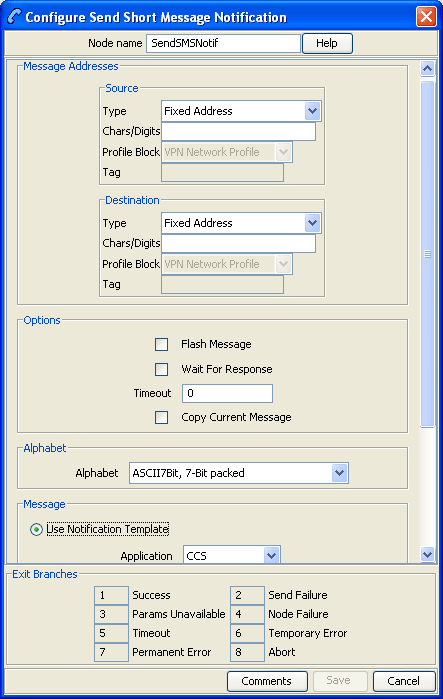
Configuring the node
Follow these steps to edit the Send Short Message Notification feature node.
| Step | Action |
|---|---|
| Message Addresses - Source | |
| 1 |
Select the Type of source address from the list. Result: The fields requiring data for the type selected are made available. |
| 2 |
If available, enter the characters or digits for the source address in the Chars/Digits field. Tip: This is a text string representing the sender of the notification. It can be either a telephone number or an alphanumeric address. If it contains any characters other than 0-9, it will be regarded as an alphanumeric address and will have TON (type of number) set to alphanumeric, otherwise TON will be set to unknown. NPI (number plan indicator) will always be set to unknown. |
| 3 | If available, from the Profile Block drop down list, select the profile block for the source address. |
| 4 |
If available, enter in the Tag field, the location of the source address within the selected profile block. Tip: Valid tags for the profile block can be found in the ACS configuration screens. From main SMS screen, select menu options Services > ACS Services, then Configuration. The profile block and tag names are available under the Profile Tag Mapping tab, and the tag value for the tag name under the Profile Tag Details tab (Profile Tag column). |
| Message Addresses - Destination | |
| 5 |
Select the Type of destination address from the list. Result: The fields requiring data for the type selected are made available. |
| 6 |
If available, enter the characters or digits for the destination address in the Chars/Digits field. Tip: This is a text string representing the sender of the notification. It can be either a telephone number or an alphanumeric address. If it contains any characters other than 0-9, it will be regarded as an alphanumeric address and will have TON set to alphanumeric, otherwise TON will be set to unknown. NPI will always be set to unknown. |
| 7 | If available, from the Profile Block drop down list, select the profile block for the destination address(es). |
| 8 |
If available, enter in the Tag field, the location of the destination address(es) as a comma separated list of destinations within the selected profile block. Tip: Valid tags for the profile block can be found in the ACS configuration screens. From main SMS screen, select menu options Services > ACS Services, then click Configuration. The profile block and tag names are available under the Profile Tag Mapping tab, and the tag value for the tag name under the Profile Tag Details tab (Profile Tag column). |
| Options | |
| 9 |
To send the message as a flash message, select the Flash Message check box. Tip: Flash messages are displayed immediately on the subscriber's handset, rather than going to their in box. |
| 10 |
If a response is expected, to avoid missing the response, select the Wait for Response check box and then enter the number of seconds to wait for the response in the Timeout field. Tip: If the check box is deselected, then the node will exit the Success exit immediately. |
| 11 |
To preserve the parameters set for the original message that triggered the control plan, select the Copy Current Message check box. Result: The current message is copied and the parameters supplied in this node are applied to the internal message being constructed by this node. Example: If the destination domain has been specified in the Set Message Routing node earlier in the control plan, this will be copied to the new message. |
| Alphabet | |
| 12 |
Select a character encoding for the SMS message, click on the arrow against the Alphabet text box and pick an encoding from the drop-down list.
Example: To send SMS text using Arabic
characters, you would pick |
| Message | |
| 13 |
Select one of the following
See Message content for a description of how to construct messages. |
| 14 | Click Save. |
Message content
The Message field is a (UTF-8) text field. This field is tokenized when the node is initialized, so that fast construction of the message can be done during message processing. For a list of tokens, see Message tokens
Tokens are searched for in the message text, and replaced with an appropriate value. If the value (at call-time) is null, the token is removed from the message text.
The SMS is sent to MM with the specified UTF-8 encoded text, and the desired alphabet set from the Alphabet drop down list.
Warning: Tokens are case sensitive.
Machine environment information
In addition, there is access to some of the machine's environment information, using the following tokens.
| Token | Description |
| <DATE> | The current system time on the SLC (after conversion to GMT).
Output format is described in the Configuration section. This
variable may have a modifier, in number of hours to add to the
time. For example: "<DATE+2:30>".
|
| <TIME> |
As above, but with a different output format. The am/pm requirement is possible through the strftime format string. |
| <TIME24> | As above, but with a different output format. |
Example message
An SMS text is:
"Your call to <SERVICE_NUMBER> was sent on
<DATE>"
This will appear (at the receiving handset) as:
"Your call to 043345335 was sent on Monday 10th December
2012".
Message tokens
Tokens are searched for in the message text, and replaced with an appropriate value. If the value (at call-time) is null, the token is removed from the message text. The token values are extracted from the ACS engine context, so a value is always expected to be available.
Here is the list of tokens:
| Token | Description |
|---|---|
| <ACCOUNT_ID> | Currently only set if the service control plan was triggered with the CC service library. The format is an integer that is the CCS Account Reference ID (stored in the SMF database). |
| <ACCOUNT_NUMBER> |
The normalized calling or called number. For Messaging Manager triggered service control plans, this is the calling number for XMS_Originating, and the called number for the XMS_Terminating service. For ACS_CB triggered service control plans this is the normalized calling or called number, whichever party is to be billed for the message. |
| <CALLED_NUMBER> | The unnormalized called number. |
| <CALLED_PARTY_ID> | Exactly the same as <CALLED_NUMBER>. |
| <CALLING_NUMBER> | The calling party's MSISDN. |
| <CALLING_PARTY_ID> | Exactly the same as <CALLING_NUMBER>. |
| <CALLING_PRIVATE_NETWORK> | Only set for service control plans that are triggered via the VPN service. In this case it will be the calling number in the private network. |
| <CALL_DURATION> | The current call length (set for example by the ccsATB and ccsUATB nodes). |
| <CALL_TIME> | Ultimately comes from the SLC time at the start of triggering to ACS. The format is determined by the node configuration for the time format. |
| <CALL_START_DATE> | Exactly the same as the <CALL_TIME>. |
| <LOCATION_NUMBER> | The location number from the IDP used to trigger ACS. For Messaging Manager triggered calls this will be the SourceLocationInformation (that is, the originating address). |
| <LOGICAL_CALLING_NUMBER> | A normalized version of the logical calling number. For Messaging Manager triggered service control plans this will be the MIN or MDN, depending on the switch involved. |
| <NETWORK_CALLING_NUMBER> | This is the MIN or MDN, depending on the switch. |
| <NORM_CALLED_NUMBER> | Normalized version of <CALLED_NUMBER>. |
| <NORM_CALLING_NUMBER> | Normalized version of <CALLING_NUMBER>. |
| <ORIGINAL_CALLED_NUMBER> | This is the getOriginalCalledPartyID from the IDP, which is the called party number (before any changes made by ACS). |
| <PIN> | Only available if a prior node in the service control plan has set the PIN (for example, the PIN Authorisation Node). |
| <PENDING_TERMINATION_NUMBER> | Only available if a termination attempt has previously been made in the current service control plan. |
|
<PROFILE_CHAR_BLOCKnumber_TAG<tag number>> <PROFILE_INT_BLOCKnumber_TAG<tag number>> |
Data stored in Profile blocks is retrieved during call processing using one of the profile tag tokens: PROFILE_CHAR_BLOCK - if value is string format PROFILE_INT_BLOCK - if value is an integer The required values are defined as:
Example: <PROFILE_CHAR_BLOCK19_TAG7671818> is replaced by a string value taken from the field with tag 7671818 from profile block 19. For more information about profile blocks, see Profile Block list. |
| <REDIRECTION_NUMBER> | The redirecting party ID from the IDP used to trigger ACS. For Messaging Manager triggered service control plans, this is the SMSCAddress (DA serviceCentre). |
| <SERVICE_NUMBER> | The normalized called number (that is, the same as <NORM_CALLED_NUMBER>). |
| <SMS_TEXT> | The original incoming SMS text message. |
| <TERMINATION_NUMBER> | Will be set after a node which has attempted termination, for example, the ccsATBNode. |
| <TERMINATION_PRIVATE_NETWORK> | Will only be set if using the VPN. It is the termination number for the private network. |
| <USSD_RESPONSE> | Text returned from the Send USSD Message node. |
Send USSD Message
Node icon

If the CPE has been configured to use the static panel CPE palette style, the CPE displays the icon shown below to represent the feature node.

Node exits
This node has one entry and four exits. The number of exits cannot be changed.
| Exit | Cause | Description |
|---|---|---|
| 1 | Success | Message sent successfully |
| 2 | USSD Failure | USSD operation sent, but an error was received from the target system. |
| 3 | Timeout | USSD operation sent, but no response received from the target system before the timeout period was reached. |
| 4 | Node Failure | Node error, the message was not sent. |
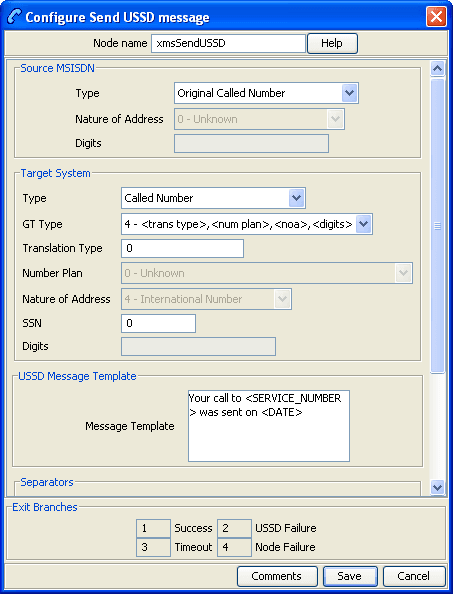
Configuration fields
This table describes the function of each field in the Configure Send USSD message screen.
| Field | Description |
|---|---|
| Source MSISDN | This section is used to set the number that Messaging Manager pretends to be, for the purposes of sending the USSD operation. |
| Type | List of numbers contained in the call context. |
| Nature of Address | Sets the nature of address to be used. This is only available for number types that do not contain a nature of address. |
| SSN | Subsystem Number to use. |
| Digits | Used to set the digits. This is only available for the Fixed Address number type. |
| Target System | This section is used to set the Global Title of the system that the USSD operation is to be sent to. |
| GT Type |
Select the Global Title Type from the list, as specified in the SCCP Q713 standard, section 3.4.2.3. The GT may be defined in any of the following formats:
|
| Message Template |
This field is simply a text field. This field is tokenized when the node is initialized, so that fast construction of the message can be done during message processing. For a list of tokens, see Message tokens. Note: Tokens are case sensitive. |
| Separators | This section determines the separators that are used in the message |
| USSD Separators | The separators that are to be used in the USSD message. The will be substituted for the Input Separators used. |
| Input Separators | The separators in the input message that are to be substituted by the USSD Separator. |
| USSD Terminator | The symbol that is to be placed at the end of the USSD message if the Add Terminator check box is selected. |
| Add Terminator | Select this check box if the USSD Terminator is to be added to the end of USSD messages that do not already contain this symbol. |
| Timeout | The period in seconds that the node will wait for a response before taking the Timeout branch. |
Configuring the node
Follow these steps to edit the Send USSD Message node.
| Step | Action |
|---|---|
| 1 | Select the Type of source address from the list. |
| 2 |
If you select the type - If it contains any characters other than 0-9, it will be regarded as an alphanumeric address and will have TON (Type Of Number) set to alphanumeric, otherwise TON will be set to unknown. NPI (Number Plan Indicator) will always be set to unknown. |
| 3 |
Set the Global Title of the destination address. Depending on the Type and GT Type selected, other fields in this section will be available, if required. |
| 4 | Set the Subsystem Number to the required value in the SSN field. |
| 5 |
Type the text of the message in the Message field. See Message content for a description of how to construct messages. |
| 6 | Add the separators required. |
| 7 | Set the timeout period for the node. |
| 8 | Click Save. |
Message content
The Message field is a (UTF-8) text field. This field is tokenized when the node is initialized, so that fast construction of the message can be done during message processing. For a list of tokens, see Message tokens.
Tokens are searched for in the message text, and replaced with an appropriate value. If the value (at call-time) is null, the token is removed from the message text.
The SMS is sent to MM with the specified UTF-8 encoded text, and the desired alphabet set from the Alphabet drop down list.
Warning: Tokens are case sensitive.
Message tokens
Tokens are searched for in the message text, and replaced with an appropriate value. If the value (at call-time) is null, the token is removed from the message text. The token values are extracted from the ACS engine context, so a value is always expected to be available.
Here is the list of tokens:
| Token | Description |
|---|---|
| <ACCOUNT_ID> | Currently only set if the service control plan was triggered with the CC service library. The format is an integer that is the CCS Account Reference ID (stored in the SMF database). |
| <ACCOUNT_NUMBER> |
The normalized calling or called number. For Messaging Manager triggered service control plans, this is the calling number for XMS_Originating, and the called number for the XMS_Terminating service. For ACS_CB triggered service control plans this is the normalized calling or called number, whichever party is to be billed for the message. |
| <CALLED_NUMBER> | The unnormalized called number. |
| <CALLED_PARTY_ID> | Exactly the same as <CALLED_NUMBER>. |
| <CALLING_NUMBER> | The calling party's MSISDN. |
| <CALLING_PARTY_ID> | Exactly the same as <CALLING_NUMBER>. |
| <CALLING_PRIVATE_NETWORK> | Only set for service control plans that are triggered via the VPN service. In this case it will be the calling number in the private network. |
| <CALL_DURATION> | The current call length (set for example by the ccsATB and ccsUATB nodes). |
| <CALL_TIME> | Ultimately comes from the SLC time at the start of triggering to ACS. The format is determined by the node configuration for the time format. |
| <CALL_START_DATE> | Exactly the same as the <CALL_TIME>. |
| <LOCATION_NUMBER> | The location number from the IDP used to trigger ACS. For Messaging Manager triggered calls this will be the SourceLocationInformation (that is, the originating address). |
| <LOGICAL_CALLING_NUMBER> | A normalized version of the logical calling number. For Messaging Manager triggered service control plans this will be the MIN or MDN, depending on the switch involved. |
| <NETWORK_CALLING_NUMBER> | This is the MIN or MDN, depending on the switch. |
| <NORM_CALLED_NUMBER> | Normalized version of <CALLED_NUMBER>. |
| <NORM_CALLING_NUMBER> | Normalized version of <CALLING_NUMBER>. |
| <ORIGINAL_CALLED_NUMBER> | This is the getOriginalCalledPartyID from the IDP, which is the called party number (before any changes made by ACS). |
| <PIN> | Only available if a prior node in the service control plan has set the PIN (for example, the PIN Authorisation Node). |
| <PENDING_TERMINATION_NUMBER> | Only available if a termination attempt has previously been made in the current service control plan. |
|
<PROFILE_CHAR_BLOCKnumber_TAG<tag number>> <PROFILE_INT_BLOCKnumber_TAG<tag number>> |
Data stored in Profile blocks is retrieved during call processing using one of the profile tag tokens: PROFILE_CHAR_BLOCK - if value is string format PROFILE_INT_BLOCK - if value is an integer The required values are defined as:
Example: <PROFILE_CHAR_BLOCK19_TAG7671818> is replaced by a string value taken from the field with tag 7671818 from profile block 19. For more information about profile blocks, see Profile Block list. |
| <REDIRECTION_NUMBER> | The redirecting party ID from the IDP used to trigger ACS. For Messaging Manager triggered service control plans, this is the SMSCAddress (DA serviceCentre). |
| <SERVICE_NUMBER> | The normalized called number (that is, the same as <NORM_CALLED_NUMBER>). |
| <SMS_TEXT> | The original incoming SMS text message. |
| <TERMINATION_NUMBER> | Will be set after a node which has attempted termination, for example, the ccsATBNode. |
| <TERMINATION_PRIVATE_NETWORK> | Will only be set if using the VPN. It is the termination number for the private network. |
| <USSD_RESPONSE> | Text returned from the Send USSD Message node. |
Machine environment information
In addition, there is access to some of the machine's environment information, using the following tokens.
| Token | Description |
| <DATE> | The current system time on the SLC (after conversion to GMT).
Output format is described in the Configuration section. This
variable may have a modifier, in number of hours to add to the
time. For example: "<DATE+2:30>".
|
| <TIME> |
As above, but with a different output format. The am/pm requirement is possible through the strftime format string. |
| <TIME24> | As above, but with a different output format. |
Example message
An SMS text is:
"Your call to <SERVICE_NUMBER> was sent on
<DATE>"
This will appear (at the receiving handset) as:
"Your call to 043345335 was sent on Monday 10th December
2012".
Send USSD Notification
Node description
The Send USSD Notification node is used to send a USSD Notification message to the MSC/handset.
Tip: This node is closely related to the Send USSD Message node.
The originator and destination for a message are selectable from one of:
- A fixed number or alpha-numeric address
- Any existing ACS context digit field, including one of:
- The caller/message originator of the current call or SMS
- The called party/message destination of the current call or SMS
Note: The node can be used on any service control plan. It needs to be installed with Messaging Manager, but can be used on non-Messaging Manager service plans, and does not require the use of the Messaging Manager service library.
Node icon

If the CPE has been configured to use the static panel CPE palette style, the CPE displays the icon shown below to represent the feature node.

Node exits
This node has one entry and four exits. The number of exits cannot be changed.
| Exit | Cause | Description |
|---|---|---|
| 1 | Success | Message sent successfully. |
| 2 | USSD Failure | USSD notification sent, but an error was received from the target system. |
| 3 | Timeout | USSD notification sent, but no response received from the target system before the timeout period was reached. |
| 4 | Node Failure | Node error, the USSD notification was not sent. |
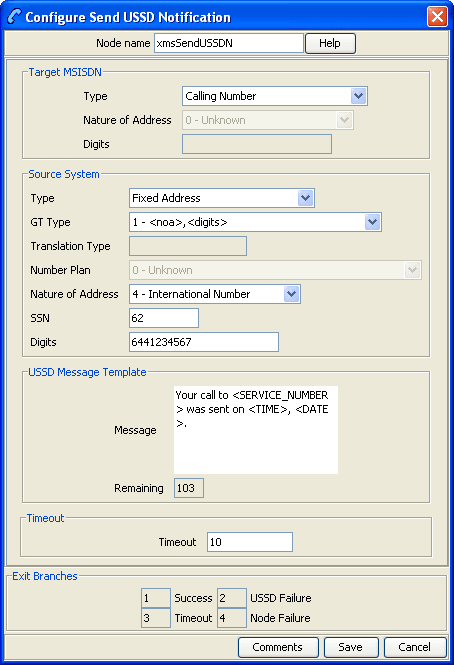
Configuration fields
This table describes the function of each field in the Configure Send USSD Notification node screen.
| Field | Description |
|---|---|
| Target MSISDN | This section is used to set the destination the USSD Notification is to be sent to. |
| Type | The list of numbers contained in the call context. |
| Nature of Address | Sets the nature of address to be used. This is only available for number types that do not contain a nature of address. |
| Digits | Sets the digits for the destination address. This is only available if Type is set to Fixed Address. |
| Type | The list of numbers used in the call context. |
| GT Type | Select the Global Title Type from the list, as specified in the SCCP Q.713 standard, section 3.4.2.3. |
| Translation Type |
The translation type for the system which is sending the notification. For more information about valid types, see Q.713. |
| Number Plan | Number plan for source. |
| Nature of Address | Sets the nature of address for source. This is only available for number types that do not contain a nature of address. |
| SSN | Subsystem number for source address. |
| Digits | Sets the digits for the source address. This is only available if Type is set to Fixed Address. |
| Message Template |
This field is simply a text field. This field is tokenized when the node is initialized, so that fast construction of the message can be done during message processing. For a list of tokens, see Message tokens. Warning: Tokens are case sensitive. |
| Timeout | The period in seconds that the node will wait for a response before taking the Timeout branch. |
Configuring the node
Follow these steps to edit the Send USSD Notification node.
| Step | Action |
|---|---|
| 1 | In the Target MSISDN area, select the type of number the destination address will be from the Type drop down list. |
| 2 | If you have selected a type which does not set an NOA, select a nature of address from the Nature of Address drop down list. |
| 3 | If you have selected Fixed Address from the Type
drop down list, enter the address to send the notification to in
the Digits field. It can be either a telephone
number or an alphanumeric address.
|
| 4 |
In the Source System area, select the type of number the source address will be from the Type drop down list. Depending on the Type and GT Type selected, other fields in this section will be available, if required. |
| 5 |
From the GT Type drop down list, select the Global Title of the source address. For more information about how these GTs are specified, see section 3.4.2.3 in the SCCP Q713 standard. |
| 6 |
In the Translation Type field, enter the translation type for the system which is sending the notification. For more information about valid types, see Q7.13. |
| 7 | If you have selected Fixed Address or one of the Extension Digits options from the Type drop down list, select a number plan from the Number Plan drop down list. |
| 8 | If you have selected a type which does not set an NOA, select a nature of address from the Nature of Address drop down list. |
| 9 | In the SSN field, enter the sub system number which will be used to identify MM in sent messages. |
| 10 |
If you have selected Fixed Address from the Type drop down list, enter the source address in the Digits field. This is a text string representing the sender of the USSD notification. It can be either a telephone number or an alphanumeric address. If it contains any characters other than 0-9, it will be regarded as an alphanumeric address and will have TON (Type Of Number) set to alphanumeric, otherwise TON will be set to unknown. NPI (Number Plan Indicator) will always be set to unknown. |
| 11 |
In the Message Template field, enter the text of the message. See Message content for a description of how to construct messages. Tip: If the text (taking into account the length specifier in any PT tokens) exceeds 160 characters, the Save button will be disabled. |
| 12 | In the Timeout field, set the number of seconds MM will wait for a response from the MSC/handset before taking the Timeout exit. |
| 13 | Click Save. |
Message content
The Message field is a (UTF-8) text field. This field is tokenized when the node is initialized, so that fast construction of the message can be done during message processing. For a list of tokens, see Message tokens .
Tokens are searched for in the message text, and replaced with an appropriate value. If the value (at call-time) is null, the token is removed from the message text.
The USSD notification is sent to MM with the specified UTF-8 encoded text.
Warning: Tokens are case sensitive.
Message tokens
Tokens are searched for in the message text, and replaced with an appropriate value. If the value (at call-time) is null, the token is removed from the message text. The token values are extracted from the ACS engine context, so a value is always expected to be available.
Here is the list of tokens:
| Token | Description |
|---|---|
| <ACCOUNT_ID> | Currently only set if the service control plan was triggered with the CC service library. The format is an integer that is the CCS Account Reference ID (stored in the SMF database). |
| <ACCOUNT_NUMBER> |
The normalized calling or called number. For Messaging Manager triggered service control plans, this is the calling number for XMS_Originating, and the called number for the XMS_Terminating service. For ACS_CB triggered service control plans this is the normalized calling or called number, whichever party is to be billed for the message. |
| <CALLED_NUMBER> | The unnormalized called number. |
| <CALLED_PARTY_ID> | Exactly the same as <CALLED_NUMBER>. |
| <CALLING_NUMBER> | The calling party's MSISDN. |
| <CALLING_PARTY_ID> | Exactly the same as <CALLING_NUMBER> |
| <CALLING_PRIVATE_NETWORK> | Only set for service control plans that are triggered via the VPN service. In this case it will be the calling number in the private network. |
| <CALL_DURATION> | The current call length (set for example by the ccsATB and ccsUATB nodes). |
| <CALL_TIME> | Ultimately comes from the SLC time at the start of triggering to ACS. The format is determined by the node configuration for the time format. |
| <CALL_START_DATE> | Exactly the same as the <CALL_TIME> |
| <LOCATION_NUMBER> | The location number from the IDP used to trigger ACS. For Messaging Manager triggered calls this will be the SourceLocationInformation (for example. the originating address). |
| <LOGICAL_CALLING_NUMBER> | A normalized version of the logical calling number. For Messaging Manager triggered service control plans this will be the MIN or MDN, depending on the switch involved. |
| <NETWORK_CALLING_NUMBER> | This is the MIN or MDN, depending on the switch. |
| <NORM_CALLED_NUMBER> | Normalized version of <CALLED_NUMBER> |
| <NORM_CALLING_NUMBER> | Normalized version of <CALLING_NUMBER> |
| <ORIGINAL_CALLED_NUMBER> | This is the getOriginalCalledPartyID from the IDP, which is the called party number (before any changes made by ACS). |
| <PIN> | Only available if a prior node in the service control plan has set the PIN (for example, the PIN Authorisation Node). |
| <PENDING_TERMINATION_NUMBER> | Only available if a termination attempt has previously been made in the current service control plan. |
| <PT BLOCK TAG FORMAT> |
Data stored in Profile blocks is retrieved during call processing using the profile tag token.
Format:
Where:
Example: <PT 8 28200002 I5> will be replace by an integer value taken from the field with tag 2820002 in profile block 8 and the displayed value will be 5 characters long. If the profile tag value is greater than 5 characters, the first five characters will be displayed and the rest will be truncated. For more information, see Profile Block list . |
| <REDIRECTION_NUMBER> | The redirecting party ID from the IDP used to trigger ACS. For Messaging Manager triggered service control plans, this is the SMSCAddress (DA serviceCentre). |
| <SERVICE_NUMBER> | The normalized called number (for example the same as <NORM_CALLED_NUMBER>). |
| <TERMINATION_NUMBER> | Will be set after a node which has attempted termination, for example, the ccsATBNode. |
| <TERMINATION_PRIVATE_NETWORK> | Will only be set if using the VPN. It is the termination number for the private network. |
Profile Block list
Here are the profile blocks accessible using the <PT> message token.
| Name | Integer | Description |
|---|---|---|
| VPN Network Profile | 1 |
Contains most of the information you can specify in the VPN edit network, for example:
Note: Only relevant if you have the VPN service installed. |
| VPN Station Profile | 2 |
Contains most of the information you can specify in the VPN edit station, for example:
Note: Only relevant if you have the VPN service installed. |
| Customer Profile | 3 |
Contains customer information, for example:
|
| Control Plan Profile | 4 | This profile contains current switch node exits only. |
| Global Profile | 5 |
Contains global information, for example:
|
| CLI Subscriber Profile | 6 |
Contains most of the information you can specify in the CLI tab of the Numbers screen, for example:
Note: Only relevant to the 0800 service. |
| Service Number Profile | 7 |
Contains most of the information you can specify in the Service Number tab of the Numbers screen, for example:
Note: Only relevant to the 0800 service. |
|
App Specific Profile 1 App Specific Profile 2 App Specific Profile 3 App Specific Profile 4 App Specific Profile 5 App Specific Profile 6 App Specific Profile 7 App Specific Profile 8 |
8 9 10 11 12 13 14 15 |
Contains information specific to an application, for example, Messaging Manager. Note: Unless it is in use by a specific application, these profiles (for example, App Specific Profile 7 can be specified as a temporary profile (where nothing is written back to the database) in order to pass information from one application to another, for example between USSD and DAP). |
| Any Valid Profile | 16 | Allows you to search for tags in all profiles that have been loaded. |
MOX tokens
MOX tokens are only available in some circumstances. A MOX request of the appropriate type must have been sent as the last MOX message. Also, the beServer that replied to this MOX message must be of a type that fills out the requested information (for example, balances are not available in some VWS protocols).
| Token | Description |
|---|---|
| <MOX_BALANCEn> | Only available if the last message received from the BeClient was a RetrieveSubscriberProfileRes. Some service libraries (for example, ACS_CB) perform this on triggering to ACS; Messaging Manager does not. For MM the RSINode should be placed immediately before the SSMNode to ensure an RSP is available. |
| <MOX_CURRENCYn> | Only available if the last message received from the BeClient was a RetrieveSubscriberProfileRes. Some service libraries (for example, ACS_CB) perform this on triggering to ACS; Messaging Manager does not. For MM the RSINode should be placed immediately before the SSMNode to ensure an RSP is available. |
| <MOX_CALL_COSTn> | Only available if there is a DebitUnitReq ready to send to the BeClient. This is only true if the last node using MOX was an attempt terminate with Billing (for example, cbATBNode or xmsADPBNode). The number format has two decimal places (for example, 19.19, 19.00), followed by the unit (which comes from the configured unit mappings). |
| <MOX_VOUCHER_NUMBER> | Only available if the last message received from the BeClient was a VoucherReserveRes. Currently, there are no call plan nodes that perform this so this token is unavailable. |
| <MOX_VOUCHER_REDEEMED_DATE> | Only available if the last message received from the BeClient was a VoucherReserveRes. Currently, there are no call plan nodes that perform this so this token is unavailable. |
| <MOX_VOUCHER_AMOUNTn> | Only available if the last message received from the BeClient was a VoucherReserveRes. Currently, there are no call plan nodes that perform this so this token is unavailable. |
| <MOX_VOUCHER_RECHARGE_ACCOUNT_TO_CREDIT> | Only available if the last message received from the BeClient was a VoucherReserveRes. Currently, there are no call plan nodes that perform this so this token is unavailable. |
| <MOX_VOUCHER_RECHARGE_REDEEMING_ACCOUNT> | Only available if the last message received from the BeClient was a VoucherReserveRes. Currently, there are no call plan nodes that perform this so this token is unavailable. |
| <MOX_CALL_START_DATE> | Only available if there is a DebitUnitReq ready to send to the BeClient. This is only true if the last node using MOX was an Attempt Terminate with Billing (for example, cbATBNode or xmsADPBNode). This time value is the same as <CALL_TIME>. The format (expressed using the time configuration format for this node) is "%G-%m-%d %T0". |
| <MOX_CALL_ANSWER_DATE> | Only available if there is a DebitUnitReq ready to send to the BeClient. This is only true if the last node using MOX was the cbATBNode. This is the attemptTerminateResultTime. The format is the same as for <MOX_CALL_START_DATE>, that is, "%G-%m-%d %T0". |
| <MOX_REDIRECTION_NUMBER> | The cbContext.normRedirectionNumber. This is the ctd_redirection_num and only available if the call plan was triggered with the ACS_CB service library. |
Note: Replace the n in the token with the index of a balance. For example, to retrieve the first balance in a set use <MOX_BALANCE0>.
Machine environment information
In addition, there is access to some of the machine's environment information, using the following tokens.
| Token | Description |
| <DATE> | The current system time on the SLC (after conversion to GMT).
Output format is described in the Configuration section. This
variable may have a modifier, in number of hours to add to the
time. For example: "<DATE+2:30>".
|
| <TIME> |
As above, but with a different output format. The am/pm requirement is possible through the strftime format string. |
| <TIME24> | As above, but with a different output format. |
Example notification
A USSD notification text is:
"Your call to <SERVICE_NUMBER> was sent on
<DATE>"
This will appear (at the receiving handset) as:
"Your call to 043345335 was sent on Monday 10th December
2012".Set Message Routing
Node description
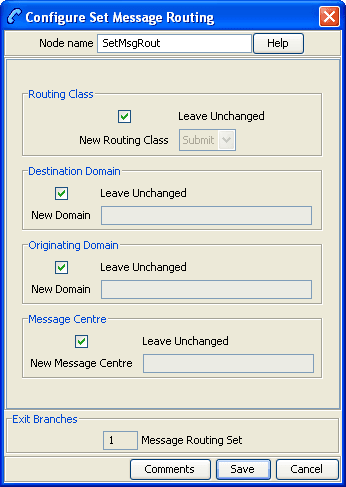
The Set Message Routing node allows a control plan to set routing parameters which determine the routing rule to use, and hence guides outbound path selection.
Node icon

If the CPE has been configured to use the static panel CPE palette style, the CPE displays the icon shown below to represent the feature node.

Restrictions
There may be any number of Set Message Routing nodes as required in a service control plan.
Node exits
This node has one entry and one exit. The number of exits cannot be changed.
| Exit | Cause | Description |
|---|---|---|
| 1 | Message Routing Set | Message has had the new routing attributes applied. |
Configuring the node
Follow these steps to edit the node.
| Step | Action |
|---|---|
| 1 |
To set the routing class for the message:
|
| 2 |
To set the destination domain for the message:
Note: This must be an exact match with a Messaging Manager domain name. |
| 3 |
To set the originating domain for the message:
Note: This must be an exact match with a Messaging Manager domain name. |
| 4 |
To set the message centre for the message:
Note: This must be an exact match with a Messaging Manager Message Center name. |
| 5 | Click Save. |
Set Originating Address
Node description
The Set Originating Address node allows you to set the originating address for all messages that pass through the node to the address specified in the node.
Node icon

If the CPE has been configured to use the static panel CPE palette style, the CPE displays the icon shown below to represent the feature node.

Restrictions
There may be any number of Set Originating Address nodes as required in a service control plan.