3 Replication Check
This chapter explains replication check and data resychronization processes used in SMS.
Replication Checks
SMS provides a replication check mechanism to enable operators to check the replication of data across their services network.
A replication check will perform a comparison of the SMF data on each replication node. Once the comparison is complete a report will be generated detailing any discrepancies. No data is changed.
Depending on the size of the data set there may be sizable performance impact on the client node and care should be taken to perform such a check outside of peak times.
Replication Check Diagram
Here is a diagram that shows the elements involved in replication checks.
Figure 3-1 Elements of Replication Check Process
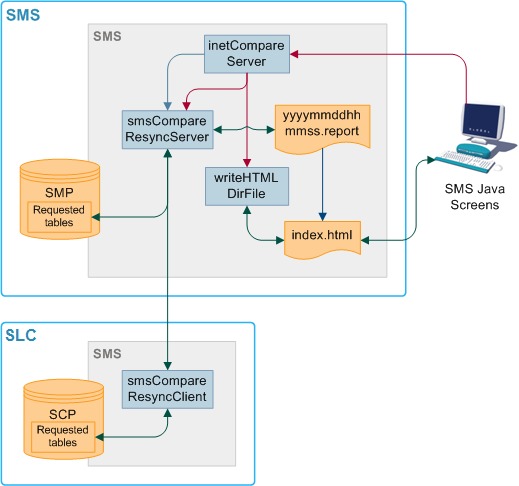
Replication Check Components
Table 3-1 Components of Replication Check Process
| Process | Role | Further information |
|---|---|---|
|
SMF |
The main database on the SMS. |
N/A |
|
SCP |
The databases on the SLCs. They hold a subset of the data on the SMF. |
N/A |
|
writeHTMLDirFile |
Updates index.html to include new replication, comparison and resynchronization reports. |
N/A |
|
smsCompareResyncServer |
Performs database resynchronizations and comparisons on the superior node. |
|
|
smsCompareResyncClient |
Performs database resynchronizations and comparisons on the inferior node. |
|
|
inetCompareServer |
Accepts Replication Check requests from the Replication Check screen. |
Replication Check Process
-
The run all command starts inetCompareServer as configured in the replication check report.
-
inetCompareServer configures and starts "smsCompareResyncServer" and writeHTMLDirFile.
-
"smsCompareResyncClient" handles the other end of the replication check.
-
writeHTMLDirFile updates index.html to include the new report for display in the screens.
Database Comparisons
compareNode is used to initiate a full database comparison of an SCP database with the definitive copy in SMF db. This ensures that an SCP's data is consistent with the SMF database. Under normal conditions, this should always be the case, but there may be a time (for example, after multiple failures) where the system administrator wants to check an SLC is consistent.
compareNode tool requests a comparison between the contents of SMF and one other node, by invoking comparisonServer. Comparisons are a more time-efficient method than resyncs. compareServer compares all the entries of all tables which are defined to be replicated to specified updateLoader node.
Database Comparison Diagram
Here is a diagram that shows the elements involved in a database comparison process.
Figure 3-2 Elements of Database Comparison Process
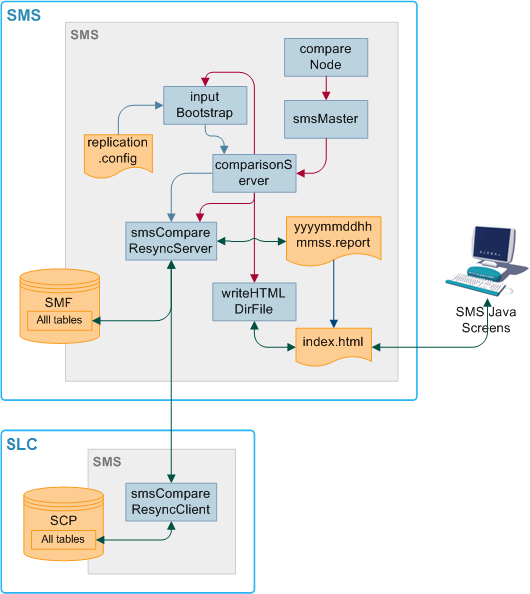
Database Comparison Components
This table describes the components involved in database comparison process.
| Process | Role | Further information |
|---|---|---|
| compareNode | Initiates a full database comparison of an SCP with the definitive copy in SMF. Starts comparisonServer. | "compareNode" |
| inputBootstrap | Creates configuration files for smsCompareResyncServer from replication.config. | "inputBootstrap" |
| smsMaster | Receives update requests and forwards them to the SMF. | "smsMaster" |
| comparisonServer | Creates configuration files for smsCompareResyncServer from replication.config. |
N/A |
|
smsCompareResync Client |
Performs database resynchronizations and comparisons on the inferior node. | "smsCompareResyncClient" |
| writeHTMLDirFile | Updates index.html to include new replication, comparison and resynchronization reports. |
N/A |
Database Comparison Process
-
compareNode sends a comparison request to smsMaster.
-
smsMaster configures and starts comparisonServer.
-
inputBootstrap provides configuration for comparisonServer from replication.config.
-
comparisonServer configures and starts smsCompareResyncServer and writeHTMLDirFile.
-
smsCompareResyncClient handles the other end of the comparison.
-
writeHTMLDirFile updates index.html to include the new report for display in the screens.
Database Resynchronizations
Nodes can become out of sync to the point where normal recovery processes cannot rectify the problem. This can happen if there is a network failure for a long period of time, or if there is a fault in the replication process.
If the databases are out of sync, a resynchronization must be run. Resyncs compare the data in two specified nodes and update the inferior database with the different information in the superior database.
-
The updateLoader is started with the -resync flag, and there is a queuedOrders.dat file
-
The smsMaster has marked that updateLoader node as out of history
-
The smsMaster is connected to by an updateLoader which is not in its pending updates queue
-
A resync instruction is included in a smsTaskAgent file
Resyncs can also be run from the command line. For more information about running resynchronizations, see "resyncServer".
Database Resynchronization Diagram
Figure 3-3 Elements of Database Resynchronization Process
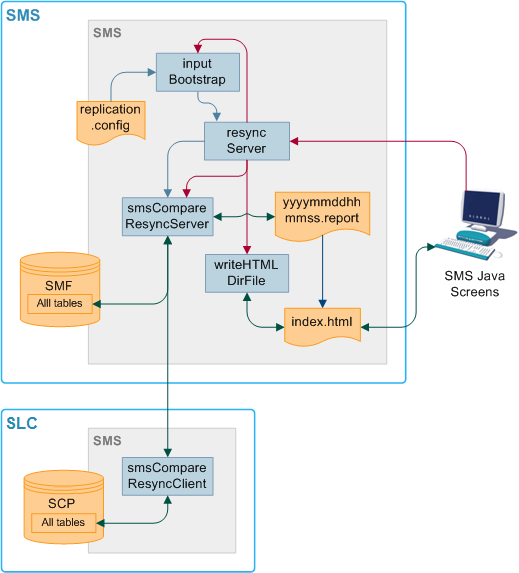
Database Resynchronization Components
This table describes the components involved in database resynchronization process.
Table 3-2 Database Resynchronization Process Components
| Process | Role | Further information |
|---|---|---|
| inputBootstrap | Creates configuration files for smsCompareResyncServer from replication.config. | "inputBootstrap" |
| resyncServer | Starts smsCompareResyncServer and inputBootstrap for resyncs. | "resyncServer" |
|
smsCompareResync Client |
Performs database resynchronizations and comparisons on the inferior node. | "smsCompareResyncClient" |
| writeHTMLDirFile | Updates index.html to include new replication, comparison and resynchronization reports. | N/A |
Database Resynchronization Process
-
If the resync has been started from the command line using resync, resync sends a resynchronization request to smsMaster.
-
smsMaster sends a resynchronization request to resyncServer.
-
resyncServer sends a request to inputBootstrap.
-
inputBootstrap reads data from replication.config and creates a configuration file for smsCompareResyncServer.
-
resyncServer starts smsCompareResyncServer in resync mode.
-
smsCompareResyncServer connects to the SMF and smsCompareResyncClient on the inferior node.
-
smsCompareResyncClient accepts the connection and connects to the SCP.
-
smsCompareResyncServer and smsCompareResyncClient resync the databases.
-
smsCompareResyncServer writes a resynchronization report to /IN/html/output/SMS/resync/inferior_node_number/yyyymmddhhmmss.report.
-
writeHTMLDirFile updates /IN/html/output/SMS/resync/inferior_node_number/index.html to include the new report.
Auditing
-
User's user ID
-
IP address of terminal from which the change was made
-
Timestamp of the change
-
Table changed
-
Copy of the record before the change and a copy of the record after the change
-
User name of the user that last changed the contents of a table
-
Date at which this change was made
-
Changing a user's password
-
Performing a search from the Subscriber tab in the Subscriber Management screen, if only one record is found
-
Opening a subscriber record in the Edit Subscriber screen
-
Viewing an EDR in the EDR viewer
-
Logging in and out of the Customer Care Portal (CCP)
-
Locking and unlocking the CCP
-
Performing a search in the CCP dashboard
-
Viewing a subscriber record through the CCP Quick View