2 Replication Overview
This chapter explains the replication system used in SMS.
What is Replication?
Data Flow
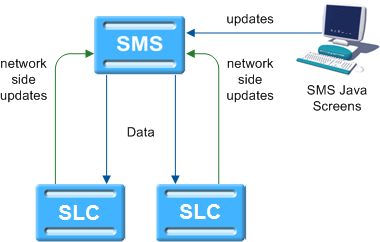
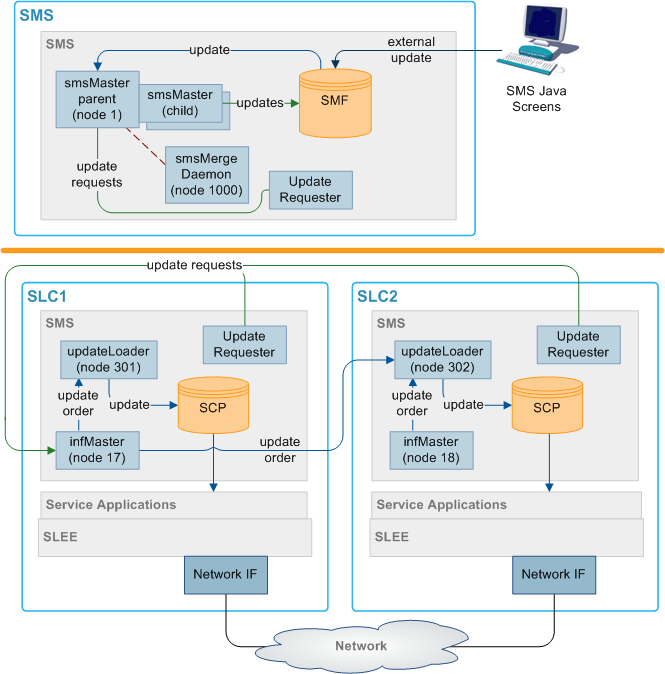
The SMF database on the SMS holds the full set of authoritative data within the system. Data required for call processing and resilience is forwarded to the SCP database on the SLCs using SMS replication. Updates are received from processes on the SMSs and the SLCs and from the Service Management System administration screens.
Figure 2-1 Data Flow
Replication Process
- Update Requests come from one of the following:
- The administration screens
- An event on the SMS or SLCs
- If the update comes from the administration screens, one of the following
occurs:
- Forwarded to the smsTaskAgent, and then through to an smsMaster
- Inserted directly into the SMF database
- When an smsMaster (parent) receives an update request, it:
- Sends an update order to all configured destination replication groups (there may be no relevant groups, in which case no order is sent)
- Spawns a local smsMaster (child) process to insert the updated data into the SMF database.
- updateLoader on the relevant SLCs reads the update order from the socket and inserts the data into the SCP database.
- If requested to do so, updateLoader sends a confirmation to smsMaster that the update completed successfully.
Nodes
Replication occurs between nodes in the system. Nodes allow specific processes on machines to be replicated to and from, and for more than one node to exist on a single machine. Each node has a node number which identifies the node.
For more information about configuring nodes, see Service Management System User's Guide.
Superior Master Nodes
Superior master nodes are forwarded all data update requests within SMS, and distribute update orders to all SLCs that require the replication data through the updateLoaders.
In a clustered installation, the superior master role is shared between the available smsMaster nodes on the SMSs.
In an unclustered installation, the superior master node is the node with the lowest node number in the system. This is usually the smsMaster on the SMS, but at times may be an infMaster on an SLC.
Update Loader Nodes
Update loader nodes run on any SLC that requires database updates. They are the updateLoader processes running on the SLCs. They accept update orders from superior master nodes and insert the data into the local SCP database.
The update loaders on a single SLC platform are independent of each other and are treated as separate replication nodes to the replication system. Hence there can be more than one per machine, although in practice there is normally just one.
An update loader must always be connected to a master. Even if it is not receiving any information from the master, it will have a connection.
Update Requester Nodes
Update requesters create update requests in response to specific events on the SLCs and send them to the superior master to update the centralized data (and from there it is replicated to the relevant SLCs). Update requesters include:
- replicationIF
- smsAlarmsDaemons
- smsStatsDaemons
Update requesters do not need to be configured in the database.
Replication Groups
A replication table has one or more replication groups. A replication group can be assigned to one or more replication nodes.
Example:
- Replication Group A resides on Node 1, Node 2 and Node 3
- Replication Group B resides on Node 1 and Node 3
Primary Replication Nodes
Primary nodes can be defined for a specific replication group. The primary is the highest priority destination node for the data defined in the replication group. This enables the IN to assign particular services to specific nodes, but still provide a failover to other nodes as required.
This only sets the node as the primary for the specific group involved and is independent of other groups. A node may be defined as a primary for one group without being a primary for another group.
Example:
- Replication Group A resides on Node 1, Node 2 and Node 3, where Node 3 is the primary for group A.
- Replication Group B resides on Node 1 and Node 3, where Node 1 is the primary for group B.
Primary nodes are not required unless a service is running with different priority on different nodes.
Update Requests to Primary Nodes
Primary node status is relevant for processes which are requesting an smsMaster to update the SMF.
The update processes have three types of Update Requests:
- Make the change and do not confirm that it has been made.
- Send a notification when the change has been made to the SMF.
- Send a notification when the change has been made to the primary replication node for this replication group.
The primary node status is used when the third type of update request is used. While the update may be successful without the primary node being configured, the requesting process may register errors if the notification of the update is not received.
For more information about setting primary and secondary status within a replication group, see Service Management System User's Guide.
Master Controllers
A master controller is any process which provides instructions to a superior master node. Possible instructions include:
- Update configuration
- Merge databases
- Resync databases
Master controllers include executables started from the command line and functions embedded in other processes. They include:
- smsTaskAgent
- resyncServer
- smsCompareResyncServer
Failover and Error Recovery
Introduction
If a node becomes unavailable for any reason, the system attempts to continue functioning. The nodes that remain available continue to operate normally. Updates for the node that is unavailable are queued for as long as the queue space lasts.
When the node becomes available again, the queued updates are resent.
If nodes become out of sync to the point where they cannot automatically recover, a manual resync can be run.
updateLoader Failure
If the update loader fails, then the updates are queued until it is back on-line. If the Update Loader is still down after a period of time and a smsMaster's pending queue reaches its configured maximum size, then the update loader is marked as "Out Of History" by that smsMaster and its updates are removed. If this happens, after the Update Loader is back on-line, a total database re-synchronization is performed with the smsMaster.
Update Queuing
If the nodes become disconnected, a number of processes queue updates until the connection is restored. After the connection is restored, the queued updates run normally.
smsMaster queues all updates it sends out until an acknowledgment is sent out by the receiving updateLoader. The number of updates that are queued is set in the smsMaster configuration.
updateLoader queues all uncompleted updates in a file named using the following format:
updateLoaderNodeNumber-queuedOrders.dat
Further Information
For more information on failover and error recovery processes, see Replication Check
Replication in an Unclustered Installation
Replication Component Diagram
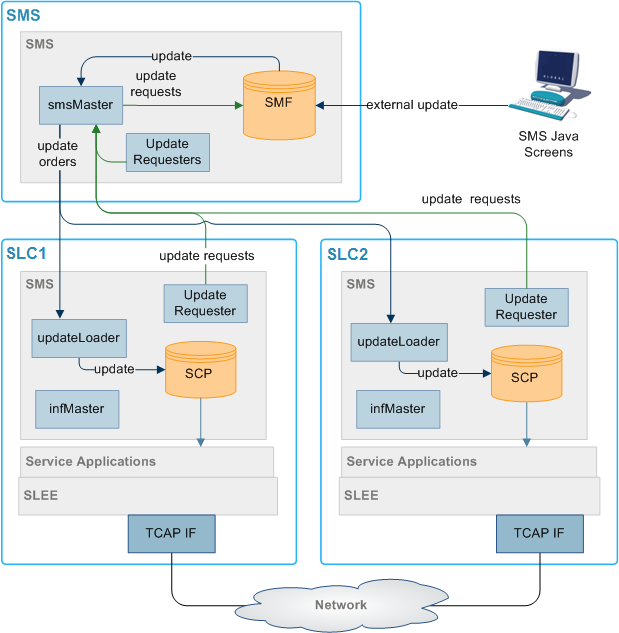
Figure 2-2 Replication component diagram
Replication Components
Table 2-1 describes the components of replication in an unclustered installation.
Table 2-1 Components of Replication
| Process | Role | Further Information |
|---|---|---|
| smsMaster | Runs on the SMS handling updates throughout SMS. This is the superior master for all connected nodes. | smsMaster |
| infMaster | An infMaster runs on each SLC. If it becomes the node with the highest number of all connected nodes, it stands in as the superior master until a higher node number becomes available again. | infMaster |
| updateLoaders |
An updateLoader runs on each SLC. It manages all incoming update orders and inserts updated data into the SCP. At any point in time, an updateLoader is connected to a specific superior master. |
updateLoader |
| update requesters | update requesters may run on any machine. They send update requests to the Superior Master. | Update Requester Nodes |
| smsMergeDaemon | The smsMergeDaemon runs on the SMS and monitors the connections between the SMS and the SLCs. If it notices a break in the connection, it may start a merge to update the disconnected nodes. | smsMergeDaemon |
| smsTaskAgent | The smsTaskAgent accepts instructions from the SMS Administration screens and produces instructions for the smsMaster. It generates the replication config file and copies it to the SLC nodes. | smsTaskAgent |
| smsNamingServer | The smsNamingServer enables non-SMS components to connect to elements within the SMS. | smsNamingServer |
| SMF | This Oracle database holds authoritative data for all SLCs. | |
| SCPs | These Oracle databases hold the subset of SMF data required to route calls. |
Updates
The replication system performs ‘row’ level updates and buffers updates to reduce processing load on the real-time system elements. This is achieved by holding the update requests in a memory resident queue (called the Pending Updates Queue) until replication has been successfully completed.
Update requests are performed in the order they arrive at the superior master.
Inferior Master Nodes
An inferior master node is a master node with a higher node number than that of the current superior master. It does not perform any function unless it becomes the available master node with the highest node number (in which case it becomes the superior master).
Node Numbers
Table 2-2 lists the node number ranges and their details for an unclustered installation.
Table 2-2 Node Numbers
| Node Numbers | Description |
|---|---|
| 1 | This node number must assigned to the smsMaster process on the SMS. |
| 17-255 | These node numbers are available to infMaster processes on the SLCs. |
| 256-511 | These node numbers are available to updateLoaders on the SLCs. |
| 512-999 |
These node numbers are available to updateRequesters. They are usually configured in the following pattern:
|
| 1000 | In an unclustered installation, this node number is used for the smsMergeDaemon. |
Note:
Node numbers are unique.Failover
If a node becomes disconnected from the smsMaster node (due to network failure or a problem with the SMS), it attempts to contact the other nodes in descending node number order until it locates a node it can connect to.
An infMaster on one of the SLCs becomes the acting superior master until the failure is resolved. After the smsMaster becomes available again, smsMergeDaemon instructs the infMaster to merge its updates with the smsMaster.
If the infMaster that is the acting superior master becomes unavailable before the smsMaster is available again, the infMaster with the next node number is used instead.
All Nodes Connected
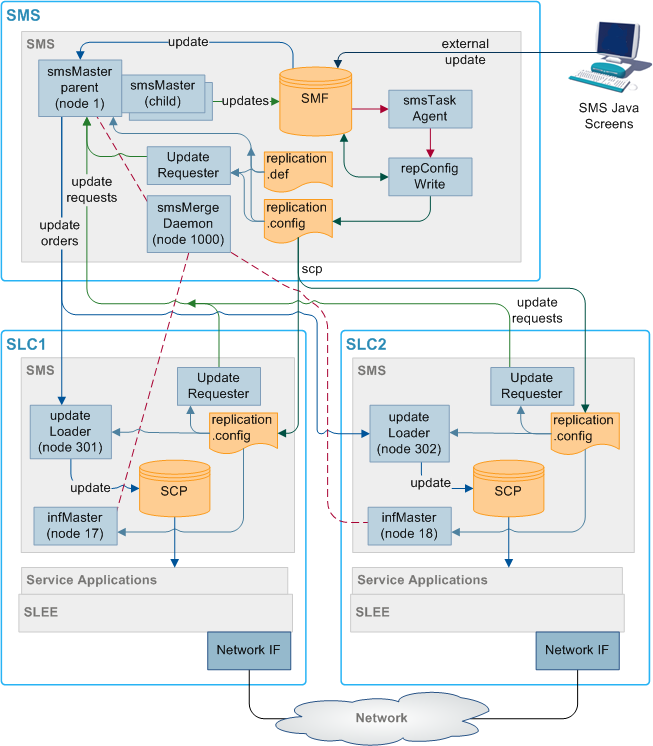
Here is an example showing all nodes in an unclustered configuration connected to the smsMergeDaemon.
Figure 2-3 All Nodes Connected
Isolated SLC
Figure 2-4 depicts an isolated SLC in an unclustered environment.
Figure 2-4 Isolated SLC
Where an SLC has been isolated from the master it looks for and connects to the master in the network, which has the next lowest node number. In the diagram above, SLC1 has been isolated from the network and the update loader cannot find Master 1, so it looks for the master with the lowest node number it can see (in this case it is Inferior Master 2 on SLC1) and connects to that.
The Master 1 queues all updates for SLC1 until such time as it comes back on line. When SLC1 comes back on line, the smsMergeDaemon queries the infMaster process to see if there are any connections to it. If there are any processes connected to the infMaster, the smsMergeDaemon sends a start merge message to the smsMaster. The smsMaster then updates the rest of the network with the information received from SLC1.
If the smsMergeDaemon is not running, the startMerge process may be used instead. startMerge copies the data from SLC1 to the smsMaster. The smsMaster then updates the rest of the network with the information received from SLC1.
Isolated SMS
Figure 2-5 depicts an isolated SMS.
Figure 2-5 Isolated SMS
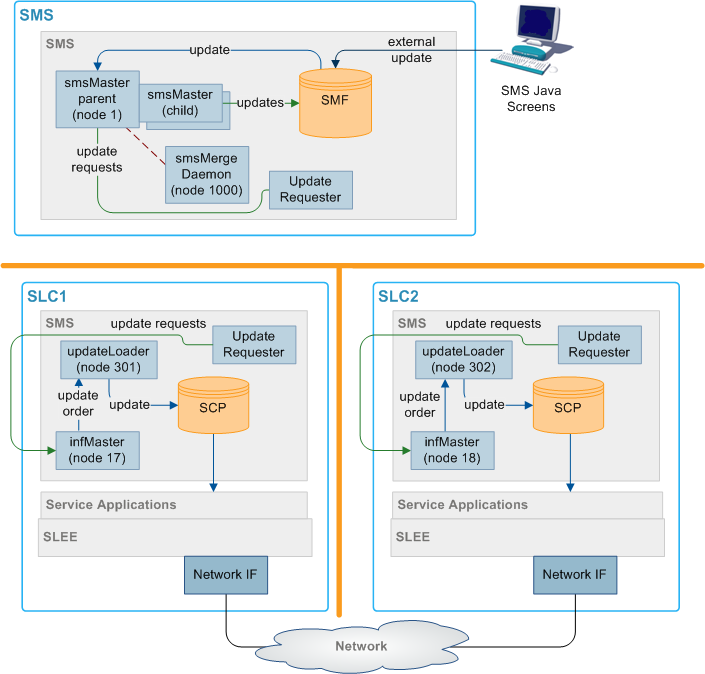
Where the master is isolated from the network, each update loader looks for the inferior master with the lowest node number and connects to that.
In the above case the Master 1 on the SMS has been isolated. The update loader on each node looks for the inferior master with the lowest node number it can find, in this case the update loaders on both SLC1 and SLC2 finds and connects to inferior master 2 on SLC1. When the SMS comes back into the network, the smsMergeDaemon checks each SLC infMaster process to see if there are any connections to them. In this case, there are connections to the SLC1 infMaster process (node 2) from the SLC2 (node 3). The smsMergeDaemon runs startMerge against SLC1. startMerge copies SLC1's data across to the SMS. The smsMaster then attempts to update both SLCs with the new data from SLC1.
All Nodes Isolated
Figure 2-6 depicts all nodes isolated.
Figure 2-6 All Nodes Isolated
Where all nodes in the network are isolated, they each connect to the inferior master with the lowest node number that they can see. In the above example, this results in the update loader on SLC1 connecting to inferior master 2 on SLC1 (node 2), and the update loader on SLC2 connecting to the inferior master 3 (node 3).
As the SLCs reconnect to the SMS and reestablish a reliable heartbeat, the smsMergeDaemons run startMerge against each SLC to copy the data across to the SMS. Then the SMS replicates the data to the available SLCs.
Merging nodes
If a infMaster is acting as a superior master, it collects update requests in a table on the local SCP. When the smsMaster (or another infMaster with a higher node number) reconnects, all local update requests must be forwarded to the new superior master node and replicated.
The process for completing this task is known as a merge. Usually, the smsMergeDaemon initiates a merge automatically when the connection has stabilized. However, it is also possible to start a merge by hand by invoking the startMerge process from the command line.
For more information about using startMerge, see startMerge.
Description of resync processes and executables
Table 2-3 describes the roles of the components involved in the resync process.
Table 2-3 Components in resync process
| Process | Role | Further information |
|---|---|---|
| smsMaster |
The smsMaster collects update requests in the pending update queue until the destination updateLoader acknowledges a successful update. If the smsMaster cannot connect to a updateLoader, it collects pending updates until a new connection to the updateLoader is made. |
smsMaster |
| resyncServer | Takes a snapshot of the SMF and sends it to the compareResyncReceive process on the SLC. One resyncServer is started for each resync commenced. | resyncServer |
| smsCompareResyncServer | Reads configuration information from the configuration file created by resyncServer and starts a resync. | smsCompareResyncServer |
| compareResyncReceiver | Updates the SCP with the data from the SMF (sent by resyncServer on the SMS). | |
| smsCompareResyncClient | Receives information from smsCompareResyncServer and updates the SCP. | smsCompareResyncClient |
| updateLoader |
When a resync is started, the updateLoader stops making updates to the SCP. Instead it writes the updates to a file named in the following file: nodenum-queuedOrders.dat When the resync is completed, the queued update orders are processed as normal. |
updateLoader |
replication.def File
Introduction
The replication.def file defines default values for all the replication executables on the node it is on. Any of the defaults may be overridden on the command line when the executable is started.
MAX PENDING=200can be overridden when starting an smsMaster by adding the command line parameters
-maxpending 400(no spaces in the parameter and all lower case).
Note:
Ensure that the heartbeat settings for both ends of a heartbeat are set to the same value. Otherwise, the connection is repeatedly dropped.This file is located in the /IN/service_packages/SMS/etc/ directory.
Parameters
The replication.def accepts the following configurable parameters.
COMMIT IDLE TIME
| Syntax: | COMMIT IDLE TIME=mseconds |
| Description: | Timeout period (in milliseconds) for the Update Receiver (Update Loader) to become idle after an Update Request (Update Order) and commit. |
| Type: | Integer |
| Optionality: | Optional (default used if not set) |
| Allowed: | |
| Default: | 100 |
| Notes: | |
| Example: | COMMIT IDLE TIME=100 |
COMMIT BUSY TIME
| Syntax: | COMMIT BUSY TIME=mseconds
|
| Description: | Timeout period (in milliseconds) for the Update Receiver or updateLoader to commit a change even if it remains continuously busy. |
| Type: | Integer |
| Optionality: | Optional (default used if not set) |
| Allowed: | |
| Default: | 10000 |
| Notes: | |
| Example: | COMMIT BUSY TIME=10000
|
CONFIG DIR
| Syntax: | CONFIG DIR=dir
|
| Description: | The directory where the replication config file is stored. This parameter has been included for future development, it is recommended that the default is always used. |
| Type: | String |
| Optionality: | Optional (default used if not set) |
| Allowed: | |
| Default: | /IN/service_packages/SMS/etc |
| Notes: | |
| Example: | CONFIG DIR=/IN/service_packages/SMS/etc
|
CONN RETRY TIME
| Syntax: | CONN RETRY TIME=seconds
|
| Description: | Time (in seconds) before an updateLoader tries to reconnect to a master replicator if none is available. |
| Type: | Integer |
| Optionality: | Optional (default used if not set) |
| Allowed: | |
| Default: | 0 |
| Notes: | If set to 0, no re-attempt is made. |
| Example: | CONN RETRY TIME=0 |
CONNECTION TIMEOUT
| Syntax: | CONNECTION TIMEOUT=seconds
|
| Description: | Timeout (in seconds) before an attempted connection to a master is terminated and alternative is tried. |
| Type: | Integer |
| Optionality: | Optional (default used if not set) |
| Allowed: | |
| Default: | 1 |
| Notes: | |
| Example: | CONNECTION TIMEOUT=1
|
HB PERIOD
| Syntax: | HB PERIOD=seconds
|
| Description: | Heartbeat period (in seconds) |
| Type: | Integer |
| Optionality: | Optional (default used if not set) |
| Allowed: | |
| Default: | 10 |
| Notes: | The period should be consistent across all platforms. Not advisable to take below 3 seconds. |
| Example: | HB PERIOD=10
|
HB TIMEOUT
| Syntax: | HB TIMEOUT=seconds
|
| Description: | Heartbeat timeout period (in seconds) used by smsMergeDaemon, before a heartbeat is considered late. |
| Type: | Integer |
| Optionality: | Optional (default used if not set) |
| Allowed: | |
| Default: | 10 |
| Notes: | Generally set to the same as HB PERIOD. |
| Example: | HB TIMEOUT=10
|
HB TOLERANCE
| Syntax: | HB TOLERANCE=mseconds
|
| Description: | Heartbeat tolerance time (in millisecs). |
| Type: | Integer |
| Optionality: | Optional (default used if not set) |
| Allowed: | |
| Default: | 250 |
| Notes: | Default is generally used |
| Example: | HB TOLERANCE=250 |
HTML DIR
| Syntax: | HTML DIR=dir
|
| Description: | The directory where html files are written. |
| Type: | String |
| Optionality: | Optional (default used if not set) |
| Allowed: | |
| Default: | /IN/html |
| Notes: | |
| Example: | HTML DIR=/IN/html |
LONG TIMEOUT
| Syntax: | LONG TIMEOUT=seconds
|
| Description: |
Heartbeat timeout period (in seconds) used by smsMergeDaemon to check if the connections to smsMaster and the node to be merged are stable. If they have both been responding to heartbeats within the time specified in LONG TIMEOUT, the merge takes place. |
| Type: | Integer |
| Optionality: | Optional (default used if not set) |
| Allowed: | |
| Default: | 60 |
| Notes: | |
| Example: | LONG TIMEOUT=60 |
MASTER PORT
| Syntax: | MASTER PORT=port
|
| Description: | The TCP port that master replicators listen for connections on. |
| Type: | Integer |
| Optionality: | Optional (default used if not set) |
| Allowed: | |
| Default: | 12343 |
| Notes: | Generally the default is used |
| Example: | MASTER PORT=12343 |
MAXMASTERSNODES
| Syntax: | MAXMASTERSNODES=num
|
| Description: | The number of master nodes used. |
| Type: | Integer |
| Optionality: | Optional (default used if not set) |
| Allowed: | |
| Default: | 8 |
| Notes: | |
| Example: | MAXMASTERSNODES=8 |
MAX PENDING
| Syntax: | MAX PENDING=num
|
| Description: | Used by master replicators to determine maximum size of their pending updates queue (the maximum number of outstanding updates that are stored before an unconnected updateLoader is considered "Out Of History"). |
| Type: | Integer |
| Optionality: | Optional (default used if not set) |
| Allowed: | |
| Default: | 10000 |
| Notes: | |
| Example: | MAX PENDING=10000
|
NODE ID
| Syntax: | NODE ID=ID
|
| Description: | Used by an updateLoader to define its replication node number. This value must be unique, and is set to the default value at installation. If more than one updateLoader is running on the same SLC machine, you must override this value with a unique number, for example, by setting the nodeid command line parameter. |
| Type: | Integer |
| Optionality: | Required |
| Default: | 274 |
| Example: | NODE ID=274
|
ORACLE USER
| Syntax: | ORACLE USER=user/pwd |
| Description: | Oracle username and associated password normally of the form user/password. Operator accounts are used to maintain security. |
| Type: | String |
| Optionality: | Optional (default used if not set) |
| Allowed: | |
| Default: | / |
| Notes: | It is recommended that this is left as the default. |
| Example: | ORACLE USER=/ |
POLLING INTERVAL
| Syntax: | POLLING INTERVAL=useconds
|
| Description: | Used to specify the polling interval (in microseconds) when the smsMaster is not receiving replication updates. |
| Type: | Integer |
| Optionality: | Optional (default used if not set) |
| Allowed: | |
| Default: | 50000 |
| Notes: | |
| Example: | POLLING INTERVAL=50000
|
QUEUE WARN THRESH
| Syntax: | QUEUE WARN THRESH=int
|
| Description: | The threshold intervals at which warnings are sent to the error log to indicate an increasing or decreasing pending updates queue. |
| Type: | Integer |
| Optionality: | Optional (default used if not set) |
| Allowed: | |
| Default: | 1000 |
| Notes: | |
| Example: | QUEUE WARN THRESH=50
|
QUEUE ERR THRESH
| Syntax: | QUEUE ERR THRESH=int
|
| Description: | The threshold intervals at which a warning is turned into an error and sent to the error log to indicate an increasing/decreasing pending updates queue. |
| Type: | Integer |
| Optionality: | Optional (default used if not set) |
| Allowed: | |
| Default: | 10000 |
| Notes: | To work correctly, this must be greater than the QUEUE WARN THRESH value. |
| Example: | QUEUE ERR THRESH=200
|
QUEUE CRIT THRESH
| Syntax: | QUEUE CRIT THRESH=int
|
| Description: | The threshold intervals at which a warning or error is turned into a critical error and sent to the error log to indicate an increasing/decreasing pending updates queue. |
| Type: | Integer |
| Optionality: | Optional (default used if not set) |
| Allowed: | |
| Default: | 100000 |
| Notes: | To work correctly, this must be greater than the QUEUE ERR THRESH value. |
| Example: | QUEUE CRIT THRESH=400 |
REP_PATH
| Syntax: | REP_PATH=path
|
| Description: | The directory path of the replication.config file. |
| Type: | String |
| Optionality: | Optional (default used if not set) |
| Allowed: | |
| Default: | /IN/service_packages/SMS/etc/replication.config |
| Notes: | Used by smsMergeDaemon. |
| Example: | REP_PATH=/IN/service_packages/SMS/etc/replication.config
|
REPORT DIR
| Syntax: | REPORT DIR=dir |
| Description: | The directory where replication reports (for example, merge reports and database comparison reports) are stored. |
| Type: | String |
| Optionality: | Optional (default used if not set) |
| Allowed: | |
| Default: | /IN/service_packages/SMS/output/Replication |
| Notes: | |
| Example: | REPORT
DIR=/IN/service_packages/SMS/output/Replication |
RESYNC DIR
| Syntax: | RESYNC DIR=dir
|
| Description: | The directory where an updateLoader’s pendingUpdates.dat file is stored during a resync. |
| Type: | String |
| Optionality: | Optional (default used if not set) |
| Allowed: | |
| Default: | IN/service_packages/SMS/tmp |
| Notes: | |
| Example: | RESYNC DIR=IN/service_packages/SMS/tmp
|
SECONDARY DELAY
| Syntax: | SECONDARY DELAY=useconds
|
| Description: | Initial time (in microseconds) that the primary network has to establish a connection before attempting to connect over the secondary network as well. |
| Type: | Integer |
| Optionality: | Optional (default used if not set) |
| Allowed: | |
| Default: | 100000 |
| Notes: | A value of 0 means both networks are attempted immediately. |
| Example: | SECONDARY DELAY=100000
|
SMS_PORT
| Syntax: | SMS_PORT=port
|
| Description: | The SMS port used by the smsMergeDaemon process. |
| Type: | Integer |
| Optionality: | Optional (default used if not set) |
| Allowed: | |
| Default: | 7 |
| Notes: | |
| Example: | SMS_PORT=7 |
STATSKEY
| Syntax: | STATSKEY=key
|
| Description: | Shared memory key for updateLoader replication statistics. |
| Type: | Integer |
| Optionality: | Optional (default used if not set). |
| Allowed: | |
| Default: | 270198 |
| Notes: | The default value is recommended. If the default is not used, part of the statistics gathering system (dm_sys) can no longer find the statistics. |
| Example: | STATSKEY=270198
|
tcpRxMaxBuf
| Syntax: | tcpRxMaxBuf =bytes
|
| Description: | Sets the receive window size in bytes. This is equivalent to the TCP/IP Tunable Parameter tcp_recv_hiwat and is set via calls to setsockopt(). This will be limited by tcp_max_buf, which is the maximum transmit/receive buffer size in bytes. |
| Type: | Integer |
| Optionality: | Optional (default used if not set) |
| Allowed: | Integer range from 2,048 to 1,073,741,824 |
| Default: | 1,048,576 |
| Notes: | The parameter default is different than the system default of 24,576. |
| Example: | tcpRxMaxBuf = 2048
|
tcpTxMaxBuf
| Syntax: | tcpTxMaxBuf = bytes
|
| Description: | Sets the transmit window size in bytes. This is equivalent to the TCP/IP Tunable Parameter tcp_xmit_hiwat and is set via calls to setsockopt(). This will be limited by tcp_max_buf, which is the maximum transmit/receive buffer size in bytes. |
| Type: | Integer |
| Optionality: | Optional (default used if not set) |
| Allowed: | Ranges from 4,096 to 1,073,741,824 |
| Default: | 1,048,576 |
| Notes: | The parameter default is different than the system default of 16,384. |
| Example: | tcpTxBuf = 4096
|
Example replication.def file
MAX PENDING=10000
ORACLE USER=/
HB PERIOD=20
HB TIMEOUT=20
LONG TIMEOUT=60
HB TOLERANCE=10000
CONNECTION TIMEOUT=2
SECONDARY DELAY=100000
CONN RETRY=1
QUEUE WARN THRESH=5
POLLING INTERVAL=50000
CONN RETRY TIME=10
tcpRxMaxBuf=2048
tcpTxMaxBuf=4096
The replication.config file
The replication.config file is created and changed through the Node Management screens in the SMS screens. The user must move tables on the screen from the Available Replication Groups list to the node they are to be replicated to in the Allocated Replication Groups list. Clicking Create Config File produces a new replication.config file.
The previous configuration is deleted prior to the new configuration being loaded. This does not necessitate the application being restarted, but it causes disruption to service on any of the SLCs.
The replication.config file contains the configuration for the whole network. This includes all configuration details needed for smsMasters and infMasters (if necessary).
Introduction
The replication.config file is a binary configuration file that defines the current specific replication setup. It is a binary representation of the replication setup within the SMF created by the repConfigWrite process.
This file is used by all replication nodes on a machine, and must be:
- The same on each machine
- Accessible by each node
The file is written to the directory specified by the output parameter.
Generating replication.config
This file is usually created by clicking Create Config File on the Table Replication tab of the Node Management window.
Example replication.config
This text shows an example of a replication.config file which has been converted using smsDumpRepConfig.
smsDumpRepConfig: File /IN/service_packages/SMS/etc/replication.config
smsDumpRepConfig: (PAD = 0)
smsDumpRepConfig: Short listing. Use -v (verbose) for full listing
-------------------------------------------------------------------------------
smsDumpRepConfig: Table, Column, Group definitions...
-------------------------------------------------------------------------------
TABLE [ACS_CALL_PLAN]
TABLE [ACS_CALL_PLAN_PROFILE]
TABLE [ACS_CALL_PLAN_STRUCTURE]
TABLE [ACS_CLI_CALL_PLAN_ACTIVATION]
TABLE [ACS_CUSTOMER]
TABLE [ACS_CUSTOMER_CLI]
TABLE [ACS_CUSTOMER_SN]
TABLE [ACS_FN_TYPE]
TABLE [ACS_GLOBAL_PROFILE]
TABLE [ACS_LANGUAGE]
TABLE [ACS_NETWORK_KEY]
TABLE [ACS_SN_CALL_PLAN_ACTIVATION]
TABLE [SMF_ALARM_MESSAGE]
TABLE [SMF_STATISTICS]
TABLE [SMF_STATISTICS_DEFN]
-------------------------------------------------------------------------------
smsDumpRepConfig: Replication Groups configured for each node...
-------------------------------------------------------------------------------
NODE NUMBER [1] Prim (192.168.0.173) Sec (0.0.0.0)
NODE NUMBER [301] Prim (192.168.0.163) Sec (0.0.0.0)
    GROUP [ACS_CUSTOMER] [Prim=-1] Min=('+0','',') Max=('+9','','')
    GROUP [ACS_FN_TYPE] [Prim=-1] Min=('+0','',') Max=('+9','','')
    GROUP [ACS_CALL_PLAN_PROFILE] [Prim=-1] Min=('+0','',') Max=('+9','','')
    GROUP [ACS_CALL_PLAN_STRUCTURE] [Prim=-1] Min=('+0','',') Max=('+9','','')
    GROUP [ACS_CALL_PLAN] [Prim=-1] Min=('+0','',') Max=('+9','','')
    GROUP [ACS_CUSTOMER_CLI] [Prim=-1] Min=('+0','',') Max=('+9','','')
    GROUP [ACS_CUSTOMER_SN] [Prim=-1] Min=('+0','',') Max=('+9','','')
    GROUP [ACS_LANGUAGE] [Prim=-1] Min=('+0','',') Max=('+9','','')
    GROUP [SMF_STATISTICS_DEFN] [Prim=-1] Min=('!','!',') Max=('~','~','')
    GROUP [ACS_CLI_CALL_PLAN_ACTIVATION] [Prim=-1] Min=('+0','',') Max=('+9','','')
    GROUP [ACS_GLOBAL_PROFILE] [Prim=-1] Min=('+0','',') Max=('+9','','')
    GROUP [ACS_NETWORK_KEY] [Prim=-1] Min=('+0','',') Max=('+9','','')
    GROUP [ACS_SN_CALL_PLAN_ACTIVATION] [Prim=-1] Min=('+0','',') Max=('+9','','')
NODE NUMBER [302] Prim (192.168.0.178) Sec (0.0.0.0)
    GROUP [ACS_CUSTOMER] [Prim=-1] Min=('+0','',') Max=('+9','','')
    GROUP [ACS_FN_TYPE] [Prim=-1] Min=('+0','',') Max=('+9','','')
    GROUP [ACS_CALL_PLAN_PROFILE] [Prim=-1] Min=('+0','',') Max=('+9','','')
    GROUP [ACS_CALL_PLAN_STRUCTURE] [Prim=-1] Min=('+0','',') Max=('+9','','')
    GROUP [ACS_CALL_PLAN] [Prim=-1] Min=('+0','',') Max=('+9','','')
    GROUP [ACS_CUSTOMER_CLI] [Prim=-1] Min=('+0','',') Max=('+9','','')
    GROUP [ACS_LANGUAGE] [Prim=-1] Min=('+0','',') Max=('+9','','')
    GROUP [SMF_STATISTICS_DEFN] [Prim=-1] Min=('!','!',') Max=('~','~','')
    GROUP [ACS_CLI_CALL_PLAN_ACTIVATION] [Prim=-1] Min=('+0','',') Max=('+9','','')
    GROUP [ACS_GLOBAL_PROFILE] [Prim=-1] Min=('+0','',') Max=('+9','','')
    GROUP [ACS_NETWORK_KEY] [Prim=-1] Min=('+0','',') Max=('+9','','')
    GROUP [ACS_CUSTOMER_SN] [Prim=-1] Min=('+0','',') Max=('+9','','')
Further Information
For more information, see:
- unresolvable-reference.html#GUID-74FDDECE-E835-4B53-BDCF-47A6A630CD73
- smsDumpRepConfig
- Service Management System User's Guide