1 System Overview
This chapter provides a high-level overview of the application. It explains the basic functionality of the system and lists the main components.
It is not intended to advise on any specific Oracle Communications Convergent Charging Controller network or service implications of the product.
What is the Service Management System?
The Service Management System (SMS) product provides service management support for existing Oracle Communications Convergent Charging Controller Intelligent Network (IN) products.
The primary function of SMS is to provide operators with access to data used by service logic applications.
SMS provides the following:
- A central repository for other IN services, such as ACS and CCS
- Generic functions
The SMS main menu provides access to all installed services. To access any service, select the item from this menu.
Functions
The generic functions of SMS include:
- Security
- Replication
- Statistics gathering
- Alarm Management
- Report generation
- Auditing of Database Changes
SMS Component Diagram
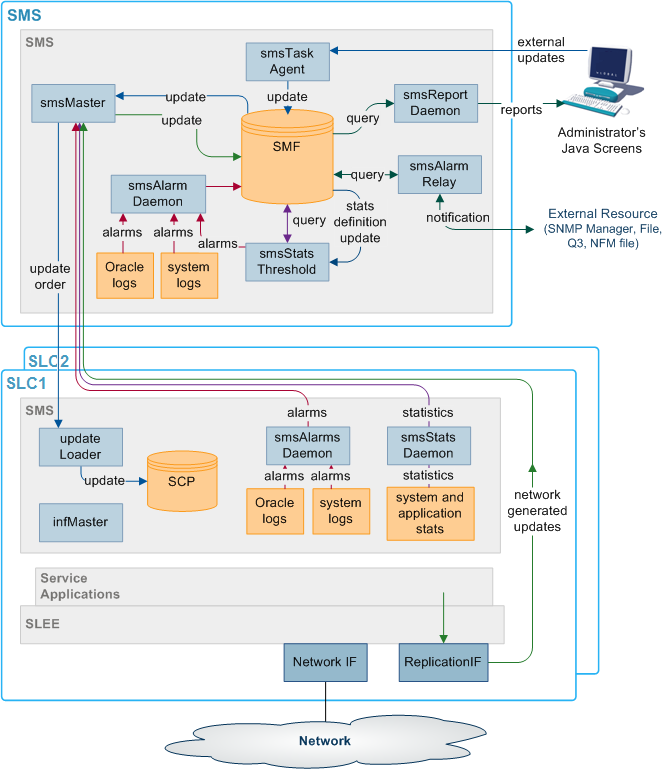
Here is an example of the main components of the SMS system.
Figure 1-1 SMS component diagram
SMS Subsystems
There are four main subsystems within SMS:
- Replication
- configuration management
- Reporting functions
- File transfer
Replication
Replication provides the main method of transferring data around the Service Management System. It provides:
- A reliable and fault tolerant delivery of data:
- From administrators and SLCs into the SMF
- Changes to persistent data held in the SMF to all relevant SLCs (so all parts of the system have consistent data)
- Alternative network routing between the SLC and SMS under network failure, or buffered updates under complete network failure or SMS downtime
- Disaster recovery in the event of a network failure
Replication moves the following data:
- Configuration data for the smsStatsDaemon
- Configuration data for other installed IN software (such as ACS, CCS and VWS)
- Any update of application data due to the actions of the service running on the SLCs (including client account and call routing data)
- System, application and interface statistics
- Alarms
For more information about replication, see Replication Overview.
Reporting Functions
The reporting functions enable the administrator to run reports against the data collected in the SMF.
The reports are configured in the SMS Java administration screens.
Process Descriptions
Table 1-1 describes the main components in SMS.
Table 1-1 Main Components in SMS
| Process | Role | Further information |
|---|---|---|
| smsMaster | Receives update requests and forwards them to the SMF. | smsMaster |
| SMF | The main SMF on the SMS. | |
| SCP | The databases on the SLCs. They hold a subset of the data on the SMF. | |
| updateLoaders | Receives update orders from the smsMaster and inserts them into the SCPs. | updateLoader |
| Update Requesters | Update requesters run on SMSs and SLCs and may run on other IPs as well . They send update requests to the smsMaster. They include the smsAlarmDaemon and the smsStatsDaemon. | |
| smsTaskAgent | Forwards administrator's instructions to the smsMaster. | smsTaskAgent |
| smsAlarmDaemon | Collects alarms from local sources and forwards them to the smsMaster. | Alarms |
| smsAlarmRelay | Monitors the alarms in the SMF and forwards alarms to administrators. | Alarms |
| smsReportsDaemon | Enables the user to run reports against the data held in the SMF. | smsReportsDaemon |
| smsStatsDaemon | Collects statistics and forwards them to the smsMaster. | Statistics |
Platform Configuration
There are three configurations that SMS can be installed on. They are:
- On a single platform.
- With one SMS on one platform and one or more SLCs on separate platforms.
- With multiple SMSs connected to a RAID array and one or more SLCs on separate platforms.
Unclustered Platform Configuration
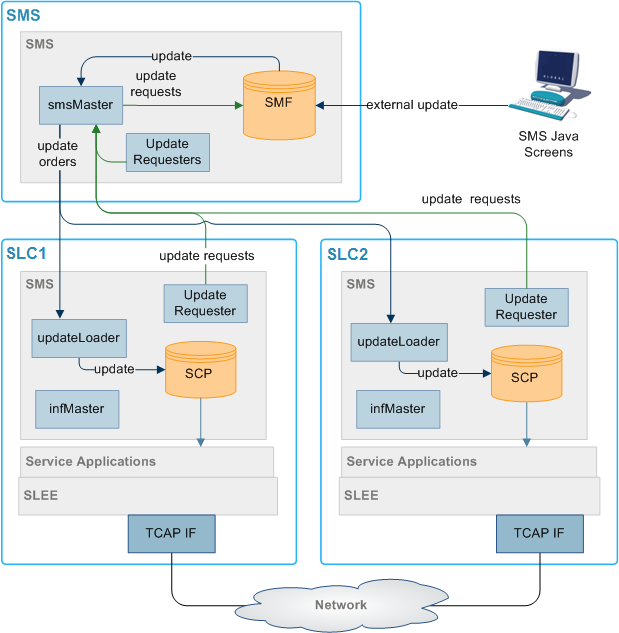
Using the unclustered platform configuration, the smsSms package is installed on the SMS. The smsScp package is installed on one or more SLCs.
This configuration provides resilience by using a failover system from the SMS to the SLCs. However, while the SMS is unavailable, no configuration updates can be forwarded to the SLCs.
Unclustered Platform Configuration Diagram
Here is an example of replication in an unclustered installation.
Figure 1-2 Unclustered Platform Configuration Diagram
Single Platform Configuration
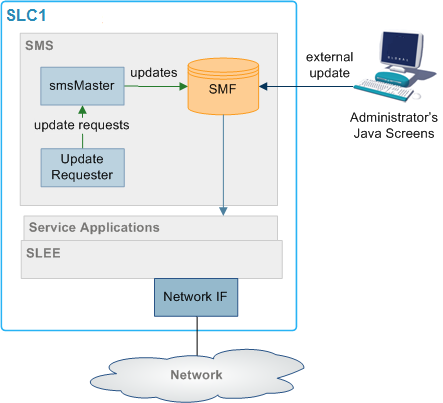
Using the single platform configuration, all required SMS functionality is installed on a single platform. Because all SMS functionality is on a single computer the parts of SMS which are involved in connecting the different components are removed.
This results in a simple, easy to administer system. However, because the system runs on one machine, resilience is reduced.
Maintaining Network Connections
All replication elements (nodes) establish TCP connections with a master replicator by implicitly connecting to one.
To maintain reliable connection between nodes of the replication system two methods are employed to strengthen the underlying TCP protocol to be used:
- Heartbeating
- Dual network connection
Heartbeating
A simple heartbeating mechanism is used to overcome TCP's failure to detect connection severance (for example, cable failure).
Every node connected to a superior master node sends a periodic heartbeat message to which the master responds with an acknowledgment. This ensures both ends of the connection can detect failure within one heartbeat period.
When a connection fails, the connecting element should attempt to reconnect to a superior master. If the superior master is part of a cluster, the connecting element attempts to connect to the next master in the cluster.
Dual Network Connection
The replication system supports dual network connection to overcome a potential single point of failure (that of the underlying transport medium).
Each node can have two addresses by which it can be reached: a primary and a secondary address. These addresses can (and should) be on separate networks.
When a connection to a superior master is required by an element, two connection attempts are made:
- Primary address (over the primary network)
- Secondary address (over a secondary network)
The replication element uses the first connection to succeed, closing the other connection first.
If required, a configurable delay (of up to one second) occurs between the connection attempt to the primary address and the secondary one.
This provides the ability to favor the primary network over the secondary (for example, if one network has a better known latency).
If no delay is configured, the connection attempts occur simultaneously. If both networks have similar latency, the one that ultimately gets used is unpredictable.
smsTrigDaemon
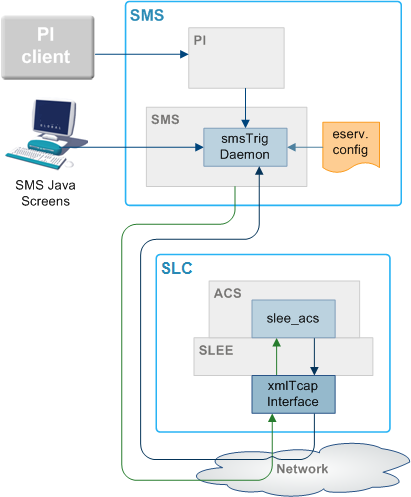
smsTrigDaemon manages control plan execution requests. It runs on the SMS platform.
smsTrigDaemon accepts control plan execution requests from either a remote PI client or the Java management screens. It forwards requests to ACS through the xmlTcapInterface on the SLC platform. An indication of whether or not the requests were successful passes back from the ACS to the initiating client.
Architectural Overview
Figure 1-4 shows smsTrigDaemon and components that surround it.
Figure 1-4 Architectural Overview
Message Flows
Table 1-2 describes the message flows that smsTrigDaemon uses.
Table 1-2 Message Flows
| Stage | Description |
|---|---|
| 1 | The Java management screens send control plan run requests to smsTrigDaemon over a CORBA transport layer. Each request contains the name of the control plan to be run, the SLC service handle, the CLI of the subscriber against which the control plan should be run, an optional called party number and extensions. |
| 2 | A remote PI client sends control plan run to requests to the provisioning interface. As with stage 1, each request contains the name of the control plan to be run, the SLC service handle, the CLI of the subscriber against which the control plan should be run, an optional called party number and extensions. |
| 3 | The provisioning interface forwards requests to smsTrigDaemon over the FIFO layer transport layer. |
| 4 | Using an XML request, smsTrigDaemon forwards the control plan execution request to the xmlTcapInterface on the SLC platform. |
| 5 |
The xmlTcapInterface constructs an InitialDP and sends it to ACS through the SLEE. For more information about the SLEE, see Service Logic Execution Environment Technical Guide. |
| 6 | An indication of success or failure is returned to the xmlTcapInterface using a Connect, Continue or ReleaseCall component. |
| 7 | The indication of success or failure is sent to smsTrigDaemon using an HTTP response. smsTrigDaemon then sends the indication back to the client. |
Note:
Third parties can also send XML requests directly to the xmlTcapInterface.Components
The smsTrigDaemon interacts with three subsystems:
- Provisioning Interface
- xmlTcapInterface
- SLEE
PI
The Provisioning Interface (PI) provides a mechanism for manipulating data in the SMF. It enables bulk or scripted operations on SMF data where manual input using the Java management screens would be inefficient.
For more information, see PI User's and Technical Guide.
xmlTcapInterface
The xmlTcapInterface enables the SLEE to inter-work with a TCAP protocol. The interface converts XML messages arriving from smsTrigDaemon into SLEE events. Similarly, the interface converts events arriving from the SLEE into XML messages that smsTrigDaemon understands.
For more information, see XML TCAP Interface Technical Guide.
Alarms
Alarms from the SMS and SLCs are collected in the SMF using replication. A set of tools enable management of the alarms in the SMF. Functions include:
- Filtering alarms
- Setting notification destinations
- Monitoring
This functionality is configured using the alarms screens in SMS. For more information about configuring alarms, see Service Management System User's Guide.
Alarms can be generated from monitoring statistics.
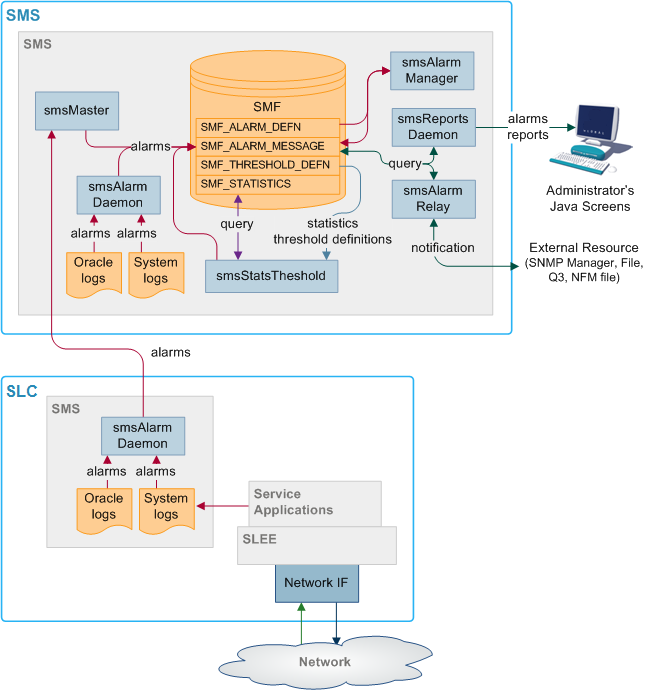
Alarms Replication Process
Table 1-3 describes the stages involved in collecting and reporting about alarms within the SMS system using replication.
Table 1-3 Stages Involved in Collecting and Reporting About Alarms
| Stage | Description |
|---|---|
| 1 |
Alarms are collected by the smsAlarmDaemon on the SMS and SLCs. Sources include:
|
| 2 |
The smsAlarmDaemon sends an update request to the superior master (usually the smsMaster). Exception: The smsAlarmDaemon on the SMS makes its updates directly to the SMF, without sending anything to the smsMaster. |
| 3 | When the superior master receives an update request, it inserts the updated data into the SMF_ALARMS_MESSAGE table of the SMF. |
| 4 | The smsAlarmManager matches each alarm instance in the SMF_ALARMS_MESSAGE table with the correct alarm type from the SMF_ALARM_DEFN table, and additional information about the alarm type is saved with the alarm instance. |
| 5 |
The smsAlarmRelay process monitors the SMF_ALARMS_MESSAGE table and forwards alarms to the specified external resource. Note: The administrator can run reports on the collected alarms using the reports screens in SMS (which are run by the smsReportsDaemon). |
Statistics Thresholds
Alarms can be generated from specific statistical measures.
The smsStatsThreshold process monitors the SMF_STATISTICS table in the SMF database. When a statistic or statistics match a rule specified in the SMF_STATISTICS_RULE table, the smsStatsThreshold process inserts an alarm record into the SMF_ALARM_MESSAGE table in the SMF database.
For more information about configuring statistics thresholds, see Service Management System User's Guide.
Enhanced Fault Management
Enhanced Fault Management (EFM) takes the alarms that are produced by the system and matches alarm instances to information that is held in the database for each alarm type. The alarm instances, including the additional information can then be relayed to an external resource for further processing.
Description of Processes and Executables
Table 1-4 describes the roles of the components involved in the alarms process.
Table 1-4 Roles of the Components
| Process | Role | Further information |
|---|---|---|
| smsAlarmDaemon | Collects alarms from local sources and forwards them to the smsMaster. | smsAlarmDaemon |
| smsMaster | Receives alarms from smsAlarmDaemons and forwards them to the SMF. | smsMaster |
| smsAlarmRelay | Monitors the SMF_ALARM_MESSAGE table in the SMF and forwards alarms to relevant notification points (including SNMP). | smsAlarmRelay |
| smsReportsDaemon | Enables the user to run reports against the alarms held in the SMF. | smsReportsDaemon |
| smsStatsThreshold | Monitors the SMF_STATISTICS table in the SMF. If the statistics meet certain rules, then this process creates an alarm and inserts it into the SMF_ALARM_MESSAGE table in the SMF. | smsStatsThreshold |
| smsAlarmManager | The smsAlarmManager matches alarm instances with the alarm definitions stored in the SMF_ALARM_DEFN table on the SMF, and adds the extra information stored in the definition to each instance of that alarm as it occurs. | smsAlarmManager |
Alarm Replication and Buffering
The smsAlarmDaemon filters alarms before they are sent. This enables:
- Protection against the SMS being flooded with alarms
- Filtering of repeating alarms
For more information about buffering alarms, see smsAlarmDaemon.
Statistics
Statistics generated by the SMS and SLCs are collected in the SMF_STATISTICS table of the SMF database. A set of tools provides management functions. Functions include:
- Filtering statistics
- Setting rules for statistics thresholds which raise alarms
- Running reports against the statistics held in SMF_STATISTICS
For more information about using these functions, see Service Management System User's Guide.
Statistics Collection Diagram
Here is an example of the statistics collection process.
Figure 1-6 Statistics Collection Diagram
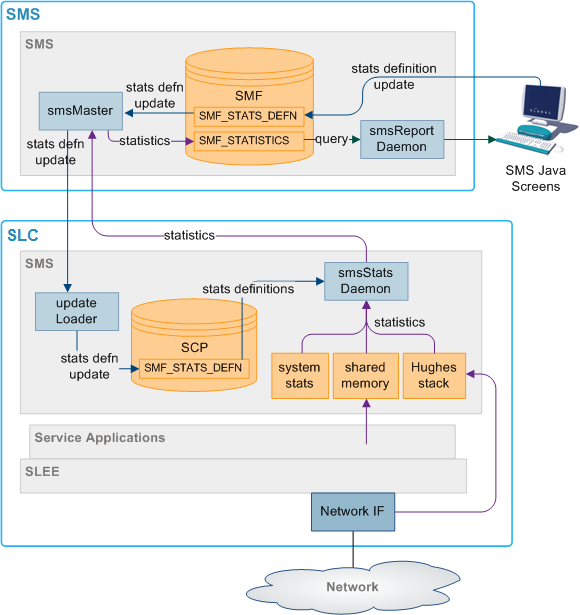
Description of Processes and Executables
Table 1-5 describes the roles of the components involved in the statistics process.
Table 1-5 Roles of the Components
| Process | Role | Further information |
|---|---|---|
| smsStatsDaemon | Collects statistics from SLCs and forwards them to smsMaster. | smsStatsDaemon |
| smsMaster | Receives statistics from the smsStatsDaemons and forwards them to the smsMaster for insertion into the SMF. | smsMaster |
| smsReportsDaemon | Enables the user to run reports against the statistics held in the SMF. | smsReportsDaemon |
| smsStatsThreshold | Monitors the SMF_STATISTICS table in the SMF. If the statistics meet certain rules, the smsStatsThreshold process creates an alarm and forwards it to the smsAlarmDaemon on the SMS. | smsStatsThreshold |
Statistics Collection Process
Table 1-6 describes the stages involved in collecting statistics within the SMS system using replication.
Table 1-6 Stages Involved in Collecting Statistics
| Stage | Description |
|---|---|
| 1 |
Statistics are gathered by the statistics daemon process (smsStatsDaemon) which runs on each SLC platform. Statistics which are collected include:
|
| 2 | At regular intervals, the smsStatsDaemon sends the values to the smsMaster process on the SMS platform as an update request. |
| 3 | The smsMaster adds the new statistics to the SMF_STATISTICS table in the SMF. |
| 4 | The administrator can run reports on the collected statistics using the statistics screens in SMS (which are executed by the smsReportsDaemon). |
Statistics Thresholds
Alarms can be generated from specific statistical measures.
The smsStatsThreshold process monitors the SMF_STATISTICS table in the SMF database. When a statistic or statistics match a rule specified in the SMF_STATISTICS_RULE table, the smsStatsThreshold process inserts an alarm record into the SMF_ALARM_MESSAGE table in the SMF database.
For more information about configuring statistics thresholds, see Service Management System User's Guide.
Statistics Collected
Statistics collected
The statistics system can collect any SMS-compatible IN application statistics. These are typically coarse values related to the general performance and behavior of the application. Typical statistics values include:
- Total number of requests from SSF.
- Number of call instances resulting in error treatment.
- Number of calls from invalid geographical locations.
- Number of calls reaching successful call completion to international locations.
- Number of calls reaching successful call completion to international category one partners.
Statistics sources may include:
- System statistics from the syslog.
- System statistics from the operating system.
- Statistics from the Sigtran stack.
- Statistics from shared memory.
Note:
For statistics about call processing, see also Advanced Control Services Technical Guide.
EDRs
The SMS software provides a complete, integrated reporting mechanism for Event Detail Records (EDR). It allows the developers of SMS-compatible IN applications to add report functions to their product, through the SMS reports interface.
EDR File Transfer Diagram
Here is an example of the transfer of files between SLCs and the SMS.
Figure 1-7 EDR File Transfer Diagram
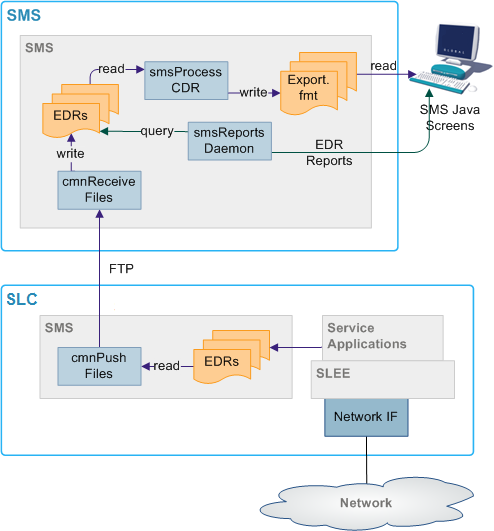
EDR File Transfer Process
Table 1-7 describes the stages involved in transferring files around the system using the Common File Transfer process. The files usually transferred are EDRs.
Table 1-7 Stages Involved in Transferring Files
| Stage | Description |
|---|---|
| 1 | On the SLCs, cmnPushFiles collects files from the configured input directory and transfers them to the configured output directory on the SMS through an stdout. It adds the destination directory to the file. |
| 2 | If the transfer fails, cmnPushFiles copies the files to the configured retry directory to attempt the transfer again later. |
| 3 | When the files are successfully transferred to the SMS, cmnPushFiles moves the files to the configured completed directory. |
| 4 | On the SMS, cmnReceiveFiles scans the configured input directory and moves any files to the directory specified in the file. |
| 5 | smsCdrProcess.sh scans its input directory for *.cdr files and moves them to its processed directory. |
Description of Processes and Executables
Table 1-4 describes the roles of the components involved in the alarms process.
Table 1-8 Roles of the Components
| Process | Role | Further information |
|---|---|---|
| smsAlarmDaemon | Collects alarms from local sources and forwards them to the smsMaster. | smsAlarmDaemon |
| smsMaster | Receives alarms from smsAlarmDaemons and forwards them to the SMF. | smsMaster |
| smsAlarmRelay | Monitors the SMF_ALARM_MESSAGE table in the SMF and forwards alarms to relevant notification points (including SNMP). | smsAlarmRelay |
| smsReportsDaemon | Enables the user to run reports against the alarms held in the SMF. | smsReportsDaemon |
| smsStatsThreshold | Monitors the SMF_STATISTICS table in the SMF. If the statistics meet certain rules, then this process creates an alarm and inserts it into the SMF_ALARM_MESSAGE table in the SMF. | smsStatsThreshold |
| smsAlarmManager | The smsAlarmManager matches alarm instances with the alarm definitions stored in the SMF_ALARM_DEFN table on the SMF, and adds the extra information stored in the definition to each instance of that alarm as it occurs. | smsAlarmManager |
Directory Structure and Filenames
So that the Unix transfer scripts can locate the output EDR file, the file should be named according to the naming convention. This is usually done by the processes which create the files.
The directory structure which holds the files is in /IN/service_packages/SMS/cdr/.
For more information about the directory structure, see Advanced Control Services Technical Guide.
The file name is ApplicationID.cdr. In this case, the complete specification of the currently active EDR filename for the ACS application is APP_yyyymmddhhmmss.txt.
Where:
- APP is the three letter acronym for the originating process
- yyyymmddhhmmss is the date and time the file started to be written to
There is no need for the application to provide any further detail in the file name, as the subsequent processing of the EDR files can perform this. The file names for archived files on the SLC and SMS are detailed in the section that deals with the subsequent processing of these files.
EDR Intermediate File Format
The intermediate EDR, as output from the SMS EDR API is written to the /IN/service_packages/SMS/cdr/current/ directory.
The format of the file is a | separated list of TAG=VALUE pairs, except for the first entry which is the service name followed by a |. Each record is new line separated.
Example:
# File created at 1999060312449
Acs_Service|SN=1800906420|TN=4770360|CGN=9380360|TCS=1999060312449
Acs_Service|SN=1800906421|TN=4770361|CGN=9380361|TCS=1999060312450
Acs_Service|SN=1800906422|TN=4770362|CGN=9380362|TCS=1999060312457
Acs_Service|SN=1800906423|TN=4770363|CGN=9380363|TCS=1999060312521
Acs_Service|SN=1800906424|TN=4770364|CGN=9380364|TCS=1999060312590
Acs_Service|SN=1800906425|CGN=9380365|TCS=1999060312449
Acs_Service|SN=1800906426|CGN=9380366|TCS=1999060312449
Acs_Service|SN=1800906427|TN=4770367|CGN=9380367|TCS=1999060313036
Acs_Service|SN=1800906428|TN=4770368|CGN=9380368|TCS=1999060312036