Connect Cables and Power Cords
- For network access, connect an Ethernet cable between the server's Ethernet ports (NET0) and the network to which the server will communicate.
- Connect any other cables to the back panel accessible connections, as needed.
- Make a connection to the Oracle ILOM service processor. See Server Management Connection Options.
Choose one of the following options:
- Connect a serial cable the server's serial management port (SER MGT) and a terminal device.
After initial configuration, you can connect and configure access using the Ethernet management (NET MGT) port.
- Connect an RJ-45 Ethernet cable to the server management port (NET MGT) and the management network.
- Connect a serial cable the server's serial management port (SER MGT) and a terminal device.
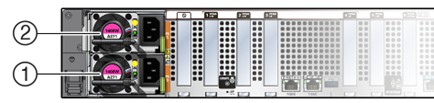
- Connect two power cords to two power supplies at the back of the server from two separate AC power sources.
Use Velcro straps to secure the power cords to the power supply handles.
The server is equipped with two power supplies. The server can operate with one power source; however, using only one power source eliminates redundancy.
Figure 6-6 Oracle Communications Server E6-2L
Caution:
Damage to Server Components: Do not operate the server unless all included fans and components are fully installed. - Confirm that the server is in Standby power mode.
When the server power cords are connected, the following actions occur:
- The green AC OK power supply indicators (LEDs) light.
- The Oracle ILOM SP initializes. During initialization, the green SP OK LED flashes rapidly.
- After the Oracle ILOM SP fully initializes, the green SP OK LED is steady on and the green System OK LED flashes slowly, indicating that the host is in Standby power mode.
In Standby power mode, the server is not initialized or powered on.