3 Media and Documentation
3.1 Media Pack
This section lists the media package for Network Analytics Suite release 25.2.1xx. To download the media package, see My Oracle Support (MOS).
To learn how to access and download the media package from MOS, see Accessing Documents on MoS.
Note:
The information provided in this section is accurate at the time of release but is subject to change. See the Oracle software delivery website for the latest information.Table 3-1 Media Pack Contents for OCNADD 25.2.100
| Description | Version | ATS Version | Upgrade Supported |
|---|---|---|---|
| Oracle Communications Network Analytics Data Director (OCNADD) | 25.2.100 | 25.2.100 | OCNADD 25.2.100 supports the upgrade from 25.1.200.
For more information, see Oracle Communications Network Analytics Data Director Installation, Upgrade, and Fault Recovery Guide . |
3.2 Documention Artifacts with MOS Patch Numbers
The following table lists the availability of various documentation artifacts such as custom templates, compliance matrix, and dimensioning sheets. It also provides the MOS patch numbers of these documentation artifacts for each network function.
Table 3-2 Documentation Artifacts with MOS Patch Numbers
| Network Function | NF Version | Compliance Matrix | Custom Templates | Dimensioning Sheet | MOS Patch Number |
|---|---|---|---|---|---|
| OCNADD | 25.2.100 | N | N | Y | 38737624 |
3.2.1 Accessing Network Analytics Suite Documents on MOS
3.2.1.1 Access with Patch Number
This procedure describes how to access the Network Analytics Suite specific documents on MOS with the patch number of the release.
- Log in to MOS using the appropriate credentials.
- Click the Patches & Updates tab.
- In the Patch Search console, the
Number/Name or Bug Number (Simple) option remains
selected by default.
Figure 3-1 Search with Patch Number
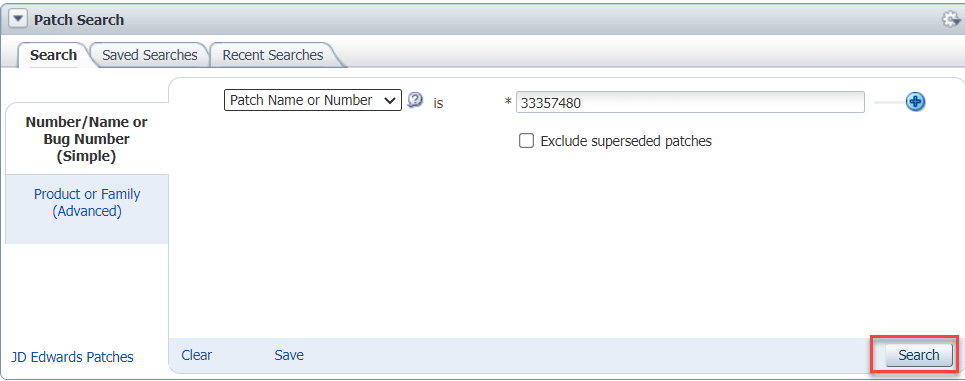
- Select Patch Name or Number from the drop-down list and enter the patch number in the corresponding input field.
- Click Search.
The Patch Simple Search Results window lists the patch.
- Select the patch to view the details.
The Patch Details window appears.
- Click Download.
The File Download window appears.
Figure 3-2 File Download

- Click the
<p********_<release_number>_Tekelec>.zipfile. - Extract the release package zip file to download the network function patch to the system where network function must be installed.
3.2.1.2 Access without Patch Number
This procedure describes how to access the Network Analytics Suite specific documents on MOS without the patch number of the release.
- Log in to MOS using the appropriate credentials.
- Click the Patches & Updates tab.
- In the Patch Search console, click the
Product or Family (Advanced) option.
Figure 3-3 Search without Patch Number

- Enter Oracle Communications Cloud Native Core - 5G in the Product field.
- From the Release drop-down list, select Oracle Communications Network Data Analytics Function <release_number>.
- Click Search.
The Patch Advanced Search Results list appears.
- Select the customer documentation patch from the list.
The Patch Details window appears.
- Click Download.
The File Download window appears.
Figure 3-4 File Download
- Click the
<p********_<release_number>_Tekelec>.zipfile. - Extract the release package zip file to download the network function patch to the system where network function must be installed.
3.3 Compatibility Matrix
Note:
For seamless integration and optimal performance of CNC NFs on third party platform, the third party platform needs to be compatible with the specified Kubernetes version.The following table lists the compatibility matrix for OCNADD:
Table 3-3 Compatibility Matrix for OCNADD 25.2.100
| Version | CNE | cnDBTier | OCI Adapter | OSO | ASM S/W | Kubernetes | OCCM | CNC Console | SCP | NRF | SEPP | BSF | PCF |
|---|---|---|---|---|---|---|---|---|---|---|---|---|---|
| 25.2.100 |
|
|
|
NA | NA |
|
|
|
|
|
|
|
|
3GPP Compatibility Matrix
The following table lists the 3GPP compatibility matrix:
Table 3-4 3GPP Compatibility Matrix
| NF | NF Version | 3GPP |
|---|---|---|
| OCNADD | 25.2.100 |
|
Note:
- For the data being sent from NRF, GZIP compression is turned off within the NRF.
- For the data being sent from SCP, OCNADD copies the base64 encoded compressed “5g-sbi- message” to the third party consumer without decoding.
- For seamless integration and optimal performance of CNC NFs on third party platform, the third party platform needs to be compatible with the specified Kubernetes version.
3.4 Common Microservices Load Lineup
This section provides information about common microservices and ATS for OCNADD release 25.2.1xx:
Table 3-5 Common Microservices Load Lineup for OCNADD 25.2.100
| Version | Alternate Route SVC | App-Info | ASM Configuration Chart | ATS Framework | Config-Server | Debug-tool | Egress Gateway | Ingress Gateway | Helm Test | Mediation | NRF-Client | Perf-Info |
|---|---|---|---|---|---|---|---|---|---|---|---|---|
| 25.2.100 | NA | NA | NA | 25.2.100 | NA | NA | NA | NA | NA | NA | NA | NA |
3.5 Security Certification Declaration
Table 3-6 Security Certification Declaration for OCNADD 25.2.100
| Compliance Test Description | Test Completion Date | Summary |
|---|---|---|
| Static Source Code Analysis
Additional Information: Assesses adherence to common secure coding standards |
17 September, 2025 | No unmitigated critical or high findings. |
| Dynamic Analysis (including fuzz testing)
Additional Information: Tests for risk of common attack vectors such as OWASP Top 10 and SANS 25 |
31 July, 2025 | No unmitigated critical or high findings |
| Vulnerability Scans
Additional Information: Scans for CVEs in embedded 3rd party components |
31 August, 2025 | No unmitigated critical or high findings |
| Malware Scans
Additional Information: Scans all deliverable software packages for the presence of known malware |
1 September, 2025 | No findings |
Overall Summary: No critical or severity 1 security issues were found or pending during internal security testing.