8 Create Policies

These policies must be created in the root compartment regardless of which compartment the vaults are created in. The policies are only created once.
  1. Sign in to the Oracle Cloud Console as an Account Administrator with appropriate privileges.
  2. Open the Navigation menu, select Identity & Security, and in the Identity section, select Policies.
  3. On the Policies page, select Create Policy.
  4. On the Create Policy page:
    1. In the Name field, enter: OPC_BYOK_POLICIES.
    2. In the Description field, enter: OPC BYOK POLICIES.
    3. In the Policy Builder section, select Show manual editor.
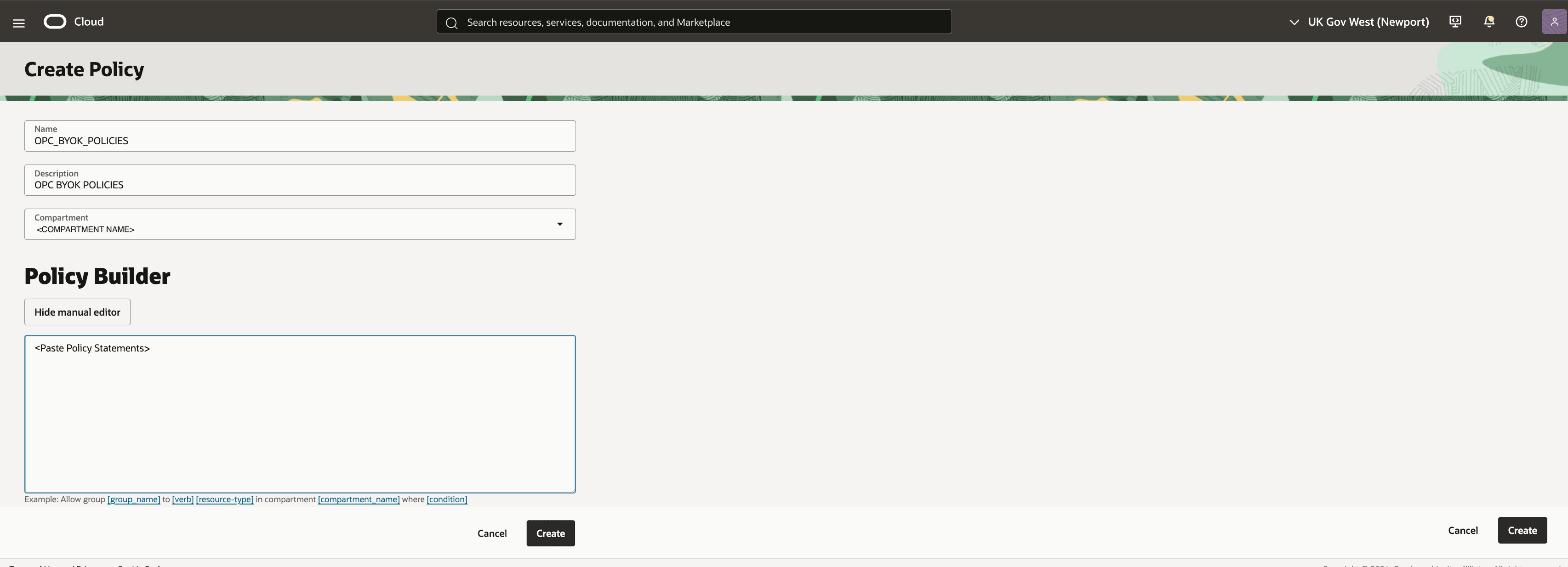
      The Create Policy screen.

    4. In the text field, enter the following policy statements.
      define tenancy opc-tenancy as <OPC_TENANCY_OCID>
      define dynamic-group opc_byok_dg as <OPC_BYOK_DG_OCID>
      allow service objectstorage-<REGION_1> to use keys in compartment <COMPARTMENT_NAME> where ALL { target.vault.id = '<VAULT_OCID>', target.resource.tag.OPCBYOKSecurity.BucketKey = 'true' }
      allow service objectstorage-<REGION_2> to use keys in compartment <COMPARTMENT_NAME> where ALL { target.vault.id = '<VAULT_OCID>', target.resource.tag.OPCBYOKSecurity.BucketKey = 'true' }
      admit dynamic-group opc_byok_dg of tenancy opc-tenancy to use vaults in compartment <COMPARTMENT_NAME> where target.vault.id = '<VAULT_OCID>'
      admit dynamic-group opc_byok_dg of tenancy opc-tenancy to inspect keys in compartment <COMPARTMENT_NAME> where target.vault.id = '<VAULT_OCID>'
      admit dynamic-group opc_byok_dg of tenancy opc-tenancy to use keys in compartment <COMPARTMENT_NAME> where ALL { target.vault.id = '<VAULT_OCID>, ANY { target.resource.tag.OPCBYOKSecurity.BucketKey = 'true', target.resource.tag.OPCBYOKSecurity.ADBKey = 'true' } }
      admit dynamic-group opc_byok_dg of tenancy opc-tenancy to use key-delegate in compartment <COMPARTMENT_NAME>
      admit dynamic-group opc_byok_dg of tenancy opc-tenancy to associate keys in compartment <COMPARTMENT_NAME> with buckets in tenancy opc-tenancy
      allow service keymanagementservice to manage vaults in tenancy
      Replace the following parameter values in the policy statements:
      • <COMPARTMENT_NAME> = Name of the Compartment that contains the customer BYOK Vault with <VAULT_OCID> in the customer tenancy.

        If the compartment is not in the root compartment but belongs to another compartment, the <COMPARTMENT_NAME> should include the parent compartment separated by colon, such as <COMPARTMENT_NAME> = parent compartment:compartment

        For example, if the compartment COMP3 is a sub-compartment of COMP2 which is a sub-compartment of COMP1, the <COMPARTMENT_NAME> should be specified as: COMP1:COMP2:COMP3

      • <VAULT_OCID> = OCID of customer BYOK Vault which will be provided by the customer.

      • <OPC_TENANCY_OCID> = Oracle Primavera Cloud Tenancy OCID in the Oracle Primavera Cloud tenancy. Provided by Oracle in the Service Request.

      • <OPC_BYOK_DG_OCID> = Oracle Primavera Cloud BYOK Dynamic Group OCID in the Oracle Primavera Cloud tenancy. Provided by Oracle in the Service Request.

      • <REGION_1> = Oracle Primavera Cloud Primary Region Identifier. Provided by Oracle in the Service Request.

      • <REGION_2> = Oracle Primavera Cloud Disaster Recovery Region Identifier. Provided by Oracle in the Service Request.

    5. Select Create.