4.7 Payout Modification
You can view or modify the payout instructions maintained during the CD account opening using this screen. Also, you can create new payout instruction, if no instructions are maintained for the CD account.
Note:
The fields marked as Required are mandatory.To view the CD payout modification details:
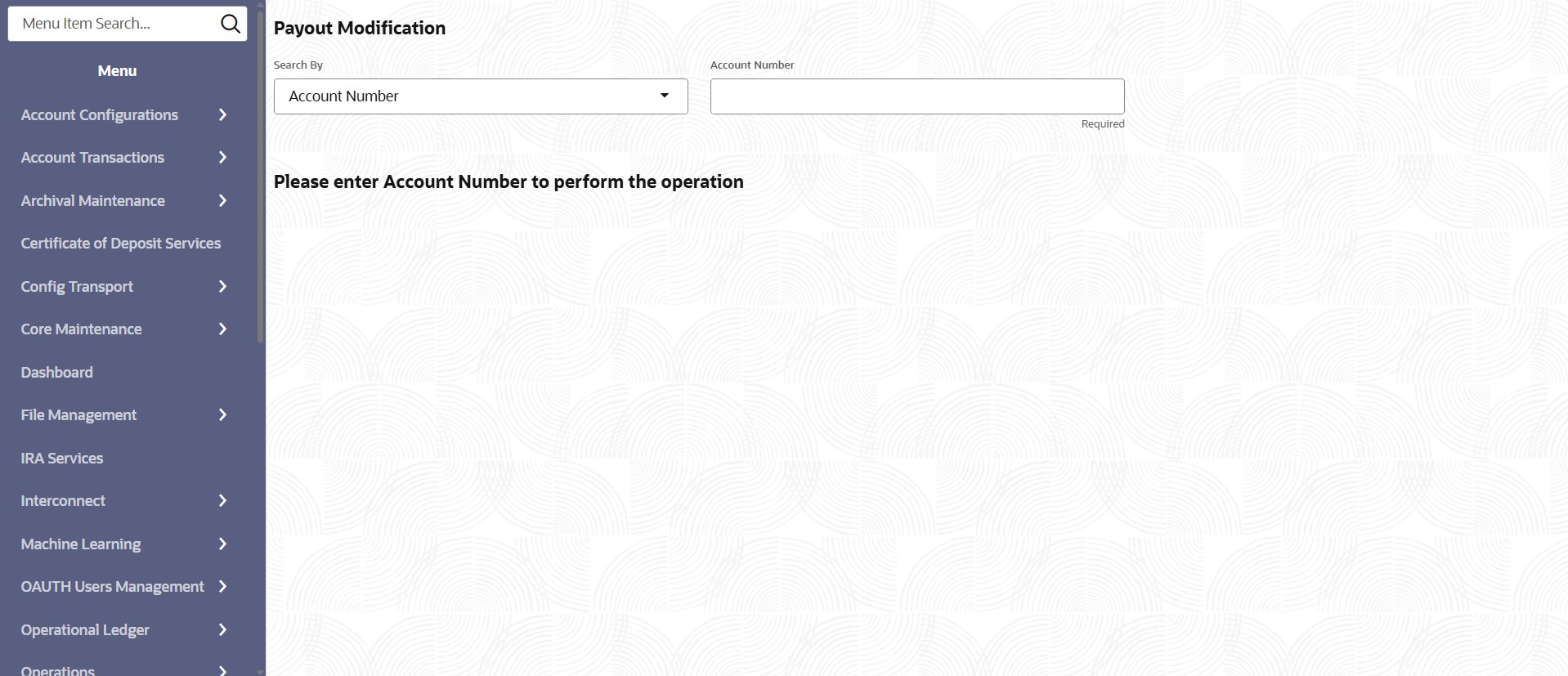
- On the Home screen, from the IRA Services menu, under Maintenance, click Payout Modification, or specify Payout Modification in the search icon bar and select the screen.
The Payout Modification screen displays.
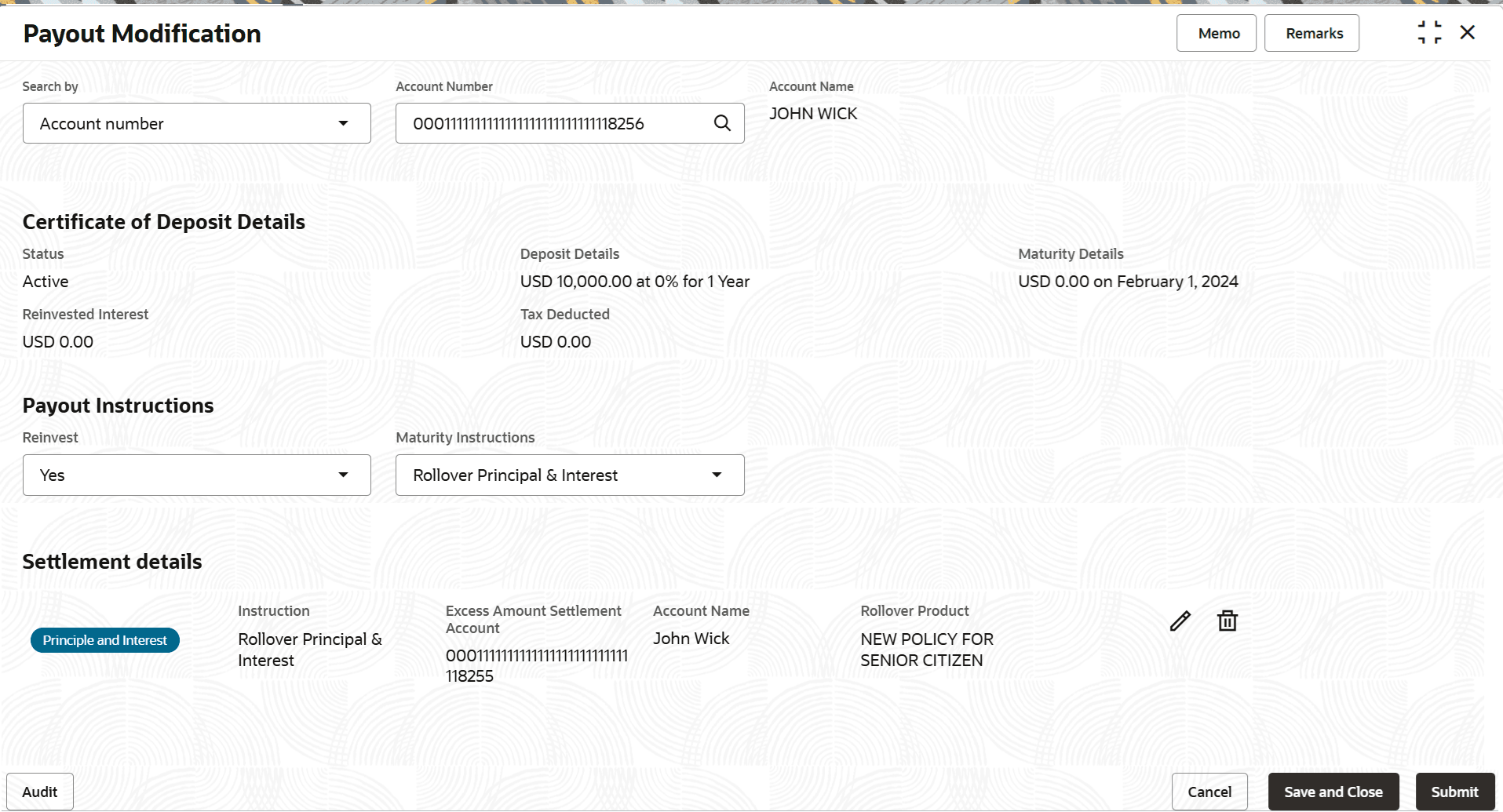
- Perform the required action, based on the option selected from the Search by field. The details are displayed.
- On the Certificate of Deposit Payout Modification screen, specify the fields. For more information on fields, refer to the field description
table.
Table 4-14 View CD Payout Details – Field Description
Field Description Search By Users can search for an account number by using any of the available search criteria. The account number is set as the default search option. Users can specify the account number directly in the adjacent field or search for an account number by clicking the Search icon. Users can also search for the specific account number by providing customer ID, account number, or account name.
Other search options available in the Search by field are Customer ID, Tax Identification Number, Mobile Number, and Email.
A specific customer ID can be searched by providing the customer name or customer ID. If Tax Identification Number, mobile, or email IDs are chosen to find an account number, the respective IDs have to be input entirely in the adjacent field for the system to display the account number. For a given search criteria, multiple account numbers may be linked.
For example, two or more account numbers can be linked to a single mobile number. In such cases, the system displays all the account number matches and the user can select the relevant account number on which to perform a servicing operation.Note:
The label of the field adjacent to the Search by field changes dynamically. For example, if the Account number is chosen as the search criteria, the label of the adjacent field is displayed as the Account Number. If Tax Identification Number is chosen as the search criteria, then the adjacent field would display the label as Tax Identification Number.Certificate of Deposit Details
Displays the basic details of the CD account.
Status
Displays the status of the CD account. The possible options are:- Active
- Overdue
- Closed
Deposit Details Displays the deposit amount, interest percentage, and tenure. Maturity Details
Displays the amount due to the customer on maturity and the maturity date.
Reinvested Interest or Interest Paid
Displays the amount and currency for the reinvested or paid out interest. Note:
- If the interest if of reinvest type, then the field name is displayed as Reinvested Interest.
- If the interest if of paid out type, then the field name is displayed as Interest Paid.
Tax Deducted
Displays the tax amount deducted till date.
Payout Instructions
This section displays the existing payout instructions of the CD account.
Reinvest Select whether the payout is to be invested. The options are: - Yes
- No
Maturity Instructions
Select the instruction to be set for payout on maturity. The options are:
- Redeem Principal & Interest
- Rollover Principal & Interest
- Special Amount Rollover
Note:
This field is displayed, if Yes option is selected from the Reinvest field.Principle Payout Instructions Select the instruction to be set for payout on maturity. The options are:
- Redeem Principal
- Rollover Principal
- Special Amount Rollover
Note:
This field is displayed, if No option is selected from the Reinvest field.Settlement details This section displays the current settlement details for the CD payout. <Settlement Type> Displays the settlement type. Instruction Displays the instruction set for the payout. Excess Amount Settlement Account Displays the account number for settling the excess amount. Account Number Displays the selected account number. Note:
This field is displayed when Maturity Instructions is set as Redeem Principal & Interest or Principle Payout Instructions is set as Redeem Principal.Account Name Displays the name of the settlement account. Rollover Product Displays the rollover product selected for the payout. <Actions> Displays the following icons: 
: Click to edit the settlement details.
: Click to delete the settlement added.
- Maturity Instruction as Redeem Principal and Interest
This topic explains the systematic instructions for adding the settlement payout for Maturity Instruction set as Redeem Principal and Interest in the Certificate of Deposit Payout Modification screen. - Maturity Instructions as Rollover Principal and Interest
This topic explains the systematic instructions for adding the settlement payout for Maturity Instruction set as Rollover Principal and Interest in the Certificate of Deposit Payout Modification screen. - Maturity Instruction as Special Amount Rollover
This topic explains the systematic instructions for adding the settlement payout for Maturity Instruction set as Special Amount Rollover in the Certificate of Deposit Payout Modification screen. - Principal Payout Instructions as Redeem Principal
This topic explains the systematic instructions for adding the settlement payout for Principal Payout Instructions set as Redeem Principal in the Certificate of Deposit Payout Modification screen. - Principal Payout Instructions as Rollover Principal
This topic explains the systematic instructions for adding the settlement payout for Principal Payout Instructions set as Rollover Principal in the Certificate of Deposit Payout Modification screen. - Principal Payout Instruction as Special Amount Rollover
This topic explains the systematic instructions for adding the settlement payout for Principal Payout Instructions set as Special Amount Rollover in the Certificate of Deposit Payout Modification screen. - Payout Modification - Payout Modes
This topic explains the systematic instructions for setting the payout option as accounts.
Parent topic: Maintenance