4.2 Check Return
The Teller can use the Check Return screen to initiate manual return of inward or outward clearing checks.
An inward check transaction may not be processed successfully for funds needed in the drawer account or due to stop payment of the check. In addition, an outward check transaction may get returned if the same is returned from the clearing house.
To perform check return:
- On the Home page, from Teller mega menu, under Clearing, click Check Return or specify Check Return in the search bar and select the screen.The Check Return screen is displayed.
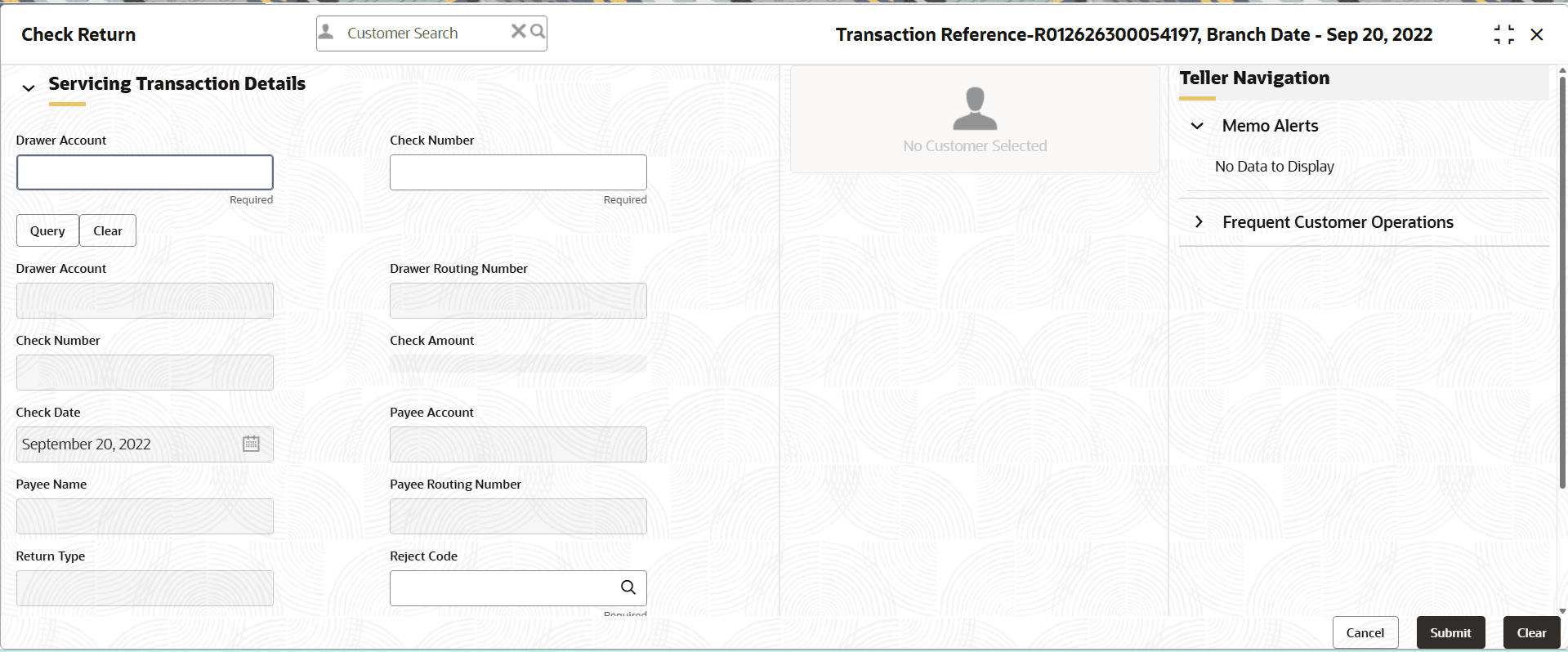
- On the Check Return screen, specify the fields. For more information on fields, refer to the field description
table.
Note:
The fields marked as Required are mandatory.Table 4-3 Check Return - Field Description
Field Description Drawer Account
Specify the drawer account number.
Check Number
Specify the check number.
Query
Click Query to fetch check details.
Clear
Click Clear to clear the check details.
Drawer Account
Displays the drawer account number.
Drawer Routing No
Displays the routing number of the specified drawer account.
Check Number
Displays the check number.
Check Amount
Displays the check amount.
Check Date
Displays the check date.
Payee Account
Displays the payee account number.
Payee Name
Displays the payee name.
Payee Routing No.
Displays the payee routing number.
Return Type
Displays the return type (Inward and Outward).
Reject Code
Select the reject code from the list of values.
Reject Reason
Displays the reason to reject.
Total Charges
Displays the total charge amount, which is computed by the system.
Narrative
Displays the default narrative as Check Return, and it can be modified.
- Specify the charge details. For information on the fields in the Charge Details segment, refer to Charge Details.
- Click Submit.
A teller sequence number is generated, and the Transaction Completed Successfully information message is displayed.
Note:
The transaction is moved to authorization in case of any warning raised when the transaction saves.
Parent topic: Clearing Transactions
