3.1 Collateral Details
This topic provides the systematic instructions about the Collateral Details data segment in Collateral Liquidation Initiation stage.
This data segment displays the collateral details captured as part of
Collateral Evaluation or Collateral Perfection process.
- Click Acquire & Edit, the required Collateral
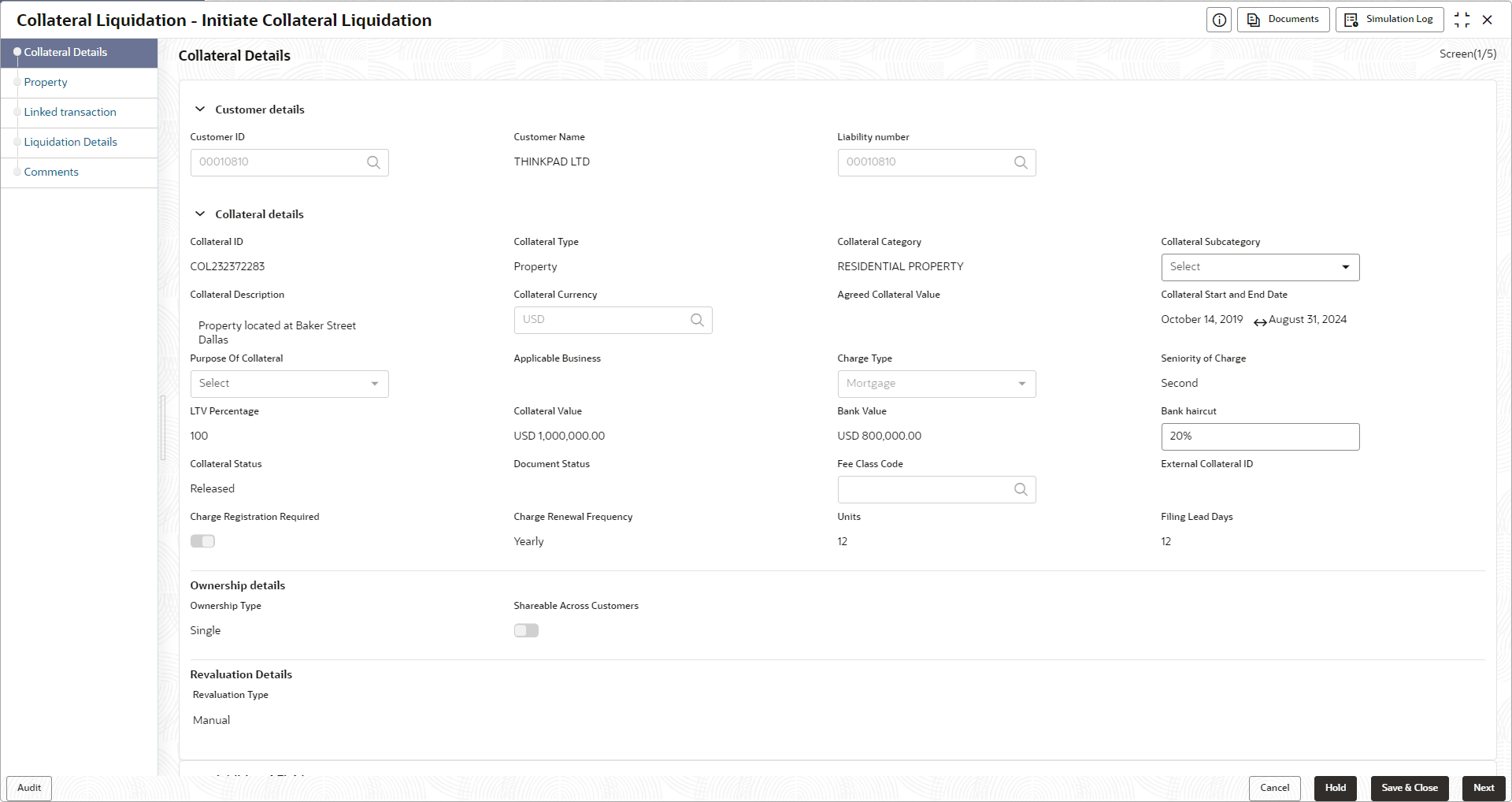
Release Request task.The Initiate Liquidation - Collateral Details screen displays.
Figure 3-3 Initiate Liquidation_Collateral Details
For more information on fields, refer to the field description table below.Table 3-1 Initiate Collateral Liquidation - Collateral Details
Field Field Description Customer Details This section displays the customer details. Customer ID Specify the customer ID. Customer Name Displays the customer name. Liability Number Specify the liability number. Collateral Details This section displays the collateral details. Collateral ID Displays the collateral ID. Collateral Type Displays the collateral type. Collateral Category Displays the collteral category. Collateral Subcategory Select the collateral subcategory from the drop-down list. The available options are: Collateral Description Displays the description of the collateral. Collateral Currency Displays the currency of the collateral. Agreed Collateral Value Specify the value of collateral that the customer has agreed to provide to the bank Collateral Start Date and End Date Displays the start date and end date of the collateral. Purpose Of Collateral Select the purpose of the collateral from the drop-down list. The available options are: Charge Type Select the charge type from the drop-down list.The available options are: Seniority of Charge Select the seniority of claim from the list. LTV Percentage Specify the LTV percentage. Collateral Value Displays the collateral value. Bank Value Specify the property value after applying Bank Haircut Value. Bank Haircut Displays the bank haircut value for the under-construction property. Collateral status Collateral status displays if the collateral is created. Document Status Displays the document status of the collateral. Fee Class Code Click search to fetch the free class code. External Collateral ID Displays the external collateral ID. Charge Regsitration Required Select this check box for recording registration details for the charge on collateral. As part of charge registration, notice with required details can be sent to the appropriate registration authority. Filing statement has to be sent to registrar for charge creation. Charge Renewal Frequency Select the charge renewal frequency from the drop-down list. The available options are: - Yearly
- Half Yearly
- Quarterly
- Monthly
- Daily
- Weekly
Units Specify the units. Filing Lead Days Specify the lead days. Ownership Details Specify the ounwership details. Ownership Type Select the collateral ownership type from the drop-down list. The available options are: - Single
- Joint
- Tenants in Common
- Others
Shareable Across Customers Select the toggle of share across the customers. Revaluation Details Specify the revaluation details. Revaluation Type Select the revaluation type from the drop-down list. The available options are: - Automatic
- Manual