3.1 Collateral 360 - RM View
This topic describes about the Collateral 360 in RM View.
In Collateral 360 - RM View, collateral related information that requires RM's
attention are displayed in addition to the general view. The RM can view the details and
plan the collateral activities for the customers in an efficient manner. The following
additional widgets are available in the RM view.
- Overall Facility Limit
- Upcoming Events
- Bank Deal Enablers
- Guidelines
Upon clicking RM View in the Collateral 360 screen, the 360
degree interface is displayed as shown below.
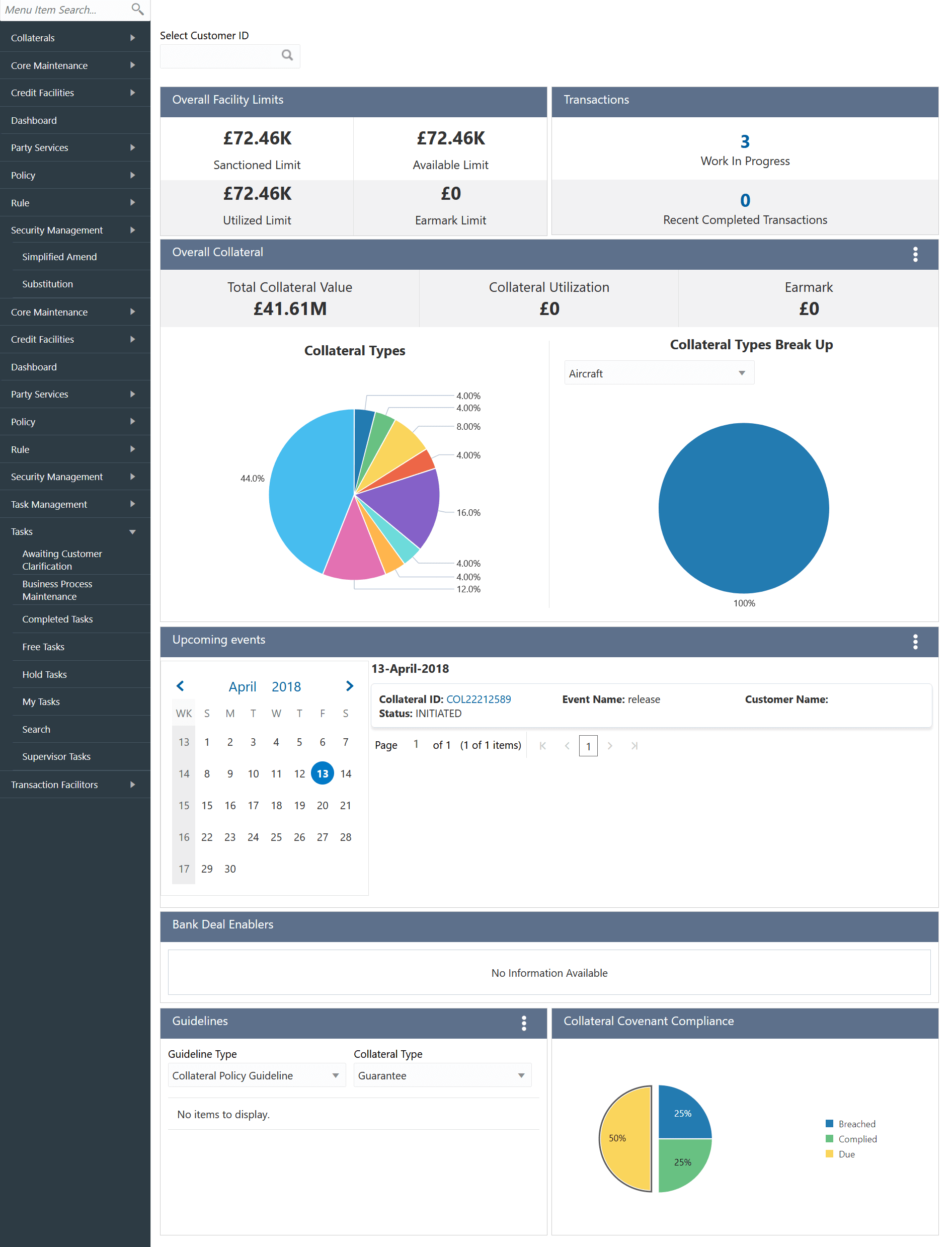
Figure 3-1 Collateral 360 - RM View
- Overall Facility Limits
This topic describes information about the Overall Facility Limits widget in Collateral 360 - RM View screen. - Transactions
This topic describes information about the Transactions widget in Collateral 360 - RM View screen. - Upcoming Events
This topic describes information about the Upcoming Events widget in Collateral 360 - RM View screen. - Bank Deal Enablers
This topic describes information about the Bank Deal Enablers widget in Collateral 360 - RM View screen. - Guidelines
This topic provides information about the Guidelines widget in Collateral 360 - RM View screen.