3.1 Initiation
This topic provides systematic instructions about the Initiation of the Credit Initiation.
This data segment allows to manage the party details captured in the FI Credit Proposal Initiation process. You can also add new customers to the party, if required.
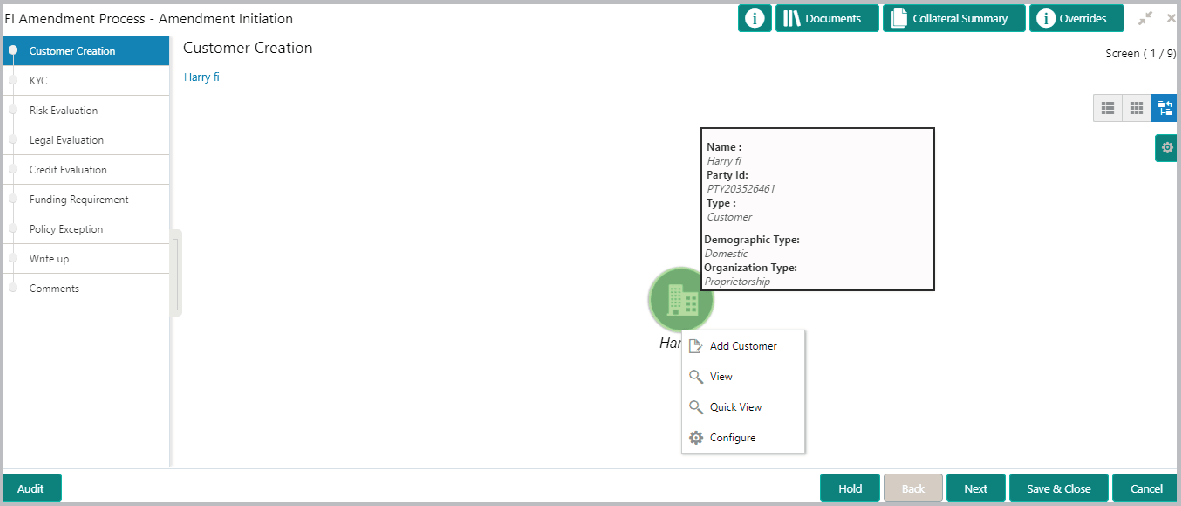
- To add a customer (child party) of the Financial Institution (party), click
Add Customer.The FI Details screen is displayed. For information on fields in the FI Details screen, refer the below table.
Table 3-3 FI Details
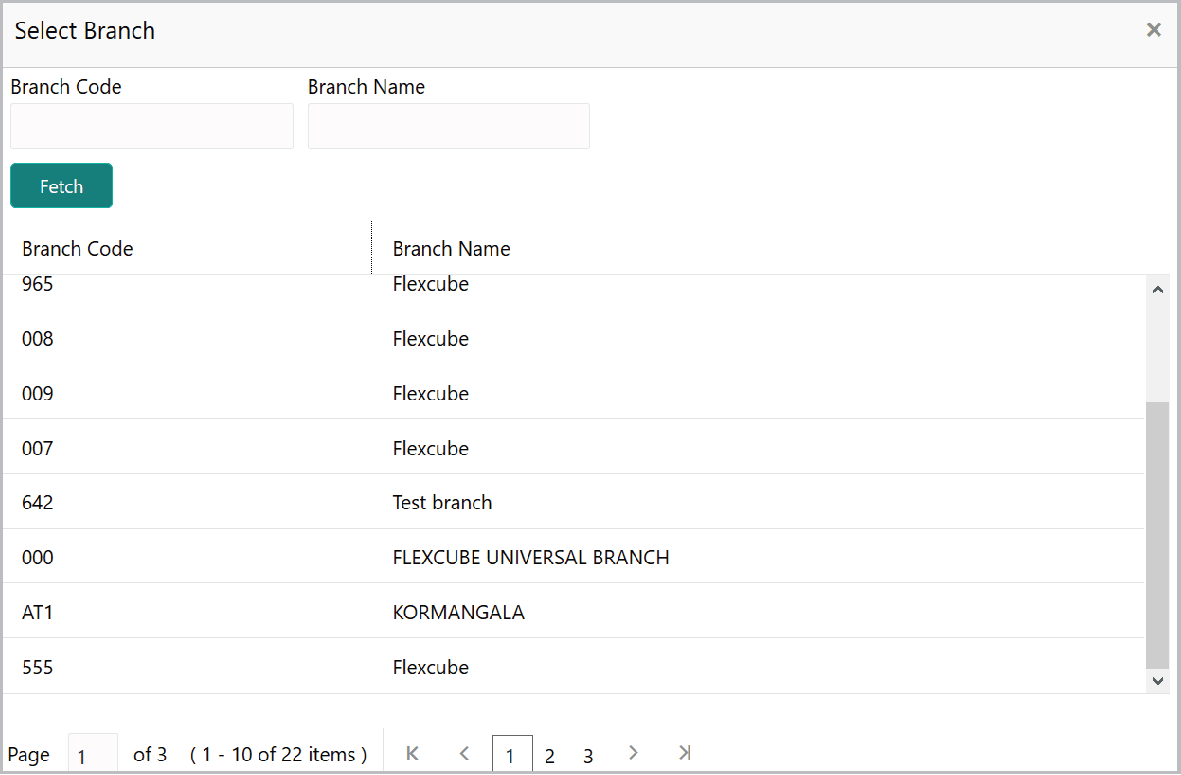
Actions Functionality Application Priority Select the Application Priority based on the requirement. The options available are Low, Medium and High. Application Branch Click search icon in the Application Branch field. Select Branch window is displayed. The following table describes the functionality of each actions listed above:
Table 3-4 Select Branch
Actions Functionality Fetch Click Fetch. Branch details is displayed. Branch Code Click the required Branch Code to add it to the Application Branch field.
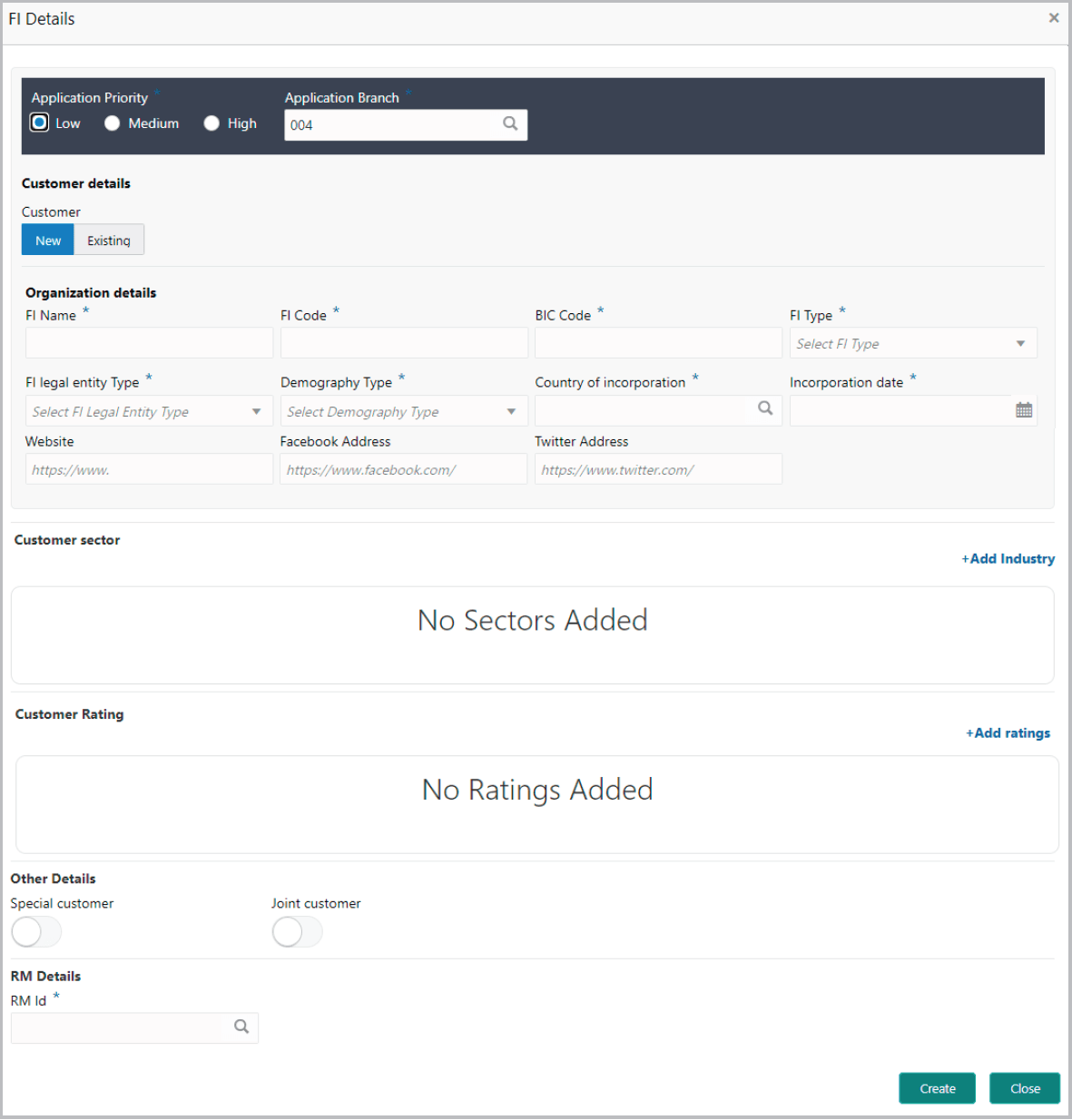
For information on fields in the FI Details screen,
refer the below table.
Table 3-5 Organization
details
Actions
Description
Customer
Select the Customer type. The options
available are New and Existing.
Customer ID
Upon selecting the Existing option, the
Customer ID field is displayed.
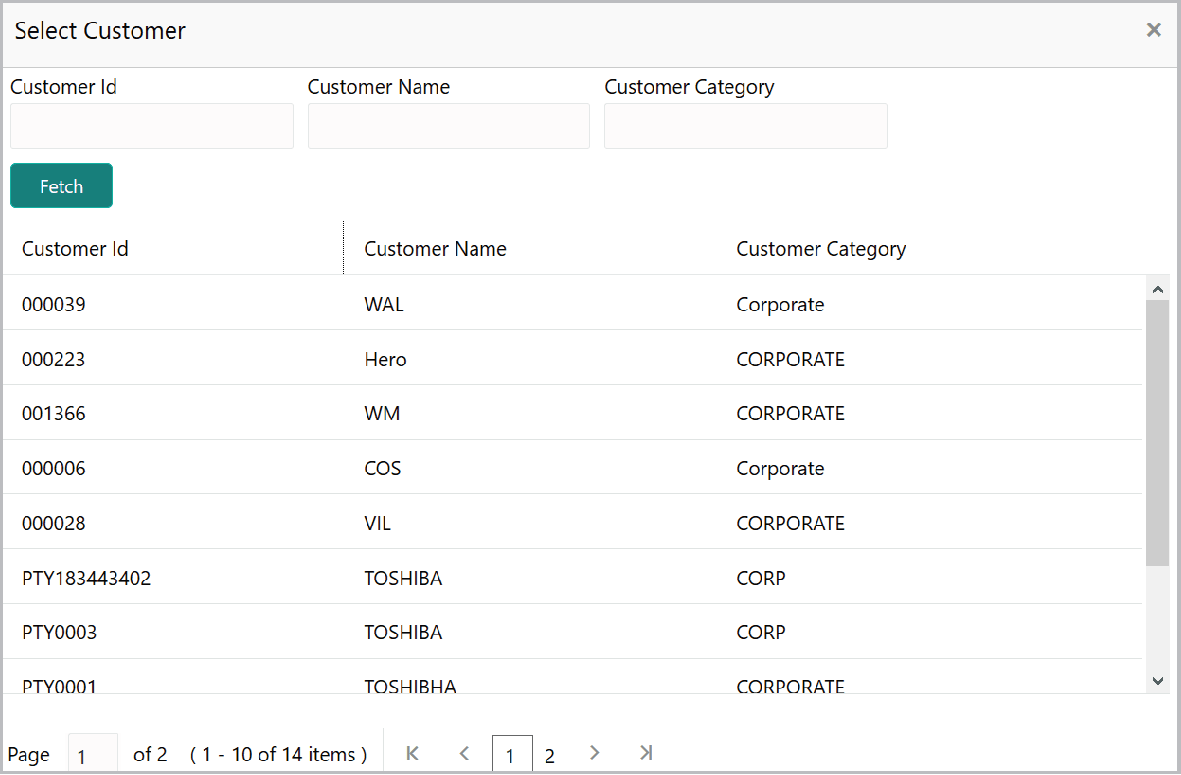
- Click the search icon in the Customer ID field. Select Customer window
is displayed.For information on fields in the Select Customer screen, refer the below table.
Table 3-6 Select Customer
Actions Functionality Fetch. Click Fetch. Customer details is displayed. Customer Id Click the Customer Id. Selected ID is added to the Customer ID field.
For information on fields in the Organization details screen, refer the below table.
Table 3-7 FI Details
| Fields/ Icons | Description |
|---|---|
| FI Name | Type the FI Name. |
| FI Code | Specify the unique code assigned to the Financial institution in the FI Code field. |
| BIC Code | Specify the financial institution’s BIC Code. |
| FI Type | Select the FI Type from the drop down list. The options available are Single and Conglomerate. |
| FI Legal Entity | Select the FI Legal Entity Type from the drop down list. The options available are Proprietorship, Pvt Ltd, Public Ltd, Govt Owned, Trusts, Clubs, Society, Associations, Limited Liability Partnership, Foreign Bodies, NGO and Others. |
| Demography Type | Select the Demography Type from the drop down list. The options available are Domestic and Global. |
| Geographical Spread | Search and select all the countries in which the FI is operating as Geographical Spread. |
| Country of incorporation. | Select the Country of incorporation. |
| Incorporation date | Click the calendar icon and select the Incorporation date. |
| fields | Type the following addresses in respective
fields:
|
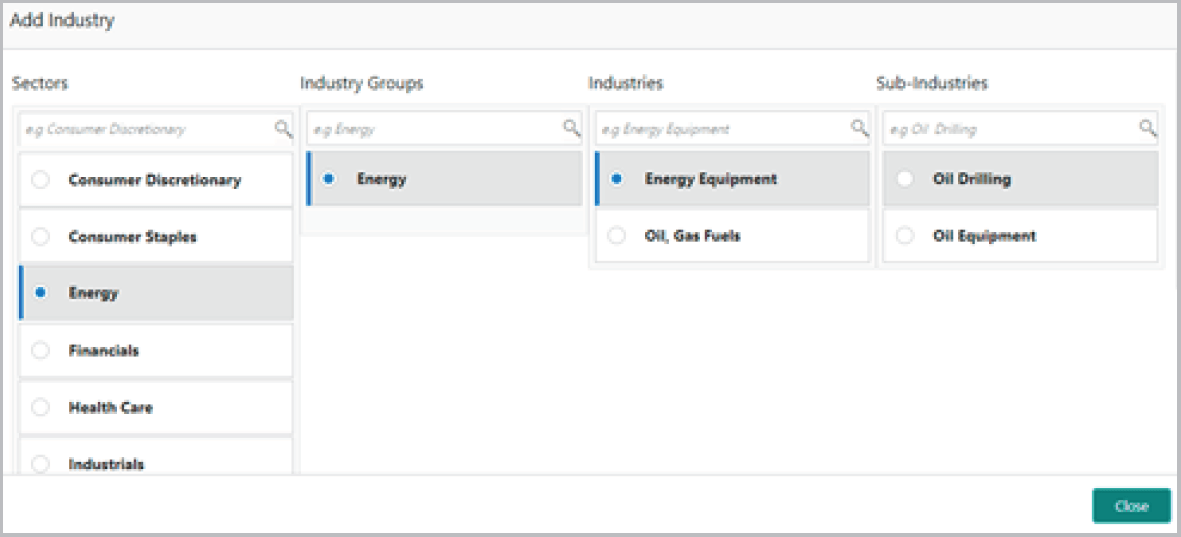
- To capture industry details of the Financial Institution, click +Add
sector.The Add Industry window is displayed.
For information on fields in the Add Industry screen, refer the below table.
Table 3-8 Add Industry
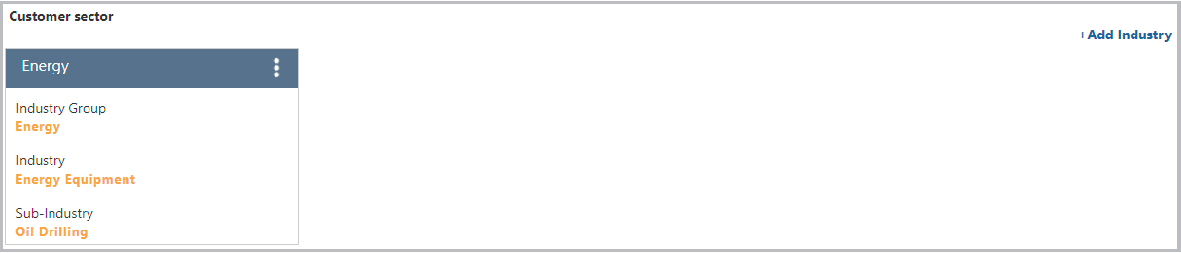
Actions Functionality Industry Groups Select the FI sector. Available Industry Groups is displayed. Available Industries Select the FI Industry Group. Available Industries is displayed. Sub-Industries Select the FI Industry. Available Sub-Industries is displayed. - Select the FI sub-industry. The Industry details are added and displayed as
shown below:
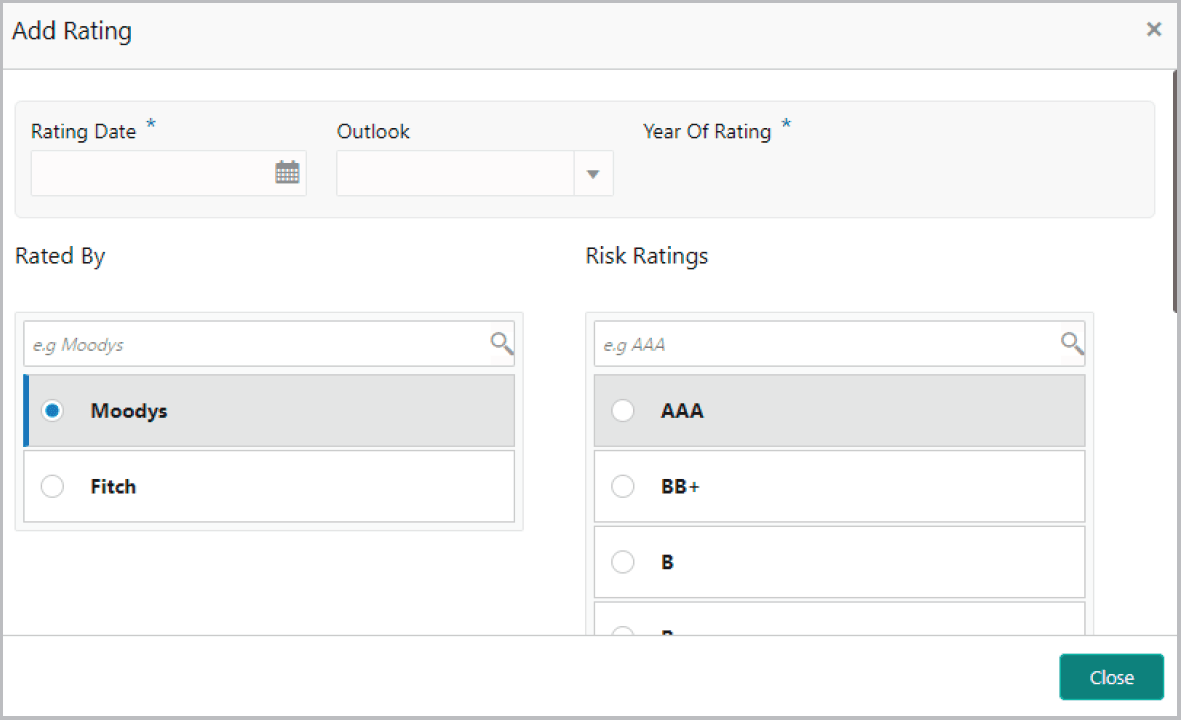
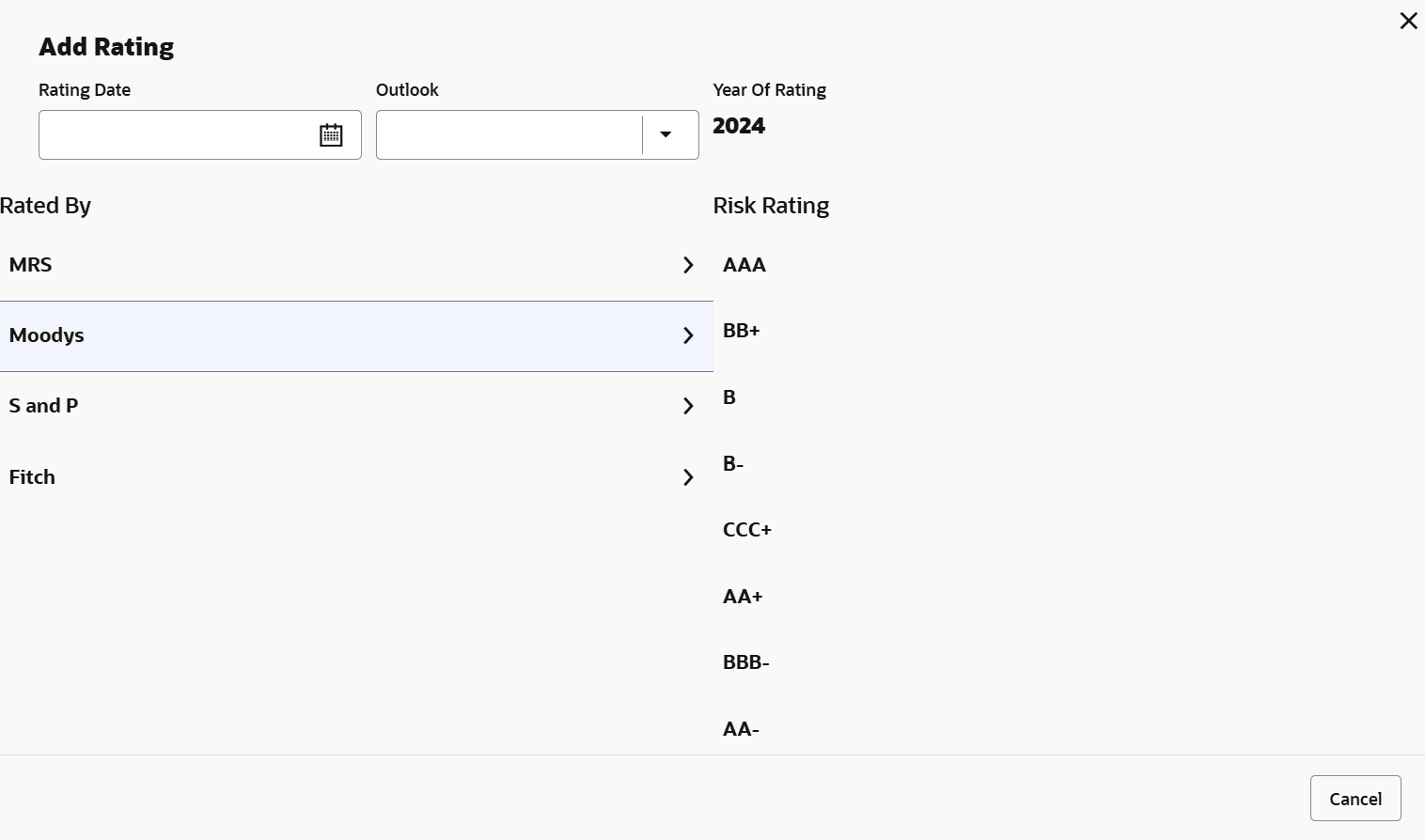
- To capture rating information of the Financial Institution, click +Add
ratings. The Add Rating window is displayed.
- Select the following details:
- Rating Date
- Outlook
- Risk Ratings
- Rated By
The Year Of Rating is automatically populated based on the selected Rating Date.
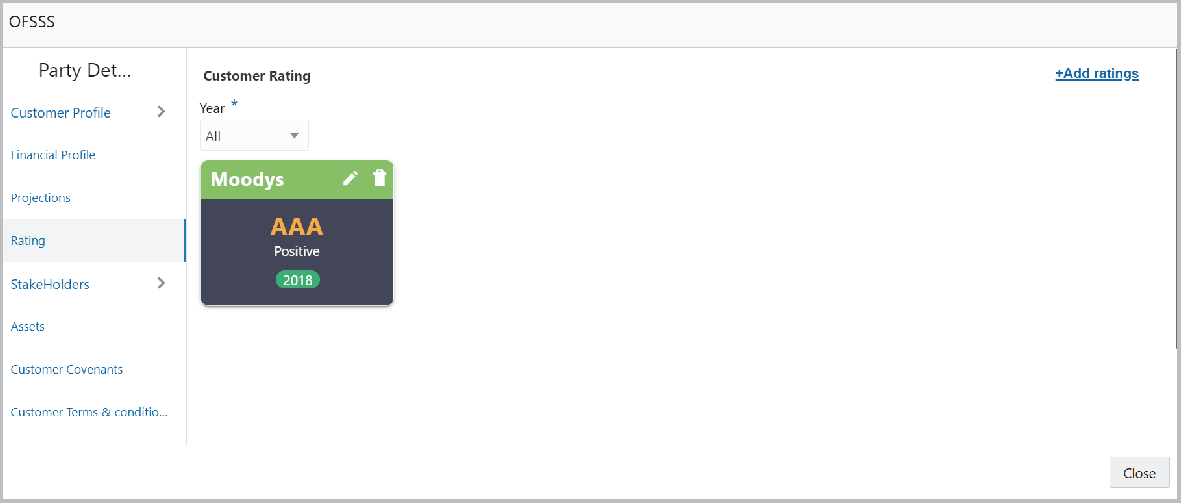
Upon selection of the above details, the rating is added and displayed as shown below:

RM Id is automatically populated based on the login details.
For information on fields in the RM Details screen, refer the below table.
Table 3-9 RM Details
| Actions | Functionality |
|---|---|
| RM Id | To modify the RM Id, search and select the required user. |
| Create | Click Create. The child customer is added
to the parent party.
Note: After creating the customer, right click the customer icon to Add Customer for the customer, View the customer details, Quick View the customer details, Configure the customer information and Delete the customer if required. |
| View, and Quick view | To View, and Quick view the party information, right click the party icon and click the respective option. |
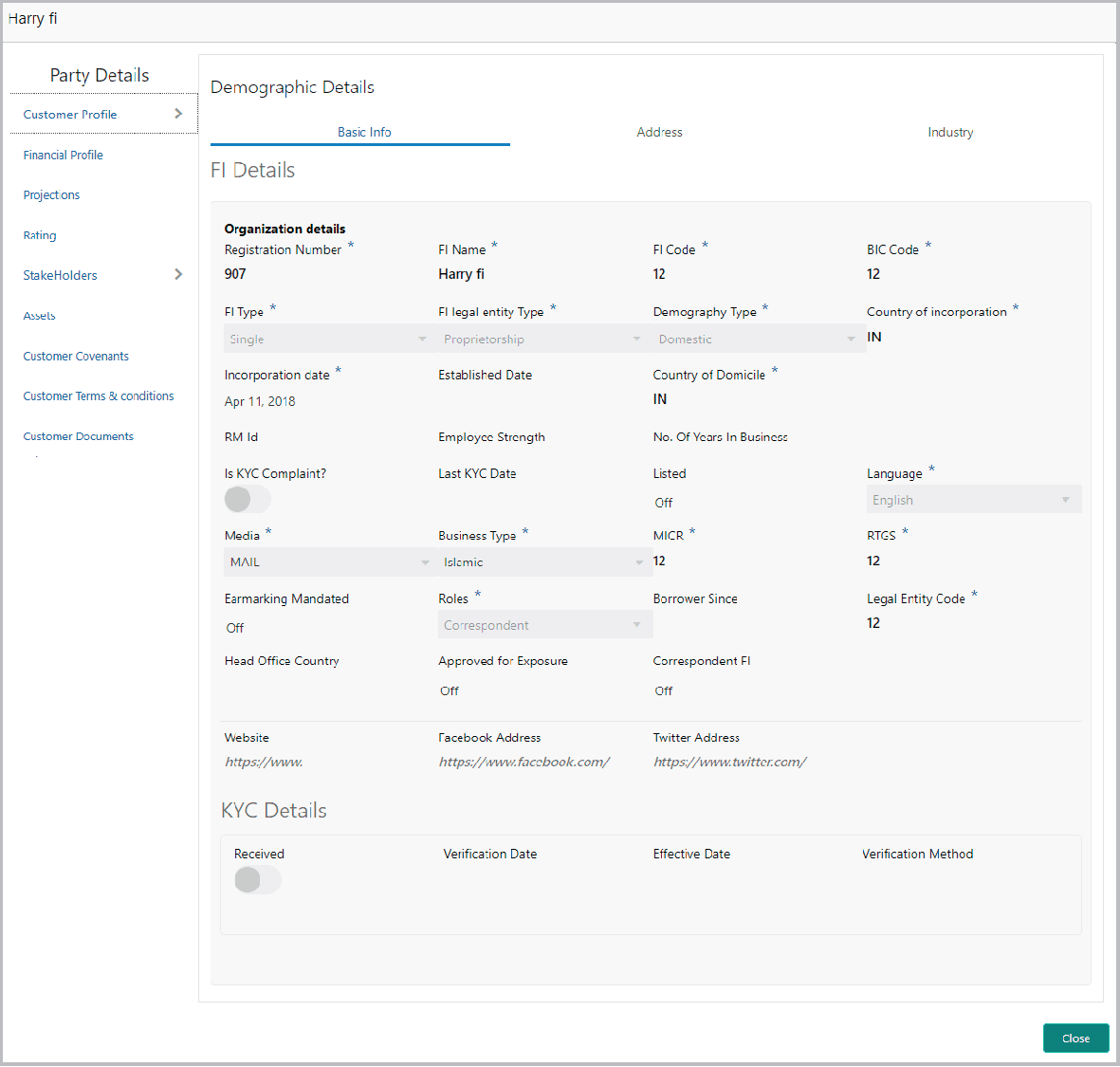
- To Configure the Financial Institution details, right click the party
icon and click Configure option. The following screen is displayed.
In the above screen, the Financial Institution details captured in the FI Credit Proposal Initiation process are displayed. You can modify the details only if modification is allowed in Business Process configuration.
For information on fields in the Company Details screen, refer the below table.
Table 3-10 Company Details
Fields Description Fields Specify / update the following details in the corresponding fields: - Registration Number
- FI Name
- FI Code
- BIC Code
- FI Type
- FI Legal Entity Type
- Demography Type
- Country Of Incorporation
- Incorporation Date
- Established Date
- Country of Domicile
- RM Id
- Employee Strength
- No. Of Years In Business
- Company Website
- Facebook Address
- Twitter Address
Is KYC Compliant? Enable the Is KYC Compliant? switch, if the Financial Institution is KYC Compliant. Last KYC Date Click the calendar icon and select the Last KYC Date. Listed Enable the Listed flag, if the Financial Institution is listed in share market. Language Select the Language from the drop down list. Media Select the Media for transactions from the drop down list. Business Type Select the Financial Institution’s Business Type from the drop down list. The options available are Islamic, Conventional, and Both. MICR Specify the MICR code of the Financial Institution. RTGS Specify the RTGS code of the Financial Institution. Earmarking Mandated Enable the Earmarking Mandated flag, if earmarking needs to be done for the Financial Institution. Role Select the Financial Institution Role from the drop down list. The options available are Correspondent and Advisory. Borrower Since Specify the period from which the Financial Institution is your bank’s borrower, by clicking the calendar icon in the Borrower Since field and selecting the date. Legal Entity Code Specify the Legal Entity Code of the Financial Institution. Head Office Country Search and select the Financial Institution’s Head Office Country. Approved for Exposure Enable the Approved for Exposure flag, if the Financial Institution is approved for the exposure flow. Correspondent FI Enable the Correspondent FI flag, if the Financial Institution is a correspondence FI. For information on fields in the KYC Details screen, refer the below table.
Table 3-11 KYC Details
Fields Description Received Enable the Received switch, if KYC verification details are received for the Financial Institution. Verification Date and Effective Date Click the calendar icon and select the KYC Verification Date and Effective Date. Verification Method Type the KYC Verification Method. For example: Field verification. Save Click Save. - To add the Financial Institution address details, click the Address tab
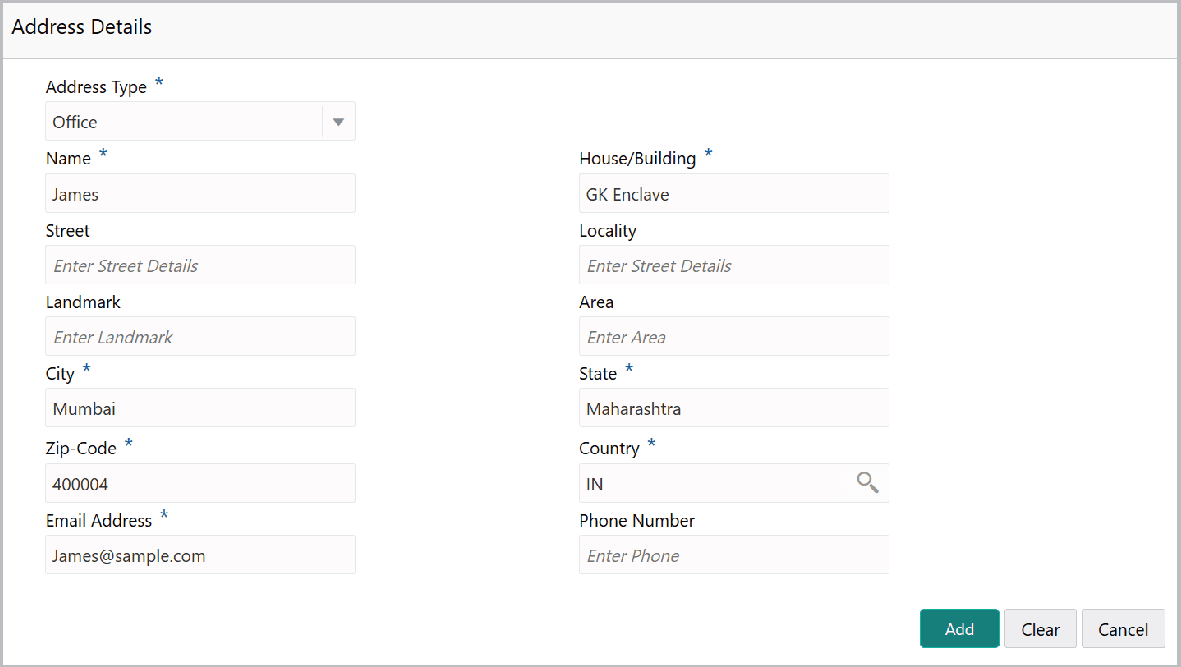
and then click the Add icon.The Address Details screen is displayed.
For information on fields in the Address Details screen, refer the below table.
Table 3-12 Address Details
Fields Description Fields Type or select the following details in the corresponding fields: - Address Type
- Name of the contact person
- House/Building name
- Street
- Locality
- Landmark
- Area
- City
- State
- Zip-Code
- Country
- Email Address
- Phone Number
Add Click Add. Address details are added. Industry To add the industry details, click the Industry tab and select the required details. Note: To Edit, Delete or View the added Basic Info, Address, and Industry. click the hamburger icon in the required list item and select the required option.
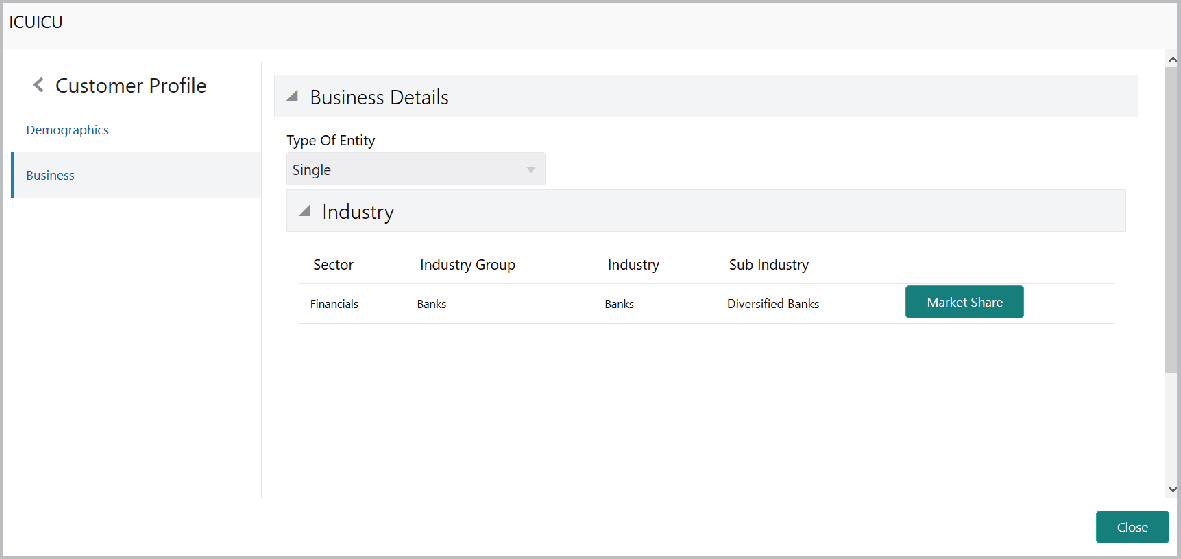
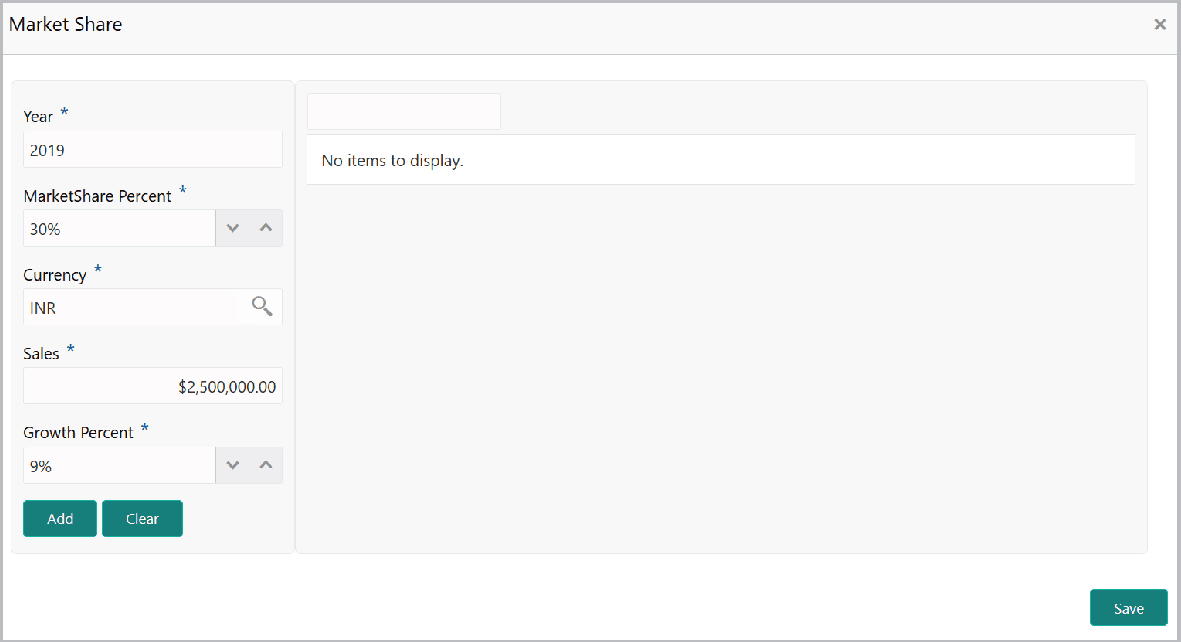
Customer Profile To view the Financial Institution’s business details, click the Customer Profile menu and then select Business sub-menu. - To add Financial Institution’s market share details, click the Market
Share. The following window is displayed.
For information on fields in the Market Share screen, refer the below table.
Table 3-13 Market Share
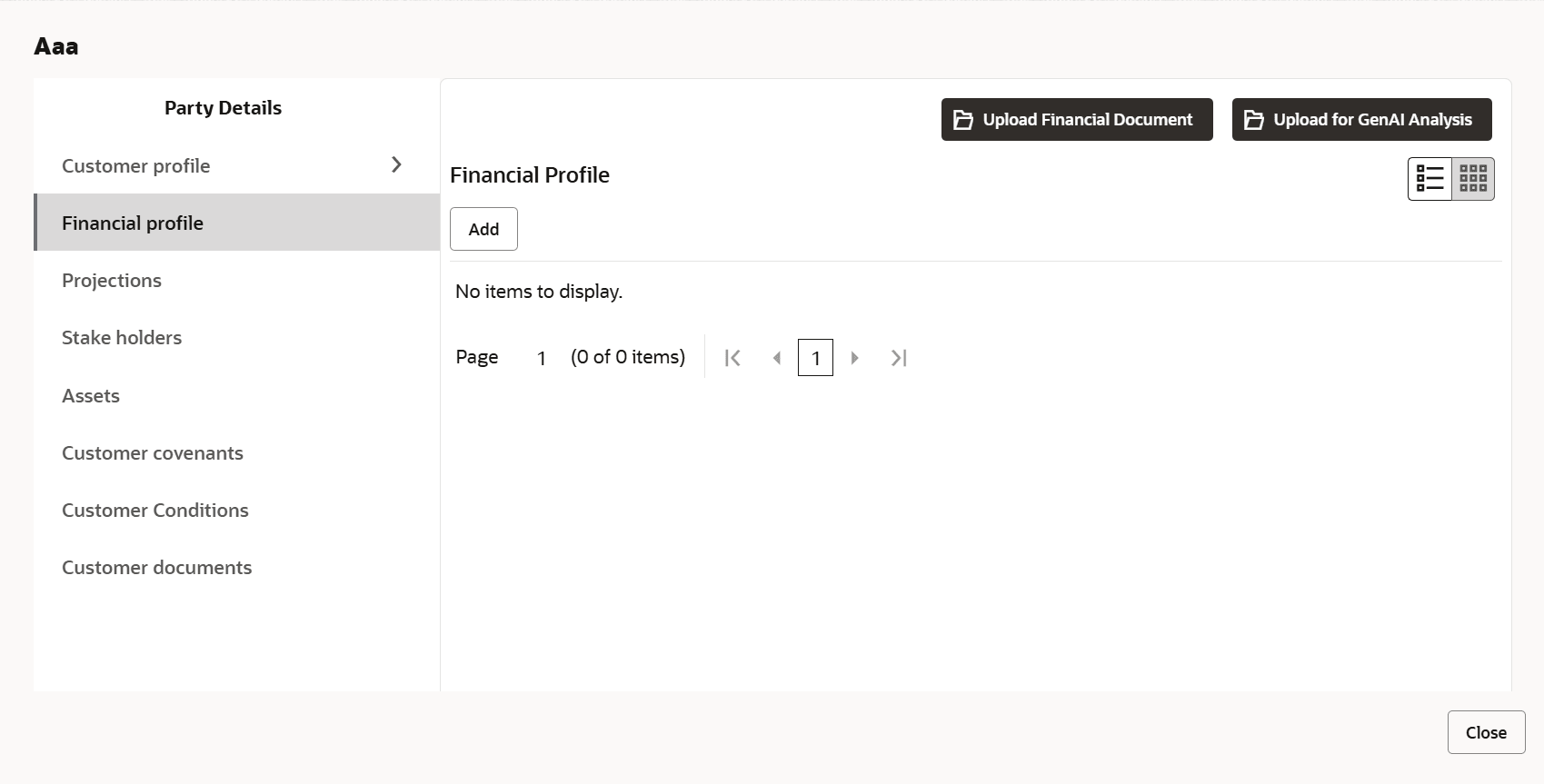
Fields Description Year Specify the Year for which you want to add market share details. Market Share Percent Specify the Financial Institution’s Market Share Percent in the mentioned year. Currency Specify the Currency in which the Sales is recorded. Sales Specify the Sales recorded in the mentioned year. Growth Percent Specify the Growth Percent. - To configure Financial Institution’s financial details, click Financial
Profile in the left menu.The Financial profile screen is displayed.
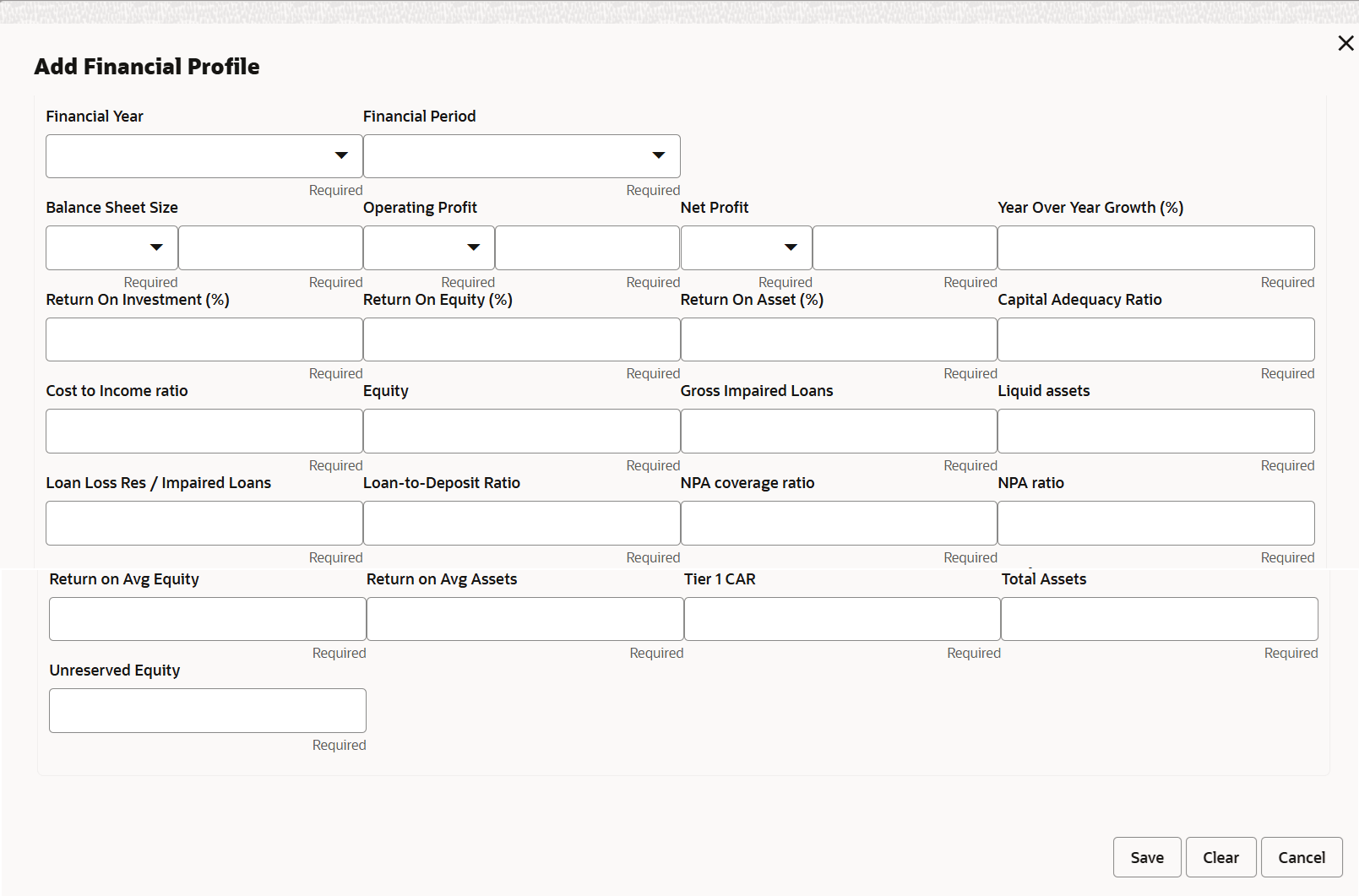
- Click the Add icon. The following screen is displayed.
For information on fields in the Financial Profile screen, refer the below table.
Table 3-14 Financial Profile
Fields Description Year Specify the Year for which the financial details are to be added. Currency Search and select the Currency for the financial information. fields Specify the following details in the corresponding fields: - Balance Sheet Size
- Operating Profit
- Net Profit
- Year Over Year Growth
- Return On Investment
- Return On Equity
- Return On Asset
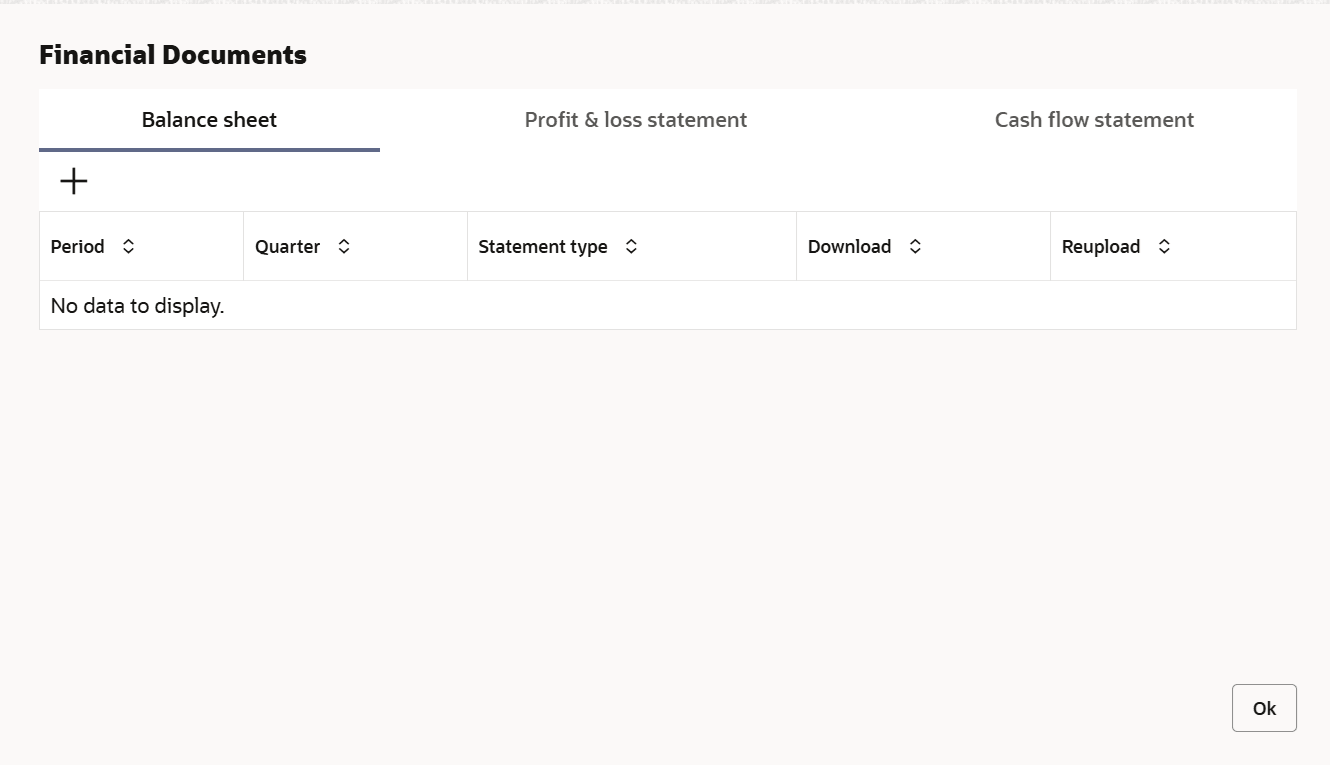
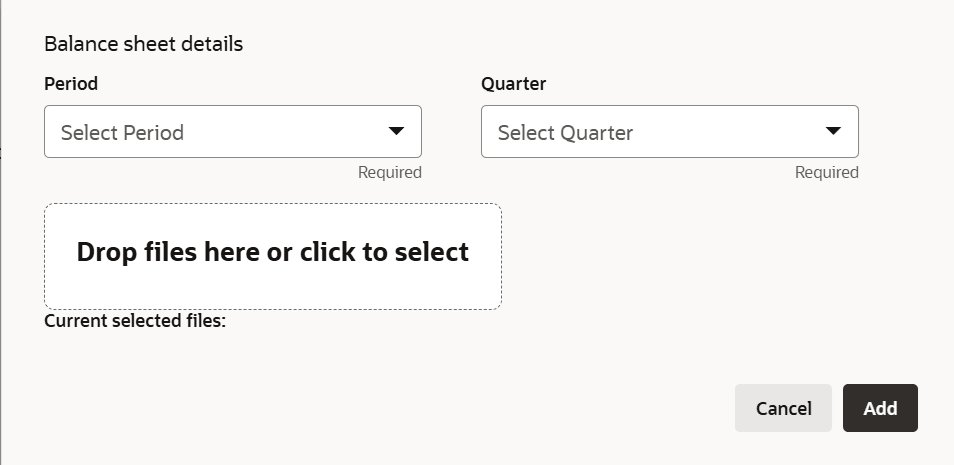
Add Click Add. The financial details are added. Upload Financial Document To add financial documents, click Upload Financial Document. The Financial Documents screen is displayed. - Upon clicking Add in any of the above tabs, the following window to
upload documents is displayed.
For information on fields in the Balance Sheet details screen, refer the below table.
Table 3-15 Balance Sheet details
Fields Description Period and Quarter Select the Period and Quarter for which the financial document is to be added. Drop files here or click to select In Drop files here or click to select section, drag and drop or click and upload the financial document. Add Click Add. Document is added. - To configure projection details, click Projections from the left menu
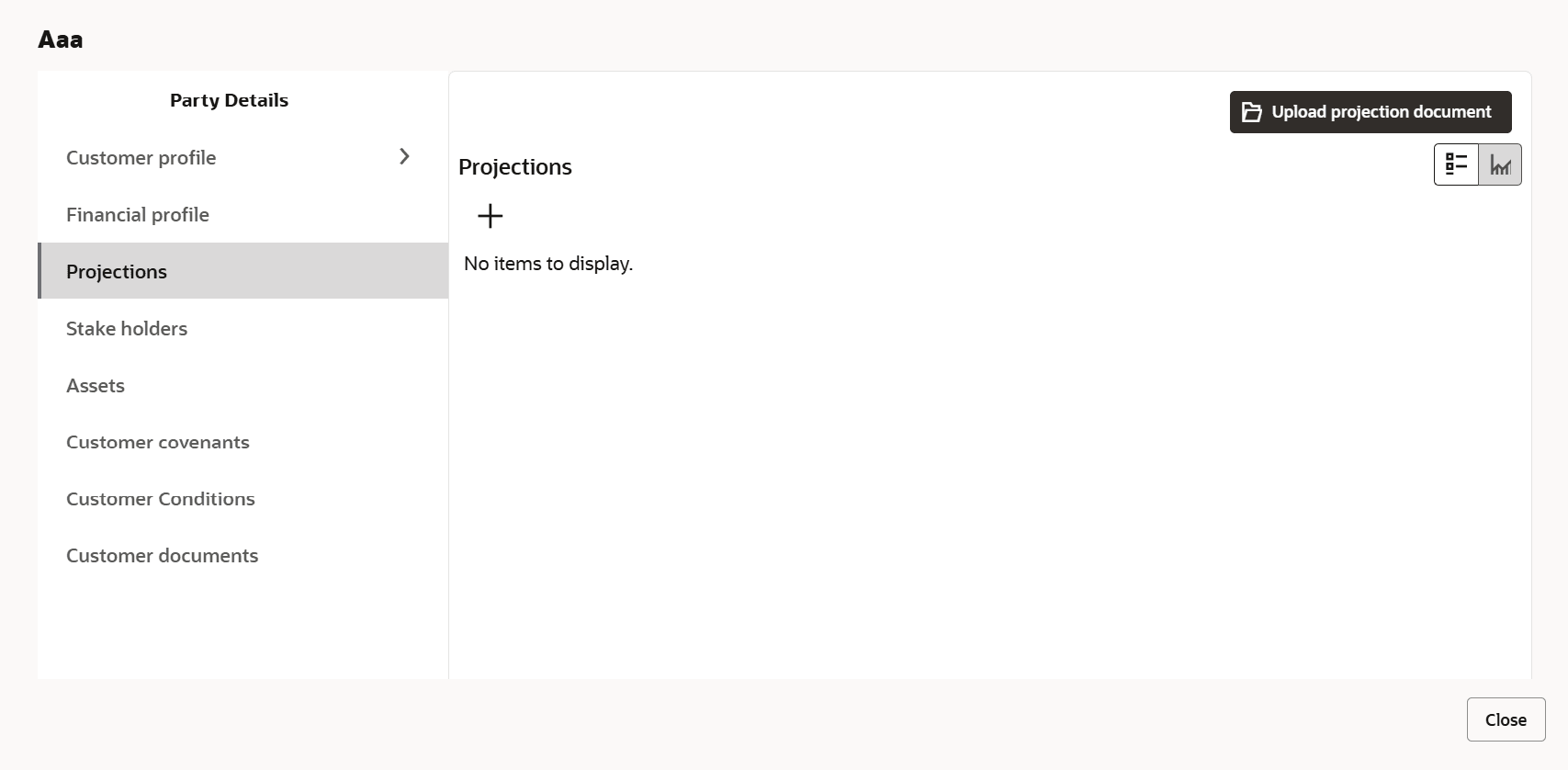
and then click the Add icon.The Projections screen is displayed.
For information on fields in the Projections screen, refer the below table.
Table 3-16 Projections
Fields Description Year Specify the Year for which the Financial Institution’s projection details are to be added. Currency Search and select the Currency for the projection details. fields Specify the following details in the corresponding fields: - Balance Sheet Size
- Operating Profit
- Net Profit
- Year Over Year Growth
- Return On Investment
- Return On Equity
- Return On Asset
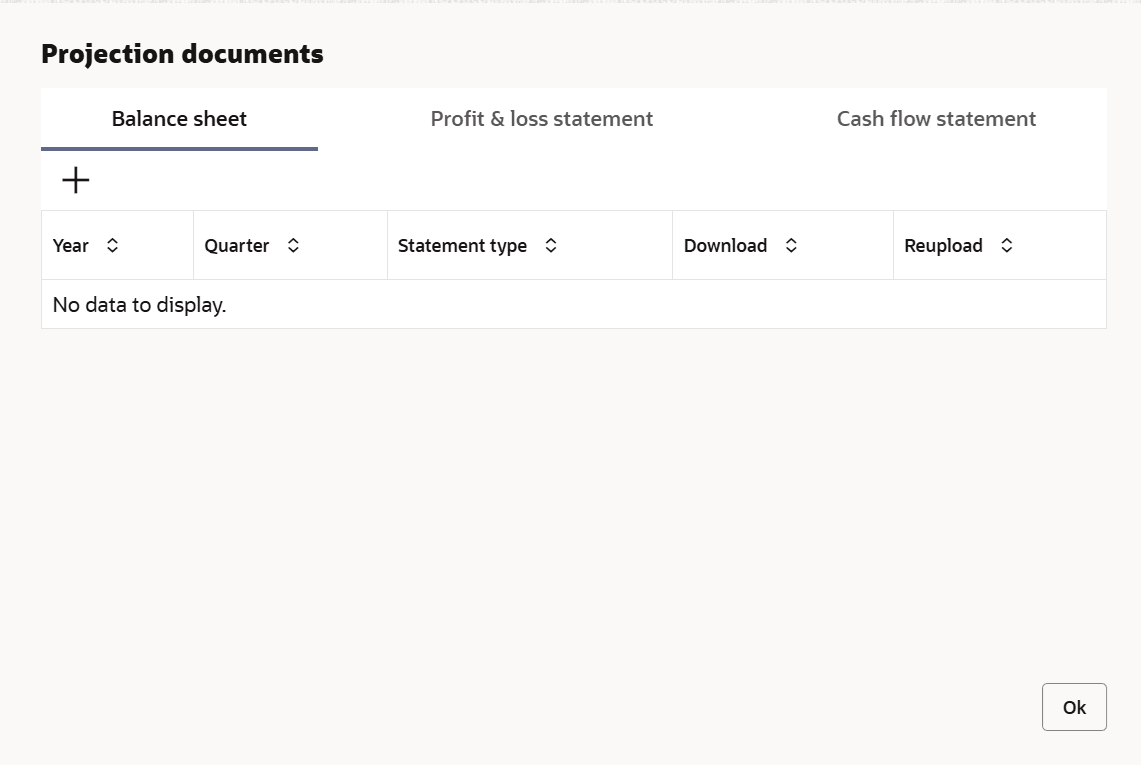
Add Click Add. The projection details are added. Upload Projection Document To add projection documents, click Upload Projection Document. The Projection Documents screen is displayed.
For information on fields in the Projection Documents screen, refer the below table.
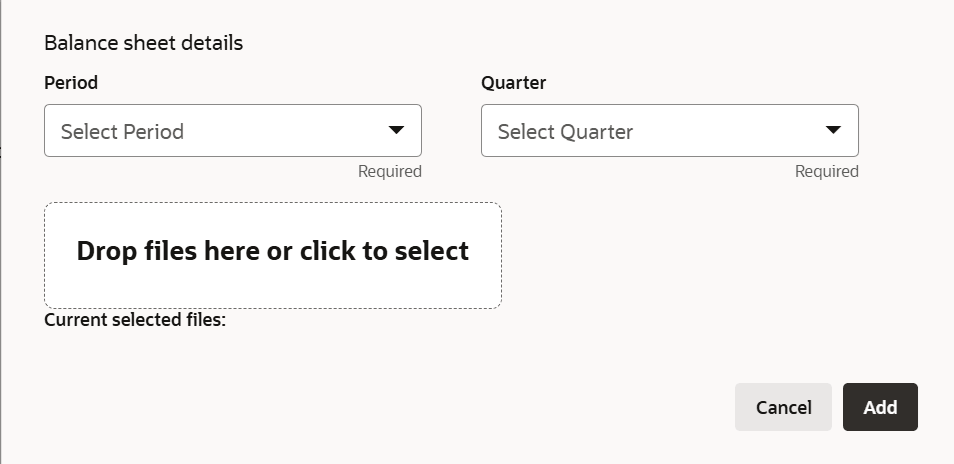
- Upon clicking Add in any of the above tabs, the following window to
upload documents is displayed.
For information on fields in the Balance Sheet details screen, refer the below table.
Table 3-17 Balance Sheet details
Fields Description Period and Quarter Select the Period and Quarter for which the projection document is to be added. Drop files here or click to select In Drop files here or click to select section, drag and drop or click and upload the projection document. Add Click Add. Document is added.
Rating
- To add rating information of the party, click Rating in the left menu
and click +Add Ratings. The Add Ratings screen is displayed.
- Upon selecting the Rated By organization, the rating is added and
displayed as shown below.
Stakeholders
- The user can add information about the following stakeholders by clicking the
Stakeholders menu:
- Auditors
- Sponsors
- Share holders
- Directors
- Management Team
- Bankers
- Guarantors
- Customers
- Suppliers
- To add sponsor details, click Sponsors from the left menu and then click
Add. The Sponsors screen is displayed.
- Click and expand the Address details section.
- To add asset details, click Assets from the left menu and then click
Add.The Assets screen is displayed.
For information on fields in the Assets details screen, refer the below table.
Table 3-18 Assets
Fields Description Name Type the Name of the Asset. Currency Search and select the Currency for the asset value. Value Specify the asset Value. Description Type the asset Description. Add Click Add. Asset details are added. Note: To Edit, Delete or View the added Assets. click the hamburger icon in the required list item and select the required option.
- To associate covenant with the Financial Institution, click Customer
Covenants from the left menu. The following screen appears.
- Click the add icon. The Covenant Details screen is displayed.
For process Covenant Details, user can set up extra placeholder fields in the Maintenance screen. For more information on managing these placeholders, refer to the Maintenance User Manual.
The system supports configuration of up to 20 fields each for the following data types:- Text
- Numeric
- Boolean
- Date
Each field type allows a minimum of 0 and a maximum of 20 fields per Covenant details, based on the requirements. These fields displays in the Covenant Details screen only if they are configured. If no additional fields are defined, the screen will display only the standard covenant details fields.
For example, we maintained 20 additional fields each for text, numeric, boolean, and date.
The Covenant Details screen displays.For information on fields in the Assets details screen, refer the below table.
Table 3-19 Assets
Fields Description Covenant code To link existing covenant, click the search icon and select the Covenant code. The covenant codes maintained in the Covenant Maintenance page are displayed in LOV. Covenant Code, Covenant name, Covenant description Upon selecting the Covenant Code, Covenant name, Covenant description and Classification type get defaulted. Click to add new covenant To create new covenant, click the Click to add new covenant link and specify the following details: - Covenant code - A unique code for the covenant to be created
- Covenant name - Name for the covenant to be created
- Covenant description - A brief description about the covenant
- Classification type - Classification type of the covenant, such as Internal and External
Covenant details Click and expand the Covenant details section. - To capture monitoring information for the covenant, click and expand the
Monitoring Information Details section.
Figure 3-32 Monitoring Information Details
- To build a formula and validate the party against it, expand the Formula
Details section.
For information on fields in the Formula Details screen, refer the below table.
Table 3-20 Formula Details
Fields Description Variable Select a Variable from the drop down list. The options available are Debt, Asset, Debt Ratio and Asset Ratio. Operators Select the required operator from the available Operators. Custom Value Provide a Custom Value, if you want to use it in the formula. Build Formula Click Build Formula. The formula is built and displayed below the formula box. The system will also display whether the formula is valid expression or invalid expression below the formula box. You must change the formula in case it is invalid expression.
Target Type Select the Target Type from the drop down list. The options available are: Value, Percentage, and Ratio. Covenant check condition Select the Covenant check condition from the drop down list. The options available are: Greater than, Greater than or equal to, Between, Less than or equal to, Equal to, and Less than. Target Value Specify the Target Value(s). If Between is selected as the covenant check condition, Target Value 1 and Target Value 2 fields appear. You need to specify the range of target values.
The system will periodically derive the built formula with the values obtained from party’s financial documents and validate it against the set target values based on covenant check condition.
- To add other covenant details, expand the Others section.
For information on fields in the Others screen, refer the below table.
Table 3-21 Others
Fields Description Compliance Status Select the current covenant Compliance Status of the party. The options available are: Met and Breach. Waiver Status Select the Waiver Status from the drop down list. The options available are: Waive and Waive all. Last Check Value Specify the target value observed during the last covenant check in the Last Check Value field. Deferred due date Specify the Deferred due date. The covenant review can be postponed till the mentioned date. Remarks Capture overall Remarks for the covenant. Create Click Create. Covenant details are added. Edit To edit the added covenant, select the covenant record and click the Edit icon. Delete To delete the added covenant, select the covenant record and click the Delete icon. - To configure conditions for the Financial Institution, click Customer
Condition in the left menu and then click Add.The Add Conditions screen is displayed.For process Conditions Details, user can set up extra placeholder fields in the Maintenance screen. For more information on managing these placeholders, refer to the Maintenance User Manual. The system supports configuration of up to 20 fields each for the following data types:
- Text
- Numeric
- Boolean
- Date
Each field type allows a minimum of 0 and a maximum of 20 fields per Conditions details, based on the requirements. These fields displays in the Conditions Details screen only if they are configured. If no additional fields are defined, the screen will display only the standard Conditions details fields. For example, we maintained 20 additional fields each for text, numeric, boolean, and date.
The Add Conditions screen displays.For information on fields in the Add Conditions screen, refer the below table.
Table 3-22 Add Conditions
Fields/ Icons Description Conditions Code Search and Select Conditions Code. Conditions Description and Conditions are defaulted based on the selected Conditions code. Conditions Description Display the Conditions description. The Conditions description will be defaulted from Conditions maintenance based on the selected Conditions Code and cannot be modified. Conditions Clause Specify the Conditions clause. This field defaulted based on the selected Conditions code. The user can input up to 250 characters. Notice Days Specify the number of notice days are the number of days before the Due date of a Conditions for the Conditions tracking. Grace Days Specify the grace days. The user must update the compliance status within grace days after the due date. If not complied, the status will be marked as breached and the compliance date will be updated to the current date during the end-of-day process using the batch “tncTrackingOverdueBreachJob”. Conditions Type Click Create. Conditions are linked to the party and displayed in the Conditions tab. Cancel Conditions Type is defaulted based on selected Conditions code. The options available are: • Pre-disbursement
• Post-disbursement
• Pre-SanctionCompliance Status Select Compliance Status from drop-down list. The options available are:
• Met
• BreachedDue Date Select the due date. Compliance Remarks Enter Compliance Remarks, if required. Customer Linkage Customer Linkage details are displayed by default based on selected Conditions code. Create Click Create. Conditions are linked to the party and displayed in the Conditions tab. Cancel Click the Cancel to cancel and exist the screen. - Click Country exposure and then click the add icon. The following window
is displayed.
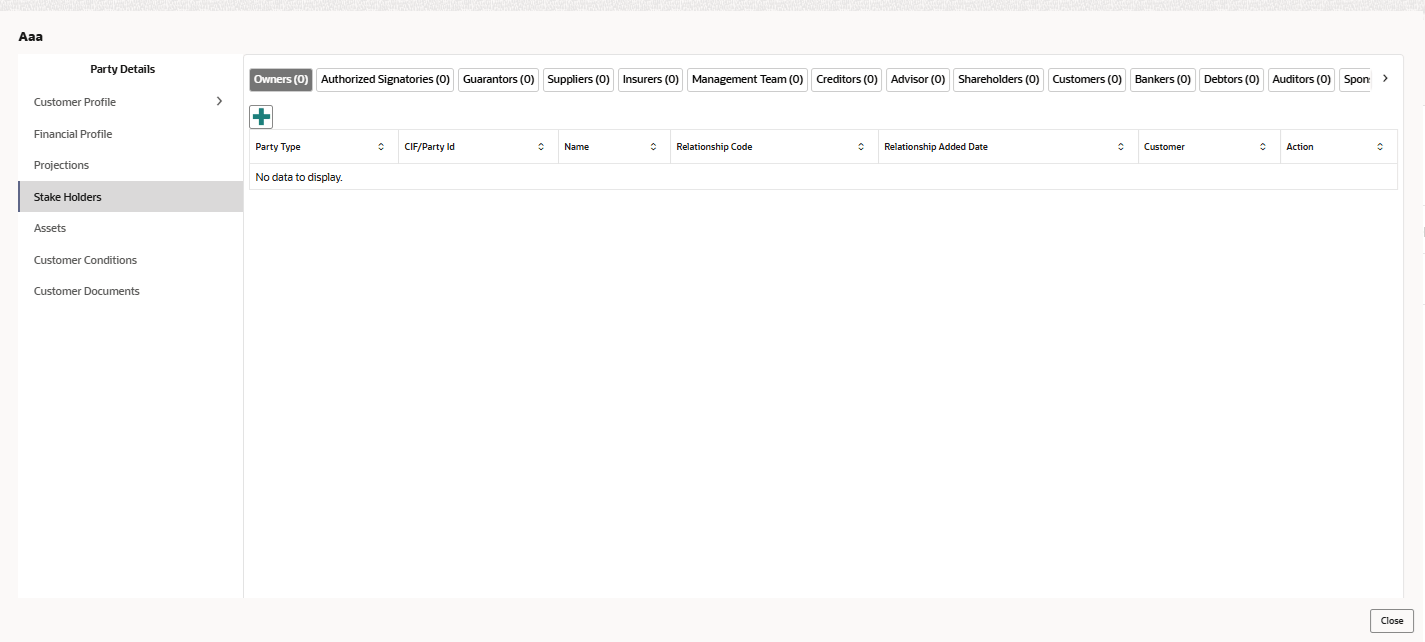
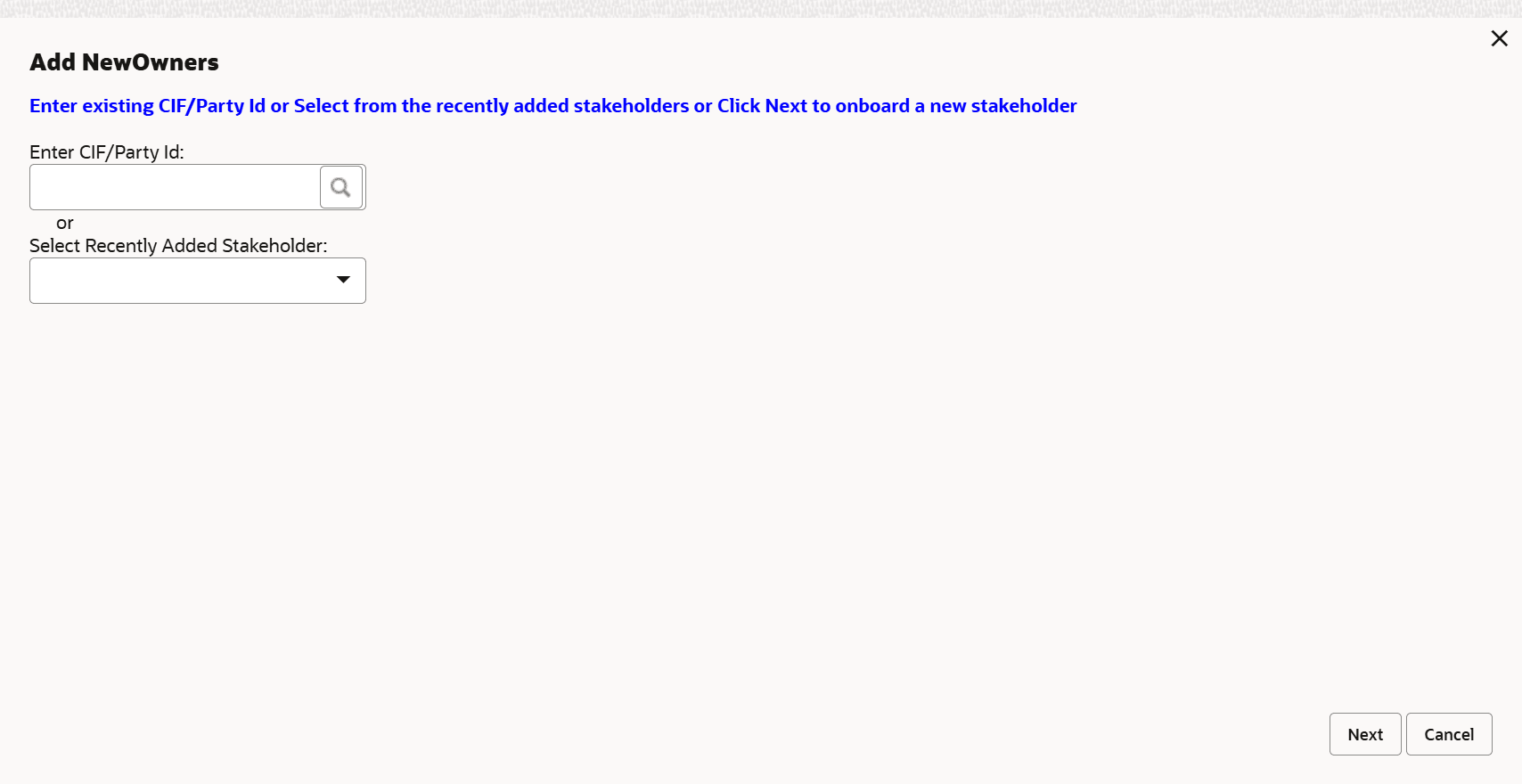
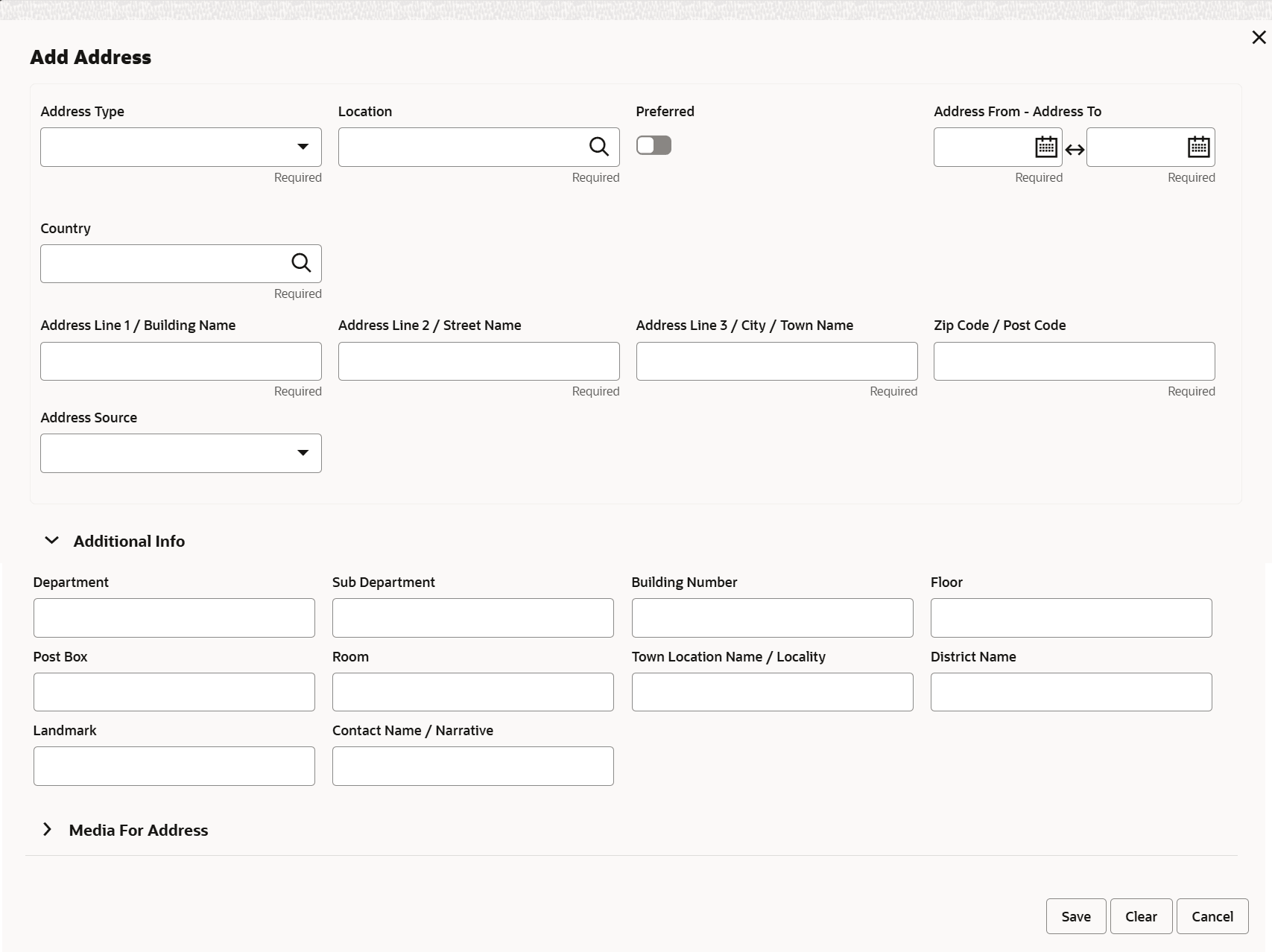
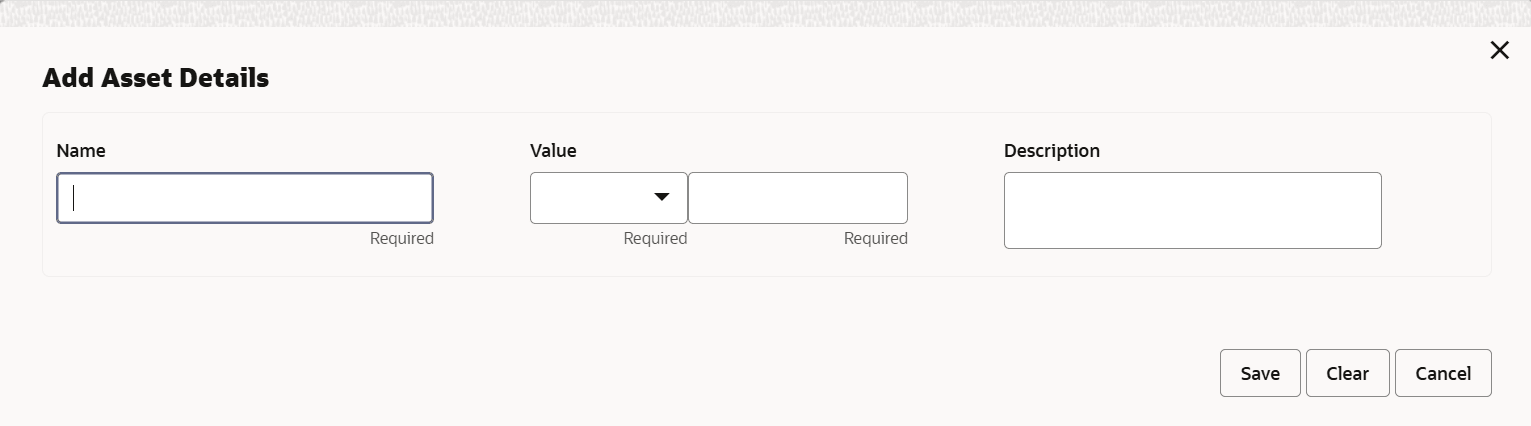
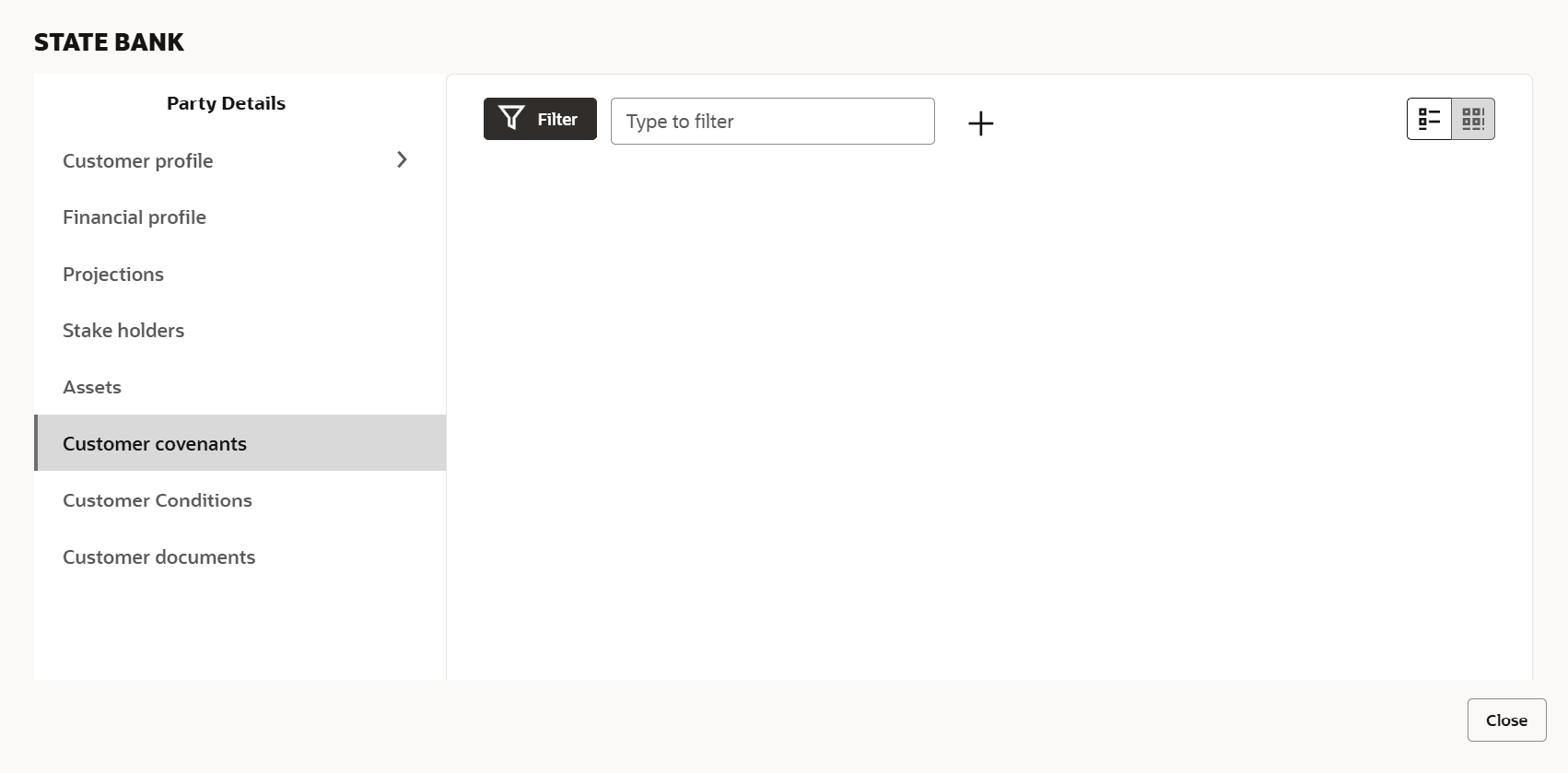
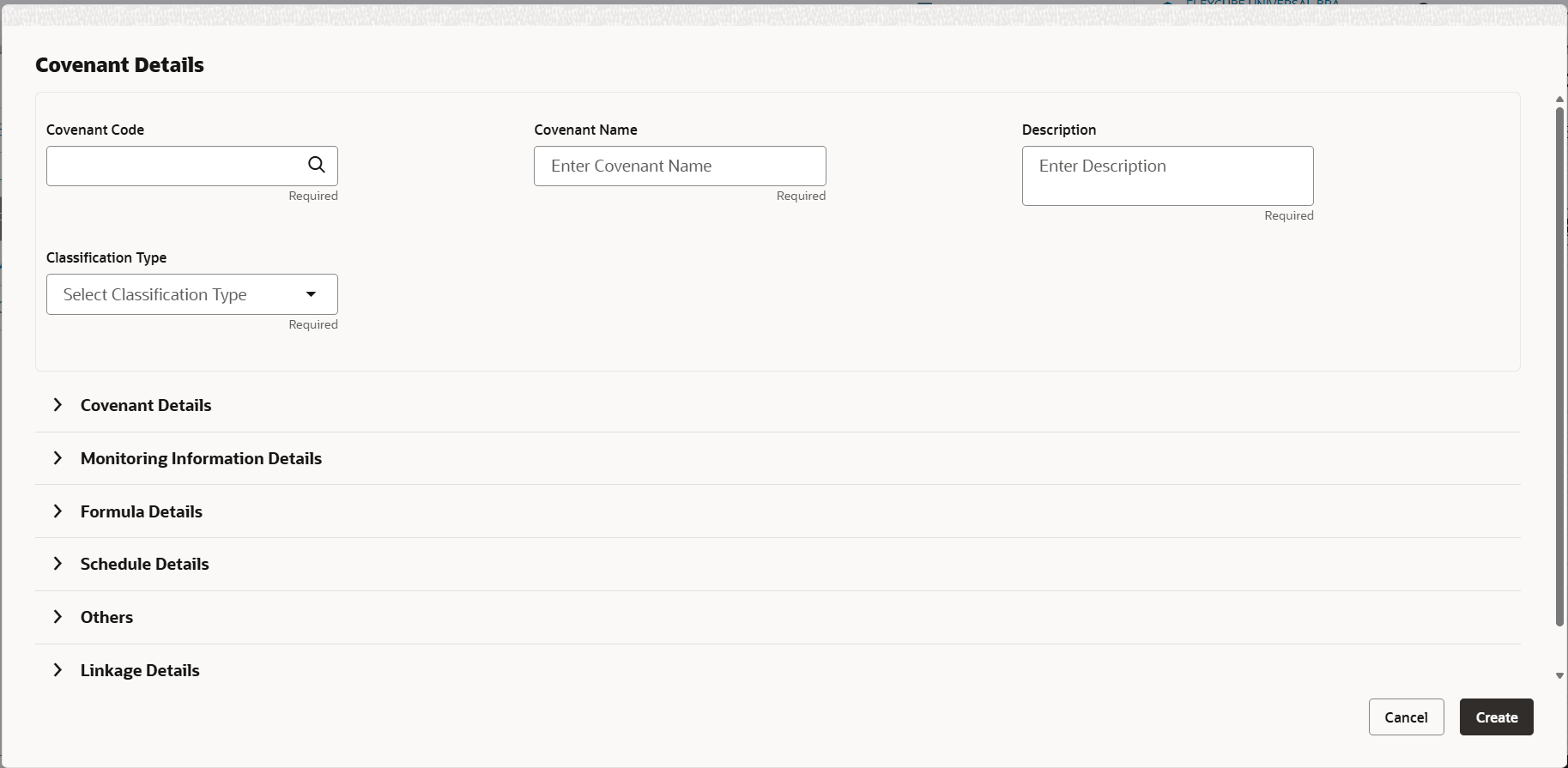
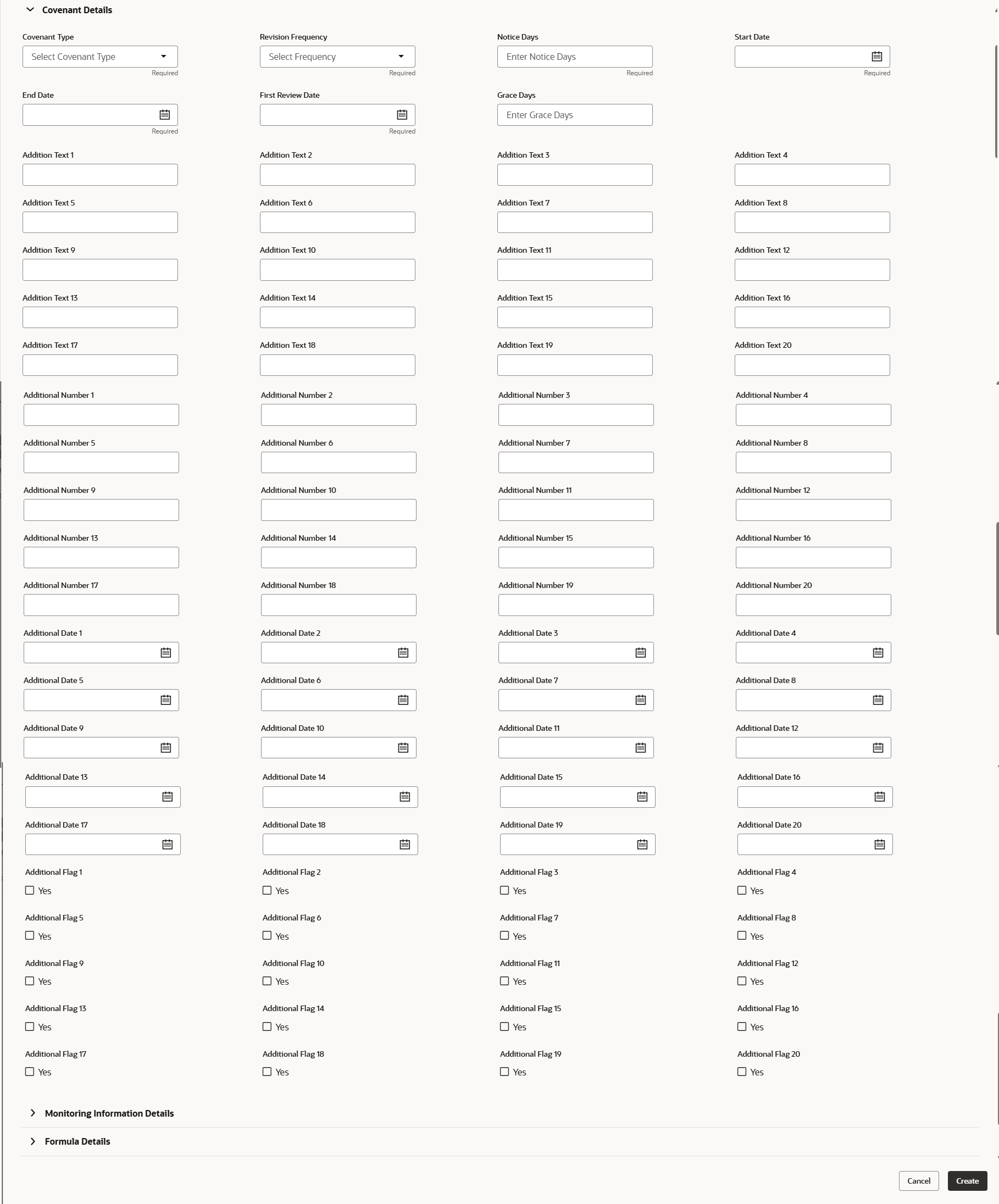


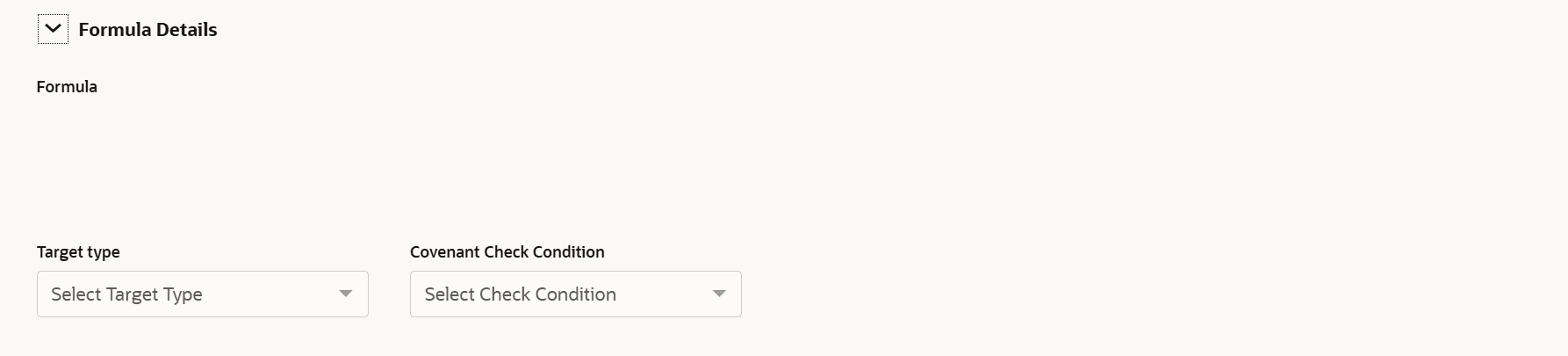

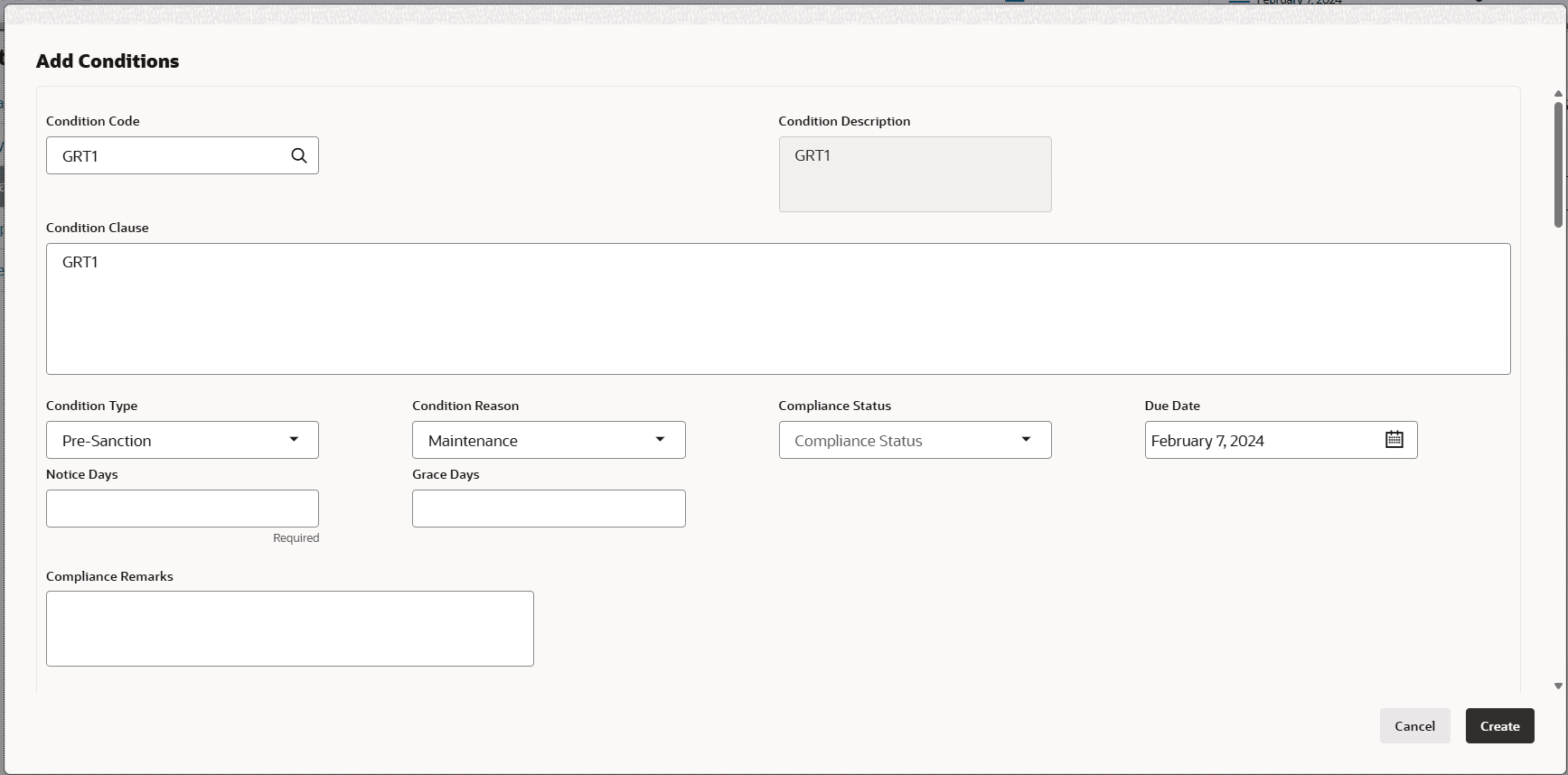
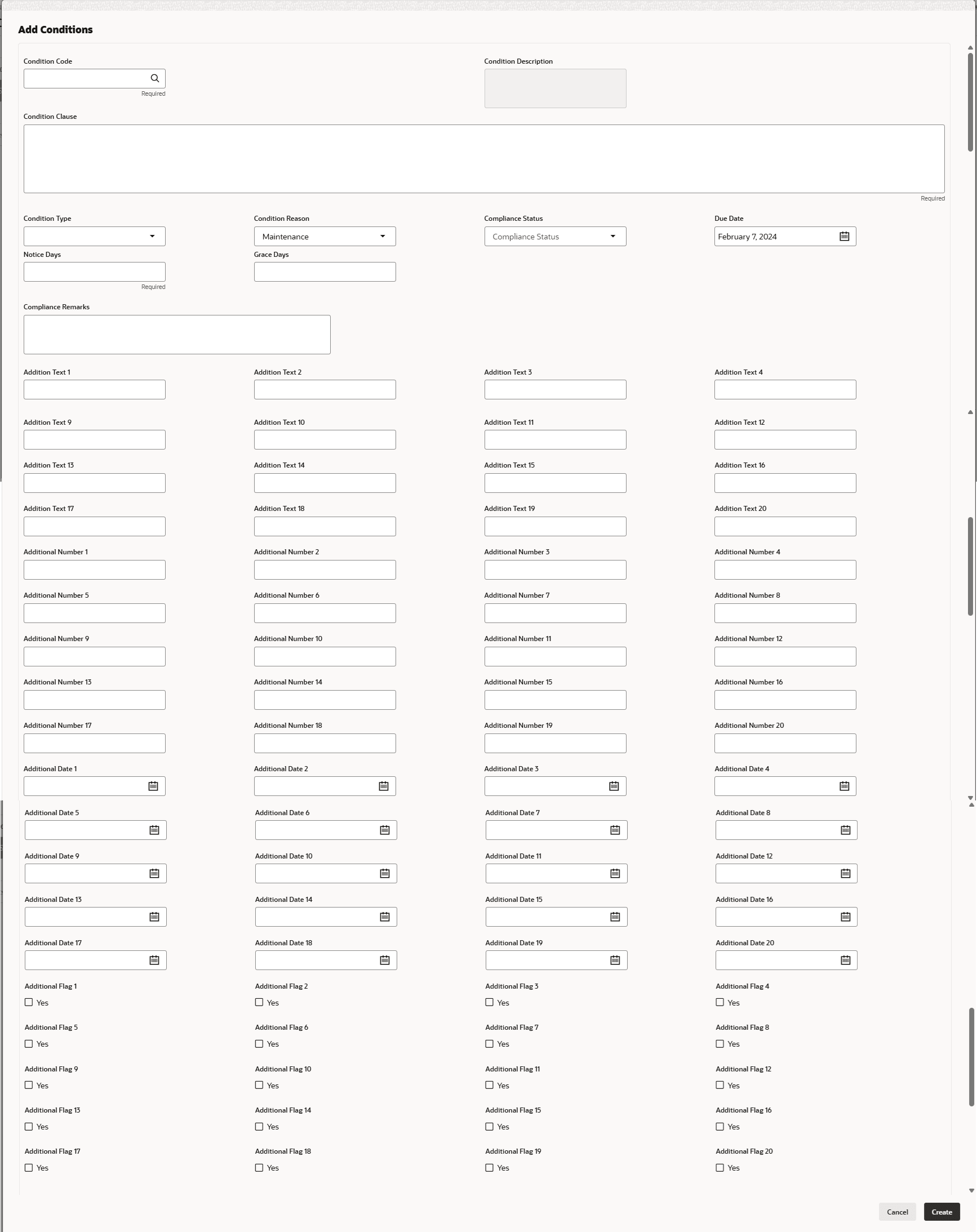
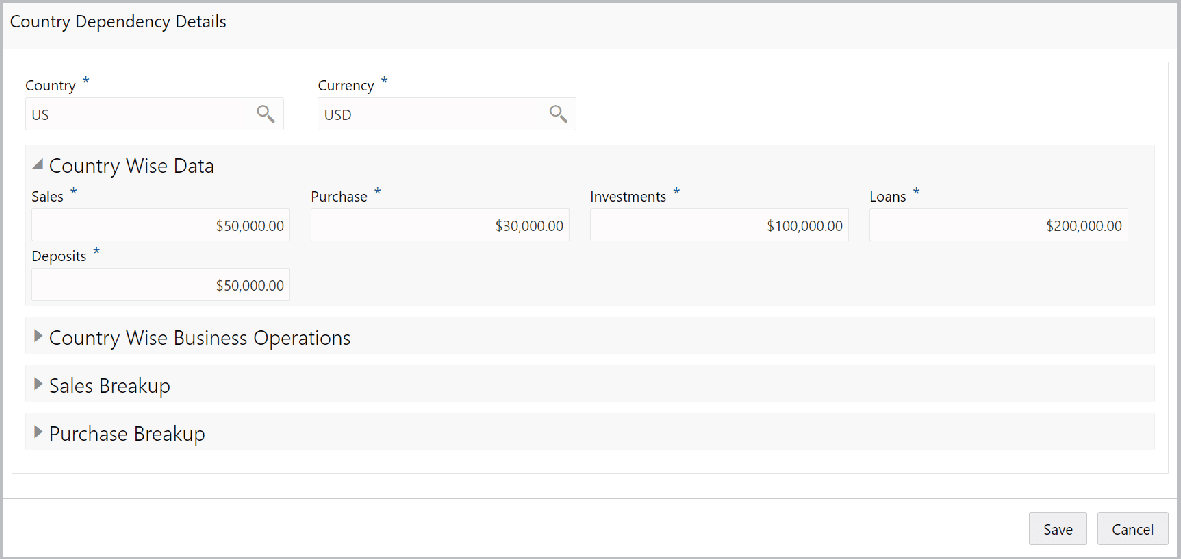
Figure 3-38 Country Wise Business
Operations
Description of "Figure 3-38 Country Wise Business
Operations"
For information on fields in the Country Wise Business Operations screen, refer the below table.
Table 3-24 Country Wise Business Operations
| Fields | Description |
|---|---|
| Market Share Percentage | Specify the Financial Institution’s Market Share Percentage in selected country. |
| Presence for Years | Specify the Financial Institution’s Presence for Years in selected county. |
| Major Products Sold | Specify the Major Products Sold by the Financial Institution in the selected country. |
| Associated Since | Specify the date on which association between the Financial Institution and selected country is established in the Associated Since field. |
Sales Breakup
In this section, you must add details of all the customers of Financial Institution in the selected country.
Figure 3-39 Sales Breakup

Description of "Figure 3-39 Sales Breakup"
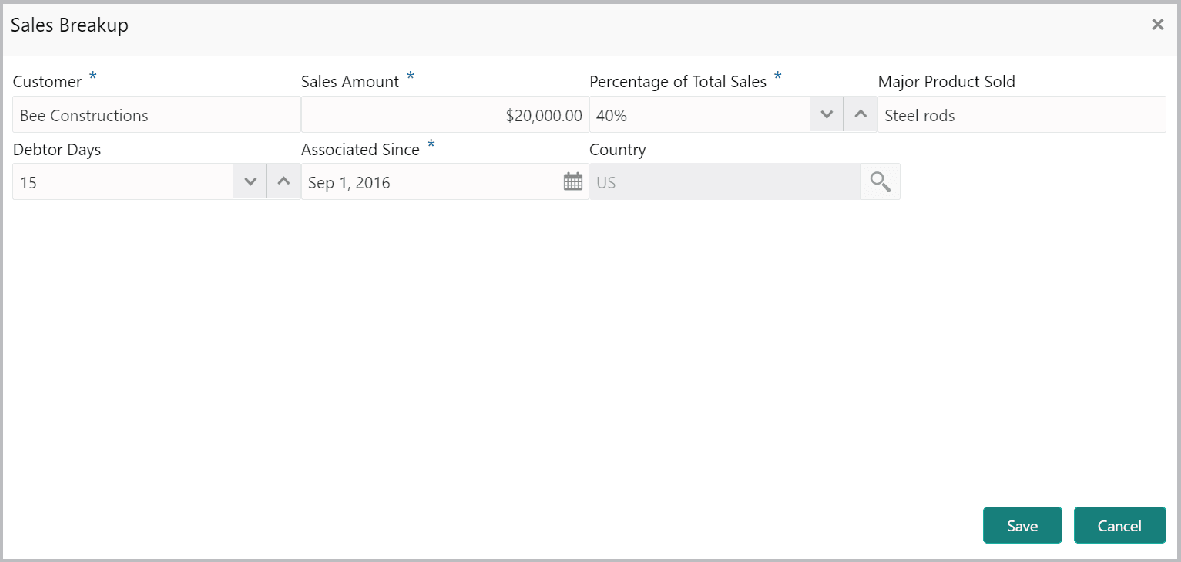
- Click the add icon. The Sales Breakup screen is displayed.
For information on fields in the Sales Breakup screen, refer the below table.
Table 3-25 Sales Breakup
Fields Description Customer Specify the Customer of the Financial Institution. Sales Amount Specify the Sales Amount recorded for the specified customer. Percentage of Total Sales Specify the Percentage of Total Sales recorded for the specified customer. Major Product Sold Specify the Major Product Sold to the specified customer. Debtor Days Specify the Debtor Days for the specified customer. Associated Since In the Associated Since field, search and select the date on which association between the Financial Institution and its customer is established. Save Click Save. Sales breakup is added and displayed in the Sales Breakup section. edit or delete To edit or delete the added sales breakup, select the record and click the respective icon.
Purchase Breakup
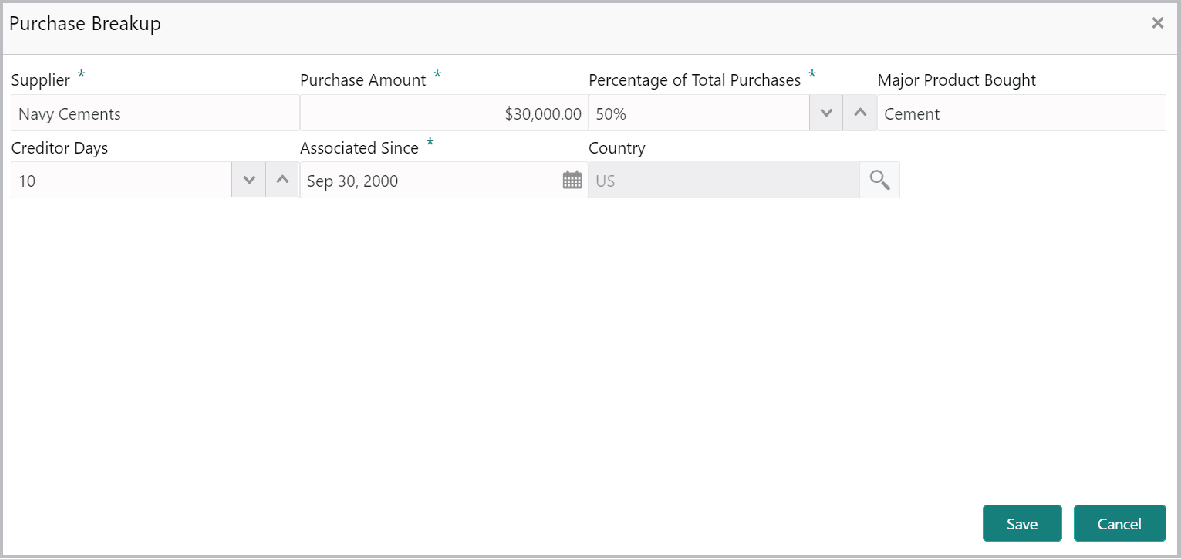
In this section, you must capture details of all the Financial Institution’s suppliers in the selected country.
- Click the add icon. The Purchase Breakup screen is
displayed.
For information on fields in the Purchase Breakup screen, refer the below table.
Table 3-26 Purchase Breakup
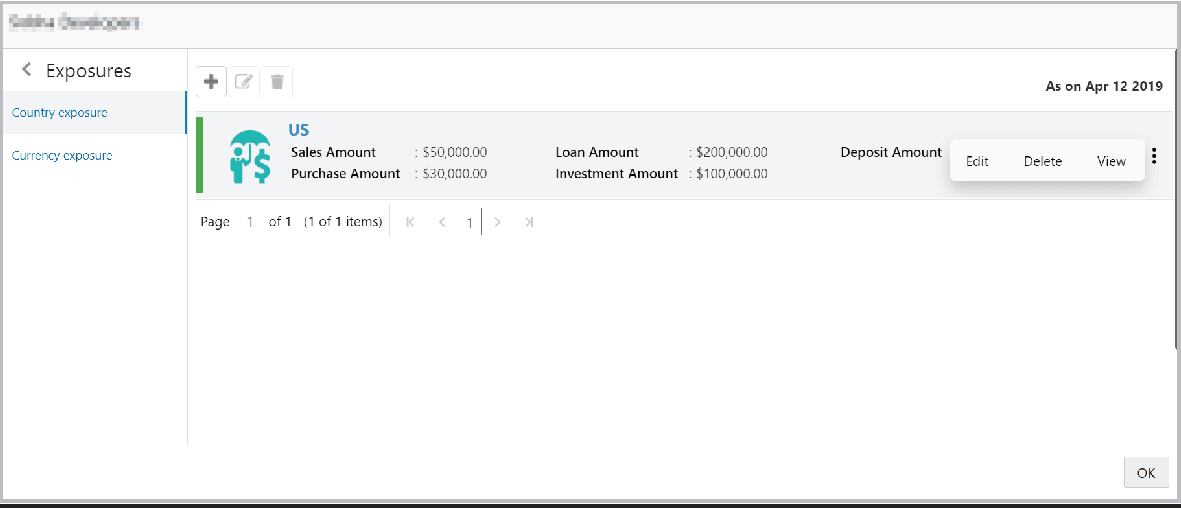
Fields Description Supplier Specify the name of Supplier. Purchase Amount In the Purchase Amount field, specify the amount of products / services purchased by the Financial Institution from the supplier. Percentage of Total Purchases Specify the Percentage of Total Purchases from the supplier. Major Product Bought Specify the Major Product Bought by the Financial Institution from the supplier. Creditor Days Specify the Creditor Days for the supplier. Associated Since In the Associated Since field, search and select the date on which association between the Financial Institution and its supplier is established. Save Click Save. Purchase breakup is added and displayed in the Purchase Breakup section. edit or delete To edit or delete the added purchase breakup, select the record and click the respective icon. - In the Country Dependency Details window, click Save. The details are
added and displayed as shown below.
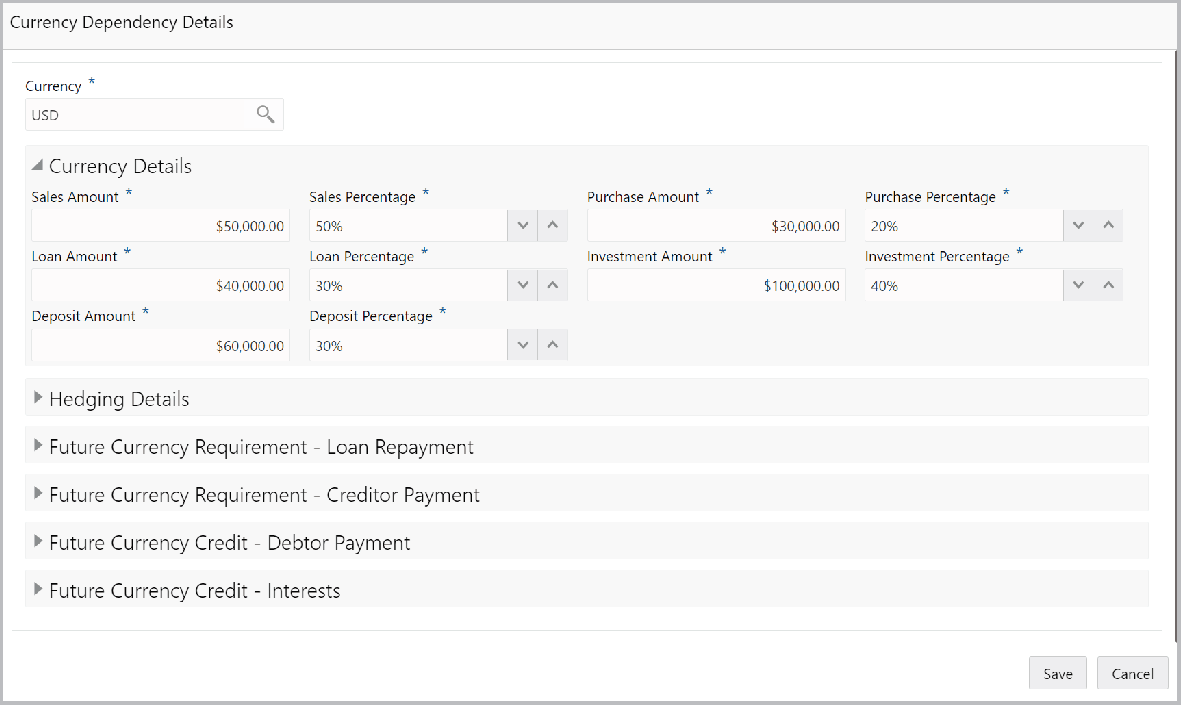
- To capture the currency dependency details, click the Currency Exposure
submenu. The Currency Dependency Details screen is displayed.
For information on fields in the Currency Dependency Details screen, refer the below table.
Table 3-27 Currency details
Fields Description Sales Amount Specify your customer's Sales Amount in the selected currency. Sales Percentage Specify your customer's Sales Percentage with respect to the selected currency. Purchase Amount Specify your customer's Purchase Amount in the selected currency. Purchase Percentage Specify your customer's Purchase Percentage with respect to the selected currency. Loan Amount Specify the Loan Amount availed by your customer in the selected currency. Loan Percentage Specify your customer's Loan Percentage with respect to the selected currency. Investment Amount Specify your customer's Investment Amount in the selected currency. Investment Percentage Specify your customer's Investment Percentage with respect to the selected currency. Deposit Amount In the Deposit Amount field, specify the amount deposited by your customer in the selected currency. Deposit Percentage In the Deposit Percentage field, specify the percentage of amount deposited by your customer in the selected currency.
Hedging Details
Figure 3-44 Hedging Details
Description of "Figure 3-44 Hedging Details"
For information on fields in the Hedging Details screen, refer the below table.
Table 3-28 Hedging Details
| Fields | Description |
|---|---|
| Credit Outstanding | Specify the Credit Outstanding amount in the selected currency. |
| Debit Outstanding | Specify the Debit Outstanding amount in the selected currency. |
| Variance | Upon entering the Credit and Debit Outstanding amounts, the system calculates and displays the Variance. |
| Hedging required | Enable the Hedging required switch, if hedging analysis is required. |
Figure 3-45 Future Currency Requirement - Loan Repayment

Description of "Figure 3-45 Future Currency Requirement - Loan Repayment"
For information on fields in the Future Currency Requirement - Loan Repayment screen, refer the below table.
Table 3-29 Future Currency Requirement - Loan Repayment
| Fields | Description |
|---|---|
| Outstanding Loan Amount | Specify your customer's Outstanding Loan Amount in selected currency. |
| Repayment in current year | In the Repayment in current year field, specify the loan amount to be repaid in the current year. |
| Repayment in Next 3 Years | In the Repayment in Next 3 Years field, specify the loan amount to be repaid in next three years. |
Figure 3-46 Future Currency Requirement - Creditor Payment
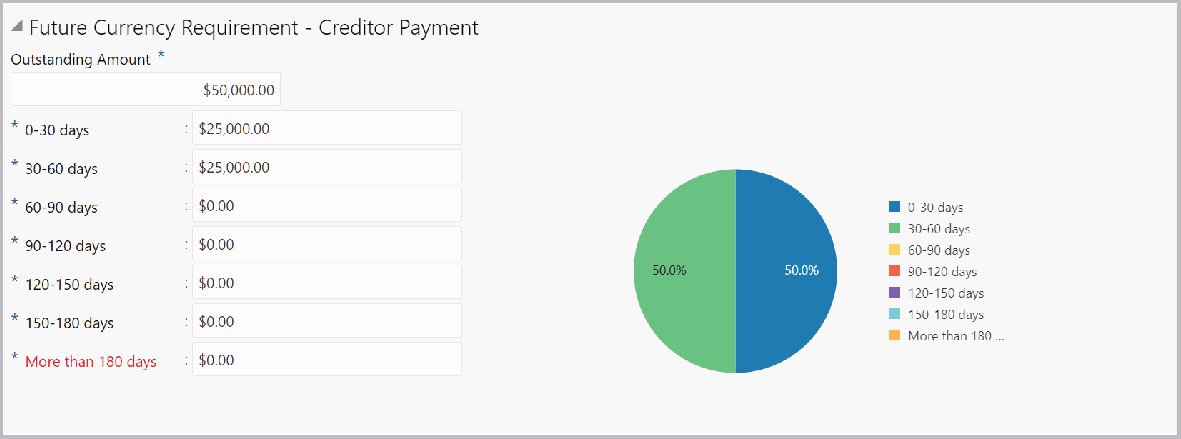
Description of "Figure 3-46 Future Currency Requirement - Creditor Payment"
For information on fields in the Future Currency Requirement - Creditor Payment screen, refer the below table.
Table 3-30 Future Currency Requirement - Creditor Payment
| Fields | Description |
|---|---|
| Outstanding Amount | Specify the Outstanding Amount to be paid by your customer to their creditor in selected currency. |
| 0-30 days | Specify the outstanding amount to be paid in 0-30 days. |
| 30-60 days | Specify the outstanding amount to be paid in 30-60 days. |
| 60-90 days | Specify the outstanding amount to be paid in 60-90 days. |
| 90-120 days | Specify the outstanding amount to be paid in 90-120 days. |
| 120-150 days | Specify the outstanding amount to be paid in 120-150 days. |
| 150-180 days | Specify the outstanding amount to be paid in 150-180 days. |
| More than 180 days | Specify the outstanding amount to be paid after 180 days in the More than 180 days field. |
Figure 3-47 Future currency credit - Debtor payment
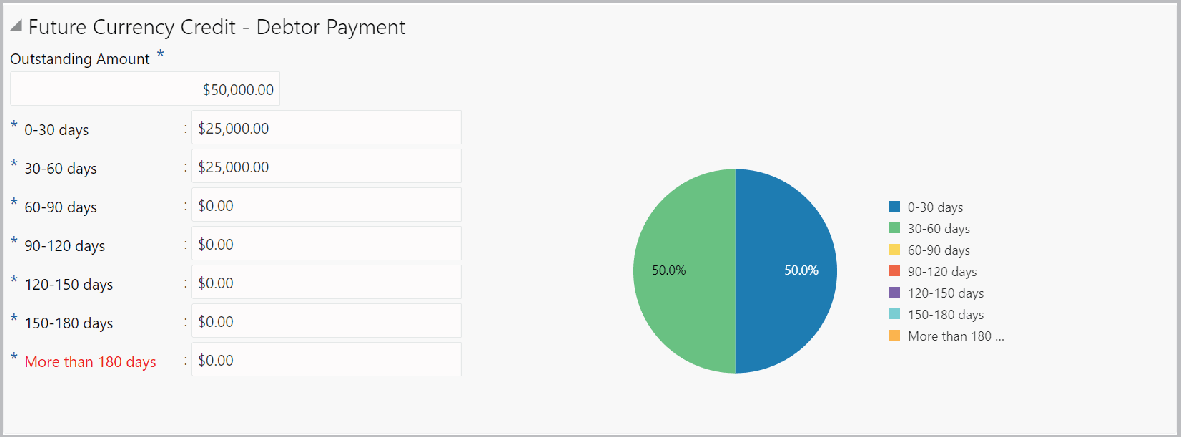
Description of "Figure 3-47 Future currency credit - Debtor payment"
For information on fields in the Future currency credit - Debtor payment screen, refer the below table.
Table 3-31 Future currency credit - Debtor payment
| Fields | Description |
|---|---|
| Outstanding Amount | Specify the Outstanding Amount to be paid by your customer’s debtor in the selected currency. |
| 0-30 days | Specify the outstanding amount to be received in 0-30 days. |
| 30-60 days | Specify the outstanding amount to be received in 30-60 days. |
| 60-90 days | Specify the outstanding amount to be received in 60-90 days. |
| 90-120 days | Specify the outstanding amount to be received in 90-120 days. |
| 120-150 days | Specify the outstanding amount to be received in 120-150 days. |
| 150-180 days | Specify the outstanding amount to be received in 150-180 days. |
| More than 180 days | Specify the outstanding amount to be received after 180 days in the More than 180 days field. |
Figure 3-48 Future Currency Credit - Interests

Description of "Figure 3-48 Future Currency Credit - Interests"
Table 3-32 Future Currency Credit - Interests
| Fields | Description |
|---|---|
| Investment amount interests | In the Investment amount interests field, specify the interest to be received for the amount invested in selected currency. |
| Interest expected in current year | In the Interest expected in current year field, specify the interest to be received in the Current year. |
| Interest expected in next 3 years field | In the Interest expected in next 3 years field, specify the interest to be received in the next 3 Years. |
Parent topic: Credit Initiation