3 Credit Initiation
This topic provides systematic instructions about the Credit Initiation of the FI Credit Proposal Amendment.
In this stage, the Relationship Manager can capture the customer’s credit request, and propose a new limit by evaluating the credit worthiness of the customer.
To initiate FI Credit Amendment process, perform the following steps:
- Login to Oracle Banking Credit Facilities Process Management.
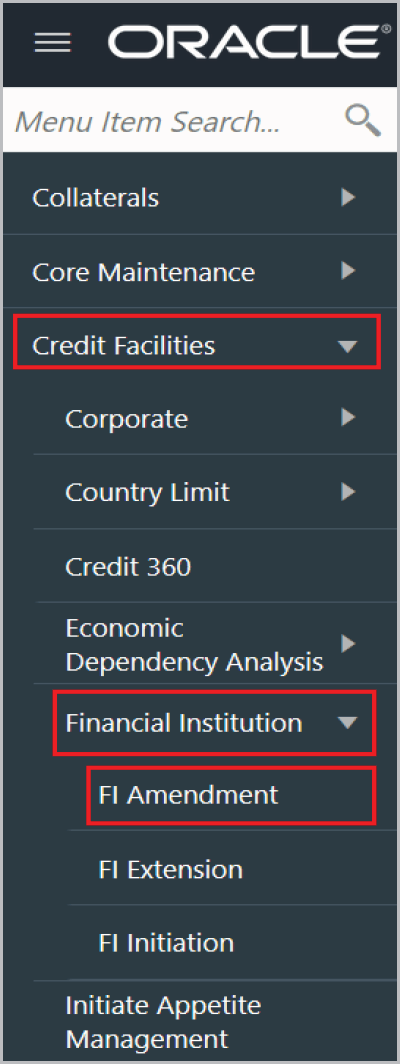
- On Home screen, select Credit
Facilities. Under Credit Facilities, select Financial
Institution. Under Financial Institution, select FI
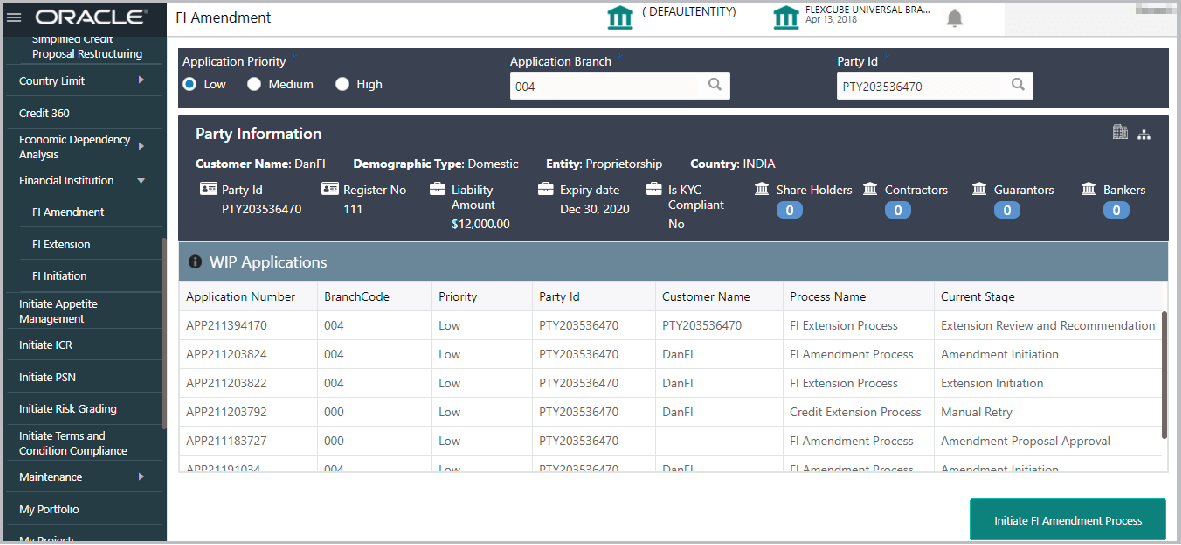
Amendment.The FI Amendment screen is displayed.
For information on fields in the FI Amendment screen, refer the below table.
Table 3-1 FI Amendment
Fields Description Application Priority Select the FI amendment Application Priority. The options available are Low, Medium, and High. Application Branch Select the Application Branch. Bank branches maintained in the system are displayed in the LOV. Party Id Search and select the required Party Id. The system displays the basic information about the selected party along with the WIP Applications available for the party.
Initiate FI Amendment Process Click Initiate FI Amendment Process. The Initiation - Customer Creation page appears.
- Initiation
This topic provides systematic instructions about the Initiation of the Credit Initiation. - KYC Evaluation
This topic provides systematic nstructions about the KYC Evaluation of the Credit Initiation. - Risk Evaluation
This topic provides systematic instructions about the Risk Evaluation of the of the Credit Initiation. - Legal Evaluation
This topic provides systematic instructions about the Legal Evaluation of the Credit Initiation. - Credit Evaluation
This topic provides systematic instructions about the Credit Evaluation of the Credit Initiation. - Funding Requirement
This topic provides systematic instructions about the Funding Requirement of the Credit Initiation. - Policy Exception
This topic provides systematic instructions about the Policy Exception of the Credit Initiation. - Writeup
This topic provides systematic instructions about the Writeup of the Credit Initiation. - Comments
Thus topic provides systematic instructions about the Comments of the Credit Initiation.