3 View RWA Parameter
This topic describes the systamatic instructions about View a list of RWA Parameters.
To view the list of RWA Parameters
- Under Maintenance, click RWA Parameter
Maintenance. Under RWA Parameter Maintenance, click
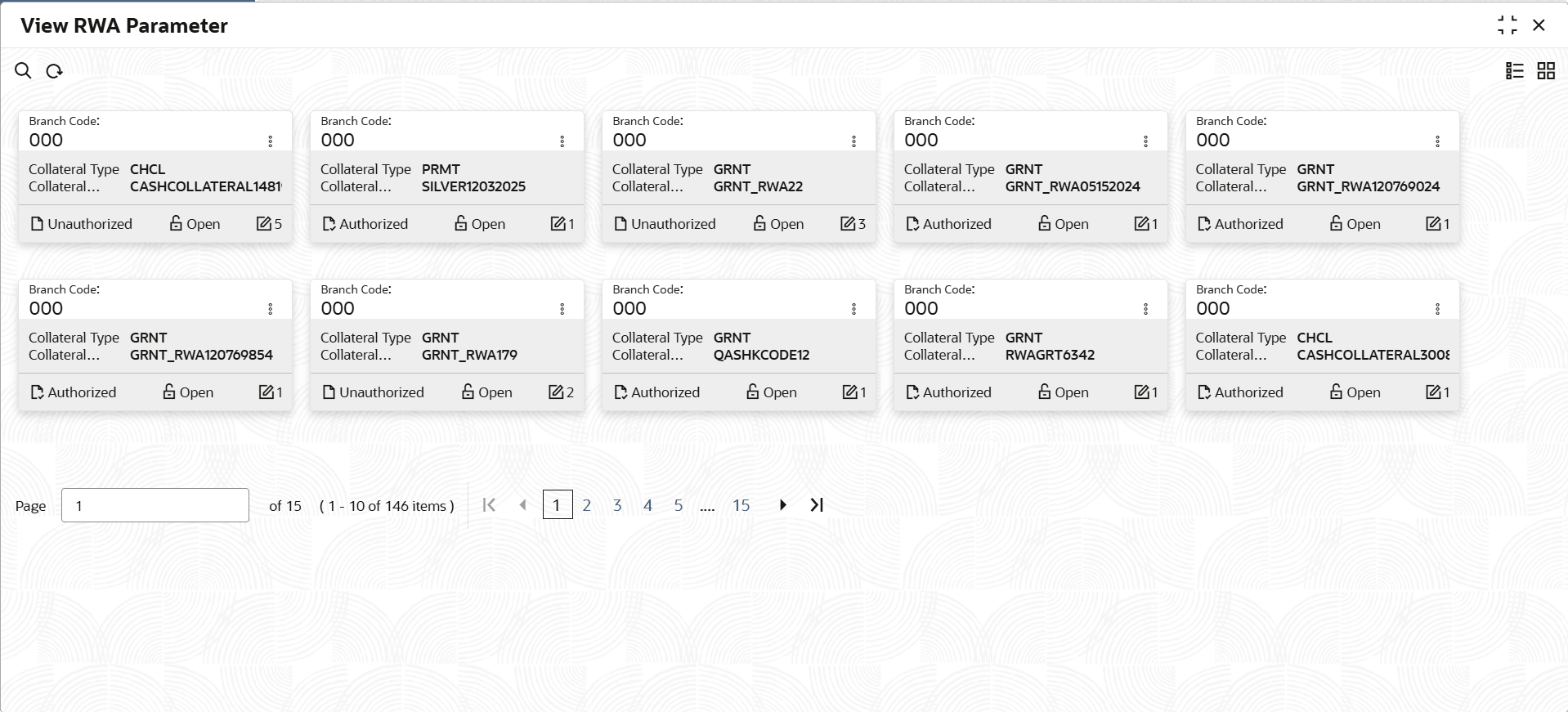
View RWA Parameter.The View RWA Parameter screen is displayed. For more information on fields, refer to the field description table.
Table 3-1 View RWA Parameter - Field Description
Field Name Description Branch Code Displays the branch code. Collateral Type Displays the collateral type. Collateral Description Displays the description of the colleteral Authorization Status Select the authorization status of the collateral. The available options are:- Unauthorized
- Authorized
Record Status Select the status of the record. The available options are:- Open
- Closed
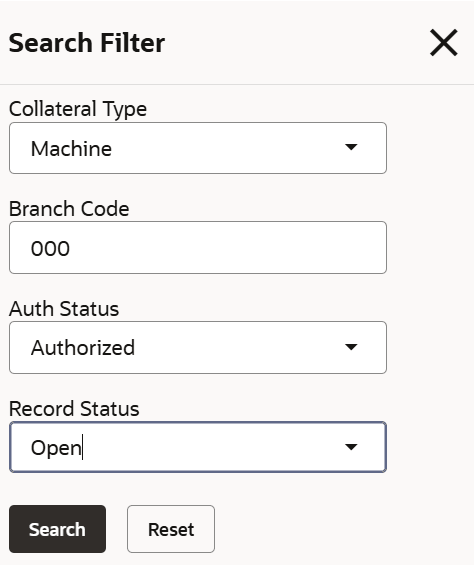
- On the View RWA Parameter screen, click
 icon.The View RWA Parameter - Search screen is displayed.
 - On View RWA Parameter screen, click
 icon to Unlock, Delete,
Authorize or View the Edit RWA
Parameter.
icon to Unlock, Delete,
Authorize or View the Edit RWA
Parameter. - Click Unlock to modify the Edit RWA Parameter.The Edit RWA Parameter - Modify screen is displayed.
- Perform any one of the following:
- On the Edit RWA Parameter - Modify screen,
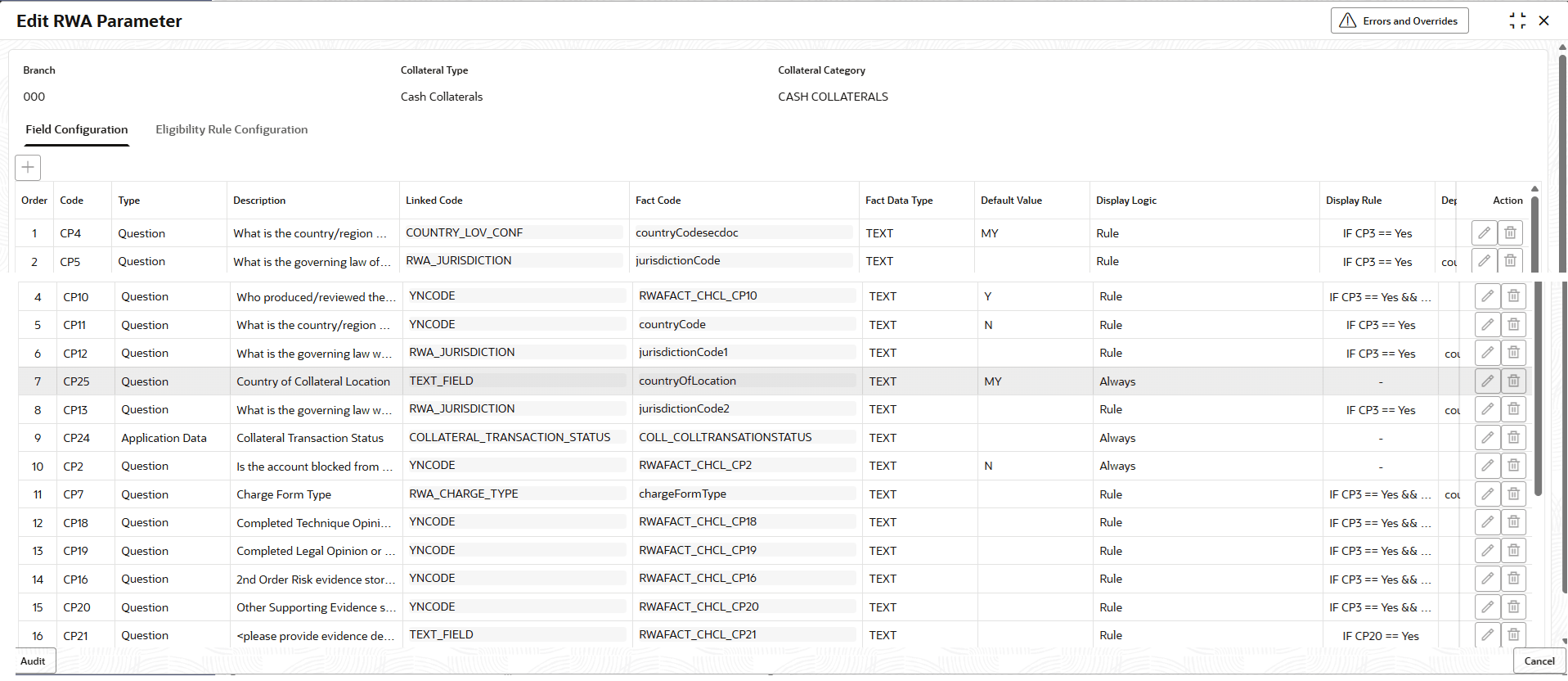
select Field Configaration to specify the
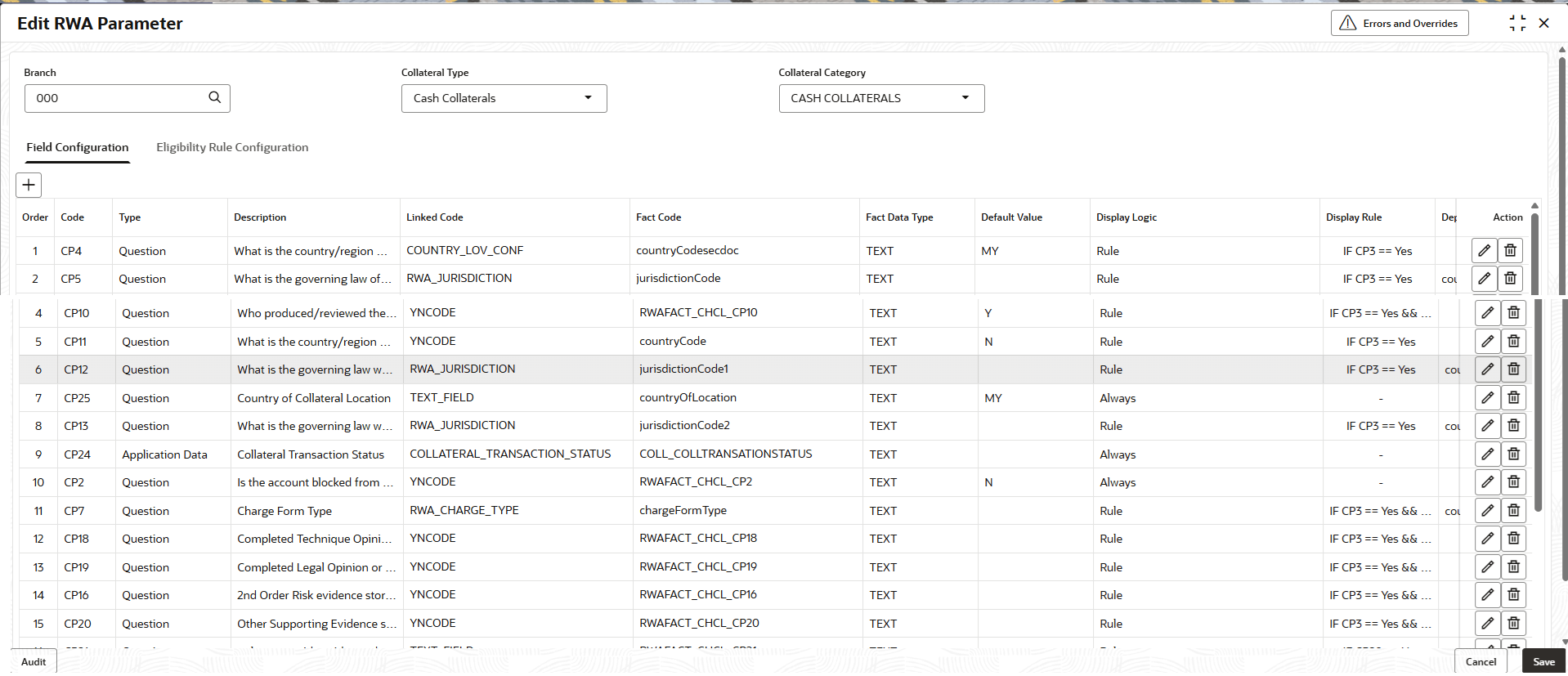
details.The Edit RWA Parameter Field Configuration screen is displayed.
Figure 3-4 Edit RWA Parameter - Field Configuration
For more information on fields, refer to the field description table.
Table 3-3 Edit RWA Parameter - Modify - Field Configuration - Field Description
Field Description Order The sequence in which the fields appear or evaluated. Code Indicates the unique identification code for the parameters. Type Select the type of parameters. The available options are:- Application Data
- Question
Description Displays the description for the created Parameter. Linked Code Click to fetch the linked code.
Fact Code Click to fetch the fact code.
Fact Data Type Displays the fact data type. Default Value Displays the default value. Display Logic Select the display logic. The available options are:- Always
- Never
- Rule
Display Rule Displays the display rule. Dependent By Displays the dependent by. Action Use the available icons to perform actions on the parameter row. The available options are:
- Edit: Click
 icon to modify the parameter
details.
icon to modify the parameter
details.
- Delete:
Click
 icon to remove the parameter from the
list.
icon to remove the parameter from the
list.
- On Edit RWA Parameter - Modify screen, select
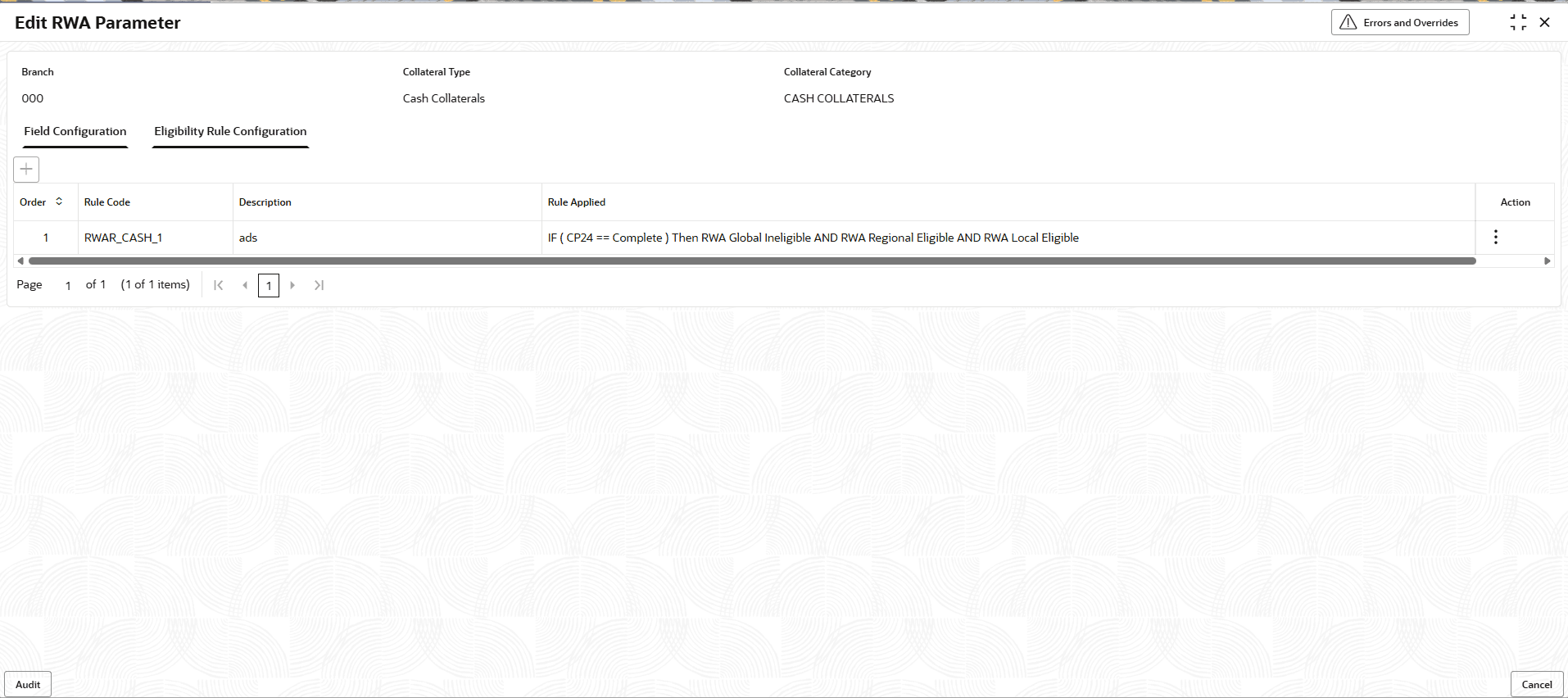
Eligibility Rule Configuration to specify the
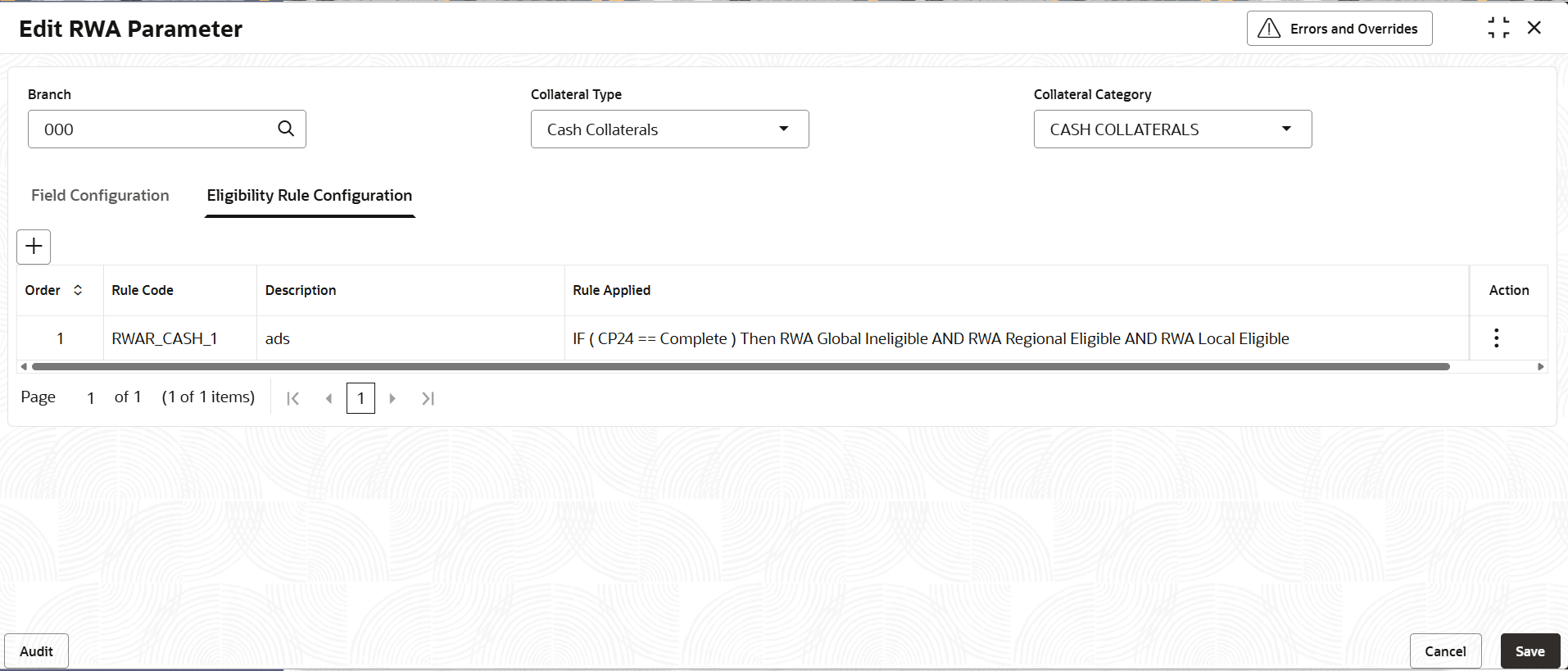
details.The Edit RWA Parameter Eligibility Rule Configutation screen is displayed.
Figure 3-5 Edit RWA Parameter - Eligibility Rule Configutation
For more information on fields, refer to the field description table.
Table 3-4 Field Description - Edit RWA Parameter - Modify - Eligibility Rule Configutation
Field Description Order The sequence in which the fields appear or evaluated. Rule Code Displays the rule code. Description Displays the description. Rule Applied Displays the applied rule Action Use the available icons to perform actions on the parameter row. The available options are:
- Edit: Click
icon to modify the parameter
details.
- Delete:
Click icon to remove the parameter from the
list.
- Edit: Click
- On the Edit RWA Parameter - Modify screen,
select Field Configaration to specify the
details.
- Click View to view the Edit RWA
Parameter.
- On the Edit RWA Parameter - View screen, select
Field Configaration to specify the
details.The Edit RWA Parameter - View - Field Configuration screen is displayed.
Figure 3-6 Edit RWA Parameter - View - Field Configuration
For more information on fields, refer to the field description table.
Table 3-5 Field Description - Edit RWA Parameter - View - Field Configuration
Field Name Description Branch Displays the branch code. Collateral Type Displays the collateral type. Collateral Category Displays the collateral category. Field Configuration This section is used to provide parameter codes for the branch. Order The sequence in which the fields appear or evaluated. Code Displays the code. Type Displays the type. Description Displays the description. Linked Code Displays the linked code. Fact Code A Fact Code is a unique alphanumeric ID given to these data points. Fact Data Type A Fact Data Type refers to the type or structure of data used to hold a "fact" value (which can be a measurable metric or an event attribute) within a system. This allows the platform to understand how to validate, store, calculate, and present that fact. Default Value Displays the default value. Display Logic Displays the display logic. Display Rule Displays the display rule. Dependent By Displays the dependent by. Action Displays the action. - On Edit RWA Parameter - View screen, select
Eligibility Rule Configuration to specify the
details.The Edit RWA Parameter - View Eligibility Rule Configuration screen is displayed.
Figure 3-7 Edit RWA Parameter - View - Eligibility Rule Configuration
For more information on fields, refer to the field description table.
Table 3-6 Field Description - Edit RWA Parameter - View - Eligibility Rule Configuration
Field Name Description Order Displays the order. Rule Code A Rule Code is a distinct alphanumeric ID (usually 10 characters) that specifies certain conditions for charges, fees, or interest. Rules are created using expressions (facts, operators, data types) to establish application conditions, like slab/tier structures for interest or charges based on transactions. Description Displays the decription. Rule Applied Displays the applied rule.
- On the Edit RWA Parameter - View screen, select
Field Configaration to specify the
details.