6.3.4 Accept / Reject Purchase Order
This topic provides systematic instructions for a supplier to accept or reject purchase orders to convey the agreement or disagreement to supply the required commodities.
One or more purchase orders can either be accepted or rejected in a single transaction.
Once the transaction is complete, the designated corporate approver is notified, in case an approval flow is set. The approver can either approve or reject the transaction. In case of rejection, the approver can send the transaction back to the corporate user (maker), to make modifications as required, and re-submit for approval.
Note:
- Only that corporate party with the role of Supplier can accept or reject purchase orders. In addition, only those purchase orders with status as Raised can be accepted or rejected.
- If the supplier is creating the purchase orders, then they are pre-accepted by default, when raised.
- Click
 .The relevant purchase orders appear.
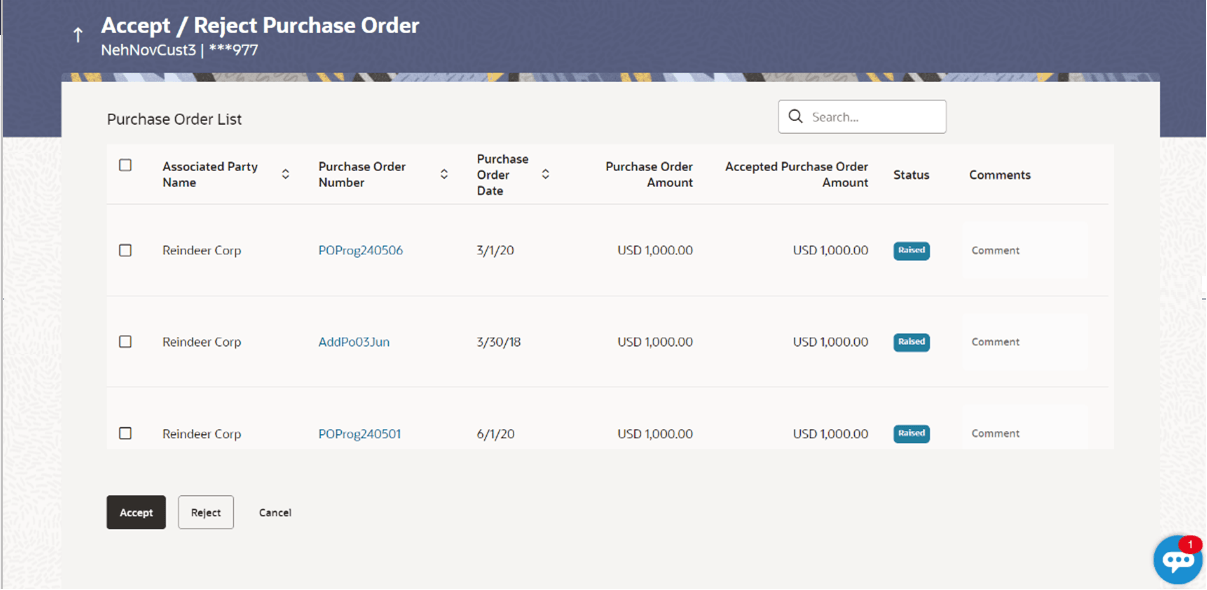
Figure 6-32 Accept / Reject Purchase Order
Table 6-24 Accept / Reject Purchase Order - Field Description
Field Name Description Party Name Displays the name and ID of the logged-in corporate party. Search By Indicates an option to search for specific purchase orders, by entering either the associate party name, or purchase order number, or purchase order amount, and clicking . Purchase Order List This section displays the Purchase Order List related fields. Associated Party Name Displays the name of the associated party. Purchase Order Number Displays the purchase order reference number as a hyperlink. If you click this link, an image of the physical purchase order appears in an overlay window. Purchase Order Date Displays the date when the purchase order has been created. Purchase Order Amount Displays the amount of the purchase order. Accepted Purchase Order Amount Displays the accepted purchase order amount. Status Displays the status of the purchase order. Comments Specify the remarks if any while accepting / rejecting the purchase order. Note: Remarks are mandatory if rejecting the purchase order.
Parent topic: View / Edit Purchase Order