8.5.1 Invoices/Debit Notes against Payments/Credit Notes
This topic provides systematic instructions to manually reconcile invoices or debit notes against payments or credit notes.
To manually reconcile invoices or debit notes against payments or credit notes:
- From the Dashboard, click the Toggle
Menu, then click Receivables/Payables,
Reconciliation, Manual
Reconciliation, and Receivables/Payables against
Payment/Credit
Note.
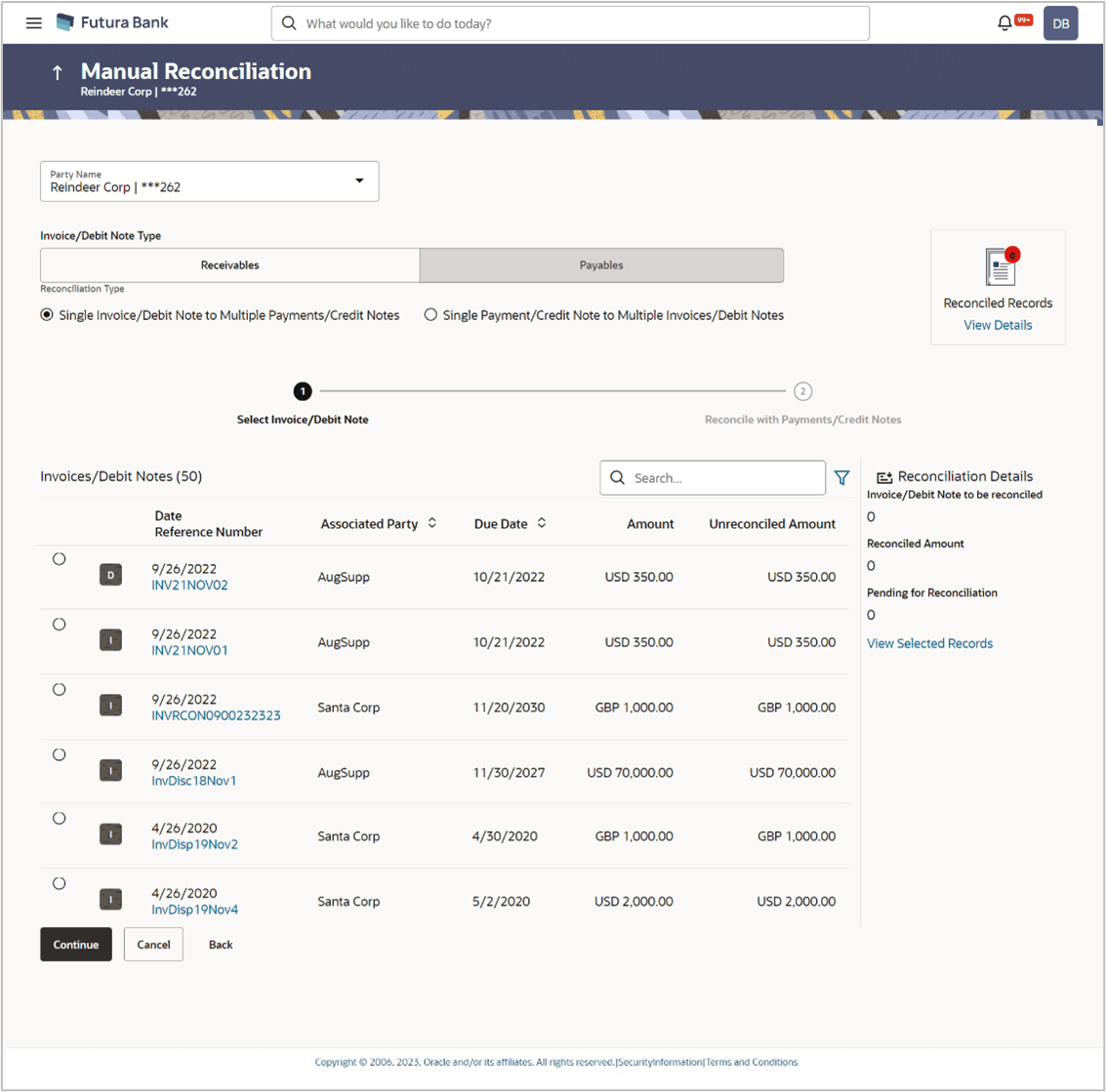
The Manual Reconciliation screen appears.
Table 8-25 Manual Reconciliation - Field Description
Field Name Description Party Name Select the party name from the dropdown list in which the manual reconciliation for invoices/debit notes must be created. By default, the primary party/gcif of the logged-in user is selected. Note: Only accessible parties are displayed to the user.
Invoice/Debit Note Type Select either the Receivables option or the Payables option, based on the corporate customer’s role. - If the corporate is a supplier, then select the Receivables option.
- If the corporate is a buyer, then select the Payables option.
Reconciliation Type Select the type of reconciliation to be performed. The reconciliation procedure steps are populated based on the option you select. The options are: - Single Invoice/Debit Note to Multiple Payments/Credit Notes: If you select this option, the application lets you select the required invoice or debit note in the 1st step, and the payments and/or credit notes in the 2nd step. For more information, refer the Single Invoice/Debit Note to Multiple Payments/Credit Notes section in this user manual.
- Single Payment/Credit Note to Multiple Invoices/Debit Notes: If you select this option, the application lets you select the required payment or credit note in the 1st step, and the invoices and/or debit notes in the 2nd step. For more details, refer the Single Payment/Credit Note to Multiple Invoices/Debit Notes section in this user manual.
- In the Manual Reconciliation screen, select the appropriate option from the Invoice/Debit Note Type field.
- From the Reconciliation Type field, select either the Single Invoice/Debit Note to Multiple Payments/Credit Notes option or the Single Payment/Credit Note to Multiple Invoices/Debit Notes option.
- Single Invoice/Debit Note to Multiple Payments/Credit Notes
This topic provides systematic instructions to select an invoice or a debit note and one or more payments/credit notes to reconcile with. - Single Payment/Credit Note to Multiple Invoices/Debit Notes
This topic provides systematic instructions to reconcile the Multiple invoices and/or debit notes with a single payment or credit note. - Invoice/Debit Note Search (overlay window)
This topic provides systematic instructions to view the recon rule details to search for specific invoices/debit notes. This overlay window appears when you click the Filter icon. - Payments/Credit Notes Search (overlay window)
This topic provides systematic instructions to search for specific payments/credit notes records. This overlay window appears when you click the Filter icon.
Parent topic: Manual Reconciliation