7 Transaction Tracker
This topic provides systematic instructions to transaction tracker.
- On Dashboard, click the Toggle
Menu, then click Supply Chain Finance.
From Supply Chain Finance, click Transaction
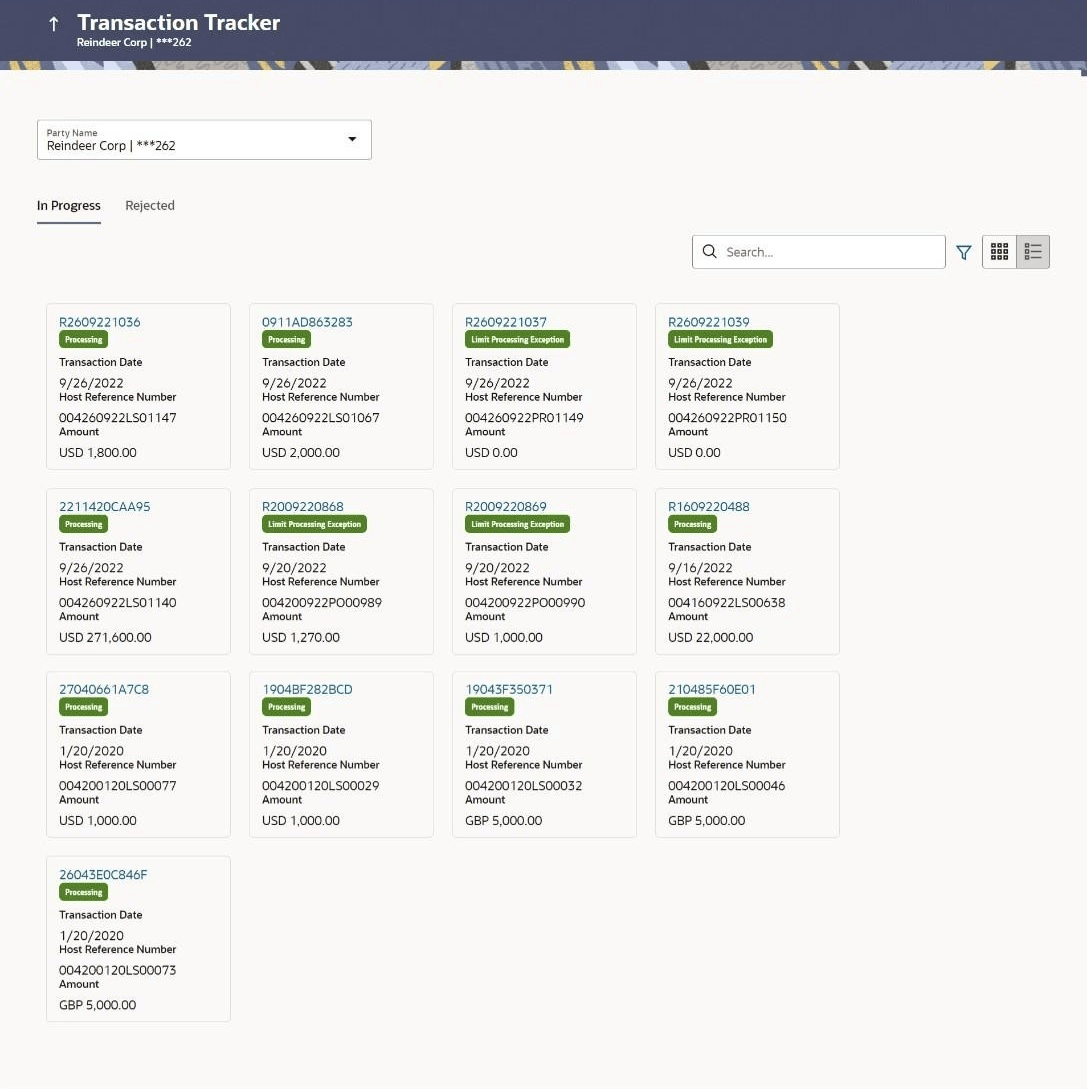
Tractor.The Transaction Tracker screen displays.
For more information on fields, refer to field description table.
Table 7-1 Transaction Tracker - Field Description
Field Description Party Name & ID Select the party name and ID from the drop-down list to view the list of transactions. By default, the primary party of the logged-in user is selected. Note: Only accessible parties are displayed to the user. Based on the party selection, the list of transactions is displayed.
In Progress or Rejected Click the respective tabs to view transactions that are in progress and those that are rejected. Search Enter the partial or complete transaction reference number, or host reference number, or amount, to view specific transactions. 
Click the filter icon to filter the transactions based on certain criteria. For more information, refer the Search (overlay window for Transaction Tracker) below.  /
/ 
Click icon to view the transactions in tile format, and
icon to view the transactions in list
format.
Transaction Reference Number Displays the OBDX reference number of the finance transaction. This is a hyperlink, which when clicked displays the details of the transaction. For more information, refer the Transaction Tracker (details) section below. Status Displays the status of the transaction. Transaction Date Displays the date of initiation of the transaction. Host Reference Number Displays the reference number of the transaction, assigned by the host. Amount Displays the transaction amount. - In the Transaction Tracker screen, use the Search option or the filter () options to view the required transactions.
- Click the transaction reference number hyperlink, to view the details of the
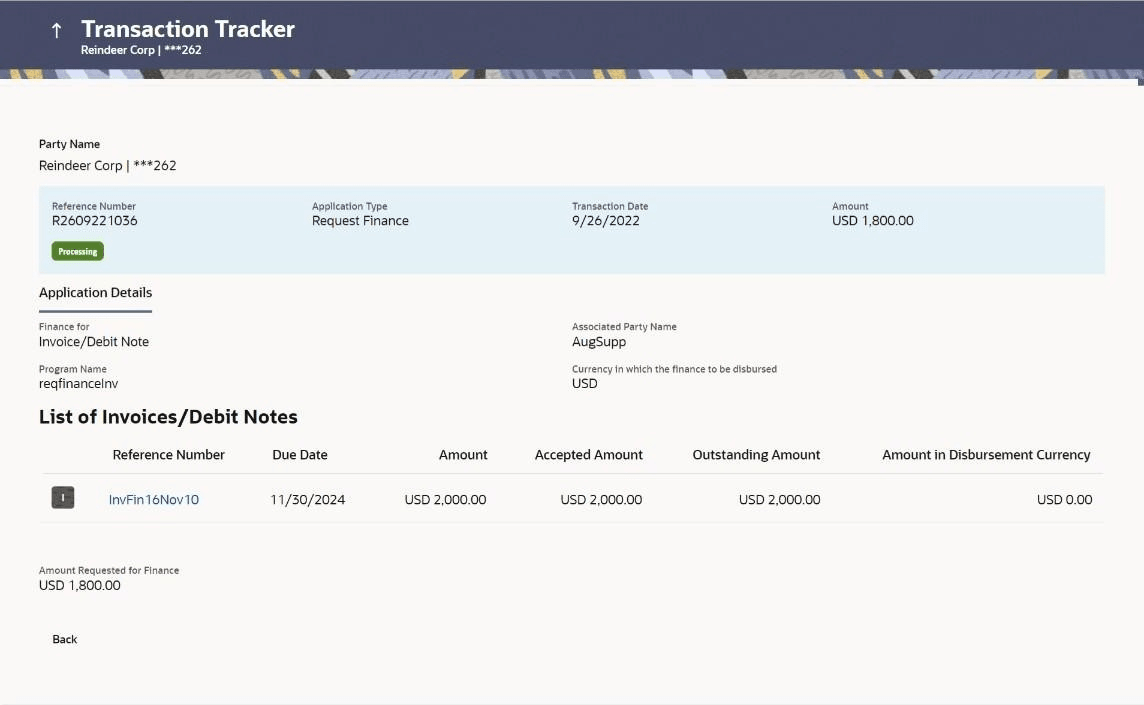
transaction.The Transaction Tracker (details) screen appears.
Table 7-2 Transaction Tracker (details) - Field Description
Field Description Party Name & ID Displays the name and ID of the logged-in corporate party. Reference Number
Status
Displays the transaction reference number of the finance. Also displays the status of the finance. Application Type Displays the type of transaction. Transaction Date Displays the date of initiation of the transaction. Amount Displays the transaction amount. Application Details This section displays the Application Details Finance for Displays the type of receivable/payable that the finance has been raised for. Associated Party Name Displays the name of the associated party linked to the receivable/payable. Program Name Displays the name of the program linked to the receivable/payable. Currency in which the finance to be disbursed Displays the currency selected for finance disbursement. Selected Receivable/Payable This section displays the Selected Receivable/Payable Details. Indicator Displays an indicator to indicate what the receivable/payable is. Example - 'I' is displayed for invoices, and 'D' for debit notes. Reference Number Displays the reference number of the receivable/payable. Due Date Displays the date on which the receivable/payable should be fully paid. Amount Displays the receivable/payable amount. Accepted Amount Displays the receivable/payable amount that has been accepted. Outstanding Amount Displays the receivable/payable amount that is yet to be paid. Amount in Disbursement Currency Displays the receivable/payable amount in the currency selected for disbursement. Amount Requested for Finance Displays the finance amount that has been requested for paying off the receivable/payable. Uploaded Documents Displays a list of documents that have been uploaded during finance request. Click on the document name to view it. - On Transaction Tracker click

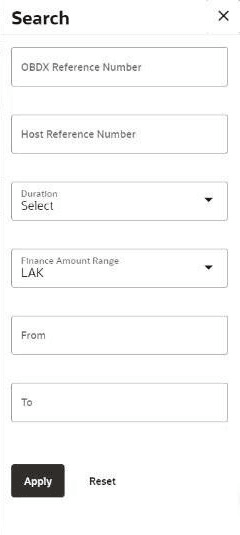
icon.The search overlay window is displayed with the list of relevant finances.Figure 7-3 Search (overlay window for Transaction Tracker)
Table 7-3 Search (overlay window for Transaction Tracker) - Field Description
Field Description OBDX Reference Number Enter the reference number of the finance transaction to be searched. Host Reference Number Enter the reference number assigned by the host, of the transaction to be searched. Duration Select the duration within which the transactions have been initiated. Finance Amount
Range
Currency
From - To
Select the currency of the transaction and enter the From and To amounts for an amount range search.