22.9 Initiate Islamic Outward Guarantee/Stand By LC – Local Undertaking
This topic provides the systematic instructions to capture the details of the Local Guarantee in the application.
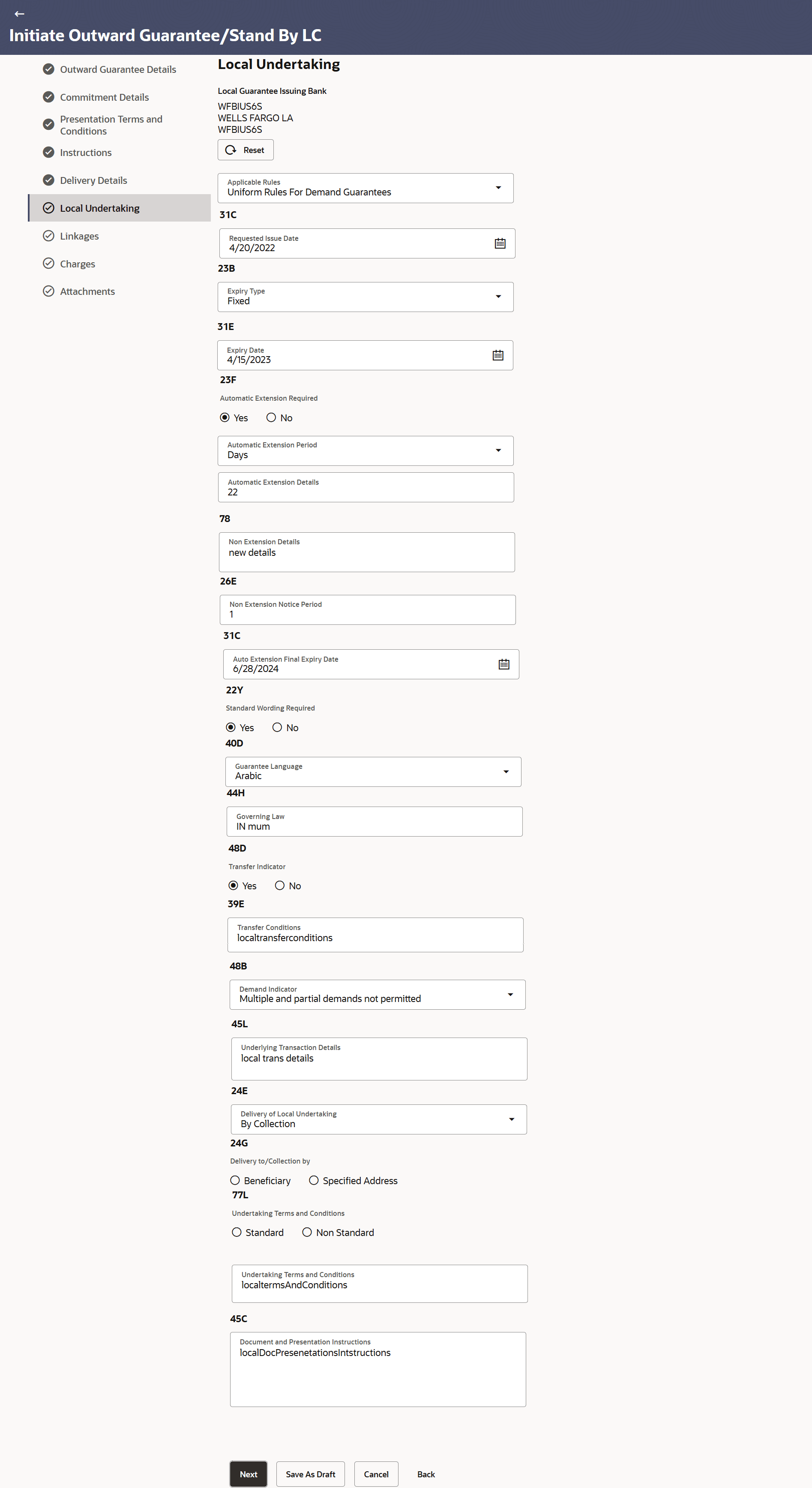
This tab is used to capture the details of the Local Guarantee. This screen is enabled when the “Issuance of counter-counter-undertaking” and “Issuance of counter-undertaking” options are selected in the “Purpose of Message” field.
To capture the details of the Local Guarantee:
- Navigate to Local Undertaking screen.On navigation to Initiate Islamic Outward Guarantee/Stand By LC screen, user lands to Local Undertaking tab screen.
Figure 22-12 Initiate Outward Guarantee/Stand By LC – Local Undertaking
For more information refer to the field description table below:
Table 22-11 Initiate Islamic Outward Guarantee/Stand By LC – Local Undertaking - Field Description
Field Name Description Local Guarantee Issuing Bank Select the party that issues the local undertaking. The options are:
- SWIFT Code
- Bank Address
SWIFT Code Specify the SWIFT code of the local guarantee bank, available in the application. Or Click the Lookup SWIFT Code link to search and select the link.
The user can specify the SWIFT Code, City and Bank Name as search criteria.
This field is enabled if the SWIFT Code option is selected in the Local Guarantee Issuing Bank field.
Name The name of the bank which issued the local undertaking. This field is enabled if the Bank Address option selected in the Local Guarantee Issuing Bank field.
Address The address details of the bank which issued the local undertaking. This field is enabled if the Bank Address option selected in the Local Guarantee Issuing Bank field.
Country The country of the local undertaking bank. Counter SBLC/ Guarantee Issuing Bank Select the party that issues the counter undertaking. The options are:
- SWIFT Code
- Bank Address
SWIFT Code Specify the SWIFT code of the counter undertaking, available in the application. Or Click the Lookup SWIFT Code link to search and select the link.
The user can specify the SWIFT Code, City and Bank Name as search criteria.
This field is enabled if the SWIFT Code option is selected in the Counter Guarantee Issuing Bank field.
Name & Address The name and address details of the bank which issued the local undertaking. This field is enabled if the Bank Address option selected in the Local Guarantee Issuing Bank field.
Country The country of the counter undertaking bank. Applicable Rules Select the applicable rules for guarantee. The options are:- Uniform Rules For Demand Guarantee
- Uniform Customs and Practice
- International Standby Practices
- Not subject to any rules
- Other
Applicable Other Details Indicates the applicable other details for guarantee. This field is enabled if the Other option selected in the Applicable Rules field.
Requested Issue Date Select the requested issue date of guarantee. Requested Issue Date cannot be less than the branch date. Expiry Type Select the type of validity applicable to the Outward Guarantee. The options are:
- Fixed - Specified date of expiry (either with or without automatic extension)
- Conditional - Expiry condition (including option for specified date of expiry)
- Open - No specified date of expiry
Expiry Condition/ Event Specify the expiry condition for the Outward Guarantee. This field is enabled if Conditional option selected in the Expiry Type list
Expiry Date Select the date after which Outward Guarantee will expire. Automatic Extension Required Select whether automatic extension is required to the Outward Guarantee or not. The options are:
- Yes
- No
This field does not appear for ‘Open’ Expiry Type.
Automatic Extension Period Select the period after which automatic extension is given to the Outward Guarantee. The options are:
- Days
- One Year
- Others
Below Automatic Extension related fields appear, if Yes option is selected in the Automatic Extension Required field.
Automatic Extension Details Specify the details of the automatic extension of the Outward Guarantee. This field is enabled to fill details only if the Other or Days option is selected in the Automatic Extension Period list.
Non Extension Details Specify the non extension details. Non Extension Notification Period Specify the period after which notification given for non-extension of automatic extension while creating Outward Guarantee. Auto Extension Final Expiry Date Select the date after which validity of automatic extension to the Outward Guarantee expires. Standard Wording Required Select the option, whether standard wording is required to the Outward Guarantee or not. The options are:
- Yes
- No
Guarantee Language Select the option for the guarantee language of the Outward Guarantee. This field appears if Yes option is Yes selected in Standard Wording Required field.
Governing Law Specify the details of the Governing Law and/or Place of Jurisdiction applicable to the undertaking. Transfer Indicator Select the option to define whether transfer of the instrument is permissible for the Outward Guarantee. The options are:
- Yes
- No
Demand Indicator Select whether the multiple or partial demands are permissible while initiating Outward Guarantee or not. The options available for selection are:
- Multiple demands not permitted
- Multiple and partial demands not permitted
- Partial demands not permitted
Underlying Transaction Details Specify the details of the underlying business transactions for which undertaking is issued. Delivery of Local Undertaking Select the details of delivery of the local undertaking. The options are:
- By Collection
- By Courier
- By Mail
- By Messenger - Hand-deliver
- By Registered Mail or Airmail
- Other method
Narrative Specify the additional details of delivery of the local undertaking, if By Courier or Other method option is selected in Delivery of Local Undertaking field. Delivery To/ Collection by Select the option to whom the delivery of undertaking will be done. The options are:
- Beneficiary
- Specified Address
Name & Address Displays the name and address details of the beneficiary to whom delivery of undertaking will be given. This field is auto populated only if the Beneficiary option is selected in the Delivery To/ Collection By field.
Narrative Specify the name and address details of the person to whom delivery of undertaking will be given. This field is enabled only if the Specified Address option is selected in the Delivery To/ Collection By field.
Undertaking Terms and Condition Select the applicable terms and condition of the undertaking. The options are:
- Standard
- Non Standard
Undertaking Terms and Conditions Displays the details of applicable terms and condition of the undertaking. The standard details of applicable terms and condition of the undertaking appears, if you select Standard option in the Undertaking Terms and Condition field. Specify the terms and condition of the undertaking, if you select Non Standard option in the Undertaking Terms and Condition field.
Document and Presentation Instruction Specify the presentation instructions (for example, form and/or place of presentation) including documents required to make a complying demand. The field indicates the details of the document and presentation instructions present in the Outward Guarantee.
Undertaking Terms and Condition Displays the details of applicable terms and condition of the undertaking. Document and Presentation Instructions Displays the details of the document and presentation instructions present in the Inward Guarantee.
Parent topic: Initiate Islamic Outward Guarantee/Stand By LC