22 Initiate Islamic Outward Guarantee/Stand By LC
This topic provides the systematic instructions to initiate Outward Guarantee/Stand By LC in the application.
Using this option, a corpoarte user can apply for an Outward Bank Guarantee (BG). For the BG application, you must enter the details under the five heads of the application available in this option viz. Parties, Commitment Details, Bank Instructions and Guarantee Advices and Attachments. The Outward Guarantee application goes through the "Maker-Checker" cycle and once it is authorized, the details are sent to the host system.
User has three options to initiate Collection.- Using existing Templates
- Using existing Drafts
- Initiating Guarantee ( New Application)
These are explained in detail underneath.
User must have a valid corporate party Id and login credentials in place.
- From the Dashboard, click Menu, then click Trade Finance, and then
click Bank Guarantee/Stand By LC. Under Bank Guarantee/Stand By LC, click
Outward Bank Guarantee/Stand By LC, select Initiate Outward Bank
Guarantee/Stand By LC - Islamic.
- From the Dashboard, click Overview, in Overview screen go to Trade Finance and then Raise Collection.
The Initiate Islamic Outward Guarantee/Stand By LC screen appears.Figure 22-1 Initiate Outward Guarantee/Stand By LC - Templates
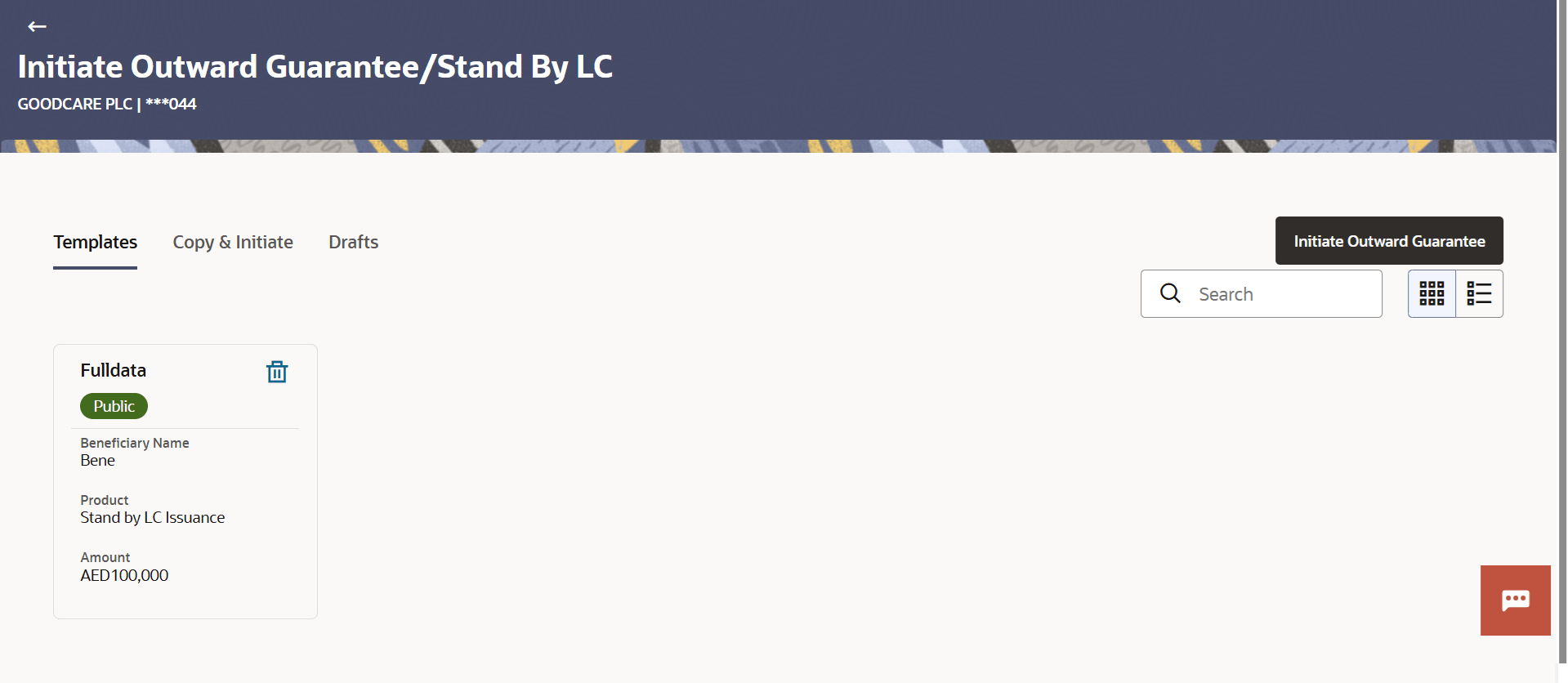
Description of the illustration initiate-outward-guarantee-stand-lc.pngFor more information refer to the field description table below:
- Perform one of the following actions:
- Click Initiate Islamic Outward Guarantee/Stand By LC to create a new Outward Guarantee/Stand By LC template.
- Click
 or
or  to view the initiate Outward Guarantee/Stand By LC template as Summarized or
Tabular view
to view the initiate Outward Guarantee/Stand By LC template as Summarized or
Tabular view
- Click
 to delete the initiated Outward Guarantee/Stand By LC template card.
This topic contains following sub-topics:
- Search Islamic Guarantee/Stand - By LC Template
This topic provides the systematic instructions to search a Islamic Outward Guarantee/Stand By LC template in the application. - Initiate Islamic Outward Guarantee/ Stand By LC - Copy and Initiate
This topic provides the systematic instructions to copy and initiate an Outward Guarantee/ Stand By LC in the application. - Initiate Islamic Outward Guarantee/Stand By LC - Drafts
This topic provides the systematic instructions to initiate an Outward Guarantee/Stand By LC in the application by using saved Outward Guarantee/Stand By LC draft. - Initiate Islamic Outward Guarantee/Stand By LC - Outward Guarantee Details
This topic provides the systematic instructions to initiate an Outward Guarantee/Stand By LC - Outward Guarantee Details in the application. - Initiate Islamic Outward Guarantee/Stand By LC - Commitment Details
This topic provides the systematic instructions to initiate an Outward Guarantee/Stand By LC - Commitment Details in the application. - Initiate Islamic Outward Guarantee/Stand By LC - Presentation Documents and Undertaking Terms and Conditions
This topic provides the systematic instructions to initiate an Outward Guarantee/Stand By LC - Presentation Documents and Undertaking Terms and Conditions in the application. - Initiate Islamic Outward Guarantee/Stand By LC - Instructions
This topic provides the systematic instructions to capture the Instructions details in the application. - Initiate Islamic Outward Guarantee/Stand By LC – Delivery Details
This topic provides the systematic instructions to capture the details of the delivery of the Outward Guarantee in the application. - Initiate Islamic Outward Guarantee/Stand By LC – Local Undertaking
This topic provides the systematic instructions to capture the details of the Local Guarantee in the application. - Initiate Islamic Outward Guarantee/Stand By LC – Linkages
This topic provides the systematic instructions to capture the Linkages details in the application. - Initiate Islamic Outward Guarantee/Stand By LC - Charges Commissions and Taxes
This topic provides the systematic instructions to capture the Charges Commissions and Taxes details in the application. - Initiate Islamic Outward Guarantee/Stand By LC - Attachments
This topic provides the systematic instructions to capture the LC Attachments details in the application. - Save as Template
This topic provides the systematic instructions to save Outward Guarantee application as a Template. - Save as Draft
This topic provides the systematic instructions to save Guarantee application as a Draft.