22.3 Initiate Islamic Outward Guarantee/Stand By LC - Drafts

This topic provides the systematic instructions to initiate an Outward Guarantee/Stand By LC in the application by using saved Outward Guarantee/Stand By LC draft.

User can save Outward Guarantee/Stand By LC application as a Draft so that it can be used if required in future. User can search the saved LC draft using Draft Name.

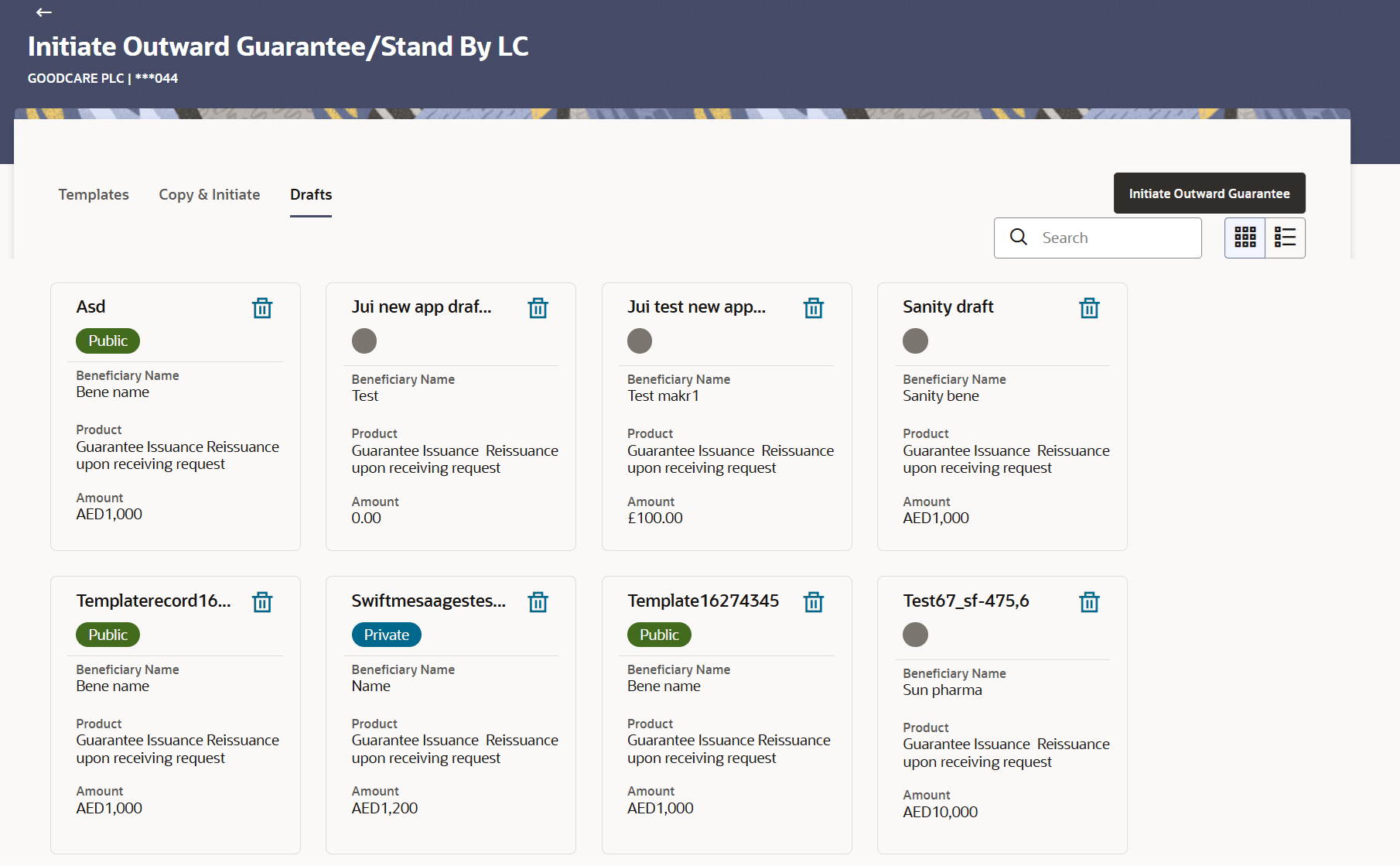
The summary of all the Initiated LC draft of a corporate are listed with basic information of each LC in a card form. User can choose to check the complete details of a specific draft template by clicking on a card. User can click the tabular icon to view the draft in tabular form.

Note:

Guarantee Application saved as Draft can be used only one time for Guarantee Application initiation.

To search the LC draft:

  1. On the Initiate Islamic Outward Guarantee/Stand By LC screen, click the Drafts tab.
    The Initiate Islamic Outward Guarantee/Stand By LC - Drafts screen appears.

    Figure 22-5 Initiate Outward Guarantee/Stand By LC - Drafts
    Description of initiate-outward-guarantee-stand-lc-draft.png follows
    Description of the illustration initiate-outward-guarantee-stand-lc-draft.png

  2. Specify the name of the specific Outward Guarantee/Stand By LC Draft Name in the Search field whose details you want to view. The specific Outward Guarantee/Stand By LC - By Drafts screen based on search criteria appears.

    For more information refer to the field description table below:

    Table 22-4 Initiate Islamic Outward Guarantee/Stand By LC - By Drafts - Field Description

    Field Name Description
    Search Specify the name of the Outward Guarantee/Stand By LC draft template to search and view its details.

    Partial search is allowed.

    Search Results - Summarized View card form This section displays the search results in Summarized View in card form.
    Initiate Outward Guarantee/Stand By Draft Card The Initiate Outward Guarantee/Stand By draft card displays the name of the Initiated Outward Guarantee/Stand By draft name along with the other details like Access Type, beneficiary name, Product and Amount.
    Initiate Outward Guarantee/Stand By Card Details Following details are present on each Outward Guarantee/Stand By draft Template card.
    Draft Name Displays the name of the Guarantee application saved as draft.
    Access Type Displays the type of access granted to template whether it is public or private.
    Beneficiary Name Displays the beneficiary’s name of the Outward Guarantee.
    Product Displays the product for the given Bank Guarantee.
    LC Amount Displays the currency and amount of the Outward Guarantee application.
  3. Specify the draft name of the specific Outward Guarantee/Stand By LC Template in the Search field whose details you want to view.
    The saved Guarantee draft appears based on search criteria.
  4. Select and click the Outward Guarantee/Stand By LC draft card whose details you want to view.
  5. Click Summarized View or Tabular to view the Draft Guarantee template as Summarized or Tabular view.
  6. Click Delete to delete the Draft Guarantee template card.
    Initiate Outward Guarantee/Stand By LC - By Drafts - Tabular View

    The Initiating Guarantee Draft - Tabular View allows the corporate user to view the Guarantee Draft in table format.

    To view the Initiate Outward Guarantee/Stand By LC - By Drafts in tabular form:

  7. In the Initiate Islamic Outward Guarantee/Stand - By Drafts Summary page, click Tabular to view the initiate Guarantee Draft template as Tabular view. The Initiate Islamic Outward Guarantee/Stand - By Drafts tabular view page appears.
  8. Click the Initiate Islamic Outward Guarantee/Stand By LC - Drafts card to view and initiate the Outward Guarantee/Stand using a draft.
    The Initiate Islamic Outward Guarantee/Stand - LC Details screen appears.