23.1 Amend Outward Guarantee - Search
This topic provides the systematic instructions to search an Outward Guarantee Amendment in the application.
User can search the list existing undertaking application using Guarantee Number/ Applicant Name/ Beneficiary Name/ Undertaking Amount and apply for amendments.
To search the Outward Guarantee amendments
- Perform any one of the following actions:
- From the All Parties list, select the appropriate option.
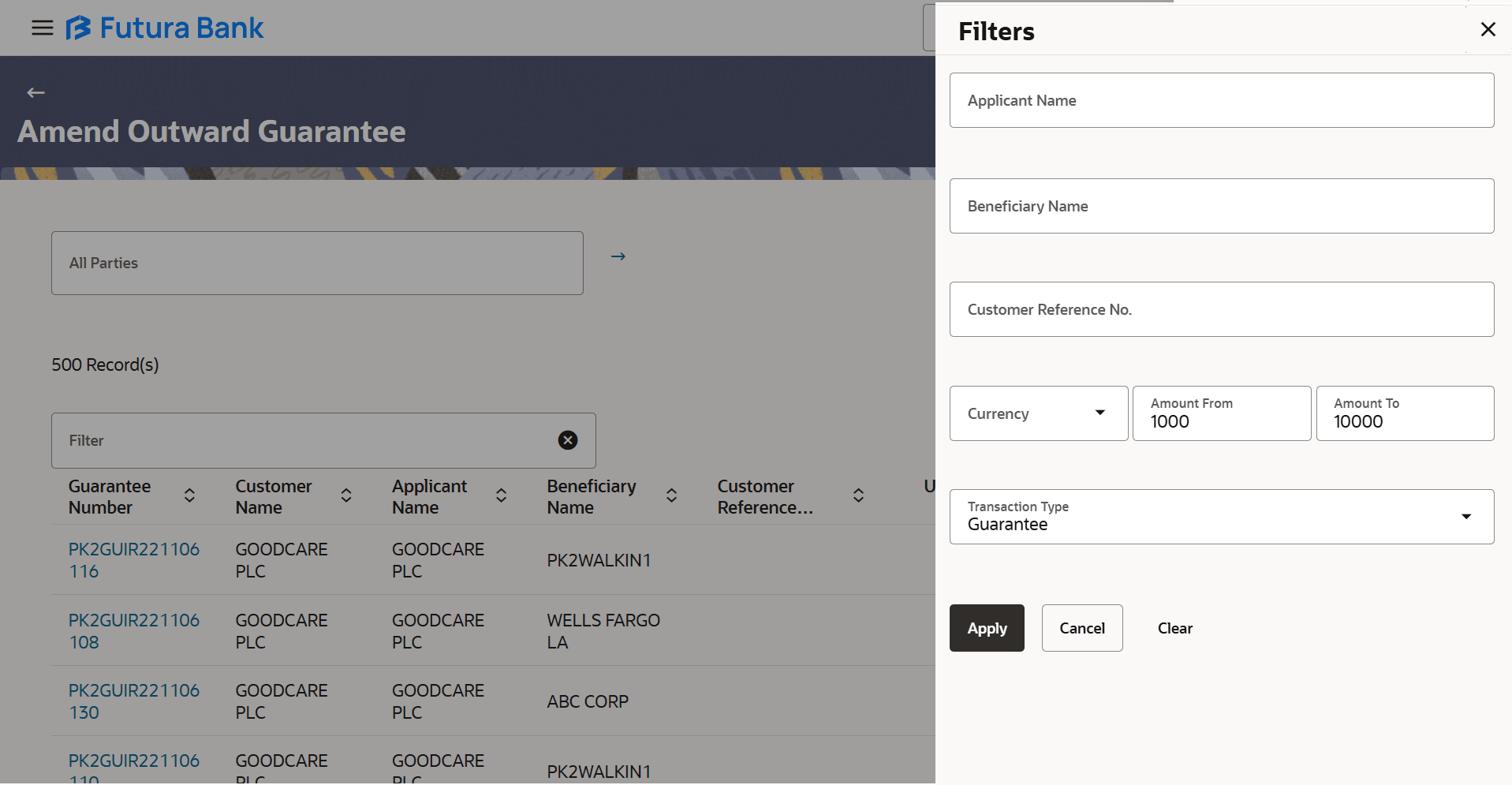
- Specify the the Applicant Name /Beneficiary Name/Customer Reference Number/Currency/Amount From- Amount To/Transaction Type in the Filter field.
- Click
 to specify the filter criteria. The Filter overlay screen appears. Based on
the defined criteria you can view transactions.
to specify the filter criteria. The Filter overlay screen appears. Based on
the defined criteria you can view transactions.
Figure 23-2 Amend Outward Guarantee - Filter
For more information refer to the field description table below:
Table 23-1 Amend Outward Guarantee - Filter - Field Description
Field Name Description Applicant Name Specify the name of the applicant of the Outward Guarantee. Beneficiary Name Specify the name of the beneficiary of the Outward Guarantee. Customer Reference Number Specify the user provided customer reference number for the transaction. Currency Select the currency under the guarantee. Amount From- Amount To Specify the amount range for searching the Outward Guarantee. Transaction Type Select the transaction type of transaction to filter the transaction. The options are:- Guarantee
- Stand By LC
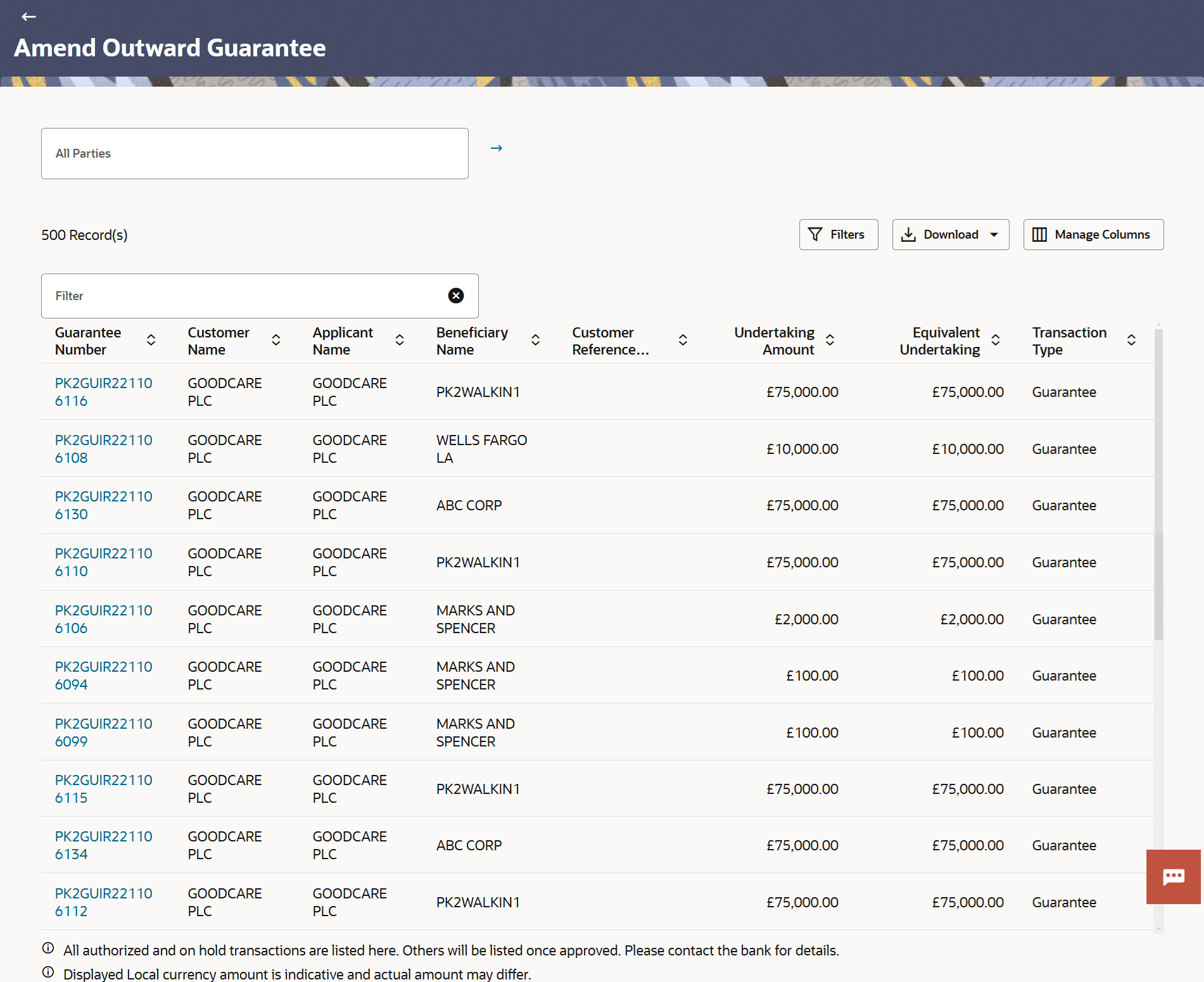
- Click Apply.The searched results are displayed based on the parameters provided.
Figure 23-3 Amend Outward Guarantee - Search Result
For more information refer to the field description table below:
Table 23-2 Amend Outward Guarantee - Search - Field Description
Field Name Description All Parties Specify the Party name to filter the LC by Party Name. Filter Specify the Guarantee Number/Customer Name/Applicant Name/ Beneficiary Name/ Customer Reference/Undertaking Amount/ Equivalent Undertaking Amount/ Transaction Type of Outward Guarantee for whom amendments to be made. Filter Results This section displays the filter results. Guarantee Number Displays the Outward Guarantee reference number generated while creating. Applicant Name Displays the LC applicant name based on the selected party ID. Beneficiary Name Displays the name of the beneficiary of the Outward Guarantee. Customer Reference Number Displays the user provided customer reference number for the transaction. Undertaking Amount Displays the undertaking amount for the Outward Guarantee along with the currency. Equivalent Undertaking Amount Displays the equivalent undertaking amount for the Outward Guarantee along with the currency. Transaction Type Displays the transaction type of transaction to filter the transaction. The options are:- Guarantee
- Stand By LC
- Perform one of the following actions:
- Click on the desired Guarantee Number link to view the Guarantee details. The Initiate Outward Guarantee Amendment screen appears.
- Click the
 icon to download the records in CSV & PDF format.
- Click the
 icon to setup a column preference by rearranging or removing
columns.
icon to setup a column preference by rearranging or removing
columns.
Parent topic: Amend Outward Guarantee