3.1.1 NEFT Inbound Transaction Input

The NEFT Incoming Payment Transaction Input Detailed screen allows user to manually create a NEFT Inbound Payment by providing the details.

  1. On Homepage, specify PTDITONL in the text box, and click next arrow.
    NEFT Incoming Payment Transaction Input Detailed screen is displayed.

    Figure 3-1 NEFT Incoming Payment Transaction Input Detailed
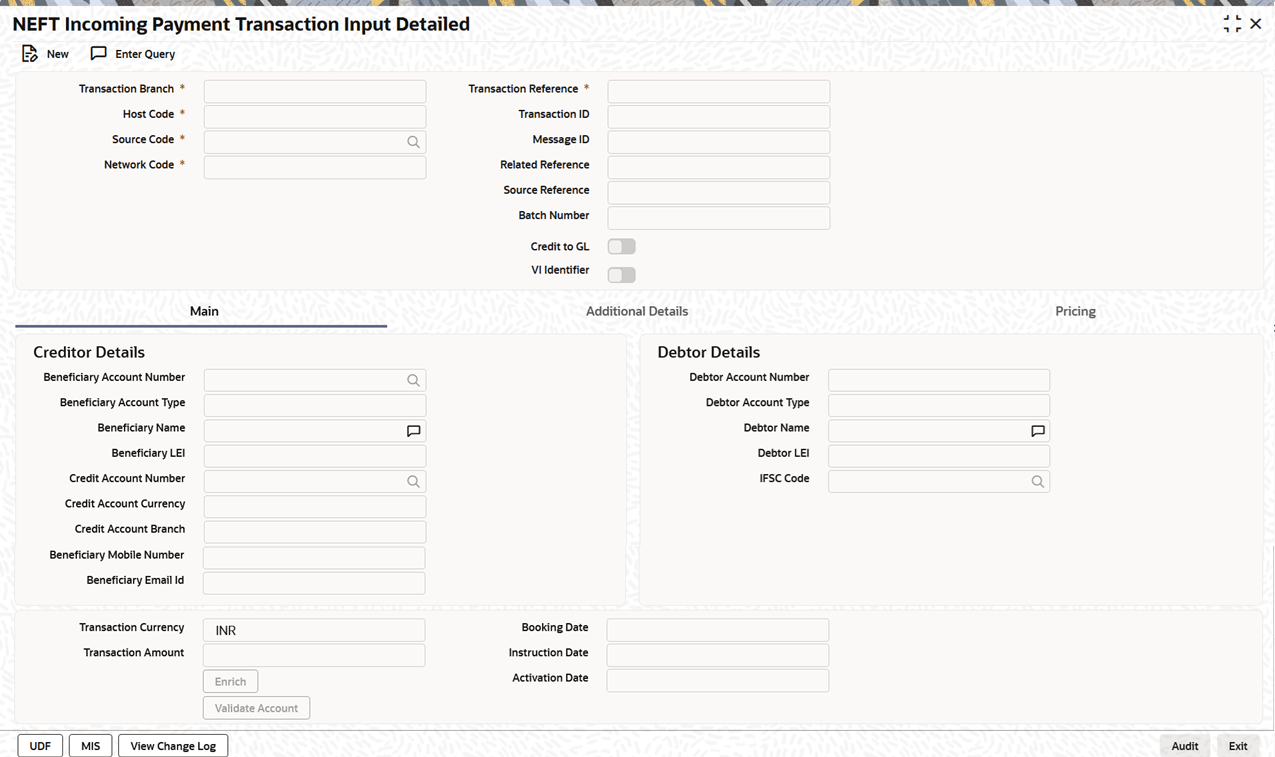
    Description of Figure 3-1 follows
    Description of "Figure 3-1 NEFT Incoming Payment Transaction Input Detailed"
  2. On NEFT Incoming Payment Transaction Input Detailed screen, specify the fields.
    For more information about the fields, refer to field description below:

    Table 3-1 NEFT Incoming Payment Transaction Input Detailed - Field Description

    Field Description
    Transaction Branch System defaults the transaction branch code with the user’s logged in branch code.
    Host Code System defaults the host code of transaction branch.
    Source Code Specify the Source Code, via which the transaction is to be booked.
    Network Code System defaults the Network code as ‘NEFT’ on clicking New.
    Transaction Reference Number System generates the transaction reference number. For more details on the format, refer the Payments Core User Guide.
    Transaction ID System generates the Transaction ID.
    Message ID System generates the Message ID.
    Related Reference System defaults transaction reference number. However user can modify this.
    Source Reference Specify the Source Reference Number, if required.
    Batch Number Specify the Batch Number.
    Credit to GL Check this flag to enable credit to GL account.
    VI Identifier

    During account validation of inbound payments, if VI Identifier is applicable to Host and the credit account is found to be invalid, on clicking Validate Account button, system sends an EAC check to the OBVAM system to verify if the Virtual Identifier is valid.

    If valid, this flag is automatically checked.