3.5.18.2.4 Unlink Collateral

This topic explains the systematic instructions for unlinking a collateral from the loan account.

To unlink a collateral:

Note:

The fields marked as Required are mandatory.
  1. From the Select Amendment field, select Unlink.
    In the Linked collateral section, the unlink option is enabled.
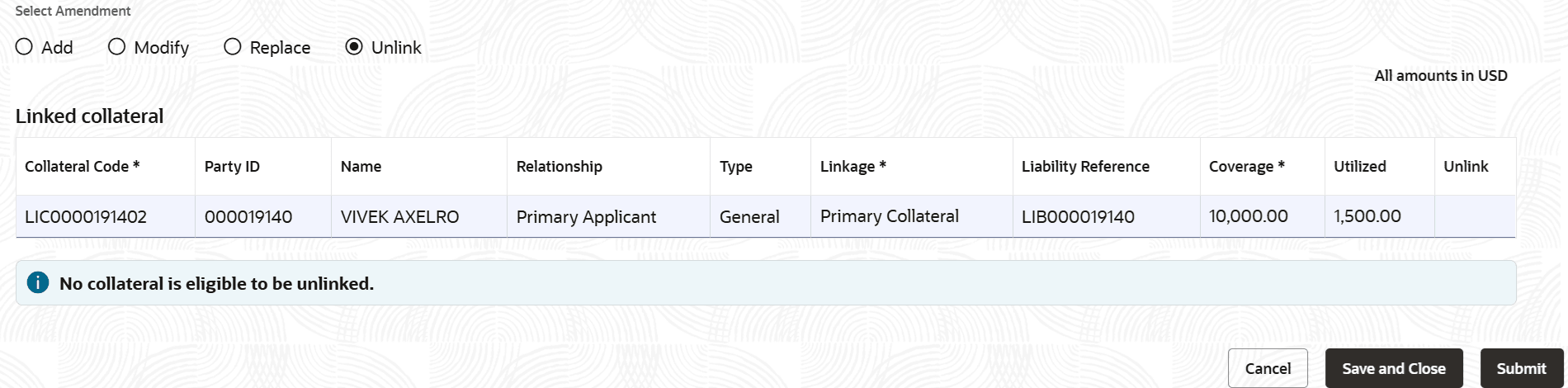
  2. In the Linked collateral section, perform the required action. For more information on fields, refer to field description table below:

    Table 3-60 Unlink Collateral – Field Description

    Field Description
    Linked collateral This section displays the linked collateral details.
    Collateral Code Displays the collateral code to linked to the account.
    Party ID Displays the party ID linked to the collateral.
    Name Displays the party name.
    Relationship Displays the relationship of the party.
    Type Displays the collateral type.
    Linkage Displays the linkage type for the collateral. The possible options are:
    • Primary Collateral
    • Secondary Collateral
    Liability Reference Displays the reference number for the liability.
    Coverage Specify the coverage amount.
    Utilized Displays the utilized amount.
    Unlink Click the option to unlink the collateral.

    Note:

    If the sum of Coverage of remaining Primary (linkage) collaterals is equal to more than the Collateral coverage required, then a message in green is displayed that, the collateral coverage that is required will be covered by remaining primary collaterals. Total of primary collateral's coverage is <<CCY>> <<Sum of coverage of remaining (lines for which unlink is not selected) primary collaterals>>.

    If sum of Coverage of remaining Primary (linkage) collaterals is not equal to or more than the Collateral coverage required, then a message in red is displayed that the collateral coverage required is not covered by remaining primary collaterals. Total of primary collateral's coverage is <<CCY>> <<Sum of remaining (lines for which unlink is not selected) primary collaterals>>.

  3. Click Submit.
    The screen is successfully submitted for authorization.