1.2 Treasury Settlement Parameters

This topic provides systematic instructions to treasury settlement parameters.

Branch parameters could be defined with default preferences for Settlement Netting using Treasury Settlement Parameters maintenance. These preferences defined at the head office would applied by default on all settlements initiated at all branchs.

The details that could be captured for Settlement Parameter include:
  • Threshold for allowing Auto authorization based on different parameters.
  • Preferences for display and validation in Settlement blotter.
  • Configuration for assigning priority to Cashflows for settlement.
Parameters would be defined at the Head Office branch by the product control team and made available to all branches.
  • All the modifications to the parameters would be logged for audit trail purposes.
  • Auto authorization could be enabled for this function.
  1. On the Home screen, type NTDSNPRM in the text box, and click Next.
    The Treasury Settlement Parameters screen displays.
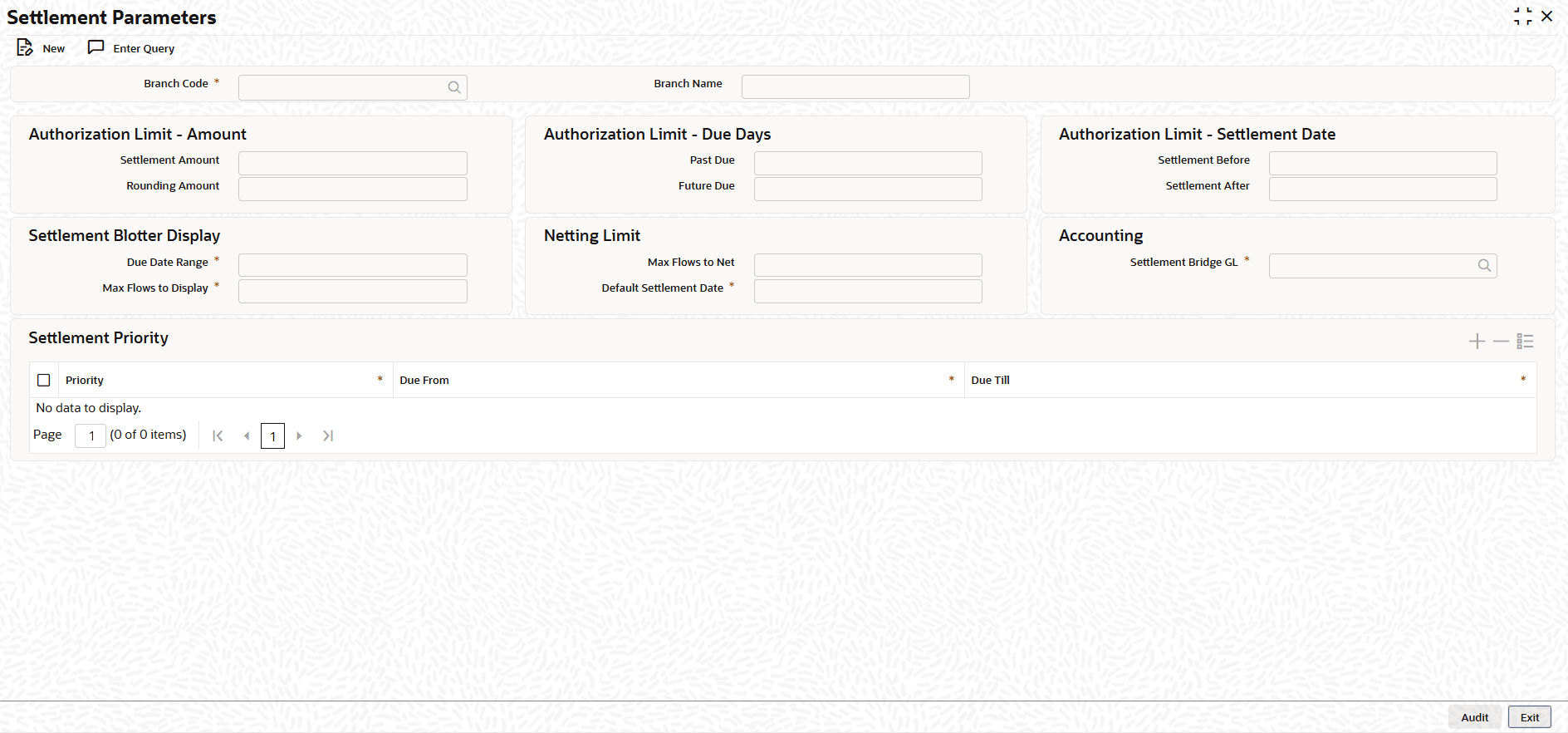
    Figure 1-2 Treasury Settlement Parameters


  2. On the Treasury Settlement Parameters screen, Click New.
  3. On the Treasury Settlement Parameters, Specify the details as required.

    Table 1-2 Treasury Settlement Parameters - Field Description

    Field Description
    Branch Code Specify head office branch for which the settlement parameters are configured.
    Branch Name Specify the name of the head office branch.
    Settlement Account Specify the maximum settlement amount, in LCY or equivalent, for which Auto Authorization is allowed.
    Rounding Amount Specify maximum adjustment of settlement amount as rounding against net amount due, in LCY or equivalent, for which Auto Authorization is allowed.
    Past Due Specify the maximum number of days a cashflow due date can be in the past, for which Auto Authorization is allowed when overdue settlement is initiated.
    Future Date Specify the maximum number of days a cashflow due date can be in the future, for which Auto Authorization is allowed when advance settlement is initiated.
    Settlement Before Specify the maximum number of days a settlement date can be in the past, for which Auto Authorization is allowed.
    Settlement After Specify the maximum number of days a settlement date can be in the future, for which Auto Authorization is allowed.
    Due Date Range Specify the maximum number of days allowed for the period between Due Date From and Due Date To selected in settlement blotter.
    Max Flows to Display Specify the maximum number of cashflows that can be displayed in the Cashflow grid in settlement blotter.
    Max Flows to Net Specify the maximum number of cashflows that are allowed to be netted together for a settlement.
    Default Settlement Date Specify the number of days to be added to the branch date to arrive at the default settlement date to be set in the settlement blotter.
    Settlement Bridge GL Select the Global Settlement Bridge GL to be used, when Treasury Settlement-Netting module is enabled
    Priority Priority to be displayed for a cashflow in the settlement blotter.
    Due From Displays minimum number of days a cashflow due date can be in the past or future, to be considered for the selected priority.
    Due Till Displays minimum number of days a cashflow due date can be in the past or future, to be considered for the selected priority.